

 so mean msi gs 70 not supporting 1.5v or 1.65v XMP profile ram ? or all the 4th gen processor not support ?
MSI Gaming Notebook V.II, The Refreshed model yet more powerful!
|
|
 Sep 3 2013, 11:39 PM Sep 3 2013, 11:39 PM
Return to original view | Post
#1
|
 
Junior Member
142 posts Joined: May 2007 From: Subang Jaya / Melaka 
|
so mean msi gs 70 not supporting 1.5v or 1.65v XMP profile ram ? or all the 4th gen processor not support ? |
|
|
Sep 4 2013, 11:25 PM
Return to original view | Post
#2
|
|
Junior Member
142 posts Joined: May 2007 From: Subang Jaya / Melaka
|
QUOTE(dinraxxx @ Sep 4 2013, 01:05 AM) QUOTE(Eiraku @ Sep 4 2013, 01:27 AM) I've read that too. But: yea i read those too .. but i cant find any confirmation on MSI GS 70 Countersauce (From Intel's own dev conference): 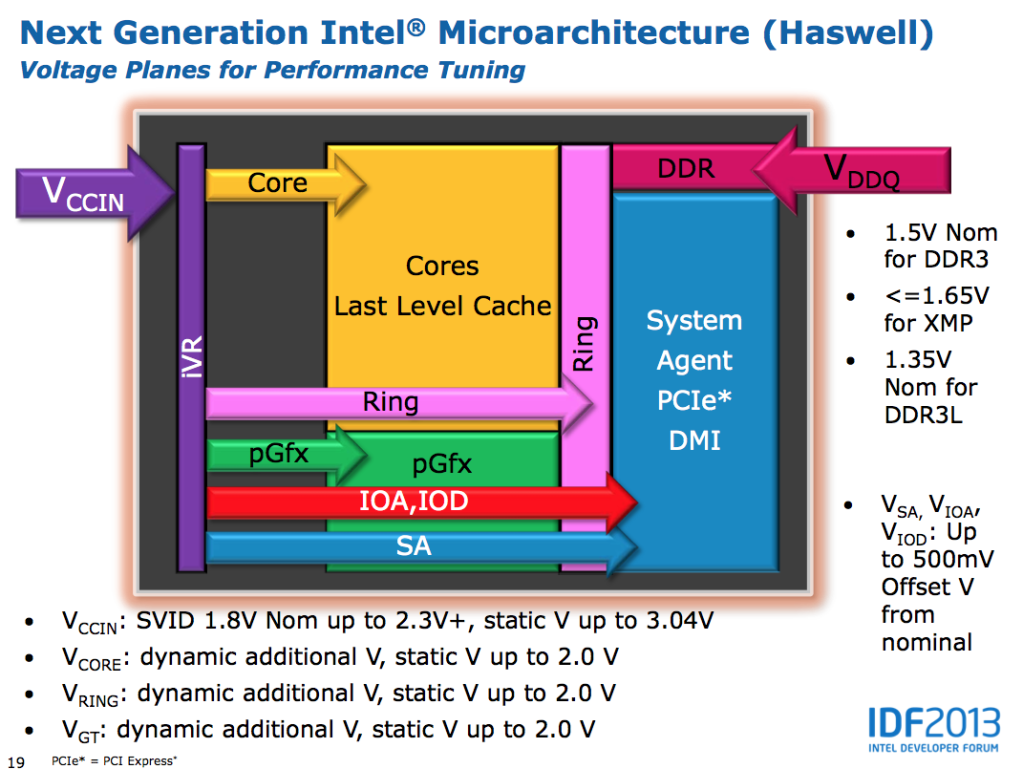 Note all 3 voltage profiles being supported on the upper right side of the slide. However, keep in mind this might simply apply to the Haswell architecture in general, the Desktop side included. More importantly, I've been hearing a lot of chatter that Haswell mobile ONLY pushes 1.35v to the RAM, which means that any 1.5/1.65v RAM stick used is simply "undervolted" down to 1.35v. This is MUCH more plausible (vs the the "it can ONLY use 1.35v or thar be dragons!" theory) and it sufficiently explains why only SOME 1.5/1.65v RAMs cause certain Haswell laptops to be unbootable, as NOT all 1.5/1.65v RAM sticks can handle running at 1.35v at default timings. In short, if the RAM used cannot run on 1.35v, the laptop will simply not boot. No matter what voltage RAM you stuff inside. The plus side is that no harm should come to the laptop in this case, because the motherboard isn't really supplying RAM voltage out-of-spec. It's simply a question of whether or not your RAM will run with the given voltage. In the worse case, the RAM sticks in question will simply not work (or die off) due to lack of power. Besides, there are ONLY 2 sites WARNING people of the dangers using anything over 1.35v with Haswell, on the ENTIRE Internet - and both of them forum posts. That has to count for something. If it'll really burn out stuff, you'd expect something like this to be ALL over the Internet, especially on "tech sites" like Anandtech and the like. But no, zero, nada, zilch. Even the senior members at NBR are running 1.5v RAM on Haswell with little issue (HTWingNut on his W230ST for example). Even with 2133Mhz RAM (which is running at 1866Mhz max on his W230ST). So it actually boils down to luck with any 1.5v (or even 1.65v) RAM sticks you plan to use. If it does 1.35v, you're fine. If not, well, tough luck. Hence the "recommendation" to use DDR3L, which are simply RAM that WILL work for sure at 1.35v. With that said, I'm fully planning to get another ADATA DDR3L stick anyway, or - like I said before - some fancy matched RAM set. It just feels better to run a matched pair in the end. But FIRST, I gotta get me some SSD love. @horns: Do you have to re-direct your cache and temps to the RAMdrive every time you cold boot? Because I don't run my laptop 24/7, and setting up startup batch commands for all that sounds like a real hassle.   i using Corsair Vengeance on my Y580 |
|
Topic ClosedOptions
|
| Change to: |  0.0336sec 0.0336sec
 0.50 0.50
 7 queries 7 queries
 GZIP Disabled GZIP Disabled
Time is now: 6th December 2025 - 05:12 PM |
 Quote
Quote