Welcome Guest ( Log In | Register )

102 Pages « < 63 64 65 66 67 > » Bottom

Outline · [ Standard ] · Linear+

 NETWORK ATTACHED STORAGE (NAS) V2

views
     
WaNaWe900
post Jan 11 2021, 02:11 AM

చąហ ąచҽ™
******
Senior Member
1,397 posts

Joined: Feb 2012
From: sOuL SoCiETY.. iSKaNDaRPuTeRi.. JB.. JDT


QUOTE(xxboxx @ Jan 11 2021, 12:55 AM)
Data scrubbing is it read and do checksum on all data on HDD to make sure no error or bitrot. Though if use BTRFS it will do checking everytime whenever it access the data to read/write, and self heal if there's error. So it doesn't need to wait until do data scrubbing then only checks it. I set mine to do every 6 months.
*
Owh like that... so my set 3 months are too soon, will change it ✌ thanks
xxboxx
post Jan 11 2021, 07:32 AM

The mind is for having ideas, not holding them
*******
Senior Member
5,261 posts

Joined: Oct 2004
From: J@Y B33


QUOTE(WaNaWe900 @ Jan 11 2021, 02:11 AM)
Owh like that... so my set 3 months are too soon, will change it ✌ thanks
*
Up to each preference really. Some even set every month.
WaNaWe900
post Jan 11 2021, 03:13 PM

చąហ ąచҽ™
******
Senior Member
1,397 posts

Joined: Feb 2012
From: sOuL SoCiETY.. iSKaNDaRPuTeRi.. JB.. JDT


QUOTE(xxboxx @ Jan 11 2021, 07:32 AM)
Up to each preference really. Some even set every month.
*
indeed icon_rolleyes.gif but since the data in/Out not so much so I just set 6 months (twice a year) schdule notworthy.gif
WaNaWe900
post Jan 18 2021, 06:43 PM

చąហ ąచҽ™
******
Senior Member
1,397 posts

Joined: Feb 2012
From: sOuL SoCiETY.. iSKaNDaRPuTeRi.. JB.. JDT


Sifus notworthy.gif

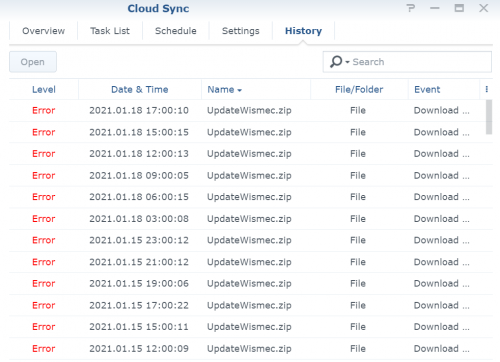
I had noticed an error in my CloudSync as below, is it because it a ZiP files ?

user posted image

Thanks icon_rolleyes.gif
xxboxx
post Jan 19 2021, 11:33 AM

The mind is for having ideas, not holding them
*******
Senior Member
5,261 posts

Joined: Oct 2004
From: J@Y B33


QUOTE(WaNaWe900 @ Jan 18 2021, 06:43 PM)
Sifus  notworthy.gif

I had noticed an error in my CloudSync as below, is it because it a ZiP files ?

user posted image

Thanks  icon_rolleyes.gif
*
What's the error message? By right it should not be an issue for zip files to sync.
xxboxx
post Jan 19 2021, 11:41 AM

The mind is for having ideas, not holding them
*******
Senior Member
5,261 posts

Joined: Oct 2004
From: J@Y B33


Google Cloud: We do use some SolarWinds, but we weren't affected by mega hack

Hope really not affected. Otherwise the biggest data breach ever.
mintgadget
post Jan 19 2021, 01:37 PM

Casual
***
Junior Member
328 posts

Joined: Jun 2008
QUOTE(cHaRsIeWpAu^^ @ Jan 9 2021, 03:30 PM)
thanks a lot bro.

decided to go for custom build way because it sounds like only pain one time and i can slowly upgrade throughout the years.

and can make it as my new year resolution to learn about building NAS. laugh.gif wont be too hard i guess, hopefully. sweat.gif
*
if you haven't started the journey of building your NAS, you should seriously consider Synology being a strong advocate for them because of its reliability and ease of use OS. If you are technically incline, suggest you get the plus models ie DS220+/DS420+/DS720...... and the list go on, coz it x86 architecture good for dockers and more. Nowadays we all have "good" internet most of the time anyway if you are in the city area. A simple NAS with mounted cloud drive i.e google/dropbox/box will give access to more space than you will ever need especially you are wiling to shell out for a single user google enterprise account for now is still unlimited after the change to google workspace, business accounts has be capped and probably lose the unlimited storage sometime down the road. look up rclone to do file transfers. some chinese group released gclone some time early last year which bypasses the 750gb daily limit. unfortunately, it now late in the day and google has capped it down to something like 2TB daily. many have been moving hundred of TBs for the longest time but like all good things must come to an end sad.gif

is a fact synology OS is just a very polished *nix GUI. Looks pretty and easy to setup, they follow the Apple philosophy, keep it simple, less is more strategy. well try out their demo at demo.synology.com you will see how fantastic their OS is. I am in no way affiliated to them but have started using Synology since day 1 and have been very fond of their products and services.
cHaRsIeWpAu^^
post Jan 19 2021, 02:02 PM

Enthusiast
*****
Senior Member
937 posts

Joined: Jun 2006


QUOTE(mintgadget @ Jan 19 2021, 01:37 PM)
if you haven't started the journey of building your NAS, you should seriously consider Synology being a strong advocate for them because of its reliability and ease of use OS. If you are technically incline, suggest you get the plus models ie DS220+/DS420+/DS720...... and the list go on, coz it x86 architecture good for dockers and more. Nowadays we all have "good" internet most of the time anyway if you are in the city area. A simple NAS with mounted cloud drive i.e google/dropbox/box will give access to more space than you will ever need especially you are wiling to shell out for a single user google enterprise account for now is still unlimited after the change to google workspace, business accounts has be capped and probably lose the unlimited storage sometime down the road. look up rclone to do file transfers. some chinese group released gclone some time early last year which bypasses the 750gb daily limit. unfortunately, it now late in the day and google has capped it down to something like 2TB daily. many have been moving hundred of TBs for the longest time but like all good things must come to an end sad.gif

is a fact synology OS is just a very polished *nix GUI. Looks pretty and easy to setup, they follow the Apple philosophy, keep it simple, less is more strategy. well try out their demo at demo.synology.com you will see how fantastic their OS is. I am in no way affiliated to them but have started using Synology since day 1 and have been very fond of their products and services.
*
thanks a lot for your recommendation.

just so happened i have few old computers, so thinking to play around with the parts, those pc were quite powerful spec for few years ago, around 6k to build them, i think they should be good enough build a NAS.

synology is very tempting if i dont have spare pc parts to begin with. tongue.gif

hopefully i can assemble the NAS hahah, i watch and read some guides on internet seems like we have to apply thermal paste on processor, sounds so hard for me. laugh.gif my hands are very cacat to do handcrafted things.

mintgadget
post Jan 19 2021, 02:09 PM

Casual
***
Junior Member
328 posts

Joined: Jun 2008
QUOTE(cHaRsIeWpAu^^ @ Jan 19 2021, 02:02 PM)
thanks a lot for your recommendation.

just so happened i have few old computers, so thinking to play around with the parts, those pc were quite powerful spec for few years ago, around 6k to build them, i think they should be good enough build a NAS.

synology is very tempting if i dont have spare pc parts to begin with. tongue.gif

hopefully i can assemble the NAS hahah, i watch and read some guides on internet seems like we have to apply thermal paste on processor, sounds so hard for me. laugh.gif my hands are very cacat to do handcrafted things.
*
sure no probs... here is a suggestion, since your got quite powerful spec parts... sell them i am sure somebody would want them. then buy a synology... lol j/k enjoy your journey is NAS building. cheers
xxboxx
post Jan 19 2021, 02:52 PM

The mind is for having ideas, not holding them
*******
Senior Member
5,261 posts

Joined: Oct 2004
From: J@Y B33


QUOTE(cHaRsIeWpAu^^ @ Jan 19 2021, 02:02 PM)
we have to apply thermal paste on processor, sounds so hard for me. laugh.gif my hands are very cacat to do handcrafted things.
*
Seriously, that is one of the most easiest thing to do for PC assembling. sweat.gif
If you not confident on assembling PC components, you can pay any PC shop to do it for you. It is just for one time job.
Most of your time will be spent on software side. Prepare to spend hours to configure everything. A lot of IF this THEN that. tongue.gif
WaNaWe900
post Jan 22 2021, 01:00 AM

చąហ ąచҽ™
******
Senior Member
1,397 posts

Joined: Feb 2012
From: sOuL SoCiETY.. iSKaNDaRPuTeRi.. JB.. JDT


QUOTE(xxboxx @ Jan 19 2021, 11:33 AM)
What's the error message? By right it should not be an issue for zip files to sync.
*
ar just noted there's pup-up when hover at the events warning... said restricted due to illegal contents sweat.gif laugh.gif sokay it just an installer for my vape mods icon_rolleyes.gif
xxboxx
post Jan 22 2021, 09:18 AM

The mind is for having ideas, not holding them
*******
Senior Member
5,261 posts

Joined: Oct 2004
From: J@Y B33


QUOTE(WaNaWe900 @ Jan 22 2021, 01:00 AM)
ar just noted there's pup-up when hover at the events warning... said restricted due to illegal contents  sweat.gif  laugh.gif  sokay it just an installer for my vape mods  icon_rolleyes.gif
*
Means Google also scan the content of zip files that's uploaded. sweat.gif
WaNaWe900
post Jan 22 2021, 11:28 PM

చąហ ąచҽ™
******
Senior Member
1,397 posts

Joined: Feb 2012
From: sOuL SoCiETY.. iSKaNDaRPuTeRi.. JB.. JDT


QUOTE(xxboxx @ Jan 22 2021, 09:18 AM)
Means Google also scan the content of zip files that's uploaded. sweat.gif
*
guess not shakehead.gif can upload in Google Drive but cannot in NAS icon_rolleyes.gif
xxboxx
post Jan 23 2021, 03:04 AM

The mind is for having ideas, not holding them
*******
Senior Member
5,261 posts

Joined: Oct 2004
From: J@Y B33


QUOTE(WaNaWe900 @ Jan 22 2021, 11:28 PM)
guess not  shakehead.gif  can upload in Google Drive but cannot in NAS  icon_rolleyes.gif
*
You mean NAS that won't upload the file? If you use your PC with GDrive, can upload the file. But only it won't be downloaded into NAS?
I found this same situation but with Dopbox
https://www.dropboxforum.com/t5/Dropbox-ins...ver/td-p/458051
Maybe Synology are over restricting or follow the cloud provider requirements. Can try rename the file or set password to encrypt the file, see it that can bypass the restriction.
WaNaWe900
post Jan 23 2021, 07:05 PM

చąហ ąచҽ™
******
Senior Member
1,397 posts

Joined: Feb 2012
From: sOuL SoCiETY.. iSKaNDaRPuTeRi.. JB.. JDT


QUOTE(xxboxx @ Jan 23 2021, 03:04 AM)
You mean NAS that won't upload the file? If you use your PC with GDrive, can upload the file. But only it won't be downloaded into NAS?
I found this same situation but with Dopbox
https://www.dropboxforum.com/t5/Dropbox-ins...ver/td-p/458051
Maybe Synology are over restricting or follow the cloud provider requirements. Can try rename the file or set password to encrypt the file, see it that can bypass the restriction.
*
Yes I can upload into GDrive but NAS not downloading it sweat.gif

Nice info you got there, can noted later that better not do this with *.exe files icon_rolleyes.gif
WaNaWe900
post Jan 25 2021, 01:06 AM

చąហ ąచҽ™
******
Senior Member
1,397 posts

Joined: Feb 2012
From: sOuL SoCiETY.. iSKaNDaRPuTeRi.. JB.. JDT


Sifus notworthy.gif

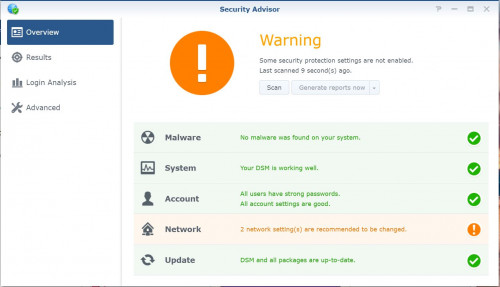
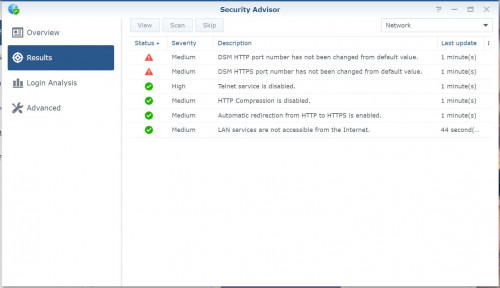
Should I change the port number from default as suggested by Security Advisor ? sweat.gif

user posted image
user posted image

How do I know which number to use shakehead.gif
xxboxx
post Jan 25 2021, 01:26 AM

The mind is for having ideas, not holding them
*******
Senior Member
5,261 posts

Joined: Oct 2004
From: J@Y B33


Default is 5000 and 5001 if not mistaken. Control Panel > Network > DSM Settings to change DSM ports

Advisable change since hacker will target the default port.

This post has been edited by xxboxx: Jan 25 2021, 01:28 AM
WaNaWe900
post Jan 25 2021, 08:41 PM

చąហ ąచҽ™
******
Senior Member
1,397 posts

Joined: Feb 2012
From: sOuL SoCiETY.. iSKaNDaRPuTeRi.. JB.. JDT


QUOTE(xxboxx @ Jan 25 2021, 01:26 AM)
Default is 5000 and 5001 if not mistaken. Control Panel > Network > DSM Settings to change DSM ports

Advisable change since hacker will target the default port.
*
yes indeed thumbup.gif so how could I know the new number will not interfere with other port sweat.gif sweat.gif sweat.gif
xxboxx
post Jan 26 2021, 02:47 AM

The mind is for having ideas, not holding them
*******
Senior Member
5,261 posts

Joined: Oct 2004
From: J@Y B33


QUOTE(WaNaWe900 @ Jan 25 2021, 08:41 PM)
yes indeed  thumbup.gif  so how could I know the new number will not interfere with other port  sweat.gif  sweat.gif  sweat.gif
*
Port numbers can run from 0 to 65353. Port numbers from 0 to 1023 are reserved for common TCP/IP applications and are called well-known ports. You should avoid using these ports. Above 5000 should be more safer. You can check at Control Panel > Firewall > Edit Rules to make sure built-in apps not using the port number that you will assign to DSM. Google it too to make sure it's in conflict with other important usage.
WaNaWe900
post Jan 26 2021, 02:51 PM

చąហ ąచҽ™
******
Senior Member
1,397 posts

Joined: Feb 2012
From: sOuL SoCiETY.. iSKaNDaRPuTeRi.. JB.. JDT


QUOTE(xxboxx @ Jan 26 2021, 02:47 AM)
Port numbers can run from 0 to 65353. Port numbers from 0 to 1023 are reserved for common TCP/IP applications and are called well-known ports. You should avoid using these ports. Above 5000 should be more safer. You can check at Control Panel > Firewall > Edit Rules to make sure built-in apps not using the port number that you will assign to DSM. Google it too to make sure it's in conflict with other important usage.
*
ar like that.. ok noted thumbup.gif thumbup.gif thumbup.gif

102 Pages « < 63 64 65 66 67 > » Top
 

Change to:
| Lo-Fi Version
0.0347sec    0.49    6 queries    GZIP Disabled
Time is now: 11th December 2025 - 04:14 AM