Outline ·
[ Standard ] ·
Linear+
TM HyppTV, Primetime. Anytime. Everytime
|
AVFAN
|
 Jan 11 2018, 12:07 PM Jan 11 2018, 12:07 PM
|

|
QUOTE(jasonws @ Jan 11 2018, 11:24 AM) Hello sifus, I am trying the hypptv everywhere on my Samsung 65MU6100 (2017 model) TV. I can login and navigate the channels. But, I can't watch the Channel after pressed "Watch". The blank screen is there, and after about 30 sec, it prompted "Unable to connect to hypptv everywhere". I am using WIFI to connect. Anyone here faced the same issue, and managed to solve? hypp everywhere... this is an FAQ. no straight answers but i can say... samsung tablet - works. smart tv's androidtv - works. most android boxes - don't work, get same message like u. |
|
|
|
|
|
birain
|
Jan 11 2018, 10:23 PM
|
|
|
hypptv brand changing to unifi tv  https://www.tm.com.my/hypptv/Pages/support.aspxThis post has been edited by birain: Jan 11 2018, 10:24 PM https://www.tm.com.my/hypptv/Pages/support.aspxThis post has been edited by birain: Jan 11 2018, 10:24 PM |
|
|
|
|
|
Anime in HD
|
Jan 11 2018, 11:43 PM
|
|
|
QUOTE(birain @ Jan 11 2018, 10:23 PM) Hope unifi play TV will be getting new look. But, it from TM. Not everyone use it. I just hope their playback video willl be nice like astro go.  Live TV is ok. On Demand content is really cannot watchable(bcoz crop to black bars). |
|
|
|
|
|
shaun_kok
|
Jan 12 2018, 05:05 AM
|
|
|
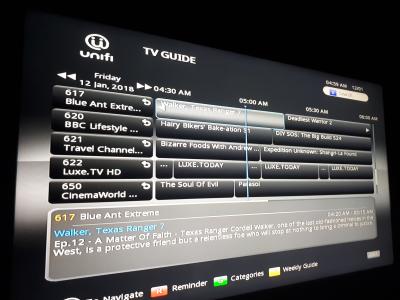
HyppTV logo changed to unifi TV logo. But things like promo endcaps, will need to take time to change since it is changed recently. Taken off Unifi TV set top box. Maybe it is the time to change the thread name to Unifi TV. Attached thumbnail(s)
|
|
|
|
|
|
Anime in HD
|
Jan 12 2018, 03:37 PM
|
|
|
QUOTE(shaun_kok @ Jan 12 2018, 05:05 AM) HyppTV logo changed to unifi TV logo. But things like promo endcaps, will need to take time to change since it is changed recently. Taken off Unifi TV set top box. Maybe it is the time to change the thread name to Unifi TV. New channel please...  Doubt they will add more channel. People use it just for some kids & fta channel. |
|
|
|
|
|
xtracooljustin
|
Jan 12 2018, 11:50 PM
|
|
|
QUOTE(AVFAN @ Jan 11 2018, 12:07 PM) hypp everywhere... this is an FAQ. no straight answers but i can say... samsung tablet - works. smart tv's androidtv - works. most android boxes - don't work, get same message like u. Will be side-loading Hypptv everywhere app on my new Sharp UE630X TV tmw. damn limited apps on the google play store. crossing fingers that it will work. will update again tmw. |
|
|
|
|
|
AVFAN
|
Jan 12 2018, 11:57 PM
|
|
|
QUOTE(xtracooljustin @ Jan 12 2018, 11:50 PM) Will be side-loading Hypptv everywhere app on my new Sharp UE630X TV tmw. damn limited apps on the google play store. crossing fingers that it will work. will update again tmw. hypptv everywhere or unifi playtv will work on yr tv. astrogo will also work, but need to install indic keyboard app and rotation/orientation app too - both in playstore. androidtv is a pretty good platform. don't worry about lack of apps in the playstore; you can always sideload with es file explorer. just about any app can be sideloaded. want more apps for your tv? here: https://forum.lowyat.net/topic/3811168/+1420This post has been edited by AVFAN: Jan 13 2018, 12:12 AM |
|
|
|
|
|
xtracooljustin
|
Jan 15 2018, 01:03 AM
|
|
|
QUOTE(AVFAN @ Jan 12 2018, 11:57 PM) hypptv everywhere or unifi playtv will work on yr tv. astrogo will also work, but need to install indic keyboard app and rotation/orientation app too - both in playstore. androidtv is a pretty good platform. don't worry about lack of apps in the playstore; you can always sideload with es file explorer. just about any app can be sideloaded. want more apps for your tv? here: https://forum.lowyat.net/topic/3811168/+1420Update: Have side loaded, runs without problem! but my only complaint is that I can only find the app under Settings>App>HyppTv... and doesnt appear on the front/main page just like the other regular apps. Any idea how to help with this? |
|
|
|
|
|
AVFAN
|
Jan 15 2018, 01:26 AM
|
|
|
QUOTE(xtracooljustin @ Jan 15 2018, 01:03 AM) Update: Have side loaded, runs without problem! but my only complaint is that I can only find the app under Settings>App>HyppTv... and doesnt appear on the front/main page just like the other regular apps. Any idea how to help with this? only approved androidtv apps will appear in the homescreen, the rest, u go to settings.... or install a "sideload launcher" like this: https://play.google.com/store/apps/details?...dlauncher&hl=en |
|
|
|
|
|
Slekerz
|
Jan 15 2018, 12:09 PM
|
|
|
I can't watch unifitv, page loading problem have reboot, u guys have this problem?
|
|
|
|
|
|
AVFAN
|
Jan 15 2018, 05:01 PM
|
|
|
QUOTE(Slekerz @ Jan 15 2018, 12:09 PM) I can't watch unifitv, page loading problem have reboot, u guys have this problem? cut power for modem-router-stb-tv. restart all of them. if still fail, call 100. |
|
|
|
|
|
birain
|
Jan 15 2018, 05:23 PM
|
|
|
hypptv with stb will be known as Unifi TV and hypptv everywhere will be known as Unifi Play TV beginning 12 January 2018. |
|
|
|
|
|
Slekerz
|
Jan 15 2018, 09:12 PM
|
|
|
QUOTE(AVFAN @ Jan 15 2018, 05:01 PM) cut power for modem-router-stb-tv. restart all of them. if still fail, call 100. I have temporary solution using hypptv everywhere on my android box, i forget have to use ethernet cable connect to stb box for unifi, before this using streamyx just wireless from router to stb box, have to buy powerline adapter to connect to other stb box in my other room. |
|
|
|
|
|
yvliew
|
Jan 20 2018, 01:35 AM
|
|
|
Wanna ask hypptv everywhere account can use in how many device at the same time?
|
|
|
|
|
|
jusbella
|
Jan 20 2018, 10:36 AM
|
|
|
QUOTE(yvliew @ Jan 20 2018, 01:35 AM) Wanna ask hypptv everywhere account can use in how many device at the same time? Two maximum |
|
|
|
|
|
cyew86
|
Jan 20 2018, 11:01 PM
|
|
|
QUOTE(evilhomura89 @ Jan 10 2018, 06:21 PM) Since your contract has already been renewed (from the unifi upgrade), u can tell them your STB is not working already then they'll send a replacement. Been there done that Did the technician come to test the old STB before replacing? I am tempted to change mine, it's a very old unit (silver bulky box), and keep it as a back up box since HyppTV Everywhere is buggy on my Android TV Box. Wondering if they are coming up with new STB since they have rebranded to Unifi TV now  |
|
|
|
|
|
ffxmadman
|
Jan 21 2018, 12:23 PM
|
New Member

|
QUOTE(cyew86 @ Jan 20 2018, 11:01 PM) Did the technician come to test the old STB before replacing? I am tempted to change mine, it's a very old unit (silver bulky box), and keep it as a back up box since HyppTV Everywhere is buggy on my Android TV Box. Wondering if they are coming up with new STB since they have rebranded to Unifi TV now Very unlikely unless u upgrade your Unifi plan hence renewing contract then I think u can claim new STB, but u can always ask TM Point and check |
|
|
|
|
|
AVFAN
|
Jan 21 2018, 12:35 PM
|
|
|
QUOTE(cyew86 @ Jan 20 2018, 11:01 PM) Did the technician come to test the old STB before replacing? I am tempted to change mine, it's a very old unit (silver bulky box), and keep it as a back up box since HyppTV Everywhere is buggy on my Android TV Box. Wondering if they are coming up with new STB since they have rebranded to Unifi TV now not as a rule. even if u sign new contract, they just give u additional 1 yr warranty. if it fails within that period, u get new one. well... one way is... pour some water over it!  |
|
|
|
|
|
cyew86
|
Jan 21 2018, 01:53 PM
|
|
|
QUOTE(ffxmadman @ Jan 21 2018, 12:23 PM) Very unlikely unless u upgrade your Unifi plan hence renewing contract then I think u can claim new STB, but u can always ask TM Point and check I downgraded my plan, hence got renewed for another 12 months. Wanted to cancel but they didn't allow. They said can only change if the STB is broken, that's why need to see how thorough they are with the process QUOTE(AVFAN @ Jan 21 2018, 12:35 PM) not as a rule. even if u sign new contract, they just give u additional 1 yr warranty. if it fails within that period, u get new one. well... one way is... pour some water over it! Lol good one. I might tinker around with it till the software fails, then request for a replacement lol. Thanks all |
|
|
|
|
|
evilhomura89
|
Jan 21 2018, 01:54 PM
|
|
|
QUOTE(cyew86 @ Jan 20 2018, 11:01 PM) [b]Did the technician come to test the old STB before replacing?[b/] I am tempted to change mine, it's a very old unit (silver bulky box), and keep it as a back up box since HyppTV Everywhere is buggy on my Android TV Box. Wondering if they are coming up with new STB since they have rebranded to Unifi TV now This one depends on the technician themselves, mine didn't I suppose you can tell them the box got stuck at "INIT" screen - common issue OR » Click to show Spoiler - click again to hide... « You can try damage the equipment deliberately  Then tell them sudah tak boleh pakai, please ask technician come and replace They wouldn't know or care anyway This post has been edited by evilhomura89: Jan 21 2018, 01:55 PM |
|
|
|
|



 Quote
Quote




 0.0240sec
 0.52
0.52
 6 queries
 GZIP Disabled