Welcome Guest ( Log In | Register )

33 Pages « < 27 28 29 30 31 > » Bottom

Outline · [ Standard ] · Linear+

PC Audio Creative GigaWorks S750 7.1 speaker repair, A short guide and info with pictures...

views
     
Bit4ever P
post Feb 7 2020, 07:23 AM

New Member
*
Probation
7 posts

Joined: Jan 2020
QUOTE(MichalD @ Feb 2 2020, 08:19 PM)
After checking this size of capacitors package 0.8x1.6mm it is rated for 16V so i think it will be enough.
*
Thank you for your advice thumbsup.gif
so I'm in the middle of moving, and I'd like to refurbish this s750 before I move into my new home. This morning I received and immediately soldered the broken components of the audio board.
So here is the long awaited moment, the end of this subwoofer update. I put everything back in place for a test to check that everything is ok.
The PSU part is working fine, when I turned on the power to green led from the pod, I heard a high-pitched whistling noise coming from the amp board that feeds the woofer, as if a component had a leak. doh.gif I turned it off immediatly. I checked if there was something visible, I didn't notice anything visible. I turned it on a second time to try to identify where the noise was coming from. and the one buzz can be heard on the board and in the woofer but no music comes out. before the update of the audio board and the amp everything is fine and now I don't understand anything anymore. rclxub.gif What can I do?
MichalD
post Feb 7 2020, 07:47 AM

Getting Started
**
Junior Member
104 posts

Joined: Feb 2017
QUOTE(Bit4ever @ Feb 7 2020, 12:23 AM)
Thank you for your advice  thumbsup.gif ....
*
Hmmm...very hard to determine what is going on. Carefully check the audio processing board with magnifier glass for some short circuits or any other visible problems possible caused by scraping off the old glue or soldering new components. I can take detailed photo during this weekend and post here to help you.
Do you have checked the voltages of PSU?
If you disconnect audio processing board flat grey wire from woofer amp board will the buzzing sound dissapear?

What for the other AMP board it is working properly?


Bit4ever P
post Feb 7 2020, 03:30 PM

New Member
*
Probation
7 posts

Joined: Jan 2020
QUOTE(MichalD @ Feb 7 2020, 12:47 AM)
Hmmm...very hard to determine what is going.....
*
Do you have checked the voltages of PSU?
Yes all voltages is ok

If you disconnect audio processing board flat grey wire from woofer amp board will the buzzing sound dissapear?
Yes i dont have any buzz
the buzz is heard only on the woofer board and it is heard on all outputs of the woofer board. whether a signal is input or not.

What for the other AMP board it is working properly?
Yes other amp board work great

I'll try to check for shorts circuit or bad solder.
MichalD
post Feb 9 2020, 06:00 PM

Getting Started
**
Junior Member
104 posts

Joined: Feb 2017
QUOTE(Bit4ever @ Feb 2 2020, 03:54 PM)
hello thank you very much for your help MichalD notworthy.gif .
*
These were ceramic caps, so they are non-polarized.
MichalD
post Feb 9 2020, 06:07 PM

Getting Started
**
Junior Member
104 posts

Joined: Feb 2017
QUOTE(MichalD @ Feb 7 2020, 12:47 AM)
Hmmm...very hard to determine what is going on...
*
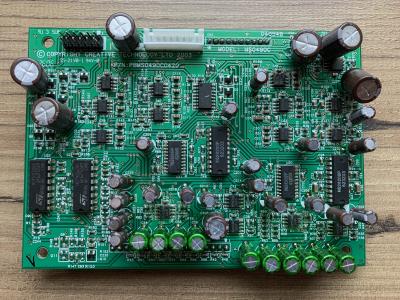
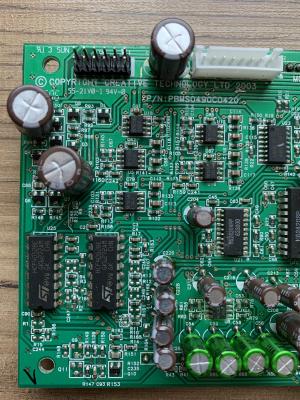
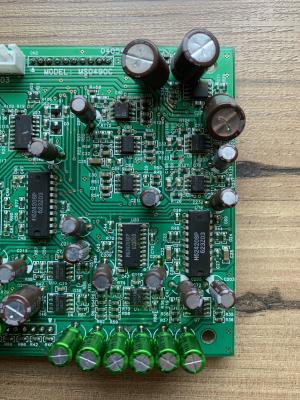
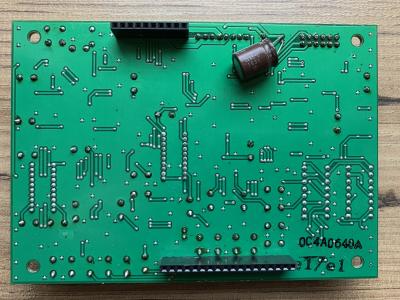
Here are the detailed pictures of the same board as you have but this is with new caps. Check the traces if you have accidentally scraped off some. Measure with continuity tester the resoldered input and output connectors if there are is conductivity to the board or nearest part.

Attached Image Attached Image Attached Image Attached Image

kotek34
post Feb 16 2020, 05:31 AM

New Member
*
Junior Member
16 posts

Joined: Sep 2016
Hello to everyone

After 2 years for my last repair the speakers again stop working. This time there is no blown fuse or any "boom". I didnt off my speakers for about 3 months, always stay on, I didnt have any problems with it, speakers worked well. But yesterday I had to to unplug it from power source and after reconnect speakers not working. The green LED light doesnt work, no blinking, no blown fuse.. nothing. I took off the power board but there is no any visual damage, capacitors are looking good. I disconnected AMP boards but nothing change.. PSU standby section is dead.

I have checked D9 - ok
D1 Voltage - 337V
Voltage between C and S on TOP243Y - 5,38V


This post has been edited by kotek34: Feb 16 2020, 05:42 AM
MichalD
post Feb 16 2020, 05:34 AM

Getting Started
**
Junior Member
104 posts

Joined: Feb 2017
QUOTE(kotek34 @ Feb 15 2020, 10:31 PM)
Hello to everyone...
*
Hello, will you repair it by yourself?
kotek34
post Feb 16 2020, 05:49 AM

New Member
*
Junior Member
16 posts

Joined: Sep 2016
Hi MichalD
I bought these speakers damaged and first time I have repaired it on my own hand. I have changed all electrolic capacitors to new ones, removed the glue and also replaced D9 (shorted) and TOP243Y. I have replaced it and speakers back to work. For now I dont have idea whats is wrong, because all compnents lookin good, fuse is not blowing but there is no power, green LED not showing.

This post has been edited by kotek34: Feb 16 2020, 05:52 AM
MichalD
post Feb 16 2020, 05:59 AM

Getting Started
**
Junior Member
104 posts

Joined: Feb 2017
QUOTE(kotek34 @ Feb 15 2020, 10:49 PM)
Hi MichalD...
*
It seems to be a stanby power section problem. Check D9, 10, 13, D26.
kotek34
post Feb 16 2020, 06:08 AM

New Member
*
Junior Member
16 posts

Joined: Sep 2016
Thank You for answer.
Yes, standby mode doesnt work at all. I have checked D9 and D10 (its ok). I had similiar problem some time ago and there was a problem with one capacitor. The speakers also didnt work and green LED was blinking. I have used hairdryer to test and after heated up capacitor the LED stopped blinkiing and speakers alive. I have replaced this capacitor and didnt have any problems.. to yesterday.

This post has been edited by kotek34: Feb 16 2020, 06:10 AM
MichalD
post Feb 16 2020, 06:25 AM

Getting Started
**
Junior Member
104 posts

Joined: Feb 2017
Hairdryer treatment is effective for electrolytics, but only for a while. TOP243Y is suspicious, but near impossible to diagnose, just very hard to replace. Can you measure capacitance and ESR of C62 and 63?

This post has been edited by MichalD: Feb 16 2020, 06:25 AM
kotek34
post Feb 16 2020, 06:45 AM

New Member
*
Junior Member
16 posts

Joined: Sep 2016
Yeah I am also thinking about TOP243Y because this is main IC of standby circuit. I have a queston, does heat treatment only work for bad capacitors or there is anoother element which can be "activated" by heat like IC's, transformators or optocouplers?
MichalD
post Feb 16 2020, 08:09 AM

Getting Started
**
Junior Member
104 posts

Joined: Feb 2017
Don’t think so. I think it only just works for caps.

kotek34
post Feb 16 2020, 10:05 PM

New Member
*
Junior Member
16 posts

Joined: Sep 2016
Hello again,

Today I did again test with hairdryer, after solid heat up C62 area the green LED start blinking and finally light on. Unfortunately I dont have new one capacitor to replace it, but I desoldered it and used old one to check it. After replace and power on speakers the green light blinking and with little hot air stay light on, so I need to get new capactor and hope this will working.

If Yours spekaers not work at all (no green LED, no blowing fuse) please check C62 because from my experiences its very often problem. I have replaced this capacitor two times and this will be third time. Maybe I am using bad quality capacitor and this the reason why my speakers cannot work more than 2 years without damage.
MichalD
post Feb 16 2020, 11:41 PM

Getting Started
**
Junior Member
104 posts

Joined: Feb 2017
Hm great knowledge, i wasn't thinking that the capacitor will be totaly dead and it will cause this problem. Maybee capacitor's ESR dramatically increases and it's capacity dramaticly decreses, so there is no power for standby section at all.
Try to use Rubycon's BXW capacitor.

kotek34
post Feb 18 2020, 12:06 AM

New Member
*
Junior Member
16 posts

Joined: Sep 2016
QUOTE(MichalD @ Feb 16 2020, 11:41 PM)
Hm great knowledge, i wasn't thinking that the capacitor will be totaly dead and it will cause this problem. Maybee capacitor's ESR dramatically increases and it's capacity dramaticly decreses, so there is no power for standby section at all.
Try to use Rubycon's BXW capacitor.
*
I replaced bad capacitor to new one and speakers working but there is a problem with stability of standby circuit and speakers reset.. AMP boards are good, still problem on PSU board. In meantime I have pruchased another damaged S750 subwoofer and will try repair PSU on it.

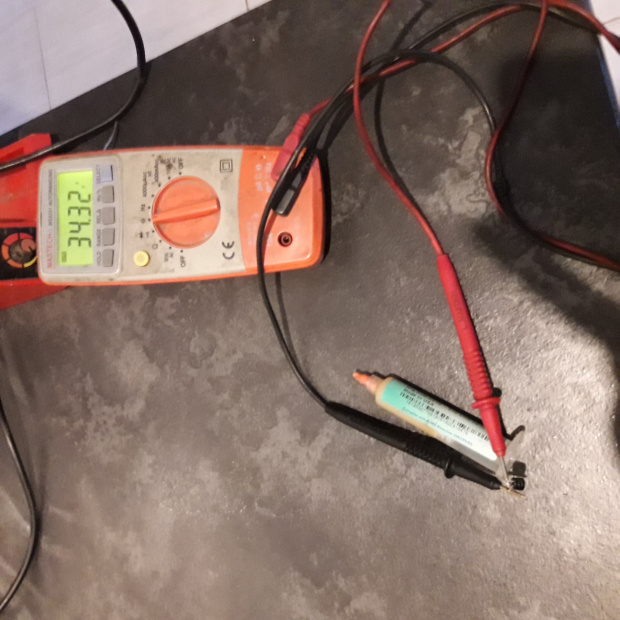
I also checked capitance C62 with multimeter. Here is my results.

On this capacitor the standby section not working at all, no LED:
user posted image

On this capacitor standby section still not working and green light blinking:
user posted image

And this is new one:
user posted image

MichalD
post Feb 18 2020, 04:16 AM

Getting Started
**
Junior Member
104 posts

Joined: Feb 2017
First two caps loosing their capacity and ESR is increasing becuase of heat of the heatsink and therefore the standby circuit is not werking properly. Replace it for new LOW ESR one 105 °C rated for long term use. 5000 hrs or more.
Reseting is common issue on all units, you can fix this by following steps described upper in my topic posted Mar 13 2018, 10:20 PM "RELAY ISSUE (CONTROL POD RESETING) - SOLVED"


kotek34
post Feb 21 2020, 11:58 PM

New Member
*
Junior Member
16 posts

Joined: Sep 2016
I've got another damaged set. The fuse is good, the green LED slowly blinking. I dissasemblied sub and first tried to discoennt AMP boards. After this the green LED is solid green. The PSU board it is very good condition, capacitors are not bulged and glue didnt damage the PCB (color of glue its almost white, not brown). I connected the POD and standy mode working great, no issue. After this I measured voltage on CN4 and CN5. There are about 95V (unload) so it is also good. My next step I tried to connect first AMP board only (board with three IC) but with connected board the green light slowly blinking. I disconnected AMP1 and connected AMP2 only. With second AMP speakers are working, I can power on it and after connecting music source and satellite I can hear the music from it (working front and rear channels) without subwoofer speaker. I think there are a problem with AMP1 board and PSU is good. I took AMP1 board off and check the capacitors (C39, C40, C41) but there is no fault, pins of STA are good too (no cracks). I didnt replace any capcitors on PSU (only removed the glue right now). Do You think is possible that PSU can power up second AMP board well but there is no enough juice to power first AMP? What else can be checked or measurment on AMP board?

This post has been edited by kotek34: Feb 22 2020, 12:00 AM
MichalD
post Feb 25 2020, 07:11 AM

Getting Started
**
Junior Member
104 posts

Joined: Feb 2017
Hello, don’t know what to measure on amp board, but they are very rare to fail besides big cap, small ceramic cap and smd cap. Try connect only 2 IC amp board and measure voltage under load where was 95V with no load. After then connect second amp board with 3 ICs an measure voltage on both amp boards under load. I think the PSU can’t deliver enough power to supply both amp boards.

djozmo P
post Apr 7 2020, 07:35 AM

New Member
*
Probation
18 posts

Joined: Apr 2019
Hello again.. I replaced all the capacitors and used it for a while but now the green light problem has occurred. Why could it be ?

33 Pages « < 27 28 29 30 31 > » Top
 

Change to:
| Lo-Fi Version
0.0301sec    0.36    6 queries    GZIP Disabled
Time is now: 6th December 2025 - 10:43 AM