Initial calculation seems to show that you can get the phone at RM1357* (RM1157 for SKMM rebate buyers), and can terminate early WITHOUT penalty. Please consult with DiGi's staff before proceeding.
Device Price
RM1299 (1183 + 116)
Advanced Payment
RM58
TOTAL
RM1357 (or 1157 with SKMM rebate)
To view the checklist upon purchasing the device (Along with many other frequently asked questions), see 'Alright, I'm in! So what do I check for when I'm purchasing one unit?' under Post #2: FAQs, Tips & Tricks.
To report in & add yourself to the owner list, fill in the form [CLICK HERE].
For more advanced knowledge, read through the [Nexus 4 Unleashed] posts below.
Always read the [Changelogs] to keep track of the latest changes made to the information in the thread.
GeneralRules
ALWAYS READ the first page's information before asking. They are created, collected and summarized to benefit the community and not for decoration purposes only!
Search before asking. At bottom-left of the thread. See sample:
CTRL+F is your best friend; apart from the search function of the forum.
Respect each other. We do not want flame wars here.
Obey rules in LYN Forum.
Strictly no warez / crack / forbidden discussion as stated in LYN rules.
Enjoy yourself here along with other members. We are a big family.
Read the instructions on how to add yourself to the user list below in post#5 before asking.
» Click to show Spoiler - click again to hide... «
Officially launched and made available in Malaysia starting from Jan 14, 2013 by DiGi (exclusive) and Hotspots, priced at RM1649 for 16GB.
The current price have dropped and it's hard to keep track with the current market's price, so the best is to directly inquire the shops (some are listed below in purchasing channels)
Nexus 4 Purchasing Channels
» Click to show Spoiler - click again to hide... «
DirectD @ SS15 (Original / AP) - (Most recommended by many new buyers!!)
Senheng/SenQ (Original) - Another recommended purchasing channel, mainly because of it's top-up warranty service (roughly top-up around RM100 to get 4-years warranty from SenHeng)
DiGi (Original) - Not recommended to get from there unless 1) You are using DiGi's smartplan or 2) You wants to use SKMM rebate; because the retail prices have dropped
Nexus 4 FAQs, Tips & Tricks Always do a search first. Answer could be in the previous version of discussion threads too. Do note that this section will only cover basic stuff related to Nexus 4. For advanced features, see the Nexus 4 Unleashed section.
A. PURCHASING RELATED QUESTIONS (BEFORE)
A1. Why Nexus 4 and not other models? Pros and Cons?
» Click to show Spoiler - click again to hide... «
Various opinions / posts regarding this question are collected and shown below:
» Click to show Spoiler - click again to hide... «
user preferences..test n pick what suit u.not what others thing..my stock rom..stock kernel..can last a day with 3g on and average 3 hours screen on time..which in my opinion and comparison..note 2 have a better battery life almost double...this is out of the box usgae..no modification and etc...
in term of lag..i would say pure android without and added ui is the advantage of nexus...very minimal lag..as 0 lag in nexus 4..nexus 4 with better cpu...make my old gnex look not smooth enough..damn..now really eager to get 2nd unut of nex4..but bdget permitted..so stick with my gnex..
why nexus?for a user like me..with no interest yet in custom rom and kernel..it is purely for the updates from google..coming from dhd..the updates fail me big time..after that..give up on other brand of android and get nexus as i personally feel that my nexus will not look old as the software is up to date to the latest..so u feel like u get the latest software..so i can keep my money and my desire in getting a new phone..at least for 2 years minimum..
why not to buy nex4..no sd slot which i dont care as 16gb is enough for me..even 8gb will serve me well..as i auto upload my photo to dropbox...i didnt listen to music using phone..i watch movie on my tab and laptop..i only play games to kill my time..play a casual games such as subway surfer and temple run...
2nd is camera..camera is performing so..so...if want better camera u can take lumia or pureview..me..i just need camera for a pictures..decent picture is enough..if i want a great picture..i have dslr which i shot a night landscape picture..
base on my usage why i didnt choose iphone?because iphone is boring for me..as i need a widget on my homescreen and as far as i know..iphone u cant add widget..so i settle for nexus devices...
last is the design..which i find it very2 subjective...btw the money is yours...go buy the devices use your hard earn money and be happy with it...even i buy my old dhd for 2.3k..i still happy with my previous dhd..and i did miss the ui of sense..some of it is useful such as t9 dialer (i cant find a good t9 dialer in gplay yet)..the appdrawer sort design..the fb and contact sync..the gallery and etc...
its just me...so make your call..
posted by polarzbearz
» Click to show Spoiler - click again to hide... «
PROS
CONS
Official Google line-up. It means that Nexus series will ALWAYS be the first to receive official updates DIRECTLY FROM Google. To put it simply, if you're not the type which loves to constantly flash ROM on daily/weekly/monthly basis, you don't have to do anything but sit back and wait for Google's official updates.
Being the first to receive updates have its disadvantages such as where we're always the white rats to test out major / minor bugs in new software versions
The hardware specifications on this device is lovely and almost completely top-tier (e.g. S4 Pro processor chipset, etc); with way cheaper price as compared to other flagships with similar specifications.
Although the specs sheet of Nexus 4 is very nice, some of its disadvantages of hardware that are most notable are such as its camera which is very average or the lack of external SD card slot. These issues may be subjective depending on person.
Do remember that these are only the subjective opinions of various forummers regarding this question; and as everyone will definitely have different usage, lifestyle, preferences and priorotisations, if you still have doubt it's best to try out the devices and pick the one you love the most and never regret with your choice!
A2. Where can I buy phone only without any telco's plans bundled (Contract-free)?
» Click to show Spoiler - click again to hide... «
You can purchase it outright at RRP (RM1649) at retails like HotSpot @ LYN or SenQ/SenHeng. For more information please visit their official website or walk-in their retail stores for inquiries.
Please visit their Facebook for most updated info on the stock availability and pre-orders.
A3. What are the purchase options for DiGi? Price? Rebates?
» Click to show Spoiler - click again to hide... «
The calculation below are estimated only and by no means to be 100% correct and confirmed, as many of us have gotten the phone via Zero Contract BEFORE DiGi decides to remove it.
The total cost sums up to be the same as the previous Zero Contract (calculations available in post#10 Information Archive) for on-the-spot terminations.
For the new DiGi Smartplan, I have not tested it yet but seems that the calculation should be this way for SKMM rebate:
DESCRIPTION
PRICE
Nexus 4
RM1169
Upfront Payment*
RM240
SKMM Rebate
- RM200
Advanced Payment
RM58
Early Termination Fee**
RM200
TOTAL
RM1467
*This is actually the rebate in order to have the discounted Nexus 4 price shown above, which will be given over 24 months. For on-the-spot termination, the device price would be RM1169 + RM240 as shown above.
**An early termination fee of RM200 (inclusive of administration fee) is applicable to the DG Smart Plan™ device bundles.
A4. Alright, I'm in! So what do I check for when I'm purchasing one unit?
» Click to show Spoiler - click again to hide... «
So you've decided to purchase one unit? Here are some guidelines which may help you to perform tests / checks for potential defects during your purchase. Do note that these are just a guideline and feel free to perform even more extensive tests at your wish
Note: These guidelines are written based on local sets but I believe the package will not vary too much, even if you have ordered from US. Do correct me if I'm wrong, tho.
Here, the main packaging in which your new baby resides in
» Click to show Spoiler - click again to hide... «
Make sure that the package is sealed when you accept it. If it's not sealed when you receives it, chances are someone else have already opened the package prior to passing it to you. The sealed stickers are shown in the picture below:
» Click to show Spoiler - click again to hide... «
Checklist of package contents
Nexus 4 with default screen protector applied (slightly different with the photo taken below; as the stock SP was removed)
USB Cable
Charger Plug
SIM Ejection Tool (a really tiny pin)
User Manual
Warranty Card
Some sort of sticker with serial number, IMEI and other information.
» Click to show Spoiler - click again to hide... «
Turn on the device now to test it! Best if you have a micro-sim ready to test out calls. A few things to note when testing are:
Check the device's IMEI (see the sticker at the back of the phone) and compare it with the box. By right it should match. Alternatively, dial *#06# to check.
Check the screen for dead pixels, turn on maximum brightness and see if there are any dead pixels.
Try to make a call and listen on the phone speaker clearly. There should not be any buzz-ling sounds (apart from bad signal receptions etc)
Try to snap photos with your camera.
Check your accelerometer and ensure that it's working fine (Easiest way to test is to enable Auto Rotate Screen and launch an application, such as Camera. It should rotate according to how you rotate your phone. There are rare hardware defects where the accelerometer are Dead on Arrival)
Check and ensure the set you receive is local original set instead of overseas original set (if you're purchasing from shops etc). LG Malaysia will only accept local sets for servicing purpose. Currently the only known way to identify local / oversea set is via the Warranty Card included in the box; local sets will have "LG Malaysia" written on it.
Basically these are just a basic guideline for you to use when you first purchase your device. If you have any suggestions or ideas, feel free to PM me or reply me!
A5. How to differentiate between Original set and Oversea (AP) set?
» Click to show Spoiler - click again to hide... «
Currently the only known way to identify local / oversea set is via the Warranty Card included in the box; local sets will have "LG Malaysia" written on it.
A6. How to identify production batch? Which batch have new camera lens cut-out and rubber nips?
» Click to show Spoiler - click again to hide... «
Based on the Serial Number on your box (Not IMEI); note the first 4 characters:
First character is for year: (e.g. 1 for 2011, 2 for 2012, 3 for 2013, etc...) Second character - Third character is for month: (e.g. 01 for January, 11 for November, etc...) Forth character for Country of Production: (e.g. C for China, K for Korea)
Most probably batches from March 2013 onwards will have the newer design.
B1. What about warranty for this phone? How long? By who? Need to register?
» Click to show Spoiler - click again to hide... «
The warranty are different depending on which set you purchase: For local sets, it is directly under LG Malaysia's warranty, register your warranty here after you purchase it by creating a LG account and fill in the details. All LG Nexus 4 will have 1-year warranty; except some SenHeng member purchases will have 2 years (1 year under LG, 1 year under Senheng).
For US Playstore Sets, the currently known warranty is to send it back to US to claim for warranty. High chances are LG Malaysia will not accept non-local sets for servicing.
Additional note (thanks to cjlai): According to one of the forummer here, he bought the Nexus 4 from US Play Store and is able to register the device under LG Malaysia's website. However, it is still unclear that whether if LG will accept International Sets for servicing & repairing without charges (under warranty).
NOTE: It doesn't matter whether if it's a local or overseas (AP) set; both are manufactured and servicing will be directly under them - LG. Do not mix up with the term 'SME' as it stands for 'SAMSUNG MALAYSIA ELECTRONICS'; which is a term used to refer to Local Sets for Samsung Devices (in NO relation with our LG Nexus 4)
B2. My unit is defective! Where is LG Warranty centre?
» Click to show Spoiler - click again to hide... «
LG Service Centre Location: Level 1, Wisma AmFIRST 2 (formerly known as Kelana Brem Towers 2) Jalan Stadium, SS7/15, Kelana Jaya, Selangor.
B3. My front-screen / back-screen got cracked . How much will it cost to repair for local / US sets?
» Click to show Spoiler - click again to hide... «
As screen cracking are not within the warranty's coverage, both local and US sets will be charged by LG Malaysia (at Kelana Jaya Service Centre or other branches, call them up to check) for screen replacements, according to most forummers here whom had repaired their cracked screen.
Non-local sets will be charged an extra of RM30 (confirmed for front-screen by damned_dude, need confirmation for back-glass)
Also, they will usually replace it on-the-spot for you (takes around 15 ~ 30 minutes) if they have ready-stocks for changing parts. You might want to give them a call before paying them a visit to save time!
C. DEVICE-SPECIFIC QUESTIONS (Note: All advanced FAQs / information regarding N4 are shown in the next-next post of Nexus 4 Unleashed)
C1. How is the battery life of Nexus 4? What's SOT?
» Click to show Spoiler - click again to hide... «
This question is really subjective and it all boils down on how you use and configure your device. However you can get a brief idea by looking at other member's battery life. As many members have posted many times, it's best if you can search it yourself using the search function within the thread.
Search for the keyword "battery life" and make sure you search the previous threads as well because there are posts about battery life in previous threads, too.
SOT = abbreviation for Screen-on Time
C2. Why some other members have received latest version update but I have not received it yet?
» Click to show Spoiler - click again to hide... «
Firstly, make sure that you are eligible for OTA update (see previous question regarding OTA / Official updates). If you're eligible and have yet received any OTA update notifications but some other members have already received it, do not worry. This is mainly because Google rolls out update by batches instead of all at once; which presumably that they chooses this method to prevent the server from overloading during the release of the new version.
You may try the steps below if you're impatient and hopes to receive update faster: For those on stock ROM and have yet receive OTA notification, try these steps: Go to Settings > Apps > All Apps > Google Framework Services > Force Stop > Disable > Clear Data > Enable > Go back to settings > About Phone > System Updates > Check now > 4.2.2 is available! (credits to stormlcc).
C3. Can I still receive OTA / Official updates from Google if I root / unlock / flash kernel / ROM / etc?
» Click to show Spoiler - click again to hide... «
Requirements to receive OTA:
CODE
Stock ROM Stock Kernel [i](might or might not work with custom kernels)[/i] Stock Bootloader Stock Recovery No modifications All system apps present.
For those who are curious / unsure; I just received OTA update notification on my second Nexus 4 (my first did not receive it yet ). And yes, it's unlocked, rooted, stock rom, stock kernel. So it's confirmed to be a myth for those that says "rooted" or "unlocked" couldn't receive OTA
Just to add on, you'll most likely lose your root access after installing the OTA. So make sure you leave your bootloader unlocked (if you do not have custom recovery installed) and re-flash the root after updating. Alternatively you may try OTA Rootkeeper(thanks ronaldlim91) and see if it's able to retain your root access after an OTA.
» Click to show Spoiler - click again to hide... «
hey @polarzbearz, might wanna add this to app to those who want to do OTA update but still want to keep their root. OTA RootKeeper.., dont know if this has been mentioned before, but saw the first page and this piece of important information isn't there, at least quite useful to me cheers!
C4. I kept receiving error message when downloading / updating apps in Play Store
» Click to show Spoiler - click again to hide... «
Can't download apps from Play Store after updating to 4.2.2 and receives the error message Error retrieving information from server. [RPC:S-5:AEC-0]? Try this solution posted by nightwalkertzs.
C5. Does this device supports NFC?
» Click to show Spoiler - click again to hide... «
In short, YES. However, do note some compatibility issues with the tags used. Nexus 4 can only read NFC-approve-standards tag (such as NTAG203). Non-approved standards will not be readable (such as MiFare Classic 1k tags).
C6. My phone froze! How do I restart / shut down / reset? Can't pull battery!!11
» Click to show Spoiler - click again to hide... «
Don't panic! Just hold your power button for ~10 seconds and your device will be forced to reboot (it's hard coded into the device).
C7. There's some rattling noises when shaking the device, is this normal?
» Click to show Spoiler - click again to hide... «
Yes, that rattling sound is pretty normal. Not sure if it's the camera or the sim tray though (many different claims online)
D. GENERAL USEFUL TIPS
D1. Battery savings
» Click to show Spoiler - click again to hide... «
Turn Google Currents background sync off if you don't need it (it is on by default) > Open up Google Currents > Settings > untick Enable background sync
Turn off location reporting, location sharing and location history (**Google Now requires Location reporting and location history enabled) > Open up Google Maps > Settings > Location settings > untick Location reporting, Report from this device, Enable location sharing and Enable location history
Turn off Google sync-ups that are not needed > Settings > Accounts > Google > tap on your ACCOUNT eg. xxx@gmail.com > untick those service that are not needed
D2. Chinese input?
» Click to show Spoiler - click again to hide... «
Nexus 4 come preloaded with Google Pinyin. Enable it at Settings > Language & input > make sure Google Pinyin is checked. After that, you could choose it from the input methods by holding the spacebar of the default English keyboard or through input method selector notification under notification bar if it's enabled.
D3. The infamous 'Red Blinking Light of Death' issue
» Click to show Spoiler - click again to hide... «
D4. I want to set my music for my ringtones / notifications / alarms / etc.
» Click to show Spoiler - click again to hide... «
Use these directories to store your music / ringtone of your choice:- /sdcard/Alarms to be used by any "Alarm" applications. /sdcard/Ringtones to be used by calling "Ringtones". /sdcard/Notifications for any other notifications (e.g. messaging, whatsapp, facebook, etc.)
To change your alarm, head over to Clock > Alarms > click on any existing / create new alarm > change the alarm tone.
To change your notifications or ringtones, head over to Settings > Sounds > Phone Ringtone / Default Notification sound; alternatively you can head over to your application and set the custom notification specific to the application.
Note: If the audio that you transferred to respective directory (e.g. Notifications) does not shows up in the respective category of audio selection (e.g. selecting notification tones), try rebooting your device and check again.
D5. Where did the 'Developer Options' go?
» Click to show Spoiler - click again to hide... «
Go to Settings > About > Tap on 'Build Number' 7 times and viola! Developer Options will now be available at your Settings page
D6. Can I hide the 'Developer Options' after showing it?
» Click to show Spoiler - click again to hide... «
To someone who wants to re-hide 'developer options' follow this step but root needed.
1. If you already root just install root explorer.
2. Open it and navigate to data/data/com.android.settings/shared_prefs/development.xml. Edit and change value "true" to "false". Save and exit.
3. Then delete development.xml.bak.
4. After that go to settings>apps>all>Settings. Open it then force stop.
5. Lastly open Settings app to check it. Voila! developer options re-hide again!
D7. How do I change my Play Store to US Version to bypass region restrictions?
» Click to show Spoiler - click again to hide... «
(posted by polarzbearz) I'm not sure which of this had worked but feel free to try them all! As I've tried all of the said method before it finally worked (after I left it there for like 1 or 2 days, without doing anything).
1. Changing Credit Card address to US 2. Changing Google Accounts setting (https://www.google.com/settings/account) to US (click the "Edit" button next to EMAIL) 3. Installing Market Access on your Android Device and emulate T-Mobile [US] 4. Using DroidVPN (combined with Market Access), clear Play Store Cache + Data, and re-launch it 5. Using HotSpotShield on PC and try to browse the play store (without cache)
Basically these are what I have done and even I myself are not sure which had helped me. But if my guesses are correct, it's the US billing address + Market Access that helped.
Hope it helps!
D8. Full-coloured notification lights for all apps?
» Click to show Spoiler - click again to hide... «
D9. Alternatives to lock / unlock the phone without using power button? Touch Control?
» Click to show Spoiler - click again to hide... «
(ONLY FOR ROOTED DEVICES WITH CUSTOM KERNEL!!!!) You can give Touch Control a try. Basically you can slide on the screen to wake / lock the device without the use of power button.
Nexus 4 Unleashed Don't like stock feels? Want to have it your way? Unleash your Nexus 4 starting with basic bootloader unlocking & rooting and flashing custom ROMs / files / etcs as you wish!
Warning: If you don't know what you're doing, have no clue, or don't like to take risks, avoid this section at all cost as it is not for faint-hearted ones. Unlocking & Rooting may void your warranty so if you are not an advanced users, avoid it at all cost!
Additionally, it is recommended for you to learn and do these using manual way via adb / fastboot so that you can learn the underlying processes / procedures before using Toolkits or Softwares which does it for you. With this way, you will have at least basic understanding on how it works which may help you in the future such as when you encounter problems; these basic understanding may come in handy.
A. GETTING STARTED WITH BASIC KNOWLEDGE All answers here are obtained from http://forum.xda-developers.com/showthread.php?t=2010338 in order to benefit the community here. Credit goes to the original author. Head on to the link to read the full version as those that are listed here are only the important/main points. Some additional points which are not available on the original thread are added, tho.
A1. What is a "bootloader"?
» Click to show Spoiler - click again to hide... «
Without getting into too many technicalities, the bootloader is essentially the program that gets loaded first when starting your device, and it is responsible for booting the Android kernel. Think of the bootloader as the BIOS of a computer.
A2. What does it mean if my bootloader is locked/unlocked?
» Click to show Spoiler - click again to hide... «
Most (if not all) devices are shipped from the manufacturer with locked bootloaders. This is for security reasons. A locked bootloader does not allow easy flashing of images, which means that it is difficult to change or modify the operating system. Unlocking a bootloader (using fastboot) on most Nexus devices results in a complete loss of all personal data from the device. Having a locked or unlocked bootloader has no bearing on the functioning of the device. Unlocking it gives you more options to play around with the OS. Additionally, an unlocked bootloader means that you can easily root your device no matter what -- unlike most non-Nexus devices, if you lose root, it is trivial to get it back.
A3. What is “root”?
» Click to show Spoiler - click again to hide... «
Root essentially means that you have root (or superuser) access to the file system on Android. It is similar to being “administrator” on a Windows PC. It has nothing to do with your device or the bootloader, it has to do with the Android OS (i.e., you cannot “root” your device – you root the Andoid build that you are running). To have root, you need to be booted into the Android OS that you have rooted. If you are in fastboot mode, root is irrelevant. In order to perform root, you will most likely have to unlock your bootloader first (see above)
A4. What is "recovery"?
» Click to show Spoiler - click again to hide... «
Recovery is like a mini OS, which allows you to perform various functions, usually related to flashing files to your device, or updating files, or backing things up, etc. The stock image has a recovery included, but its functionality is very limited. There are a number of custom recoveries available, but the two most popular for the Nexus 4 are CWM and TWRP. There are various versions of each. More details to come in this section.
A5. What is a "ROM"?
» Click to show Spoiler - click again to hide... «
A ROM is slang for an mobile OS build.
A6. What is the difference between a "stock ROM" and a "custom ROM"?
» Click to show Spoiler - click again to hide... «
A stock ROM is a ROM that is built by Google and is signed by Google’s platform keys. Everything else is a custom ROM.
A7. If I unlock my bootloader, is that the same as root?
» Click to show Spoiler - click again to hide... «
No, as was mentioned above, unlocking the bootloader allows you to (among a few other things) flash images easily to the device when not booted into the Android OS. Root allows you access to manipulate the files WITHIN the Android OS.
A8. If I want to root, do I have to unlock my bootloader?
» Click to show Spoiler - click again to hide... «
Yes. Because you will have to flash custom recovery in order to flash a file which grants you root access. For more information on rooting, refer to following points in spoilers within this post.
A9. If I unlock my bootloader, does that mean that I have to root?
» Click to show Spoiler - click again to hide... «
No.
A10. If I unlock my bootloader, do I have to flash a custom ROM?
» Click to show Spoiler - click again to hide... «
No.
A11. Do I need to root to flash a ROM?
» Click to show Spoiler - click again to hide... «
No, but it is recommended as some custom ROMs will have additional features which require root access.
A12. Custom kernels? Stock kernels? What are these? Any differences?
» Click to show Spoiler - click again to hide... «
B1. What is the process flow in general for unleashing my Nexus 4?
» Click to show Spoiler - click again to hide... «
While these steps might not be definite; these are however common approaches used by fellow owners.
1. Unlocking the bootloader 2. Flashing Custom Recovery (Either temporary or permanently) 3. Rooting (via Recovery) 4. Flashing Custom Kernel 5. Flashing Custom ROM
As shown above, the common process flow for unleashing our device. Step 1 is easily reversible via fastboot commands (or BootUnlocker apps via PlayStore which requires Root); whereby Step 2 - 4 can be reversed by flashing stock images via fastboot.
B2. I want to go back to stock ROM for warranty purposes / OTA / dislike custom ROM / any other reasons
» Click to show Spoiler - click again to hide... «
Head over to this link to read on what steps are required to revert to stock:
Head over to the link above to download the drivers, and then use google's instructions to install the driver and browse for the folder extracted from the .zip file you downloaded (instead of Google's driver).
Read section C > Manual ways of doing it for a detailed instructions / guides
B4. Alright so I have heard that there are different CPU binnings like slow, nominal, fast or faster. How do I check?
» Click to show Spoiler - click again to hide... «
In order to check your CPU bins, you must be rooted and have Android Terminal Emulator installed, then follow the steps below: 1. Launch the 'Terminal Emulator' application. 2. Type 'su' and hit Enter. 3. If there are any pop-up prompts requesting for SuperUser access, GRANT it. 3. Type 'dmesg | grep PVS' and hit Enter. 4. It should return a line and show you whether if yours are SLOW, NOMINAL, FAST or FASTER. If it does not return these values, try rebooting your device and try again.
Note: This might not work on custom kernels as kernel developers might have changed the return value. Credits to XDA Community for the original thread.
B5. I have seem some ROMs or Kernels offering Krait Optimization or Bionic Optimisation. What are these?
» Click to show Spoiler - click again to hide... «
Kraits and bionic optimization speed up 2 things in your phone:
1. string / memory operation. these operation including string copy, memory copy, compare, etc. even a simply file copy uses these operation. all these implemented in a library known as bionic library in android. it's similar to libc in pc. this is the bionic optimization.
2. after Qualcomm introduce krait core (since S4), they release new code that allow you to use extended instructions that can only be found in Krait core to do some math operation. by implementing these new code, some math function such as sin(), cos(), etc will be faster. Many heavy graphic app uses math functions.
What custom ROM/kernel developer do is to get these code from Code Aurora, and implement in their ROM/kernel then recompile it. You may not notice performance improvement if you just swipe homescreen, etc but if you do benchmark, you will see a huge improvement.
For example, before any optimization, most N4 getting like 17k Antutu score. After Bionic optimization around you will get around 19k. You should see huge improvement in the RAM score, in this case 3274. Also check out the CPU floating point score, 2139, in this case, not optimized yet.
Now, if you optimize the math library with Krais extended instruction, you should see huge improvement in CPU floating point score, in this case 4182. With both optimized, you see a jump from 17k Antutu score to 21k, around 30% improvement at the same CPU speed.
B6. Can I compile my own kernel?
» Click to show Spoiler - click again to hide... «
(Originally posted by cowithgun) WARNING: A word of caution, proceed only if you're clear of what you are doing. No one should be held responsible for any mishaps that happened for following this tutorial.
» Click to show Spoiler - click again to hide... «
Google Nexus Wireless Charger LG WCP300 Wireless Charger
Screen protectors
» Click to show Spoiler - click again to hide... «
- SGP Stenheil Ultra Oleophobic/Crystal/Crystal DUAL (Dry application) > Only Crystal DUAL includes front & back
» Click to show Spoiler - click again to hide... «
SGP Ultra Oleophobic
- Nilkin Crystal/Matte (Dry application) > Comes with front-back and front only pack (confirm with seller)
» Click to show Spoiler - click again to hide... «
Nilkin Crystal
- Best Skins Ever Total Body Skin/Total Body Skin with Case Optimized Screen Skin/Screen Skin/Case Optimized Screen Skin/Body Skin (Wet application)
Nexus 4 accessories bulk orders/selling thread in Bulk Orders and Garage Sales forum
» Click to show Spoiler - click again to hide... «
*These are all gathered through search from Bulk Orders and Garage Sales. I might not have included all of them but you can always do a search for "Nexus 4" for more accessories selling threads. Feel free to PM me your thread link if you are selling accessories for Nexus 4.
Disclaimer: Do note that by no means the thread starter is associated with any of the seller below. The link is collected and put up in order to provide conveniences to users in this thread. At any given time that warning of taking down the links are given; they will be removed without any objections.
Instructions: To add yourself to the owner list, fill in the form [CLICK HERE] To view detailed owner list, view the spreadsheet [CLICK HERE]
The owner list in this thread will be occasionally updated, based on the speadsheet (Credits to tcmean for the spreadsheet & form)
Note: Names added between 19 - 23 January 2013 are mostly lost tracked. Check the spreadsheet here to see if your name is in there. If not, just re-add your name by filling in the form.
Note#2: All the duplicated entries in the spreadsheet will be treated as one (e.g. multiply entry for a single LYN username).
Note#3:Please only add your name into the list ONCE, even if the side-infos (e.g. Bootloader unlocked? Rooted? ROM? Kernel? CPU binning? Hardware version) are inaccurate, it doesn't matter as long as your entry is there. Duplicated entries will only incur more works to the thread starter. Your cooperation is much appreciated!
Total of 348++ proud owners and it's still growing strong.. (last merged: 20130613)
WARNING: Extremely looooooooooooooong list. You have been warned!
16GB
» Click to show Spoiler - click again to hide... «
QuackSilver
tcmean
irenic
joonwei23
tcf127
ruffstuff
shamsulaswad
lelynx
boonhoong
Doomsday
Kuntakinte
Devinz
cassplayer
anarchy2cruo
sophan
swain
nsg86
creepygeek
nerd
wyjswmw
Juoin
nightwalkertzs
Yisien
zero_hour
louyea
iksern
Palmoanest
presario3839
azrash
brugaras
mulder_sam
DjK
cheekeong
baliwesti
ineser
damnreaper
karwaidotnet
datofazly
xenon79
Brian90
barrybear
weng98
Zseusz
wcl1988
NightFelix
Pscoolly
mutt
kenkk
eric_tan
~tera~
Kven148
benny888
Fivezul
blu7
exkaizen
alexander.ch_1992
TwoJay
monza84
chingchen
sebastianX11
maldini3totti
azril1990
mhanis
monked
haturaya
Berserker
vincentxiang
syahbi
azrash
pyan09
D_23
tany
glauncher
fat404
annoymous1234
inspire_evo
shredder90
evilpraeotor
swimfan
crownter
Nlack Valor
Chicky86
codenameX
danieloo
fx_53_xt
chonkit
asstoash
thamch
kuroda1226
selphy
DaMyst
faiz2036
Jakusan
hhng
fire_chrome
mame32kawaks
lynch
keithglh
basSist
shermanheng4862
mucha_wan
haru88
sophan
afiqkhairi
:zeus:
anarchy2cruo
eddie89
olygopoly
iamoracle
polarzbearz
ronaldlim91
ansonmox83
dmn
orenzai
rayzel
NicholasFake
szehue
mrSherlock
enzo23
Kazz123
lwch8e
ArthurMickey
radrad1995
Yay121
astral_traveller
shamsulaswad
wailing81
xerox8908
keathong
josh.
aqblood
gHuLzEr
kEazYc
mceong644
syncing
Jinkinz
stormlcc
arcticmonyet
billy_overheat
anytime1157
Cyruz13
txvll
gastacopz
eldiablo79
kepak
mrl
jasonmiracle
Joker87
roboto
eNOOBz
konpaku
Lynyrd Skynyrd
B14FX
xorz
stargazhe
limz9
jamallj
cool-ly
kaiweateng
wiseprince
i906
samuraijin
Maverick_Code
Presley1984
ashrism
hasnolfa
iceman31
Roan-Doppel
urang kampung
Dreamezz
KanGz
v.e.s
Norameen
pastst
miwight
extremeken
pherac
tungfunglaw
siayy
skip2malou
xbloodlessx
gray04
cocoanut
humongousgravy
cjlai
MrTaxxi
genius_xp
sharulzzz
daryl020189
Kyl3
katz79
Smokey78
saifulsaijue
crowfort
siahkh
zxcvbn99
phadly
HaN18
torped91
Heavenn
metalboy201289
AG idris
WanMya
gbx
St. Orion
Shah_15
trisx
nitewish
jason_mufc
fr3eze
rockmaniac85
riusgnal
autobau
ahnee92
NeO2
zennasyndroxx
IMfae_
Koki
ihsansyairazyy
Fakhree
suffian1
Calex
poad
horphi
ronaldjoe
konandram
beh0211
steellusion
SheeKenSays
skyliner66
ProjectXW
DarkSilver
csv
akarsan
keong5661
sanjikun
goskype
onecent
zaabaworld92
man_hakim87
amin92
ck_iphone
azharzul
realmaestr0
ronnie_kurosaki
afiqms
lowyard
FuuuuuuD
usop8290
jonathan_k
kenkk
mousqy
digital_brigadier
isab3lle
sitosbiuh
jerrylo
rizmans
yaw6365
illuminarias
Deani_77
xxOpizaro
lowyj
eric_tan
syncomp
samlee860407
arara
alhs76
fishuu
poad
teckyang97
harrybobo
damnreaper
Iz1011
lalachong
Jonchoongqx
chungliwen
muhdizhan90
Alex.K
iliyashakim
Amarto12345
silver311
Icy-Flow
DeepMemory
aperpunbole
choipadu
cqf
alexchin91
aze89
eric8188
fatboythin
phatzlan
dopod838
n0name8886
cheatz92
Sky.Live
trane116
harith_gtr34
joeroxworld
mohkwei
NeXus.St0rM
strike01
guardioo
harhahar
PyOsE
Aaronyyl
aze89
kamarulamir
bombgen
Syukaro
extremej
cless^alvein
sheldonyong
cv6149
johnchew91
kimjs90
fuzzywuzzy
soyabean00
Someonesim
darrenlam
norhazrien
pisces1529
me076310
deblyrie
BigBen
Alpse
synchronyzablemie
m.dandollah
wqv_joe
thepostman22
eric93yo
nike89
kevinlyj813
xavierchan
azaanfishol
azaanfishol
dineshmike
JK33HC
xavier7
8GB
» Click to show Spoiler - click again to hide... «
BrunoWong
heLL[tuRt]
bloodplasm18
plecil
vcheam
RcykZai
Robottoes
GreenSamurai
chokolato
Fatyao
Proud to be part of the Nexus 4 Club? You may use these userbars in your signature!
» Click to show Spoiler - click again to hide... «
Homescreen Gallery Love customising your Android experiences? Want to show it to others? You can request to have your homescreen design posted here by using the following format!
» Click to show Spoiler - click again to hide... «
Instructions: Copy the entire CODE BLOCK below and paste in your new reply; modify the fields according to Note#1 and Note#2.
Note: Fill in THREAD_STARTER_NAME with the current threadstarter's name; YOUR_USERNAME with your forum's name and LINK_TO_YOUR_POST with the direct link to your homescreen's post. To obtain the post direct link, click on the Post #number at your post (see screenshot below) Note#2: Please make sure that you modify the REMOVE_THE_SPACE_INFRONT section, by removing the space infront of the [ /code] closing tag.
How to obtain your post link?
» Click to show Spoiler - click again to hide... «
Note: Please use the above format to make requests of adding your screenshot here. Requests that does not adhere to the template/format will be ignored
Screenshots By polarzbearz
» Click to show Spoiler - click again to hide... «
Customisation Strategies Want to customise your device to have unique experiences of Android? Don't know what to use? Here are some recommended applications, tools or basic guides to give you a head start!
Home Launcher Replacements
» Click to show Spoiler - click again to hide... «
» Click to show Spoiler - click again to hide... «
Head over to MyColorScreen to have a glimpse at other's work to have inspirations; or directly use their customisations (if they provides tutorial or files required). Alternatively, view the previous post Homescreen Gallery to look at other member's customisation work
How to put screenshot inside the frame of Nexus 4?
» Click to show Spoiler - click again to hide... «
Information Archive & Changelogs All the old posts and obsolete information which are no longer applicable / usable but might be useful to be reserved as a reference will be dumped here; alongside with the top 20 latest changes made to the thread shown in the table.
Note: Only notable and important highlights will be logged into the changelog. Minor tweaks or fixes will not be mentioned
FORMAT
DESCRIPTION
VERSION
Thread Version.Post Number.Revision [e.g. 10.8.1 represents changes in V10 of the thread in post #8, first revision.] (note: For overall changes, the format will be Thread Version followed by alphabet to represent Revision)
DATE
YYYY-MM-DD (e.g. 2013-12-31)
DESCRIPTION
Summary of changes
ORDER
oldest on top to newest on bottom
VERSION
DATE
DESCRIPTION
-
n.d.
Lost track of many other revamps or major milestones here and thus will not be revisited.
8a
20130414
Reorganised overall FAQs structure to have a cleaner structure.
9.4.1
20130602
Simplified and entirely rewritten the manual rooting guide to allow easier understanding. [Link]
10a
20130606
Simplified and merged various sections to eliminate redundant sections (e.g. Tips & Tricks; and Userbars)
10.7.1
20130611
Added guide to attach screenshots to Nexus 4 Frame in 'Customisation Strategies'
10.8.1
20130611
Added new 'Changelogs' section and merged it into 'Information Archive'
10.3.1
20130612
Added a new section 'PART 5: Custom Kernels / Custom ROMs' to the Nexus 4 Unleashing Guide [Link]
10.2.1
20130624
Added two new frequently asked questions relating to alternative locking ways (touch control) & ratting noise when shaking
DiGi Zero Contract? SKMM Rebate?
» Click to show Spoiler - click again to hide... «
DiGi only sells Nexus 4 bundled with plans. You will have to sign up for plans with the phone price at RM1449. Plans available are DG Smart Plan 68 (Zero Contract) and DG Smart Plan 88 (24 months/Zero Contract). You can always visit your nearest DiGi Centre to purchase your phone & DiGi plan outright!
Please note that "Zero Contract customers must sign up for DG Smart Plan for at least three (3) months. In the event of termination within the first 3 months of subscription, customers will be charged an administrative fee of RM100."
Sharing by nightwalkertzs on his experience in getting Nexus 4 from DiGi store
» Click to show Spoiler - click again to hide... «
I bought from digi store ALAMANDA already..Device after discount RM200 rebate -RM1299
i Will use digi for 3 months = rm68*3 = Rm204
mean total own cost = RM 1503...i will terminate the plan after 3 months for sure. hehe so now i am eenjoying my Nexus 4...thanks all for acc me all lon g waiting 1 month ^^
auto billing with credit card can rebate rm5 each month^^ so in 3 months = Rm1503 - Rm15 = RM1488
Want to purchase Nexus 4 with SKMM rebate? Read on below; posted by polarzbearz.
» Click to show Spoiler - click again to hide... «
For DiGi, if you want to just get the phone; the best and cheapest option is to take DiGi Zero Contract 68 which breaks down to the price table below:
DESCRIPTION
PRICE
Nexus 4
RM1499
SKMM Rebate
- RM200
Advanced Payment
RM68
Early Termination Fee*
RM100
TOTAL
RM1467
*Zero Contract customers must sign up for DG Smart Plan™ for at least three (3) months. In the event of termination within the first 3 months of subscription, customers will be charged an administrative fee of RM100. (Source).
However, some of the DiGi staff does not allow on-the-spot termination so make sure you negotiate hard or go for another DiGi Store.
An alternative is to use the plan for 3 months first and then terminate, which will cost:
DESCRIPTION
PRICE
Nexus 4
RM1499
SKMM Rebate
- RM200
Advanced Payment
RM68
Second Month Payment
RM68
Third Month Payment
RM68
TOTAL
RM1503
Also, when you terminate, make sure you get proof of termination just in case they did not successfully terminate your account within their system and continues sending you bill.
Another post shared by SSY22 regarding his experiences of signing DiGi Zero Contract 48 instead of the usual 68, so you might want to try your luck to save some bucks
» Click to show Spoiler - click again to hide... «
Nexus 4 User here. Btw , i wan to share something here.
If you want to sign up DG rm48+1499 price for ZERO CONTRACT , go to DEALER store
DG centre only allow you to sign up RM68+1499 for ZERO CONTRACT
BTW no advanced payment needed. I got my nexus 4 today. Been waiting for so long.
This why sometime you see got people able to subscribe 48 plan.
4.2.2 Announcement @ 14 February 2013 along with some guidelines / tips
» Click to show Spoiler - click again to hide... «
OTA 4.2.2 is out! Didn't receive OTAs (for stock ROM & stock kernel users)? On custom ROM / kernel? Head over this link to D.I.Y! Heads up to XDA Community for the thread.
For those on stock ROM and have yet receive OTA notification, try these steps: Go to Settings > Apps > All Apps > Google Framework Services > Force Stop > Disable > Clear Data > Enable > Go back to settings > About Phone > System Updates > Check now > 4.2.2 is available! (credits to stormlcc).
Some members reported that these had to be done repeatedly (more than one time) in order to receive the OTA notification; and some got it work within first try. So do try a few times if it does not work
*Do note that it may take some time for the OTA to be rolled out to all users. Some of us (including me) have not received the OTAs yet. If you can't wait, use the link above to do it yourself manually; or try the above trick to receive OTA notification!
If you are on custom recovery when you receives OTA notification, please read this post by annoymous1234 on how to proceed
Can't download apps from Play Store after updating to 4.2.2 and receives the error message Error retrieving information from server. [RPC:S-5:AEC-0]? Try this solution posted by nightwalkertzs.
This post has been edited by polarzbearz: Jun 24 2013, 01:20 AM
If you want to reply-to / quote some of the posts in the previous thread, you are still able to do so by using the multi-quotes option of the forum (refer to the image below for details)
» Click to show Spoiler - click again to hide... «
Might be line or server problem. Tried *100# on my Maxis (on another device though) and it works.
Yup it works but when I want to choose next page the message appeared..just now I want to request Tac for m2u but then I didn't get message from maybank..is there anything wrong with my maxis apn?
Yup it works but when I want to choose next page the message appeared..just now I want to request Tac for m2u but then I didn't get message from maybank..is there anything wrong with my maxis apn?
By any chance, was the number recently ported from a different operator? I had to re enter my number at the ATM when I ported mynumber years ago. Called mMaybank and they said it was a security feature on their end. If you TAC requests still fail, call Maybank customer service. Your APN wouldn't affect your ability to receive normal SMS
By any chance, was the number recently ported from a different operator? I had to re enter my number at the ATM when I ported mynumber years ago. Called mMaybank and they said it was a security feature on their end. If you TAC requests still fail, call Maybank customer service. Your APN wouldn't affect your ability to receive normal SMS
Yup I just ported my number from different operator..so I only need to go to atm to solve this?dont need to verify using m2u first? But how to solve the *100# thing ?
This post has been edited by shinchan5347: Jun 6 2013, 06:48 PM
here is the Cow's official changelog for Android 4.3:
- OpenGL ES 3.0 - Bluetooth Smart Ready - Better 2d rendering with re-ordering and merging (http://forum.lowyat.net/index.php?showtopic=2780417&view=findpost&p=60711994) - Guest Mode - Better camera UI
Bluetooth battery improvement is almost retarded for me... LOL.
I don't even use Bluetooth.
Bluetooth Smart Ready is not a technology to make Nexus save more battery in Bluetooth mode. It's a tech that allow our Nexus to connect to new Bluetooth Smart devices that uses low power, as small as a pill, etc.
I remember there is something like bluetooth low energy feature and enhancing the security
That's BLE. Also something about Bluetooth 4.0.
No native support for bluetooth 4.0 and BLE yet in 4.2.2 when Apple already have it in previous gen of iPhone (I think I read this somewhere).
The fun part is... Even 2011 Galaxy Nexus has the hardware for Bluetooth 4.0. Of course Nexus 4 too.
QUOTE(cowithgun @ Jun 7 2013, 12:02 AM)
here is the Cow's official changelog for Android 4.3:
- OpenGL ES 3.0 - Bluetooth Smart Ready - Better 2d rendering with re-ordering and merging (http://forum.lowyat.net/index.php?showtopic=2780417&view=findpost&p=60711994) - Guest Mode - Better camera UI
Big clap for you. Guest mode... How often will we use that? Wondering how easy will they make it to switch between normal and guest mode.
The 3rd one is the most welcomed.
Better camera UI... Hope they fix the camera-viewfinder-not-100% problem.
QUOTE(DarkSilver @ Jun 7 2013, 12:02 AM)
Bluetooth battery improvement is almost retarded for me... LOL.
I don't even use Bluetooth.
Bluetooth for sending small files. Superbeam for sending large files using WiFi Direct. Tested between Galaxy Nexus and Nexus 4. Link speed up to 30Mbps.
Guest mode... How often will we use that? Wondering how easy will they make it to switch between normal and guest mode.
I want Guest mode... something like, u wanna lend your phone to your friend awhile... snap in the guest mode... he can call, browse, without using my account! not allow to change setting or anything.
I hope big-G can do a little more to that, extend the Guest Mode to Sandboxing. Allow you to "try" game in your phone. Using fake account, fake contacts, etc...
Yup I just ported my number from different operator..so I only need to go to atm to solve this?dont need to verify using m2u first? But how to solve the *100# thing ?
the TAC request issue should be escalated to Maybank customer service, they might have changed the procedure now, so just give them a call, and tell that you have ported your number and no longer receive TAC requests. They'll give you the steps you need to do.
For the *100# part, just give it a try again, that menu thing is a bit finicky anyways, mine have failed several times through various operators and phones, it goes way back when I was still using the torchlight nokia black and white phone. If the problem persists, then contact your operator.
On a side note, anyone here using the recently released radio? Version 0.54 that was released for Nexus 4 in India. Might give it a whirl.
This post has been edited by azrash: Jun 7 2013, 05:15 PM
I want Guest mode... something like, u wanna lend your phone to your friend awhile... snap in the guest mode... he can call, browse, without using my account! not allow to change setting or anything.
I hope big-G can do a little more to that, extend the Guest Mode to Sandboxing. Allow you to "try" game in your phone. Using fake account, fake contacts, etc...
Ya I know what Guest mode does. But I rarely lend my phone to others. I also don't mind lending them straight away.
You know why???
Because all my icons are invisible! Press power, unlock, they see only time, date, 3 buttons (back, home, recent), browser bookmark on the left screen, calendar and bbs stats on the right screen. Not even a single icon is visible.
Just let them explore and normally they'll just pass me back my phone within a minute or so
Ya I know what Guest mode does. But I rarely lend my phone to others. I also don't mind lending them straight away.
You know why??? Because all my icons are invisible! Press power, unlock, they see only time, date, 3 buttons (back, home, recent), browser bookmark on the left screen, calendar and bbs stats on the right screen. Not even a single icon is visible.
Just let them explore and normally they'll just pass me back my phone within a minute or so
what if i tell u, i only need 1 min to download APK and install it?
what if i tell u, i only need 1 min to download APK and install it?
Considering the fact that most people ain't android enthusiast not to mention those using iOS only. Also considering the fact that most ppl will be lazy to explore. Unlikely to happen
Hi guys,stupid question here,I just got myself Cerberus license free,now I want to track my devices for a test,it tracked so long yet its still not found,and no wipe SD card and data option also
Just bought nillkin SP for my nexus 4 because of the back lense got cover,and applied it myself(much better than shop apply),I don't understand why shop cannot apply perfectly and have some dust inside the protector,mostly they do imperfect I always pretend nothing happen,haiz
Just bought nillkin SP for my nexus 4 because of the back lense got cover,and applied it myself(much better than shop apply),I don't understand why shop cannot apply perfectly and have some dust inside the protector,mostly they do imperfect I always pretend nothing happen,haiz
Got dust inside sometimes is unavoidable. I even applied mine inside the bathroom after taking hot bath (someone recommended this). Still. I get a couple of them. Not good at taping them out, just let them be. It really depends very much on environment. My place here near construction site. After wiping my table, it gather another layer of dust in just few hours time. Screw KL air quality. So dusty Bad for health.
Got dust inside sometimes is unavoidable. I even applied mine inside the bathroom after taking hot bath (someone recommended this). Still. I get a couple of them. Not good at taping them out, just let them be. It really depends very much on environment. My place here near construction site. After wiping my table, it gather another layer of dust in just few hours time. Screw KL air quality. So dusty Bad for health.
I have only 1 small tiny dust that can only be seen under sunlight on the SP I apply,I mean inside shopping mall sure no dust one,yet they applied mine got a few dust,sometimes even some imperfections like wrong placing(like too right or too left)
I have only 1 small tiny dust that can only be seen under sunlight on the SP I apply,I mean inside shopping mall sure no dust one,yet they applied mine got a few dust,sometimes even some imperfections like wrong placing(like too right or too left)
Their hand too dusty or their shop too dusty then
I always do it myself realign realign realign and realign until I happy
N4 does not support LTE, even though theoretically there's two bands (IIANM) that N4's hardware is supporting; but still useless as it's incompatible with our band frequency
N4 does not support LTE, even though theoretically there's two bands (IIANM) that N4's hardware is supporting; but still useless as it's incompatible with our band frequency
i see.. seems like can't force it to get LTE also.. haha... was curious since i saw the preferred network type there's a choice for that.
hi guys, just got my s4. was digging around, and i realized there are 3 google search widget: a white one, a black one, and another white one called quick search. does anyone know what's the difference between the 3?
I got mine from a digi store some time ago. Not sure if they are still selling a separate set
QUOTE(teckyang97 @ Jun 7 2013, 01:56 PM)
Just bought nillkin SP for my nexus 4 because of the back lense got cover,and applied it myself(much better than shop apply),I don't understand why shop cannot apply perfectly and have some dust inside the protector,mostly they do imperfect I always pretend nothing happen,haiz
Really ? So far mine has been applied perfectly hahaha ... Maybe because I keep stare at them when they are applying.
This post has been edited by skip2malou: Jun 7 2013, 09:54 PM
Hi guys,stupid question here,I just got myself Cerberus license free,now I want to track my devices for a test,it tracked so long yet its still not found,and no wipe SD card and data option also
I havent tried mine yet , let me try it in awhile and let you know, but I saw a lot of negative feedbacks after the Free license for 1 day and a lot of feedback that some of the function is not working at all.
QUOTE(cowithgun @ Jun 7 2013, 05:24 PM)
Personally, I don't like running something as powerful as Cerberus in my phone without ability to verify the source.
Just so you know that there is an open source Anti-Thief system as well:
Guys, I sometimes carry my phone and my wallet together when I'm going out. When the screen is on and I place my phone on top of my wallet, there's a strange tone like it detects chipped-cards and when you're NFC-ing with other phone. This is normal right and it doesn't affect my phone and the cards?
Guys, I sometimes carry my phone and my wallet together when I'm going out. When the screen is on and I place my phone on top of my wallet, there's a strange tone like it detects chipped-cards and when you're NFC-ing with other phone. This is normal right and it doesn't affect my phone and the cards?
It's normal bro, i guess it detected your IC You can off the NFC in the setting though.
polarzbearz I got my shipping notice, but no tracking number. Did you get any info?
QUOTE(nsg86 @ Jun 7 2013, 08:56 PM)
Same , the track & trace return no result..hmmmm
Try checking it from the website instead and it should link you to a Korean website. Just press cancel when popup window appears (there's two). After that you should be redirected to tracking page, copy that code and track from the link given in email.
Try checking it from the website instead and it should link you to a Korean website. Just press cancel when popup window appears (there's two). After that you should be redirected to tracking page, copy that code and track from the link given in email.
Try checking it from the website instead and it should link you to a Korean website. Just press cancel when popup window appears (there's two). After that you should be redirected to tracking page, copy that code and track from the link given in email.
QUOTE(nsg86 @ Jun 8 2013, 09:10 AM)
Thanks, saw the progress now already
Tried last night, logged in to qoo10 and clicked my order but still blank. No korean site popped up. Any step I'm missing?
When is your order date? Saw from website that first 3-4 day might not have any tracking info. Mine is around 1 week already
QUOTE(polarzbearz @ Jun 8 2013, 12:16 PM)
Under my orders, click on 'track delivery' under order status if I'm not mistaken.
Ooohh 3-4 days later... ok minr was stated shipped only yesterday. Hopefullu tue/wed it arrives. Polarzbearz n nsg86 gotten yours already? I still need to wait for my charging receiver frm taobao.
Ooohh 3-4 days later... ok minr was stated shipped only yesterday. Hopefullu tue/wed it arrives. Polarzbearz n nsg86 gotten yours already? I still need to wait for my charging receiver frm taobao.
Ooohh 3-4 days later... ok minr was stated shipped only yesterday. Hopefullu tue/wed it arrives. Polarzbearz n nsg86 gotten yours already? I still need to wait for my charging receiver frm taobao.
Before nillkin,I use dbrand titanium black for my back skin,I'm sure the skin didn't cover the speaker,and I realise the volume is low and try some mod,still low,after yesterday took out my dbrand skin and apply nillkin one,its much much louder,I don't know why lol
Before nillkin,I use dbrand titanium black for my back skin,I'm sure the skin didn't cover the speaker,and I realise the volume is low and try some mod,still low,after yesterday took out my dbrand skin and apply nillkin one,its much much louder,I don't know why lol
hmmm... Seems doesnt sound logic, not so sure the skin will effect volume? lol
QUOTE(shinchan5347 @ Jun 8 2013, 02:10 PM)
Can I know how to display battery percentage in status bar?
Before nillkin,I use dbrand titanium black for my back skin,I'm sure the skin didn't cover the speaker,and I realise the volume is low and try some mod,still low,after yesterday took out my dbrand skin and apply nillkin one,its much much louder,I don't know why lol
What sort of problem are you having? Mine, sometimes won't turn on the bluetooth, until I have rebooted the phone. Happened even when I was on stock, my friend with a stock Nexus 4 is plagued with the same bug as well.
There are multiple reports of bluetooth connectivity issue on xda.
i drop my nexus today. the screen cracked and the part of the lcd cannot be used. any idea how much is the replacement? and how long? really need help guys cz i need to use my phone
i drop my nexus today. the screen cracked and the part of the lcd cannot be used. any idea how much is the replacement? and how long? really need help guys cz i need to use my phone
If not mistaken rm350 for the screen. Should be within 30 minutes to 1 hour to replace and get the phone back
i drop my nexus today. the screen cracked and the part of the lcd cannot be used. any idea how much is the replacement? and how long? really need help guys cz i need to use my phone
RM350 if your one is LG Malaysia set and still under warranty, if not, RM50 extra for labour fee.
Can go LG Kelana Jaya service centre to change the screen, including waiting time max is like 30 minutes only. Changing itself only takes 10 minutes +
Before going you can call 1800-822-822 to contact LG Kelana Jaya, to check whether got stock or not~
What sort of problem are you having? Mine, sometimes won't turn on the bluetooth, until I have rebooted the phone. Happened even when I was on stock, my friend with a stock Nexus 4 is plagued with the same bug as well.
There are multiple reports of bluetooth connectivity issue on xda.
You are not alone, I'm on stock 4.2.2 and I have the same issue like yours, turn on bluetooth then bounce back turn off, until I reboot only work properly then later on have the same problem again.
You are not alone, I'm on stock 4.2.2 and I have the same issue like yours, turn on bluetooth then bounce back turn off, until I reboot only work properly then later on have the same problem again.
anyone else with this issue as well? Try turning your bluetooth on, and see whether it'll work, if it doesn't, does and immediate reboot turns the bluetooth on when it boots up?
It doesn't happen all the times though, which is what that makes it even more annoying, because I can't seem to be able to replicate the issue. But sometimes when I need to use bluetooth, this thing happens again. One of the many reasons why I prefer to use SuperBeam to transfer files.
. I am not sure whether this is a bug, or a hardware defect, if it is a hardware defect, then I'm thinking of going to LG.
This post has been edited by azrash: Jun 9 2013, 01:31 AM
thanks!. but this model quite new right? im afraid the parts is not available here. im in kelantan
This model has been around for a while, so they have the parts available. Just call them up and make sure they're in stock before going there. Saves you the hassle.
hi.. just flash to new CM 10.1 and my swype keyboard seem not working.. when i swype, no words come out.. after flash ROM then i flash PA gapps, is it the PA gapps cause the problem?
I have been a really strong fan of bumper casings, have used Apple Bumper case on my iPhone 4 before. I see reviews that Google and LG has an official bumper case for the Nexus 4, do you guys know where can I buy them?
I'm open to your other casing suggestions too, as long as it's slim profile or bumper type.
hi.. just flash to new CM 10.1 and my swype keyboard seem not working.. when i swype, no words come out.. after flash ROM then i flash PA gapps, is it the PA gapps cause the problem?
Might be, PA gapps is different with normal gapps, mostly to cater for PA's different mode(tablet mode, hybrid mode, phone mode)
Maybe you try for normal gapps. Mine working fine, cm10 rc5
When is your order date? Saw from website that first 3-4 day might not have any tracking info. Mine is around 1 week already
What you are guys ordering ??
QUOTE(shinchan5347 @ Jun 8 2013, 02:10 PM)
Can I know how to display battery percentage in status bar?
I am using Notification Toggle, which gives me short cuts in my status bar and also the battery status which I think is very neat hehe ...
QUOTE(azrash @ Jun 9 2013, 01:28 AM)
anyone else with this issue as well? Try turning your bluetooth on, and see whether it'll work, if it doesn't, does and immediate reboot turns the bluetooth on when it boots up?
It doesn't happen all the times though, which is what that makes it even more annoying, because I can't seem to be able to replicate the issue. But sometimes when I need to use bluetooth, this thing happens again. One of the many reasons why I prefer to use SuperBeam to transfer files.
. I am not sure whether this is a bug, or a hardware defect, if it is a hardware defect, then I'm thinking of going to LG.
I have been a really strong fan of bumper casings, have used Apple Bumper case on my iPhone 4 before. I see reviews that Google and LG has an official bumper case for the Nexus 4, do you guys know where can I buy them?
I'm open to your other casing suggestions too, as long as it's slim profile or bumper type.
http://www.ebay.com.my/itm/Black-Bumper-ca...55b92c62&_uhb=1 I'm just showing u the actual look of the OEM bumper, it's kind of tpu gel+aluminium design and there's plenty of color u can choose, seek for more seller in garage sales btw, I'm using the blue bumper for my n4 too
What you are guys ordering ?? I am using Notification Toggle, which gives me short cuts in my status bar and also the battery status which I think is very neat hehe ... No problem from my end here.
» Click to show Spoiler - click again to hide... «
anyone else with this issue as well? Try turning your bluetooth on, and see whether it'll work, if it doesn't, does and immediate reboot turns the bluetooth on when it boots up?
It doesn't happen all the times though, which is what that makes it even more annoying, because I can't seem to be able to replicate the issue. But sometimes when I need to use bluetooth, this thing happens again. One of the many reasons why I prefer to use SuperBeam to transfer files.
. I am not sure whether this is a bug, or a hardware defect, if it is a hardware defect, then I'm thinking of going to LG.
No problem with the BT either. Connect with my Kia Forte smoothly. If you were asking about the wifi bug, then I've got it. Hopefully JB4.3 fix this.
I have been a really strong fan of bumper casings, have used Apple Bumper case on my iPhone 4 before. I see reviews that Google and LG has an official bumper case for the Nexus 4, do you guys know where can I buy them?
I'm open to your other casing suggestions too, as long as it's slim profile or bumper type.
I have been a really strong fan of bumper casings, have used Apple Bumper case on my iPhone 4 before. I see reviews that Google and LG has an official bumper case for the Nexus 4, do you guys know where can I buy them?
I'm open to your other casing suggestions too, as long as it's slim profile or bumper type.
Poetic Nexus 4 bumper much more fit, slimmer and sturdier imho. I got both OEM and Poetic bumpers. I would prefer Poetic over OEM. but the poetic bumper will peeling after some time. I overcome it with super glue. You can buy the bumpers at Hotspot in lowyat plaza.
Apex Launcher with Minimal UI icons (not shown) and TinyWhites icon Widgetlocker with Slider Minimalistic Text with Bebas Neue as font. Missed it with Bebas Neue as font. All running under PA with LUCID theme 240dpi
could it be that the BT problem is a hardware defect since it is not widespread? it works fine today tough
QUOTE(annoymous1234 @ Jun 9 2013, 01:56 PM)
hey guys u said cerberus can make itself immune to factory reset right? How to do that? something bout putting itself in system/apps?
They have pushed a new version of cerberus to the play store, I am not sure whether they have included the feature or it'll be pushed in a few weeks time. You can open the app, and look for convert it into /system app ,and if you are using CM, look for survive a ROM update option.
If it is not available, this is how I did mine. Uninstall cerberus first, ddownload a flashable zip from their site here https://www.cerberusapp.com/ i use the hidden version. flash it in recovery, (root access not required,just unlocked bootloader) and you are done
If you are using CM, you can use this script and put it in system/addon.d so that it'll survive a ROM update. Check the permissions of other files in that folder and use the same permission for this script. http://db.tt/VRNe3E02
you can tweak the script for other modifications to /system too if there is any. This, way, you can flash a CM update and don't have to reflash the cerberus zip or other things. I used the gapps script as a guide to make the script
This post has been edited by azrash: Jun 9 2013, 03:31 PM
Apex Launcher with Minimal UI icons (not shown) and TinyWhites icon Widgetlocker with Slider Minimalistic Text with Bebas Neue as font. Missed it with Bebas Neue as font. All running under PA with LUCID theme 240dpi http://forum.xda-developers.com/showthread.php?t=2198786 Edited in the stock gallery. Forgot which filter I used but yeeeaah.
They have pushed a new version of cerberus to the play store, I am not sure whether they have included the feature or it'll be pushed in a few weeks time. You can open the app, and look for convert into /system and if you are using CM look for survive a ROM update option.
If it is not available, this is how I did mine. Uninstallcerberus first, ddownload a flashable zip from their site here https://www.cerberusapp.com/ i used the hidden version. flash it in recovery, (root access not required,just unlocked bootloader) and you are done
If you are using CM, you can use this script and put it in system/addon.d so that it'll survive a ROM update. Check the permissions of other files in that folder and use the same permission for this script. http://db.tt/VRNe3E02
you can tweak the script for other modifications to /system too if there is any
thanks!! but since i didnt dl the apk from play store. means i wont get auto updates?
This post has been edited by annoymous1234: Jun 9 2013, 03:31 PM
hi.. just flash to new CM 10.1 and my swype keyboard seem not working.. when i swype, no words come out.. after flash ROM then i flash PA gapps, is it the PA gapps cause the problem?
Oh ! Can you guys share you experience once you receive it ?
QUOTE(illuminarias @ Jun 9 2013, 02:01 PM)
Apex Launcher with Minimal UI icons (not shown) and TinyWhites icon Widgetlocker with Slider Minimalistic Text with Bebas Neue as font. Missed it with Bebas Neue as font. All running under PA with LUCID theme 240dpi http://forum.xda-developers.com/showthread.php?t=2198786 Edited in the stock gallery. Forgot which filter I used but yeeeaah.
I love my Nexus 4 and I'm tempting to get another phone. HTC One, the design is just so nice...
HTC One is a nice phone. My friend got one, really like the feel of the hardware. I am especially delighted by the aluminum unibody and the micro-drill holes. You can see those holes in the speaker, but you cannot fell it when you move your finger across it, like this since HTC One X.
Now that it is available in pure Android, I am tempting to get one in the future too. I hope they do well...
This post has been edited by cowithgun: Jun 10 2013, 10:37 AM
HTC One is a nice phone. My friend got one, really like the feel of the hardware. I am especially delighted by the aluminum unibody and the micro-drill holes. You can see those holes in the speaker, but if you cannot fell it when you move your finger across it, like this since HTC One X.
Now that it is available in pure Android, I am tempting to get one in the future too. I hope they do well...
Samsung is getting into the aluminium/metal bandwagon too. Let's see how they stand up against other manufacturers. Hoping that they'll ditch that ugly home button and softkeys soon. I think they patented that design. Seriously?
QUOTE(cowithgun @ Jun 10 2013, 10:24 AM)
My other friend got XPeria Z. He loves the phone. Sometimes he wash the phone with tap water and see people goes nuts. Priceless.
Something I would like to do with my phones but I CAN'T!!! It's just easier to get stains off a phone by washing it with shampoo than cleaning it using just a clothes. Plus... We can use dettol to keep it away from bacteria! Something like this (seems to be the only video on youtube that washed with water+soap. Others just water):
Oh ! Can you guys share you experience once you receive it ? Thank you for sharing provided that the aircon is working hahaha depends, i didnt root my phone yet cause all the apps I have used so far does not require rooting.
HTC One is a nice phone. My friend got one, really like the feel of the hardware. I am especially delighted by the aluminum unibody and the micro-drill holes. You can see those holes in the speaker, but you cannot fell it when you move your finger across it, like this since HTC One X.
Now that it is available in pure Android, I am tempting to get one in the future too. I hope they do well...
I love HTC's design too. Their aluminium body design have always been nice, plus it's a good material to help disperse heats. The only downside was their lack if software updates previously..
HTC One is a nice phone. My friend got one, really like the feel of the hardware. I am especially delighted by the aluminum unibody and the micro-drill holes. You can see those holes in the speaker, but you cannot fell it when you move your finger across it, like this since HTC One X.
Now that it is available in pure Android, I am tempting to get one in the future too. I hope they do well...
Hmm... but that HTC One Google Edition only available at US Play Store. How we going to get one on hands? Beats Audio awesomness!
QUOTE(cowithgun @ Jun 10 2013, 10:24 AM)
My other friend got XPeria Z. He loves the phone. Sometimes he wash the phone with tap water and see people goes nuts. Priceless.
Seriously! Is Priceless! Dump your XPeria Z into milk like you eat your Orea Cookies. Rumour said that Xperia Z coming with Google Edition too?
Hmm... but that HTC One Google Edition only available at US Play Store. How we going to get one on hands? Beats Audio awesomness! Seriously! Is Priceless! Dump your XPeria Z into milk like you eat your Orea Cookies. Rumour said that Xperia Z coming with Google Edition too?
If that's true,I will dump my nexus 4 and get xperia z for sure
Samsung is getting into the aluminium/metal bandwagon too. Let's see how they stand up against other manufacturers. Hoping that they'll ditch that ugly home button and softkeys soon. I think they patented that design. Seriously? Something I would like to do with my phones but I CAN'T!!! It's just easier to get stains off a phone by washing it with shampoo than cleaning it using just a clothes. Plus... We can use dettol to keep it away from bacteria! Something like this (seems to be the only video on youtube that washed with water+soap. Others just water):
If Xperia Z is coming with Stock ... i might just get that ! LOL
so tempting to get one N4! Can share with me where you guys bought it? =)
and wanna ask..the battery is sealed right? WHAT IF one day the battery having problem then how ar? ?_?
DiGi, certain selected SenHeng/SenQ Branch, Lowyat Forum Garage Sales here, Hotspot at Lowyat Plaza, where else?
The battery is sealed but if anything happen to your battery in the future, take it to LG service center, they able to take out and replace for you if your warranty still apply or else pay for the battery price, should be like that, anyone correct me if I'm wrong.
DiGi, certain selected SenHeng/SenQ Branch, Lowyat Forum Garage Sales here, Hotspot at Lowyat Plaza, where else?
The battery is sealed but if anything happen to your battery in the future, take it to LG service center, they able to take out and replace for you if your warranty still apply or else pay for the battery price, should be like that, anyone correct me if I'm wrong.
A worn out battery won't be replaced for free unless it just goes wrong out of a sudden which is not the consequence of wear and tear.
Yea... Pay for the battery price and labor possibly.
best result should be when u switch off the phone since a recent patch make it only running on 1 core when the phone is off and showing only the battery icon...
Hey guys, do you download torrent using Nexus 4? and which apps you use? mind to share?
the standard utorrent app not good enough ka? Haha I use that one when I need the file urgently on my phone. Otherwise, I just use Transdroid that is connected to my utorrent at the PC. Transdroid is open source and works with a lot of different torrent clients too.
Wondering if any of you here with Stock ROM + Stock Kernel are facing this issue - where Notification Bar sometimes could not be dragged down and requires a reboot.
This randomly happens to my partner's device (even after warranty where the entire motherboard was changed). Shouldn't be touch screen issue as well because the touch are registered in those areas.. the only problem is with sliding down the notification bar
Wondering if any of you here with Stock ROM + Stock Kernel are facing this issue - where Notification Bar sometimes could not be dragged down and requires a reboot.
This randomly happens to my partner's device (even after warranty where the entire motherboard was changed). Shouldn't be touch screen issue as well because the touch are registered in those areas.. the only problem is with sliding down the notification bar
Nope. Status bar isn't hidden. I'm wondering if it's issue with Nova Launcher (although it never happened on mine). Gotta test it out when it happens again.
my sis bought n4 last week. she encounter screen defect; yellow mark on screen. i help her called digi store and they inform me, all the warranty will be covered by LG, no new replacement phone will be given directly from DiGi. is that true?.
what is the best solution here?. direct go to LG or go to DiGi 1st?. and how long it will take to RMA?.
my sis bought n4 last week. she encounter screen defect; yellow mark on screen. i help her called digi store and they inform me, all the warranty will be covered by LG, no new replacement phone will be given directly from DiGi. is that true?.
what is the best solution here?. direct go to LG or go to DiGi 1st?. and how long it will take to RMA?.
you better straight go to LG service centre, heard the Kelana Jaya is most efficient one. If you bring to DiGi, they will send to LG as well. Therefore, it takes longer. In term of RMA duration, it depends.
my sis bought n4 last week. she encounter screen defect; yellow mark on screen. i help her called digi store and they inform me, all the warranty will be covered by LG, no new replacement phone will be given directly from DiGi. is that true?.
what is the best solution here?. direct go to LG or go to DiGi 1st?. and how long it will take to RMA?.
Depending on stock availability. If there's stock for change they'll mostly do it on the spot for you. Else it'll really depends (took mine two business days to replace motherboard)
Anyone had the random restart bug? I had 1 or 2 instances since 4.2.2 patch with the latest one being just now.
I am on stock with custom kernel..3 time restarted this morning alone...i wipe dalvik cache and cache..seems okay so far...not sure if it will happen again..
It is an innovation to Apple Fanboy le...dun make them feel islanded
They are isolated in their barbed wired concrete walled jail garden so they are seeing a tiny peek of the rest of the world fir the first time. I almost feel sorry for them.
They are isolated in their barbed wired concrete walled jail garden so they are seeing a tiny peek of the rest of the world fir the first time. I almost feel sorry for them.
IOS 7 multitask looks like android multitask and chrome multitask
No excitement for this iOS7. All those new feature and changes are available in Android. I'm converting everything single of my friend iPhone user to Android phone already except for ladies, some girls like iPhone just dont know why.
No excitement for this iOS7. All those new feature and changes are available in Android. I'm converting everything single of my friend iPhone user to Android phone already except for ladies, some girls like iPhone just dont know why.
Haha. no song from her recently~~ After seeing the ios7.. I also want KLP
Watch her drama
On a side note, I'm grateful that Google did not announce KLP yet.. at least I'd rather wait longer for them to get more things done instead of announcing tiny-bit-eye-candy-updates-like-ios
No excitement for this iOS7. All those new feature and changes are available in Android. I'm converting everything single of my friend iPhone user to Android phone already except for ladies, some girls like iPhone just dont know why.
On a side note, I'm grateful that Google did not announce KLP yet.. at least I'd rather wait longer for them to get more things done instead of announcing tiny-bit-eye-candy-updates-like-ios
iOS have new interface doesnt wow us at all, as android have a lot of skin customization even ready-made launcher for noobs to change the skin. So at least they start to change something, so that I can update my own iPad2 to upcoming iOS7.
When will be next Google event which announce those new rumor Nexus devices and KLP? November?
iOS have new interface doesnt wow us at all, as android have a lot of skin customization even ready-made launcher for noobs to change the skin. So at least they start to change something, so that I can update my own iPad2 to upcoming iOS7.
When will be next Google event which announce those new rumor Nexus devices and KLP? November?
It'll be the usual waiting game again; waiting for Google to sneak-up behind us with their sudden announcements
Thanks, that's what I thought. I live in HK and the seller said that the model is 4G-capable which I doubt. There is an exploit to enable the 4G connectivity but I don't think it works on HK's LTE spectrum.
Thanks, that's what I thought. I live in HK and the seller said that the model is 4G-capable which I doubt. There is an exploit to enable the 4G connectivity but I don't think it works on HK's LTE spectrum.
Not an exploit. Just dial *#4636#*#* and change to use LTE.
Wont work in HK since HK only support 1800/2300/2600 but N4 only has 1700/2100.
Thanks, that's what I thought. I live in HK and the seller said that the model is 4G-capable which I doubt. There is an exploit to enable the 4G connectivity but I don't think it works on HK's LTE spectrum.
Nexus 4's hardware does indeed support some bands (namely band 1700 or 2100 MHz); but 4.2.2 have removed the exploit and also not many carriers does support that frequency (not in Malaysia that I know of).
Nexus 4's hardware does indeed support some bands (namely band 1700 or 2100 MHz); but 4.2.2 have removed the exploit and also not many carriers does support that frequency (not in Malaysia that I know of).
Didn't actually removed. They just made it non-permanent. Meaning you need to do it again after reboot.
ps: it's removed!
This post has been edited by cowithgun: Jun 11 2013, 02:38 PM
Finally did my third simple customisation after two and a half month!
Comments & Criticisms are welcomed
Nice design bro, I like the way it is now (horizontal icons) instead of the previous vertical icons. Because vertical you need to move icons everytime you change to a different wallpaper.
Btw, how to take screenshot with the phone model displayed like this? Is there any app I can use?
Nice design bro, I like the way it is now (horizontal icons) instead of the previous vertical icons. Because vertical you need to move icons everytime you change to a different wallpaper.
Btw, how to take screenshot with the phone model displayed like this? Is there any app I can use?
Nice design bro, I like the way it is now (horizontal icons) instead of the previous vertical icons. Because vertical you need to move icons everytime you change to a different wallpaper.
Btw, how to take screenshot with the phone model displayed like this? Is there any app I can use?
Usually I'll give international postings a 14-days frame before further inquiring.
Alright. The last time I bought some stuff from ebay it was pretty fast, 8 days arrived, and tracking number could go via poslaju. This one's different.
Alright. The last time I bought some stuff from ebay it was pretty fast, 8 days arrived, and tracking number could go via poslaju. This one's different.
Hopefully everything is going smooth Kinda worried as well (if compared with ordering from Amazon on US)
mine got sudden death today, while using facebook messager. there's around 30% battery left. only revived after charging using PC USB port and not the charger.
I read somewhere this is due to facebook apps. anyone can confirm?
This post has been edited by zaidi: Jun 11 2013, 07:16 PM
alright i will give a try but is there any free keyboard apps that can do that?
Not sure mate, been using SwiftKey before they released SwiftKey X. Was lucky to have bought it at $0.10 during the play store sales. Just look at the SwiftKey app page, and scroll down to go to related apps, you might find one.
QUOTE(polarzbearz @ Jun 11 2013, 08:18 PM)
Good idea. Will add it to first page, alongside with azrash's suggestions
at the rate of update and quality of the first page, I think we'll need a Changelog for it, or is it there already?
This post has been edited by azrash: Jun 11 2013, 09:07 PM
Not sure mate, been using SwiftKey before they released SwiftKey X. Was lucky to have bought it at $0.10 during the play store sales. Just look at the SwiftKey app page, and scroll down to go to related apps, you might find one.
at the rate of update and quality of the first page, I think we'll need a Changelog for it, or is it there already?
Was thinking of the same thing but still trying to figure out a nice format which are not too bloated whilst providing enough information in the changelogs.
PA's pie hides everything. But, I got it, in pie, the + symbols on left can let me get access to pulldown easily. now, no bars in my homescreen!
Even swiping down in Desktop couldn't bring down the bar? Cause I hid my notification bar using Nova Launcher and can bring it down easily by performing the "Swipe-down" gesture on any part of the screen.
Never used pie so I'm not really sure with your scenario
On a side note, is this format acceptable for the proposed changelogs?
FORMAT
DESCRIPTION
VERSION
Thread Version.Post Number.Revision
DATE
YYYY-MM-DD (e.g. 2013-12-31)
DESCRIPTION
Summary of changes
VERSION
DATE
DESCRIPTION
10.8.1
20130611
Added new 'Changelogs' section and merged it into 'Information Archive'
Those websites don't really care about the 'originality' or so. As long as there's seller who wanna advertise, they will just accept. And for this, its for sure the OEM otterbox which made by China. You can get it from obostore for $5 with free shipping. Haha
This post has been edited by billy_overheat: Jun 11 2013, 10:50 PM
Those websites don't really care about the 'originality' or so. As long as there's seller who wanna advertise, they will just accept. And for this, its for sure the OEM otterbox which made by China. You can get it from obostore for $5 with free shipping. Haha
Thanks for the reply,the one who sell the case is livingsocial themselves,not by other people, so I guess its OEM
Google have officially acquired Waze. A good thing I suppose, as Waze's map update are much more frequent than Google Maps (especially road changes due to new road constructions and etc.).
Still a better story than to be acquired by Facebook or Apple (lol) I suppose
After using the pirated Light Flow for months and trying out Light Manager for a week; decided to purchase the full version of Light Flow immediately after the comparison test
This post has been edited by polarzbearz: Jun 12 2013, 02:48 AM
After using the pirated Light Flow for months and trying out Light Manager for a week; decided to purchase the full version of Light Flow immediately after the comparison test
After using the pirated Light Flow for months and trying out Light Manager for a week; decided to purchase the full version of Light Flow immediately after the comparison test
Cool app, trying it out now ! ... so many options and selections ... dont know where to start ! LOL ...
as using PA3.6, pulse doesnt work..need light manager to make it works
Hi , im considering to flash back PA . May i know hows the PA's "recent apps" button function? It closes all the recent apps if you press twice right? thanks
Hi , im considering to flash back PA . May i know hows the PA's "recent apps" button function? It closes all the recent apps if you press twice right? thanks
well if you dont want to close all at once just select which app and swipe the required app only to close it
Yea, some times i just like to playing around with fast clicking the recent apps button on my stock rom to enjoy the smoothness and speed of our device. But i cant do it in PA. clicked twice, cleared all.
Yea, some times i just like to playing around with fast clicking the recent apps button on my stock rom to enjoy the smoothness and speed of our device. But i cant do it in PA. clicked twice, cleared all.
I think better to leave the recent apps so that when next time we open it would be faster IMO. Think Android would intelligently closes those app when not needed if im not mistaken.
Google have officially acquired Waze. A good thing I suppose, as Waze's map update are much more frequent than Google Maps (especially road changes due to new road constructions and etc.).
Still a better story than to be acquired by Facebook or Apple (lol) I suppose
Cool app, trying it out now ! ... so many options and selections ... dont know where to start ! LOL ...
Tweak / play around till you get familiar with it. Same thing happened to me when I first used it, too darn many options and confusing
QUOTE(jasontonglee @ Jun 12 2013, 09:33 AM)
Guys I want to ask other than waze,is there any other better GPS software ? Sygic is expensive lol
Well Waze seems to be the most preferred choice as it requires data and smart rerouting. For offline most will use sygic or papago (though the latter does not seem to be as good as sygic or waze.)
QUOTE(xavier7 @ Jun 12 2013, 10:05 AM)
EDIT: Nevermind, looking at the picture again the second time from first post notice its nicely fit with no excess.
Hi guys, does the Niilkin matte screen protector fit nicely on the front screen without leaving the edges sticking up where it meets the curve glass?
It only covers the flat surface and curved areas will not be covered. So far, only wet application screen protectors will be able to cover the curved edge due to the design.
It only covers the flat surface and curved areas will not be covered. So far, only wet application screen protectors will be able to cover the curved edge due to the design.
Thanks, covering the flat surface only is what I'm looking for.
The stock goodness Tweak / play around till you get familiar with it. Same thing happened to me when I first used it, too darn many options and confusing Well Waze seems to be the most preferred choice as it requires data and smart rerouting. For offline most will use sygic or papago (though the latter does not seem to be as good as sygic or waze.) It only covers the flat surface and curved areas will not be covered. So far, only wet application screen protectors will be able to cover the curved edge due to the design.
Tried Pie Control and didn't really like it. I'd prefer something like reduced-size of Navigation Bar (e.g. from current 96px to 48px) with transparent background on desktop (and maybe maintaining its black bar on apps). Wonder if it's achievable though
HALO on the another hand, is seriously attracting me to flash into PA ROMs
Now the HALO is open source already right, I read the article somewhere which is downloadable from PlayStore even without custom ROM but just need Root.
Anyway, anyone of you tested the MIUI ROM? I'd tested. There's still many stuffs MIUI need to fix(although most functions are good and it does'nt lag).
I guess it'll take at least 13 days for attempting delivery in Malaysia (based on one of the tracking posted in the sales' Q&A here)
Collected for shipment on 29th May and attempted delivery in Malaysia on 10th Jun. Mine was collected on 5th June so it's gonna be a long wait I guess
Also I found a nice website to track both sides (tracks Korea Mail as well as Pos Malaysia): http://www.track-trace.com/. Just paste the tracking code (RMXXXXXXXXKR) in the "Post/EMS(with USPS)" option.
This post has been edited by polarzbearz: Jun 12 2013, 01:42 PM
Now the HALO is open source already right, I read the article somewhere which is downloadable from PlayStore even without custom ROM but just need Root.
That one is Floating Notifications, it is not HALO at all. It functions as just a notification center to notify you without using the notification bar, while HALO includes pop up windows.
HALO is open source already but it can never be installed as an app, it has to be built into the ROM itself.
Now the HALO is open source already right, I read the article somewhere which is downloadable from PlayStore even without custom ROM but just need Root.
QUOTE(zellleonhart @ Jun 12 2013, 01:30 PM)
That one is Floating Notifications, it is not HALO at all. It functions as just a notification center to notify you without using the notification bar, while HALO includes pop up windows.
HALO is open source already but it can never be installed as an app, it has to be built into the ROM itself.
Wonder if they'll come up with some sort of flashable zips so that it'll work with Stock ROMs
QUOTE(DarkSilver @ Jun 12 2013, 01:22 PM)
You guys got look at the new iOS 7?
It's like a Windroid. LOL.
Anyway, anyone of you tested the MIUI ROM? I'd tested. There's still many stuffs MIUI need to fix(although most functions are good and it does'nt lag).
inb4 Apple suing all other companies again for iOS7 infringement
Yea, some times i just like to playing around with fast clicking the recent apps button on my stock rom to enjoy the smoothness and speed of our device. But i cant do it in PA. clicked twice, cleared all.
As long as you don't click twice then it is fine? Click once to show recent apps and maybe back/home button or simply touch anywhere to close it.
QUOTE(polarzbearz @ Jun 12 2013, 12:05 PM)
Tried Pie Control and didn't really like it. I'd prefer something like reduced-size of Navigation Bar (e.g. from current 96px to 48px) with transparent background on desktop (and maybe maintaining its black bar on apps). Wonder if it's achievable though
HALO on the another hand, is seriously attracting me to flash into PA ROMs
You need like 3 days or so to get used to it and you'll never look back... Now I navigate with full PIE (no notification bar at all) all the time. Swipe upper left for quick toggles, upper right for notification (rarely do this also, because HALO already covered this).
You don't have to wait until PIE appears to navigate, quickly swipe also works even though PIE hasn't showed up.
Anyway, anyone of you tested the MIUI ROM? I'd tested. There's still many stuffs MIUI need to fix(although most functions are good and it does'nt lag).
well, its more than that. There are animation, parallax wallpaper etc.
Wonder if they'll come up with some sort of flashable zips so that it'll work with Stock ROMs inb4 Apple suing all other companies again for iOS7 infringement
It will take some moons before they can make flashable zips (if it is even possible). Because HALO includes many new libraries and dependencies which need to be included deep into ROM. Well, I don't really know that much but just based on my shallow understanding.
If it can be done like that, it's a great milestone
As long as you don't click twice then it is fine? Click once to show recent apps and maybe back/home button or simply touch anywhere to close it. You need like 3 days or so to get used to it and you'll never look back... Now I navigate with full PIE (no notification bar at all) all the time. Swipe upper left for quick toggles, upper right for notification (rarely do this also, because HALO already covered this).
You don't have to wait until PIE appears to navigate, quickly swipe also works even though PIE hasn't showed up.
it takes 1 day for me to control it. damn, when I switched it back to navbar, i swiped and google now appeared~ which means yeah, full pie control, damn it, navbar.
btw, the default setting UI is in tablet UI, how to set it back to phone UI setting? Even when I set it to phone UI, setting, email, gmail and stuff are still in tablet UI. Did I miss something?
This post has been edited by billy_overheat: Jun 12 2013, 01:43 PM
I guess it'll take at least 13 days for attempting delivery in Malaysia (based on one of the tracking posted in the sales' Q&A here)
Collected for shipment on 29th May and attempted delivery in Malaysia on 10th Jun. Mine was collected on 5th June so it's gonna be a long wait I guess
Also I found a nice website to track both sides (tracks Korea Mail as well as Pos Malaysia): http://www.track-trace.com/. Just paste the tracking code (RMXXXXXXXXKR) in the "Post/EMS(with USPS)" option.
Thanks !!!
Tried it and the result is:
14:30 12-Jun-2013 Departure from outward office of exchange INTERNATIONAL POST OFFICE
it takes 1 day for me to control it. damn, when I switched it back to navbar, i swiped and google now appeared~ which means yeah, full pie control, damn it, navbar.
btw, the default setting UI is in tablet UI, how to set it back to phone UI setting? Even when I set it to phone UI, setting, email, gmail and stuff are still in tablet UI. Did I miss something?
No, actually it is the hybrid engine of PA. You can run certain apps in tablet UI while using the phone in phone UI.
I actually prefer setting, gmail in tablet UI (the default PA dpi). You can set it in the PA preferences > Apps > choose the app and change the dpi and size.
Dpi: stock normal is 320dpi, change to smaller to reduce the text size and it will look better for certain apps. size: 360p is phone UI, 600p or 720p is tablet ui. For example gmail is in 600p (old gmail, latest 4.5 gmail doesn't have that anymore).
No, actually it is the hybrid engine of PA. You can run certain apps in tablet UI while using the phone in phone UI.
I actually prefer setting, gmail in tablet UI (the default PA dpi). You can set it in the PA preferences > Apps > choose the app and change the dpi and size.
Dpi: stock normal is 320dpi, change to smaller to reduce the text size and it will look better for certain apps. size: 360p is phone UI, 600p or 720p is tablet ui. For example gmail is in 600p (old gmail, latest 4.5 gmail doesn't have that anymore).
I usually use 280 dpi for most of my apps.
Gotcha! Thanks yah! Used to be changing build prop during 7.7 time in cm. It's so convenient now! =D
No, actually it is the hybrid engine of PA. You can run certain apps in tablet UI while using the phone in phone UI.
I actually prefer setting, gmail in tablet UI (the default PA dpi). You can set it in the PA preferences > Apps > choose the app and change the dpi and size.
Dpi: stock normal is 320dpi, change to smaller to reduce the text size and it will look better for certain apps. size: 360p is phone UI, 600p or 720p is tablet ui. For example gmail is in 600p (old gmail, latest 4.5 gmail doesn't have that anymore).
I usually use 280 dpi for most of my apps.
oh ya, one more thing, there's no charging LED in pa's rom. Any place to enable that? There's no such setting in the setting. ROm's stuff and is there anything that I can do to enable that?
Joined: Feb 2008
From: /K/opitiam Pak Hang Status: Permaban
QUOTE(billy_overheat @ Jun 12 2013, 08:45 PM)
oh ya, one more thing, there's no charging LED in pa's rom. Any place to enable that? There's no such setting in the setting. ROm's stuff and is there anything that I can do to enable that?
Light manager...
as led/light flow not working well...with my nexus
Guys recently my nexus 4 just fell 2foot now the screen cracked very hard. Cant use touch input at all. I'm staying at shah alam anyone know where is the nearest LG service centre? Anyone know how long the repair process?
Buying a used Nexus 4 tmr, wish me luck, long time nvr change my phone since Nexus S
Buying second hand can save alot yo, as long as the device's working fine and covered by warranty
QUOTE(damned_dude @ Jun 12 2013, 11:43 PM)
Guys recently my nexus 4 just fell 2foot now the screen cracked very hard. Cant use touch input at all. I'm staying at shah alam anyone know where is the nearest LG service centre? Anyone know how long the repair process?
I feel so shit right now
Nearest would be Kelana Jaya, if there's stock they will usually do it on the spot for you. Check first page FAQs for specific details (address / coordinates / etc)
I would be tempted to get Xperia Z if there is a Nexus version of it haha
Rumors said to be confirm that there's Google edition of xperia z
QUOTE(damned_dude @ Jun 12 2013, 11:43 PM)
Guys recently my nexus 4 just fell 2foot now the screen cracked very hard. Cant use touch input at all. I'm staying at shah alam anyone know where is the nearest LG service centre? Anyone know how long the repair process?
I feel so shit right now
2 feet can shatter glass already?I drop 4 feet for back glass directly without case and it survived,I think the nearest is at kelana jaya there
With all those recent famous background running app like whatsapp, facebook, wechat, watchdog, dropbox, swiftkey, etc really making my Nexus S lagging a lot, 512MB is really bad for today usage.. I think it's time for it to retire
QUOTE(monocle @ Jun 12 2013, 11:40 PM)
Welcome.. Once you are use to Nexus series, hard to skip to others..
Nearest would be Kelana Jaya, if there's stock they will usually do it on the spot for you. Check first page FAQs for specific details (address / coordinates / etc)
Thank you. Am not very familiar with kelana jaya though.. Plaza lowyat got? If not will have to use gps then
QUOTE(teckyang97 @ Jun 12 2013, 11:50 PM)
2 feet can shatter glass already?I drop 4 feet for back glass directly without case and it survived,I think the nearest is at kelana jaya there
Ya.. I used to drop many times also. Even higher that 2feet. Perfectly fine. But this time my luck run out. The front of the screen absorb all the impact rendering the phone now to be completely useless.
Good thing I have extra cash now but still.. I'm so lazy to travel out......
Installed iOS 7 Beta into my 4s. Confirmed iOS 7 gonna bring down iOS. It is laggy (Maybe still in beta stage). The font is so tiny and slim. All white background straining my eyes. Nothing impressive, cant even get close to Jelly Bean. From my point of view, iOS 6 is even more solid.... say bye bye to Apple.... cant even get close to our Nexus 4...
Thank you. Am not very familiar with kelana jaya though.. Plaza lowyat got? If not will have to use gps then Ya.. I used to drop many times also. Even higher that 2feet. Perfectly fine. But this time my luck run out. The front of the screen absorb all the impact rendering the phone now to be completely useless.
Good thing I have extra cash now but still.. I'm so lazy to travel out......
Haha,since you drop many times,that shows the true power of gorilla glass
Installed iOS 7 Beta into my 4s. Confirmed iOS 7 gonna bring down iOS. It is laggy (Maybe still in beta stage). The font is so tiny and slim. All white background straining my eyes. Nothing impressive, cant even get close to Jelly Bean. From my point of view, iOS 6 is even more solid.... say bye bye to Apple.... cant even get close to our Nexus 4...
Their update are FULL OF COPIES!I miss my ios4 day,that was the most stable and smoothest os I had ever used on iPad 2
I followed your guide and now the phone won't boot! HALP HALPPPP!!
ok kidding, lol. if it destroyed other nexus 4s, ganti with white version le
unlocking - perhaps put the warning of the device would be wiped at the beginning of the part, and tell the user to backup their files first. What will happen to the Nexus S? giving it to younger sibling?
Alright, adding it right now
QUOTE(damned_dude @ Jun 12 2013, 11:58 PM)
Thank you. Am not very familiar with kelana jaya though.. Plaza lowyat got? If not will have to use gps then Ya.. I used to drop many times also. Even higher that 2feet. Perfectly fine. But this time my luck run out. The front of the screen absorb all the impact rendering the phone now to be completely useless.
Good thing I have extra cash now but still.. I'm so lazy to travel out......
I don't think they have branch in Lowyat. Just use the GPS coordinate provided in first page and it'll be fine. Will upload a picture soon (snapped the outside of the building when I was there previously )
This post has been edited by polarzbearz: Jun 13 2013, 12:16 AM
oh ya, one more thing, there's no charging LED in pa's rom. Any place to enable that? There's no such setting in the setting. ROm's stuff and is there anything that I can do to enable that?
For charging LED you need to use third party app then, currently PA doesn't have. Only can assign for apps.
I don't think they have branch in Lowyat. Just use the GPS coordinate provided in first page and it'll be fine. Will upload a picture soon (snapped the outside of the building when I was there previously )
I followed your guide and now the phone won't boot! HALP HALPPPP!!
ok kidding, lol. if it destroyed other nexus 4s, ganti with white version le
unlocking - perhaps put the warning of the device would be wiped at the beginning of the part, and tell the user to backup their files first. What will happen to the Nexus S? giving it to younger sibling?
So far it's ok. Haven't really look through yet. =D will do when I'm free.
QUOTE(zellleonhart @ Jun 13 2013, 12:25 AM)
For charging LED you need to use third party app then, currently PA doesn't have. Only can assign for apps.
It's not in the ROM itself. Anyway, downloaded light flow and got everything. Thanks! =D
Well, I am kind of disagree with some points. Manufacturers are still not going to release Android 5 to older device even if Google optimize it to run at 512mb ram.
Take my previous phone, Samsung Galaxy W with 512MB. It is more than enough to run ICS. Nexus S with same spec can run ICS and Jellybean. Even independent developers like arco can release ICS for the phone. The ONLY reason why it was never released by Samsung is: profit
- It cost money to 'port' and 'support' ICS / Jellybean once Samsung release it for SGW - It will affect the sales of newer phone that runs on better OS
Another reason why Android 5.0 will probably not going to run on older phone (except may be Nexus) is because, no matter how seamlessly it is, there will still going to be some development to 'port' it to older phone. Even Google will not be able to port this OS to all older phones.
I think part of the reason why it will be optimized to run on low memory is because of Google Glass. It will run on Android, it's confirmed, and it has only 1GB ram in the prototype.
This post has been edited by cowithgun: Jun 13 2013, 10:38 AM
Well, I am kind of disagree with some points. Manufacturers are still not going to release Android 5 to older device even if Google optimize it to run at 512mb ram.
Take my previous phone, Samsung Galaxy W with 512MB. It is more than enough to run ICS. Nexus S with same spec can run ICS and Jellybean. Even independent developers like arco can release ICS for the phone. The ONLY reason why it was never released by Samsung is: profit
- It cost money to 'port' and 'support' ICS / Jellybean once Samsung release it for SGW - It will affect the sales of newer phone that runs on better OS
Another reason why Android 5.0 will probably not going to run on older phone (except may be Nexus) is because, no matter how seamlessly it is, there will still going to be some development to 'port' it to older phone. Even Google will not be able to port this OS to all older phones.
I think part of the reason why it will be optimized to run on low memory is because of Google Glass. It will run on Android, it's confirmed, and it has only 1GB ram in the prototype.
Yes, 3rd party manufacturers will not be giving updates. See how they dumped previous phones like desire HD which absolutely capable of running ics and jb.
Other than that, I always tell my friends to buy hot android phones or nexus due to the devs going on. Many were regretted due to lackof supporting even in xda.
Well, I am kind of disagree with some points. Manufacturers are still not going to release Android 5 to older device even if Google optimize it to run at 512mb ram.
Take my previous phone, Samsung Galaxy W with 512MB. It is more than enough to run ICS. Nexus S with same spec can run ICS and Jellybean. Even independent developers like arco can release ICS for the phone. The ONLY reason why it was never released by Samsung is: profit
- It cost money to 'port' and 'support' ICS / Jellybean once Samsung release it for SGW - It will affect the sales of newer phone that runs on better OS
Another reason why Android 5.0 will probably not going to run on older phone (except may be Nexus) is because, no matter how seamlessly it is, there will still going to be some development to 'port' it to older phone. Even Google will not be able to port this OS to all older phones.
I think part of the reason why it will be optimized to run on low memory is because of Google Glass. It will run on Android, it's confirmed, and it has only 1GB ram in the prototype.
QUOTE(billy_overheat @ Jun 13 2013, 11:23 AM)
Yes, 3rd party manufacturers will not be giving updates. See how they dumped previous phones like desire HD which absolutely capable of running ics and jb.
Other than that, I always tell my friends to buy hot android phones or nexus due to the devs going on. Many were regretted due to lackof supporting even in xda.
Oh yeah google glass. It even has Porn app now.
Sadly but true. When ICS was released, HTC claims that Desire He's hardware could not support it but now I'm even running JB on it.
Good side of a coin though, custom ROMS will / might be more optimised due to the core optimisation done on the OS itself by Google.
Hi guys I just have my nexus 4 screen repaired at LG service centre Kelana Jaya. The damage is = severe crack + zero touch input
Fees charges is rm350 (as stated in the first post) But since my n4 is from Google, they charge me an additional rm30. Seems like the rm350 only applies to local set. Anyway, this is the best experience at a service centre I ever had. Total time taken for repairing around 20 minutes only. Also, the staff.. should I say Goat Damn friendly?
If there is any of you who need to claim for warranty/send for repair etc, don't hesitate to go to Kelana Jaya.
nice info u got there, btw I just got my used Nexus 4, but without front SP
QUOTE(damned_dude @ Jun 13 2013, 12:43 PM)
Hi guys I just have my nexus 4 screen repaired at LG service centre Kelana Jaya. The damage is = severe crack + zero touch input
Fees charges is rm350 (as stated in the first post) But since my n4 is from Google, they charge me an additional rm30. Seems like the rm350 only applies to local set. Anyway, this is the best experience at a service centre I ever had. Total time taken for repairing around 20 minutes only. Also, the staff.. should I say Goat Damn friendly?
If there is any of you who need to claim for warranty/send for repair etc, don't hesitate to go to Kelana Jaya.
Hi guys I just have my nexus 4 screen repaired at LG service centre Kelana Jaya. The damage is = severe crack + zero touch input
Fees charges is rm350 (as stated in the first post) But since my n4 is from Google, they charge me an additional rm30. Seems like the rm350 only applies to local set. Anyway, this is the best experience at a service centre I ever had. Total time taken for repairing around 20 minutes only. Also, the staff.. should I say Goat Damn friendly?
If there is any of you who need to claim for warranty/send for repair etc, don't hesitate to go to Kelana Jaya.
Can we directly deliver to there by postage for outstation users like us?
Hi guys I just have my nexus 4 screen repaired at LG service centre Kelana Jaya. The damage is = severe crack + zero touch input
Fees charges is rm350 (as stated in the first post) But since my n4 is from Google, they charge me an additional rm30. Seems like the rm350 only applies to local set. Anyway, this is the best experience at a service centre I ever had. Total time taken for repairing around 20 minutes only. Also, the staff.. should I say Goat Damn friendly?
If there is any of you who need to claim for warranty/send for repair etc, don't hesitate to go to Kelana Jaya.
That's fast
Added the information regarding extra RM30 charges for non-local sets to first page
Added the information regarding extra RM30 charges for non-local sets to first page
Ya I also can't believe how fast it was. Thank you to this thread and all forumer for advices/information. Anyway, you are such a good thread maintainer
Anyone got purchase the AppGratis offer yesterday that Camera Apps "Cameringo"? Quite nice to use.
Didn't download it as I wasn't really interested with it lol.
QUOTE(damned_dude @ Jun 13 2013, 01:14 PM)
Ya I also can't believe how fast it was. Thank you to this thread and all forumer for advices/information. Anyway, you are such a good thread maintainer
QUOTE(vincentxiang @ Jun 13 2013, 02:44 PM)
good job thnx for keeping updated info on the 1st page so users should always look at the 1st page before to post enquiry for getting ans
09:15 13-Jun-2013 Arrival at inward office of exchange MYKULA 09:16 13-Jun-2013 Handed over to Customs MYKULA Customs retention reason : Awaiting presentation to customs commissioner
Supposedly 5 more days to reach my doorstep; if it's the same pattern with the other's delivery timing
09:15 13-Jun-2013 Arrival at inward office of exchange MYKULA 09:16 13-Jun-2013 Handed over to Customs MYKULA Customs retention reason : Awaiting presentation to customs commissioner
Supposedly 5 more days to reach my doorstep; if it's the same pattern with the other's delivery timing
Mine's still like this:
15:18 12-Jun-2013 Handed over to Air carrier INCHEON
09:15 13-Jun-2013 Arrival at inward office of exchange MYKULA 09:16 13-Jun-2013 Handed over to Customs MYKULA Customs retention reason : Awaiting presentation to customs commissioner
Supposedly 5 more days to reach my doorstep; if it's the same pattern with the other's delivery timing
09:41 10-Jun-2013 Unsuccessful delivery MY8155 Reason : Other Result : Attempted delivery
Yours unsuccessful delivery.. How come? You not at home?
QUOTE(joytest @ Jun 13 2013, 04:11 PM)
Mine's still like this:
15:18 12-Jun-2013 Handed over to Air carrier INCHEON
I guess Shengz should be in the same status.
Yes.. He make me gan cheong awhile, went to click, jeeezzzz.. same status.
09:15 13-Jun-2013 Arrival at inward office of exchange MYKULA 09:16 13-Jun-2013 Handed over to Customs MYKULA Customs retention reason : Awaiting presentation to customs commissioner
Supposedly 5 more days to reach my doorstep; if it's the same pattern with the other's delivery timing
the epost.kr site is asking me to install some plugin. Should I ? Is it only IE compatible?
09:15 13-Jun-2013 Arrival at inward office of exchange MYKULA 09:16 13-Jun-2013 Handed over to Customs MYKULA Customs retention reason : Awaiting presentation to customs commissioner
Supposedly 5 more days to reach my doorstep; if it's the same pattern with the other's delivery timing
11:10 12-Jun-2013 Handed over to Customs MYKULA Customs retention reason : Awaiting presentation to customs commissioner 23:42 12-Jun-2013 Departure from inward office of exchange MYKULA
09:41 10-Jun-2013 Unsuccessful delivery MY8155 Reason : Other Result : Attempted delivery
Yours unsuccessful delivery.. How come? You not at home? Yes.. He make me gan cheong awhile, went to click, jeeezzzz.. same status.
No that one not mine, just manage to see it from the listing's Q&A. Mine still in customs, probably to be released 5 days later if it takes the same amount of time.
QUOTE(joytest @ Jun 13 2013, 04:27 PM)
the epost.kr site is asking me to install some plugin. Should I ? Is it only IE compatible?
I just cancel and allows chrome to block popup from that site in the future
the latest is 0.54, it was released in India. The reason I asked is that, I use Digi for my N4, and sometimes I face disconnection from the line, but dont know which one to blame, Digi or the modem lol.
the latest is 0.54, it was released in India. The reason I asked is that, I use Digi for my N4, and sometimes I face disconnection from the line, but dont know which one to blame, Digi or the modem lol.
I have tried the newer version, but I don't really notice any differences, that being said, I have not had connectivity issues so far since the.33 radio. Did it help your situation?
Hi guys,my nexus 4 camera got problem,when after I take pictures,it will show some colorful pixel on the photos,but when taking picture that time don't have
Hi guys,my nexus 4 camera got problem,when after I take pictures,it will show some colorful pixel on the photos,but when taking picture that time don't have
lol that looks like there are dead pixel in your camera, try take few more time see if it still there. My friend iPhone used to have this problem.
Hi guys,my nexus 4 camera got problem,when after I take pictures,it will show some colorful pixel on the photos,but when taking picture that time don't have
Never see something like that! Interesting!!!
You should try warranty. But make sure you can replicate the issue as you want. Else susah also
Hi guys,my nexus 4 camera got problem,when after I take pictures,it will show some colorful pixel on the photos,but when taking picture that time don't have
QUOTE(teckyang97 @ Jun 13 2013, 08:07 PM)
No,some shot don't have,and when taking that time don't have,the photo(result) will have
Just in case, did you happen to undervolt your processor and if yes, how much on what CPU BINNING?
Yes,I under volt -100 via Franco kernel updater app
That number doesn't seem to be undervolted I think. By default it's 850mV for 384mHz; and 1150mV for 15xxmHz.
Anyway, since the problem is solved I guess it's not related to the kernel then; since there are reports where some users are facing camera issues when they undervolts too much (based on XDA threads).
That number doesn't seem to be undervolted I think. By default it's 850mV for 384mHz; and 1150mV for 15xxmHz.
Anyway, since the problem is solved I guess it's not related to the kernel then; since there are reports where some users are facing camera issues when they undervolts too much (based on XDA threads).
The screenshot is default,I'm just showing you which app I under volt with,and yea,under volt cause the problem
Maybe take a day's leave and send it for repair Sad thing is their service centre only opens from Mon - Fri on working hours (9 to 6), very inconvenience for those whom are working
It's getting more and more interesting. How does a ROM causes that? Just wondering. Paging cowithgun to explain
yup. too much unvervolting will cause camera to mal-function although the system seem normal. once i tried -200mv, system boot, but camera FC. listen to advise from azrash for undervolting:
For now, they only build this for Nexus 4, the next one, they gonna build for Galaxy S3.
QUOTE
What an ending! Thanks again to everyone for your support. Once we get the money from Startnext, we will order the items and then hopefully start soon with the assembly. Here are the results of the design decision: Galaxy S3: 7 Galaxy S4: 1 Note 2: 1 HTC One S: 1 HTC One: 1 Nexus 5: 1 Nexus 4: 1 Nokia Lumia 920: 1 So the next version of AnDock is for the Galaxy S3. Thank you, David
how much the price for ori n4 bumper and where to get it?
Originally around USD$19.99 (19.99 US Dollar equals 62.28 Malaysian Ringgit) before tax / shipping.
You can either directly order via Google US Play Store and have forwarding services (like HopShopGo); or just look into Garage Sales / Bulk Services in the forum where they'll do all the ordering and shipping for you (should be around RM75 including Pos Laju).
Maybe take a day's leave and send it for repair Sad thing is their service centre only opens from Mon - Fri on working hours (9 to 6), very inconvenience for those whom are working
Most kernel would try to achieve that. I rather look at BBS and check out the idle stats. They have a thread where you can share your dumpfile. There might be some apps holding wakelocks.
If you want no frill just plug and play, try intersect raven, very closeto stock, and good battery life + fast. II use motley's continued.
hey guy, im using original charger and cable to charge my n4 sometime it will show USB charge and i have to replug for it to show AC charge anyone having this problem?
P.S stock rom + trinity kernel (checked trinity thread but no one having this problem...)
This post has been edited by tvcat: Jun 15 2013, 08:30 AM
hey guy, im using original charger and cable to charge my n4 sometime it will show USB charge and i have to replug for it to show AC charge anyone having this problem?
P.S stock rom + trinity kernel (checked trinity thread but no one having this problem...)
Most of the store rite now selling new batch which got tiny bump behind?
That will depend, as some of them might still carry old stocks. Check the production batch - where the newer batch should have the new design (check first page)
QUOTE(tvcat @ Jun 15 2013, 08:28 AM)
hey guy, im using original charger and cable to charge my n4 sometime it will show USB charge and i have to replug for it to show AC charge anyone having this problem?
P.S stock rom + trinity kernel (checked trinity thread but no one having this problem...)
Never encountered this problem even when I'm using stock charger. Can't help there
The screenshot is default,I'm just showing you which app I under volt with,and yea,under volt cause the problem
QUOTE(teckyang97 @ Jun 15 2013, 12:35 PM)
I love HALO for nexus 4,I don't have to stop something while doing something else
It depends on your bin and your battery as I read in XDA. Mine fast bin with -100mV with franco so far no problem, should check on your bin rating as my friend can go for -150mV without any problem with faster bin.
btw, any idea how to change the UI setting for PA? looks horrible to me, that's a turn off to me but HALO on it still superB
It depends on your bin and your battery as I read in XDA. Mine fast bin with -100mV with franco so far no problem, should check on your bin rating as my friend can go for -150mV without any problem with faster bin.
btw, any idea how to change the UI setting for PA? looks horrible to me, that's a turn off to me but HALO on it still superB
Go to hybrid properties and search for apps. Adjust the dpi and ppi.From zallonheart.
guys, i need some help. i just only recently bought a nexus 4 a few days back. AP set. ( May 2013 based on the serial number of the phone box ) the first couple of days, the phone is fantastic and wonderful. This afternoon i set it to flight mode. When i turn off the airplane mode, my phone cant make calls anymore. It can register to maxis and i can get the data ie browsing and whatsapp no problem. But i cannot make calls. This is a stock phone, barely had any time to change anything. i factory reset the phone twice. still no change. i go to the dialer screen, when i pressed the call button, it wud say dialing then after 2 secs, straight away call ended without even a ringtone. i am using a new sim card , in fact i got the new sim to use it with my nexus. any help is much appreciated.
guys, i need some help. i just only recently bought a nexus 4 a few days back. AP set. ( May 2013 based on the serial number of the phone box ) the first couple of days, the phone is fantastic and wonderful. This afternoon i set it to flight mode. When i turn off the airplane mode, my phone cant make calls anymore. It can register to maxis and i can get the data ie browsing and whatsapp no problem. But i cannot make calls. This is a stock phone, barely had any time to change anything. i factory reset the phone twice. still no change. i go to the dialer screen, when i pressed the call button, it wud say dialing then after 2 secs, straight away call ended without even a ringtone. i am using a new sim card , in fact i got the new sim to use it with my nexus. any help is much appreciated.
Using maxis? And it happen only recently? 2 of my house mate facing the same problem too using maxis. Any outgoing calls seems to be impossible for now. Their data connection is working, same like you. I think by tomorrow everything should be ok. Carrier can be such a b**** some time. Try checking your other friend using maxis for confirmation. Goodluck I hope there is nothing wrong with your baby nexus
This post has been edited by damned_dude: Jun 15 2013, 09:30 PM
happened first time today. but others can call me. still the moment i answered, it went to missed call. i am in puchong area. but even at the airport just now, i encountered the same problem.
happened first time today. but others can call me. still the moment i answered, it went to missed call. i am in puchong area. but even at the airport just now, i encountered the same problem.
How about swapping to another sim card? I still think it is maxis' problem tho.
i dont have another sim card. hmm. i hope to God its maxis fault. i did boot into recovery mode. also to no avail. just now my friend succesfully called me for 3mins before the call was dead.
i will try to swap with a sim card from digi or celcom. will update. thank you very much for the info.
Bandar Sunway area, two of my friends with Maxis on S3 and Gnote can't make calls as well. My Nexus 4,umobileon 2G roaming to Maxis can't make calls as well, haven't tried 3G only.
guys, is it worth to get a nexus 4 from digi with zero contract?
It would be 1183+116 = 1299 from what I read on that website (my understanding) since there is no early termination fee. But you have to go to digi to terminate after 2 months if you don't need the package. Basically it is 1299, whether you want or don't want the first 2 month. I think so.
Just wondering, does your n4 have rattling noise. especially at the top of the phone. the noise is really freaking me out. check around the internet and other people seem to have the same problem. Tell me you guys also have this problem so that i wont be the "special" one.
same, feel like something loosen, my Nexus S still solid
QUOTE(iliyashakim @ Jun 15 2013, 11:20 PM)
Hi guys.
Just wondering, does your n4 have rattling noise. especially at the top of the phone. the noise is really freaking me out. check around the internet and other people seem to have the same problem. Tell me you guys also have this problem so that i wont be the "special" one.
Just wondering, does your n4 have rattling noise. especially at the top of the phone. the noise is really freaking me out. check around the internet and other people seem to have the same problem. Tell me you guys also have this problem so that i wont be the "special" one.
It would be 1183+116 = 1299 from what I read on that website (my understanding) since there is no early termination fee. But you have to go to digi to terminate after 2 months if you don't need the package. Basically it is 1299, whether you want or don't want the first 2 month. I think so.
it's 1183+116+58 (advance payment for 1 month) = 1357
Hi. I'm a new Nexus 4 noob user, reporting. Got my Nexus 4 original set from Satu Gadget Dot Com, ordering via SMS & COD at my area. Ballistic case got from Mudah.my, sealed box & COD. Rhino Shield got from Lowyat user with COD. Thanks for making this thread so useful for new Nexus 4 user like me.
Just wondering, does your n4 have rattling noise. especially at the top of the phone. the noise is really freaking me out. check around the internet and other people seem to have the same problem. Tell me you guys also have this problem so that i wont be the "special" one.
Even my friends iPhone 5 had it,its normal
QUOTE(Shawnzz @ Jun 16 2013, 12:53 AM)
finally, after 2 month plus, my rear glass got 1 hairline crack .
Hi. I'm a new Nexus 4 noob user, reporting. Got my Nexus 4 original set from Satu Gadget Dot Com, ordering via SMS & COD at my area. Ballistic case got from Mudah.my, sealed box & COD. Rhino Shield got from Lowyat user with COD. Thanks for making this thread so useful for new Nexus 4 user like me.
Nexus 4 + Ballistic Case + Rhino Shield
Can you give me the link for the Ballistic case from mudah,com thanks
Hi. I'm a new Nexus 4 noob user, reporting. Got my Nexus 4 original set from Satu Gadget Dot Com, ordering via SMS & COD at my area. Ballistic case got from Mudah.my, sealed box & COD. Rhino Shield got from Lowyat user with COD. Thanks for making this thread so useful for new Nexus 4 user like me.
Nexus 4 + Ballistic Case + Rhino Shield
a wise choice u made bro btw, whr do u get the rhino shield, I need it seriously for my n4


 Jun 6 2013, 05:58 PM, updated 13y ago


 General Rules


 Quote
Quote


 . How much will it cost to repair for local / US sets?
 ). And yes, it's unlocked, rooted, stock rom, stock kernel. So it's confirmed to be a myth for those that says "rooted" or "unlocked" couldn't receive OTA

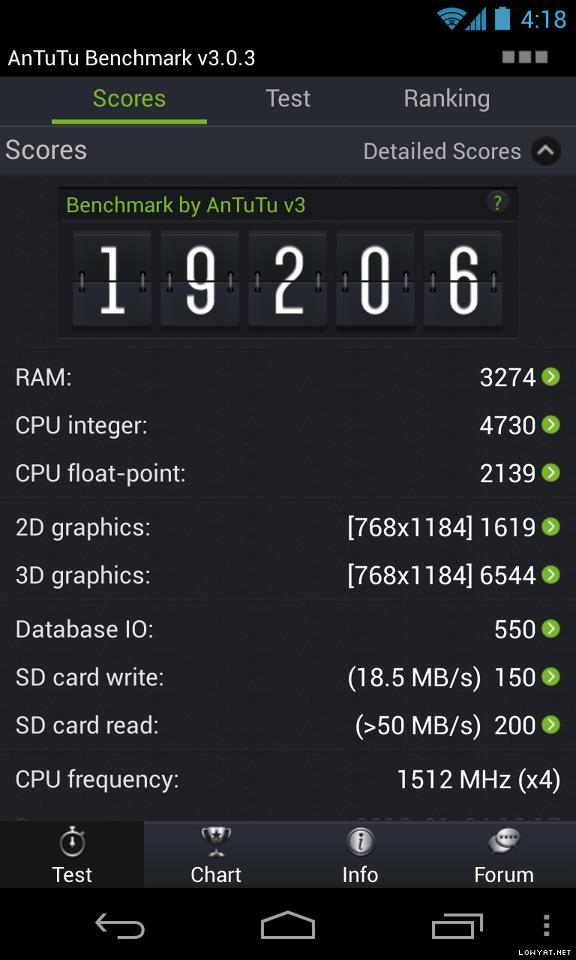

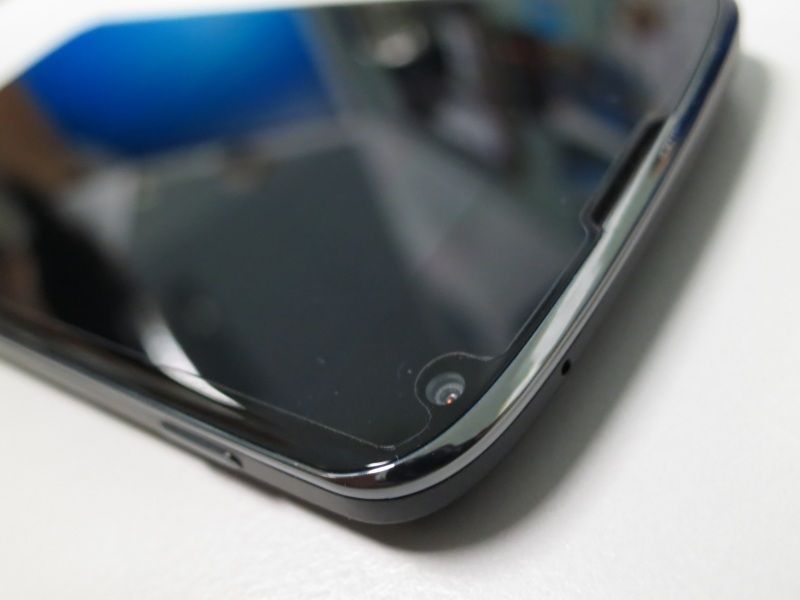
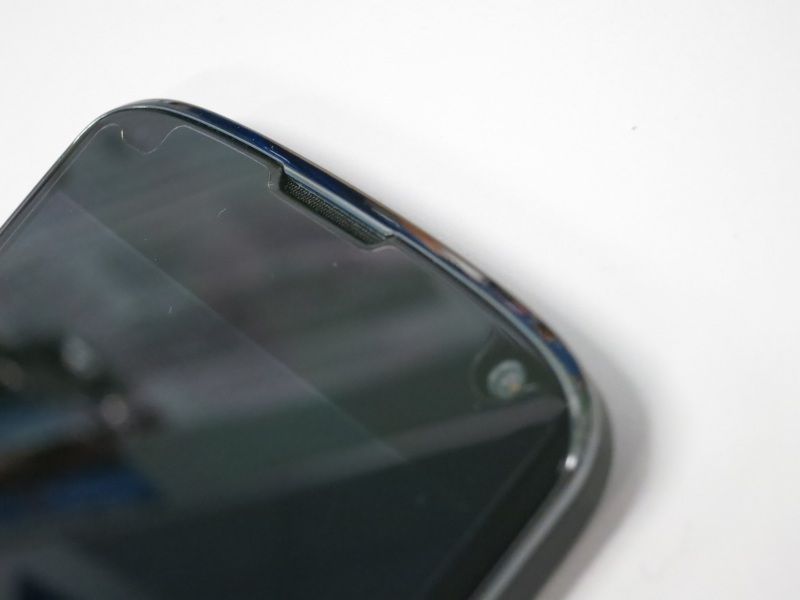












 Last night already have lah.


 Bad for health.
















 HTC One, the design is just so nice...
 Samsung is getting into the aluminium/metal bandwagon too. Let's see how they stand up against other manufacturers. Hoping that they'll ditch that ugly home button and softkeys soon. I think they patented that design. Seriously?
  awesomness!




















 0.2008sec
 0.59
0.59
 6 queries
 GZIP Disabled