Welcome Guest ( Log In | Register )

Bump Topic Topic Closed RSS Feed
125 Pages « < 99 100 101 102 103 > » Bottom

Outline · [ Standard ] · Linear+

 ** Google Nexus 4 Official Thread V10 **, 4.3 Jelly Bean rolled out!

views
     
super_evil_alien
post Jul 18 2013, 07:04 PM

Slumber Mode
*******
Senior Member
5,105 posts

Joined: Mar 2007
From: In front of my desktop/laptop/phone


QUOTE(azrash @ Jul 18 2013, 06:24 PM)
lol, i am one of those crazy people that chased that crazy trail, it was a rush man. when we first saw the g+ post, there were like only 3 posts, and there were too many people trying to help but not really helping as the steps are in wrong order, and gave some links to setup stuffs that were not necessary.and we had to go to IRC and mute everyone. getting that system image extracted was a sweet victory! thumbup.gif

will i flash it? no, not without the new bootloader and the new radio, which we'll probably extract tomorrow, if Jeff is free.

TBH, I won't upgrade to 4.3 until the code is pushed to AOSP master, and CM can merge them. Too comfortable with my current setup to go back to stock just to try 4.3 tongue.gif
Artem of Android Police is dissecting parts of it now, he might still be in IRC, but expect Ron of AP to dissect more and you'll probably see a detailed changelog tomorrow or the day after.

btw, if any of you guys want the system dump, it is already mirrored at AP, otherwise you can dowload via torrent here

it is legit, the files are md5sum the same as the one i got from the original dropbox, it was gravufo/albert that uplaoded the torrent.

have fun!  tongue.gif
*
I'm still wondering why the CWM failed to extract the system files.You guys tried contacting Koush?
Maybe I'll take a look at the IRC log to see what happened biggrin.gif
But I get why you guys had to mute some people. Usually majority of the users aren't very well versed with the technical details.They just want the rom files.Sometimes their "instruction" just derail the entire discussion.
I had my fair share of experience in MeeGo IRC.

Jeff on holiday tomorrow.He'll probably extract the bootloader & baseband files tomorrow.
Even with those files I'll probably wait till CM release CM 10.2 to upgrade my device.From what I'm seeing there isn't much functionality changes in 4.3.
super_evil_alien
post Jul 18 2013, 07:06 PM

Slumber Mode
*******
Senior Member
5,105 posts

Joined: Mar 2007
From: In front of my desktop/laptop/phone


Assuming 4.3 do announced next week then I think the code might be released the week after the announcement.
monocle
post Jul 18 2013, 07:36 PM

Look at all my stars!!
*******
Senior Member
2,645 posts

Joined: Jun 2012
QUOTE(acbc @ Jul 18 2013, 03:01 PM)
I'm on official 4.2.2 unrooted and every now and then, both WiFi or Bluetooth will die. Can't turn on. Have to do a hard reboot then only ok. What gives? Apart from that, it is a good phone. Sadly the camera sucks!
*
Custom rom will solve the bluetooth issue..
My bluetooth keeps DC, when i'm on stock ROM.
fishuu
post Jul 18 2013, 07:50 PM

Getting Started
**
Junior Member
295 posts

Joined: Feb 2013
From: Penang Island


QUOTE(Shengz @ Jul 18 2013, 05:29 PM)
Those N4 users are like Malaysian chasing minions now. Leaked 4.3 posts are everywhere in web. Well, I will wait for another week for official release.

Edit: Do review if anyone tried. Any micro stuttering or fixed? And mic gain fixed? Everyone can't hear me when they call me. Sucks.
*
Minionsssssssss!!!
Nahh N4 wayy better brows.gif
cowithgun
post Jul 18 2013, 08:04 PM

A cow that can play notebook & phone
*******
Senior Member
2,248 posts

Joined: Sep 2010
QUOTE(azrash @ Jul 18 2013, 03:36 PM)
The IRC went crazy man. Tried with TWRP first but it didn't work, then all sort of people went it they keep on talking about some general guides on how to get adb fastboot working etc. Then we had to mute all of the people.

Then we tried with cwm, no good, tried again to enable adb, no gooding, so one last try, TWRP, and bloody he'll it worked!

Dude mirrored link, checked the md5sum to see that it is legit, got torrent uploaded and bam. It is widespread now. Kekeke

Tomorrow will try to extract the bootloader radios and what not.

Even efrant from xda came in to help, and intersect raven, the kernel dev, who went mia for three months since he got a GF now tongue.gif

If you guys want the torrent, it is here. Damn it can't post from N4,later I open my laptop and share. So you guys can dig around if you want tongue.gif
*
seem havoc there... sound like u just wanna dump the system? what's wrong with "dd" ?

CODE

dd if=/dev/block/platform/msm_sdcc.1/by-name/system of=/sdcard/system.img

azrash
post Jul 18 2013, 08:14 PM

Regular
******
Senior Member
1,174 posts

Joined: Mar 2010


QUOTE(super_evil_alien @ Jul 18 2013, 07:04 PM)
I'm still wondering why the CWM failed to extract the system files.You guys tried contacting Koush?
Maybe I'll take a look at the IRC log to see what happened biggrin.gif
But I get why you guys had to mute some people. Usually majority of the users aren't very well versed with the technical details.They just want the rom files.Sometimes their "instruction" just derail the entire discussion.
I had my fair share of experience in MeeGo IRC.

Jeff on holiday tomorrow.He'll probably extract the bootloader & baseband files tomorrow.
Even with those files I'll probably wait till CM release CM 10.2 to upgrade my device.From what I'm seeing there isn't much functionality changes in 4.3.
*

yeah, if he shares the cwm log, we might get something.

Yeap same here. TBH, I am still unhappy that the security patches for the two exploits are not pushed over OTA, and they'll rather wait for it to be included in the next release. The update file would be very small.

CM is doing a great job TBH, once the patches were pushed to aosp, tested by the devs, it was straight away pushed to the cm sources and the stable release were updated even before the nightlies for the day were out. And they pushed it all the way to cm7 branch. When the next update comes, pretty sure cm won't be taking too long, they did only in two days when 4.2.2 came.

QUOTE(monocle @ Jul 18 2013, 07:36 PM)
Custom rom will solve the bluetooth issue..
My bluetooth keeps DC, when i'm on stock ROM.
*
Most likely would be fixed in the next release with newer bluetooth stack.
QUOTE(cowithgun @ Jul 18 2013, 08:04 PM)
seem havoc there... sound like u just wanna dump the system? what's wrong with "dd" ?

CODE

dd if=/dev/block/platform/msm_sdcc.1/by-name/system of=/sdcard/system.img

*
Adb was not accessible. Jeff was using a mac, but we did a trial run with another user with N4 and Mac, followed the same steps, and it worked fine for the other user. Not sure why.
annoymous1234
post Jul 18 2013, 11:51 PM

Look at all my stars!!
*******
Senior Member
7,617 posts

Joined: Mar 2009

Wow geek talk..lol
shinchan5347
post Jul 18 2013, 11:56 PM

Regular
******
Senior Member
1,675 posts

Joined: Dec 2008


after i rooted can i put custom kernel only instead of custom rom?
IwanAGP
post Jul 19 2013, 12:06 AM

Nothing is Possible!
*******
Senior Member
9,590 posts

Joined: Jan 2008
From: S'wak||KL||SG


QUOTE(shinchan5347 @ Jul 18 2013, 11:56 PM)
after i rooted can i put custom kernel only instead of custom rom?
*
Of course you can! Some MODs require deodexed ROM (stock is odexed) so you might not be able to get them to work.

With custom kernel only (without custom ROM), you have the exact experience you have now but you now gain control to Root, limit/under/over clock, undervoltage, tune colour etc.

With Custom ROM then you can do something like changing the tiles in quick settings, adding moreeeeeeee tiles(about... 25~30 max? Depends on ROM)

You can also do things like long press on navigation bar to launch an app or to mute volume adjust sound and shutter sound (shutter sound can be removed if you have root access without a custom ROM).

A hell lot more you can do with custom ROM biggrin.gif

Have fun, dive in!
shinchan5347
post Jul 19 2013, 12:27 AM

Regular
******
Senior Member
1,675 posts

Joined: Dec 2008


QUOTE(IwanAGP @ Jul 19 2013, 12:06 AM)
Of course you can! Some MODs require deodexed ROM (stock is odexed) so you might not be able to get them to work.

With custom kernel only (without custom ROM), you have the exact experience you have now but you now gain control to Root, limit/under/over clock, undervoltage, tune colour etc.

With Custom ROM then you can do something like changing the tiles in quick settings, adding moreeeeeeee tiles(about... 25~30 max? Depends on ROM)

You can also do things like long press on navigation bar to launch an app or to mute volume adjust sound and shutter sound (shutter sound can be removed if you have root access without a custom ROM).

A hell lot more you can do with custom ROM biggrin.gif

Have fun, dive in!
*
Can I download and install custom rom by using rom manager apps?
IwanAGP
post Jul 19 2013, 12:30 AM

Nothing is Possible!
*******
Senior Member
9,590 posts

Joined: Jan 2008
From: S'wak||KL||SG


QUOTE(shinchan5347 @ Jul 19 2013, 12:27 AM)
Can I download and install custom rom by using rom manager apps?
*
Never use that as I prefer to have the zip files inside the phone and flash manually (most ppl does). In case if I need to flash again, I know where the zips are. I'm not sure for ROM Manager. On a side note, Nexus 4 doesn't support USB-OTG, you can't have the files in your thumbdrive and flash from that. If you had to reflash or something, you have to use ADB. Nothing too hard anyway biggrin.gif
azrash
post Jul 19 2013, 02:19 AM

Regular
******
Senior Member
1,174 posts

Joined: Mar 2010


QUOTE(shinchan5347 @ Jul 19 2013, 12:27 AM)
Can I download and install custom rom by using rom manager apps?
*
People flash manually because sometimes, flashing the zips via app can be unreliable. With manually selecting them in recovery, you'll be in more control.
skip2malou
post Jul 19 2013, 09:05 AM

Getting Started
**
Junior Member
238 posts

Joined: May 2011


Saw someone looking for Music streaming like Google Play or Stopify. Try this app, KUWO player. Similar and best of all, got almost of all my Kpop and Jpop artist ! AND ITS FREEE ~

You can even install the player on your computer and have the player sync the playlist.

However it is in chinese. So you might need to be able to read Chinese to use it.

Here is the link to download ~
https://play.google.com/store/apps/details?id=cn.kuwo.player
super_evil_alien
post Jul 19 2013, 09:25 AM

Slumber Mode
*******
Senior Member
5,105 posts

Joined: Mar 2007
From: In front of my desktop/laptop/phone


QUOTE(azrash @ Jul 19 2013, 02:19 AM)
People flash manually because sometimes, flashing the zips via app can be unreliable. With manually selecting them in recovery, you'll be in more control.
*
+1. Sometimes when the flashing failed you still have to go to adb recovery mode.

Also regarding adb,(I've repeated this multiple time) always learn how to install adb manually.It's not hard to install the adb.All you need is the latest adb & Koush's universal adb driver.You can dump the system image from the sdk if you don't plan to use the emulator.
kiwlm
post Jul 19 2013, 09:27 AM

Enthusiast
*****
Senior Member
978 posts

Joined: Mar 2005
From: PJ


Thinking of getting Nexus 4 from Digi. For those that got their phones from Digi recently, did you get the new batch with the bump?
cowithgun
post Jul 19 2013, 09:38 AM

A cow that can play notebook & phone
*******
Senior Member
2,248 posts

Joined: Sep 2010
QUOTE(azrash @ Jul 18 2013, 08:14 PM)
Adb was not accessible. Jeff was using a mac, but we did a trial run with another user with N4 and Mac, followed the same steps, and it worked fine for the other user. Not sure why.
*
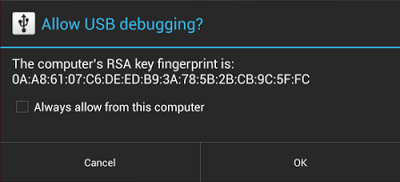
sound like secure USB feature that introduced since 4.2.2. you just need to "allow" that computer to use USB debugging first before boot into recovery and try to use adb.

http://www.androidpolice.com/2013/02/12/ne...ome-situations/

user posted image

ps: if u dont see the box even in normal boot, there is also possibility that that guy is using old "adb"

"For developers, the change to USB debugging should be largely transparent. If you've updated your SDK environment to include ADB version 1.0.31 (available with SDK Platform-tools r16.0.1 and higher), all you need to do is connect and authorize your device(s). If your development device appears in "offline" state, you may need to update ADB. To so so, download the latest Platform Tools release through the SDK Manager."

source: http://android-developers.blogspot.com/201...jelly-bean.html

This post has been edited by cowithgun: Jul 19 2013, 09:49 AM
nsg86
post Jul 19 2013, 10:32 AM

Nexus
******
Senior Member
1,146 posts

Joined: Dec 2007


QUOTE(super_evil_alien @ Jul 19 2013, 09:25 AM)
+1. Sometimes when the flashing failed you still have to go to adb recovery mode.

Also regarding adb,(I've repeated this multiple time) always learn how to install adb manually.It's not hard to install the adb.All you need is the latest adb & Koush's universal adb driver.You can dump the system image from the sdk if you don't plan to use the emulator.
*
I thought you can install both adb driver and adb both from android SDK? Well that's my way, do not need universal adb driver
cowithgun
post Jul 19 2013, 10:54 AM

A cow that can play notebook & phone
*******
Senior Member
2,248 posts

Joined: Sep 2010
QUOTE(nsg86 @ Jul 19 2013, 10:32 AM)
I thought you can install both adb driver and adb both from android SDK? Well that's my way, do not need universal adb driver
*
Problem with USB driver with google, you cannot use adb in recovery mode. To fix that, use the universal driver or in my case, which i don't trust code from others, you can do it yourself.

1. Boot your phone into recovery
2. Connect your phone to PC
3. Check in Device Manager for the unknown hardware.
4. Get the Hardware Ids of the unknown hardware
5. Open android_winusb.inf and edit it accordingly. (can download from SDK)
6. Install the "universal" driver.


Dreamezz
post Jul 19 2013, 12:48 PM

Getting Started
**
Junior Member
63 posts

Joined: Apr 2011


hey guys, anyone here came across not being able send or receive sms before??

i dont usually send text messages, and it didnt occur to me that i hadnt receive any sms lately, till today when i wanted to sms someone.

i'm on Umobile, data works just fine. i can make and receive calls just fine.

i've tried googling around, and some pointed out to the SMSC thingy in the phone info via *#*#4636#*#*, i've tried that to no avail.
even tried switching to a blackberry, just to save the sms settings(which had the SMSC settings there).

cant restore from back up too, since i'm a hero, malas to make backup when flashing stuff. tongue.gif

any suggestions? icon_question.gif
zaidi
post Jul 19 2013, 12:52 PM

Regular
******
Senior Member
1,738 posts

Joined: Jan 2003
QUOTE(Dreamezz @ Jul 19 2013, 12:48 PM)
hey guys, anyone here came across not being able send or receive sms before??

i dont usually send text messages, and it didnt occur to me that i hadnt receive any sms lately, till today when i wanted to sms someone.

i'm on Umobile, data works just fine. i can make and receive calls just fine.

i've tried googling around, and some pointed out to the SMSC thingy in the phone info via *#*#4636#*#*, i've tried that to no avail.
even tried switching to a blackberry, just to save the sms settings(which had the SMSC settings there).

cant restore from back up too, since i'm a hero, malas to make backup when flashing stuff. tongue.gif

any suggestions? icon_question.gif
*
wait a while. sometimes it's just the carrier issue

125 Pages « < 99 100 101 102 103 > » Top
Topic ClosedOptions
 

Change to:
| Lo-Fi Version
0.0337sec    1.05    6 queries    GZIP Disabled
Time is now: 18th December 2025 - 02:30 AM