Welcome Guest ( Log In | Register )

66 Pages « < 15 16 17 18 19 > » Bottom

Outline · [ Standard ] · Linear+

 Haswell, Devil's Canyon, Pentium G3258 OC V1, 4790K/4760K/4770K/4670K/G3258 | LGA1150

views
     
goldfries
post Jun 22 2013, 11:17 PM

40K Club
Group Icon
Forum Admin
44,415 posts

Joined: Jan 2003


QUOTE(cstkl1 @ Jun 22 2013, 10:48 PM)
tweaktown manage to get up to 1.2v should be based on their past reviews and running 4.5ghz
*
thanks. I don't use that many Asrock boards.

I've no problem with MSI / Asus boards. smile.gif Looks like I'll have to try again.

As you know, UEFI / Manuals are almost never helpful.
cstkl1
post Jun 22 2013, 11:31 PM

Look at all my stars!!
Group Icon
Elite
6,799 posts

Joined: Jan 2003

QUOTE(goldfries @ Jun 22 2013, 11:17 PM)
thanks. I don't use that many Asrock boards.

I've no problem with MSI / Asus boards. smile.gif Looks like I'll have to try again.

As you know, UEFI / Manuals are almost never helpful.
*
shld be same as kmar extreme 4.

so....

just dont do adaptive or offset mode for haswell.

AceCombat
post Jun 22 2013, 11:39 PM


Group Icon
Elite
5,434 posts

Joined: Dec 2006


[REPOST]

Instant overclocked by: AceCombat, ktek, owikh84 & kelvinchen
Just a fast overclocking, took us about 2 hours to get this done.
The objective is to build a best C/P rig only.

Intel Core i7 4770k @ 5.0GHz
4 cores 8 threads (1.472 vcore in BIOS)
Gigabyte Z87-D3HP
Corsair Dominator 2x2GB 1600MHz @ 2600MHz
Sapphire HD4850
Gigabyte PowerRock 500W
Corsair H100 with 4 fans

SuperPI 32m stabled. Running more tests real soon.
Full size images.

http://imageshack.us/a/img802/118/h0nk.jpg
» Click to show Spoiler - click again to hide... «


http://imageshack.us/a/img823/4071/s7j2.jpg
» Click to show Spoiler - click again to hide... «

ktek
post Jun 22 2013, 11:42 PM

小喇叭
********
All Stars
13,189 posts

Joined: Jul 2006
QUOTE(AceCombat @ Jun 22 2013, 11:39 PM)
[REPOST]
*

remember cpuz validation icon_rolleyes.gif
kmarc
post Jun 22 2013, 11:49 PM

The future is here - Cryptocurrencies!
Group Icon
Elite
14,576 posts

Joined: May 2006
From: Sarawak


QUOTE(goldfries @ Jun 22 2013, 10:02 PM)
on a more depressing note, I can't even get my vcore to go above 1.000v with this Asrock Z87E-ITX.

Spent some 30 minutes or more with the interface with no luck bumping vcore. Probably one of the worst UEFI / BIOS i ever use. sad.gif
*
QUOTE(goldfries @ Jun 22 2013, 11:17 PM)
thanks. I don't use that many Asrock boards.

I've no problem with MSI / Asus boards. smile.gif Looks like I'll have to try again.

As you know, UEFI / Manuals are almost never helpful.
*
I have no problems with my Asrock Z87 extreme4. Just set the CPU voltage to 1.2v and booted up with CPUz showing 1.192v. You're using the newest CPUz right?

The older CPUz actually showed 0.888v on load and 0.800v at idle..... rclxub.gif

This post has been edited by kmarc: Jun 22 2013, 11:50 PM
AceCombat
post Jun 22 2013, 11:50 PM


Group Icon
Elite
5,434 posts

Joined: Dec 2006


QUOTE(ktek @ Jun 22 2013, 11:42 PM)
remember cpuz validation icon_rolleyes.gif
*
Is it with you? Anyway, i got it in my phone.
swisspac
post Jun 23 2013, 12:03 AM

Getting Started
**
Junior Member
69 posts

Joined: Jun 2013
From: Megamall Prai,Penang Bukit Jambul / Ict Komtar
QUOTE(AceCombat @ Jun 22 2013, 11:50 PM)
Is it with you? Anyway, i got it in my phone.
*

ur email got ma, just paste the validation link here
goldfries
post Jun 23 2013, 12:04 AM

40K Club
Group Icon
Forum Admin
44,415 posts

Joined: Jan 2003


QUOTE(kmarc @ Jun 22 2013, 11:49 PM)
I have no problems with my Asrock Z87 extreme4. Just set the CPU voltage to 1.2v and booted up with CPUz showing 1.192v. You're using the newest CPUz right?

The older CPUz actually showed 0.888v on load and 0.800v at idle.....  rclxub.gif
using latest. shows me the numbers you mentioned. sometimes 0.894.

i felt it really weird cos the option is there. I set the voltage no matter how it just doesn't go above 1.0
goldfries
post Jun 23 2013, 12:05 AM

40K Club
Group Icon
Forum Admin
44,415 posts

Joined: Jan 2003


QUOTE(cstkl1 @ Jun 22 2013, 11:31 PM)
shld be same as kmar extreme 4.

so....

just dont do adaptive or offset mode for haswell.
all tried. all fail.

my style of OC is i don't use off-set / adaptive whatever. I prefer just set the vcore. Unfortunately this OCing experience took up 2 - 3 hours of my time. tongue.gif

k. now I'm going to update firmware, just in case it's firmware issue.

kmarc
post Jun 23 2013, 12:11 AM

The future is here - Cryptocurrencies!
Group Icon
Elite
14,576 posts

Joined: May 2006
From: Sarawak


QUOTE(goldfries @ Jun 23 2013, 12:04 AM)
using latest. shows me the numbers you mentioned. sometimes 0.894.

i felt it really weird cos the option is there. I set the voltage no matter how it just doesn't go above 1.0
*
Latest version as in 1.64.3?

If I remember correctly, I downloaded the newest from CPUz's website but it is actually not the newest, showing the weird voltages.... It was only when I downloaded the link in the first page of this thread where it showed correct voltages....

Try the link in the first page wink.gif
goldfries
post Jun 23 2013, 12:27 AM

40K Club
Group Icon
Forum Admin
44,415 posts

Joined: Jan 2003


ok will check.

my side confusing already.

Asrock UEFI 1.776 vcore = CPU-Z ~0.88 vcore
Asrock UEFI 1.2xx vcore = CPU-Z ~0.64 vcore
goldfries
post Jun 23 2013, 12:38 AM

40K Club
Group Icon
Forum Admin
44,415 posts

Joined: Jan 2003


cheeehhh vomit blood. so many hours fiddling all because of CPU-Z.

That also I downloaded from the site and installed some more.

In the end had to Google out the 1.64.3 to get it to show the correct vcore. smile.gif

doing 4.2 nicely now.
TSowikh84
post Jun 23 2013, 12:39 AM

i7 Clan
Group Icon
Elite
8,711 posts

Joined: Nov 2007
From: Butterworth, PG / Machang, Kelantan


QUOTE(AceCombat @ Jun 22 2013, 11:39 PM)
[REPOST]

Instant overclocked by: AceCombat, ktek, owikh84 & kelvinchen
Just a fast overclocking, took us about 2 hours to get this done.
The objective is to build a best C/P rig only.

Intel Core i7 4770k @ 5.0GHz
4 cores 8 threads (1.472 vcore in BIOS)
Gigabyte Z87-D3HP
Corsair Dominator 2x2GB 1600MHz @ 2600MHz
Sapphire HD4850
Gigabyte PowerRock 500W
Corsair H100 with 4 fans

SuperPI 32m stabled. Running more tests real soon.
Full size images.
*
Nice chip spotted. Later sure kelvinchen will hunt for a good Hynix RAM to strike for 3000+ IMC. drool.gif
Looks like you guys had fun with overclocking there. Too bad couldn't join (I chose my GF) =.=/
Welcome back to OC world, AceMeimei wub.gif notworthy.gif

Your OC needs some tuning to make it more efficient.

4770K @ 4.9GHz and RAM @ 2600 10-12-12-27-2T:

user posted image

4770K @ 5.0GHz and RAM @ 1866+ should yield 6m 20s.

This post has been edited by owikh84: Jun 23 2013, 12:43 PM
kelvinchen
post Jun 23 2013, 12:51 AM

New Member
*
Junior Member
48 posts

Joined: Jul 2010
QUOTE(owikh84 @ Jun 23 2013, 12:39 AM)
Nice chip spotted. Later sure kelvinchen will hunt for a good Hynix RAM to strike for 3000+ IMC.  drool.gif
Looks like you guys had fun with overclocking there. Too bad couldn't join (I chose my GF) =.=/
Welcome back to OC world, AceMeimei  wub.gif  notworthy.gif
*

nod.gif bro owikh84,come to join next time oc project...need your Hynix brows.gif ......
goldfries
post Jun 23 2013, 01:25 AM

40K Club
Group Icon
Forum Admin
44,415 posts

Joined: Jan 2003


Attached Image

smile.gif OK finally got it OCed.

Tested stability with video encoding.

4.4ghz failed no matter how I tried, even with 1.35vcore.
4.3ghz 1.25 vcore = passed.
4.3ghz 1.225 vcore = passed.
4.3ghz 1.20 vcore = failed.

Using the Cooler Master Seidon 120M, AIO WC unit. Testing the product ........ not exactly an impressive AIO setup. I feel that my air coolers can do similar / better. Can't do comparison now cos this ITX board is really small.

Will be getting ATX LGA 1150 board(s) next week so another round of OCing would ensue.

Why video test instead of prime95? I can't get the CPU to run straight at 4.3ghz. Disabling Speedstep / TurboBoost results in default speed only. sad.gif

Prime95 on the above setting doesn't push it to 4.3ghz, just hovers at 3.8ghz. The video test pushes it to 4.3ghz though.

Now I go do further test. See if Prime95 can push it to 4.3ghz for further test.

*ok I just ran Prime95 Small FFT test (didn't run the suggest test in 1st post cos that one doesn't push it to 4.3ghz) and the AIO WC couldn't take it. tongue.gif
cstkl1
post Jun 23 2013, 02:00 AM

Look at all my stars!!
Group Icon
Elite
6,799 posts

Joined: Jan 2003

QUOTE(stasio @ Jun 22 2013, 07:15 PM)
Die (made of silicon) is to sensitive to do soldering and the top layer of the DIE is not conductive.
Edit:
Hmm,seems upcoming 4960X coming with soldering IHS:

http://translate.google.com/translate?hl=e...%25E5%258B%2592

user posted image

user posted image

and other thing is why no Haswell from Costa Rica.  hmm.gif
*
interesting. More interesting when Haswell-E comes out i am jumping on it.

Haswell main market is notebook n ultrabooks. They all going to get a performance upgrade with longer battery life n better graphics with iris pro,
QUOTE(goldfries @ Jun 23 2013, 01:25 AM)
Attached Image

smile.gif OK finally got it OCed.

Tested stability with video encoding.

4.4ghz failed no matter how I tried, even with 1.35vcore.
4.3ghz 1.25 vcore = passed.
4.3ghz 1.225 vcore = passed.
4.3ghz 1.20 vcore = failed.

Using the Cooler Master Seidon 120M, AIO WC unit. Testing the product ........ not exactly an impressive AIO setup. I feel that my air coolers can do similar / better. Can't do comparison now cos this ITX board is really small.

Will be getting ATX LGA 1150 board(s) next week so another round of OCing would ensue.

Why video test instead of prime95? I can't get the CPU to run straight at 4.3ghz. Disabling Speedstep / TurboBoost results in default speed only. sad.gif

Prime95 on the above setting doesn't push it to 4.3ghz, just hovers at 3.8ghz. The video test pushes it to 4.3ghz though.

Now I go do further test. See if Prime95 can push it to 4.3ghz for further test.

*ok I just ran Prime95 Small FFT test (didn't run the suggest test in 1st post cos that one doesn't push it to 4.3ghz) and the AIO WC couldn't take it. tongue.gif
*
seems to be more or less what kmarc was describing.

This post has been edited by cstkl1: Jun 23 2013, 02:08 AM
cstkl1
post Jun 23 2013, 02:03 AM

Look at all my stars!!
Group Icon
Elite
6,799 posts

Joined: Jan 2003

Btw i expect some cheating on cpu related benchmarks. Haswell u can change multi n voltages during stress runs. As long the new settings are correct, no issue.

This post has been edited by cstkl1: Jun 23 2013, 02:04 AM
kmarc
post Jun 23 2013, 06:40 AM

The future is here - Cryptocurrencies!
Group Icon
Elite
14,576 posts

Joined: May 2006
From: Sarawak


QUOTE(goldfries @ Jun 23 2013, 01:25 AM)
Attached Image

smile.gif OK finally got it OCed.

Tested stability with video encoding.

4.4ghz failed no matter how I tried, even with 1.35vcore.
4.3ghz 1.25 vcore = passed.
4.3ghz 1.225 vcore = passed.
4.3ghz 1.20 vcore = failed.

Using the Cooler Master Seidon 120M, AIO WC unit. Testing the product ........ not exactly an impressive AIO setup. I feel that my air coolers can do similar / better. Can't do comparison now cos this ITX board is really small.

Will be getting ATX LGA 1150 board(s) next week so another round of OCing would ensue.

Why video test instead of prime95? I can't get the CPU to run straight at 4.3ghz. Disabling Speedstep / TurboBoost results in default speed only. sad.gif

Prime95 on the above setting doesn't push it to 4.3ghz, just hovers at 3.8ghz. The video test pushes it to 4.3ghz though.

Now I go do further test. See if Prime95 can push it to 4.3ghz for further test.

*ok I just ran Prime95 Small FFT test (didn't run the suggest test in 1st post cos that one doesn't push it to 4.3ghz) and the AIO WC couldn't take it. tongue.gif
*
Newest version of prime95 (build 27.9) would be able to stress your CPU adequately as it uses AVX FFTs. However, I found out the hard way that for windows 7, you need SP1 to enable AVX.

You should try linx 0.6.4 (10.3.7) but ensure your rig can run AVX. My temperature almost hit the roof with AVX.
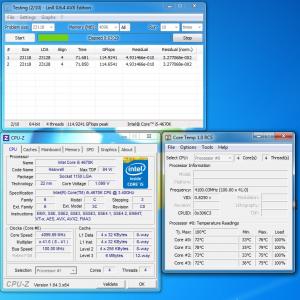
Attached Image

Vcore of 1.100v @ 4.1Ghz already hitting 75-79'c (about 10 mins). If I increase vcore to 1.2v, temps will hit 81-86'c in an instant. sweat.gif

The most I can do with the temperature in my comfort zone is vcore 1.153v @ 4.2Ghz

What's your temp at 1.20- 1.25v? hmm.gif

This post has been edited by kmarc: Jun 23 2013, 06:40 AM

TSowikh84
post Jun 23 2013, 10:18 AM

i7 Clan
Group Icon
Elite
8,711 posts

Joined: Nov 2007
From: Butterworth, PG / Machang, Kelantan


QUOTE(stasio @ Jun 22 2013, 07:15 PM)
and other thing is why no Haswell from Costa Rica.  hmm.gif
*
Dunno how true but this OCN guy said that he got a 4670K Costa Rica batch from NCIX.
Link

Hopefully it will hit our stores soon. Our hope for better chip. biggrin.gif
mudkipryan94
post Jun 23 2013, 11:08 AM

someone need a sarcasm meter?
********
All Stars
12,000 posts

Joined: Feb 2010
From: Banting, Puchong, KL


QUOTE(AceCombat @ Jun 22 2013, 11:39 PM)
[REPOST]

Instant overclocked by: AceCombat, ktek, owikh84 & kelvinchen
Just a fast overclocking, took us about 2 hours to get this done.
The objective is to build a best C/P rig only.

Intel Core i7 4770k @ 5.0GHz
4 cores 8 threads (1.472 vcore in BIOS)
Gigabyte Z87-D3HP
Corsair Dominator 2x2GB 1600MHz @ 2600MHz
Sapphire HD4850
Gigabyte PowerRock 500W
Corsair H100 with 4 fans

SuperPI 32m stabled. Running more tests real soon.
Full size images.

http://imageshack.us/a/img802/118/h0nk.jpg
» Click to show Spoiler - click again to hide... «


http://imageshack.us/a/img823/4071/s7j2.jpg
» Click to show Spoiler - click again to hide... «

*
WOW... naked... tongue.gif

Ace.... how much u building w this rigs smile.gif

66 Pages « < 15 16 17 18 19 > » Top
 

Change to:
| Lo-Fi Version
0.0276sec    1.32    6 queries    GZIP Disabled
Time is now: 1st December 2025 - 06:45 PM