

maxis no LTE?but my iphone show me LTE oh
LTE for iPhone 5 , 1800MHz band is supported in Malaysia!
LTE for iPhone 5 , 1800MHz band is supported in Malaysia!
|
|
 Apr 11 2013, 08:23 AM Apr 11 2013, 08:23 AM
|
 
Senior Member
1,551 posts Joined: Nov 2008  
|
maxis no LTE?but my iphone show me LTE oh
|
|
|
|
|
|
Apr 11 2013, 08:34 AM
|

Junior Member
396 posts Joined: Jun 2011
|
Satisfy with the LTE on my iphone 5... Just that Shah Alam dun have LTE coverage yet..
Can only use LTE once i reached my working place.. Bandar Utama.. Huhu.. |
|
|
Apr 11 2013, 08:36 AM
|
|
Senior Member
1,551 posts Joined: Nov 2008
|
QUOTE(hovercraft97 @ Apr 11 2013, 08:34 AM) Satisfy with the LTE on my iphone 5... Just that Shah Alam dun have LTE coverage yet.. yes, LTE is very fastCan only use LTE once i reached my working place.. Bandar Utama.. Huhu..  |
|
|
Apr 11 2013, 08:46 AM
|

All Stars
10,261 posts Joined: Jan 2003
|
I managed to get LTE on 6.1.2.

|
|
|
Apr 11 2013, 08:49 AM
|
|
Junior Member
396 posts Joined: Jun 2011
|
QUOTE(deric79k @ Apr 11 2013, 08:36 AM) yes, LTE is very fast True indeed... I noticed it also improves the bateri consumption as well.. Using 3G, bateri very fast drain out.. But not with LTE..So all the rumors that MY iphone cannot support LTE due different band not correct... Huhu.. |
|
|
Apr 11 2013, 08:51 AM
|

Junior Member
417 posts Joined: Feb 2010
|
Reset the network settings, woala lte appears!
PS: running on ios6.1 This post has been edited by ericng19: Apr 11 2013, 08:51 AM |
|
|
|
|
|
Apr 11 2013, 09:19 AM
|

Senior Member
7,924 posts Joined: Jul 2009
|
QUOTE(calvin_gsc @ Apr 11 2013, 08:46 AM) I managed to get LTE on 6.1.2. just by updating Carrier Settings?
|
|
|
Apr 11 2013, 09:36 AM
|

Junior Member
448 posts Joined: Nov 2010
|
Celcom has been given green light from MCMC to use 1800Mhz spectrum. So we'll see another telco will provide iPhone 5 LTE in the market soon..
   This post has been edited by adiyon84: Apr 11 2013, 09:36 AM |
|
|
Apr 11 2013, 10:38 AM
|
|
Senior Member
1,096 posts Joined: Jan 2003 From: Jamm'd Up Old Klang Road 
|
Damn it, 6.1 really cannot get LTE meh.... :/
|
|
|
Apr 11 2013, 10:40 AM
|

Senior Member
1,654 posts Joined: Nov 2011
|
QUOTE(jiro1986 @ Apr 10 2013, 11:48 PM) same problem... and still cant be solved what's your plan? 1gb and above? how about your sim? surf the maxis website for the requirements, as it also mentioned before on this thread. |
|
|
Apr 11 2013, 11:12 AM
|

Senior Member
2,003 posts Joined: Sep 2008 From: Lowyat.NET
|
QUOTE(geek8585 @ Apr 9 2013, 02:54 PM) wow, jinglebelle... are u working there? u sure got LTE? for iphone 5? My gf working there and sent me the LTE screenshot to poison me (ulu guy) from kampung muar.. |
|
|
Apr 11 2013, 11:14 AM
|

Senior Member
959 posts Joined: Jun 2006 From: Uaaaaaaa Status: Machine Coding 
|
for those who still in in ios 6.0.2 or below 6.1.2. this is my method of updating the carrier list. tis method is only to make sure that itunes detect your iphone is 6.1.3 and after that itunes will automatic check the carrier setting. the method are:
1) use ifunbox and connect your iphone and go to. Raw system file>Device>system>coreservices>systemversion.plist. 2)copy the systemversion.plist to your pc and open the file. and you should see the "<string>6.0.2</string>" in the plist. after that change into 6.1.2 or 6.1.3 and after that safe the file. 3) copy back into your iphone in the Raw system file>Device>system>coreservices> and replace with the original systemversion.plist. 4)reboot your phone. 5) after that you go into system>general>about. check the system it is either 6.1.3 or not. 6) connect your iphone into itunes and itunes will detect and ask you to update the carrier setting. 7) update the carrier setting. 8) you should see the carrier setting is 14.1 in the general. 9) do the same method to change back the systemverion.plist to change into original 6.0.2. and reboot the phone. your phone will detect the LTE. p/s: some user may encounter automatic update when they check the phone is step 5. goog luck. Added: 
Using ifunbox to take the file out from iphone. 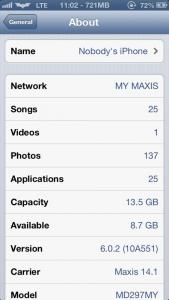
ios 6.0.2 with LTE. this method works on jailbroken iphone. as for none jailbroken iphone. you can always on latest firmware and should be no problem in updating the iphone carrier setting. This post has been edited by TakanoKyohei: Apr 11 2013, 11:26 AM |
|
|
Apr 11 2013, 11:19 AM
|

All Stars
21,313 posts Joined: Jan 2003 From: Kuala Lumpur
|
QUOTE(TakanoKyohei @ Apr 11 2013, 11:14 AM) for those who still in in ios 6.0.2 or below 6.1.2. this is my method of updating the carrier list. tis method is only to make sure that itunes detect your iphone is 6.1.3 and after that itunes will automatic check the carrier setting. the method are: Nice tip.... You should have posted earlier.... else wouldn't update to 6.1.3 hehehe1) use ifunbox and connect your iphone and go to. Raw system file>Device>system>coreservices>systemversion.plist. 2)copy the systemversion.plist to your pc and open the file. and you should see the "<string>6.0.2</string>" in the plist. after that change into 6.1.2 or 6.1.3 and after that safe the file. 3) copy back into your iphone in the Raw system file>Device>system>coreservices> and replace with the original systemversion.plist. 4)reboot your phone. 5) after that you go into system>general>about. check the system it is either 6.1.3 or not. 6) connect your iphone into itunes and itunes will detect and ask you to update the carrier setting. 7) update the carrier setting. 8) you should see the carrier setting is 14.1 in the general. 9) do the same method to change back the systemverion.plist to change into original 6.0.2. and reboot the phone. your phone will detect the LTE. p/s: some user may encounter automatic update when they check the phone is step 5. goog luck. |
|
|
|
|
|
Apr 11 2013, 11:22 AM
|
|
Senior Member
959 posts Joined: Jun 2006 From: Uaaaaaaa Status: Machine Coding
|
haha. sorry. i busy this week outstation. anyway i will update with picture for more info.
p/s: hope TS wil copy this and put in the first page so that others will check and use this method. cheers! |
|
|
Apr 11 2013, 11:45 AM
|
|
Junior Member
417 posts Joined: Feb 2010
|
QUOTE(kltower4 @ Apr 11 2013, 10:38 AM) Damn it, 6.1 really cannot get LTE meh.... :/ Can la! I'm on ios 6.1, just reset your network settingsAttached thumbnail(s) 
|
|
|
Apr 11 2013, 11:57 AM
|

Senior Member
1,804 posts Joined: Jun 2009
|
Tmn danau desa. Jln kelang lama. Got
One spot manage to get lte signal. Lol Attached thumbnail(s) 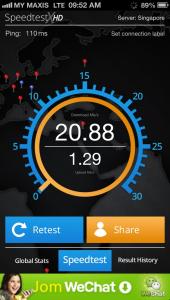
|
|
|
Apr 11 2013, 12:03 PM
|

Senior Member
923 posts Joined: Nov 2011
|
QUOTE(dannygeni @ Apr 11 2013, 11:57 AM) Tmn danau desa. Jln kelang lama. Got u mean not the entire old klang road got LTE? which spot u got the LTE?One spot manage to get lte signal. Lol is that iphone 5 ?  |
|
|
Apr 11 2013, 12:10 PM
|
|
All Stars
10,261 posts Joined: Jan 2003
|
QUOTE(BRY7 @ Apr 11 2013, 09:19 AM) just by updating Carrier Settings? That's right. |
|
|
Apr 11 2013, 12:27 PM
|

Senior Member
2,366 posts Joined: Sep 2008 From: Selangor
|
QUOTE(TakanoKyohei @ Apr 11 2013, 11:14 AM) for those who still in in ios 6.0.2 or below 6.1.2. this is my method of updating the carrier list. tis method is only to make sure that itunes detect your iphone is 6.1.3 and after that itunes will automatic check the carrier setting. the method are: If JB, just use iFile to change to 6.1.x (in text viewer). 1) use ifunbox and connect your iphone and go to. Raw system file>Device>system>coreservices>systemversion.plist. 2)copy the systemversion.plist to your pc and open the file. and you should see the "<string>6.0.2</string>" in the plist. after that change into 6.1.2 or 6.1.3 and after that safe the file. 3) copy back into your iphone in the Raw system file>Device>system>coreservices> and replace with the original systemversion.plist. 4)reboot your phone. 5) after that you go into system>general>about. check the system it is either 6.1.3 or not. 6) connect your iphone into itunes and itunes will detect and ask you to update the carrier setting. 7) update the carrier setting. 8) you should see the carrier setting is 14.1 in the general. 9) do the same method to change back the systemverion.plist to change into original 6.0.2. and reboot the phone. your phone will detect the LTE. p/s: some user may encounter automatic update when they check the phone is step 5. goog luck. Added:
Using ifunbox to take the file out from iphone.
ios 6.0.2 with LTE. this method works on jailbroken iphone. as for none jailbroken iphone. you can always on latest firmware and should be no problem in updating the iphone carrier setting. /System/Library/CoreServices Thanks for the heads up anyway..  |
|
|
Apr 11 2013, 12:35 PM
|

Junior Member
661 posts Joined: Jul 2005 From: Kelana Jaya
|
QUOTE(dino89 @ Apr 10 2013, 05:47 PM) Means ur ios is 6.1.0 and can get lte? Yup! |
| Change to: |  0.0769sec 0.0769sec
 0.69 0.69
 6 queries 6 queries
 GZIP Disabled GZIP Disabled
Time is now: 13th December 2025 - 05:18 PM |
 Quote
Quote