
Welcome Guest ( Log In | Register )

Outline · [ Standard ] · Linear+

 LTE for iPhone 5 , 1800MHz band is supported in Malaysia!

views
     
TakanoKyohei
post Apr 11 2013, 11:14 AM

101101010110100101011
*****
Senior Member
959 posts

Joined: Jun 2006
From: Uaaaaaaa Status: Machine Coding


for those who still in in ios 6.0.2 or below 6.1.2. this is my method of updating the carrier list. tis method is only to make sure that itunes detect your iphone is 6.1.3 and after that itunes will automatic check the carrier setting. the method are:

1) use ifunbox and connect your iphone and go to.
Raw system file>Device>system>coreservices>systemversion.plist.
2)copy the systemversion.plist to your pc and open the file. and you should see the "<string>6.0.2</string>" in the plist. after that change into 6.1.2 or 6.1.3 and after that safe the file.
3) copy back into your iphone in the
Raw system file>Device>system>coreservices> and replace with the original systemversion.plist.
4)reboot your phone.
5) after that you go into system>general>about. check the system it is either 6.1.3 or not.
6) connect your iphone into itunes and itunes will detect and ask you to update the carrier setting.
7) update the carrier setting.
8) you should see the carrier setting is 14.1 in the general.
9) do the same method to change back the systemverion.plist to change into original 6.0.2. and reboot the phone.

your phone will detect the LTE.

p/s: some user may encounter automatic update when they check the phone is step 5.

goog luck.


Added:

Attached Image

Using ifunbox to take the file out from iphone.
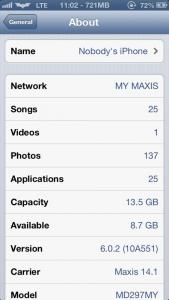
Attached Image


ios 6.0.2 with LTE.


this method works on jailbroken iphone. as for none jailbroken iphone. you can always on latest firmware and should be no problem in updating the iphone carrier setting. icon_idea.gif

This post has been edited by TakanoKyohei: Apr 11 2013, 11:26 AM
TakanoKyohei
post Apr 11 2013, 11:22 AM

101101010110100101011
*****
Senior Member
959 posts

Joined: Jun 2006
From: Uaaaaaaa Status: Machine Coding


haha. sorry. i busy this week outstation. anyway i will update with picture for more info.

p/s: hope TS wil copy this and put in the first page so that others will check and use this method.

cheers!
TakanoKyohei
post Apr 11 2013, 05:29 PM

101101010110100101011
*****
Senior Member
959 posts

Joined: Jun 2006
From: Uaaaaaaa Status: Machine Coding


QUOTE(Charlton @ Apr 11 2013, 03:07 PM)
Can this work for 6.0.1?
*
yes it should be no problem i believe. the reason we edit the ios version is to make sure that itunes detects the ios version and do the proper update for the carrier setting. thats why ios 6.1.2 or 6.1 cannot update thiers carrier when open setting>general>about and nothing were pops up.

try using ifile and edit instead of using my method because its easier to edit and after that, update using itunes.

update us the result then. smile.gif
TakanoKyohei
post Apr 13 2013, 12:16 AM

101101010110100101011
*****
Senior Member
959 posts

Joined: Jun 2006
From: Uaaaaaaa Status: Machine Coding


QUOTE(Charlton @ Apr 12 2013, 11:31 PM)
Thanks for your method, I got my iphone 5 upgraded to maxis 14.1 smile.gif

The description of yours are good, just that the plist file is at a different path. But still able to search using ifunbox. smile.gif
*
alright. its works for different ios too. glad can help. smile.gif

cheers~

taka.


Change to:
| Lo-Fi Version
0.0333sec    0.25    7 queries    GZIP Disabled
Time is now: 8th December 2025 - 03:38 AM