Welcome Guest ( Log In | Register )

Bump Topic Topic Closed RSS Feed
127 Pages « < 46 47 48 49 50 > » Bottom

Outline · [ Standard ] · Linear+

 Tp LInk TL-MR3420 Owner CLub V2.5, need a pro here

views
     
JEHUTHI
post May 14 2013, 04:49 PM

New Member
*
Junior Member
29 posts

Joined: May 2007
From: KK, Sabah


QUOTE(Wahroonga Farm @ May 14 2013, 03:58 PM)
I wonder if the speed increases when you connect the modem to the router via a good quality USB extension cable, rather than plug the modem directly into the router?

If you have one with a ferrite bead, all the better.

Some modems appear to create RF noise, that affect the modem performance.

These are the collective recommendations from the ROOter teams field testing:
*
Thanks for the reply.

No, the speed increase when I connect the modem to my computer via USB extension cable.

Another strange thing is, while the 3G modem plug directly to the router, I use the wifi to download a program from my notebook, the speed is also faster. Not sure why using the LAN cable will cause the decrease in speed ......
maya9090
post May 14 2013, 06:53 PM

Getting Started
**
Junior Member
94 posts

Joined: Jan 2009
can mr3420 support captive portal? I need to create a splash screen for advertisement/guide purposes. If yes, how do I go about it? Tried googling but seemed so technical...

This post has been edited by maya9090: May 14 2013, 06:54 PM
digilife
post May 14 2013, 07:46 PM

The MNP guy, its me yeah.
*******
Senior Member
8,025 posts

Joined: Feb 2005
From: Planet Boleland


QUOTE(Wahroonga Farm @ May 14 2013, 03:58 PM)
I wonder if the speed increases when you connect the modem to the router via a good quality USB extension cable, rather than plug the modem directly into the router?

If you have one with a ferrite bead, all the better.

Some modems appear to create RF noise, that affect the modem performance.

These are the collective recommendations from the ROOter teams field testing:
*
QUOTE
A number of testers have experienced problems (disconnection etc) with 4G modems (320U, E3276, MF821, E392 etc) in low signal strength areas or other situations. The most likely reason is insufficient USB router power when the modem is operating at the fast ROOter speeds. Fast USB modems can draw in excess of 750mA @ 5 volt. These USB modems may require a Y – cable, to provide additional USB power. You can also use a powered hub or a higher power ROOter AC plug pack if you have one available. There is also evidence that a USB cable with ferrite bead may also assist in a suspect interference issue. Turning off wifi and using a LAN only connection is often sufficient to achieve stable modem operation. This is due to a reduction in ROOter power consumption leaving more power for the USB modem.

    If you set a modem to a particular Mode e.g. 2G, 3G, 4G, Auto; the mode is set in the modem and is permanent until changed ie you can shift the modem between devices and the mode configuration remains. This is also true for the modems connection manager software. The permanent setting of Mode can trip you up at times; so beware!

    The MR3040 travel router appears to have limited battery power when used with the newer power hungry USB modems. This is widely reported on the web. It will probably require a permanent AC power connection to work successfully.

    The 703N (and it's stable mates) will likely benefit from a larger AC power pack when used with power hungry USB modems. The standard power pack specification is 5V @ 1A or 5 watts. The 703n internal current regulator limits @ 1.25A, or a total ROOter power availability of 6.25 watts. A 5v @ 1.5A (or 2A) AC power pack, will provide more power for the modem; before internal current limiting kicks in.


And this explains why a 1043ND (1.5A power adaptor) performed better han a Mr3420 (1.0A power adaptor ) this morning. Shall i try a 1.5A power adaptor with my MR3420 brows.gif

Btw, now on HM 2013-05-12b

Attached Image

user posted image

My speed is consider good because i am in a non DC-HSPA+ area now, moreover at this hour.......

notworthy.gif notworthy.gif

This post has been edited by digilife: May 14 2013, 07:49 PM

digilife
post May 14 2013, 09:16 PM

The MNP guy, its me yeah.
*******
Senior Member
8,025 posts

Joined: Feb 2005
From: Planet Boleland


Such good latency despite this peak hour period on HM 2013-05-12b

user posted image

user posted image

its only HSPA+ in my area now

smile.gif

This post has been edited by digilife: May 14 2013, 09:18 PM
Wahroonga Farm
post May 15 2013, 10:48 AM

Getting Started
**
Junior Member
97 posts

Joined: Feb 2013


Top Tip

For my money the single best thing you can do to improve performance and reliability of a Router + USB Modem set-up, is to use a quality USB extension cable between the router and modem, preferably one with a ferrite bead in line.

I know that Dovado and Netgear (and I'm sure others ... but certainly not TP-Link) provide a USB extension cable and stand, to enable locating the modem away from the router.

Intriguingly, this old slow 160E benefited from a USB cable on a TP-LINK in a weak signal area.

So it's not just the new 4G high power modems that have issues ...

PS The problem, what ever it is (interference of some sort no doubt), seems to be much less apparent when modems are directly connected to USB ports in a laptop.

This post has been edited by Wahroonga Farm: May 15 2013, 10:48 AM
digilife
post May 15 2013, 01:38 PM

The MNP guy, its me yeah.
*******
Senior Member
8,025 posts

Joined: Feb 2005
From: Planet Boleland


QUOTE(Wahroonga Farm @ May 15 2013, 10:48 AM)
Top Tip

For my money the single best thing you can do to improve performance and reliability of a Router + USB Modem set-up, is to use a quality USB extension cable between the router and modem, preferably one with a ferrite bead in line.

I know that Dovado and Netgear (and I'm sure others ... but certainly not TP-Link) provide a USB extension cable and stand, to enable locating the modem away from the router.

Intriguingly, this old slow 160E benefited from a USB cable on a TP-LINK in a weak signal area.

So it's not just the new 4G high power modems that have issues ...

PS The problem, what ever it is (interference of some sort no doubt), seems to be much less apparent when modems are directly connected to USB ports in a laptop.
*
I have a TD-W8968 which face slow speed without a USB cable connectionm ( <1.5Mbps ), even with an extension cable it rarely touches 4Mbps. I hope Dairyfarm can come out with a Rooter version of the OpenWRT Fw for this model.

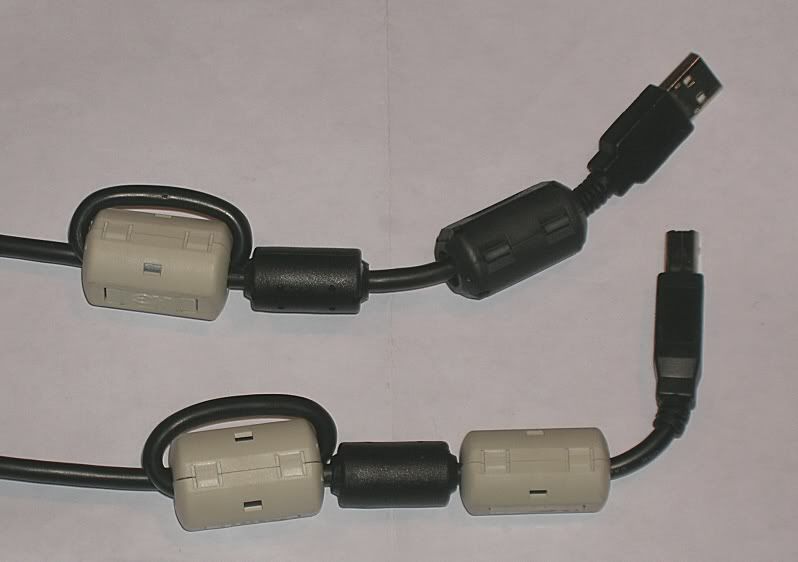
Btw, where can i buy ferrite bead / core to tie to my usb cable ?

Can i use a 1.5A power adaptor for my MR3420 ?


noobandroid
post May 15 2013, 03:24 PM

Audiophile
********
All Stars
11,836 posts

Joined: Mar 2011
From: Kota Kinabalu, Sabah


why my MF680 cant detect?!!
Attached Image
Wahroonga Farm
post May 15 2013, 04:23 PM

Getting Started
**
Junior Member
97 posts

Joined: Feb 2013


QUOTE(digilife @ May 15 2013, 04:38 PM)
I have a TD-W8968 which face slow speed without a USB cable connectionm ( <1.5Mbps ), even with an extension cable it rarely touches 4Mbps. I hope Dairyfarm can come out with a Rooter version of the OpenWRT Fw for this model.

Btw, where can i buy ferrite bead / core to tie to my usb cable ?

This is the sort of thing:

user posted image

or buy a cable with one inserted

user posted image

QUOTE(digilife @ May 15 2013, 04:38 PM)
Can i use a 1.5A power adaptor for my MR3420 ?

The MR3420's come with a 12v 1A supply.

I intend to run a full range of USB power tests with a number of routers to determine if we can get a bit more power to the router's USB port.

The TP-LINKS appear to have good internal regulators and current limiting built in (e.g you can short out the USB connector), so I don't believe the larger power supply will cause any problems and may provide more power to the USB port.

As an example, the TP-Link 703n has an internal current limit of 1.25A @ 5v; but the AC plug pack is only 1A, so it will benefit from say a 1.5A @ 5v plug pack. smile.gif

Suck it and see ....


digilife
post May 15 2013, 05:10 PM

The MNP guy, its me yeah.
*******
Senior Member
8,025 posts

Joined: Feb 2005
From: Planet Boleland


QUOTE(Wahroonga Farm @ May 15 2013, 04:23 PM)
This is the sort of thing:

user posted image

or buy a cable with one inserted

user posted image
The MR3420's come with a 12v 1A supply.

I intend to run a full range of USB power tests with a number of routers to determine if we can get a bit more power to the router's USB port.

The TP-LINKS appear to have good internal regulators and current limiting built in (e.g you can short out the USB connector), so I don't believe the larger power supply will cause any problems and may provide more power to the USB port.

As an example, the TP-Link 703n has an internal current limit of 1.25A @ 5v; but the AC plug pack is only 1A, so it will benefit from say a 1.5A @ 5v plug pack. smile.gif

Suck it and see ....
*
My Asus RT-N16 original adaptor was 12v 1.5A , it spoilt and i am using a 12V 2.A , it works with better WiFi output too
(whoever wanna try, do it at your own risk icon_idea.gif )

biggrin.gif
digilife
post May 15 2013, 05:24 PM

The MNP guy, its me yeah.
*******
Senior Member
8,025 posts

Joined: Feb 2005
From: Planet Boleland


QUOTE(noobandroid @ May 15 2013, 03:24 PM)
why my MF680 cant detect?!!
Attached Image
*
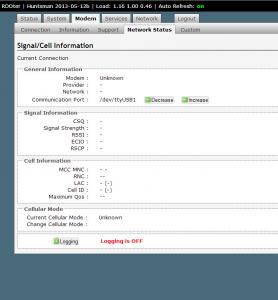
It actually dun matters as you can get connected, just play around with the Increase/Decrease , you will finally get the infos after a few minutes or each increase/decrease

Fyi, E372 is /dev/ttyUSB0

FW Default is /dev/ttyUSB1 but i still get connected even if i dun touch the Increase/Decrease button laugh.gif

Those infos to masturbate your mind only laugh.gif
noobandroid
post May 15 2013, 06:08 PM

Audiophile
********
All Stars
11,836 posts

Joined: Mar 2011
From: Kota Kinabalu, Sabah


QUOTE(digilife @ May 15 2013, 05:24 PM)
It actually dun matters as you can get connected, just play around with the Increase/Decrease , you will finally get the infos after a few minutes or each increase/decrease

Fyi, E372 is /dev/ttyUSB0

FW Default is /dev/ttyUSB1 but i still get connected even if i dun touch the Increase/Decrease button  laugh.gif

Those infos to masturbate your mind only  laugh.gif
*
can use but the network info not working
digilife
post May 15 2013, 06:18 PM

The MNP guy, its me yeah.
*******
Senior Member
8,025 posts

Joined: Feb 2005
From: Planet Boleland


QUOTE(noobandroid @ May 15 2013, 06:08 PM)
can use but the network info not working
*
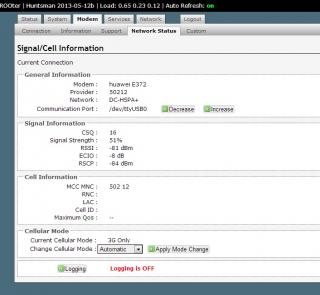
I am using MR3420 V1 HM12b now

On bootup it shows nothing, Internet is fine, then i decrease to 0 and surf awhile later its shows all the infos........


Attached Image


noobandroid
post May 15 2013, 08:07 PM

Audiophile
********
All Stars
11,836 posts

Joined: Mar 2011
From: Kota Kinabalu, Sabah


QUOTE(digilife @ May 15 2013, 06:18 PM)
I am using MR3420 V1 HM12b now

On bootup it shows nothing, Internet is fine, then i decrease to 0 and surf awhile later its shows all the infos........
Attached Image
*
but im mf680 modem
BladeRider88
post May 16 2013, 10:28 AM

On my way
****
Junior Member
554 posts

Joined: Nov 2006


My area & USB modem (Huawei E398) supports DC-HSPA+ but inside the router it shows as HSPA+ sad.gif
Currently i am on 1043ND + latest version of blackwidow firmware
digilife
post May 16 2013, 10:52 AM

The MNP guy, its me yeah.
*******
Senior Member
8,025 posts

Joined: Feb 2005
From: Planet Boleland


QUOTE(BladeRider88 @ May 16 2013, 10:28 AM)
My area & USB modem (Huawei E398) supports DC-HSPA+ but inside the router it shows as HSPA+  sad.gif
Currently i am on 1043ND + latest version of blackwidow firmware
*
My same router (1043ND) shows DC-HSPA+ on Barrier Breaker
BladeRider88
post May 16 2013, 10:58 AM

On my way
****
Junior Member
554 posts

Joined: Nov 2006


QUOTE(digilife @ May 16 2013, 10:52 AM)
My same router (1043ND) shows DC-HSPA+ on Barrier Breaker
*
Guess i have to accept the cold hard fact cry.gif
High speed era turns out to be a past tense sweat.gif
digilife
post May 16 2013, 11:05 AM

The MNP guy, its me yeah.
*******
Senior Member
8,025 posts

Joined: Feb 2005
From: Planet Boleland


QUOTE(BladeRider88 @ May 16 2013, 10:58 AM)
Guess i have to accept the cold hard fact  cry.gif
High speed era turns out to be a past tense  sweat.gif
*
do you have other modems to try ?

use the same E398 on MDMA11beta and see if DC is available there icon_idea.gif
BladeRider88
post May 16 2013, 11:16 AM

On my way
****
Junior Member
554 posts

Joined: Nov 2006


QUOTE(digilife @ May 16 2013, 11:05 AM)
do you have other modems to try ?

use the same E398 on MDMA11beta and see if DC is available there
*
OK will try it out later as now I am at outside
z8net
post May 16 2013, 10:16 PM

New Member
*
Junior Member
39 posts

Joined: Jan 2010


newbie reporting in icon_rolleyes.gif

Setup: TL-MR3420 V2 + Huawei E398U1V2 (from blacktubi notworthy.gif )

OpenWRT: rfactory.org

just setup everything just now icon_idea.gif

location: Cheras (near Bandar Sri Permaisuri)

result: rclxms.gif
user posted image

thumbup.gif thumbup.gif thumbup.gif

This post has been edited by z8net: May 16 2013, 10:21 PM
digilife
post May 16 2013, 11:56 PM

The MNP guy, its me yeah.
*******
Senior Member
8,025 posts

Joined: Feb 2005
From: Planet Boleland


QUOTE(z8net @ May 16 2013, 10:16 PM)
newbie reporting in  icon_rolleyes.gif

Setup: TL-MR3420 V2 + Huawei E398U1V2 (from blacktubi notworthy.gif )

OpenWRT: rfactory.org

just setup everything just now  icon_idea.gif

location: Cheras (near Bandar Sri Permaisuri)

result:  rclxms.gif
user posted image

thumbup.gif  thumbup.gif  thumbup.gif
*
Pls show your ROOter page like mine but cover your Cell ID like what i done

Attached Image

127 Pages « < 46 47 48 49 50 > » Top
Topic ClosedOptions
 

Change to:
| Lo-Fi Version
0.0331sec    0.72    6 queries    GZIP Disabled
Time is now: 12th December 2025 - 02:50 PM