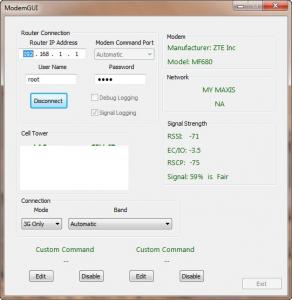
signal = NA ?
but still i can get it in log
CODE
-------Time-------------RSSI-----RSCP------ECIO------LAC---CELLID---Network-------
Wed Mar 06 23:44:22 : -072 -076:0000 -003:0000 "TURBO 3G+"
Tp LInk TL-MR3420 Owner CLub V2.5, need a pro here
|
|
Mar 6 2013, 11:49 PM
Return to original view | Post
#1
|
![]() ![]() ![]() ![]() ![]() ![]() ![]() ![]()
All Stars
11,836 posts Joined: Mar 2011 From: Kota Kinabalu, Sabah |
|
|
|
|
|
|
Mar 7 2013, 05:53 PM
Return to original view | Post
#2
|
![]() ![]() ![]() ![]() ![]() ![]() ![]() ![]()
All Stars
11,836 posts Joined: Mar 2011 From: Kota Kinabalu, Sabah |
is the "turbo 3G+" reported the same as a HSPA+ or is it a DC-HSPA+ ?
|
|
|
Mar 7 2013, 11:03 PM
Return to original view | Post
#3
|
![]() ![]() ![]() ![]() ![]() ![]() ![]() ![]()
All Stars
11,836 posts Joined: Mar 2011 From: Kota Kinabalu, Sabah |
another thing, i use a home line router connected to my own tplink, so i change frequently between LAN- dhcp client and the modem, i could switch between each by just using the connect button (that was in another firmware), but cant be done on barrier breaker, hope you can look into it
|
|
|
Mar 8 2013, 04:08 PM
Return to original view | Post
#4
|
![]() ![]() ![]() ![]() ![]() ![]() ![]() ![]()
All Stars
11,836 posts Joined: Mar 2011 From: Kota Kinabalu, Sabah |
QUOTE(DairymanCanada @ Mar 8 2013, 01:39 AM) This is confirmed by my findings as well. The Touch can only get location from an already recorded wifi location. i switch a lot between LAN and the modem, and the interface of my Lan can be reconnected just by using the "connect button", but it wont reconnect the modem using the same actionDid you try the factory TP-Link in different locations to see if it gave the proper location? Or was it only at one location? It is possible that the Touch is getting its location from a different wifi in the area, not one you are connected to but one the Touch can see. It doesn't need to connect to a wifi in order to use it for location and it will use multiple wifis if they are available to triangulate your position. I honestly can't see how the factory TP-Link could know its location to give to the database. It has no GPS and it could only find the tower ID from the modem, something I doubt it does. Something else is at work here. |
|
|
Mar 9 2013, 07:58 AM
Return to original view | Post
#5
|
![]() ![]() ![]() ![]() ![]() ![]() ![]() ![]()
All Stars
11,836 posts Joined: Mar 2011 From: Kota Kinabalu, Sabah |
QUOTE(DairymanCanada @ Mar 9 2013, 01:22 AM) I'm just getting into programming the buttons now. I've enabled the reset button so it deletes the password so you can get access if you have forgotten the password. put it this way, i have 2 internet connections on my routerWhen you switch between the Lan and the modem (WAN) does the modem disconnect? This is all new to me as I am not a router expert, more of a modem interface man. It is easy to program a button to run a script and do quite a few things, as long as I have a clear understanding of what I'm doing. If you could give me a detailed description of what you are doing and what is supposed to happen I may be able to make something work. 1. dhcp client to another router for cable internet 2. modem for broadband internet i want to switch between the two, previously on attitude adjustment firmware, i could by just,say, stop the modem, and connect the LAN for cable internet, or vice versa |
|
|
Mar 12 2013, 09:20 PM
Return to original view | Post
#6
|
![]() ![]() ![]() ![]() ![]() ![]() ![]() ![]()
All Stars
11,836 posts Joined: Mar 2011 From: Kota Kinabalu, Sabah |
QUOTE(AtWork @ Mar 12 2013, 08:45 PM) Hi. the modem must be not in their hardware supported list, thats why it is unrecognised and hence the outcomeI tried the ModemGUI, but looks like this: ![]() Did not show any information about the model USB Modem or other information. Can you help me? Router: TP-Link TL-MR3420 V2.1 USB Modem: Huawei e392u-12 I tried other ports Command but without effect. Thanks and have a nice day. |
|
|
|
|
|
Mar 12 2013, 10:07 PM
Return to original view | Post
#7
|
![]() ![]() ![]() ![]() ![]() ![]() ![]() ![]()
All Stars
11,836 posts Joined: Mar 2011 From: Kota Kinabalu, Sabah |
barrier breaker connects to broadband ridiculously slow and often disconnects, this needs a fix, it is hard to reconnect once it disconnects, doesnt happen on other openwrt versions
|
|
|
Mar 13 2013, 11:28 AM
Return to original view | Post
#8
|
![]() ![]() ![]() ![]() ![]() ![]() ![]() ![]()
All Stars
11,836 posts Joined: Mar 2011 From: Kota Kinabalu, Sabah |
QUOTE(DairymanCanada @ Mar 12 2013, 11:25 PM) The connection delay is deliberate in our firmware. When using a protocol other than PPP it needs a fair amount of time for everything to get setup and running. It normally takes 1.5 to 2 minutes for the modem to connect. well i dont quite like it as it switches off my modem and i cant connect back it unless a modem reboot, reconnection that slow is not very convenient, this is one thing the other performs better than yours, might as well u figure something outUsing PPP is slightly faster and other versions of OpenWRT don't have our scripts in them so they bang ahead with the connection. This can cause big problems in many situations and is one of the reasons we developed our version. |
|
|
Mar 13 2013, 11:44 AM
Return to original view | Post
#9
|
![]() ![]() ![]() ![]() ![]() ![]() ![]() ![]()
All Stars
11,836 posts Joined: Mar 2011 From: Kota Kinabalu, Sabah |
QUOTE(Wahroonga Farm @ Mar 13 2013, 11:38 AM) Do you want a fast router that manages the fast protocols required for 4G ... or one that is limited to 25Mbps due to PPP. i need is just simple:Your choice. PS I have an expensive Dovado Tiny and it takes a similar (long) time to connect. Dairyman has said he'll look at switching options in future releases. Cheers John k 1. router doesnt switch off my modem when i use local network, which it does somehow 2. reconnect to the broadband swiftly, which eases me constant switching around, and not wait that lengthy time to use a network 3. (this i not sure if related to router or not) less drop out and disconnections |
|
|
Mar 13 2013, 11:27 PM
Return to original view | Post
#10
|
![]() ![]() ![]() ![]() ![]() ![]() ![]() ![]()
All Stars
11,836 posts Joined: Mar 2011 From: Kota Kinabalu, Sabah |
|
|
|
Mar 20 2013, 05:43 PM
Return to original view | Post
#11
|
![]() ![]() ![]() ![]() ![]() ![]() ![]() ![]()
All Stars
11,836 posts Joined: Mar 2011 From: Kota Kinabalu, Sabah |
still the same issue, once i stop the modem connection, i cant revive it without a restart of the modem
|
|
|
Mar 21 2013, 05:26 PM
Return to original view | Post
#12
|
![]() ![]() ![]() ![]() ![]() ![]() ![]() ![]()
All Stars
11,836 posts Joined: Mar 2011 From: Kota Kinabalu, Sabah |
|
|
|
Mar 21 2013, 05:39 PM
Return to original view | Post
#13
|
![]() ![]() ![]() ![]() ![]() ![]() ![]() ![]()
All Stars
11,836 posts Joined: Mar 2011 From: Kota Kinabalu, Sabah |
QUOTE(Wahroonga Farm @ Mar 21 2013, 05:36 PM) There are still problems with the MR3420 V2 BlackWidow ie No USB power. i still using redback on my v1, and now even reboot cant use my modem internet, help with this~So the OpenWRT image is still faulty and we wait some more. All other releases should be fine. |
|
|
|
|
|
Mar 21 2013, 09:18 PM
Return to original view | Post
#14
|
![]() ![]() ![]() ![]() ![]() ![]() ![]() ![]()
All Stars
11,836 posts Joined: Mar 2011 From: Kota Kinabalu, Sabah |
|
|
|
May 11 2013, 05:08 PM
Return to original view | Post
#15
|
![]() ![]() ![]() ![]() ![]() ![]() ![]() ![]()
All Stars
11,836 posts Joined: Mar 2011 From: Kota Kinabalu, Sabah |
why is there still no support for MF680 on blackwidow rooter? requested for so long still not granted
|
|
|
May 11 2013, 05:17 PM
Return to original view | Post
#16
|
![]() ![]() ![]() ![]() ![]() ![]() ![]() ![]()
All Stars
11,836 posts Joined: Mar 2011 From: Kota Kinabalu, Sabah |
QUOTE(blacktubi @ May 11 2013, 05:16 PM) in the modem tab it writes not supported and cant get any info on literally everythingcouple reasons i dont use blackwidow, mf680 users and others can consider my points, not to be taken overly seriously 1. cant get info on modem tab 2. speed wise drops a lot, ping rises a lot from 7mb to 2-3mb, ping from 150 to 600+ ping 3. action applying takes way longer than other firmware 4. load is more compared, from 1.03 to 3.2 peak at times this makes me thinking that mf680 is bad modem cause of lack of supports from devs This post has been edited by noobandroid: May 11 2013, 05:23 PM |
|
|
May 11 2013, 05:31 PM
Return to original view | Post
#17
|
![]() ![]() ![]() ![]() ![]() ![]() ![]() ![]()
All Stars
11,836 posts Joined: Mar 2011 From: Kota Kinabalu, Sabah |
QUOTE(digilife @ May 11 2013, 05:26 PM) BlackWidow dun support MF680 ? yer, then why mine so many problems one Who said ? I was using BW on MF680, however now i flashed it to Huntsman ( Mr3420 V1 ) and it rocks mama now [attachmentid=3433180] My other 1043ND is on Barrier Breaker and it too rocks mama....... [attachmentid=3433181] But sincerely, 1043ND is much better lo....... |
|
|
May 11 2013, 06:32 PM
Return to original view | Post
#18
|
![]() ![]() ![]() ![]() ![]() ![]() ![]() ![]()
All Stars
11,836 posts Joined: Mar 2011 From: Kota Kinabalu, Sabah |
QUOTE(noobandroid @ May 11 2013, 05:17 PM) in the modem tab it writes not supported and cant get any info on literally everything couple reasons i dont use blackwidow, mf680 users and others can consider my points, not to be taken overly seriously 1. cant get info on modem tab 2. speed wise drops a lot, ping rises a lot from 7mb to 2-3mb, ping from 150 to 600+ ping 3. action applying takes way longer than other firmware 4. load is more compared, from 1.03 to 3.2 peak at times this makes me thinking that mf680 is bad modem cause of lack of supports from devs QUOTE(digilife @ May 11 2013, 05:38 PM) |
|
|
May 11 2013, 06:33 PM
Return to original view | Post
#19
|
![]() ![]() ![]() ![]() ![]() ![]() ![]() ![]()
All Stars
11,836 posts Joined: Mar 2011 From: Kota Kinabalu, Sabah |
QUOTE(digilife @ May 11 2013, 05:38 PM) QUOTE(noobandroid @ May 11 2013, 05:17 PM) in the modem tab it writes not supported and cant get any info on literally everything couple reasons i dont use blackwidow, mf680 users and others can consider my points, not to be taken overly seriously 1. cant get info on modem tab 2. speed wise drops a lot, ping rises a lot from 7mb to 2-3mb, ping from 150 to 600+ ping 3. action applying takes way longer than other firmware 4. load is more compared, from 1.03 to 3.2 peak at times this makes me thinking that mf680 is bad modem cause of lack of supports from devs |
|
|
May 11 2013, 08:18 PM
Return to original view | Post
#20
|
![]() ![]() ![]() ![]() ![]() ![]() ![]() ![]()
All Stars
11,836 posts Joined: Mar 2011 From: Kota Kinabalu, Sabah |
QUOTE(digilife @ May 11 2013, 06:43 PM) Reset it back to factory FW then re flash Huntsman or BarrierBreaker by doing a 30/30/30 reset. what is this?If it still sucks, buy a used MR3420 ( rm50 ) to try again........ i think i will live with the use of barrier breaker for now, dont need to make anymore headaches, what is smooth is the best, sabah is always behind technologies anyways, always get put at last in queues |
|
Topic ClosedOptions
|
| Change to: | 0.0532sec
0.86
7 queries
GZIP Disabled
Time is now: 12th December 2025 - 04:06 AM |