Outline ·
[ Standard ] ·
Linear+
Tp LInk TL-MR3420 Owner CLub V2.5, need a pro here
|
lpc26
|
 Nov 16 2013, 05:45 PM Nov 16 2013, 05:45 PM
|
Getting Started


|
QUOTE(chuahcs79 @ Nov 16 2013, 05:42 PM) oh ? so do you face any disconnected sometime ? will the blackwidow 2013-04-13 able to reconnect ?  no facing disconnect, only when power off the router, need to take out the modem, then on back wait til the router finished boot up then only plug in the modem. |
|
|
|
|
|
chuahcs79
|
Nov 16 2013, 05:48 PM
|
Look at all my stars!!

|
QUOTE(lpc26 @ Nov 16 2013, 05:45 PM) no facing disconnect, only when power off the router, need to take out the modem, then on back wait til the router finished boot up then only plug in the modem. how long your connection will last before it disconnected ? so u have to wait for router boot up fully first before plugin the E3276 |
|
|
|
|
|
lpc26
|
Nov 16 2013, 05:52 PM
|
Getting Started
|
QUOTE(chuahcs79 @ Nov 16 2013, 05:48 PM) how long your connection will last before it disconnected ? so u have to wait for router boot up fully first before plugin the E3276 not sure, not yet fully tested. ya if the modem plug with the router when bootup, unable to log in into router interface and unable to detect the modem also. |
|
|
|
|
|
chuahcs79
|
Nov 16 2013, 05:54 PM
|
Look at all my stars!!
|
QUOTE(lpc26 @ Nov 16 2013, 05:52 PM) not sure, not yet fully tested. ya if the modem plug with the router when bootup, unable to log in into router interface and unable to detect the modem also. i am just curious to know whether after it disconnected will the blackwidow firmware able to auto reconnect the connecttion, so far the latest huntsman not able to do so for my E3276 |
|
|
|
|
|
lpc26
|
Nov 16 2013, 06:00 PM
|
Getting Started
|
QUOTE(chuahcs79 @ Nov 16 2013, 05:54 PM) i am just curious to know whether after it disconnected will the blackwidow firmware able to auto reconnect the connecttion, so far the latest huntsman not able to do so for my E3276 I think is the AT command of the modem configuration make the different. |
|
|
|
|
|
chuahcs79
|
Nov 16 2013, 06:04 PM
|
Look at all my stars!!
|
QUOTE(lpc26 @ Nov 16 2013, 06:00 PM) I think is the AT command of the modem configuration make the different. yea i guess so too, it is not convenience when not able to auto reconnect after it disconnected  |
|
|
|
|
|
lpc26
|
Nov 16 2013, 06:06 PM
|
Getting Started
|
QUOTE(chuahcs79 @ Nov 16 2013, 06:04 PM) yea i guess so too, it is not convenience when not able to auto reconnect after it disconnected 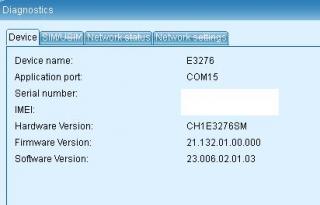
same right? |
|
|
|
|
|
chuahcs79
|
Nov 16 2013, 06:09 PM
|
Look at all my stars!!
|
QUOTE(lpc26 @ Nov 16 2013, 06:06 PM)
same right? yeah i think is same  please update me if the blackwidow able to auto reconnect after it disconnected by itself 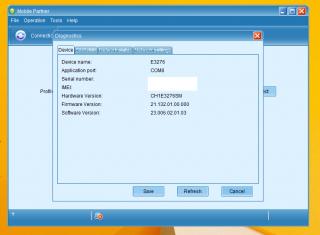 This post has been edited by chuahcs79: Nov 16 2013, 06:11 PM
 |
|
|
|
|
|
lpc26
|
Nov 16 2013, 06:11 PM
|
Getting Started
|
QUOTE(chuahcs79 @ Nov 16 2013, 06:09 PM) yeah i think is same
weird, i put this AT command result is ERROR AT^SETPORT="A1,A2;10,12,16,13,A1,A2" |
|
|
|
|
|
chuahcs79
|
Nov 16 2013, 06:14 PM
|
Look at all my stars!!
|
QUOTE(lpc26 @ Nov 16 2013, 06:11 PM) weird, i put this AT command result is ERROR AT^SETPORT="A1,A2;10,12,16,13,A1,A2" which version huntsman yo are using with that AT COMMAND ? for me, i am using the latest red version, after i finish flashed i reboot the router, and as soon as router is ready, i direct login LuCI and input that AT COMMAND first,. and after 10~20 second the E3276 will be dial in my case, |
|
|
|
|
|
lpc26
|
Nov 16 2013, 06:15 PM
|
Getting Started
|
QUOTE(chuahcs79 @ Nov 16 2013, 06:14 PM) which version huntsman yo are using with that AT COMMAND ? for me, i am using the latest red version, after i finish flashed i reboot the router, and as soon as router is ready, i direct login LuCI and input that AT COMMAND first,. and after 10~20 second the E3276 will be dial in my case, I had done your step, but at the end its either GATEWAY ERROR at the web or ERROR output at the AT command dialog. |
|
|
|
|
|
chuahcs79
|
Nov 16 2013, 06:19 PM
|
Look at all my stars!!
|
QUOTE(lpc26 @ Nov 16 2013, 06:15 PM) I had done your step, but at the end its either GATEWAY ERROR at the web or ERROR output at the AT command dialog. it is quite weird, since both same router, same modem and yet same firmware, let me try out the blackwidow and see whether it will give me stable connection with auto reconnect once it DC  |
|
|
|
|
|
blacktubi
|
Nov 16 2013, 06:40 PM
|
-
|
My E3276 run 21.260.05.00.609, work so well with V1, online within 90 seconds.
On V2 keep getting errors. Gave up Rooter, will use plain OpenWRT
|
|
|
|
|
|
blacktubi
|
Nov 16 2013, 06:42 PM
|
-
|
QUOTE(lpc26 @ Nov 16 2013, 01:49 PM) I'm running 10-16 red with MR3420v2, modem can detect but can't dial use that AT command result ERROR. Can detect cant dial means the port settings @ Rooter is wrong. Can be solved simply if your Modem > Information show this. This post has been edited by blacktubi: Nov 16 2013, 06:42 PM Attached thumbnail(s)
|
|
|
|
|
|
chuahcs79
|
Nov 16 2013, 07:11 PM
|
Look at all my stars!!
|
QUOTE(blacktubi @ Nov 16 2013, 06:42 PM) Can detect cant dial means the port settings @ Rooter is wrong. Can be solved simply if your Modem > Information show this. Bro, how to manually set the protocol using ttyUSB1 instead of auto on ttyUSB0 ? |
|
|
|
|
|
blacktubi
|
Nov 16 2013, 07:13 PM
|
-
|
QUOTE(chuahcs79 @ Nov 16 2013, 07:11 PM) Bro, how to manually set the protocol using ttyUSB1 instead of auto on ttyUSB0 ? My V1 auto detect correctly, didn't set anything. I did modified something on my V1, forgotten what I done. |
|
|
|
|
|
lpc26
|
Nov 16 2013, 07:14 PM
|
Getting Started
|
@chuahcs79
Bro, help me 1 thing, putty your modem, and check the AT command
AT^SETPORT?
|
|
|
|
|
|
chuahcs79
|
Nov 16 2013, 07:16 PM
|
Look at all my stars!!
|
QUOTE(blacktubi @ Nov 16 2013, 07:13 PM) My V1 auto detect correctly, didn't set anything. I did modified something on my V1, forgotten what I done. Oh well i guess i have to switch back to latest red huntsman till found a better solutions... |
|
|
|
|
|
chuahcs79
|
Nov 16 2013, 07:22 PM
|
Look at all my stars!!
|
QUOTE(lpc26 @ Nov 16 2013, 07:14 PM) @chuahcs79 Bro, help me 1 thing, putty your modem, and check the AT command AT^SETPORT? finally found a rooter version which is fit our E3276 totally try this version Huntsman 2013-10-12 / LuCI Trunk (svn-r9811) -> hereno need to do anything, just flash it and wait for auto dial, auto recognize and auto reconnect !!! try it    |
|
|
|
|
|
lpc26
|
Nov 16 2013, 07:24 PM
|
Getting Started
|
@chuahcs79 Bro, I found solution, Huntsman 2013-11-10Red is usable by turning on the AT command AT^SETPORT="A1,A2;1,2,3,10,12,13,16,A1,A2" and my QoS finally works.  This post has been edited by lpc26: Nov 16 2013, 07:27 PM
 |
|
|
|
|




 Quote
Quote


 0.0200sec
 0.60
0.60
 6 queries
 GZIP Disabled