Welcome Guest ( Log In | Register )

5 Pages < 1 2 3 4 > » Bottom

Outline · [ Standard ] · Linear+

Home Networking ASUS Malaysia Networking User & Technical Support, Managed by ASUS Malaysia Representative

views
     
eclectice
post Jun 22 2020, 02:25 PM

Look at all my stars!!
*******
Senior Member
2,734 posts

Joined: Mar 2008
QUOTE(playxboxwii @ Jun 22 2020, 03:28 AM)
Hmm
First i did put router beside modem at ground floor but signal is bad in my room 1st floor..because i needed signal and fast internet i have put the router in my room but then other area is bad (my room not middle) far end.. i actually did try put router on 1st floor near stairs but for some reason could not connect to internet..i think the wiring is mess up but it did work in my room

I did buy wifi extender netgear ex6200 its work ok if its connected to my router via lan..and only get fast speed if i put in my room but thats not the point of getting extender if im gonna put in my room i put it outside my room near stairs but signal is ok but speed is noticebly slower..but the slowness is really bad

Then i buy wifi mesh..much better coverage but speed is still slow outside my room

I get frustrated so i buy new asus router so i can get 1 ssid with full coverage internet in whole house around 4k sq ft
Turn out it didnt improve anything at all (and it is expensive router) sad.gif

And is it weird that my mesh speed is really good compared to others..should it be the other way around bcause it works similar as wifi extendr?
Old router - not consistent most of time below 30mbps
Wifi repeater -2ghz same as router, 5ghz can get up to 100mbps
New router - similar to wifi repeater
Wifi mesh - not consistent but download speed is 260-300mbps
All this was tested in fast.com and unifi speedtest..but this only from the main mesh connected to router via lan.. other mesh is as shitty as the extender(probably bit better but still bad)

And all of this speed is only in my room once i stepped outside my room the speed bcome slow sometimes it not even 5mbps

What i really want is just good coverage and decent speed to watch youtube/netflix without buffer..and for family members to enjoy internet too

Btw another problem i just did an update to my old asus router and now i cannot login to asus 192.168.1.1 invalid uname/pw..im sure username/pw is correct bcause before i update can login i even write in notepad..but internet still works fine with the router
*
A 4000 sq feet home using dual-band router/mesh/extender system?... It is not sufficient. You may need to go for a tri-band or more mesh system, with at least two mesh nodes.

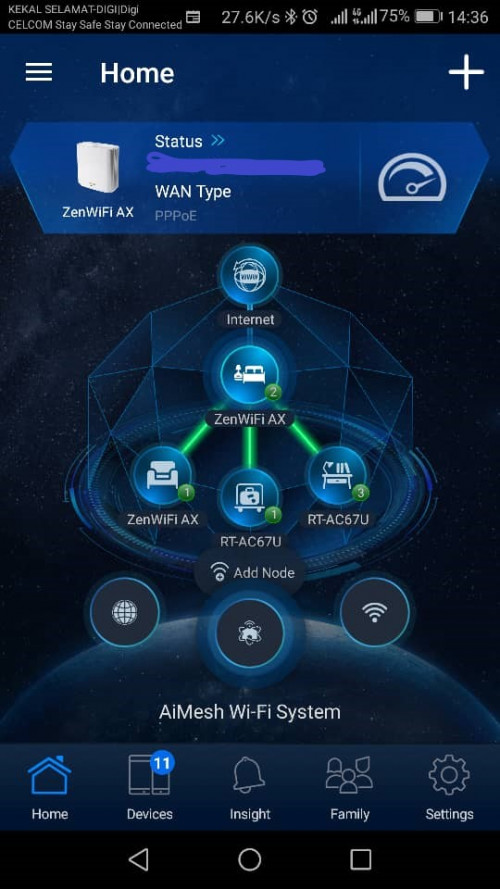
I have successfully installed 2800 sq feet (base) 3-story house, with the new Asus ZenWIFI AX (two=pack, tri-band, WIFI6) which should theoretically cover 5500 sq feet area. It is using the 5GHz-2 as the wireless backhaul between the main router ZenWIFI AX (master bedroom, 1st floor) and the second ZenWIFI AX node (living room, ground floor), both of them are just above/below each other in top-view position. This configuration is sufficient to cover the ground and the first floor but it is not enough for the second floor and corner areas. It can achieve almost half of the 500 Mbps Unifi package.

However, due to many thick walls to penetrate (too many rooms and levels, the main ONU is located on the first floor in the master bedroom). I still had to add two extra nodes, using the existing ASUS RT-67U routers to cover areas with the weakest signal strength (guest room on the second floor and the areas in the study room), adjusting the RT-67U nodes at the best positions possible due to their dual-band capability.
user posted image

This post has been edited by eclectice: Jun 22 2020, 03:32 PM
eclectice
post Jun 22 2020, 03:13 PM

Look at all my stars!!
*******
Senior Member
2,734 posts

Joined: Mar 2008
QUOTE(blacktubi @ Jun 22 2020, 02:58 PM)
eclectice What's your experience of running the ZenWiFi AX with the RT-AC67U?

Do you face any stability of roaming issues?
*
I installed the system for my neighbor's home and performed the WIFI connection stability and speed at 5GHz only for every room in the house. But, I didn't check properly the roaming issue after finished the installation. So far, my neighbor didn't complain about anything and had learned to use the ASUS Router app to block the kids.

This post has been edited by eclectice: Jun 22 2020, 03:36 PM
eclectice
post Jun 24 2020, 05:27 AM

Look at all my stars!!
*******
Senior Member
2,734 posts

Joined: Mar 2008
QUOTE(playxboxwii @ Jun 23, 2020, 10:44 AM)
The expensive router i mention in the previous post is actually tri-band Asus gt-ac5300 the router with 8 antennas..in the box mentioned it cover 5000 sq ft
But it doesn't seem to cover all area
Another issue I'm having is the modem is located at my storeroom which is a closed space. I'm not sure if I can put the router in the middle floor because the ethernet port doesn't work. It cannot detect the floor.. I think some wiring issue ..only my room ethernet port works but my room is the far end

Should i install the mesh as router setup (need to put unifi password)[modem > mesh] or another setup which connect to the router [modem > router > mesh] ..which is better currently im using modem >router> mesh

I was thinking to put my triband router near modem in the store since its located in middle (ground floor) but is a closed space.. then use my old router as wifi repeater (put in my room) and then use mesh? Should it work? Unfortunately, my Asus rt n16 doesn't support Asus mesh
*
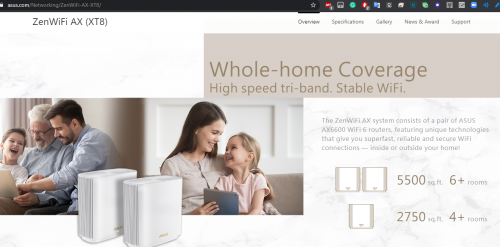
In actuality, when it means up to 5500 sq ft for ASUS ZenWIFI AX (two packs), it is a maximum of 2750 sq ft area per ZenWIFI AX node. So, if the floor area to cover is 2800 sq ft, it is going to have an issue at the far corner sides. That is why in my case, the ZenWIFI nodes can still cover the ground (2800 sq ft) and the first floor (2800 sq ft) only because I put one node for each floor but none for the second floor (ASUS ZenWIFI AX package only has two packs). Therefore, I topped up the second floor with the RT-AC67U units at optimum positions to sync AiMesh config for all nodes.

user posted image
https://www.asus.com/Networking/ZenWiFi-AX-XT8/

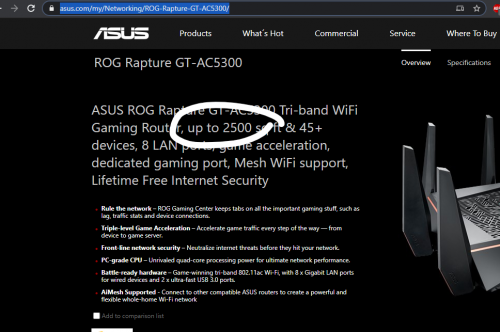
In your case for ASUS ROG GT-AC5300, I've tried to find from the website any mention of 5000 sq ft, but it only mentions 2500 sq ft area.

user posted image
https://www.asus.com/my/Networking/ROG-Rapt...C5300/overview/

But, If you have two GT-AC5300 units, you can put them side by side with a distance of 10m or at an optimum position between each other over the wireless overhaul in AiMesh configuration to cover a floor area of 5000 sq ft. But, the throughput loss and latency will be scaled geometrically for the wireless backhaul configuration, subject to the RF signal constraints.

https://helpcenter.engeniustech.com/hc/en-u...-Best-Practices

This post has been edited by eclectice: Jun 24 2020, 08:24 AM
eclectice
post Jun 24 2020, 09:00 AM

Look at all my stars!!
*******
Senior Member
2,734 posts

Joined: Mar 2008
QUOTE(kwai_83 @ Jun 24 2020, 08:41 AM)
hi would check is Ax86 available at Malaysia  .saw Asus official Malaysia got this model
*
https://www.asus.com/my/Networking/RT-AX86U/

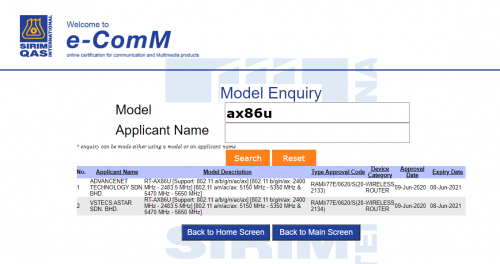
The SIRIM database shows AX86U has been approved on 9 June 2020.

user posted image

You can buy it at the online shops.

I have checked one link below saying it is original and imported but I am surprised to see its SKU # 1076488005_MY-2964370134, showing the "MY". Maybe Malaysia unit, perhaps?

https://www.lazada.com.my/products/asus-rt-...qoscQF&search=1

Maybe wait a few weeks to see it appears at any brick-and-mortar shops.

This post has been edited by eclectice: Jun 24 2020, 09:01 AM
eclectice
post Jun 28 2020, 10:26 AM

Look at all my stars!!
*******
Senior Member
2,734 posts

Joined: Mar 2008
QUOTE(boxsystem @ Jun 28 2020, 09:37 AM)
I have a ax3000 and considering to purchase either this ax86u or zen ax to cover for my whole double storey house, which is around 2000sqft.

Which one is more ideal?
*
What is wrong with the current one?
eclectice
post Jun 30 2020, 11:04 AM

Look at all my stars!!
*******
Senior Member
2,734 posts

Joined: Mar 2008
QUOTE(boxsystem @ Jun 28, 2020, 11:13 AM)
I got a bit dead spot because right now I am unable to place it at the mid of the house.
*
I can't say much about the actual area covered by Asus AX-3000 and Asus AX86U since Asus doesn't state anything. Since you have stated that AX-3000 suffers from the dead spots, it means it could not cover a 2000 sq ft floor area by itself.

But, I can say the Asus ZenWIFI AX (XT8) 2-pack mesh system (currently priced around RM1859 in June 2020) is proven to be a good solution for reducing the dead spots for a base floor area of 2750 sq ft per node. It is stated 5500 sq ft on the website but it means the total area covered by two ZenWIFI AX nodes (1router, 1 satellite/node). So, in your case, it is more than enough for the 2000 sq ft. area; too much exactly, so it is quite excessive in my opinion.

In reality, it really does justice for any floor area less than 2750 sg ft. per node. But, if your floor area is more than that, it will still have some dead spots or weak signal strength at the far corner-sides of the area. I found that iPhone 11 could take advantage of the WIFI6 standard during my 5GHz tests.

Maybe, you can go for the cheaper ZenWIFI AC (CT8) mesh system (priced around RM12xx in June 2020) which covers a total of 5400 sq ft or a 2700 sq ft floor area per node. But, it doesn't support the latest WIFI6 standard (of course since it is AC system) and the WP3 encryption.

Blacktubi did ask me about the roaming stability of the ZenWIFI AX (XT8) but I didn't take the chance to verify the issue that seemed to occur on his review of ZenWIFI AC (CT8).

Update:

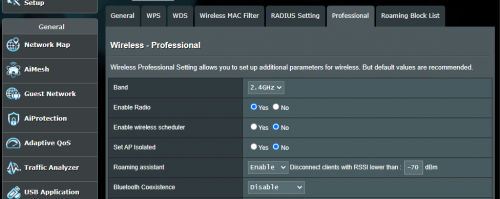
I just notice that you can control the roaming threshold to help Asus ZenWIFI decides which clients should disconnect and try to look for a better node. It is called the Roaming Assistant, accessible through the router's website interface and available for each band. It may be a little bit technical but you can play around with this setting to find the best roaming stability for the devices, subject to how you position the AX nodes and the RF interference in the house. The current default is -70 dBm for 5GHz band but you may try -50 dBm if it helps.

user posted image

AiMesh does provide a How-To guide on how to position the nodes. https://www.asus.com/microsite/AiMesh/en/how_to.html

This post has been edited by eclectice: Jun 30 2020, 04:43 PM
eclectice
post Dec 22 2020, 03:20 AM

Look at all my stars!!
*******
Senior Member
2,734 posts

Joined: Mar 2008
QUOTE(msafiedin @ Dec 18 2020, 10:37 PM)
my old router ac86U cant renew Lets Ecrypt anymore

status is just updating.
i Just realized this today when try to login using ddns asus

Does anybody know how to fix?
*
If it is not the issue with the Let's Encrypt transition from V2 to V3 cert protocol (since Asus has updated the firmware to support this transition quite a while already for its AC routers): I think either your current Let's Encrypt cert has expired or its DDNS cache needs a flush. Just reboot your router to get a new cert or recache the DDNS. It happens to me every time the cert expires or the DDNS cache not working. The usual symptom, I will face difficulty to access my router using DDNS remotely with its ASUS Router app or website the next time if I don't properly log out.

This post has been edited by eclectice: Dec 22 2020, 03:24 AM
eclectice
post Dec 24 2020, 10:41 AM

Look at all my stars!!
*******
Senior Member
2,734 posts

Joined: Mar 2008
QUOTE(yongtjunkit @ Dec 24 2020, 07:09 AM)
hmm.gif my AX92U is having the same issue, rebooting doesn’t seem to fix the issue as it’s stuck at authorizing
*
It is pretty hard to say; maybe same symptom but a different issue as you are using a AX router, mine and that guy are using a AC router (RT-AC88U and RT-AC86U). I assume you have installed the latest RT-AX92 firmware 3.0.0.4.386.40451

This post has been edited by eclectice: Dec 24 2020, 10:48 AM
eclectice
post Dec 24 2020, 01:01 PM

Look at all my stars!!
*******
Senior Member
2,734 posts

Joined: Mar 2008
QUOTE(yongtjunkit @ Dec 24 2020, 11:56 AM)
Yup, already running the latest firmware
As far as I recall, my AC68U(latest firmware) was having the same issue as well ( before upgrade to AX92U) a few days ago
*
Have you recently changed the domain name you put for asuscomm.com? It could be an issue with the ASUS DDNS service which ties your last used domain name to your router and it is unable to update the latest info. Try to contact Asus support to release your last used domain.
eclectice
post Dec 26 2020, 01:55 PM

Look at all my stars!!
*******
Senior Member
2,734 posts

Joined: Mar 2008
QUOTE(afif92 @ Dec 24 2020, 03:20 PM)
After this, we can just easily use Instant Guard vpn connection to connect directly from anywhere to our Asus router. I've already tried it and can configure my router easily even from mobile data.

Even this Let's Encrypt problem still occur, I can connect using Instant Guard app through ddns and just using router IP in browser to configure.
*
Yes, it is the purpose of VPN, creating a local virtual network, and bringing the local network end-to-end inside a private tunnel. I guess, as long as the VPN doesn't use our created *.asuscomm.com DDNS but a different domain, it will be fine. I also bet you can use other VPN solutions besides ASUS Instant Guard VPN (seems to use IPSec) to achieve the same solution.

https://www.snbforums.com/threads/asus-inst...lic-beta.66814/
eclectice
post Dec 26 2020, 01:56 PM

Look at all my stars!!
*******
Senior Member
2,734 posts

Joined: Mar 2008
QUOTE(RickJames09 @ Dec 26 2020, 12:26 AM)
Is it a must to restore/reset the router after upgrading the firmware? If yes, may I know why?
*
After the firmware is upgraded, it auto reboots. Why?
eclectice
post Mar 11 2021, 08:20 PM

Look at all my stars!!
*******
Senior Member
2,734 posts

Joined: Mar 2008
QUOTE(starwalk2002 @ Mar 11 2021, 03:33 PM)
Thank you for the suggestion.  The LAN speed did improve (same level as per the speed I get from TP-LINK) after did a factory reset on the router. 

I have further questions, I have a plan to get the AX AT8 router twin set.  Per my understanding AX AT8 will rely on the 5 GHz-2 as the backhaul connection (wireless) between AX XT8.  If I am to reuse AC88U as an AiMesh node using wireless backhaul, can it be set up to use  5 GHz-2 or it can only use the 5 GHz-1 as backhaul to the main AX XT8?
*
5GHz-2 wireless backhaul is not supported on RT-AC88U (if this is not a typo between AC and AX). You can just use the AiMesh connection between RT-AC88U and ZenWIFI XT8 nodes since I have set such a setup before. In my setup, RT-AC88U is the main router with my 800 Mbps broadband package. You can try one of the ZenWIFI XT8 to become the main router, connect it as a true Mesh system with its sibling node and later pair it with RT-AC88 as an AiMesh unit.

In either setup, you will only get the power of a tri-band WIFI connection of around 3XX Mbps at 40 feet distance (if your broadband package is 300 Mbps and above). If you really want the full bandwidth close to your subscribed broadband package, you better go with a wired backhaul.

This post has been edited by eclectice: Mar 11 2021, 08:26 PM
eclectice
post Jun 7 2022, 09:46 AM

Look at all my stars!!
*******
Senior Member
2,734 posts

Joined: Mar 2008
QUOTE(sinnlig @ Jun 3 2022, 07:36 PM)
I'm using the same. Rubbish coverage. Also staying in a 2 storey semi-d. Poor signal coverage upstairs + constant DC. Asus CS said because signal strength not good enough for home, they checked and apparently my router logs got nothing wrong.

Now I'm considering XT8. Anyone got reviews about this?

If your house is a 2 storey semi-d, I better suggest you go get something better and save your 700 bucks on tuf ax3000.

I feel regret buying the tuf ax3000. If u insist, I can sell you mine.

But I have to add, it's quite weird, when I first bought it, maybe first few months, signal strength was ok, I can play LOL on mobile in my room upstairs with low ping. Now it's impossible, constant DC. Idk why. Sad case.
Anyway, if you're considering TUF AX3000, better look at TUF AX5400. Price not much difference anyway.
P/S if anyone wants to buy a used TUF AX3000 (I think only 8 months old thereabout, pm me)
*
I previously reported on installing a pair of Asus ZenWIFI XT8 using WIFI backhaul in a three-story, two-linked house next door. If one is placed on top of the other (main node above/below the other node at each level), it can cover up to two stories. To address the third, you can utilize the ASUS router and connect it using AiMesh, or you can purchase another XT8 and connect it as another node. In the case of my neighbor, he had one pair of Asus AC68u from the prior installation, so I linked them using AiMesh.

The primary node in this configuration has the fastest WIFI speed from his Unifi 500 Mbps, while the secondary node has half the WIFI speed but still has a good speed. The Asus AC68u with AiMesh connectivity performs similarly to the latter. However, it is entirely dependent on the position of connected devices from each node and whatever barrier the signal from each node needs to pass through.

The best position is still the center of each story area of the house.

This post has been edited by eclectice: Jun 7 2022, 09:57 AM
eclectice
post Jun 7 2022, 04:23 PM

Look at all my stars!!
*******
Senior Member
2,734 posts

Joined: Mar 2008
QUOTE(sinnlig @ Jun 7 2022, 03:47 PM)
Thanks for sharing! Btw, does the XT8 have odd issues? Buggy etc or DC issues? Since it's quite pricey

I was thinking to pair two XT8 with the main TUF AX3000. AX3000 is downstairs, 2 XT8 upstairs.
*
You should put each unit outside rather than inside a closed space like any other routers in the market. It needs proper ventilation. Keep checking the fans from time to time.

Make one of the XT8 devices your primary router, connecting to your ISP. Then, add AX3000 as an AiMesh node.

This post has been edited by eclectice: Jun 7 2022, 04:25 PM
eclectice
post Jun 8 2022, 09:29 AM

Look at all my stars!!
*******
Senior Member
2,734 posts

Joined: Mar 2008
QUOTE(parpy @ Jun 7 2022, 04:36 PM)
I installed a pair of XT8 recently by using the phone app and it is currently working as it is ( i mean i did not do anything more than what the app required). Are there any special settings that i should be doing to make full use of the router/backhaul?

Thank you

Ong
*
Too lengthy to describe. You can find it here

General:
https://www.asus.com/support/FAQ/1045754

Ethernet backhaul
https://www.asus.com/support/FAQ/1044151/
https://www.asus.com/support/FAQ/1044184/

This post has been edited by eclectice: Jun 8 2022, 09:35 AM
eclectice
post Dec 28 2022, 10:25 AM

Look at all my stars!!
*******
Senior Member
2,734 posts

Joined: Mar 2008
QUOTE(trishala21 @ Dec 21 2022, 03:12 PM)
HI Asus support,

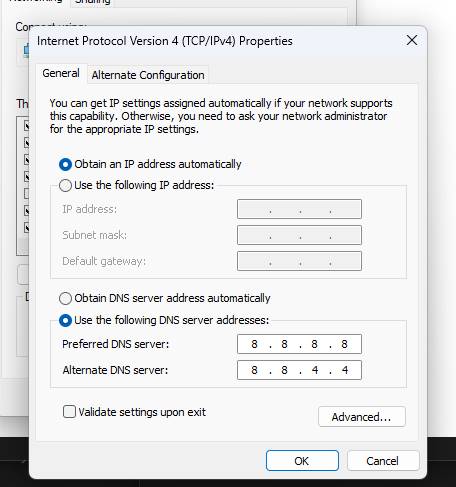
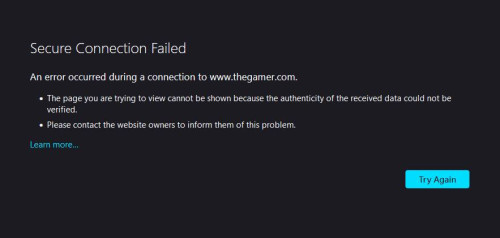
i'm having a weird issue whereby i can't access certain websites, i tried using google DNS and cloudflare DNS same, tried turning off AI protection same, turned off firewall same, tried adding website into allowed exception list no luck, same goes with mobile device and any other computer in my home can't access some website. this persist in both LAN & Wifi, i've even gone ahead and performed a full reset of the router as well. FW is updated as well

i tried using personal hotspot and access website, no issues.

Model: TUF Gaming AX5400

user posted image
user posted image
user posted image
*
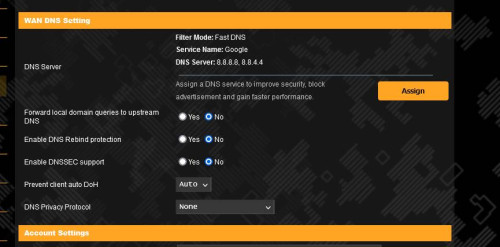
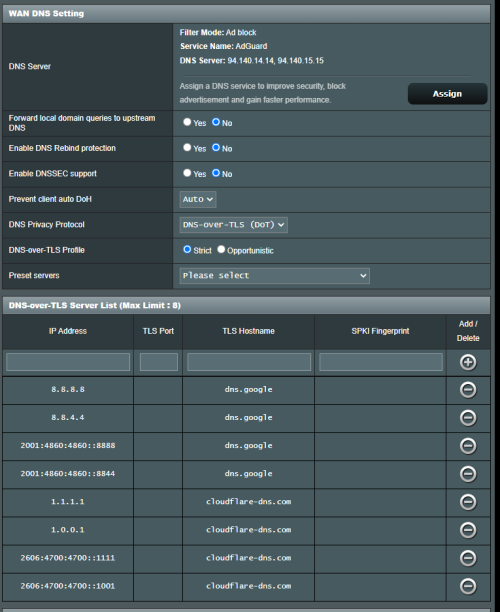
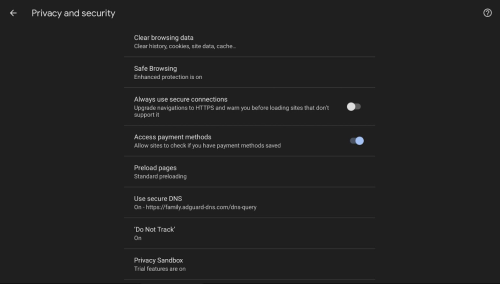
I'll simply give my configuration...it appears to work OK with the Asus ZenWIFI XT8...basically, it's the same settings page as your Asus router, except for the DNS Privacy Protocol setting and DNS Filter mode.

user posted image

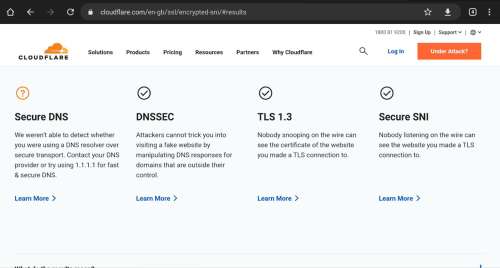
You should get this result when performing the secure DNS testing with Chrome browser Version 108.0.5359.125 (Official Build) (64-bit).

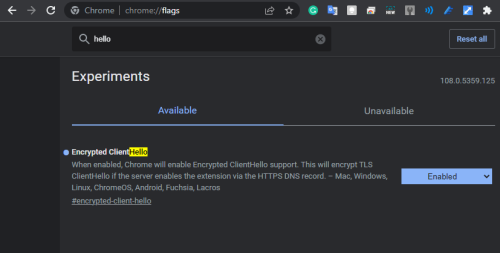
You can enable ECH in the chrome://flags setting.

user posted image

chrome://flags setup for Encrypted Client Hello (ECH)

user posted image

Current ECH status in the Chrome browser: https://chromestatus.com/feature/6196703843581952

More about ECH https://blog.cloudflare.com/encrypted-client-hello/

The reason why I get orange (?) mark for the Secure DNS result is because I've changed my default Secure DNS provider in my Chrome browser settings.

user posted image

You will not be able to use the Secure DNS setting if your Chrome browser is administered by your workplace.

user posted image

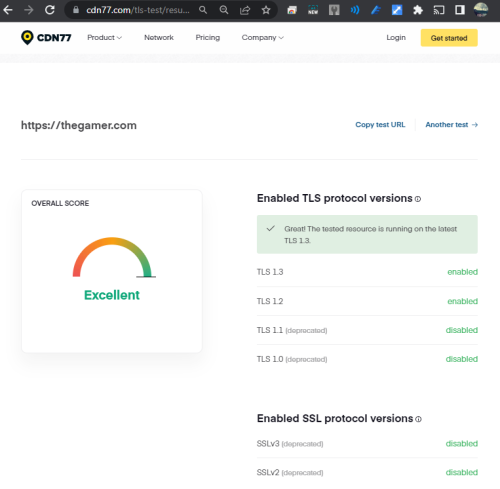
www.thegamer.com appears to be compliant with the most recent TLS domain configuration:

user posted image

This post has been edited by eclectice: Dec 29 2022, 12:35 PM
eclectice
post Jan 13 2023, 05:12 PM

Look at all my stars!!
*******
Senior Member
2,734 posts

Joined: Mar 2008
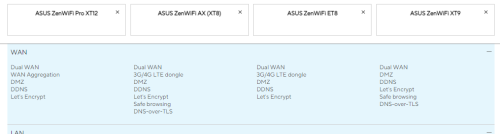
I finally noticed that, unlike ZenWIFI XT8, ZenWIFI XT12 does not offer the DNS-to-TLS setup. In my last post, I mentioned helping someone with this setup for his TUF Gaming AX5400.

https://forum.lowyat.net/topic/2651405/+14940#


user posted image

https://www.asus.com/product-compare?Produc...esh-wifi-system

This implies that XT12 users must rely on their browser's DNS-to-TLS setup rather than their XT12 if they want to use Secure DNS features.

It is not a significant concern because XT12 is intended for corporate network configuration anyway, and network administrators may wish to manage their own Secure DNS setup in their firewall/proxy settings.


This post has been edited by eclectice: Jan 13 2023, 05:28 PM
eclectice
post Jan 15 2023, 08:21 PM

Look at all my stars!!
*******
Senior Member
2,734 posts

Joined: Mar 2008
QUOTE(blacktubi @ Jan 13 2023, 10:10 PM)
I have the ZENWIFI XT12 and it does support DNS-to-TLS

ASUS admin probably forget to add this feature on their portal
*
Thank you, Blacktubi. Yes, they should double-check everything they post on their website or they will lose a customer due to a confusion
eclectice
post Jun 6 2023, 11:26 AM

Look at all my stars!!
*******
Senior Member
2,734 posts

Joined: Mar 2008
What do you think: should it make a difference if I combine ASUS ZenWiFi XT9 with ASUS ZenWiFi XT8? I'm thinking about buying and using ASUS ZenWiFi XT9 as the primary system and two existing XT8 units as nodes.

This post has been edited by eclectice: Jun 6 2023, 01:19 PM
eclectice
post Jun 7 2023, 01:29 PM

Look at all my stars!!
*******
Senior Member
2,734 posts

Joined: Mar 2008
QUOTE(ASUSmy @ Jun 7 2023, 01:22 PM)
Hi eclectice,

The ZenWiFi XT9 is not available yet in Malaysia. Below is the comparison between the 2 ZenWiFi.

https://www.asus.com/my/product-compare?Pro...esh-wifi-system

Thank you
*
Even so, the key question is: can we mix ZenWIFI XT9 and ZenWIFI XT8 units because the main difference is in the 160 MHz bandwidth component, whereby XT9 is wider than XT8? I just need your technical point of view about this.

5 Pages < 1 2 3 4 > » Top
 

Change to:
| Lo-Fi Version
0.2621sec    0.62    7 queries    GZIP Disabled
Time is now: 12th December 2025 - 09:17 AM