Welcome Guest ( Log In | Register )

Outline · [ Standard ] · Linear+

Home Networking ASUS Malaysia Networking User & Technical Support, Managed by ASUS Malaysia Representative

views
     
eclectice
post Feb 22 2024, 01:26 PM

Look at all my stars!!
*******
Senior Member
2,734 posts

Joined: Mar 2008
QUOTE(goliath @ Feb 21 2024, 01:18 PM)
I am using Asus Zenwifi XD5 and occasionally, there are two issues I am facing; wifi disconnection and blue blinking light (for one of the units).
I need to manually reboot it by switching off and on in order for them to work like normal.
I am wondering anybody facing the same issue(s).
*
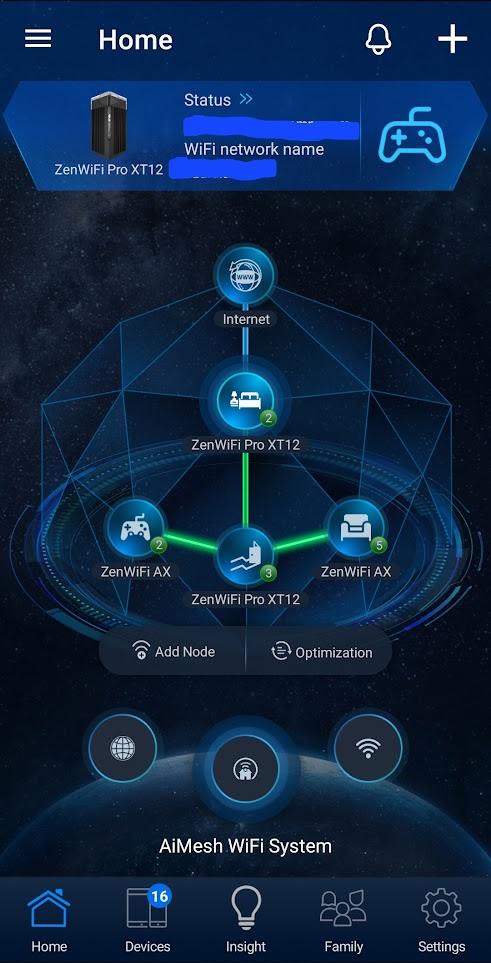
There are various ways to address synchronization (blue-light) problems between nodes in a mesh network. My preferred method is to place each node at the center of the house and arrange nodes between floors in a way that each node is above or below the other (true for terrace/semi-detached home design). If I cannot position one of the nodes at the center of the house, I will use a LAN cable for certain nodes as a wired backhaul. In addition, I use a fixed control channel instead of an auto setting. Before selecting the channel, I ensure that it will not be interfered with by adjoining WiFi networks from neighbors that are using the same channel. I always aim to connect each node at the most 5GHz with all channel spacings covered. This requires knowledge of which control channel can support every channel spacing. If not, you will get an orange light indicating a weak signal.

I will aim for the mesh system with the highest theoretical coverage using fewer nodes before purchasing.
user posted image

The above setup has been stable for more than 32 days since the latest firmware upgrade (which requires a restart).

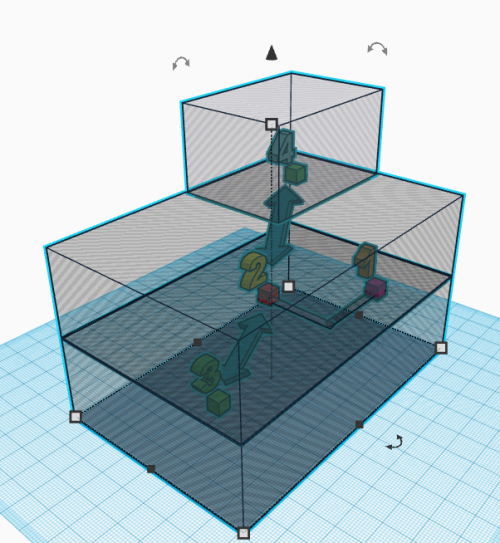
Below is the simplified 3D view of the layout where:
1 - master bedroom (1F - XT12 main router)
2 - hallway (1F - XT12 node)
3 - living room (GF - XT8 node)
4 - gaming room (2F - XT8 node)

The XT12 router and node are connected using a CAT7 patch cable.
user posted image

This post has been edited by eclectice: Feb 22 2024, 03:02 PM
eclectice
post Feb 23 2024, 11:25 AM

Look at all my stars!!
*******
Senior Member
2,734 posts

Joined: Mar 2008
QUOTE(skzzi @ Feb 22 2024, 09:27 PM)
I too recently acquired XT12 combine use with one XT8 that i previously use. All wireless backhaul. Been using it for few days now, all is good. I kept the xt8 because of the Usb.
There’s the xt12 and xt8 node on second floor, somehow whenever i go up, my phone wifi tends do go for the xt8 instead of the xt12. My wife phone as well. Is there any other way to force the phone to go for the xt12 instead?
I tried disable the 5ghz-1 radio on the xt8. Didnt work, not sure why since 5ghz-2 is used for backhaul.
*
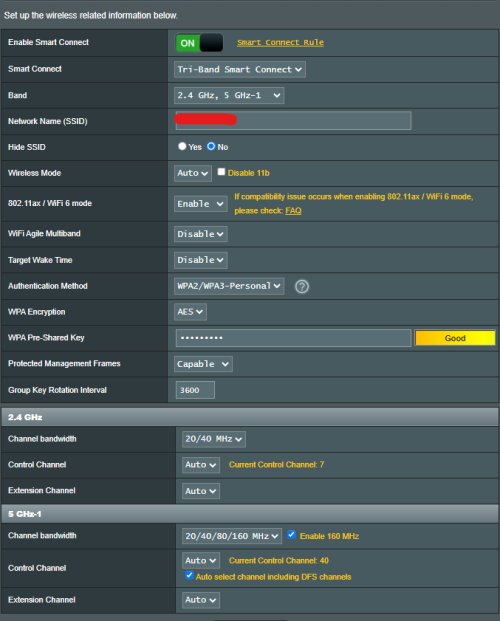
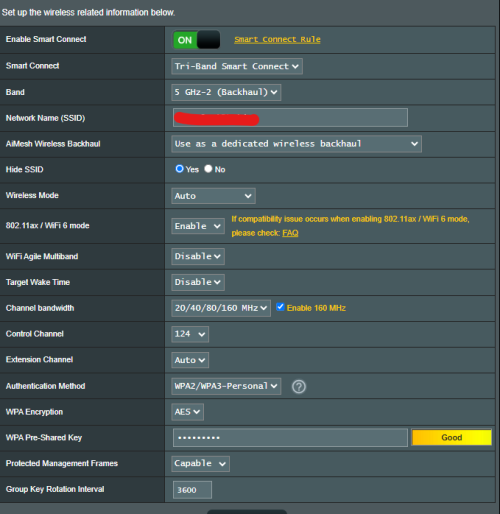
I configured it in dedicated wireless backhaul (Smart Connect DWB) mode where the 5GHz-2 band is used for DWB instead of using separate 2.4GHz and 5GHz WIFI SSIDs.

You may need to choose the correct control channel (between CH 100-128) for your 5GHz-2 band DWB that covers the whole channel spacing (20/40/80/160 MHz)

user posted image

Settngs for 2.4 GHz and 5GHz-1 (XT12 Pro main router)

user posted image

Settings for DWB (XT12 Pro main router)

user posted image

I am unable to move the XT12 Pro main router to the center of the house due to the location of the Unifi BTU for a security reason. Therefore, I need to set up the two-pack XT12 Pro in wired backhaul.

When you select a device from the Devices list in the ASUS Router app, you can assign it to different nodes under "Bind to AP," as suggested by afif92. However, moving away from the assigned node may weaken the signal, rendering it useless. It is useful for immovable devices like smart TVs. So, in my case, I don't use this and just let the mesh system decide.

This post has been edited by eclectice: Feb 23 2024, 11:53 AM
eclectice
post Aug 11 2024, 09:47 PM

Look at all my stars!!
*******
Senior Member
2,734 posts

Joined: Mar 2008
Will ASUS ZenWiFi BQ16 be available soon? Around RM7K, perhaps?
https://www.asus.com/my/networking-iot-serv...s-zenwifi-bq16/

5 Pages « < 3 4 5Top
 

Change to:
| Lo-Fi Version
0.0351sec    0.56    7 queries    GZIP Disabled
Time is now: 11th December 2025 - 07:16 PM