Welcome Guest ( Log In | Register )

5 Pages « < 2 3 4 5 >Bottom

Outline · [ Standard ] · Linear+

Home Networking ASUS Malaysia Networking User & Technical Support, Managed by ASUS Malaysia Representative

views
     
eclectice
post Nov 19 2023, 09:12 AM

Look at all my stars!!
*******
Senior Member
2,734 posts

Joined: Mar 2008
QUOTE(InSplre @ Nov 16 2023, 08:36 PM)
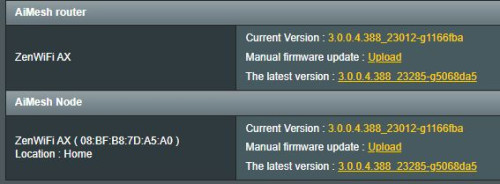
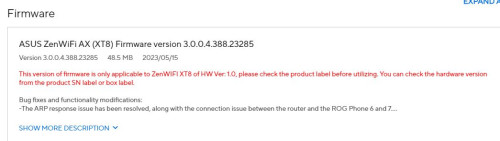
I just bought XT8 hw v2 on 11.11 . Manage to set it up and there is a notification saying i need to update the firmware but then at asus website it indicated that the update is only for hw v2. so which is which? can i upgrade ? will it brick my new mesh ?

user posted image
user posted image
*
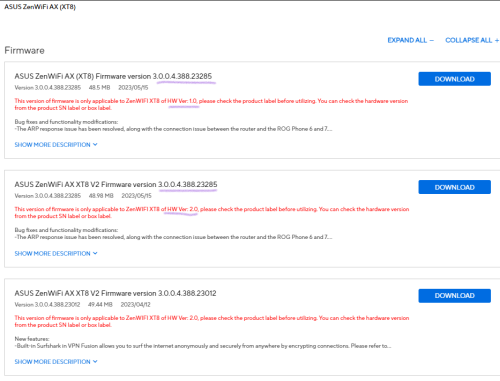
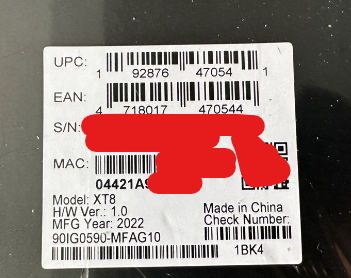
Please check your XT8 package UPC/EAN/SN/MAC white rectangular sticker label (it is affixed to the package box; you will notice the "H/W Ver" word.

Don't worry, it offers Firmware version 3.0.0.4.388.23285 for both H/W version 1.0 and 2.0

user posted image

https://www.asus.com/supportonly/asus%20zen.../helpdesk_bios/

This post has been edited by eclectice: Nov 19 2023, 09:17 AM
eclectice
post Nov 19 2023, 02:09 PM

Look at all my stars!!
*******
Senior Member
2,734 posts

Joined: Mar 2008
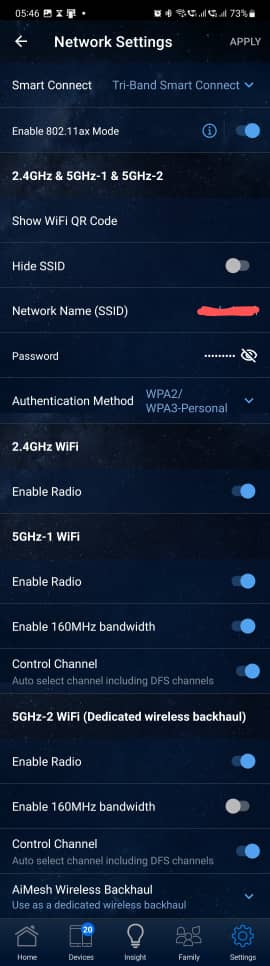
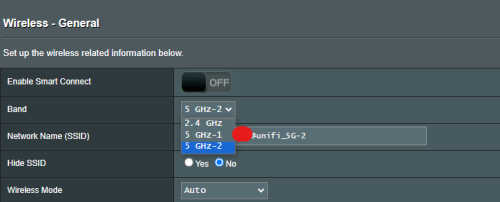
Sometimes, Asus nodes inexplicably use 2.4GHz instead of 5GHz uplink mode for syncing to AiMesh 5GHz-2 WIFI dedicated wireless backhaul.

user posted image

Toggling off and on the 160 MHz bandwidth seems to resolve the issue.

user posted image

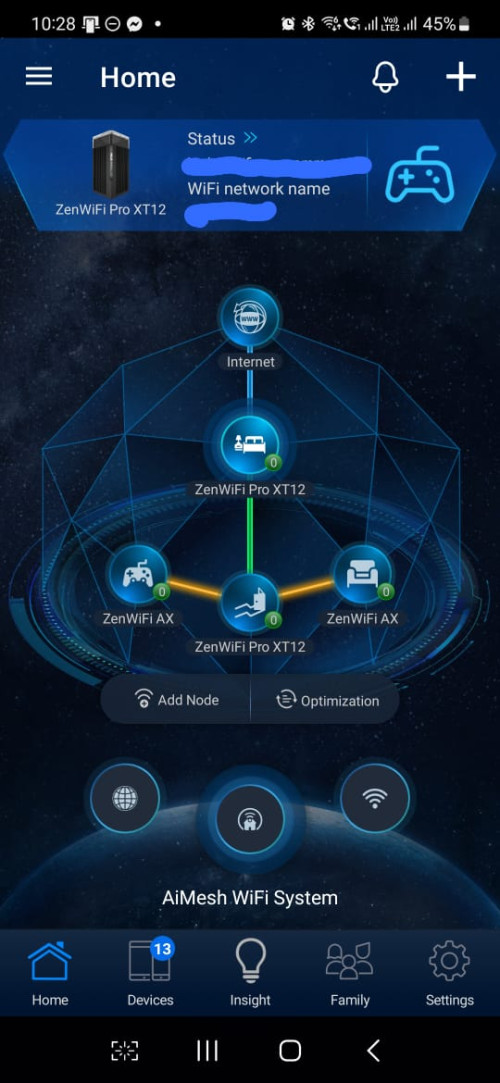
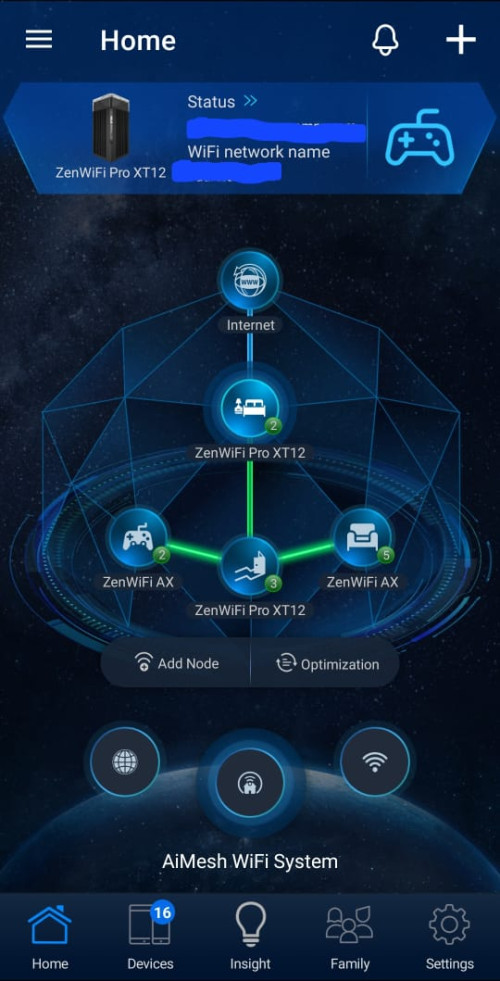
I want to clarify that my AiMesh network above uses a combination of wired and wireless backhaul with the default Tri-Band Smart Connect rules. Specifically, the ZenWIFI AX nodes are connected to the ZenWIFI Pro XT12 node wirelessly, whereas the ZenWIFI Pro XT12 router and node are connected to each other via a 20-meter flat Ethernet CAT7 patch cable (router: 2.5G LAN -> node: 2.5G WAN)

This post has been edited by eclectice: Nov 19 2023, 02:22 PM
eclectice
post Nov 20 2023, 03:23 PM

Look at all my stars!!
*******
Senior Member
2,734 posts

Joined: Mar 2008
QUOTE(satriaguy @ Nov 20 2023, 01:38 PM)
This is not the case, when i check the connection, still connected to 5GHz network.
*
Can you run the speed test again with only your device connected (no other devices connected) over an Ethernet connection for comparison? I prefer you use the bufferbloat test https://www.waveform.com/tools/bufferbloat

This post has been edited by eclectice: Nov 20 2023, 03:25 PM
eclectice
post Nov 22 2023, 06:02 AM

Look at all my stars!!
*******
Senior Member
2,734 posts

Joined: Mar 2008
QUOTE(eclectice @ Nov 19 2023, 02:09 PM)
Sometimes, Asus nodes inexplicably use 2.4GHz instead of 5GHz uplink mode for syncing to AiMesh 5GHz-2 WIFI dedicated wireless backhaul.

user posted image

» Click to show Spoiler - click again to hide... «


I want to clarify that my AiMesh network above uses a combination of wired and wireless backhaul with the default Tri-Band Smart Connect rules. Specifically, the ZenWIFI AX nodes are connected to the ZenWIFI Pro XT12 node wirelessly, whereas the ZenWIFI Pro XT12 router and node are connected to each other via a 20-meter flat Ethernet CAT7 patch cable (router: 2.5G LAN -> node: 2.5G WAN)
*
It seems like I'm running into the same issue again and again. But no worries, I found a solution to fix it for good! Instead of turning off the roaming assistant, I decided to disable the 160 MHz bandwidth on the 5GHz-2 dedicated wireless backhaul (DWB). As soon as I disable it, the entire network reverts back to its normal state and shows a green connection status for each node. I hope this will do the trick and solve the problem.

user posted image

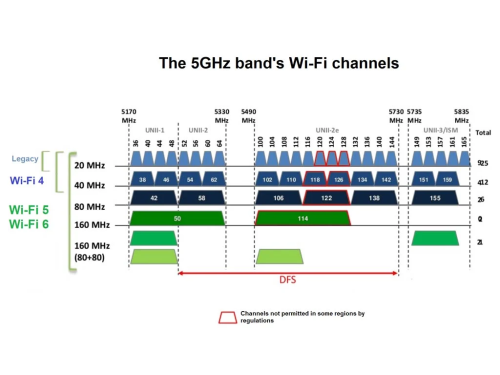
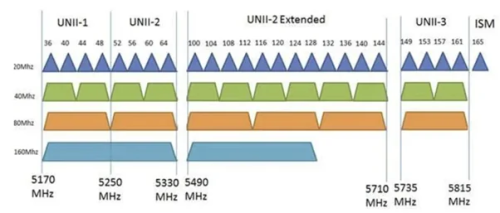
The AiMesh network decides to use 20MHz bandwidth on the highest channel 165 for the DWB. This is about 150Mbps per 20 MHz bandwidth which is sufficient for 4K and cloud gaming streaming.

» Click to show Spoiler - click again to hide... «


user posted image
Image from https://dongknows.com/wi-fi-6-explained/

This is understandable since increasing the bandwidth for 5GHz WiFi from 80 MHz to 160 MHz can significantly improve performance, but it is important to note that this can only be done if there is no interference on the wider channel. If there is interference, then the performance may actually decrease.

This post has been edited by eclectice: Nov 22 2023, 07:15 AM
eclectice
post Dec 7 2023, 09:28 AM

Look at all my stars!!
*******
Senior Member
2,734 posts

Joined: Mar 2008
QUOTE(firdausbhari @ Dec 6 2023, 10:54 AM)
ZenWifi XT8 still worth to buy at discounted price? .
*
This product has good quality and performance. If you are looking for the V2 version that blacktubi mentioned, check the "H/W ver" label on the side of the box before you purchase it at the store. This info is not provided on the router's web browser settings and its Asus Router app.

Asus should have designed a better bootloader that can provide this info hardcoded and later can be retrieved by the user firmware image and Asus Router app and its web browser settings.

user posted image

To use it as a mesh node with the same or different AIMesh device model(s), avoid auto control channel setup. The router will switch channels when there is interference, disrupting the WIFI link between the main router and the nodes even though their physical locations are fixed in our house setup. This may cause a drop from 5GHz wireless mode to 2.4GHz wireless mode upon any of the link connections.

It is better to set a fixed channel number which can avoid possible interference around your environment for the whole AiMesh network. This is my conclusion after my experience setting up a three-story house with 2-pack ZenWifi XT12 Pro and 2-pack ZenWifi XT8 with ZenWifi XT12 Pro as the main backhaul provider.

This post has been edited by eclectice: Dec 7 2023, 10:32 AM
eclectice
post Dec 7 2023, 10:15 AM

Look at all my stars!!
*******
Senior Member
2,734 posts

Joined: Mar 2008
QUOTE(firdausbhari @ Dec 7 2023, 09:58 AM)
» Click to show Spoiler - click again to hide... «

Managed to upgrade to ZenWifi. Apparently the unit i got is just V1. Now thinking to add TUF AX4200 as primary router & deploy ZenWifi as mesh nodes.

I noticed 5Ghz channels were limited to 36-48 only compared to my previous AC88U which has 36-165.
*
Are you sure? There are two 5 GHz bands for ZenWifi XT8: 5GHz-1 and 5GHz-2

This is 5GHz-1 info:

» Click to show Spoiler - click again to hide... «


This is 5GHz-2 band info:

» Click to show Spoiler - click again to hide... «


Different page Wireless page setup for:

Dedicated wireless backhaul (DWB):

user posted image

Non-DWB:

user posted image

This post has been edited by eclectice: Dec 7 2023, 10:24 AM
eclectice
post Dec 8 2023, 09:04 AM

Look at all my stars!!
*******
Senior Member
2,734 posts

Joined: Mar 2008
QUOTE(firdausbhari @ Dec 7 2023, 09:58 AM)
» Click to show Spoiler - click again to hide... «

Managed to upgrade to ZenWifi. Apparently the unit i got is just V1. Now thinking to add TUF AX4200 as primary router & deploy ZenWifi as mesh nodes.

I noticed 5Ghz channels were limited to 36-48 only compared to my previous AC88U which has 36-165.
*
It looks like you are using a wired backhaul setup for your whole network, based on the double outlines of the green lines.
eclectice
post Dec 16 2023, 10:54 AM

Look at all my stars!!
*******
Senior Member
2,734 posts

Joined: Mar 2008
QUOTE(firdausbhari @ Dec 14 2023, 03:13 PM)
Question: i am able to access the router without register DDNS? What does the security link means?
*
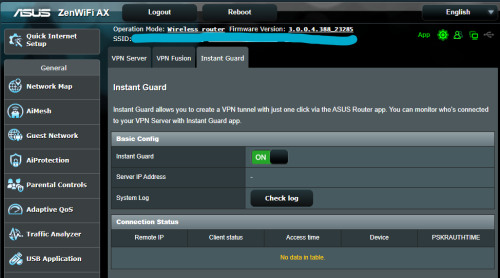
You can use the Instant Guard feature if you don't want to enable remote access via WAN. But, it requires you to set up the Asus DDNS service.

user posted image

Do note that the Instant Guard app is not available for desktops, just mobile devices. So, you can activate Instant Guard and use your Asus Router app through your mobile device.

https://www.asus.com/my/content/instant-guard/

It's possible to use WireGuard and OpenVPN to access your home network remotely via the VPN Server feature. But, if you're trying to remotely access your home network through your office's WIFI or LAN network, there's a chance that remote UDP ports like WireGuard or OpenVPN in UDP TAP mode might be blocked. To avoid this, it's recommended that you configure your OpenVPN server to use TUN mode with TCP port 443 as it has a better chance of functioning properly with the office firewall (unless it uses deep packet inspection or DPI approach). However, if you don't want to go through the hassle of configuring OpenVPN or Wireguard server, you can use your mobile network to access your home network through the VPN. Or, just use Instant Guard, easy! But, this router-based VPN server setup still requires Asus or third-party DDNS service.

If you choose not to enable the DDNS service, you can still use the VPN Fusion feature. This allows you to use Surfshark or third-party VPN providers that support OpenVPN, WireGuard, PPTP, or L2TP service. The VPN server is hosted elsewhere, not from your router. It avoids the issue with the home ISP network that doesn't have a publicly-assigned IPv4 address.

This post has been edited by eclectice: Dec 16 2023, 11:28 AM
eclectice
post Dec 16 2023, 10:34 PM

Look at all my stars!!
*******
Senior Member
2,734 posts

Joined: Mar 2008
QUOTE(blacktubi @ Dec 16 2023, 05:55 PM)
Wouldn't work without public IP.
*
The VPN Fusion feature should be usable in a privately shared address space. It's an advanced VPN Client feature that allows the Asus router to act as a "VPN client device assigner" to one or more remote VPN servers. With this feature, there is no need to worry about private shared address space since we won't be running a VPN server from our router inside this network space.

Instead, we will be accessing remote VPN servers from third-party VPN providers on the Internet side to be used by our home devices. We can assign any device in our home to use one of the VPN tunnels we set up in the VPN Fusion setup, without the device needing to run any VPN client software on it. If we can get a VPN profile, we can access any devices within that VPN profile as long as the devices are part of that VPN profile.

For a solution to run Instant Guard behind a private WAN IP:

How to set up Instant Guard with port forwarding under private WAN IP https://www.asus.com/support/FAQ/1045725/

This post has been edited by eclectice: Dec 16 2023, 10:35 PM
eclectice
post Dec 22 2023, 06:12 PM

Look at all my stars!!
*******
Senior Member
2,734 posts

Joined: Mar 2008
QUOTE(ntw @ Dec 21 2023, 07:16 PM)
"only Parental Control checked for Adult and P2P content category."
Have you tried disabling both the AIProtection and Parental Control feature and see how stable it is?

https://www.snbforums.com/threads/rt-ax58u-...xt-steps.82439/

This post has been edited by eclectice: Dec 22 2023, 06:13 PM
eclectice
post Jan 4 2024, 05:01 PM

Look at all my stars!!
*******
Senior Member
2,734 posts

Joined: Mar 2008
QUOTE(WaCKy-Angel @ Dec 30 2023, 09:22 AM)
» Click to show Spoiler - click again to hide... «

Anyone can help advise what is this?
When the router crash and reboot i get long text so i disabled upnp and it was clear for awhile then i see this again.

previous logs shows reboot most frequently happens when something happen to eth5 & eth6 so seeing it again after disabling upnp makes me nervous liao
current uptime 40 minutes
*
Can you identify which MAC addresses belong to which device? To figure out which device is which, you can disconnect all devices connected, connect one device at a time, and check the log to see if the same MAC address appears each time. This will help you identify which MAC address belongs to which device. You can also use the Devices list table to identify the devices that appear in the logs.

I don't usually pay much attention to wlceventd_proc_event events because they could indicate a device disconnecting and reconnecting due to an unstable connection or a purported disconnection from the router.

wlceventd_proc_event(YYY): wlX.X - wireless device
wlceventd_proc_event(YYY): ethX - wired device

https://superuser.com/questions/1766699/map...entd-proc-event

But, compared to my logs, I haven't faced any single bsd events in the 12 days since I rebooted my router. Is your router in the Smart Connect mode (Wireless > General settings)? You will see these events if you use the Smart Connect mode.

I set non-Smart Connect mode for my first home that uses a 2-pack ZenWIFI-XT8 mesh system. In this setup, it will have separate SSIDs for 2.4Ghz, 5Ghz-1, and 5GHz-2 bands.

I set Smart-Connect mode for my second home that uses a 2-pack ZenWIFI-XT12 Pro mesh system and a 2-pack ZenWIFI-XT8 mesh system combined. In this setup, it will have one single SSID and one dedicated wireless backhaul (DWB).

However, both events should not be a concern.

I usually disable UPnP as I don't find the need for it in my home networks.

This post has been edited by eclectice: Jan 4 2024, 05:37 PM

eclectice
post Jan 11 2024, 11:44 AM

Look at all my stars!!
*******
Senior Member
2,734 posts

Joined: Mar 2008
QUOTE(crazyissac @ Jan 10 2024, 04:52 PM)
anyone please ?
*
You have already received your answer. https://forum.lowyat.net/topic/5424552/+720
eclectice
post Jan 16 2024, 09:20 AM

Look at all my stars!!
*******
Senior Member
2,734 posts

Joined: Mar 2008
QUOTE(rogue @ Jan 16 2024, 08:38 AM)
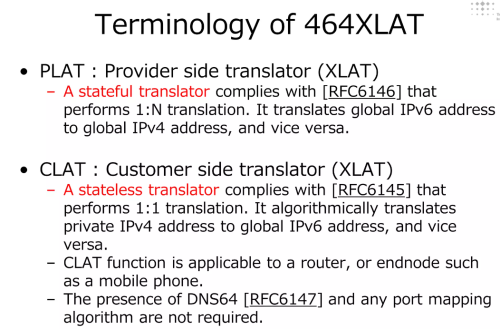
@Asusmy Please suggest to product tech team to add 464xlat feature into their router products. Thanks.
*
Does it also require the Internet Service Provider (ISP) to support it as well?

user posted image

user posted image

This post has been edited by eclectice: Jan 16 2024, 09:32 AM
eclectice
post Jan 17 2024, 12:37 PM

Look at all my stars!!
*******
Senior Member
2,734 posts

Joined: Mar 2008
QUOTE(leongsem @ Jan 17 2024, 09:11 AM)
Hi Asus My
I stay in 3 terrace house with 3 storey (70x22)
I put AX5400 at my 1st floor near the back
1 AX55 at 1st floor near the front due to kids complain wifi signal quite poor
1 AX55 at Ground floor near front

now we suffer the 2nd floor wifi signal quite week, any cheapest way add the AI-Mesh there? or others solution? thanks
@asusmy
*
It would be useful to have the info about the detected RSSI signal strength (in dBm) of each AiMesh node on the network map in the ASUS Router app. Additionally, it would be interesting to know if the wireless control channel has been set in auto mode or not, as this could impact the network's overall performance due to external interference.

The issue with using an extensible (non-ZenWiFi) ASUS router is we don't know its effective coverage range, unlike the ZenWifi mesh system which provided such a "claim", albeit theoretically.

I have a 3-story home with the following challenges:
1) Each level is 20 x 130 sqft in dimension.
2) There are 4 rooms on the ground floor, 6 rooms on the first floor, and 2 rooms on the second floor.
3) The Unifi BTU (fiber ONU modem) is located in the MDF-type wardrobe unit in the master bedroom on the first floor, which is not in the center of the floor.

I utilize a mesh system to accomplish this, which consists of a 2-pack ZenWifi Pro XT12 system and a 2-pack ZenWifi XT8 system. In this setup, one of the ZenWiFi Pro XT12 units acts as the main router whereas the others function as satellite nodes. I connect my ZenWiFi Pro XT12 units using a wired CAT7 cable from the LAN 2.5 GHz port on the router side to the WAN 2.5 GHz port on the node side. After analyzing the available bands, I determined that fixing the control channel to 104 would minimize external interference from neighbors' WIFI. It has been more than 48 days since the last reboot and everything is still working fine.

This post has been edited by eclectice: Jan 17 2024, 12:38 PM
eclectice
post Jan 17 2024, 01:47 PM

Look at all my stars!!
*******
Senior Member
2,734 posts

Joined: Mar 2008
QUOTE(leongsem @ Jan 17 2024, 01:22 PM)
Hi, I am unable to use LAN cable now

Yes, the wireless control channel been set t auto

Currently my main router and two AI mesh is all from Asus.
*
Router & Nodes positions:

Second Floor: ZenWifi XT8 satellite node (Gaming Room)
First Floor: Unifi ONU/BTU -> 1.5m CAT6 cable -> ZenWifi Pro XT12 router (Master Bedroom) -> 20m CAT7 cable (in theory 600 MHz max bandwidth) -> ZenWifi Pro XT12 satellite node (Hallway which is in the center of the house). The goal is to evenly distribute WIFI strength throughout the house, despite the many rooms on different levels from the main router. I need a wired backhaul to ensure maximum bandwidth for the satellite node.
Ground Floor: ZenWifi XT8 satellite node (Living Room 1)

I purposely avoided selecting an automatic DFS channel mode or using the highest channel 165 in the non-auto mode for the dedicated wireless backhaul at the 5GHz-2 band range. This is because these DFS channels tend to switch frequently when set in auto mode with the DFS feature on. The shorter wavelength in CH 165 forces WIFI clients to use the 20MHz channel spacing with lower bandwidth. The main objective is to ensure that the wireless backhaul remains stable enough to support the entire mesh system at a higher bandwidth, even if we use a wired backhaul.

user posted image

This post has been edited by eclectice: Jan 17 2024, 04:06 PM
eclectice
post Jan 17 2024, 02:37 PM

Look at all my stars!!
*******
Senior Member
2,734 posts

Joined: Mar 2008
QUOTE(leongsem @ Jan 17 2024, 02:25 PM)
Hi,
I check on the asus apps

Node 1 (Gnd floor) signal so so -80dB
Node 2 (same floor ) signal good -72dbB

May I know how to set the dedicated channel?

Thank you.
*
Do you mean a non-auto control channel?

You can only modify this setting through the router's web interface, not the ASUS Router app since you can't choose a channel number when using the app.

First, please make sure to choose the correct band that you set up as a wireless backhaul. Wireless -> Band -> 5GHz-2 (in my case for ZenWIFI system)
Go to Wireless -> Control Channel -> Select a channel other than "Auto".

Using a WIFI analyzer app, you can identify interferences from your neighbors' WIFI and select the best channel with the least interference but can support all 20/40/80/160MHz channel spacing. In my case, I use the Analiti app on the Google Play Store.

N.B. I have edited my previous post to add more info.

It seems that you need to improve the coverage of your WIFI network across your entire house. To achieve this, you can reposition your main router, which has the AX5400, so that it is in the center of the house. To do this, you can connect the BTU/ONU to your router using a long CAT5e/CAT6/CAT6a cable. Just make sure that the router is still able to detect the 1 or 2.5 Gbps speed from the 1 or 2.5 Gbps port of the BTU (I don't remember the actual speed on the ONU/BTU side). But, remember that a longer cable introduces attenuation and it narrows the usable bandwidth.

This post has been edited by eclectice: Jan 17 2024, 03:14 PM
eclectice
post Jan 17 2024, 03:58 PM

Look at all my stars!!
*******
Senior Member
2,734 posts

Joined: Mar 2008
QUOTE(leongsem @ Jan 17 2024, 03:55 PM)
hi, do you think add another node at level 3 will help?

plan to add one cheapest version aimesh there, thank you.
*
It's best to start with the cheapest solution first (pull a long Ethernet cable as above) before trying more expensive options to see if it works.
eclectice
post Jan 17 2024, 04:03 PM

Look at all my stars!!
*******
Senior Member
2,734 posts

Joined: Mar 2008
QUOTE(leongsem @ Jan 17 2024, 04:00 PM)
no place to pull the LAN cable as no plaster ceiling there
*
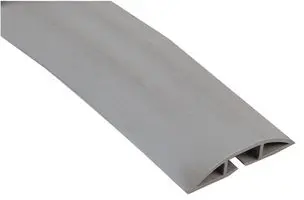
I ran a 20m Vention CAT7 patch cable along the floor, around wall corners, and used a 2m floor cable trunking/bracket (purchased at Home Pro) to protect it when crossing a room.

user posted image

This post has been edited by eclectice: Jan 17 2024, 04:13 PM
eclectice
post Jan 19 2024, 03:42 PM

Look at all my stars!!
*******
Senior Member
2,734 posts

Joined: Mar 2008
[Wireless Router] Duration of Security Update Support (only for Singapore)

Product: BQ16, EBA63, EBM68, EBR63, GT-AXE16000, GT-BE98, RT-AXE7800, ZenWiFi Pro ET12
End of Support: 30th December 2026

Product: 4G-AX56, GT6, ROG Rapture GT-AX11000, ROG Rapture GT-AX11000 Pro, ROG Rapture GT-AX6000, RT-AX1800HP (RT-AX54HP), RT-AX53U, RT-AX5400, RT-AX55, RT-AX56U, RT-AX57 (RT-AX3000P), RT-AX58U, RT-AX82U, RT-AX86S, RT-AX86U, RT-AX86U Pro, RT-AX89X, RT-AX92U, TUF-AX3000, TUF-AX4200, TUF-AX5400, TUF-AX6000, ZenWiFi AX Mini XD4, ZenWiFi AX XP4, ZenWiFi AX XT8, ZenWiFi Pro XT12, ZenWiFi XD4S, ZenWiFi XD5, ZenWiFi XD6
End of Support: 28th February 2025

https://www.asus.com/MY/support/FAQ/1051375
archived https://web.archive.org/web/20240119073808/...ort/FAQ/1051375

I think Malaysia should follow this approach.

https://www.csa.gov.sg/our-programmes/certi...ls)product-list

This post has been edited by eclectice: Jan 19 2024, 03:47 PM
eclectice
post Feb 7 2024, 10:13 PM

Look at all my stars!!
*******
Senior Member
2,734 posts

Joined: Mar 2008
Some too many ambiguities and considerations need to be addressed here concerning the broken antenna case:

Cleaning: "Going to clean it" could imply anything from dusting to vigorous scrubbing, each potentially impacting the antenna differently.

Broken: "Broken" doesn't clarify the extent of damage. Did it snap due to external pressure or crumble through simple handling?

The force applied: Did the owner accidentally bump the antenna while cleaning, causing it to break? Or did the plastic simply degrade over time and give way during gentle handling?

Intentionality: Did the owner knowingly subject the antenna to stress beyond its intended use? Or was the breakage an unforeseen consequence of normal cleaning activity?

Product quality: Did the antenna's design or material contribute to its fragility, even under light pressure?

Plastic part: While the ASUS rep mentioned "accident" and "misuse," focusing solely on cosmetic plastic might not reveal the full picture.

I encourage the owner to provide pictures, clarify cleaning methods, and describe the break itself.

Then, the ASUS rep on the forum, with knowledge of warranty policies and product details, can make an informed judgment of the case.

5 Pages « < 2 3 4 5 >Top
 

Change to:
| Lo-Fi Version
0.5869sec    0.53    7 queries    GZIP Disabled
Time is now: 13th December 2025 - 03:53 AM