Welcome Guest ( Log In | Register )

5 Pages < 1 2 3 4 5 >Bottom

Outline · [ Standard ] · Linear+

Home Networking ASUS Malaysia Networking User & Technical Support, Managed by ASUS Malaysia Representative

views
     
eclectice
post Jun 7 2023, 02:30 PM

Look at all my stars!!
*******
Senior Member
2,734 posts

Joined: Mar 2008
QUOTE(blacktubi @ Jun 7 2023, 02:18 PM)
On tri-band system, mesh backhaul only use the 5GHz-2 band as dedicated backhaul.

Both XT8 and XT9 comes with 4x4 160MHz backhaul up to 4804Mbps

Anyway, to answer your technical question, AiMesh doesn't care. You can mix and match all AiMesh models. You can even mesh XT8 with the cheapest RT-AX53U at a cost of slower speed when connected to the RT-AX53U.
*
So, it is just as with water flowing through pipes of different sizes (as an analogy), the available bandwidth of each mesh device will affect the speed and efficiency of data transfer. If we have a lot of devices connected to the network or are transferring large amounts of data, we may benefit from using a mesh device with a larger available bandwidth to ensure that the network can handle the load.
eclectice
post Jun 11 2023, 02:34 PM

Look at all my stars!!
*******
Senior Member
2,734 posts

Joined: Mar 2008
Is Malaysia going to recognize UNII-4 5.9 GHz? Must change my current region to the US to access UNII-4 (DFS 5.9 GHz channel 181)?

I'd like to use UNII-4 5.9 GHz channel 181, which is another bandwidth that most homes do not use, thus there will be less interference. Its DFS support is designed to automatically avoid military/airport/weather radar signals causing a brief disconnectivity if it happens, which is not a concern in my area.

user posted image

Current ZenWifi AX XT8 Firmware Version:3.0.0.4.388_23285

Currently, my 5GHz-2 band used for wireless backhaul is performing great at -54dBm.

My Wireless log for 5GHz-2 Band (before auto DFS channels):

QUOTE
SSID: "xxx@unifi_5G-2"
noise: -87 dBm Channel: 104/160
BSSID: X1:Y2:Z3:A4:B5:C6 Capability: ESS RRM
Supported Rates: [ 6(b) 9 12 18 24(b) 36 48 54 ]
HE Capable:
Chanspec: 5GHz channel 114 160MHz (0xe972)
Primary channel: 104
HT Capabilities: 40Mhz SGI20 SGI40
Supported HT MCS : 0-31
Supported VHT MCS:
  NSS1 Tx: 0-11        Rx: 0-11     
  NSS2 Tx: 0-11        Rx: 0-11     
  NSS3 Tx: 0-11        Rx: 0-11     
  NSS4 Tx: 0-11        Rx: 0-11     
Supported HE MCS:
     80 Mhz:
  NSS1 Tx: 0-11        Rx: 0-11
  NSS2 Tx: 0-11        Rx: 0-11
  NSS3 Tx: 0-11        Rx: 0-11
  NSS4 Tx: 0-11        Rx: 0-11
     160 Mhz:
  NSS1 Tx: 0-11        Rx: 0-11
  NSS2 Tx: 0-11        Rx: 0-11
  NSS3 Tx: 0-11        Rx: 0-11
  NSS4 Tx: 0-11        Rx: 0-11

Interference Level: Acceptable
Mode : AP Only

DFS status: state In-Service Monitoring(ISM) time elapsed 47901000ms radar channel cleared by DFS channel 104/160 (0xE972)

Channel Information                    
----------------------------------------
Channel 100 A Band, RADAR Sensitive
Channel 104 A Band, RADAR Sensitive
Channel 108 A Band, RADAR Sensitive
Channel 112 A Band, RADAR Sensitive
Channel 116 A Band, RADAR Sensitive
Channel 120 A Band, RADAR Sensitive
Channel 124 A Band, RADAR Sensitive
Channel 128 A Band, RADAR Sensitive
Channel 132 A Band, RADAR Sensitive, Passive
Channel 136 A Band, RADAR Sensitive, Passive
Channel 140 A Band, RADAR Sensitive, Passive
Channel 144 A Band, RADAR Sensitive, Passive
Channel 149 A Band
Channel 153 A Band
Channel 157 A Band
Channel 161 A Band
Channel 165 A Band

Stations List                          
----------------------------------------
idx MAC               Associated Authorized   RSSI PHY PSM SGI STBC MUBF NSS   BW Tx rate Rx rate Connect Time
    X1:Y2:Z3:A4:B5:C6 Yes        Yes        -54dBm ax  No  Yes Yes  Yes    4 160M 1361.1M 1361.1M     13:20:06
Sidenote:

UNII-4 is a set of channels in the 5 GHz frequency band that includes channels 52-64 and 100-144. In the United States, the 5.9 GHz frequency band is used for Dedicated Short-Range Communications (DSRC) and Intelligent Transportation Systems (ITS), and includes channel 181 (5.905 GHz). However, the availability and use of channel 181 may be subject to regulatory restrictions and limitations in other regions. It is important to follow local regulations and guidelines when configuring wireless networks.

DFS is a mechanism that allows wireless devices to detect and avoid interference with radar systems that operate in the same frequency band.

This post has been edited by eclectice: Jun 11 2023, 04:54 PM
eclectice
post Jun 19 2023, 09:44 AM

Look at all my stars!!
*******
Senior Member
2,734 posts

Joined: Mar 2008
Attention all Asus ZenWIFI Pro XT12 users! I need your help in detecting a potential issue with the router. If you have experienced any difficulties connecting to the WAN/Internet after configuring the PPPoE account, please let me know.

I recently purchased ZenWifi Pro XT12 (2 pack) to replace my ZenWifi AX XT8 (2 pack) as my primary router. However, I encountered a problem with the WAN/Internet connection after setting up the PPPoE account.

I initially suspected that the issue was caused by the Ethernet cable that I was using to connect the Unifi BTU's LAN1 port (a ZTE fiber modem) to the WAN port of the Pro XT12.

However, I tested the cable by connecting it again to the WAN port of the ZenWifi AX XT8, and the WAN/Internet worked properly again.

I also considered the possibility that the WAN port of the Pro XT12 was malfunctioning. However, the router was able to detect cable disconnection/reconnection when observing it through the ASUS Router app, only just It told me that It couldn't connect to the Internet.

I have conducted the same tests with another Pro XT12 unit, yet the issue persists with that unit as well.

I have attempted to use other Ethernet cables that I had on hand, but unfortunately, the issue persisted with both Pro XT12 units. However, when I tested the same cables with the XT8, it worked flawlessly. This further confirms that the issue is specific to the Pro XT12 model and not caused by external factors such as the Ethernet cable.

Despite my efforts to troubleshoot the problem, both units were unable to connect to the WAN/Internet after configuring the PPPoE account.

This leads me to believe that the issue is not isolated to a single faulty unit, but rather an unexpected behavior in the Pro XT12 model that I am not aware of.

When I initially went through the setup wizard, I believed that I had selected the "Unifi-Home" option as the profile. So, I ignored rechecking the profile.

Therefore, I believe that the problem may be unique to the Pro XT12 model, and I need your assistance in identifying and resolving it.

Currently, I have reverted to using the XT8 as my primary router and have set up the Pro XT12 units as nodes in order to have access to the Internet. While this is a temporary workaround, it is not an ideal setup as it may not fully utilize the capabilities of the Pro XT12 units. Nonetheless, it allows me to maintain connectivity and continue to use my network until a solution to the issue with the Pro XT12 is found.

NOTES:
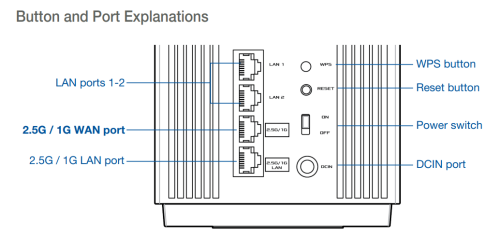
Asus ZenWIFI Pro XT12 -> RJ45 for 2.5G BaseT for WAN x 1
Asus ZenWIFI AX XT8 -> RJ45 for 2.5G BaseT for WAN x 1

I haven't updated the firmware yet since getting the issue; so, both units are still with the old stock firmware Version 3.0.0.4.386.49723

This post has been edited by eclectice: Jun 19 2023, 10:23 AM
eclectice
post Jun 19 2023, 10:53 AM

Look at all my stars!!
*******
Senior Member
2,734 posts

Joined: Mar 2008
QUOTE(Eithanius @ Jun 19 2023, 10:51 AM)
Why didn't you update the firmware on the XT12 see if that solves the problem...?
*
I'll try it when I get home because I can now update Pro XT12 with my current workaround network using XT8 as my primary router.

eclectice
post Jun 19 2023, 11:25 AM

Look at all my stars!!
*******
Senior Member
2,734 posts

Joined: Mar 2008
QUOTE(sHawTY @ Jun 19 2023, 11:07 AM)
Did you write the PPPoE username correctly?
Just in case, go back to WAN > Internet Connection: then check if your username is written like this: "example@unifi"
Once you've written everything correctly, click Apply

Then go to LAN > IPTV > Select ISP Profile > Unifi Business / UniFi Home
*If you don't use the UniFi TV set top box, you can use the UniFi Business profile

Once you've chosen the correct ISP profile, click Apply
*
I did select "Unifi-Home" as my IPTV profile. After double-checking my PPPoE settings, I determined that the issue was not related to the Unifi PPPoE username or password.

Yes, I could try the "Unifi-Business" profile later, but I'm not sure how it would address the PPPoE connection issue.

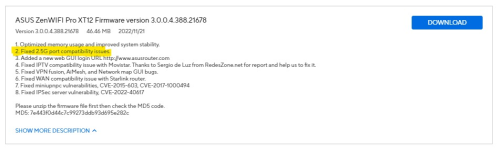
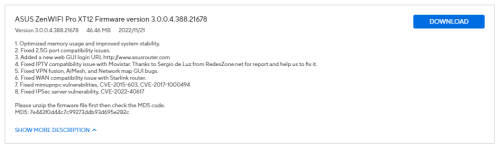
This firmware version is quite interesting and is more recent than the stock firmware:

user posted image

https://www.asus.com/my/networking-iot-serv...enWiFi-Pro-XT12

It doesn't reveal much, but given that the WAN port is of 2.5G port standard, I suspect it.

user posted image

Let's see what will happen after I update the Pro XT12 to the latest firmware when I get home.

References that I may use to troubleshoot:
https://www.asus.com/my/support/FAQ/1030645/
https://support.huawei.com/enterprise/en/do...oe-dialup-fails

This post has been edited by eclectice: Jun 19 2023, 11:49 AM
eclectice
post Jun 19 2023, 08:18 PM

Look at all my stars!!
*******
Senior Member
2,734 posts

Joined: Mar 2008
QUOTE(eclectice @ Jun 19 2023, 11:25 AM)
I did select "Unifi-Home" as my IPTV profile. After double-checking my PPPoE settings, I determined that the issue was not related to the Unifi PPPoE username or password.

Yes, I could try the "Unifi-Business" profile later, but I'm not sure how it would address the PPPoE connection issue.

This firmware version is quite interesting and is more recent than the stock firmware:

user posted image

https://www.asus.com/my/networking-iot-serv...enWiFi-Pro-XT12

It doesn't reveal much, but given that the WAN port is of 2.5G port standard, I suspect it.

user posted image

Let's see what will happen after I update the Pro XT12 to the latest firmware when I get home.

References that I may use to troubleshoot:
https://www.asus.com/my/support/FAQ/1030645/
https://support.huawei.com/enterprise/en/do...oe-dialup-fails
*
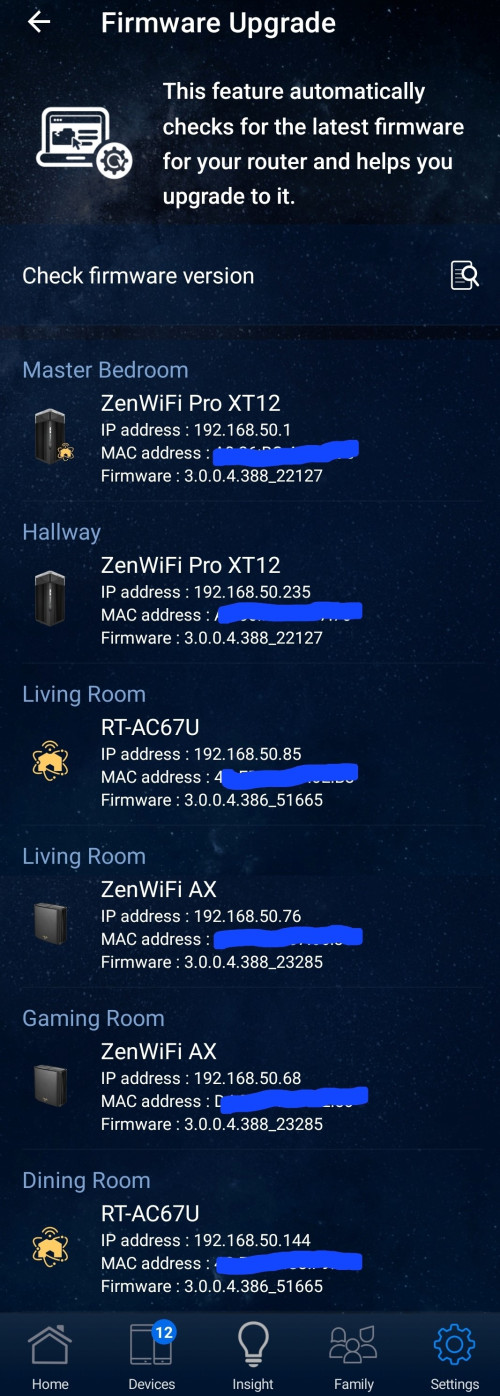
After updating my Pro XT12 router to the latest firmware ASUS ZenWiFi Pro XT12 Firmware version 3.0.0.4.388.22127, I was able to successfully resolve the issue with the WAN port in relation to PPPoE.

user posted image

user posted image

» Click to show Spoiler - click again to hide... «


This post has been edited by eclectice: Jun 19 2023, 08:33 PM
eclectice
post Jun 19 2023, 09:06 PM

Look at all my stars!!
*******
Senior Member
2,734 posts

Joined: Mar 2008
QUOTE(Eithanius @ Jun 19 2023, 09:01 PM)
You live in a castle or something...?  blink.gif  blink.gif
*
3-story bungalow
eclectice
post Jun 20 2023, 05:11 PM

Look at all my stars!!
*******
Senior Member
2,734 posts

Joined: Mar 2008
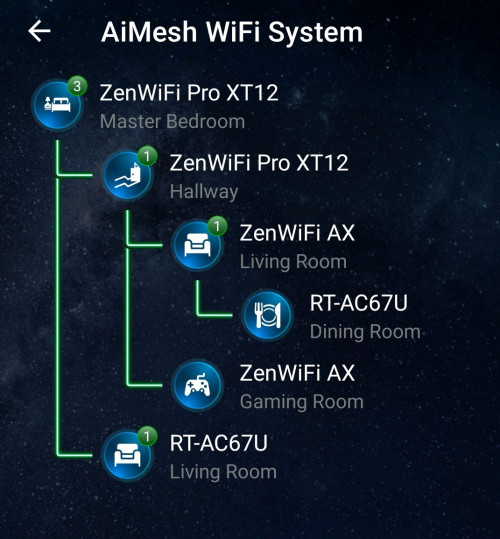
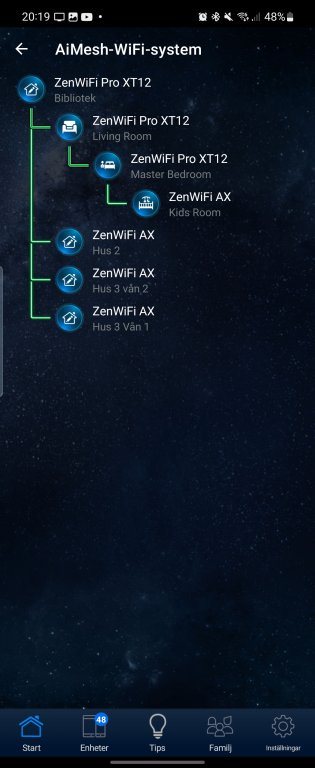
Having multiple Aimesh nodes in a house is not uncommon, especially if there are many walls and floors that obstruct the wireless signal. In fact, it is often necessary to have several nodes to ensure that the wireless signal reaches every corner of the house. It is the option left if we can't do a wired backhaul.

This Swedish person seems to have even more nodes than I do!

user posted image

This post has been edited by eclectice: Jun 20 2023, 05:53 PM
eclectice
post Jun 21 2023, 08:47 AM

Look at all my stars!!
*******
Senior Member
2,734 posts

Joined: Mar 2008
QUOTE(blacktubi @ Jun 20 2023, 06:25 PM)
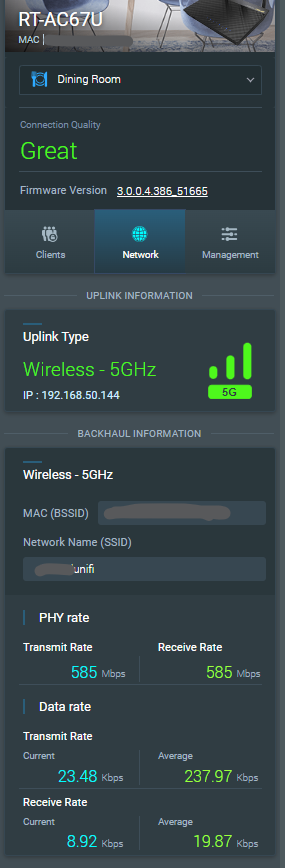
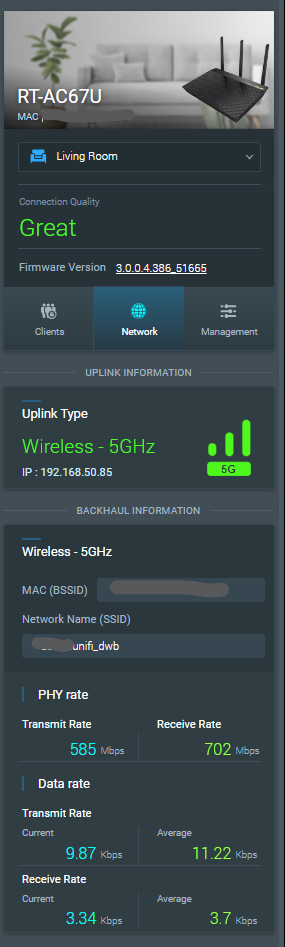
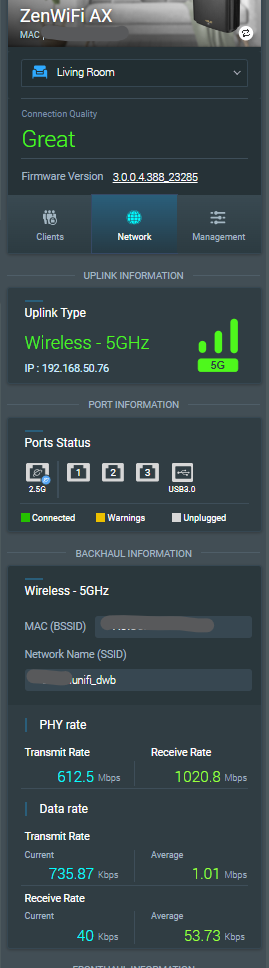
What's your performance when connected to the mesh node especially for the dining room RT-AC67U.
*
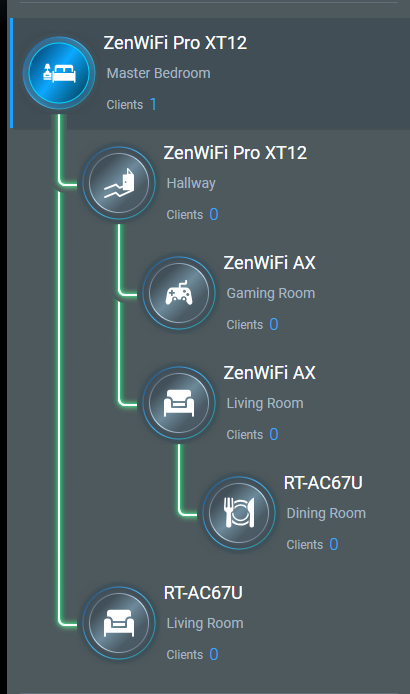
TM Unifi plan: 800/200 Mbps (tested speed 840.39/207.75 Mbps via TM Klang using built-in Asus speed test OOKLA page; apologies for the image limit per post on the Lowyat forum)

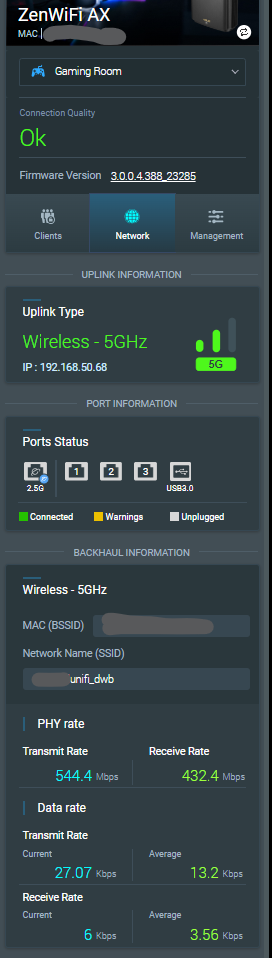
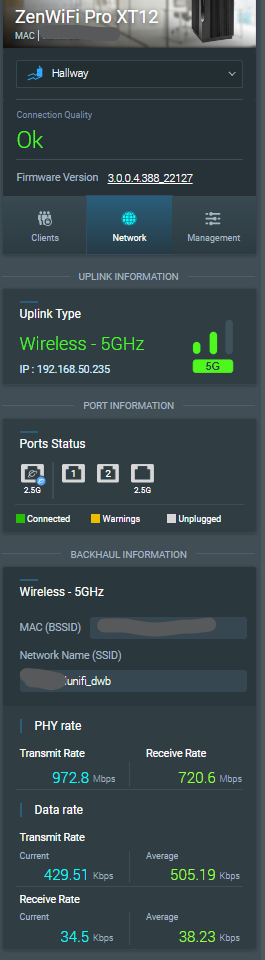
AsusWRT AiMesh page for today (21 June 2023):

user posted imageuser posted image

user posted imageuser posted image user posted image


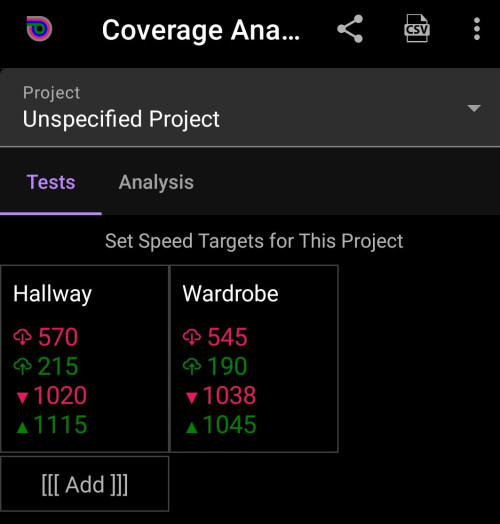
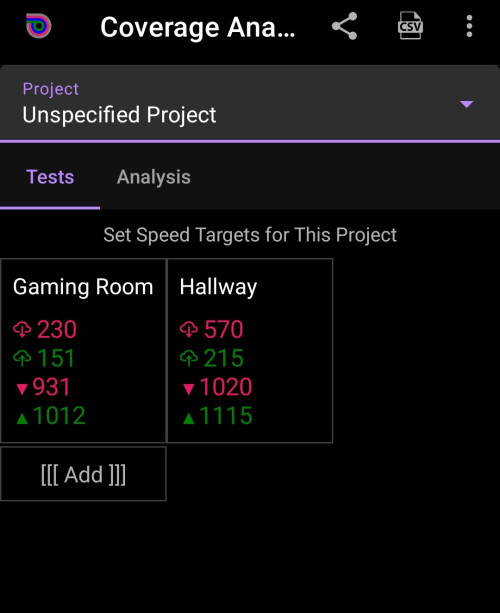
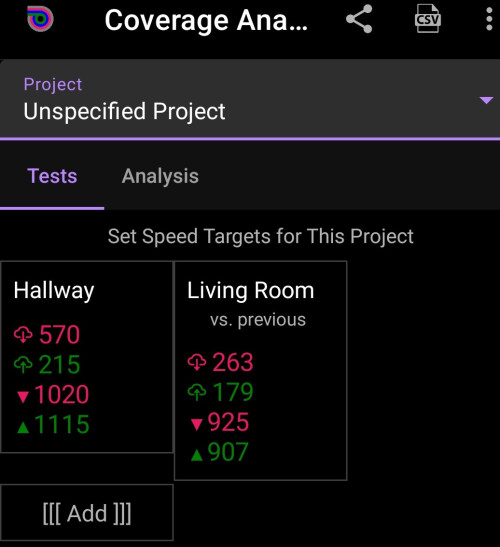
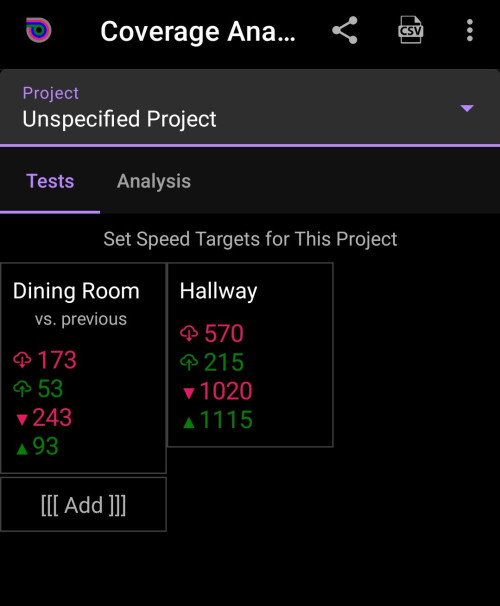
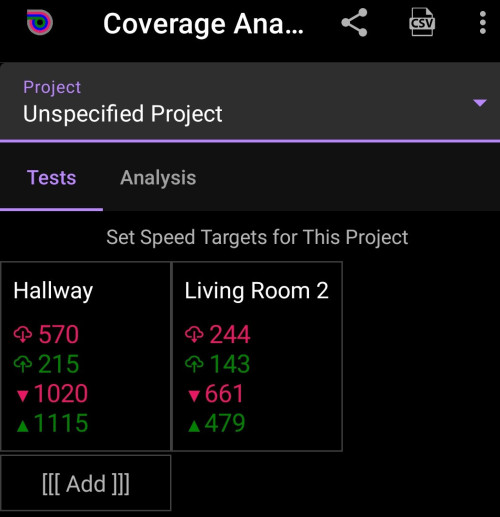
Analiti app (free account; installed on Samsung Galaxy S22) test analysis results done on 19 June 2023:

The first two are WIFI DL/UL rates (in Mbps)
The last two are WIFI mean PHY RX/TX rates (in Mbps)

Note: The PHY rate reported by the app may not always be accurate or reliable, as it may be affected by the quality of the app's algorithms and the accuracy of the data received from the device's hardware.

Hallway and Wardrobe (wardrobe in the master bedroom is where the main router XT12 resides)
user posted image

Gaming room and hallway
user posted image

Hallway and living room (I don't understand what it means by "vs. previous" remark)
user posted image

Hallway and Dining room (I don't understand what it means by "vs. previous" remark)
user posted image

Hallway and Living Room 2 where RT-AC67U is located
user posted image

This post has been edited by eclectice: Jun 21 2023, 11:40 AM
eclectice
post Jun 21 2023, 11:00 AM

Look at all my stars!!
*******
Senior Member
2,734 posts

Joined: Mar 2008
Two firmware bugs I have found so far for ASUS ZenWiFi Pro XT12 Firmware version 3.0.0.4.388.22127 (since it is the main router):

Bug#1

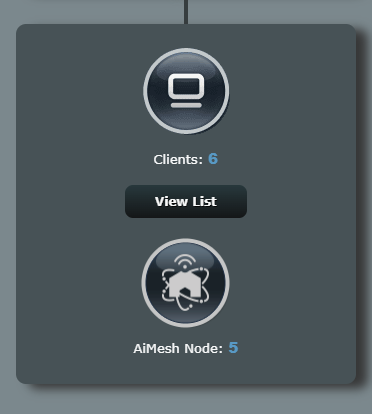
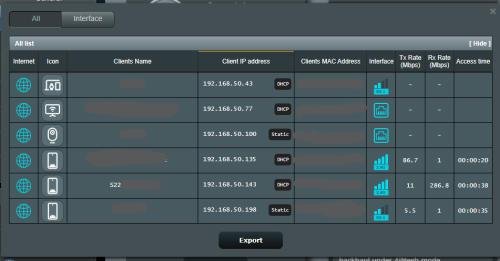
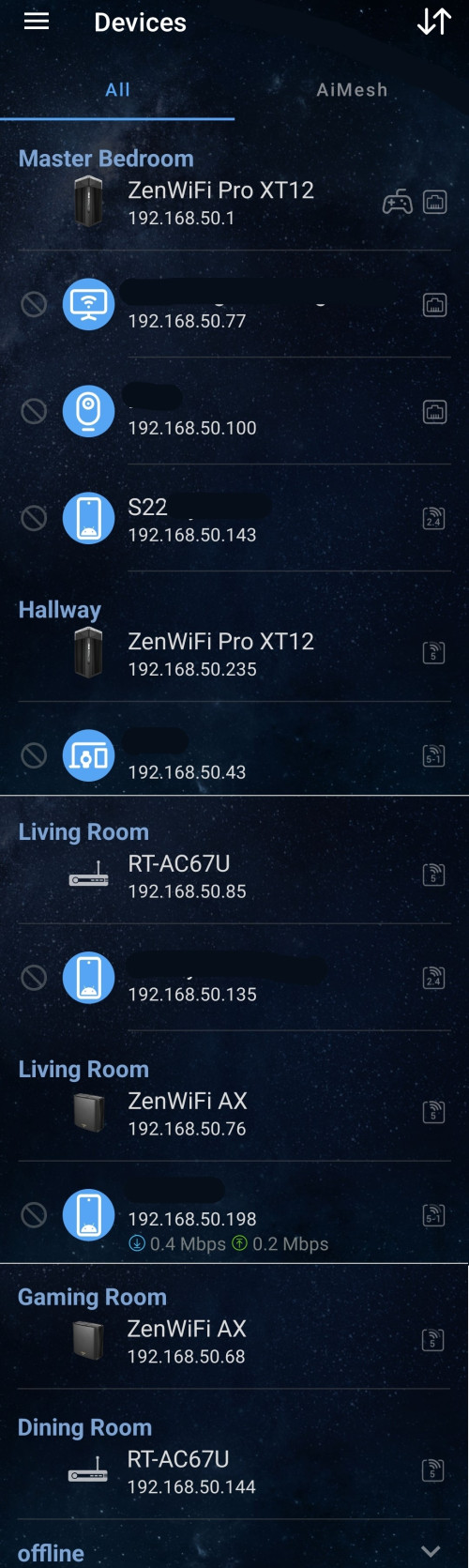
I discovered that the devices reported on the AsusWRT AiMesh page and in the Asus Router app do not tally with the newest firmware. The ASUS Router app report is right.

There is no issue with the device count and what is reported on the Network Map tab.

So, it appears to be a bug.

ASUS Router app
user posted image

ASUSWRT AiMesh page:
user posted image

ASUSWRT Network Map page:
user posted image

Bug#2

Another issue is that one of the six devices (S22 in both images below) is no longer joined to the network, yet it is still listed on both the ASUS Router app and the ASUWRT Network Map:

Therefore, we can't trust the report on each device's access time and other metrics.

user posted image

user posted image

There are references to changes made in the prior firmware, yet it appears to still have many issues:

user posted image

This post has been edited by eclectice: Jun 21 2023, 11:49 AM
eclectice
post Jun 25 2023, 10:15 AM

Look at all my stars!!
*******
Senior Member
2,734 posts

Joined: Mar 2008
QUOTE(ASUSmy @ Jun 23 2023, 11:47 AM)
Hi eclectice,

Thank you for the feedback on the bugs, will send it to our RD to check and get back to you ASAP.

Can you help to send a feedback using the router GUI at Administration->Feedback.

PM me your email address used to send the feedback once done.

Thank you
*
Thank you but I won't.

My suspicion why this happens is my AiMesh network is no longer homogeneous due to three different models and AiMesh management report protocol doesn't work well in such setup.

Even now, I can't trust the reported AiMesh setup in both app and website page since they are not updating the current state of the devices in the network at all. It looks the same since the day I set it up. There is no change in term of the devices going in and out of the network.

Despite the reporting issue, the network works just fine.

My suspicion is valid since I have another home with two-pack ZenWifi AX XT8 only. In this homogeneous AiMesh network, its AiMesh report is correct in both the app and the website page.

This post has been edited by eclectice: Jun 27 2023, 08:42 AM
eclectice
post Jun 28 2023, 09:51 AM

Look at all my stars!!
*******
Senior Member
2,734 posts

Joined: Mar 2008
QUOTE(gibranhashim @ Jun 28 2023, 12:06 AM)
I noticed the ET12 is now available for sale here. I recently upgraded to the 1gb Unifi plan but I realised the new router they gave is plugged in directly to the fibre cable with the PPPOE all handled by this router/ONU device. Let’s say I get the ET12 How do I go about setting it up? Thanks.
*
Unifi provides the D-LINK DPN-FX3060V optical network router for 1 and 2 Gbps plans. I think it employs proprietary firmware developed for Unifi (as has previously occurred with all Unifi routers/modems).

The D-Link DPN-FX3060V optical network or ONR router is a fiber gateway with wireless access that acts as a fiber "modem" (the ONT) and a wireless router in one.

You should get two DPN-FX3060V units to create a mesh network: one as the main mesh router and one as a mesh node. If not, please reconfirm with Unifi.

user posted image

Double-NAT

You may have heard about single NAT and double NAT. By default, your mesh network is in a single NAT configuration with DPN-FX3060V primary router.

Single NAT and double NAT are two different ways of using Network Address Translation (NAT) to connect multiple devices to the internet.

Single NAT is the most common way to use NAT. In a single NAT configuration, there is one router that performs NAT for all of the devices on the network. This router has a public IP address that is assigned by the internet service provider (ISP). The router then translates the private IP addresses of the devices on the network to the public IP address. This allows the devices on the network to communicate with the internet.

Double NAT occurs when there are two routers that perform NAT. This can happen if you have a router from your ISP and then you add another router to your network. The second router will also perform NAT, which will create a second layer of translation.

You may need to set up a double NAT configuration to use your Asus mesh router (ZenWifi ET12) with the DPN-FX3060V router to extend your wireless network. This is because the Asus router's wireless mesh capabilities and the DPN-FX3060V's wireless mesh technology are incompatible. Unlike the DPN-FX3060V, the Asus router does not support the WIFI EasyMesh standard via its AiMesh technology.

https://www.wi-fi.org/discover-wi-fi/wi-fi-easymesh
https://dongknows.com/asus-aimesh-overview/

user posted image

While the Unifi FAQ statement is partially true, it may not be entirely accurate. If you have a wireless mesh router from a brand other than Asus that supports EasyMesh, such as the TP-LINK Deco series, you can connect it to the DPN-FX3060V mesh to extend your network coverage without performing any double-NAT configuration. However, it's important to note that the performance of the connected router may be negatively impacted if the EasyMesh implementation in the DPN-FX3060V or TP-LINK Deco is crippled or has limitations. So, you have no choice but to perform a double-NAT configuration.

The steps on how to create a double NAT configuration between an ASUS router and a DPN-FX3060V router via LAN cable:

https://dongknows.com/double-nat-vs-single-nat/

Take note that Double NAT can cause problems with some applications and services, such as gaming and file sharing.

Bridge Mode

Another alternative to double-NAT is bridge mode: setting the primary router (ISP gateway) as a bridge can be an alternative to using double NAT.

In this setup, the primary router acts as a bridge, forwarding all network traffic to the secondary router to handle routing and NAT. This eliminates double NAT issues in gaming, file sharing, and VoIP. With only one NAT device to manage, network setup is simplified, and all devices can access the full internet bandwidth, improving performance.

Since it is really difficult to get a proper user manual for DPN-FX3060V, I can't help you in this regard.

WIFI cert for DPN-FX3060V from WIFI Alliance

Attached File  WFA125713__No_.pdf ( 77.86k ) Number of downloads: 11


The aforementioned double-NAT and bridge mode enables you to take advantage of certain helpful AiMesh features. If you don't care about that, you may simply configure the Asus router as an access point (AP) or a repeater.

I recommend against using the ET12's 6GHz band as a wireless backhaul in the AiMesh configuration if you have a large home with more than two stories and at least six rooms to cover because it has a shorter range and may not give enough coverage for your needs.

This post has been edited by eclectice: Jun 28 2023, 12:32 PM

eclectice
post Jun 29 2023, 12:41 PM

Look at all my stars!!
*******
Senior Member
2,734 posts

Joined: Mar 2008
QUOTE(Jason2021 @ Jun 28 2023, 11:56 PM)
Hi I am using ASUS ZenWifi ProXT12. My Unifi package is 800 Mbps. When I test internet speed using the ASUS app, it will always reach max speed. But when I test using the Speedtest app, it can only achieve max 400 plus Mbps. I am using same mobile phone (Samsung S22 Ultra) for both tests. Do you have such issue & how to rectify it? Thanks
*
It's important to understand that while the ASUS Router app provides a user-friendly interface for accessing your router's web interface, the actual speed test is conducted from the router's side (AsusWRT), not the app itself. Both the Speedtest app and the built-in speed test available through the ASUS router app and its web interface (AsusWRT) use the OOKLA service to conduct the test. However, it's worth noting that the test server used can affect the results, which may vary between the two apps.

To get a more accurate comparison, it's recommended to use the same test server for both tests. Additionally, wireless interference and signal strength can also affect the speed test results on your smartphone. To eliminate these factors and obtain a more accurate measurement of your internet performance, you can try running the speed test from a wired device connected directly to your router or using the ASUS router app or AsusWRT web interface to test speed. Remember to use the same test server for both tests to ensure a fair and accurate comparison.

This post has been edited by eclectice: Jul 3 2023, 09:39 AM
eclectice
post Jun 29 2023, 12:55 PM

Look at all my stars!!
*******
Senior Member
2,734 posts

Joined: Mar 2008
QUOTE(gibranhashim @ Jun 28 2023, 09:29 PM)
Thanks for this. Is it possible to switch off the Wi-Fi function on the provided router/modem and get the ET12 to handle the wi fi? Also should I just get a second hand ONU online and connect the ET12 to that instead?
*
Yes, it's usually possible to disable the Wi-Fi function on the provided router/modem and let the Asus ZenWifi ET12 handle the Wi-Fi network instead. This way, you can take advantage of the mesh capabilities of the ET12 and potentially improve the coverage and performance of your wireless network. It also saves your electricity bill by turning off the wireless service that you don't need on the ONR (ISP gateway).

To disable the Wi-Fi function on the DPN-FX3060V, I think you can usually do so through the router's web-based interface (the app). Look for a setting related to wireless or Wi-Fi, and you should be able to turn it off from there.

On the Asus router, this setting is available in its Wireless advanced settings. You need to choose which WIFI band to turn its radio off.

user posted image

Regarding replacing the ONR provided by Unifi with a third-party ONU/ONT, it's important to note that this may not be possible without getting support from Unifi. Some ISPs may require you to use their specific ONR or have strict compatibility requirements, so it's best to check with ISP (Unifi) first before attempting to replace the ONR with a third-party ONU/ONT. Additionally, some ISPs may not provide support or warranty for third-party equipment, so you should weigh the risks and benefits before making a decision.

This post has been edited by eclectice: Jun 29 2023, 01:04 PM
eclectice
post Jul 4 2023, 04:59 PM

Look at all my stars!!
*******
Senior Member
2,734 posts

Joined: Mar 2008
I'm not going to start using beta firmware just yet. However, I need additional information on some of the latest beta features in ZenWIFI XT12, such as VLAN-only networking.

ASUS ZenWiFi Pro XT12 Firmware version 9.0.0.6.102.4856
Version 9.0.0.6.102.4856
Beta Version
49.55 MB
2023/03/21
Be noted: This is an early stage beta, there might be bugs. This version can be downgraded via web GUI only.

1. Recap new features of 3.0.0.6.102: Guest network Pro(SDN), VLAN, Auto USB WAN backup, iPhone tethering, Multi-services WAN.
2. Re-defined VLAN, supports Trunk, Access mode with VLAN-only-network.
3. Synchronize Guest network pro (SDN) with VLAN, create/delete new VLAN-only-network will create/delete a new profile in Guest network as well.
4. Port isolation and AP isolation to restrict device access to each other.
5. Re-defined multi-service WAN, disable it by default.
6. Add surfshark VPN in VPN fusion.


ASUS ZenWiFi Pro XT12 Firmware version 9.0.0.6.102.3506
Version 9.0.0.6.102.3506
Beta Version
48.88 MB
2022/12/30
Be noted: This is an early stage beta, there might be bugs. This version can be downgraded via web GUI only.

New Features:
1. Add Guest Network Pro:
• Kids WiFi: Create a network for kids that blocks access to adult content and has a schedule to control when the network is available.
• VPN WiFi: Create a VPN network that connects to 3rd party VPN services or with ASUS site to site VPN(https://www.asus.com/support/FAQ/1048281/) to encrypts your internet connection and hides your IP address to protect your online activities from being tracked or monitored.
• IoT WiFi : Create an IoT (Internet of Things) network that blocks malicious traffic* and only allows 2.4GHz devices to connect.
• Guest WiFi: Create a guest network with a WiFi schedule and access rights to control when and how guests can use the network.
2. Add VLAN in LAN settings.
3. Add Multi-services WAN, create multiple profiles on a single WAN interface.

https://www.asus.com/my/networking-iot-serv...enWiFi-Pro-XT12

This post has been edited by eclectice: Jul 4 2023, 05:21 PM
eclectice
post Jul 17 2023, 02:26 PM

Look at all my stars!!
*******
Senior Member
2,734 posts

Joined: Mar 2008
QUOTE(kkranger @ Jul 14 2023, 11:37 AM)
Hi all.

Need your opinion. I bought at ROG GT AC2900 during Covid 2020 and now having some issues with it.
1. Past 1 month the internet speed and its connection is up and down. It will improve after i resatrt the router and after few days, the problems comes back again.
2. Sometimes the LED lights are out but the router is half working. Some gadgets are connected and some nare not.
3. I cant log in to its web GUI.

I have never updated its firmware. Would factory reset and updated software help me with the modem? Or should i just buy a new one? Thanks.
*
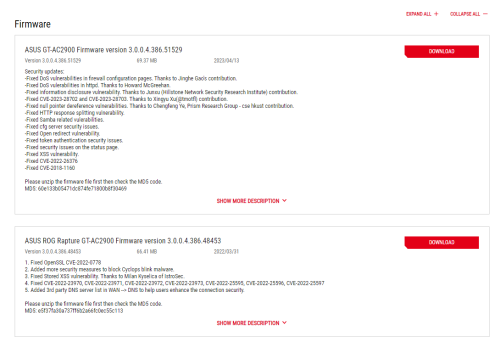
Wow, there are only two firmware upgrades for this model so far:

user posted image

https://rog.asus.com/my/supportonly/rog_rap.../helpdesk_bios/

I'm not sure if you purchased it during the COVID period since the first firmware release wasn't until 2022. Could you please clarify when you bought it?

You may want to consider updating the firmware to see if it can help extend the life of your router.

However, based on my personal experience with the RT-AC88U router I purchased in 2019, which exhibited similar symptoms to what you're experiencing, I decided to replace it instead.

When I ran a speed test, the results showed that it was only delivering half of the normal speed that my 800 Mbps Unifi package subscribed to. After confirming with the TM technician that the speed test was done using their stock mesh router, I opted to upgrade to the Asus ZenWIFI AX XT8 (2022) 2-pack for my first home.

This was a wise choice, as I had previously purchased the same Asus ZenWIFI AX XT8 system for my neighbor in 2020 and it's still performing well today.

Now, I have another Asus ZenWIFI AX XT8 mesh system joined together with a 2-pack ZenWIFI XT12 (2023) for my other home.

This post has been edited by eclectice: Jul 17 2023, 02:55 PM
eclectice
post Jul 21 2023, 09:28 AM

Look at all my stars!!
*******
Senior Member
2,734 posts

Joined: Mar 2008
QUOTE(sadlyfalways @ Jul 20 2023, 02:53 PM)
Hey guys! I'm in the midst of contemplating which new router to buy before upgrading to unifi 1gbps plan

Anyone here who is using an X model asus router with wireshark to 3rd party vpn?

May I know what kinds of speeds you can get?

Right now i'm using an old ac86u as my vpn router, and tp link deco x90 as access point

deco can reach 800mbps without vpn

if enable vpn to singapore surfshark server via asus router can get 200mbps

its ok buy with multiple people at home can get really show

what speeds do you guys get?
*
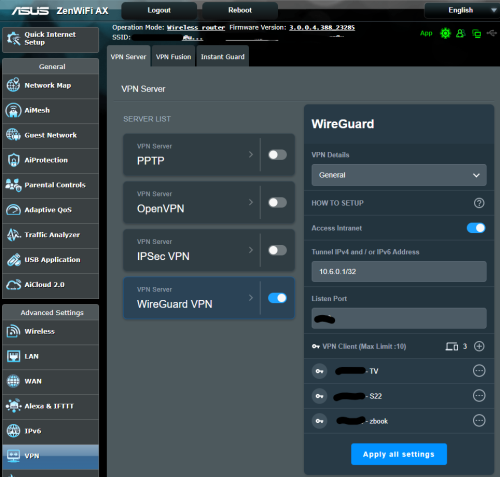
Did you mean WireGuard instead of Wireshark? I have set up WireGuard clients on devices like phones and Android TVs with my router as the WireGuard server, and it works quite well and is fast. However, I have stopped using it because it only allows tunneling over UDP and not TCP, which means I cannot bypass firewalls using TCP port 443.

user posted image

This post has been edited by eclectice: Jul 21 2023, 12:08 PM
eclectice
post Oct 12 2023, 02:52 PM

Look at all my stars!!
*******
Senior Member
2,734 posts

Joined: Mar 2008
QUOTE(satriaguy @ Oct 10 2023, 05:25 PM)
can i confirm there is no such function/feature to re-connect to better RSSI Aimesh node even the existing node signal still strong ?
*
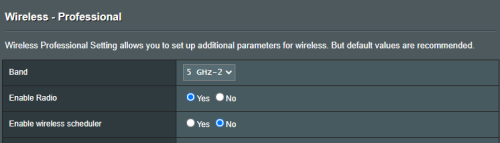
There is an option under the Wireless > Professional section in the Asus router where you control the roaming signal threshold using the Roaming Assistant.

TL;DR: Roaming Assistant on Asus routers lets you stay connected to the best AP in your network. It checks your signal strength and switches you to a stronger AP if needed. You won't notice any drops in your connection.

user posted image

In the image above, the Roaming Assistant feature is already enabled. The Disconnect clients with RSSI lower than value is set to -70 dBm. This means that the Roaming Assistant will disconnect a client from the current AP and connect it to a stronger AP if the signal strength falls below -70 dBm.

Play around with the RSSI lower than setting to make your network better. Too low = too much roaming, bad for speed. Too high = weak signal, bad for quality.

This post has been edited by eclectice: Oct 12 2023, 02:54 PM
eclectice
post Nov 6 2023, 03:11 PM

Look at all my stars!!
*******
Senior Member
2,734 posts

Joined: Mar 2008
QUOTE(blacktubi @ Nov 3 2023, 09:00 PM)
After 11 months, ASUS finally released a new firmware update for the ZenWiFi XT12

Still my mesh Wi-Fi of choice if budget is not an issue

Firmware version 3.0.0.4.388_24177
- Release Note -

» Click to show Spoiler - click again to hide... «

*
user posted image
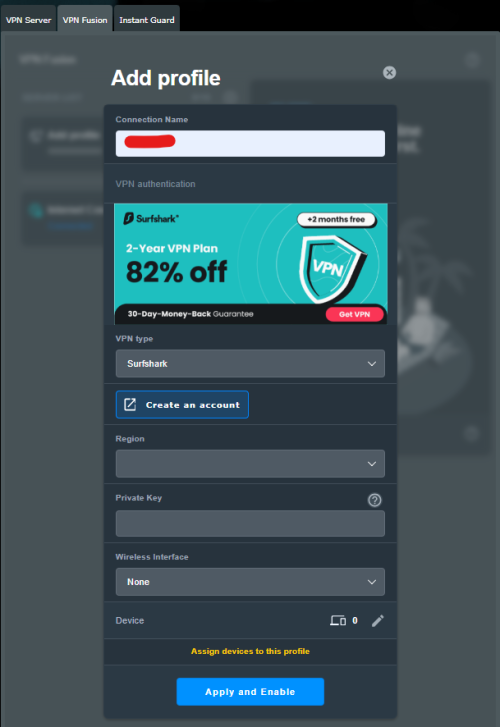
Surfshark VPN Fusion is supported on ZenWIFI XT8. I didn't notice it missing on XT12 Pro before the update since I don't use Surfshark.

This post has been edited by eclectice: Nov 6 2023, 03:23 PM
eclectice
post Nov 19 2023, 08:53 AM

Look at all my stars!!
*******
Senior Member
2,734 posts

Joined: Mar 2008
QUOTE(mikey8811 @ Nov 17 2023, 02:29 PM)
Hi

I just had the Unifi people come and switch my package over to 500 Mbps. However, my Asus 86u seems to be capping the speeds at 100 Mbps.


*
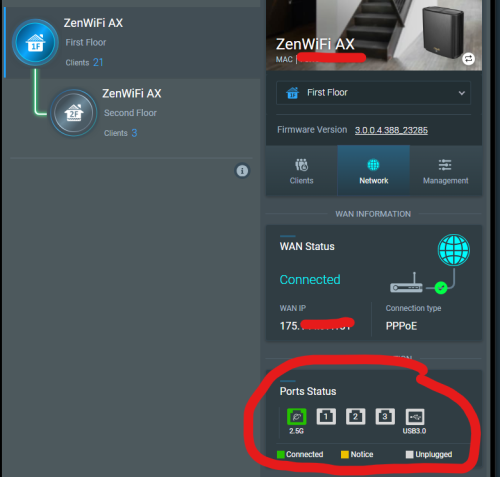
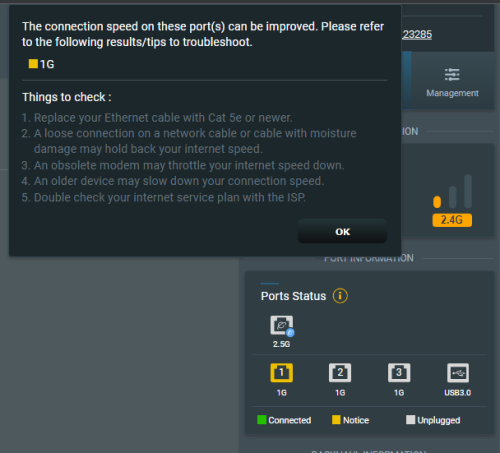
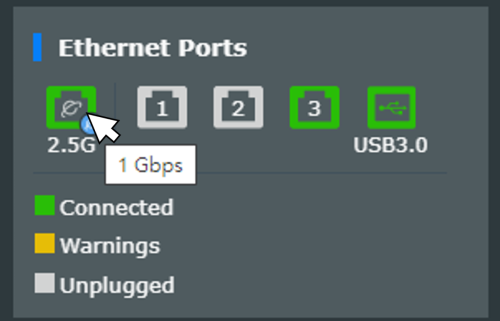
According to the ASUS specs, the Ethernet WAN/LAN ports are Gigabit ports. It is likely your Ethernet cable to one of these ports is not getting Gigabit speed; it detects 100 Mbps instead of 1 Gbps. Can you get a screenshot of your LAN/WAN port performance like the below image?

user posted image

If it is not working at its intended port speed, the port will get a yellow notice and if you hover your mouse pointer over the yellow port icon, a tooltip will tell you the detected speed.

user posted image

user posted image

This post has been edited by eclectice: Nov 19 2023, 12:20 PM

5 Pages < 1 2 3 4 5 >Top
 

Change to:
| Lo-Fi Version
0.0483sec    0.65    7 queries    GZIP Disabled
Time is now: 13th December 2025 - 01:05 PM