

QUOTE(Stefan How @ Jan 2 2013, 02:55 PM)
 Anyone have problem installing the latest Nvidia driver 310.70? It seems im having trouble updating it,i tried clean install and typical too..still no luck..=( any idea?
Lenovo IdeaPad Y Series Thread v2, When Y480/580 meet Y400/500
|
|
 Jan 2 2013, 05:28 PM Jan 2 2013, 05:28 PM
|
 
Senior Member
1,916 posts Joined: Jan 2012 From: USJ  
|
QUOTE(Stefan How @ Jan 2 2013, 02:55 PM) Anyone have problem installing the latest Nvidia driver 310.70? It seems im having trouble updating it,i tried clean install and typical too..still no luck..=( any idea? |
|
|
|
|
|
Jan 2 2013, 07:32 PM
|

Junior Member
12 posts Joined: Apr 2012
|
Hey guys, lenovo y400 user reporting for duty here
 But when i tried play LoL in this laptop, got sudden lag spikes sometimes like when skilling, or even opening the shop tab. :/ any tips? |
|
|
Jan 2 2013, 07:46 PM
|

Junior Member
64 posts Joined: Sep 2011
|
Hi guys, I just wanted to ask where to get the Y480? Not many sellers at LYP and Digital Mall have it.
|
|
|
Jan 2 2013, 07:49 PM
|
 
VIP
969 posts Joined: Sep 2008 From: Subspace Emissary
|
QUOTE(Insanity_Jerr @ Jan 2 2013, 07:46 PM) Hi guys, I just wanted to ask where to get the Y480? Not many sellers at LYP and Digital Mall have it. try check at LYN garage sales... there are some sellers that may still sell em... i believe many already switched to Y400  |
|
|
Jan 2 2013, 11:27 PM
|

Senior Member
977 posts Joined: Jan 2009 From: In the middle...
|
QUOTE(kujiro @ Jan 2 2013, 02:27 PM) It seems like the lenovo had set to throttle down the CPU speed to 2.4ghz after reaching 90C, attached is the testing using throttlestop to maintain the speed after 90C and max the CPU temp reach 98C without cooler. I believe the throttle temp comes from the CPU itself... not Lenovo...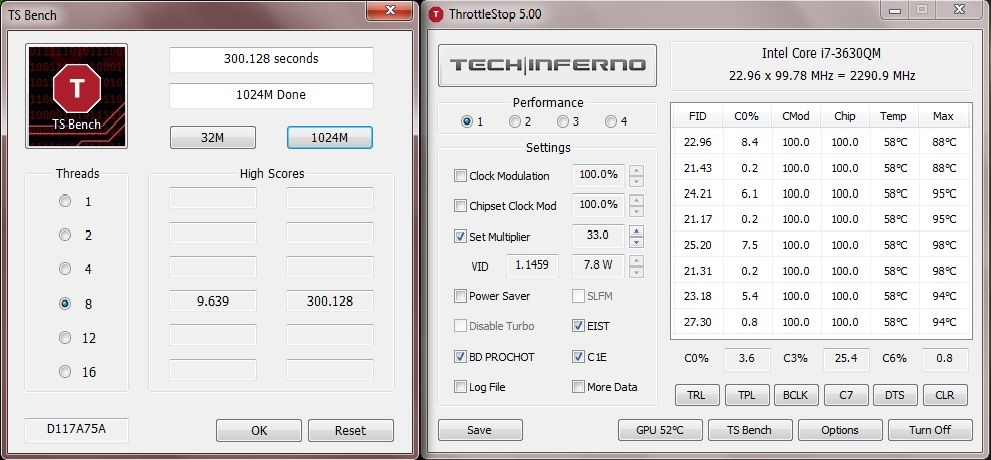 QUOTE(Stefan How @ Jan 2 2013, 02:55 PM) Anyone have problem installing the latest Nvidia driver 310.70? It seems im having trouble updating it,i tried clean install and typical too..still no luck..=( any idea? |
|
|
Jan 3 2013, 12:17 AM
|

Senior Member
1,329 posts Joined: May 2008
|
QUOTE(kujiro @ Jan 2 2013, 02:27 PM) It seems like the lenovo had set to throttle down the CPU speed to 2.4ghz after reaching 90C, attached is the testing using throttlestop to maintain the speed after 90C and max the CPU temp reach 98C without cooler. every cpu will also do the same thing |
|
|
|
|
|
Jan 3 2013, 12:17 AM
|
|
Junior Member
248 posts Joined: Dec 2012
|
QUOTE(tennytyy @ Jan 2 2013, 05:28 PM) Make sure you download the notebook version instead of desktop version of driver i did,i download the notebook version..but still..cant update =/  |
|
|
 Jan 3 2013, 12:40 AM Jan 3 2013, 12:40 AM
|

Junior Member
133 posts Joined: May 2012 From: Cyberjaya
|
Hello guys, proud Y480 user here.
 Can TS add my name to the list? Can TS add my name to the list?  Bought this rig for RM2479 @4GB FreeDOS (11 Aug 2012). Upgraded to 8GB, original Win 7 Pro x64 and Mushkin Atlas mSATA SSD 240GB few months ago, shipped from US.  Mainly used for work, anime and games. WEI: 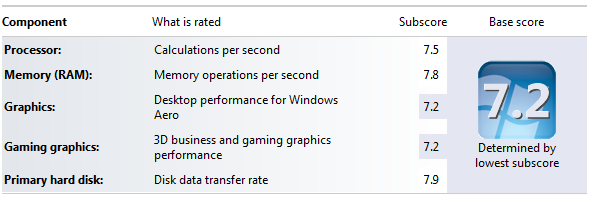 Restart time: 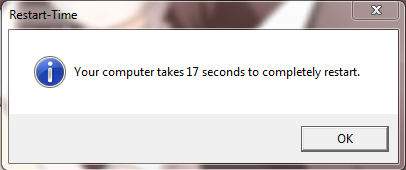 Atto Benchmark: 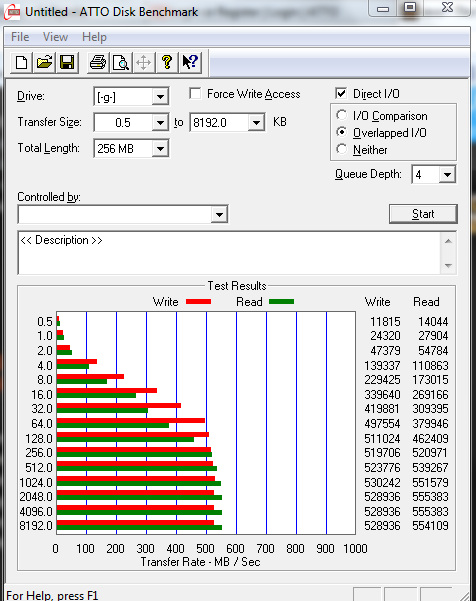 |
|
|
Jan 3 2013, 05:53 AM
|
|
Newbie
1 posts Joined: Jun 2009
|
http://ark.intel.com/products/71459/Intel-...3_40-GHz?q=3630
The Intel specified thermal throttling temperature for a Core i7-3630QM is 105C. Any throttling before the CPU reaches this temperature has nothing to do with Intel. 98C is a high temperature but it is still within the Intel spec. Make sure the ThrottleStop Set Multiplier is set to Turbo to get maximum performance out of your CPU. This post has been edited by unclewebb: Jan 3 2013, 05:56 AM |
|
|
Jan 3 2013, 06:30 AM
|
|
Senior Member
977 posts Joined: Jan 2009 From: In the middle...
|
QUOTE(unclewebb @ Jan 3 2013, 05:53 AM) http://ark.intel.com/products/71459/Intel-...3_40-GHz?q=3630 yeah, you're right... it's from Lenovo... The Intel specified thermal throttling temperature for a Core i7-3630QM is 105C. Any throttling before the CPU reaches this temperature has nothing to do with Intel. 98C is a high temperature but it is still within the Intel spec. Make sure the ThrottleStop Set Multiplier is set to Turbo to get maximum performance out of your CPU.  after reading here and there, the limit looks like can be adjusted from BIOS... probably already hardcoded by Lenovo? after reading here and there, the limit looks like can be adjusted from BIOS... probably already hardcoded by Lenovo?and this suddenly reminds me why my BF3 crashed, I remembers the temp is more than 100'C (104'C iinm) and now I wonder how come BF3 used a lot of CPU resources... |
|
|
Jan 3 2013, 08:47 AM
|

Junior Member
238 posts Joined: Dec 2010 From: Kedah
|
QUOTE(shadowzephyr @ Jan 3 2013, 12:40 AM) Hello guys, proud Y480 user here. What software you used to time the restart time? Can TS add my name to the list? Bought this rig for RM2479 @4GB FreeDOS (11 Aug 2012). Upgraded to 8GB, original Win 7 Pro x64 and Mushkin Atlas mSATA SSD 240GB few months ago, shipped from US. Mainly used for work, anime and games. » Click to show Spoiler - click again to hide... « |
|
|
Jan 3 2013, 10:31 AM
|
|
Senior Member
1,329 posts Joined: May 2008
|
QUOTE(unclewebb @ Jan 3 2013, 05:53 AM) http://ark.intel.com/products/71459/Intel-...3_40-GHz?q=3630 Well in 105'c I'm sure almost all the lappy will ady auto shut downThe Intel specified thermal throttling temperature for a Core i7-3630QM is 105C. Any throttling before the CPU reaches this temperature has nothing to do with Intel. 98C is a high temperature but it is still within the Intel spec. Make sure the ThrottleStop Set Multiplier is set to Turbo to get maximum performance out of your CPU. What Intel state the highest temp does not mean that u can reach on that level |
|
|
Jan 3 2013, 10:39 AM
|

Junior Member
160 posts Joined: Jan 2005
|
Anyone resized your partition and Windows 8 having problem on logging in? How do you resolve that if you did?
** OKR definitely won't work anymore, another issue :/ |
|
|
|
|
|
Jan 3 2013, 02:26 PM
|

Junior Member
497 posts Joined: Sep 2005 From: PSN Home/Steam
|
Any Y580 users playing Sleeping Dogs? When you guys run the in game benchmark, does it show running on Intel Hd4000 instead of GTX660M? Mine does though. However, under the Nvidia GPU usage it states that they are running Sleeping Dogs. Confusing...
|
|
|
Jan 3 2013, 02:48 PM
|
|
Junior Member
248 posts Joined: Dec 2012
|
QUOTE(wookp @ Jan 3 2013, 02:26 PM) Any Y580 users playing Sleeping Dogs? When you guys run the in game benchmark, does it show running on Intel Hd4000 instead of GTX660M? Mine does though. However, under the Nvidia GPU usage it states that they are running Sleeping Dogs. Confusing... I think Ur y580 show the intel as the primary,but gaming usually it runs on nvidia..this is wat i think..like lets say im using my y480 play some graphic intensive game on battery..i guess it use intel all the time as to save battery..Its my point of view =/ just telling/ |
|
|
Jan 3 2013, 03:38 PM
|
|
Senior Member
1,916 posts Joined: Jan 2012 From: USJ
|
QUOTE(wookp @ Jan 3 2013, 02:26 PM) Any Y580 users playing Sleeping Dogs? When you guys run the in game benchmark, does it show running on Intel Hd4000 instead of GTX660M? Mine does though. However, under the Nvidia GPU usage it states that they are running Sleeping Dogs. Confusing... I'm sure Sleeping Dogs is running under GTX660M.Don't think so Intel HD4000 can handle such graphic intensive game. This post has been edited by tennytyy: Jan 3 2013, 03:39 PM |
|
|
Jan 3 2013, 03:41 PM
|
|
Junior Member
248 posts Joined: Dec 2012
|
QUOTE(tennytyy @ Jan 3 2013, 03:38 PM) I'm sure Sleeping Dogs is running under GTX660M. Im saying that the gtx does the job =.= impossible it would be intel..as intel would have been lagging all the way... Don't think so Intel HD4000 can handle such graphic intensive game.  Added on January 3, 2013, 3:43 pmcrab i wrongly see it..srry for that post  This post has been edited by Stefan How: Jan 3 2013, 03:43 PM |
|
|
Jan 3 2013, 04:43 PM
|

Junior Member
31 posts Joined: Dec 2012
|
Y580 user report in, bought few unit for office, the laptop is truely nice, no regret, plan to change to ssd, any brand suggest? and how to migrate OS, thanks guy:-)
|
|
|
Jan 3 2013, 08:08 PM
|
|
Junior Member
133 posts Joined: May 2012 From: Cyberjaya
|
QUOTE(xyz_cityhunter @ Jan 3 2013, 08:47 AM) What software you used to time the restart time? Well just a simple vbscript, created by guys from Sevenforums website. You can get the script here: http://www.sevenforums.com/tutorials/720-restart-time.html.Also, as stated from the page above, you guys can post your restart time there, for fun. Here's the link (registration is needed). |
|
|
Jan 3 2013, 08:30 PM
|
|
Junior Member
238 posts Joined: Dec 2010 From: Kedah
|
QUOTE(shadowzephyr @ Jan 3 2013, 08:08 PM) Well just a simple vbscript, created by guys from Sevenforums website. You can get the script here: http://www.sevenforums.com/tutorials/720-restart-time.html. Thanks, my time same with you... guess this is the limit on Win7... Also, as stated from the page above, you guys can post your restart time there, for fun. Here's the link (registration is needed).  |
|
Topic ClosedOptions
|
| Change to: |  0.0390sec 0.0390sec
 0.48 0.48
 6 queries 6 queries
 GZIP Disabled GZIP Disabled
Time is now: 7th December 2025 - 03:17 AM |
 Quote
Quote