

» Click to show Spoiler - click again to hide... «
Hardware Your Mac Desktop / Apple Hardware
Hardware Your Mac Desktop / Apple Hardware
|
|
 May 21 2008, 06:31 PM May 21 2008, 06:31 PM
|
 
Junior Member
137 posts Joined: Jan 2006 From: The Other Side 
|
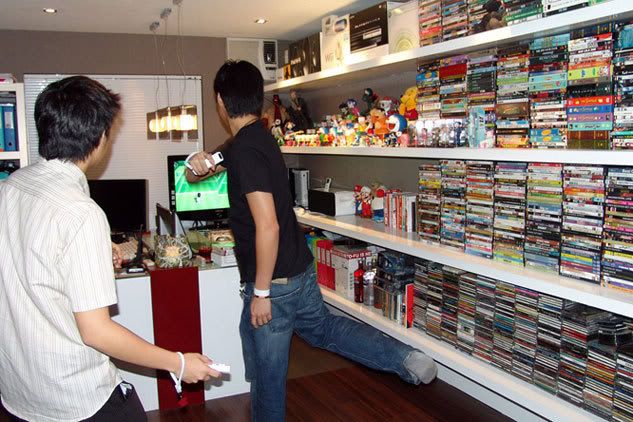
When it comes to playing the Nintendo Wii, especially Tennis - can't sit on my desk. Gotta move my massage chair and clear the area for some Doubles. (Picture taken last year when I was still using my Sony Vaio). Getting off topic. Hehehehe. Sorry Mod. Back to Apple Hardware - am loving the MacBook Air. A fine piece of hardware indeed. But definitely can't be used as a primary computer - the screen is way too "sempit" for my liking. But the size, what can I say? Fantastic. » Click to show Spoiler - click again to hide... «
|
|
|
|
|
|
May 21 2008, 06:56 PM
|

Senior Member
2,550 posts Joined: Dec 2006
|
[quote=ps360,May 21 2008, 06:31 PM]When it comes to playing the Nintendo Wii, especially Tennis - can't sit on my desk. Gotta move my massage chair and clear the area for some Doubles. (Picture taken last year when I was still using my Sony Vaio). Getting off topic. Hehehehe. Sorry Mod. Back to Apple Hardware - am loving the MacBook Air. A fine piece of hardware indeed. But definitely can't be used as a primary computer - the screen is way too "sempit" for my liking. But the size, what can I say? Fantastic.
Your media collection is so Full..  Saw Car ambi pur on your air cond. This post has been edited by ff8ong: May 21 2008, 09:16 PM |
|
|
May 21 2008, 07:16 PM
|
|
Junior Member
137 posts Joined: Jan 2006 From: The Other Side
|
@ ff8ong - Hahahaha, very sharp eyes u have.
Bro, can please edit message removing links to image? So page will not be too heavy. Thanks.  |
|
|
May 21 2008, 07:25 PM
|

Senior Member
1,484 posts Joined: Jan 2007
|
QUOTE(TechnoDude94 @ May 21 2008, 05:33 PM) Nice, but if it was me, I'll still feel claustrophobic. Nice gaming consoles you have there. PS3 and Xbox 360. Can't get a Wii eh? If you play tenis, it's gonna be a warzone there. All flying cartoon/movie characters. and a PSP white if i didn't see it wrongly This post has been edited by diners: May 21 2008, 07:30 PM |
|
|
May 21 2008, 07:30 PM
|
|
Senior Member
1,484 posts Joined: Jan 2007
|
QUOTE(ps360 @ May 21 2008, 06:31 PM) When it comes to playing the Nintendo Wii, especially Tennis - can't sit on my desk. Gotta move my massage chair and clear the area for some Doubles. (Picture taken last year when I was still using my Sony Vaio). Getting off topic. Hehehehe. Sorry Mod. Back to Apple Hardware - am loving the MacBook Air. A fine piece of hardware indeed. But definitely can't be used as a primary computer - the screen is way too "sempit" for my liking. But the size, what can I say? Fantastic.
» Click to show Spoiler - click again to hide... « hmm... no offence.. it is arranged very tidy-ly.. but for me its super duper messy...lol.. dun get angry k? i'll just prefer to.... put EVERYTHING in some cupboard and cover it.. to colourful already... but.. i dun like gaming.. so a macbook and wireless mighty mouse on my desk would be fine =) |
|
|
May 21 2008, 08:52 PM
|

Senior Member
6,738 posts Joined: Dec 2006 From: Kuala Lumpur, Malaysia | Eau Claire, Wisconsin 
|
QUOTE(lailaikatong @ May 21 2008, 06:12 PM) @TechnoDude94 I stand corrected. Sorry didn't see it. There's a Wii right next to the Xbox. You can also see the sensor bar on top of the TV. @ps360 Nice hardware there, and yeah sempit is indeed the right word to use  QUOTE(ps360 @ May 21 2008, 06:31 PM) When it comes to playing the Nintendo Wii, especially Tennis - can't sit on my desk. Gotta move my massage chair and clear the area for some Doubles. (Picture taken last year when I was still using my Sony Vaio). Getting off topic. Hehehehe. Sorry Mod. Back to Apple Hardware - am loving the MacBook Air. A fine piece of hardware indeed. But definitely can't be used as a primary computer - the screen is way too "sempit" for my liking. But the size, what can I say? Fantastic.
» Click to show Spoiler - click again to hide... « Wow, where do you live? Next time if your free can invite me over to game?  QUOTE(diners @ May 21 2008, 07:30 PM) hmm... no offence.. it is arranged very tidy-ly.. but for me its super duper messy... What's the reason of this post when the post is empty? It's just a quote. Lol. lol.. dun get angry k? i'll just prefer to.... put EVERYTHING in some cupboard and cover it.. to colourful already... but.. i dun like gaming.. so a macbook and wireless mighty mouse on my desk would be fine =) |
|
|
|
|
|
May 22 2008, 12:25 AM
|

Senior Member
3,813 posts Joined: Jan 2003
|
QUOTE(ps360 @ May 20 2008, 10:22 AM) Added on May 20, 2008, 10:50 am@ dinodog_Jr As what u have read, it has been reported that the 20" monitor could not display million of colors compared to the 24". I've got both and I can only say the 20" displaying colors differently. (Even after calibration) For example, I was working on a project with a yellow color scheme, on my PC and printed material, the yellow looks like a Maybank yellow. But on the 20", it looks like a DiGi yellow. Other than that, the 20" screen has a yellowish tone on white. While on the 24", white is white. Maybe its my imagination, but the text and icons on the 24" looks sharper too. On your question about portability, the 20" is great. Upgrade to a wireless keyboard and mouse and you will have a super clean desk. I went to see the real unit again. (A more serious study about the imac.). The 24" is indeed HUGE!. Superb masterpiece for computer. To me 20" is already a beautiful "artwork". And i think further again according to my living style. Perhaps i should get macbook pro entry level wif 256MB dedicated 3D card. Cause i am more like a traveler style. The only problem macbook pro fell into 2nd consideration is the steep price. Meanwhile imac can get at around RM4XXX. Imac is good & really perfect to move inside the house environment for me. Think about portability, if got car to carry it. It is fine. Too bad, i am more into walking or public transport. Does the Macbook pro LCD got color washed effects to you compare to Imac? I am very much into digital painting work. Just to avoid colors looks so difference between CRT. (i know it would never be exactly color contrast in both different monitor technology.) That's why i included imac at the very first place. At least color won't washed out so terribly with bare eye's recognition. Btw, I asked the Machine's staff. We are not allow to upgrade 3D card in Imac 20" from 128mb to 256mb. Only allow to customized RAM & HDD. Is it true?  Thanx~! Thanx~! |
|
|
May 22 2008, 12:49 AM
|

Senior Member
1,807 posts Joined: Jul 2005 From: World Wide Web
|
QUOTE(dinodog_Jr @ May 22 2008, 12:25 AM) Thanx for the color explanation between Imac 20" & Imac 24". The explanation is simple and yet straightful answer which i wish to know. (I watched the youtube video, i don't know what the guy tried to prove...haha. Perhaps i didn't get the most proven video.) if you getting the iMac 20" Rm5299 which is the second spec, the ram of the GC will be 256MB. In my opinion, 128MB/256MB will not make any different in your digital painting work. You'll able notice the difference in gaming. I would say that you must calibrate the LCD to make sure it is displaying the colour correctly.I went to see the real unit again. (A more serious study about the imac.). The 24" is indeed HUGE!. Superb masterpiece for computer. To me 20" is already a beautiful "artwork". And i think further again according to my living style. Perhaps i should get macbook pro entry level wif 256MB dedicated 3D card. Cause i am more like a traveler style. The only problem macbook pro fell into 2nd consideration is the steep price. Meanwhile imac can get at around RM4XXX. Imac is good & really perfect to move inside the house environment for me. Think about portability, if got car to carry it. It is fine. Too bad, i am more into walking or public transport. Does the Macbook pro LCD got color washed effects to you compare to Imac? I am very much into digital painting work. Just to avoid colors looks so difference between CRT. (i know it would never be exactly color contrast in both different monitor technology.) That's why i included imac at the very first place. At least color won't washed out so terribly with bare eye's recognition. Btw, I asked the Machine's staff. We are not allow to upgrade 3D card in Imac 20" from 128mb to 256mb. Only allow to customized RAM & HDD. Is it true? Thanx~! |
|
|
May 22 2008, 07:52 PM
|
|
Senior Member
6,738 posts Joined: Dec 2006 From: Kuala Lumpur, Malaysia | Eau Claire, Wisconsin
|
QUOTE(dinodog_Jr @ May 22 2008, 12:25 AM) Thanx for the color explanation between Imac 20" & Imac 24". The explanation is simple and yet straightful answer which i wish to know. (I watched the youtube video, i don't know what the guy tried to prove...haha. Perhaps i didn't get the most proven video.) I doubt that changing the memory on the graphics card will indeed help you in your digital painting work unless you game. I'm not sure that you can upgrade it but if you can it may be superbly expensive. I went to see the real unit again. (A more serious study about the imac.). The 24" is indeed HUGE!. Superb masterpiece for computer. To me 20" is already a beautiful "artwork". And i think further again according to my living style. Perhaps i should get macbook pro entry level wif 256MB dedicated 3D card. Cause i am more like a traveler style. The only problem macbook pro fell into 2nd consideration is the steep price. Meanwhile imac can get at around RM4XXX. Imac is good & really perfect to move inside the house environment for me. Think about portability, if got car to carry it. It is fine. Too bad, i am more into walking or public transport. Does the Macbook pro LCD got color washed effects to you compare to Imac? I am very much into digital painting work. Just to avoid colors looks so difference between CRT. (i know it would never be exactly color contrast in both different monitor technology.) That's why i included imac at the very first place. At least color won't washed out so terribly with bare eye's recognition. Btw, I asked the Machine's staff. We are not allow to upgrade 3D card in Imac 20" from 128mb to 256mb. Only allow to customized RAM & HDD. Is it true? Thanx~! As always Macs are more expensive than others but the prices are slowly decreasing. Just my 2 cents. As always Macs are more expensive than others but the prices are slowly decreasing. Just my 2 cents. |
|
|
May 23 2008, 02:19 PM
|
|
Senior Member
3,813 posts Joined: Jan 2003
|
Hi..sorry i forgotten to mention i will also further into 3D application.
Gaming is not my priority intention with computer anymore. At least, i know that I don't like playing games inside computer for quite a long while already. hee... Waiting for June. Let's see any updates from Macbook pro~.. Actually, i still very doubt why people buy one macbook pro(entry level) which we can get an even better graphics card PC laptop at much lower price? Are we buying the Apple's laptop of its thoughtful mechanism's design? Or we are paying more for its more stable OS comparing to Microsoft?! Any kindful info to share some lights on me? This post has been edited by dinodog_Jr: May 23 2008, 02:20 PM |
|
|
May 23 2008, 08:01 PM
|

Senior Member
2,605 posts Joined: Jan 2003
|
Offtopic: well, I bought Macbook pro bcoz of Mac OS X, as I am sick of vista
inside MacBook Pro looks so empty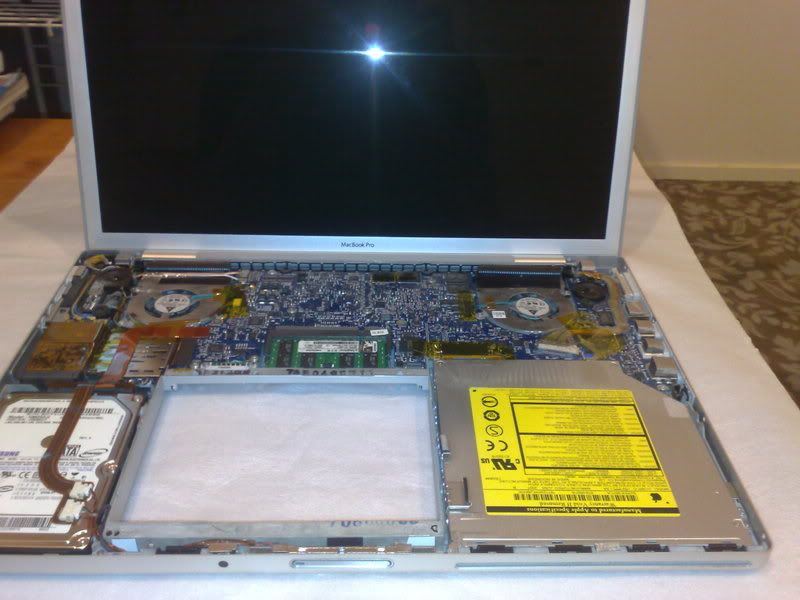 This post has been edited by psyeo: May 23 2008, 08:03 PM |
|
|
May 23 2008, 10:40 PM
|
|
Senior Member
6,738 posts Joined: Dec 2006 From: Kuala Lumpur, Malaysia | Eau Claire, Wisconsin
|
Do you know how to open up the MacBook? I was thinking of cleaning the whole thing during my school holiday which is now. Thanks in advance.
|
|
|
May 24 2008, 07:33 AM
|
|
Senior Member
2,605 posts Joined: Jan 2003
|
QUOTE(TechnoDude94 @ May 24 2008, 02:40 AM) Do you know how to open up the MacBook? I was thinking of cleaning the whole thing during my school holiday which is now. Thanks in advance. well. i open up my mbp in order to replace the HDD, not cleaning..  Guide for MacBook Warning, this will void your warranty |
|
|
|
|
|
May 24 2008, 09:38 AM
|

Junior Member
210 posts Joined: May 2008 From: Ibox-holland 
|
QUOTE(psyeo @ May 24 2008, 07:33 AM) well. i open up my mbp in order to replace the HDD, not cleaning.. Edit...... Guide for MacBook Warning, this will void your warranty This post has been edited by reva: Mar 4 2009, 06:29 AM |
|
|
May 24 2008, 11:27 AM
|
|
Senior Member
6,738 posts Joined: Dec 2006 From: Kuala Lumpur, Malaysia | Eau Claire, Wisconsin
|
QUOTE(psyeo @ May 24 2008, 07:33 AM) well. i open up my mbp in order to replace the HDD, not cleaning.. No worries, my warranty long expired. Guide for MacBook Warning, this will void your warranty |
|
|
May 24 2008, 10:40 PM
|
All Stars
15,182 posts Joined: Jan 2003 From: Damansara Heights 
|
Just saw the 20" Wide IMac, for RM3999. Free 1GB ram, so total 2GB. 250GB disk.
I just love the monitor.  |
|
|
May 25 2008, 01:49 AM
|
|
Senior Member
6,738 posts Joined: Dec 2006 From: Kuala Lumpur, Malaysia | Eau Claire, Wisconsin
|
May I know where's your source? I just saw 4299 on Star newspaper ad.
|
|
|
May 25 2008, 09:09 AM
|
|
All Stars
15,182 posts Joined: Jan 2003 From: Damansara Heights
|
It's a while stock last promotion.
Previous price was RM4,799, now dropped to RM3,999. Jusco Bandar Bukit Tinggi Klang. |
|
|
May 25 2008, 08:59 PM
|

Senior Member
1,513 posts Joined: Nov 2004 From: Kuching - Klang 
|
QUOTE(zeist @ May 25 2008, 09:09 AM) It's a while stock last promotion. i asked today they didnt mention free 1GB ram thing.. Previous price was RM4,799, now dropped to RM3,999. Jusco Bandar Bukit Tinggi Klang. infact to upgrade to 2GB cost like RM300-400 and RM3999 is for 20" older model.. with 2.0ghz.. so basically pricing wise its same as any other mac shop |
|
|
May 25 2008, 09:43 PM
|
|
All Stars
15,182 posts Joined: Jan 2003 From: Damansara Heights
|
QUOTE(prazole @ May 25 2008, 08:59 PM) i asked today they didnt mention free 1GB ram thing.. So the shop that I go to only untung extra 1GB ram. Better than nothing ler. The sales girl were pretty friendly, and the boss look honest. infact to upgrade to 2GB cost like RM300-400 and RM3999 is for 20" older model.. with 2.0ghz.. so basically pricing wise its same as any other mac shop  Will try to ask what else can they give, some freebies or something, like iMac bag.  Yea, in their leaflet only got till 2.8ghz (RM5,xxx), 3.02ghz don't have. This post has been edited by zeist: May 25 2008, 09:43 PM |
|
Topic ClosedOptions
|
| Change to: |  0.0281sec 0.0281sec
 0.74 0.74
 6 queries 6 queries
 GZIP Disabled GZIP Disabled
Time is now: 4th December 2025 - 05:03 PM |
 Quote
Quote