Outline ·
[ Standard ] ·
Linear+
Hardware Your Mac Desktop / Apple Hardware
|
TechnoDude94
|
 May 25 2008, 10:15 PM May 25 2008, 10:15 PM
|

|
QUOTE(zeist @ May 25 2008, 09:43 PM) So the shop that I go to only untung extra 1GB ram. Better than nothing ler. The sales girl were pretty friendly, and the boss look honest.  Will try to ask what else can they give, some freebies or something, like iMac bag.  Yea, in their leaflet only got till 2.8ghz (RM5,xxx), 3.02ghz don't have. I doubt the 3.02GHz one will arrive here that quickly. You thinking of carrying your iMac where ever you go with the bag?  Must flirt with the "friendly" sales girls and ask for more discounts. |
|
|
|
|
|
ff8ong
|
May 25 2008, 11:02 PM
|
|
|
QUOTE(zeist @ May 25 2008, 09:43 PM) So the shop that I go to only untung extra 1GB ram. Better than nothing ler. The sales girl were pretty friendly, and the boss look honest. Will try to ask what else can they give, some freebies or something, like iMac bag. Yea, in their leaflet only got till 2.8ghz (RM5,xxx), 3.02ghz don't have. iMAC BAG?OMG  |
|
|
|
|
|
RaymondT
|
May 27 2008, 09:45 AM
|
|
|
|
|
|
|
|
|
TechnoDude94
|
May 27 2008, 10:45 AM
|
|
|
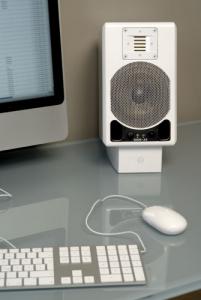
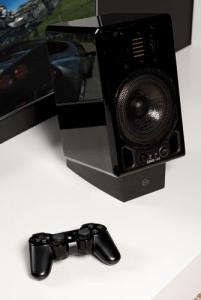
QUOTE(RaymondT @ May 27 2008, 09:45 AM) My Mac setup is going to look like this! Well, minus the glass table and aluminium iMac.....I have the white iMac. Still waiting for the speakers to come. Maybe if got money will get 1 for my PS3 as well. I enjoy mostly music, so a quality speakers is what I like. The brand of the speakers is Adam, it's not cheap mind you. What you mean that your Mac setup is gonna look like this? If that's the case, whose Mac setup is this? Not wide enough to see enough Apple hardware, all I see is half an aluminum iMac, PS2 control (not by Apple but by Sony) and speakers. |
|
|
|
|
|
ff8ong
|
May 27 2008, 01:54 PM
|
|
|
I think he getting old genaration white imac,those picture just waant to show the speaker only
|
|
|
|
|
|
psyeo
|
May 27 2008, 02:13 PM
|
|
|
QUOTE(RaymondT @ Apr 23 2008, 02:33 PM) My Babies!.......   QUOTE(ff8ong @ May 27 2008, 05:54 PM) I think he getting old genaration white imac,those picture just waant to show the speaker only nope, he already have a white imac, and are now waiting for the speaker to arrive (that's not his apple setup, it is just to show how his setup will be, after the speaker arrived  ) This post has been edited by psyeo: May 27 2008, 02:15 PM |
|
|
|
|
|
lailaikatong
|
May 28 2008, 11:27 AM
|
|
|
No use apologizing for going off-topic if you keep on straying in the next post, it just makes it all the more irritating. This thread is not your chatroom, go somewhere else! There's the PM button. There's also the CARD button where you can find IM addresses. USE THEM for all your personal enquiries that don't contribute to the thread.
Think before you type, don't post just for the sake of posting.
Now let's get back to the topic, shall we?
|
|
|
|
|
|
TSUnUsUaL
|
May 28 2008, 11:30 AM
|
ah jek

|
Thread Cleaned.
|
|
|
|
|
|
lailaikatong
|
May 28 2008, 10:00 PM
|
|
|
Current unpretentious 'scrambling to complete assignment' setup:  |
|
|
|
|
|
TechnoDude94
|
May 28 2008, 10:33 PM
|
|
|
QUOTE(lailaikatong @ May 28 2008, 10:00 PM) Current unpretentious 'scrambling to complete assignment' setup: Nice setup you have there, however it's a little messy with the papers flying about. Eh, can view 2 full sized A4 paper on 24"? Why'd you need tissue boxes near your computer, on the bottom right of your picture? This post has been edited by TechnoDude94: May 29 2008, 03:44 PM |
|
|
|
|
|
MaxLaw
|
May 29 2008, 01:34 PM
|
Getting Started

|
QUOTE(lailaikatong @ May 28 2008, 10:00 PM) Current unpretentious 'scrambling to complete assignment' setup: hahaha... "unpretentious" that's a good one |
|
|
|
|
|
3ric
|
Jun 15 2008, 02:39 PM
|
|
|
guys how can i set my MBP to desktop mode with the cover closed? i bought a 22 inch LCD want to try close my MBP but it went to sleep mode... ---------------------------------------------------------------------------------------- Thanks lailaikatong Here is my 22 inch LCD... what i need now is a good speakers ...=)  This post has been edited by 3ric: Jun 15 2008, 10:03 PM This post has been edited by 3ric: Jun 15 2008, 10:03 PM |
|
|
|
|
|
lailaikatong
|
Jun 15 2008, 07:29 PM
|
|
|
QUOTE(3ric @ Jun 15 2008, 02:39 PM) guys how can i set my MBP to desktop mode with the cover closed? i bought a 22 inch LCD want to try close my MBP but it went to sleep mode... |
|
|
|
|
|
wei
|
Jun 16 2008, 01:56 PM
|
|
|
Or you can take out the display: 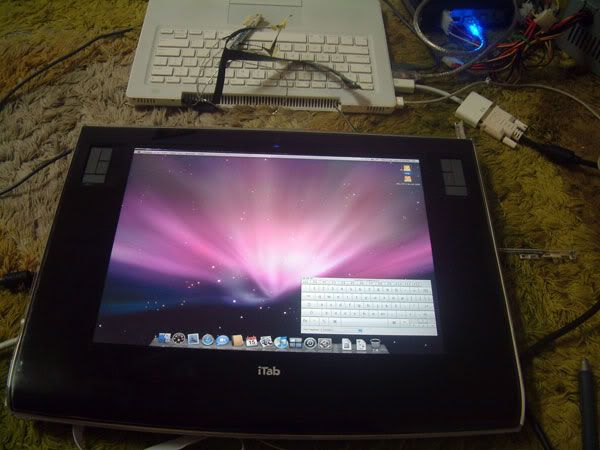 no pun intended  This post has been edited by wei: Jun 16 2008, 02:00 PM This post has been edited by wei: Jun 16 2008, 02:00 PM |
|
|
|
|
|
dinodog_Jr
|
Jun 16 2008, 06:16 PM
|
|
|
waoh~~.. this is incredible..
where to get this?
|
|
|
|
|
|
wei
|
Jun 16 2008, 06:29 PM
|
|
|
Don't think there's such product, unless you get the ModBook or Cintiq. But you can build one. hehehe. |
|
|
|
|
|
d_lai_309
|
Jun 17 2008, 07:53 AM
|
|
|
anyone coming back from US?i would like he/she to bring me back a mighty mouse from colorware the link is here http://www.colorwarepc.com/p-137-wireless-mighty-mouse.aspxhopefully in July.... thanks.... This post has been edited by d_lai_309: Jun 17 2008, 07:55 AM |
|
|
|
|
|
macfanatic
|
Jun 17 2008, 05:16 PM
|
New Member
|
QUOTE(lailaikatong @ Jun 15 2008, 07:29 PM) To use MB/MBP with display closed - Close the screen, it will go to sleep. After that, wake it up with the keyboard, mouse or other input device (i.e. tablet). If you're using Bluetooth, make sure you have "Allow Bluetooth devices to wake this computer" under your Advanced Bluetooth preferences. USB mouse is most responsive, from my experience. |
|
|
|
|
|
ezpcx
|
Jun 18 2008, 03:02 PM
|
New Member
|
QUOTE(3ric @ Jun 15 2008, 02:39 PM) guys how can i set my MBP to desktop mode with the cover closed? i bought a 22 inch LCD want to try close my MBP but it went to sleep mode... ---------------------------------------------------------------------------------------- Thanks lailaikatong Here is my 22 inch LCD... what i need now is a good speakers ...=) Go to System Preferences -> Keyboard & Mouse -> Bluetooth -> There is an option "Allow bluetooth devices to wake up this computer". Check that option. Whenever you start your computer, if you wanna close your cover using external output. Put it to sleep by closing the cover, and use a bluetooth device such as mouse or keyboard to wake it up. You do not need to open the cover. Or you can attach a wired mouse or keyboard to wake the computer. Tat wouldn't be a problem. Hope ir helps...  |
|
|
|
|
|
shaznizzle
|
Jul 7 2008, 01:58 PM
|
|
|
 Hmm.... My humble work/sch/play/bizz station. Im a noob in Apple Tech... slowly converting... planing to get the MacBook Pro. 1) 500GB Vantech HDD 2) HP HDMI 24" LCD 3) ASUS M series (Win XP) 4) Cooler Master Infinity 5) Ipod Shuffle 1GB 6) Apple Wireless Keyboard 7) Apple Wireless Mighty Mouse 8) IKEA Mouse Pad |
|
|
|
|



 Quote
Quote






 0.0346sec
 0.63
0.63
 6 queries
 GZIP Disabled