Welcome Guest ( Log In | Register )

Bump Topic Topic Closed RSS Feed
124 Pages « < 53 54 55 56 57 > » Bottom

Outline · [ Standard ] · Linear+

Hardware Your Mac Desktop / Apple Hardware

views
     
Eithanius
post May 7 2008, 01:51 AM

::+::KukuNius(tm)::+::
*******
Senior Member
3,952 posts

Joined: Apr 2005
From: Sector 1921B, Delta Quadrant


QUOTE(|Keantan| @ May 5 2008, 05:17 PM)
they have some in mac city amcorp mall, maybe the cineleisure has also both new and old one ... i think. but make sure u ask for discount! biggrin.gif mention my name .. Kean
*
if my memory serves me well, got your mac pro already...? brows.gif
|Keantan|
post May 7 2008, 12:05 PM

Casual
***
Junior Member
407 posts

Joined: Dec 2005
QUOTE(Eithanius @ May 7 2008, 01:51 AM)
if my memory serves me well, got your mac pro already...? brows.gif
*
Me? Mac Pro? I using Macbook Pro already. haha not me I think... No need for Mac Pro at the moment laugh.gif
Nitrous
post May 9 2008, 10:05 AM

Getting Started
**
Junior Member
212 posts

Joined: Jan 2003
Hi gurus
Got a quick question, I m currently using an old Ibook G4 (mainly used for graphics processing) and recently, the internal Superdrive that I am using went bonkers. It swallowed the CD/DVD, tried to read, and never once successfully read the disc. Best of all, the CD gets stuck inside....

I have been enquiring all over to get the best quote for repairs. Machines quoted me abt RM1400, which is very very steep someone who is exempted from paying income tax due to low wages. VR Technology quoted RM1501, even steeper. Good news is that I found one shop in Lowyat Plaza (Mac seller, ground floor), and they quoted about RM800. However, I m a bit cautious as their prices are only half of what others have mentioned, not sure if they only "quoted" for the sake of sales, and it increases when you iBook is with them already (sort of like a ransom).

My question is, if you guys know, where can I get a good price for my repairs? I do prefer an authorized repair center, in case they break the antique iBook I have, but anything above RM1K for a superdrive is really too expensive for myself.

Appreciate any inputs from the people here. Thanks for the help..

Nit
wei
post May 9 2008, 10:40 AM

Get your Macs done right!
*******
Senior Member
6,496 posts

Joined: Jan 2003
From: Kota Damansara


Nit,

you might want to check this thread for others' input: http://forum.lowyat.net/topic/675433

It seems that RM1400-1500 is the usual price. For RM800, you might want to check if that's the price for a used unit or brand new with warranty.
|Keantan|
post May 9 2008, 02:49 PM

Casual
***
Junior Member
407 posts

Joined: Dec 2005
have you tried starting the iBook holding down the mouse button? it forces an eject sequence and the drive should connect if it is connected, even before data has been read.. it may save u quite a bit of money
wei
post May 9 2008, 03:33 PM

Get your Macs done right!
*******
Senior Member
6,496 posts

Joined: Jan 2003
From: Kota Damansara


Alternately, when boot-up, hold the "option" key. In the menu where you select what drive to boot from, press F12. After the disc ejected, select your drive to start OS X.
TechnoDude94
post May 17 2008, 03:00 PM

Happiness Advocate
*******
Senior Member
6,738 posts

Joined: Dec 2006
From: Kuala Lumpur, Malaysia | Eau Claire, Wisconsin


QUOTE(|Keantan| @ May 9 2008, 02:49 PM)
have you tried starting the iBook holding down the mouse button? it forces an eject sequence and the drive should connect if it is connected, even before data has been read.. it may save u quite a bit of money
*
QUOTE(wei @ May 9 2008, 03:33 PM)
Alternately, when boot-up, hold the "option" key. In the menu where you select what drive to boot from, press F12. After the disc ejected, select your drive to start OS X.
*
Any more ways? I'm gonna make a guide on the methods/ways to eject a disc in a Mac.
ps360
post May 17 2008, 09:07 PM

Getting Started
**
Junior Member
137 posts

Joined: Jan 2006
From: The Other Side
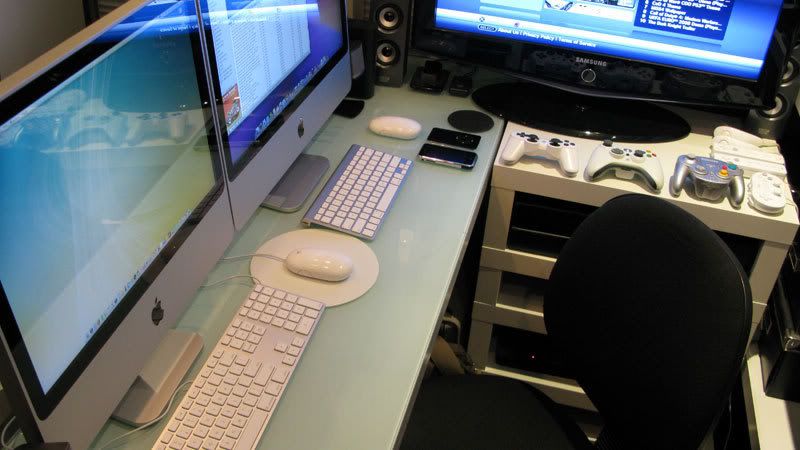
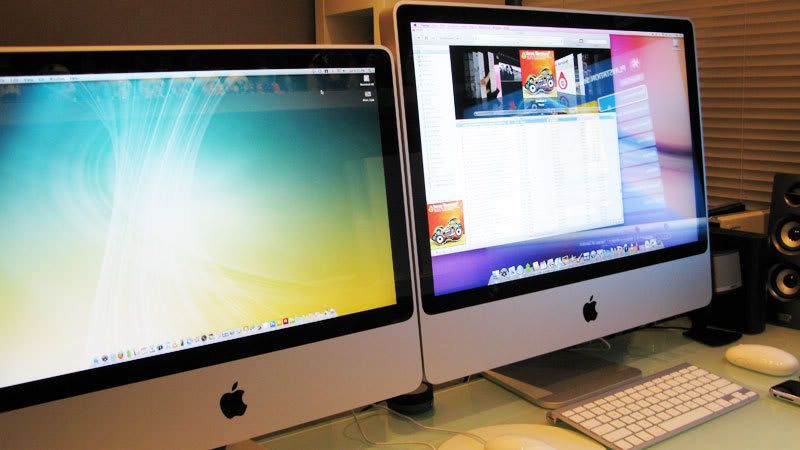
Here's a 20" (2.4 Ghz) and my new 24" iMac (2.8Ghz) side by side on my very congested desk. By next week, things will be better once I send the 20" unit off to its new owner.

user posted image

The screen on the 24" is way superior compared to the 20". As you can see, I have very limited desk space, that's the reason why I got the 20" instead of the 24" in the first place. Size wise, the 20" is perfect for me - but I needed 1920 x 1200 screen resolution for my work. Hence, the upgrade.

user posted image

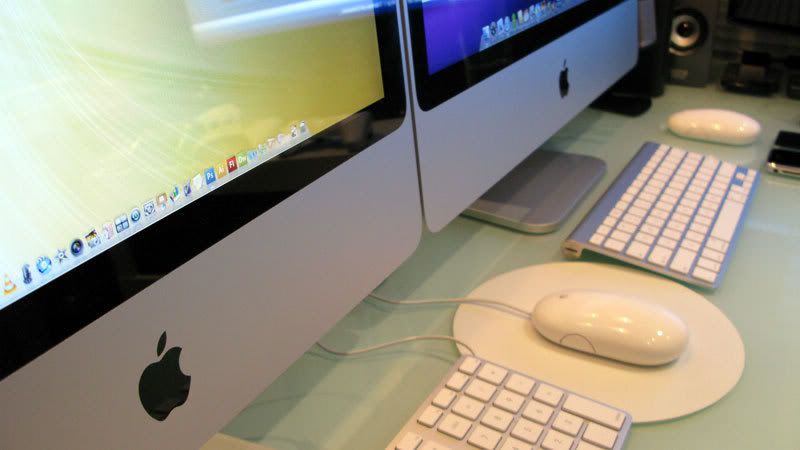
I find the wireless keyboard a little too small for comfort. When I type, it wobbles from left to right. Told the shop I bought it from about it and they asked me to bring it back for an exchange. Anyone of you with this keyboard faced similar problems?

user posted image


TechnoDude94
post May 17 2008, 10:55 PM

Happiness Advocate
*******
Senior Member
6,738 posts

Joined: Dec 2006
From: Kuala Lumpur, Malaysia | Eau Claire, Wisconsin


QUOTE(ps360 @ May 17 2008, 09:07 PM)
Here's a 20" (2.4 Ghz) and my new 24" iMac (2.8Ghz) side by side on my very congested desk. By next week, things will be better once I send the 20" unit off to its new owner.
he screen on the 24" is way superior compared to the 20". As you can see, I have very limited desk space, that's the reason why I got the 20" instead of the 24" in the first place. Size wise, the 20" is perfect for me - but I needed 1920 x 1200 screen resolution for my work. Hence, the upgrade.
I find the wireless keyboard a little too small for comfort. When I type, it wobbles from left to right. Told the shop I bought it from about it and they asked me to bring it back for an exchange. Anyone of you with this keyboard faced similar problems?
*
Very clean and tidy. However, if I was on the chair I'd feel very claustrophobic, no offense. biggrin.gif

This post has been edited by TechnoDude94: May 20 2008, 08:07 PM
diners
post May 18 2008, 08:07 AM

Young Dipertuan
******
Senior Member
1,484 posts

Joined: Jan 2007
QUOTE(ps360 @ May 17 2008, 09:07 PM)
Here's a 20" (2.4 Ghz) and my new 24" iMac (2.8Ghz) side by side on my very congested desk. By next week, things will be better once I send the 20" unit off to its new owner.

» Click to show Spoiler - click again to hide... «

*
nice set ups u have there.. but.. its kinda.. sempit ohmy.gif
no offence mate >.<

This post has been edited by diners: May 20 2008, 04:47 PM
dinodog_Jr
post May 18 2008, 09:14 AM

I am not a dog
*******
Senior Member
3,813 posts

Joined: Jan 2003
I had read bout 24inch Imac screen color is much better compare to 20inch Imac?!

Can i know what is the obvious comparison which can be trace by eyes instead on technical benchmark?

I will get one for digital design purpose. Thanx~

I am aiming at 20inch due to the price "wise" & much portable to carry around in the house. I not sure yet due to no realistic experience.

So, issit portable enough? No more many wires.. like a common PC setup.

blu3_apple
post May 18 2008, 12:02 PM

Casual
***
Junior Member
419 posts

Joined: Jan 2003
From: -


ps360, nice.
an apple notebook would be even better haha
ff8ong
post May 18 2008, 02:28 PM

Look at all my stars!!
*******
Senior Member
2,550 posts

Joined: Dec 2006
Nice setup,alot of game console..
want to sell 20 imac how much?
TechnoDude94
post May 18 2008, 03:19 PM

Happiness Advocate
*******
Senior Member
6,738 posts

Joined: Dec 2006
From: Kuala Lumpur, Malaysia | Eau Claire, Wisconsin


QUOTE(dinodog_Jr @ May 18 2008, 09:14 AM)
I had read bout 24inch Imac screen color is much better compare to 20inch Imac?!

Can i know what is the obvious comparison which can be trace by eyes instead on technical benchmark?

I will get one for digital design purpose. Thanx~

I am aiming at 20inch due to the price "wise" & much portable to carry around in the house. I not sure yet due to no realistic experience.

So, issit portable enough? No more many wires.. like a common PC setup.
*
There were rumors that, it isn't clearer. the 24" should be 1.6 million colours if I'm not mistaken. Not sure so don't count on me.

QUOTE(blu3_apple @ May 18 2008, 12:02 PM)
ps360, nice.
an apple notebook would be even better haha
*
It'll be nicer if he had a bigger desk with a 30" Mac Pro and a MacBook Pro. He'll be the Apple freak of LYN.

QUOTE(ff8ong @ May 18 2008, 02:28 PM)
Nice setup,alot of game console..
want to sell 20 imac how much?
*
He already sold it. Too late. tongue.gif
ps360
post May 20 2008, 10:22 AM

Getting Started
**
Junior Member
137 posts

Joined: Jan 2006
From: The Other Side
Thanks guys for your comments. Yeah, I do wish I have more space on my desk, but I can only wish. sad.gif


NOTE: Guys, maybe you can edit your message to exclude the links to those images so that it will not display them repeatedly. Thanks.


Added on May 20, 2008, 10:50 am@ dinodog_Jr

As what u have read, it has been reported that the 20" monitor could not display million of colors compared to the 24". I've got both and I can only say the 20" displaying colors differently. (Even after calibration) For example, I was working on a project with a yellow color scheme, on my PC and printed material, the yellow looks like a Maybank yellow. But on the 20", it looks like a DiGi yellow.

Other than that, the 20" screen has a yellowish tone on white. While on the 24", white is white. Maybe its my imagination, but the text and icons on the 24" looks sharper too.

On your question about portability, the 20" is great. Upgrade to a wireless keyboard and mouse and you will have a super clean desk.

This post has been edited by ps360: May 20 2008, 10:50 AM
TechnoDude94
post May 20 2008, 08:08 PM

Happiness Advocate
*******
Senior Member
6,738 posts

Joined: Dec 2006
From: Kuala Lumpur, Malaysia | Eau Claire, Wisconsin


QUOTE(ps360 @ May 20 2008, 10:22 AM)
Thanks guys for your comments. Yeah, I do wish I have more space on my desk, but I can only wish.  sad.gif
NOTE: Guys, maybe you can edit your message to exclude the links to those images so that it will not display them repeatedly. Thanks.


Added on May 20, 2008, 10:50 am@ dinodog_Jr

As what u have read, it has been reported that the 20" monitor could not display million of colors compared to the 24". I've got both and I can only say the 20" displaying colors differently. (Even after calibration) For example, I was working on a project with a yellow color scheme, on my PC and printed material, the yellow looks like a Maybank yellow. But on the 20", it looks like a DiGi yellow.

Other than that, the 20" screen has a yellowish tone on white. While on the 24", white is white. Maybe its my imagination, but the text and icons on the 24" looks sharper too.

On your question about portability, the 20" is great. Upgrade to a wireless keyboard and mouse and you will have a super clean desk.
*
My posts have been edited. icon_rolleyes.gif
ps360
post May 21 2008, 07:43 AM

Getting Started
**
Junior Member
137 posts

Joined: Jan 2006
From: The Other Side
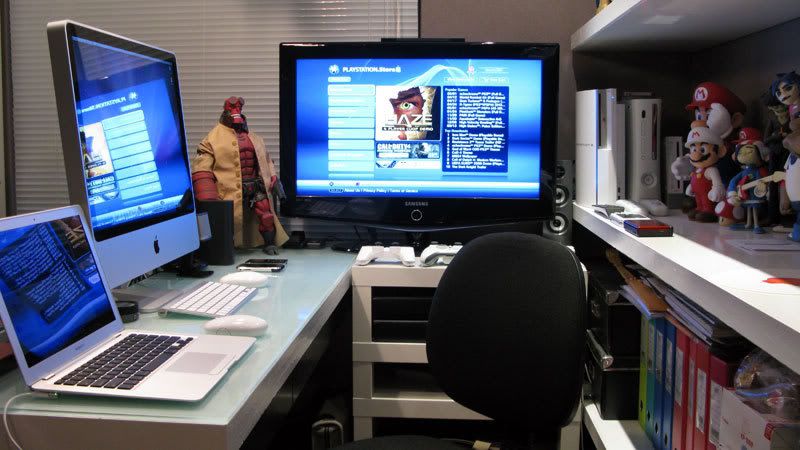
20" iMac delivered to the new owner. Desk now has more space for the tiny MacBook Air.
End up, the desk still sempit. Back to square one. tongue.gif

user posted image


This post has been edited by ps360: May 21 2008, 07:48 AM
allornothing
post May 21 2008, 09:19 AM

Melancholic //
*****
Senior Member
926 posts

Joined: Feb 2006
From: KL, Malaysia


The rumors are actually true. The 20 inch iMac does not display as many colors as the 24 inch. A suit was filed against Apple by two guys who found out but they managed to pay them off out of court.

PS: super nice hardware smile.gif

This post has been edited by allornothing: May 21 2008, 09:19 AM
TechnoDude94
post May 21 2008, 05:33 PM

Happiness Advocate
*******
Senior Member
6,738 posts

Joined: Dec 2006
From: Kuala Lumpur, Malaysia | Eau Claire, Wisconsin


QUOTE(ps360 @ May 21 2008, 07:43 AM)
20" iMac delivered to the new owner. Desk now has more space for the tiny MacBook Air.
End up, the desk still sempit. Back to square one.  tongue.gif
*
Nice, but if it was me, I'll still feel claustrophobic. Nice gaming consoles you have there. PS3 and Xbox 360. Can't get a Wii eh? If you play tenis, it's gonna be a warzone there. All flying cartoon/movie characters.

This post has been edited by TechnoDude94: May 21 2008, 05:33 PM
lailaikatong
post May 21 2008, 06:12 PM

On my way
****
Senior Member
601 posts

Joined: Oct 2005
From: [Shah Alam]/Melbourne


@TechnoDude94
There's a Wii right next to the Xbox. You can also see the sensor bar on top of the TV.

@ps360
Nice hardware there, and yeah sempit is indeed the right word to use tongue.gif


124 Pages « < 53 54 55 56 57 > » Top
Topic ClosedOptions
 

Change to:
| Lo-Fi Version
0.0322sec    0.20    6 queries    GZIP Disabled
Time is now: 3rd December 2025 - 01:36 AM