I think you can order from some of the shops in Lowyat and maybe they'll send it to you.
Hardware Your Mac Desktop / Apple Hardware
Hardware Your Mac Desktop / Apple Hardware
|
|
 Aug 17 2007, 02:19 PM Aug 17 2007, 02:19 PM
Return to original view | Post
#1
|
 
Senior Member
6,738 posts Joined: Dec 2006 From: Kuala Lumpur, Malaysia | Eau Claire, Wisconsin  
|
I think you can order from some of the shops in Lowyat and maybe they'll send it to you.
|
|
|
|
|
|
Aug 20 2007, 04:37 PM
Return to original view | Post
#2
|
|
Senior Member
6,738 posts Joined: Dec 2006 From: Kuala Lumpur, Malaysia | Eau Claire, Wisconsin
|
I just tried the iMac just now. Very responsive. Tried it in XP and Mac mode too.
|
|
|
Aug 25 2007, 06:39 PM
Return to original view | Post
#3
|
|
Senior Member
6,738 posts Joined: Dec 2006 From: Kuala Lumpur, Malaysia | Eau Claire, Wisconsin
|
As long as your human you'll have the lust. LoL...
|
|
|
Aug 29 2007, 10:43 AM
Return to original view | Post
#4
|
|
Senior Member
6,738 posts Joined: Dec 2006 From: Kuala Lumpur, Malaysia | Eau Claire, Wisconsin
|
Yup, this thread is becoming boring.
|
|
|
Sep 4 2007, 12:20 PM
Return to original view | Post
#5
|
|
Senior Member
6,738 posts Joined: Dec 2006 From: Kuala Lumpur, Malaysia | Eau Claire, Wisconsin
|
Hey, how about we show the internal hardware of our Apple products?
|
|
|
Sep 10 2007, 05:35 PM
Return to original view | Post
#6
|
|
Senior Member
6,738 posts Joined: Dec 2006 From: Kuala Lumpur, Malaysia | Eau Claire, Wisconsin
|
Hey yetieater, nice setup but why the messy cables?
|
|
|
|
|
|
Dec 31 2007, 02:39 AM
Return to original view | Post
#7
|
|
Senior Member
6,738 posts Joined: Dec 2006 From: Kuala Lumpur, Malaysia | Eau Claire, Wisconsin
|
Wow, another Mac lover here. So many nice products like the iPhone and iPod Touch.
|
|
|
Apr 22 2008, 06:16 PM
Return to original view | Post
#8
|
|
Senior Member
6,738 posts Joined: Dec 2006 From: Kuala Lumpur, Malaysia | Eau Claire, Wisconsin
|
Well, this is my Apple MacBook, Intel Core Duo 1.83GHz, 2X1GB RAM, 60GB HDD. Also, included is my Logitech MX518 Gaming-grade optical mouse. When I bought it, it came with Tiger but I recently installed Leopard.
This post has been edited by TechnoDude94: Apr 22 2008, 11:48 PM |
|
|
May 2 2008, 07:24 PM
Return to original view | Post
#9
|
|
Senior Member
6,738 posts Joined: Dec 2006 From: Kuala Lumpur, Malaysia | Eau Claire, Wisconsin
|
Nice MacPro you have there, hope you enjoy your toy. May I ask you, don't you find the monitor a tad too little? 20" for a MacPro, shouldn't it be 30"? Just asking.
|
|
|
May 3 2008, 11:48 AM
Return to original view | Post
#10
|
|
Senior Member
6,738 posts Joined: Dec 2006 From: Kuala Lumpur, Malaysia | Eau Claire, Wisconsin
|
QUOTE(yongkailoon @ Apr 22 2008, 11:58 PM) The keyboard so yellow. I'm sure I'll have one of the cleanest keyboards on a MacBook here because, the keyboard has been covered by the silicon keyboard protector which has been on the keyboard since day one I bought the computer which was November 2006.   |
|
|
May 6 2008, 06:18 PM
Return to original view | Post
#11
|
|
Senior Member
6,738 posts Joined: Dec 2006 From: Kuala Lumpur, Malaysia | Eau Claire, Wisconsin
|
QUOTE(wei @ May 3 2008, 01:06 PM) Don't be too sure. Dust will still get in from the gap. But yeah, at lease it wont turn yellow. Do you have problem when you close the MB, the silicon protector left stain/marking on your LCD? Yes, all my schoolmates have that problem. QUOTE(tinkerbel @ May 3 2008, 03:53 PM) @wei, When I turn on the MacBook it's always on full brightness so that I don't get the annoying reflection. Yes that is a problem! At least I get it on my monitor. QUOTE(yongkailoon @ May 3 2008, 03:54 PM) May I ask what kind of mark/stain that gets on to the monitor ? There can be many types of stains, if you know what I mean?   . Urm, it's a marking left on the monitor by the keyboard silicon protector, sometimes I can even see the alphabets. . Urm, it's a marking left on the monitor by the keyboard silicon protector, sometimes I can even see the alphabets. |
|
|
May 17 2008, 03:00 PM
Return to original view | Post
#12
|
|
Senior Member
6,738 posts Joined: Dec 2006 From: Kuala Lumpur, Malaysia | Eau Claire, Wisconsin
|
QUOTE(|Keantan| @ May 9 2008, 02:49 PM) have you tried starting the iBook holding down the mouse button? it forces an eject sequence and the drive should connect if it is connected, even before data has been read.. it may save u quite a bit of money QUOTE(wei @ May 9 2008, 03:33 PM) Alternately, when boot-up, hold the "option" key. In the menu where you select what drive to boot from, press F12. After the disc ejected, select your drive to start OS X. Any more ways? I'm gonna make a guide on the methods/ways to eject a disc in a Mac. |
|
|
May 17 2008, 10:55 PM
Return to original view | Post
#13
|
|
Senior Member
6,738 posts Joined: Dec 2006 From: Kuala Lumpur, Malaysia | Eau Claire, Wisconsin
|
QUOTE(ps360 @ May 17 2008, 09:07 PM) Here's a 20" (2.4 Ghz) and my new 24" iMac (2.8Ghz) side by side on my very congested desk. By next week, things will be better once I send the 20" unit off to its new owner. Very clean and tidy. However, if I was on the chair I'd feel very claustrophobic, no offense. he screen on the 24" is way superior compared to the 20". As you can see, I have very limited desk space, that's the reason why I got the 20" instead of the 24" in the first place. Size wise, the 20" is perfect for me - but I needed 1920 x 1200 screen resolution for my work. Hence, the upgrade. I find the wireless keyboard a little too small for comfort. When I type, it wobbles from left to right. Told the shop I bought it from about it and they asked me to bring it back for an exchange. Anyone of you with this keyboard faced similar problems?  This post has been edited by TechnoDude94: May 20 2008, 08:07 PM |
|
|
|
|
|
May 18 2008, 03:19 PM
Return to original view | Post
#14
|
|
Senior Member
6,738 posts Joined: Dec 2006 From: Kuala Lumpur, Malaysia | Eau Claire, Wisconsin
|
QUOTE(dinodog_Jr @ May 18 2008, 09:14 AM) I had read bout 24inch Imac screen color is much better compare to 20inch Imac?! There were rumors that, it isn't clearer. the 24" should be 1.6 million colours if I'm not mistaken. Not sure so don't count on me. Can i know what is the obvious comparison which can be trace by eyes instead on technical benchmark? I will get one for digital design purpose. Thanx~ I am aiming at 20inch due to the price "wise" & much portable to carry around in the house. I not sure yet due to no realistic experience. So, issit portable enough? No more many wires.. like a common PC setup. QUOTE(blu3_apple @ May 18 2008, 12:02 PM) ps360, nice. It'll be nicer if he had a bigger desk with a 30" Mac Pro and a MacBook Pro. He'll be the Apple freak of LYN. an apple notebook would be even better haha QUOTE(ff8ong @ May 18 2008, 02:28 PM) Nice setup,alot of game console.. He already sold it. Too late. want to sell 20 imac how much?  |
|
|
May 20 2008, 08:08 PM
Return to original view | Post
#15
|
|
Senior Member
6,738 posts Joined: Dec 2006 From: Kuala Lumpur, Malaysia | Eau Claire, Wisconsin
|
QUOTE(ps360 @ May 20 2008, 10:22 AM) Thanks guys for your comments. Yeah, I do wish I have more space on my desk, but I can only wish. My posts have been edited.  NOTE: Guys, maybe you can edit your message to exclude the links to those images so that it will not display them repeatedly. Thanks. Added on May 20, 2008, 10:50 am@ dinodog_Jr As what u have read, it has been reported that the 20" monitor could not display million of colors compared to the 24". I've got both and I can only say the 20" displaying colors differently. (Even after calibration) For example, I was working on a project with a yellow color scheme, on my PC and printed material, the yellow looks like a Maybank yellow. But on the 20", it looks like a DiGi yellow. Other than that, the 20" screen has a yellowish tone on white. While on the 24", white is white. Maybe its my imagination, but the text and icons on the 24" looks sharper too. On your question about portability, the 20" is great. Upgrade to a wireless keyboard and mouse and you will have a super clean desk.  |
|
|
May 21 2008, 05:33 PM
Return to original view | Post
#16
|
|
Senior Member
6,738 posts Joined: Dec 2006 From: Kuala Lumpur, Malaysia | Eau Claire, Wisconsin
|
QUOTE(ps360 @ May 21 2008, 07:43 AM) 20" iMac delivered to the new owner. Desk now has more space for the tiny MacBook Air. Nice, but if it was me, I'll still feel claustrophobic. Nice gaming consoles you have there. PS3 and Xbox 360. Can't get a Wii eh? If you play tenis, it's gonna be a warzone there. All flying cartoon/movie characters.End up, the desk still sempit. Back to square one. This post has been edited by TechnoDude94: May 21 2008, 05:33 PM |
|
|
May 21 2008, 08:52 PM
Return to original view | Post
#17
|
|
Senior Member
6,738 posts Joined: Dec 2006 From: Kuala Lumpur, Malaysia | Eau Claire, Wisconsin
|
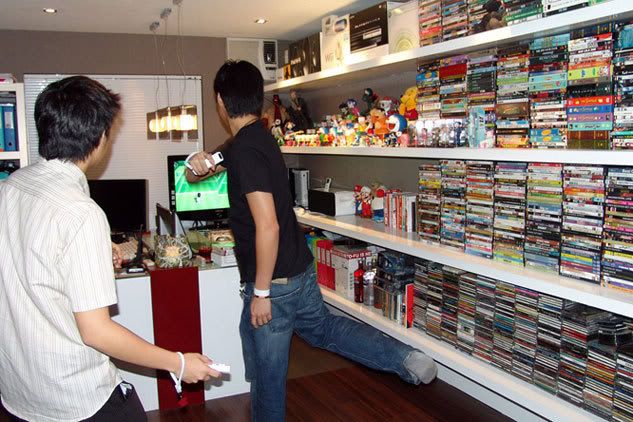
QUOTE(lailaikatong @ May 21 2008, 06:12 PM) @TechnoDude94 I stand corrected. Sorry didn't see it. There's a Wii right next to the Xbox. You can also see the sensor bar on top of the TV. @ps360 Nice hardware there, and yeah sempit is indeed the right word to use QUOTE(ps360 @ May 21 2008, 06:31 PM) When it comes to playing the Nintendo Wii, especially Tennis - can't sit on my desk. Gotta move my massage chair and clear the area for some Doubles. (Picture taken last year when I was still using my Sony Vaio). Getting off topic. Hehehehe. Sorry Mod. Back to Apple Hardware - am loving the MacBook Air. A fine piece of hardware indeed. But definitely can't be used as a primary computer - the screen is way too "sempit" for my liking. But the size, what can I say? Fantastic.
» Click to show Spoiler - click again to hide... « Wow, where do you live? Next time if your free can invite me over to game?  QUOTE(diners @ May 21 2008, 07:30 PM) hmm... no offence.. it is arranged very tidy-ly.. but for me its super duper messy... What's the reason of this post when the post is empty? It's just a quote. Lol. lol.. dun get angry k? i'll just prefer to.... put EVERYTHING in some cupboard and cover it.. to colourful already... but.. i dun like gaming.. so a macbook and wireless mighty mouse on my desk would be fine =) |
|
|
May 22 2008, 07:52 PM
Return to original view | Post
#18
|
|
Senior Member
6,738 posts Joined: Dec 2006 From: Kuala Lumpur, Malaysia | Eau Claire, Wisconsin
|
QUOTE(dinodog_Jr @ May 22 2008, 12:25 AM) Thanx for the color explanation between Imac 20" & Imac 24". The explanation is simple and yet straightful answer which i wish to know. (I watched the youtube video, i don't know what the guy tried to prove...haha. Perhaps i didn't get the most proven video.) I doubt that changing the memory on the graphics card will indeed help you in your digital painting work unless you game. I'm not sure that you can upgrade it but if you can it may be superbly expensive. I went to see the real unit again. (A more serious study about the imac.). The 24" is indeed HUGE!. Superb masterpiece for computer. To me 20" is already a beautiful "artwork". And i think further again according to my living style. Perhaps i should get macbook pro entry level wif 256MB dedicated 3D card. Cause i am more like a traveler style. The only problem macbook pro fell into 2nd consideration is the steep price. Meanwhile imac can get at around RM4XXX. Imac is good & really perfect to move inside the house environment for me. Think about portability, if got car to carry it. It is fine. Too bad, i am more into walking or public transport. Does the Macbook pro LCD got color washed effects to you compare to Imac? I am very much into digital painting work. Just to avoid colors looks so difference between CRT. (i know it would never be exactly color contrast in both different monitor technology.) That's why i included imac at the very first place. At least color won't washed out so terribly with bare eye's recognition. Btw, I asked the Machine's staff. We are not allow to upgrade 3D card in Imac 20" from 128mb to 256mb. Only allow to customized RAM & HDD. Is it true? Thanx~! As always Macs are more expensive than others but the prices are slowly decreasing. Just my 2 cents. As always Macs are more expensive than others but the prices are slowly decreasing. Just my 2 cents. |
|
|
May 23 2008, 10:40 PM
Return to original view | Post
#19
|
|
Senior Member
6,738 posts Joined: Dec 2006 From: Kuala Lumpur, Malaysia | Eau Claire, Wisconsin
|
Do you know how to open up the MacBook? I was thinking of cleaning the whole thing during my school holiday which is now. Thanks in advance.
|
|
|
May 24 2008, 11:27 AM
Return to original view | Post
#20
|
|
Senior Member
6,738 posts Joined: Dec 2006 From: Kuala Lumpur, Malaysia | Eau Claire, Wisconsin
|
QUOTE(psyeo @ May 24 2008, 07:33 AM) well. i open up my mbp in order to replace the HDD, not cleaning.. No worries, my warranty long expired.  Guide for MacBook Warning, this will void your warranty |
|
Topic ClosedOptions
|
| Change to: |  0.1374sec 0.1374sec
 0.73 0.73
 7 queries 7 queries
 GZIP Disabled GZIP Disabled
Time is now: 5th December 2025 - 08:17 PM |
 Quote
Quote