Outline ·
[ Standard ] ·
Linear+
Nvidia Fan Club V10, Vision, innovation and market leadership
|
Smithmaster
|
 Aug 22 2012, 06:48 PM Aug 22 2012, 06:48 PM
|

|
QUOTE(apecorp @ Aug 22 2012, 09:40 AM) I would like to know more regarding this MSI Dust Removal Technology also. 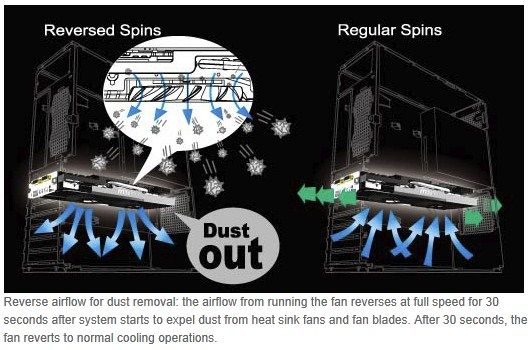 It say there that everytime system startup the fan will spin 100% for 30seconds. Will this not shorten the GPU fan lifespan? Let say i startup my pc once or twice everyday, wont the fan die fast? And also is there a way to disable this feature? Is only 30second.. If you reboot 20times a day is still only 600seconds.. The fan if spoilt also rma or slap in a new fan anyhow this tech is good because it remove dust as dust is numba one enemy for any electrical componenent |
|
|
|
|
|
ukimaro
|
Aug 22 2012, 06:54 PM
|
|
|
hi guys is anybody using the FXAA in the control panel ?
if we enable it right, do we need to to on the AA in games in order to make it run ?
|
|
|
|
|
|
Boldnut
|
Aug 22 2012, 07:00 PM
|
|
|
MSI market seems to be successful in getting on u guys. I still skeptical on this.
very simple, take a case fan put on the ur dusty GPU heatsink in reverse for 30 seconds see if those sticky dust that u build up for month will gone or not.
|
|
|
|
|
|
TSrc2x
|
Aug 22 2012, 07:04 PM
|
|
|
I would rather use a can of compressed air. Do it outside the case, stop the fan from spinning and see those dust fly out.
|
|
|
|
|
|
devillightning1
|
Aug 22 2012, 07:23 PM
|
Getting Started

|
QUOTE(kamechi @ Aug 21 2012, 12:34 PM) hi anyone own a MSi card? i want to know hows the dust removal technology works. reli use full? My GTX 680 Lightning spins at reversed speed at 100% (Its loud)when booting up for the first 30 seconds, then it is back to normal  no problems
Added on August 22, 2012, 7:28 pmQUOTE(ukimaro @ Aug 22 2012, 06:54 PM) hi guys is anybody using the FXAA in the control panel ? if we enable it right, do we need to to on the AA in games in order to make it run ? FXAA can be combined with other kinds of AA...such as MSAA, or standalone This post has been edited by devillightning1: Aug 22 2012, 07:28 PM |
|
|
|
|
|
ukimaro
|
Aug 22 2012, 07:33 PM
|
|
|
QUOTE(devillightning1 @ Aug 22 2012, 07:23 PM) My GTX 680 Lightning spins at reversed speed at 100% (Its loud)when booting up for the first 30 seconds, then it is back to normal no problems
Added on August 22, 2012, 7:28 pmFXAA can be combined with other kinds of AA...such as MSAA, or standalone ok, thanx ! is fxaa standalone > AA+FXAA ? |
|
|
|
|
|
devillightning1
|
Aug 22 2012, 07:40 PM
|
Getting Started
|
QUOTE(ukimaro @ Aug 22 2012, 07:33 PM) ok, thanx ! is fxaa standalone > AA+FXAA ? Of course more AA=less jaggies  |
|
|
|
|
|
DeepMemory
|
Aug 22 2012, 07:44 PM
|
|
|
QUOTE(gazer8866 @ Aug 22 2012, 06:10 PM) Why cannot have Nvidia Surround? Is that because of the dell monitor did not support for 3D? Thank! Nvidia surround is not the same as Nvidia 3D Vision surround. It is Nvidia's answer to AMD's Eyefinity technology  |
|
|
|
|
|
Freedom1104
|
Aug 22 2012, 07:46 PM
|
|
|
i Suppose nt every ppl will notice d minor jaggies when enemy RPG is heading your direction~~ haha
anyway i love FXAA as it impact game performance minorly~~
|
|
|
|
|
|
barbar554
|
Aug 22 2012, 07:49 PM
|
|
|
QUOTE(Boldnut @ Aug 22 2012, 07:00 PM) MSI market seems to be successful in getting on u guys. I still skeptical on this. very simple, take a case fan put on the ur dusty GPU heatsink in reverse for 30 seconds see if those sticky dust that u build up for month will gone or not. They spin backwards every time upon start-up, not every month so it shouldn't be a problem I guess. But then again... where does all the dust go? The bottom of your case ._. Doesn't really solve the problem eh? Oh well... at least it gets rid of the dust on the video card. |
|
|
|
|
|
devillightning1
|
Aug 22 2012, 07:49 PM
|
Getting Started
|
QUOTE(Freedom1104 @ Aug 22 2012, 07:46 PM) i Suppose nt every ppl will notice d minor jaggies when enemy RPG is heading your direction~~ haha anyway i love FXAA as it impact game performance minorly~~ If used correctly, but too much can blur out the image, such as BF3...shoulda make it like in Max Payne 3, barely any blurring  |
|
|
|
|
|
TSrc2x
|
Aug 22 2012, 07:53 PM
|
|
|
QUOTE(barbar554 @ Aug 22 2012, 07:49 PM) They spin backwards every time upon start-up, not every month so it shouldn't be a problem I guess. But then again... where does all the dust go? The bottom of your case ._. Doesn't really solve the problem eh? Oh well... at least it gets rid of the dust on the video card. Definitely still inside the case. If open on bench rack should be ok. Every MSI card got this feature?  |
|
|
|
|
|
barbar554
|
Aug 22 2012, 07:54 PM
|
|
|
QUOTE(devillightning1 @ Aug 22 2012, 07:49 PM) If used correctly, but too much can blur out the image, such as BF3...shoulda make it like in Max Payne 3, barely any blurring Battlefield 3's stupid bloom effect from their anti-aliasing lolol And... TXAA and FXAA pwns MSAA. NVIDIA  |
|
|
|
|
|
devillightning1
|
Aug 22 2012, 07:55 PM
|
Getting Started
|
QUOTE(rc2x @ Aug 22 2012, 07:53 PM) Definitely still inside the case. If open on bench rack should be ok. Every MSI card got this feature? Cards equiped with TwinFrozr IV fans
Added on August 22, 2012, 7:57 pmQUOTE(barbar554 @ Aug 22 2012, 07:54 PM) Battlefield 3's stupid bloom effect from their anti-aliasing lolol And... TXAA and FXAA pwns MSAA. NVIDIA Could use the FXAA injector, but the FPS hit isn't worth it This post has been edited by devillightning1: Aug 22 2012, 07:57 PM |
|
|
|
|
|
rav3n82
|
Aug 22 2012, 08:01 PM
|
|
|
QUOTE(rc2x @ Aug 22 2012, 07:04 PM) I would rather use a can of compressed air. Do it outside the case, stop the fan from spinning and see those dust fly out. Lol, indeed. I've always manually clean my CPU heatsink or graphic cards anyway, so no diff to me. Regardless, this feature comes with the card by default, so just enjoy it. I will report in on my findings in a few months time to see if it really does reduce the dust buildup.  This post has been edited by rav3n82: Aug 22 2012, 08:03 PM This post has been edited by rav3n82: Aug 22 2012, 08:03 PM |
|
|
|
|
|
Boldnut
|
Aug 22 2012, 08:15 PM
|
|
|
QUOTE(barbar554 @ Aug 22 2012, 07:49 PM) They spin backwards every time upon start-up, not every month so it shouldn't be a problem I guess. But then again... where does all the dust go? The bottom of your case ._. Doesn't really solve the problem eh? Oh well... at least it gets rid of the dust on the video card. yeah but I still skeptical that will actually remove ALL the thick dust u clog over months even u reverse spin every day. 30secs is I kinda.... skeptical since ur fan is collecting dust for many hours, I doubt that 30seconds is enough to remove all of them lol. besides, some people never shut down/boot up PC for weeks/months. hows that gonna say? lol. manual cleaning still better bro. |
|
|
|
|
|
devillightning1
|
Aug 22 2012, 08:23 PM
|
Getting Started
|
QUOTE(Boldnut @ Aug 22 2012, 08:15 PM) yeah but I still skeptical that will actually remove ALL the thick dust u clog over months even u reverse spin every day. 30secs is I kinda.... skeptical since ur fan is collecting dust for many hours, I doubt that 30seconds is enough to remove all of them lol. besides, some people never shut down/boot up PC for weeks/months. hows that gonna say? lol. manual cleaning still better bro. Better than nothing |
|
|
|
|
|
barbar554
|
Aug 22 2012, 08:28 PM
|
|
|
Yeah, it's for lazy people who are just too lazy to open up their case to clean the insides.
Or maybe even those rich nerds who just play games and seriously don't know anything about tech stuff. They just write down their desired parts on a piece of paper and then hand it over to some professional builder than handle the rest.
There are people like that, just so you know.
|
|
|
|
|
|
DeepMemory
|
Aug 22 2012, 08:31 PM
|
|
|
IMO the Dust technology just keep dust from accumulating inside the fan bearing thus prolonging the life span of the fan. Manual dust cleaning is still needed though.
|
|
|
|
|
|
devillightning1
|
Aug 22 2012, 08:33 PM
|
Getting Started
|
Maybe it maybe help the fans work better since fans with thick dust on it doesn't perform well...of course you would still have to clean the computer maybe every month?
|
|
|
|
|



 Quote
Quote







 0.0246sec
 0.53
0.53
 6 queries
 GZIP Disabled