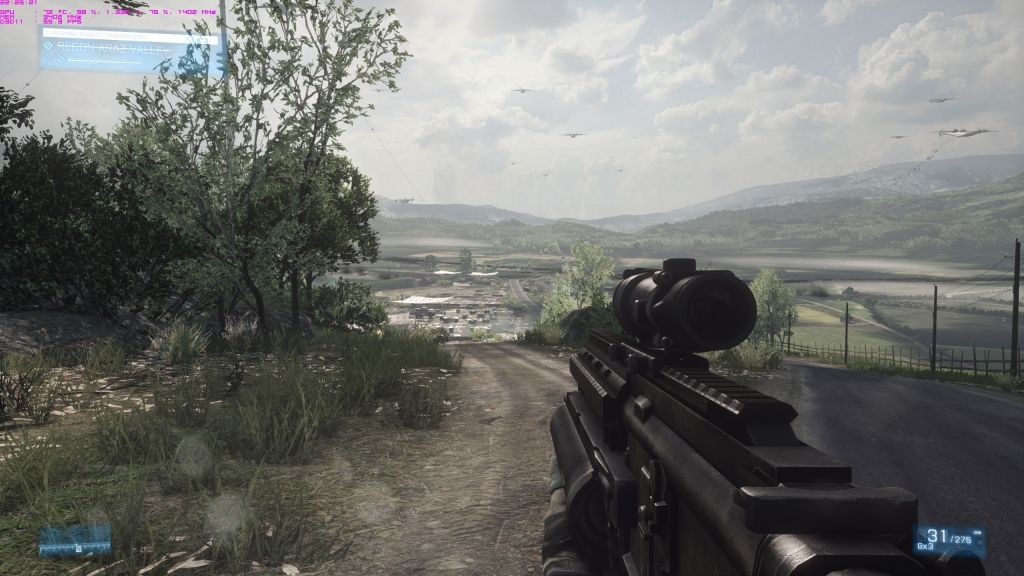
GTX 680 Lightning kicking ass here
This post has been edited by devillightning1: Aug 16 2012, 11:22 PM
Nvidia Fan Club V10, Vision, innovation and market leadership
Nvidia Fan Club V10, Vision, innovation and market leadership
|
|
 Aug 16 2012, 11:22 PM Aug 16 2012, 11:22 PM
Return to original view | Post
#1
|
 
Junior Member
246 posts Joined: Apr 2012 From: A house somewhere...   
|
GTX 680 Lightning kicking ass here
This post has been edited by devillightning1: Aug 16 2012, 11:22 PM |
|
|
|
|
|
Aug 20 2012, 12:26 AM
Return to original view | Post
#2
|
|
Junior Member
246 posts Joined: Apr 2012 From: A house somewhere...
|
QUOTE(Freedom1104 @ Aug 19 2012, 09:36 PM) anybody here hw to use MSI afterburner on GTX6series card... i having hard time figuring out how to use it.....using GPU tweak~~@@ Turn up the Power Limit to the max first, then slowly increase the GPU core clock...if crash then increase Voltage Core, repeat until you hit maximum core clock stable (Unigine or gaming for few hours to make sure), and then try upping the Memory clock |
|
|
Aug 22 2012, 07:23 PM
Return to original view | Post
#3
|
|
Junior Member
246 posts Joined: Apr 2012 From: A house somewhere...
|
QUOTE(kamechi @ Aug 21 2012, 12:34 PM) hi anyone own a MSi card? i want to know hows the dust removal technology works. reli use full? My GTX 680 Lightning spins at reversed speed at 100% (Its loud)when booting up for the first 30 seconds, then it is back to normal  no problems no problemsAdded on August 22, 2012, 7:28 pm QUOTE(ukimaro @ Aug 22 2012, 06:54 PM) hi guys is anybody using the FXAA in the control panel ? FXAA can be combined with other kinds of AA...such as MSAA, or standaloneif we enable it right, do we need to to on the AA in games in order to make it run ? This post has been edited by devillightning1: Aug 22 2012, 07:28 PM |
|
|
Aug 22 2012, 07:40 PM
Return to original view | Post
#4
|
|
Junior Member
246 posts Joined: Apr 2012 From: A house somewhere...
|
QUOTE(ukimaro @ Aug 22 2012, 07:33 PM) ok, thanx ! is fxaa standalone > AA+FXAA ? Of course more AA=less jaggies  |
|
|
Aug 22 2012, 07:49 PM
Return to original view | Post
#5
|
|
Junior Member
246 posts Joined: Apr 2012 From: A house somewhere...
|
QUOTE(Freedom1104 @ Aug 22 2012, 07:46 PM) i Suppose nt every ppl will notice d minor jaggies when enemy RPG is heading your direction~~ haha If used correctly, but too much can blur out the image, such as BF3...shoulda make it like in Max Payne 3, barely any blurring anyway i love FXAA as it impact game performance minorly~~  |
|
|
Aug 22 2012, 07:55 PM
Return to original view | Post
#6
|
|
Junior Member
246 posts Joined: Apr 2012 From: A house somewhere...
|
QUOTE(rc2x @ Aug 22 2012, 07:53 PM) Definitely still inside the case. If open on bench rack should be ok. Cards equiped with TwinFrozr IV fansEvery MSI card got this feature?  Added on August 22, 2012, 7:57 pm QUOTE(barbar554 @ Aug 22 2012, 07:54 PM) Battlefield 3's stupid bloom effect from their anti-aliasing lolol Could use the FXAA injector, but the FPS hit isn't worth itAnd... TXAA and FXAA pwns MSAA. NVIDIA  This post has been edited by devillightning1: Aug 22 2012, 07:57 PM |
|
|
|
|
|
Aug 22 2012, 08:23 PM
Return to original view | Post
#7
|
|
Junior Member
246 posts Joined: Apr 2012 From: A house somewhere...
|
QUOTE(Boldnut @ Aug 22 2012, 08:15 PM) yeah but I still skeptical that will actually remove ALL the thick dust u clog over months even u reverse spin every day. 30secs is I kinda.... skeptical since ur fan is collecting dust for many hours, I doubt that 30seconds is enough to remove all of them lol. Better than nothing besides, some people never shut down/boot up PC for weeks/months. hows that gonna say? lol. manual cleaning still better bro. |
|
|
Aug 22 2012, 08:33 PM
Return to original view | Post
#8
|
|
Junior Member
246 posts Joined: Apr 2012 From: A house somewhere...
|
Maybe it maybe help the fans work better since fans with thick dust on it doesn't perform well...of course you would still have to clean the computer maybe every month?
|
|
|
Aug 23 2012, 05:20 PM
Return to original view | Post
#9
|
|
Junior Member
246 posts Joined: Apr 2012 From: A house somewhere...
|
QUOTE(rc2x @ Aug 23 2012, 04:59 PM) I think you are the early bird that got MSI 670 PE. zero your siggy so big! Not scare kena nuke? aiya SNSD nvm de la... |
|
|
Aug 28 2012, 06:44 PM
Return to original view | Post
#10
|
|
Junior Member
246 posts Joined: Apr 2012 From: A house somewhere...
|
QUOTE(Mr_47 @ Aug 28 2012, 04:50 PM) 680 got 2GB mem mang..... go for 1080 lorr.... still strong! someone on youtube told me to go 2560x1440...after creating a custom resolution, I tried playing BF3 on all high settings and got 70-80FPS on Gulf Of Oman with 64 players, definitely a monster although I do OC the card quite high |
|
|
Aug 29 2012, 03:40 PM
Return to original view | Post
#11
|
|
Junior Member
246 posts Joined: Apr 2012 From: A house somewhere...
|
QUOTE(Mr_47 @ Aug 28 2012, 09:01 PM) Shiat how to do tat? go nvidia control panel and create custom resolution |
|
|
Aug 29 2012, 03:47 PM
Return to original view | Post
#12
|
|
Junior Member
246 posts Joined: Apr 2012 From: A house somewhere...
|
QUOTE(zerohunter @ Aug 29 2012, 03:43 PM) sorry off topic, bro ur siggy 'Thermaltake' Venomous X-RT , should be 'thermalright' My spelling fails |
|
|
Aug 29 2012, 06:07 PM
Return to original view | Post
#13
|
|
Junior Member
246 posts Joined: Apr 2012 From: A house somewhere...
|
QUOTE(Mr_47 @ Aug 29 2012, 04:05 PM) even maximum monitor resolution is 1080? ken r? tot kennot tested lasttime. » Click to show Spoiler - click again to hide... «
|
|
|
|
|
|
Aug 30 2012, 05:01 PM
Return to original view | Post
#14
|
|
Junior Member
246 posts Joined: Apr 2012 From: A house somewhere...
|
QUOTE(codenamew @ Aug 30 2012, 04:28 PM) any idea whats the 2nd value for evga gtx570 hd? is it expensive if buy around 750? nah...i dont think so...my DCII 570 can sell 850+ |
|
|
Aug 31 2012, 12:04 AM
Return to original view | Post
#15
|
|
Junior Member
246 posts Joined: Apr 2012 From: A house somewhere...
|
QUOTE(codenamew @ Aug 30 2012, 11:12 PM) anyone selling 570 here? looking for upgrade.haha See my friend gonna pay me anot...my GTX 570 DirectCU II still waiting for my friend to pay me zzz |
|
|
Sep 4 2012, 07:31 PM
Return to original view | Post
#16
|
|
Junior Member
246 posts Joined: Apr 2012 From: A house somewhere...
|
QUOTE(Mr_47 @ Sep 4 2012, 05:34 PM) 1481..... shiat 670 buthurt kambing.... lets go for 1400 boost clock trying now to OC 680 to beat this... + aircond he he he (only reachable after hacking the voltage, and fans spinning 90% to keep it at 70c) |
|
|
Sep 4 2012, 10:29 PM
Return to original view | Post
#17
|
|
Junior Member
246 posts Joined: Apr 2012 From: A house somewhere...
|
QUOTE(our_team89 @ Sep 4 2012, 08:59 PM) guys,i have problem with my gtx275. Did you OC the card? that usually means unstable overclock or driver problemwhen i play games like darksider 2, apb reloaded n lost planet,at first the fps is normal (60-70 fps) but then the game crash n when i restart the game back, fps become 25-30fps.. i've tried driver from 197.48, 256.98 to 301.42 but still have the same problem.(i clean the driver 1st using driver sweeper b4 installing new driver) any idea what's the problem is? fyi recently i changed my motherboard from asus m4a87td to gigabyte 970a-ds3 but i did not format my pc.just delete old driver n install new one.. my gc temp also going till 85c when playing games.. please help me,going crazy with this fps drop problem..  |
|
|
Sep 4 2012, 10:35 PM
Return to original view | Post
#18
|
|
Junior Member
246 posts Joined: Apr 2012 From: A house somewhere...
|
QUOTE(our_team89 @ Sep 4 2012, 10:31 PM) no..cos i'm afraid it will overheat with stock cooler. no, higher temp wont lower frames, but I would try to let the GPU run below 80c by increasing fan speed cause high temps can degrade the GPU fasterbtw,does high temp will lower frame rates? This post has been edited by devillightning1: Sep 4 2012, 10:36 PM |
|
|
Sep 4 2012, 10:39 PM
Return to original view | Post
#19
|
|
Junior Member
246 posts Joined: Apr 2012 From: A house somewhere...
|
QUOTE(hazwan_aviator @ Sep 4 2012, 10:37 PM) actually,that bcoz of the bios mod,these bios remove the thermal throttle refer my previous post(i not sure its true or not,but i do attach some prove of a guy said that) I only modded my GPU bios twice and thats for the GTX 570 DirectCU II (to allow higher voltages) and GTX 680 Lightning (cause the first batch of bios makes my PC hard crashes instead of driver reset when OC failed)...you cant change your bios with the same one... ...i tried to flash but failed as the bios version is still the same...no idea how to go on with the mod bios...any ideas guy?? ...i tried to flash but failed as the bios version is still the same...no idea how to go on with the mod bios...any ideas guy??  This post has been edited by devillightning1: Sep 4 2012, 10:40 PM |
|
|
Sep 10 2012, 07:44 PM
Return to original view | Post
#20
|
|
Junior Member
246 posts Joined: Apr 2012 From: A house somewhere...
|
QUOTE(ukimaro @ Sep 10 2012, 06:56 PM) No error and it is stable (went thru benchmarking using unigine heaven).. Increasing the VOLTAGE will increase OC capability, but also increase TEMPS...make sure you have a good cooler (twin frozr 3/4, DCII, windforce ...) and make sure to have good airflow in your casedoes increasing the voltage helps ? |
|
Topic ClosedOptions
|
| Change to: |  0.0421sec 0.0421sec
 0.42 0.42
 7 queries 7 queries
 GZIP Disabled GZIP Disabled
Time is now: 16th December 2025 - 11:05 AM |
 Quote
Quote