Welcome Guest ( Log In | Register )

57 Pages « < 39 40 41 42 43 > » Bottom

Outline · [ Standard ] · Linear+

 Graphic Cooling discussion thread!, come discuss here. nowhere else

views
     
Doom
post Jan 9 2008, 12:39 AM

Doom"s here >_<"
*******
Senior Member
4,496 posts

Joined: Apr 2005
From: KL


hahah .. .like LittleLinnet said ... the fan at the 5.25" slot is enough to keep the card at such temperature ...

I can't believe it myself .. but it does works that well ..

The reason I don't want to put the fan beneath the cooler because I want a smooth airflow direction ..

from intake through south bridge, gc and sound card then exhaust through the rear PCI slot ...
mADmAN
post Jan 9 2008, 03:24 AM

10k Club
********
All Stars
10,530 posts

Joined: Nov 2004
From: Petaling Jaya & Mid Valley


QUOTE(sHawTY @ Jan 9 2008, 12:11 AM)
That's with fan or without fan? blink.gif
Don't tell me you get that kind of temps with the S1 on passive mode. shocking.gif

By the way Doom, you can still put a fan on the S1 if you put the soundcard on the first PCI slot.
With that, you'd have bigger room for the fan to absorb more air and blow it to the heatsink.

Just my suggestion though. smile.gif
*
actually the soundcard is best kept as far away from the GC as possible...i remember reading somewhere that audio wise, the GC is the biggest 'noise' maker in a PC... cant remember where i read this..and i havent even bothered trying to test it....


QUOTE(Doom @ Jan 9 2008, 12:39 AM)
hahah .. .like LittleLinnet said ... the fan at the 5.25" slot is enough to keep the card at such temperature ...

I can't believe it myself .. but it does works that well ..

The reason I don't want to put the fan beneath the cooler because I want a smooth airflow direction ..

from intake through south bridge, gc and sound card then exhaust through the rear PCI slot ...
*
actually if u put the soundcard above like shawty suggested, and add a low cfm fan on the pci slots ur airflow will be better man...itll help to make sure theres no heat trapped under the GC. (unless ur front fan is strong enough to push it out the back la)

but....doing that....will contradict with what i said to shawty above laugh.gif
Doom
post Jan 9 2008, 05:53 AM

Doom"s here >_<"
*******
Senior Member
4,496 posts

Joined: Apr 2005
From: KL


hahha .. thanks for the suggestion men...

Believe it or not, the poor static pressure Noctua fan can pushes the air exhaust through the PCI slot opening.

I can feel it with my hands ... so no problem with airflow ...

I just don't want to place more fans and creates more noise ...

Overall temperature within my expectation .. so cheer ...

nles
post Jan 9 2008, 12:54 PM

♥ It's not about the girl ♥ It's the G-Shock
*******
Senior Member
2,125 posts

Joined: Jan 2003


Really nice temp but wondering if compare to Zalman ZV9 with Fan which 1 will runs cooler.
Doom
post Jan 9 2008, 03:50 PM

Doom"s here >_<"
*******
Senior Member
4,496 posts

Joined: Apr 2005
From: KL


hmmm ...... it could perform even better if I placed a fan at the bottom of the cooler ....

I'm not sure about ZV9 actual performance, but the double price would definitely not justify lack of two times performance increment ...

Another thing is this cooler definitely run quieter than ZV9 which is one of my key requirement when building a PC ....

I just have a pair of sensitive ear .....
darude87
post Jan 11 2008, 12:22 PM

hhhoooiii!!!
******
Senior Member
1,412 posts

Joined: Jun 2005


my friend just bought a zalman like fan and install to his 1st batch palit 7300GT, the temp decrease a lot, from 53(idle), 72(max) dropped to 42(idle), 55(max), i'm really impressed by the result

but at the same time, i'm using galaxy 7900GS with the real zalman, i've remount my hsf with tuniq TX-2, but my temp seems to be worse than that, idle 51 and 65 max, is it because my card consume more power that's why the temp also higher?
Doom
post Jan 11 2008, 05:57 PM

Doom"s here >_<"
*******
Senior Member
4,496 posts

Joined: Apr 2005
From: KL


of course .. ur card produced more heat than 7300GT dude ..

it uses more in the 3D mode or load condition ...
metalfreak
post Jan 14 2008, 10:37 AM

Working out is not my routine, it's my new lifestyle
*******
Senior Member
3,300 posts

Joined: Jan 2003
ah i finally found this thread..

Which cooler would you recommend for my Asus 8800GT(non TOP version).

budget is not really an issue. I read that Thermalright HR-03 GT is good(with a fan).

Any others?
longpants
post Jan 14 2008, 09:40 PM

Getting Started
**
Junior Member
260 posts

Joined: Nov 2005


I'm also looking for for third party cooler.

QUOTE(metalfreak @ Jan 14 2008, 10:37 AM)
ah i finally found this thread..

Which cooler would you recommend for my Asus 8800GT(non TOP version).

budget is not really an issue. I read that Thermalright HR-03 GT is good(with a fan).

Any others?
*
I think Artic Cooling Accelero 1 and 2 also will be another choice. One of the forumer also recommended Zalman FC-ZV9.

RECOMMENDATIONS PLZZZZZZZZZZZ................!!!!!!!


sukhoi37
post Jan 14 2008, 09:41 PM

Into Computer Since 2002
*******
Senior Member
4,810 posts

Joined: Jan 2003


artic S1 or TR HR03 GT.
longpants
post Jan 14 2008, 10:42 PM

Getting Started
**
Junior Member
260 posts

Joined: Nov 2005


the TR HR03 GT is like 2-3 times the price of AC S1 leer.. lol.. which one better ah. some say S1 better than HR03 leer..

anyway my ori post is at this part of the forum. is it melted or is it like this? http://forum.lowyat.net/topic/610327
sukhoi37
post Jan 14 2008, 10:57 PM

Into Computer Since 2002
*******
Senior Member
4,810 posts

Joined: Jan 2003


QUOTE(longpants @ Jan 14 2008, 10:42 PM)
the TR HR03 GT is like 2-3 times the price of AC S1 leer.. lol.. which one better ah. some say S1 better than HR03 leer..

anyway my ori post is at this part of the forum. is it melted or is it like this? http://forum.lowyat.net/topic/610327
*
i got a HR03 Plus now, but it cant fit into my 3870.
gonna mod it.
also ordered a S1 from bata.
I'll do a comparison review once the S1 is here. smile.gif
Doom
post Jan 15 2008, 01:55 AM

Doom"s here >_<"
*******
Senior Member
4,496 posts

Joined: Apr 2005
From: KL


Performance wise, HR-03 GT definitely works better since it's designed by TR that often king of air cooling ....

but in term of price it can't be compared with AC S1 ...

AC S1 is really good but it just can't match TR ...


clayclws
post Jan 15 2008, 10:01 AM

Look at all my stars!!
*******
Senior Member
2,659 posts

Joined: Sep 2006
From: Miri, PJ & KL


Doom...S1 does not come with RAM heatsink, does it? According to the pictures you posted, you didn't use any fans...may I know why? A single fan could add around 7-10°C difference and the noise is neglible...and you could add TWO fans to it...


Added on January 15, 2008, 10:01 amOh, btw, according to PC-Zone's pricelist...they have Accelero S1 and its fans...

This post has been edited by clayclws: Jan 15 2008, 10:01 AM
Doom
post Jan 15 2008, 06:03 PM

Doom"s here >_<"
*******
Senior Member
4,496 posts

Joined: Apr 2005
From: KL


AC Accelero S1 does comes with heatsink .. those are made of aluminum ..

btw if u are getting those make sure u get some thermal tape as well .. coz those stock thermal tape just won't stick for good initially unless u put a folded paper to slip between the ram sink and cooler itself ..

if not it might drop when first using it ...

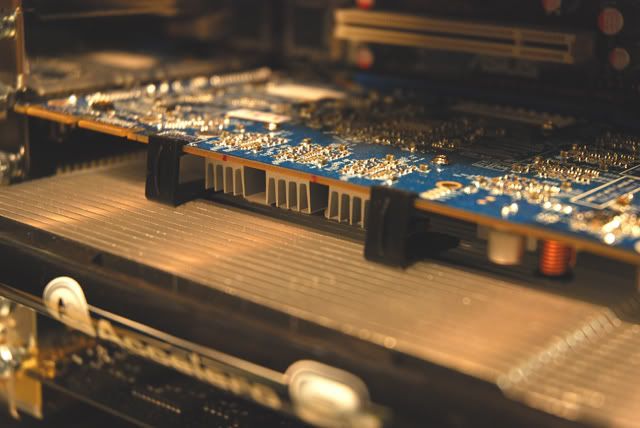
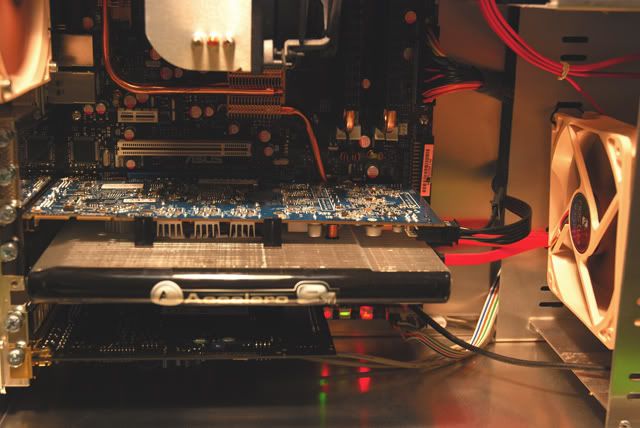
Why would I need to put another fan below the cooler when I'm getting 36c to 49c of cooling result ... brows.gif

I have a fan that is placed right in front of the card to provide adequate airflow ....

Photo speaks thousand of words ....

user posted image

user posted image

btw those turbo fans that mentioned by you are sold separately and I just don't think its' worth the money to buy it ..

basically it only provides small amount of airflow .... sweat.gif

This post has been edited by Doom: Jan 15 2008, 06:05 PM
clayclws
post Jan 15 2008, 06:33 PM

Look at all my stars!!
*******
Senior Member
2,659 posts

Joined: Sep 2006
From: Miri, PJ & KL


QUOTE(Doom @ Jan 15 2008, 06:03 PM)
btw if u are getting those make sure u get some thermal tape as well .. coz those stock thermal tape just won't stick for good initially unless u put a folded paper to slip between the ram sink and cooler itself ..
*
You should read what Ianho recommended. Clean the whole RAM bit completely with alchohol or spirit or whatever it is that he used...then baru you apply the new RAM heatsinks.


QUOTE(Doom @ Jan 15 2008, 06:03 PM)
user posted image
*
Wow, how do you install the fan there?


QUOTE(Doom @ Jan 15 2008, 06:03 PM)
btw those turbo fans that mentioned by you are sold separately and I just don't think its' worth the money to buy it ..

basically it only provides small amount of airflow .... sweat.gif
*
Those Turbo Module are quite cheap, aren't they? RM40 for 2 fans if I'm not mistaken. That's roughly less than £7 over at UK. You can get other fans like the Vizo Propeller or something smile.gif Or add your own 120mm or 92mm fans...But seems like you don't overclock at all, do you?
[attachmentid=379897]
Doom
post Jan 15 2008, 08:48 PM

Doom"s here >_<"
*******
Senior Member
4,496 posts

Joined: Apr 2005
From: KL


@clayclws

I did read his review about the ram sink issue .. the thing is it just need some heat to melt the tape to stick on the ram properly...

so I don't bother to go with alcohol cleaning .. some how hard to find it around local store..

btw... I don't OC and don't see the point of OC ... coz it just doesn't yield to much of different in term of real time gaming .. 2 to 5 fps ....

That vizo cooler is one hell a noise maker ... I never go for VIZO fan for one reason ... absolute noise maker ....

besides, AC S1 is a cooler that works well with passive mod or minimal airflow .. so even though putting a fan below would just let it gain better result during load ..

I rather maintain healthy ambient temperature within the case by pushing all the hot air out asap.... putting a fan below the card would just cycle part of hot air within the case ...
clayclws
post Jan 15 2008, 09:12 PM

Look at all my stars!!
*******
Senior Member
2,659 posts

Joined: Sep 2006
From: Miri, PJ & KL


QUOTE(Doom @ Jan 15 2008, 08:48 PM)
@clayclws

I did read his review about the ram sink issue .. the thing is it just need some heat to melt the tape to stick on the ram properly...

so I don't bother to go with alcohol cleaning .. some how hard to find it around local store..

btw... I don't OC and don't see the point of OC ... coz it just doesn't yield to much of different in term of real time gaming ..  2 to 5 fps ....

That vizo cooler is one hell a noise maker ... I never go for VIZO fan for one reason ... absolute noise maker ....

besides, AC S1 is a cooler that works well with passive mod or minimal airflow .. so even though putting a fan below would just let it gain better result during load ..

I rather maintain healthy ambient temperature within the case by pushing all the hot air out asap.... putting a fan below the card would just cycle part of hot air within the case ...
*
I think you generalize Vizo too much. I've seen this Vizo Propeller working at Sri Comp and AllIT. It's silent.
Doom
post Jan 15 2008, 10:12 PM

Doom"s here >_<"
*******
Senior Member
4,496 posts

Joined: Apr 2005
From: KL


It's silent ??? maybe our level of acceptance of silent is different...

I'd call it silent when it's tested during midnight ....where surrounding noise goes down to minimal..

Places like All IT and Sri Comp are so noisy most of time .. and for a fan that could grab a person notice required it to be as loud as 60dba ...

VIZO Propeller won't reaches that noise level coz it only goes up to 35 dba on full speed for 38 cfm .. so no one could actually hear the noise from the cooler in such environment...

I know it well cos I'm very sensitive to noise ... I would rate it quiet if fall below 30 dba and silent 20 dba ....

btw tested putting a fan below the cooler ... it doesn't seems to benefit much .... temperature still about the same .....

The reason is the 12 cm fan placed below the cooler has limited airflow due to existent of the sound card ....

So in my setup, having that Noctua 12cm fan would be enough ...


clayclws
post Jan 15 2008, 10:13 PM

Look at all my stars!!
*******
Senior Member
2,659 posts

Joined: Sep 2006
From: Miri, PJ & KL


And...still, how did you mount your Noctua fan that way?

57 Pages « < 39 40 41 42 43 > » Top
 

Change to:
| Lo-Fi Version
0.0232sec    0.58    6 queries    GZIP Disabled
Time is now: 6th December 2025 - 10:50 PM