Welcome Guest ( Log In | Register )

Bump Topic Topic Closed RSS Feed
126 Pages « < 4 5 6 7 8 > » Bottom

Outline · [ Standard ] · Linear+

 Jailbreak and Unlock Discussion v4, READ: ABSOLUTELY NO DISCUSSION ON PIRACY

views
     
TSazraeil
post Apr 27 2012, 05:04 PM

Prince of Ravens
*******
Senior Member
4,286 posts

Joined: Jun 2008
Personally I would wait for 6. I see no reason to tell apple the exploit only for 5.1, I'd rather wait for 6 and use the exploit then. I think ion1c is also recommending for pod2g to hold on to the exploit for ios 6 which apple is currently testing.
r-care
post Apr 27 2012, 05:09 PM

Getting Started
**
Junior Member
103 posts

Joined: Jul 2007


well, chpwn suggested to release ASAP since there are no guarantee the same exploit will work. ion1c? he already got the JB for himself and never gonna release to public.
otosan
post Apr 27 2012, 05:24 PM

Getting Started
**
Junior Member
162 posts

Joined: Sep 2009
From: 127.0.0.1
QUOTE(r-care @ Apr 27 2012, 05:09 PM)
well, chpwn suggested to release ASAP since there are no guarantee the same exploit will work. ion1c? he already got the JB for himself and never gonna release to public.
*
This is true, but also, who knows? that's why i said to them that if they have several exploits then it's nevermind to keep it... but if only one, better they release it fast...

as for 5.1 exploit, just make sure everybody save their SHSH while still can so they can go to 5.1 later..

for A5 devices user, too bad..., i think the hacker should prioritize to find a way to downgrade or using SHSH for this devices 1st..
r-care
post Apr 27 2012, 05:33 PM

Getting Started
**
Junior Member
103 posts

Joined: Jul 2007


yeah, i also think if they dont want to release the JB, better share how to downgrade to JB-able version.
kopiko21
post Apr 27 2012, 06:07 PM

Getting Started
**
Junior Member
78 posts

Joined: Mar 2011
QUOTE(otosan @ Apr 27 2012, 04:23 PM)
use Redsn0w to stitch your SHSH with the FW, another word, create the custom FW using Redsn0w...
*
bro can u explian more detail.. quit blur now..
i wana preserve bb. when i choose stith i need to choose ipsw right. then i need to choose what
i got 2.
1) no_bb
2) ori 5.0.1
what need i choose

shsh i choose 5.0.1 right?

after i finish this step i oso need pawn to dfu mode before shift + restore in itunes?
ty then

This post has been edited by kopiko21: Apr 27 2012, 06:16 PM
otosan
post Apr 27 2012, 06:34 PM

Getting Started
**
Junior Member
162 posts

Joined: Sep 2009
From: 127.0.0.1
QUOTE(kopiko21 @ Apr 27 2012, 06:07 PM)
bro can u explian more detail.. quit blur now..
i wana preserve bb. when i choose stith i need to choose ipsw right. then i need to choose what
i got 2.
1) no_bb
2) ori 5.0.1
what need i choose

shsh i choose 5.0.1 right?

after i finish this step i oso need pawn to dfu mode before shift + restore in itunes?
ty then
*
So 1st, we preserve baseband :

1. Open Redsn0w 0.9.10b7 or 8, choose Custom IPSW
2. Pick Your Ori 5.0.1 IPSW and wait the process

2nd, We Stitch SHSH

1. Take SHSH of 5.0.1 using TinyUmbrella
2. Use Redsn0w 0.9.10b7 or 8 choose Extras --> SHSH
3. Choose Stitch and Use The SHSH from step 1 (choose Local) combine it with NoBB 5.0.1 we just created
4. Redsn0w will create another IPSW in same folder as your NOBB IPSW the Latest IPSW Name should be look like this (this is mine created using Redsn0w as well) :
user posted image

3rd, We restore

1. Put your device in PWNED DFU (don't forget to turn off device before do this, to prevent error happen when restore)
2. Restore using iTunes
3. Drink Coffee or eat maggie while iTunes restoring your phone
4. If it stuck on Recovery Screen, Just use Redsn0w again and choose Recovery Fix

Done smile.gif

This post has been edited by otosan: Apr 27 2012, 06:38 PM

IFANS
post Apr 27 2012, 06:55 PM

Getting Started
**
Junior Member
99 posts

Joined: Oct 2010
Need advise, currently my iphone4 locked with jpn soft bank ios 5.0.1 baseband 4.11.08. Not jailbreak..
really new regarding unlock thing...
Now gonna unlock using SAM..
My question..before unlock i need to jailbreak ..then
Do i need gevey sim? During jailbreak process i need to put softbank micro sim or malaysia telco micro sim inside iphone 4?
flexus90
post Apr 27 2012, 07:02 PM

On my way
****
Senior Member
580 posts

Joined: Jun 2009
From: North Pole oF Msia


I tested the SAM unlock today, seem it does not work. Did Apple do something?

Btw SAM unlock do not required iOS to be updated in order to fix it. Apple just need to fix it on their server.
otosan
post Apr 27 2012, 07:05 PM

Getting Started
**
Junior Member
162 posts

Joined: Sep 2009
From: 127.0.0.1
QUOTE(IFANS @ Apr 27 2012, 06:55 PM)
Need advise, currently my iphone4 locked with jpn soft bank ios 5.0.1 baseband 4.11.08. Not jailbreak..
really new regarding unlock thing...
Now gonna unlock using SAM..
My question..before unlock i need to jailbreak ..then
Do i need gevey sim? During jailbreak process i need to put softbank micro sim or malaysia telco micro sim inside iphone 4?
*
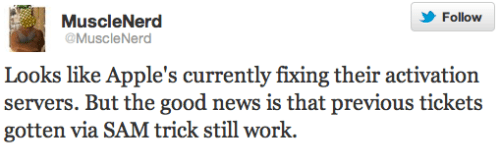
Sorry friend, too late, apple FIXED the hole... just buy gevey and unlock your phone...


Added on April 27, 2012, 7:06 pm
QUOTE(flexus90 @ Apr 27 2012, 07:02 PM)
I tested the SAM unlock today, seem it does not work. Did Apple do something?

Btw SAM unlock do not required iOS to be updated in order to fix it. Apple just need to fix it on their server.
*
user posted image

This post has been edited by otosan: Apr 27 2012, 07:06 PM
flexus90
post Apr 27 2012, 07:08 PM

On my way
****
Senior Member
580 posts

Joined: Jun 2009
From: North Pole oF Msia


Gevey/R-Sim can do activation?
otosan
post Apr 27 2012, 07:12 PM

Getting Started
**
Junior Member
162 posts

Joined: Sep 2009
From: 127.0.0.1
QUOTE(flexus90 @ Apr 27 2012, 07:08 PM)
Gevey/R-Sim can do activation?
*
I thought so, but some people said they have difficulty to do
kopiko21
post Apr 27 2012, 07:20 PM

Getting Started
**
Junior Member
78 posts

Joined: Mar 2011
QUOTE(otosan @ Apr 27 2012, 06:34 PM)
So 1st, we preserve baseband :

1. Open Redsn0w 0.9.10b7 or 8, choose Custom IPSW
2. Pick Your Ori 5.0.1 IPSW and wait the process

2nd, We Stitch SHSH

1. Take SHSH of 5.0.1 using TinyUmbrella
2. Use Redsn0w 0.9.10b7 or 8 choose Extras --> SHSH
3. Choose Stitch and Use The SHSH from step 1 (choose Local) combine it with NoBB 5.0.1 we just created
4. Redsn0w will create another IPSW in same folder as your NOBB IPSW the Latest IPSW Name should be look like this (this is mine created using Redsn0w as well) :
user posted image

3rd, We restore

1. Put your device in PWNED DFU (don't forget to turn off device before do this, to prevent error happen when restore)
2. Restore using iTunes
3. Drink Coffee or eat maggie while iTunes restoring your phone
4. If it stuck on Recovery Screen, Just use Redsn0w again and choose Recovery Fix

Done smile.gif
*
ty bro.. i will try.
lets have some coffee.. biggrin.gif biggrin.gif
flexus90
post Apr 27 2012, 07:27 PM

On my way
****
Senior Member
580 posts

Joined: Jun 2009
From: North Pole oF Msia


QUOTE(kopiko21 @ Apr 27 2012, 07:20 PM)
ty bro.. i will try.
lets have some coffee.. biggrin.gif biggrin.gif
*
If you bit fast you might be can unlock you iPhone d using SAM. Save the unlock ticket, and use it pretty long time.
WimpyKid
post Apr 27 2012, 08:05 PM

We fix your Devices!
*******
Senior Member
2,673 posts

Joined: Aug 2010
From: Puchong, Selangor


SAM no longer work. sad.gif
Lucky managed to unlock a few sets. biggrin.gif
kopiko21
post Apr 27 2012, 08:32 PM

Getting Started
**
Junior Member
78 posts

Joined: Mar 2011
QUOTE(WimpyKid @ Apr 27 2012, 08:05 PM)
SAM no longer work. sad.gif
Lucky managed to unlock a few sets. biggrin.gif
*
really? i juz wan to unlock by using SAM..
so it cant be again? i juz fail..
still need unlock using gevey.
lucky i presevre bb... sad.gif
WimpyKid
post Apr 27 2012, 08:40 PM

We fix your Devices!
*******
Senior Member
2,673 posts

Joined: Aug 2010
From: Puchong, Selangor


QUOTE(kopiko21 @ Apr 27 2012, 08:32 PM)
really? i juz wan to unlock by using SAM..
so it cant be again? i juz fail..
still need unlock using gevey.
lucky i presevre bb... sad.gif
*
Guess you ran out of luck. I tried 2 sets today and both failed to unlock using sam.
flexus90
post Apr 27 2012, 08:44 PM

On my way
****
Senior Member
580 posts

Joined: Jun 2009
From: North Pole oF Msia


QUOTE(kopiko21 @ Apr 27 2012, 08:32 PM)
really? i juz wan to unlock by using SAM..
so it cant be again? i juz fail..
still need unlock using gevey.
lucky i presevre bb... sad.gif
*
You dont even need to preserved baseband to unlock using sam. Btw i will bring latest gevey unlock for iPhone 4
kopiko21
post Apr 27 2012, 08:53 PM

Getting Started
**
Junior Member
78 posts

Joined: Mar 2011
QUOTE(flexus90 @ Apr 27 2012, 08:44 PM)
You dont even need to preserved baseband to unlock using sam. Btw i will bring latest gevey unlock for iPhone 4
*
i preserve bb coz im afraid thing like this la.. that y im do it.. plz inform me if SAM working back..

flexus90
post Apr 27 2012, 08:54 PM

On my way
****
Senior Member
580 posts

Joined: Jun 2009
From: North Pole oF Msia


QUOTE(kopiko21 @ Apr 27 2012, 08:53 PM)
i preserve bb coz im afraid thing like this la.. that y im do it.. plz inform me if SAM working back..
*
Sure will do. But it unlikely. Lucky you preserved BB
kopiko21
post Apr 27 2012, 08:59 PM

Getting Started
**
Junior Member
78 posts

Joined: Mar 2011
QUOTE(flexus90 @ Apr 27 2012, 08:54 PM)
Sure will do. But it unlikely. Lucky you preserved BB
*
yes i am.. wahhh.. if not im will become crazy...zzzz


Added on April 27, 2012, 9:01 pm
QUOTE(otosan @ Apr 27 2012, 06:34 PM)
So 1st, we preserve baseband :

1. Open Redsn0w 0.9.10b7 or 8, choose Custom IPSW
2. Pick Your Ori 5.0.1 IPSW and wait the process

2nd, We Stitch SHSH

1. Take SHSH of 5.0.1 using TinyUmbrella
2. Use Redsn0w 0.9.10b7 or 8 choose Extras --> SHSH
3. Choose Stitch and Use The SHSH from step 1 (choose Local) combine it with NoBB 5.0.1 we just created
4. Redsn0w will create another IPSW in same folder as your NOBB IPSW the Latest IPSW Name should be look like this (this is mine created using Redsn0w as well) :
user posted image

3rd, We restore

1. Put your device in PWNED DFU (don't forget to turn off device before do this, to prevent error happen when restore)
2. Restore using iTunes
3. Drink Coffee or eat maggie while iTunes restoring your phone
4. If it stuck on Recovery Screen, Just use Redsn0w again and choose Recovery Fix

Done smile.gif
*
ty mr otosan.. i did well.. biggrin.gif biggrin.gif
but im still cant unlock using SAM.. sad.gif

This post has been edited by kopiko21: Apr 27 2012, 09:01 PM

126 Pages « < 4 5 6 7 8 > » Top
Topic ClosedOptions
 

Change to:
| Lo-Fi Version
0.0388sec    0.49    6 queries    GZIP Disabled
Time is now: 21st December 2025 - 05:12 PM