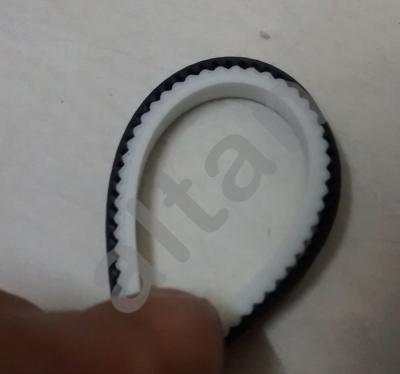
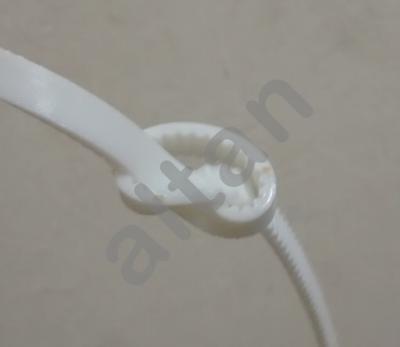
Wow! That's prolly printed with ninjaflex tho. PLA or abs woudlnt work i assume.
Btw altan, i cant enable cooling fan during prints or else my hotend temperature drops like crazy that the heater cant sustain. does it have something to do with the dfault PID settings?
Here's just a picture of my prusa
Ignore the messy table. Been tinkering with the printer for 2 days. Although it is really fun!
Edit: Side note, how do you fix lowyat forum from rotating the photo -.-
This post has been edited by izzudinhafiz: Dec 12 2014, 09:24 PM
Joined: Sep 2009
From: Either PJ, JB or SG but not at your house!
QUOTE(izzudinhafiz @ Dec 12 2014, 09:23 PM)
Wow! That's prolly printed with ninjaflex tho. PLA or abs woudlnt work i assume.
Btw altan, i cant enable cooling fan during prints or else my hotend temperature drops like crazy that the heater cant sustain. does it have something to do with the dfault PID settings?
Here's just a picture of my prusa
Ignore the messy table. Been tinkering with the printer for 2 days. Although it is really fun!
Edit: Side note, how do you fix lowyat forum from rotating the photo -.-
You could set the fan speed to a slow fixed value like M106 S64 or in CURA setup the fan to gradually increase during the first 5 layers so your hot end won't drop dramatically. Usually the PID settings is difficult to set and it is very hotend specific. You could try messing around the PID settings but it will take a lot of time to workout the values.
Your Prusa is really nice looks well built and that aluminum frame is thick... I also notice you are missing one z-axis coupler
You could set the fan speed to a slow fixed value like M106 S64 or in CURA setup the fan to gradually increase during the first 5 layers so your hot end won't drop dramatically. Usually the PID settings is difficult to set and it is very hotend specific. You could try messing around the PID settings but it will take a lot of time to workout the values.
Your Prusa is really nice looks well built and that aluminum frame is thick... I also notice you are missing one z-axis coupler
No worries, my work table is the worst...
I didn't know lowyat rotates images
hmm. been looking at auto tune, but even autotune PID wouldnt get the hotend up to temperature. it just wouldnt ever reach 200 Celsius. A recommended fix on the web is to insulate the hotend and blow the fan only at the PEEK insulator. Im designing a fan shroud now in Solidworks. we'll see how that goes.
Of course the Prusa is nice! It has neon yellow 3d printed parts made from sifu Altan The missing Z coupler is from mixed up eBay shipment, ordered two but received one. Still waiting on it to get here.
the alu is 6mm thick. wasnt too expensive. cutting the frame and the bed cost me 150 ringgit including materials. So i dont get why people still opt for wooden version. Oh a side note to get alu cut cheaper. unless you need to save weight, dont bother making holes in the aluminium to "save material". They charge you with the aluminium blank and cutting time. so if you have less holes, there's less cutting time.
On another side note, I just tried 70mm/s printing on the prusa with VERY low acceleration setting from Marlin's default 9000 mm/sec^2. Its now down to 2000. XY jerk cut down to 10 compared to 30. so the print is looking fine BUT its fast! It is still printing now, I have a video here of it. But once it's done i'll add a photo of the final product. Its a cylindrical shaft for my filament spool holder. I'll try cube stuffs later.
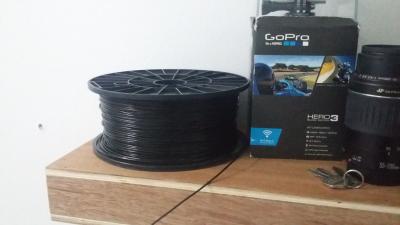
Of course currently without a spool holder, so im stuck with this and turning it by hand every few minutes
This post has been edited by izzudinhafiz: Dec 12 2014, 10:01 PM
my nozzle is 0.4mm your desk is tidier than mine, if you see mine I can't even find my screw driver on it , btw in the video why does your fans not spinning?
this is my marlin config
CODE
#define DEFAULT_AXIS_STEPS_PER_UNIT {80,80,4000,92} // Narrow Channel #define DEFAULT_MAX_FEEDRATE {500, 500, 2, 50} // (mm/sec) #define DEFAULT_MAX_ACCELERATION {200,200,50,300} // X, Y, Z, E maximum start speed for accelerated moves. E default values are good for skeinforge 40+, for older versions raise them a lot.
#define DEFAULT_ACCELERATION 3000 // X, Y, Z and E max acceleration in mm/s^2 for printing moves #define DEFAULT_RETRACT_ACCELERATION 3000 // X, Y, Z and E max acceleration in mm/s^2 for retracts
QUOTE
You seem to be running really fast for the Prusa, did you come across overshot corners and some bubbled surfaces at these speeds?
altan
does not seem to see any of those effect maybe not yet, the setting was actually for my mendelmax, I did a test print on a calibration part and it came out great so I just stick with it
This post has been edited by DarkTenno: Dec 12 2014, 10:07 PM
Joined: Sep 2009
From: Either PJ, JB or SG but not at your house!
QUOTE(izzudinhafiz @ Dec 12 2014, 09:57 PM)
hmm. been looking at auto tune, but even autotune PID wouldnt get the hotend up to temperature. it just wouldnt ever reach 200 Celsius. A recommended fix on the web is to insulate the hotend and blow the fan only at the PEEK insulator. Im designing a fan shroud now in Solidworks. we'll see how that goes.
Of course the Prusa is nice! It has neon yellow 3d printed parts made from sifu Altan The missing Z coupler is from mixed up eBay shipment, ordered two but received one. Still waiting on it to get here.
the alu is 6mm thick. wasnt too expensive. cutting the frame and the bed cost me 150 ringgit including materials. So i dont get why people still opt for wooden version. Oh a side note to get alu cut cheaper. unless you need to save weight, dont bother making holes in the aluminium to "save material". They charge you with the aluminium blank and cutting time. so if you have less holes, there's less cutting time.
On another side note, I just tried 70mm/s printing on the prusa with VERY low acceleration setting from Marlin's default 9000 mm/sec^2. Its now down to 2000. XY jerk cut down to 10 compared to 30. so the print is looking fine BUT its fast! It is still printing now, I have a video here of it. But once it's done i'll add a photo of the final product. Its a cylindrical shaft for my filament spool holder. I'll try cube stuffs later.
Of course currently without a spool holder, so im stuck with this and turning it by hand every few minutes
I just notice your hotend isn't wrapped in Kapton tape. If you have Kapton tape give the nozzle end of the hotend a few layer of the tape, helps keep the heat in.
Neon Yellow is meant to stand out and thanks for the compliment.
Thanks for the tip on the alu cutting, now I need to find a nearby shop for alu sheets.
QUOTE(DarkTenno @ Dec 12 2014, 10:01 PM)
izzudinhafiz
my nozzle is 0.4mm your desk is tidier than mine, if you see mine I can't even find my screw driver on it , alu plate is cheap you can it at sg besi around rm20 for 210x210
this is my marlin config
CODE
#define DEFAULT_AXIS_STEPS_PER_UNIT {80,80,4000,92} // Narrow Channel #define DEFAULT_MAX_FEEDRATE {500, 500, 2, 50} // (mm/sec) #define DEFAULT_MAX_ACCELERATION {200,200,50,300} // X, Y, Z, E maximum start speed for accelerated moves. E default values are good for skeinforge 40+, for older versions raise them a lot.
#define DEFAULT_ACCELERATION 3000 // X, Y, Z and E max acceleration in mm/s^2 for printing moves #define DEFAULT_RETRACT_ACCELERATION 3000 // X, Y, Z and E max acceleration in mm/s^2 for retracts
altan
does not seem to see any of those effect maybe not yet, the setting was actually for my mendelmax, I did a test print on a calibration part and it came out great so I just stick with it
Care to share the shop name that sells alu sheets at that price? I am thinking of getting some for another project.
Same for me, I played around with the setting based on a calibration cube and just stuck with since then.
I just notice your hotend isn't wrapped in Kapton tape. If you have Kapton tape give the nozzle end of the hotend a few layer of the tape, helps keep the heat in.
Neon Yellow is meant to stand out and thanks for the compliment.
Thanks for the tip on the alu cutting, now I need to find a nearby shop for alu sheets. Care to share the shop name that sells alu sheets at that price? I am thinking of getting some for another project.
Same for me, I played around with the setting based on a calibration cube and just stuck with since then.
hmm, Kapton tape. I'll try that. where can i get that which is not online? does normal hardware shops stock them?
they're in damansara. just send an SVG file by email, you'll get a quote in a few days. pay online and you can either pick it up or add shipping charges.
it a alu hardware shop, somewhere in chan sow lin, I get the address if I can find the receipt, it will cut the size when you oder so if you requested for 200x200 it will cut exact size, last time I boght 150x150 5mm alu plate cost me RM17 if I remember correctly
lelong got ppl selling kapton tape
This post has been edited by DarkTenno: Dec 12 2014, 10:20 PM
they're in damansara. just send an SVG file by email, you'll get a quote in a few days. pay online and you can either pick it up or add shipping charges.
I am not too sure where you can get Kapton tape in Malaysia but I do know it is sold at electronic shops. Try jalan pasar in KL, maybe one of the shop sells it. I have some extra 15mm x 100ft Kapton tape with me and I could sell it to you for RM 15 if you want. I bought the tape from china through ebay.
QUOTE(DarkTenno @ Dec 12 2014, 10:19 PM)
it a alu hardware shop, somewhere in chan sow lin, I get the address if I can find the receipt, it will cut the size when you oder so if you requested for 200x200 it will cut exact size, last time I boght 150x150 5mm alu plate cost me RM17 if I remember correctly
lelong got ppl selling kapton tape
I will try to find the shop, since I roughly know my way around chan sow lin.
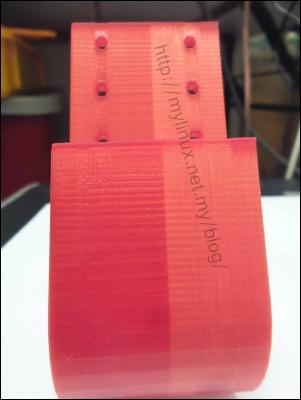
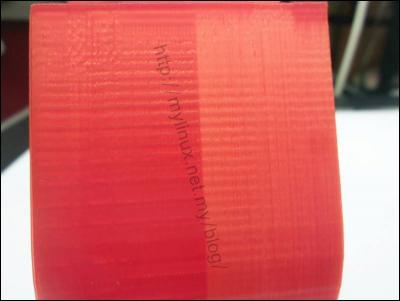
My result from overnight print total time 5 hours, some oddness with the part half of are shining but half of it have dull color weird temperature setting are the same through all print time
» Click to show Spoiler - click again to hide... «
This post has been edited by DarkTenno: Dec 13 2014, 10:05 AM
really? my prusa i3 is print much faster than that for on 0.2mm layer height, non print move I maxed 150m/s
[attachmentid=4256710]
altan can you share your normal cura setting, interested to try cura
I tried your settings on my printer, had some problems with the support material. This is what i am printing at. Doesn't add much more time to the total print time for smaller items.
This post has been edited by KLKS: Dec 13 2014, 12:17 PM
Joined: Sep 2009
From: Either PJ, JB or SG but not at your house!
QUOTE(DarkTenno @ Dec 13 2014, 10:05 AM)
My result from overnight print total time 5 hours, some oddness with the part half of are shining but half of it have dull color weird temperature setting are the same through all print time
» Click to show Spoiler - click again to hide... «
QUOTE(KLKS @ Dec 13 2014, 11:58 AM)
could it be the quality of the filament?
KLKS is right, your supplier must have provided you with low quality filaments because the sudden color change can only be caused by joining two batches of filament. The filament maker probably didn't want to remelt the last bits and decided to cut corners by joining it with another batch of filament.
I notice that the filaments I bought vary in color and intensity slightly from reel to reel but consistency throughout the filament is always the same.


 Dec 12 2014, 08:52 PM


 Quote
Quote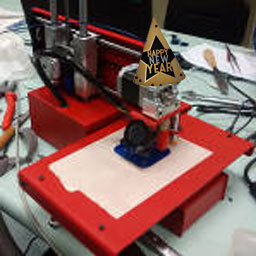





 looks well built and that aluminum frame is thick... I also notice you are missing one z-axis coupler



 , btw in the video why does your fans not spinning?




 0.0343sec
 0.56
0.56
 6 queries
 GZIP Disabled