

 Oct 22 2010, 12:37 AM


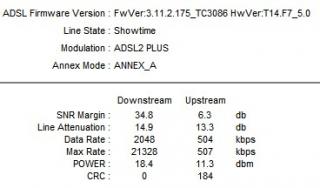
6dB SNR is an acceptable figure as long as you have a relatively stable line (read: low attenuation) that is free from interference and isn't too far from the exchange.
Depending on how the DSLAM is configured, in most cases the modem and/or DSLAM can negotiate a target SNR by adjusting the sync speed. Assuming your line had a theoretical maximum of 4096Kbps, the closer your sync speed is to 4096Kbps, the lower your SNR is. The issue is that SNR figures can fluctuate throughout different times of the day, based on different external factors etc., hence if your SNR fluctuates excessively, you lose sync.
Say during the day you were able to sync at 3.8Mbit, and your modem reported a SNR (applies to both down/upstream) of 10dB. During the wee hours of the night, condensation sets in which causes your SNR to drop and your modem to lose sync. The modem attempts to re-sync, but this time it can only manage 2Mbps to maintain a SNR of 10dB.
This is why a higher SNR will give you more headroom.
A number of Australian ISPs allow users to change the configuration profile to tweak the target SNRs from the DSLAM side as well as turn interleaving on/off to maximize your sync rate and minimize latency. Most DSLAMs will, however enforce a 10dB SNR. AFAIK, the quickest profile for sync speeds at the moment will enforce a SNR of 6dB both up and downstream, with interleaving turned on.
This profile works for most people; however if you have line issues, electrolysis, a distance of over 3-4KM from the exchange etc, you will need to pick a profile that allows you more SNR headroom.
If you have an extremely poor line, it is possible that you may not be able to sync at the target SNR. In this situation your sync speeds will generally be low (usually under 1Mbps) and you will experience a large number of dropouts.
I wouldn't know if TM Nut techs actually tweak SNR settings on the DSLAM side, but certain modems (ie. Billion, don't think they're sold in Malaysia) offer users the ability to change Coding Gain and Tx attenuation settings to tweak sync speeds. This may or may not alter your SNR - your mileage may vary.

PS. I'm not sure about Malaysia, but as I mentioned earlier the majority of Australian DSLAMs are set to achieve a target SNR of 10dB, with sync speeds uncapped. If your line is capable if a sync speed of 8Mbps but you are only connected at 4Mbps due to your plan being capped, you could very well have a SNR of over 20dB. This does not necessarily make your connection any more stable than one with a SNR of 10dB. If you are, however on a 4Mbit plan and syncing at 4Mbit with under 6dB SNR, there's a good chance you may need to consider downgrading to a slower plan if TM techs are unable to fix your line.
Attainable Line Rate (AKA Synch Rate)
This is the maximum rate at which your modem can connect to the DSLAM if there was no service provisioning limiting the bandwidth. Anything over 2,000Kbps is considered good. The higher the number the better.
If your maximum attainable rate was 2Mbps, you would most likely be over 5KM from the exchange and have a line attenuation of over 50dB. In Aus, the cutoff is 1536Kbit or 60dB. This is borderline low, and as line conditions can change extremely rapidly I wouldn't consider it anywhere near good.
This post has been edited by skyther: Oct 22 2010, 12:47 AM
 Quote
Quote




 0.0428sec
 0.56
0.56
 6 queries
 GZIP Disabled