Welcome Guest ( Log In | Register )

87 Pages « < 81 82 83 84 85 > » Bottom

Outline · [ Standard ] · Linear+

Streamyx Streamyx SNR Margin, --Read here if you face disconnections--

views
     
idealhometech
post Jun 11 2011, 12:33 AM

NCS
*****
Senior Member
949 posts

Joined: Oct 2010
From: Yen Lee NCS Enterprise (Seri Kembangan)
QUOTE(Eden-Teror @ May 26 2011, 07:14 PM)
what is the best solution for this problem??

call TM technician?? nah..i call him 4 times already..but never come.. cry.gif

what should i DO!!!??
*
I face SNR problem before...
Solution: reconnect/change the connector which connect ur home line with the poll line (Main line)... DIY..

Another factor...
a phone line connected before the splitter...
all phone line must connect after the splitter..
Sign: when phone ring, or u call... ur internet line will DC...


neroslash
post Jun 12 2011, 11:24 PM

Getting Started
**
Junior Member
162 posts

Joined: Sep 2008
From: Around M'sia


Good or not ? Please advise. THankiu.

Attached Image
prienze
post Jun 16 2011, 07:59 AM

Getting Started
**
Junior Member
281 posts

Joined: Jan 2003
From: PS
Statistics -- ADSL

Mode: ADSL2+
Line Coding: Trellis On
Status: Connected
Link Power State: L0

Downstream Upstream
SNR Margin (dB): 30.4 30.7
Attenuation (dB): 1.5 2.2
Output Power (dBm): 12.4 10.1
Attainable Rate (Kbps): 23968 1229
Rate (Kbps): 7168 509
MSGc (number of bytes in overhead channel message): 59 16
B (number of bytes in Mux Data Frame): 224 15
M (number of Mux Data Frames in FEC Data Frame): 1 1
T (Mux Data Frames over sync bytes): 1 3
R (number of check bytes in FEC Data Frame): 0 0
S (ratio of FEC over PMD Data Frame length): 1.0000 0.9846
L (number of bits in PMD Data Frame): 1800 130
D (interleaver depth): 1 1
Delay (msec): 0 0

Super Frames: 27343 27817
Super Frame Errors: 0 0
RS Words: 0 0
RS Correctable Errors: 0 0
RS Uncorrectable Errors: 0 N/A

HEC Errors: 0 0
OCD Errors: 0 0
LCD Errors: 0 0
Total Cells: 7511583 4071818830
Data Cells: 111973 27123038
Bit Errors: 0 12377313

Total ES: 0 661
Total SES: 0 20
Total UAS: 89 2099740


is mine okay?


Added on June 16, 2011, 8:03 am
QUOTE(prienze @ Jun 16 2011, 07:59 AM)
Statistics -- ADSL

Mode: ADSL2+ 
Line Coding: Trellis On 
Status: Connected 
Link Power State: L0 
 
  Downstream Upstream
SNR Margin (dB): 30.4  30.7 
Attenuation (dB): 1.5  2.2 
Output Power (dBm): 12.4  10.1 
Attainable Rate (Kbps): 23968  1229 
Rate (Kbps): 7168  509 
MSGc (number of bytes in overhead channel message): 59  16 
B (number of bytes in Mux Data Frame): 224  15 
M (number of Mux Data Frames in FEC Data Frame): 1  1 
T (Mux Data Frames over sync bytes): 1  3 
R (number of check bytes in FEC Data Frame): 0  0 
S (ratio of FEC over PMD Data Frame length): 1.0000  0.9846 
L (number of bits in PMD Data Frame): 1800  130 
D (interleaver depth): 1  1 
Delay (msec): 0  0 
 
Super Frames: 27343  27817 
Super Frame Errors: 0  0 
RS Words: 0  0 
RS Correctable Errors: 0  0 
RS Uncorrectable Errors: 0  N/A 
 
HEC Errors: 0  0 
OCD Errors: 0  0 
LCD Errors: 0  0 
Total Cells: 7511583  4071818830 
Data Cells: 111973  27123038 
Bit Errors: 0  12377313 
 
Total ES: 0  661 
Total SES: 0  20 
Total UAS: 89  2099740 
is mine okay?
*
I faced frequent disconnections too...not sure is my modem problem or line problem.
I'm using Riger DB108-WL.

Please help

This post has been edited by prienze: Jun 16 2011, 08:03 AM
vinorgouki
post Jun 18 2011, 11:54 AM

Getting Started
**
Junior Member
120 posts

Joined: Jan 2003


hi guys,

mine is 4mb bb deals.

DSL Status: Connected
DSL Modulation Mode: ADSL2+ AnnexM
DSL Path Mode: Fast
Downstream Rate: 4092 kbps
Upstream Rate: 511 kbps
Downstream Margin: 14 db
Upstream Margin: 30 db
Downstream Line Attenuation: 36 db
Upstream Line Attenuation: 9 db
Downstream Transmit Power: 15 db
Upstream Transmit Power: 19 db

i saw my Downstream Margin: 14 db is too low.
what happend if my Downstream Marginis lower than 12db?
will dc always?
isit higher cap will make Downstream Margin become lower?

This post has been edited by vinorgouki: Jun 18 2011, 12:41 PM
liquidsny
post Jun 19 2011, 09:32 AM

On my way
****
Junior Member
589 posts

Joined: Apr 2007
u guys who keep posting snr margin and ask if it's low or high..
do u even read the first page ? it's clearly stated there...
vinorgouki
post Jun 19 2011, 10:57 AM

Getting Started
**
Junior Member
120 posts

Joined: Jan 2003


QUOTE(liquidsny @ Jun 19 2011, 09:32 AM)
u guys who keep posting snr margin and ask if it's low or high..
do u even read the first page ? it's clearly stated there...
*
if wan answer then answer this
QUOTE
isit higher cap will make Downstream Margin become lower?


don think u r too clever. not everybody can understanding clearly like u.
if u don like don reply, dont answer something not related. waste post.

This post has been edited by vinorgouki: Jun 19 2011, 10:59 AM
jsthackz95
post Jun 19 2011, 03:14 PM

New Member
*
Newbie
1 posts

Joined: Jun 2011
read the manual or check the company that made that modem...........or try google
dan137
post Jun 21 2011, 07:16 PM

I don't need a parachute
*****
Senior Member
874 posts

Joined: Feb 2008
read the 1st post, seems cant understand to relate on my case.

Streamyx 1Mbps package.
facing slowness of internet connection for 4 days now.
can someone help me bout the SNR reading..

[attachmentid=2287286]
terrence_my
post Jul 7 2011, 03:18 PM

New Member
*
Junior Member
38 posts

Joined: Oct 2009


I have this figure and I read the first post.

SNR, Attenuation are good enough.

The Power (output/TX Power) goes until 18db

and currently (this 2 weeks) i am facing frequently call drops which might occurs every second in the time.

modem changing, tel line, splitter are changed again and again

phone calls made and technicians came as well

any suggestion?

http://forum.lowyat.net/topic/1939914


Attached thumbnail(s)
Attached Image
dvinez
post Jul 20 2011, 06:56 PM

Limited Edition
******
Senior Member
1,475 posts

Joined: Dec 2006
From: Paradise


previously my snr and attenuation is excellent, now it become bad..snr 18, attn 39.

any idea what happen? streamyx or my problem? thanks
cllee86
post Jul 31 2011, 05:23 PM

On my way
****
Senior Member
540 posts

Joined: Aug 2007


Hi Guys, just realize I should have post my question here tongue.gif

According to the info in the 1st page, I think my signal reading is quite...err.....terrrible....

For SNR Margin, I constantly getting less than 7dB for downstream but my upstream is 18dB, which is borderline OK I think.

My signal attenuation is constantly more than 50dB for downstream and my upstream is about 20dB.

But even though my signal reading is quite bad from what is stated in the first page, I don't experience frequent disconnection. In fact, my connection is quite OK. There is one little issue though, the speed will not last long and will degrade over time.

I can get more than 100 kb/s download when it first started but eventually the speed will go down over some period of time and in the end, I'll be forced to restart my modem to get back the speed.
I wonder if this got something to do with my signal reading. I have been facing this kind of situation for so long that I think its normal for Streamyx. Now I'm not too sure.

Besides I'm not too sure whether my interpretation of the signal in my modem page is correct. I have attach the screen shot of my modem below. Hopefully the master here wil take a look at it and give me some advice. notworthy.gif

Btw, my Downstream Line Rate has dropped to around 1100kbps lately. When I first upgraded to 1mbps, I can easily get around 1200 ~ 1300 kbps. Sometimes I can get 1400kbps but lately its getting harder to pass 1100kbps. I'm stuck with 900kbps for a whole day when I connect during the weekends cry.gif

I'm not too sure whether I should complain to TM or not. My only concern is that they don't entertain me only.
Wonder what should I do sweat.gif

Attached Image
Sky.Live
post Aug 6 2011, 05:51 PM

Proctected Species
*******
Senior Member
4,390 posts

Joined: Oct 2004
From: Cheras, Malaysia


I am getting 2 different reading using 2 different modem.. Anyone know what's the cause behind it?

Aztech 605EU

06/08/2011
Us Rate (Kbps) 511
Ds Rate (Kbps) 1933
US Margin 24
DS Margin 7
Trained Modulation ADSL_2plus_AnxM
LOS Errors 0
DS Line Attenuation 54
US Line Attenuation 28
Peak Cell Rate 1205 cells per sec
CRC Rx Fast 7
CRC Tx Fast 0


TP-Link

04/08/2011
IP Address Subnet GateWay DNS Server
175.140.157.64 255.255.255.255 219.93.218.177 202.188.0.133
Downstream Upstream
SNR Margin: 16.5 22.4 db
Line Attenuation: 66.0 33.9 db
Data Rate: 2048 511 kbps
Max Rate: 5264 1251 kbps
POWER: 17.0 12.3 dbm
CRC: 45 0

Shud I report my situation? I doubt tmnet will do anything tho..

Electricity
post Aug 8 2011, 10:17 PM

New Member
*
Junior Member
14 posts

Joined: Jun 2011
EDIT: POST REMOVED.

This post has been edited by Electricity: Oct 1 2011, 11:33 PM
teehk_tee
post Sep 7 2011, 11:10 AM

ไม่เป็นไร
*******
Senior Member
5,363 posts

Joined: Apr 2005
From: กรุงเทพมหานคร BKK

hi guys, not long ago my side here has been experiencing a lot of lightning strikes.

after one such event, i experienced severe service degradation on my internet service.. line attenuation used to be around the 15-20db mark but now it's at 122 Downstream, 149 Upstream! SNR still around the same.

can someone explain what's wrong? could my splitter be damaged?
sniper69
post Sep 28 2011, 02:55 PM

.: One Shot One Kill :. .+|Level 9 Type Shit|+.
*******
Senior Member
7,173 posts

Joined: Jan 2003
From: PCH


user posted image

hello, this is mine. pretty slow though, not as fast as before, 180KBps, now only 100KBps, max pun 120KBps saja.
idoblu
post Sep 30 2011, 08:24 AM

stars for sale
********
All Stars
11,308 posts

Joined: Feb 2008
QUOTE(sniper69 @ Sep 28 2011, 02:55 PM)
user posted image

hello, this is mine. pretty slow though, not as fast as before, 180KBps, now only 100KBps, max pun 120KBps saja.
*
how to get this page? im using riger modem
war3boy
post Oct 2 2011, 02:03 AM

Getting Started
**
Junior Member
269 posts

Joined: Aug 2011
QUOTE(sniper69 @ Sep 28 2011, 02:55 PM)
user posted image

hello, this is mine. pretty slow though, not as fast as before, 180KBps, now only 100KBps, max pun 120KBps saja.
*
Hey your connection not stable? from the statistic you shown, it should be outstanding connection (SNR Margin) among so many ppl.

But the attenuation seem high. ><

But you might look it again after 30minutes see any change on those SNR Margin and Attenuation.


Added on October 2, 2011, 2:12 am
QUOTE(Sky.Live @ Aug 6 2011, 05:51 PM)
I am getting 2 different reading using 2 different modem.. Anyone know what's the cause behind it?

Aztech 605EU

06/08/2011
Us Rate (Kbps)     511
Ds Rate (Kbps)     1933
US Margin     24
DS Margin     7
Trained Modulation     ADSL_2plus_AnxM
LOS Errors     0
DS Line Attenuation     54
US Line Attenuation     28
Peak Cell Rate     1205 cells per sec
CRC Rx Fast     7
CRC Tx Fast     0
TP-Link

04/08/2011
IP Address Subnet GateWay DNS Server
175.140.157.64 255.255.255.255 219.93.218.177 202.188.0.133
  Downstream Upstream   
SNR Margin:  16.5  22.4 db
Line Attenuation:  66.0  33.9  db
Data Rate:  2048  511  kbps
Max Rate:   5264  1251  kbps
POWER:   17.0  12.3  dbm
CRC:   45 0

Shud I report my situation? I doubt tmnet will do anything tho..
*
Hi,

First one [Aztech 605EU],
SNR Margin for download is bad. and it might experiencing frequent disconnect issue?
This is the key -> Trained Modulation ADSL_2plus_AnxM
You might change it to G.dmt and see how it reflect.
If still the same, please call TM and let them know your connection is in bad condition and need to check the physical connection from DSLAM toward your connection including DSLAM.


Second one [TP-Link],
SNR margin still in safe rate. but the attenuation is quite high.
Did you always get dc status?


*Note, for the best connection it should no exist the CRC error. Before this i did try to troubleshoot with TM about this issue and unable to fix permanently. That is my experience i not sure about others.


Added on October 2, 2011, 2:22 am
QUOTE(teehk_tee @ Sep 7 2011, 11:10 AM)
hi guys, not long ago my side here has been experiencing a lot of lightning strikes.

after one such event, i experienced severe service degradation on my internet service.. line attenuation used to be around the 15-20db mark but now it's at 122 Downstream, 149 Upstream! SNR still around the same.

can someone explain what's wrong? could my splitter be damaged?
*
Please take out the splitter and make a direct connection from your phone line to the modem.
From there, you able to know is that splitter damaged?


Added on October 2, 2011, 2:27 am
QUOTE(cllee86 @ Jul 31 2011, 05:23 PM)
Hi Guys, just realize I should have post my question here tongue.gif 

According to the info in the 1st page, I think my signal reading is quite...err.....terrrible....

For SNR Margin, I constantly getting less than 7dB for downstream but my upstream is 18dB, which is borderline OK I think.

My signal attenuation is constantly more than 50dB for downstream and my upstream is about 20dB.

But even though my signal reading is quite bad from what is stated in the first page, I don't experience frequent disconnection. In fact, my connection is quite OK. There is one little issue though, the speed will not last long and will degrade over time.

I can get more than 100 kb/s download when it first started but eventually the speed will go down over some period of time and in the end, I'll be forced to restart my modem to get back the speed.
I wonder if this got something to do with my signal reading. I have been facing this kind of situation for so long that I think its normal for Streamyx. Now I'm not too sure.

Besides I'm not too sure whether my interpretation of the signal in my modem page is correct. I have attach the screen shot of my modem below. Hopefully the master here wil take a look at it and give me some advice. notworthy.gif

Btw, my Downstream Line Rate has dropped to around 1100kbps lately. When I first upgraded to 1mbps, I can easily get around 1200 ~ 1300 kbps. Sometimes I can get 1400kbps but lately its getting harder to pass 1100kbps. I'm stuck with 900kbps for a whole day when I connect during the weekends cry.gif

I'm not too sure whether I should complain to TM or not. My only concern is that they don't entertain me only.
Wonder what should I do sweat.gif 

Attached Image
*
Try to change the mode to G.dmt instead of ADSL2.
See that this able to solve your problem or not.

This post has been edited by war3boy: Oct 2 2011, 02:27 AM

cllee86
post Nov 19 2011, 01:14 AM

On my way
****
Senior Member
540 posts

Joined: Aug 2007


Thanks war3boy for ur advice.

I tried to change the mode to G.Dmt but the signal reading doesn't improve.
Its OK bro, I've accepted my fate. As long as I'm staying in this house I will be forever 1 mbps cry.gif

Oh, no Unify as my landlord does not permit TM technician to drill holes for the fiber optic cable cry.gif

someone_stupid
post Jan 11 2012, 03:31 PM

Regular
******
Senior Member
1,205 posts

Joined: May 2007


guys i want to ask, my stats are:

Downstream Upstream
Data rate(Kbps) 1536 512
Noise Margin 7 23
Output power(dBm) 53 31
Attenuation(dB) 122 185

its very bad rite? pj area anyone facing this?
chenghoe
post Jan 12 2012, 04:15 PM

New Member
*
Junior Member
44 posts

Joined: Oct 2006
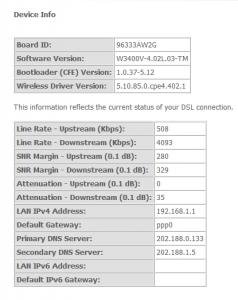
Need help, I'm using innacomm. Connect wireless.

oard ID: 96333AW2G
Software Version: W3400V-4.02L.03-TM
Bootloader (CFE) Version: 1.0.37-5.12
Wireless Driver Version: 5.10.85.0.cpe4.402.0

This information reflects the current status of your DSL connection.

Line Rate - Upstream (Kbps): 512
Line Rate - Downstream (Kbps): 1536
SNR Margin - Upstream (0.1 dB): 240
SNR Margin - Downstream (0.1 dB): 303
Attenuation - Upstream (0.1 dB): 110
Attenuation - Downstream (0.1 dB): 205

The problem, very bad connection when playing online game. Keep lagging and disconnect.
Any solution to it? The stats of modem looks bad =.=''

This post has been edited by chenghoe: Jan 12 2012, 06:29 PM

87 Pages « < 81 82 83 84 85 > » Top
 

Change to:
| Lo-Fi Version
0.0314sec    0.40    6 queries    GZIP Disabled
Time is now: 7th December 2025 - 04:52 AM