

the problem is when i first benchmark the score... the write read speed is 460mb and 190 write... now is 460read 150 write... how come decreased?
The SSD Thread V2, Faster Better Greener Unbreakable!
The SSD Thread V2, Faster Better Greener Unbreakable!
|
|
 Aug 7 2012, 11:48 AM Aug 7 2012, 11:48 AM
|
 
Junior Member
238 posts Joined: May 2012 
|
the problem is when i first benchmark the score... the write read speed is 460mb and 190 write... now is 460read 150 write... how come decreased?
|
|
|
|
|
|
Aug 7 2012, 11:52 AM
|

Senior Member
3,591 posts Joined: Feb 2008
|
QUOTE(louislw @ Aug 7 2012, 11:48 AM) the problem is when i first benchmark the score... the write read speed is 460mb and 190 write... now is 460read 150 write... how come decreased? "Used" SSDs are always a bit slower, because the NAND chips they use needs to erase "old" data first before they can write new data. Benchmarking a lot will quickly render any SSD into a "used" state. Especially with CrystalDiskMark's default setting of writing about 20GB of data per full test. |
|
|
Aug 7 2012, 11:53 AM
|
|
Junior Member
238 posts Joined: May 2012
|
QUOTE(everling @ Aug 7 2012, 11:52 AM) "Used" SSDs are always a bit slower, because the NAND chips they use needs to erase "old" data first before they can write new data. Benchmarking a lot will quickly render any SSD into a "used" state. Especially with CrystalDiskMark's default setting of writing about 20GB of data per full test. so isit normal for intel ssd 520 120gb going on 150mb on write speed? |
|
|
Aug 7 2012, 11:55 AM
|
|
Senior Member
3,591 posts Joined: Feb 2008
|
QUOTE(louislw @ Aug 7 2012, 11:53 AM) so isit normal for intel ssd 520 120gb going on 150mb on write speed? That I do not know. But I would recommend that you do at least one test run with ATTO first. If it should still show ~150MB performance on write, then there might be a problem. |
|
|
Aug 7 2012, 11:58 AM
|
|
Junior Member
238 posts Joined: May 2012
|
QUOTE(everling @ Aug 7 2012, 11:55 AM) That I do not know. But I would recommend that you do at least one test run with ATTO first. If it should still show ~150MB performance on write, then there might be a problem. ok will try nowAdded on August 7, 2012, 12:03 pm QUOTE(everling @ Aug 7 2012, 11:55 AM) That I do not know. But I would recommend that you do at least one test run with ATTO first. If it should still show ~150MB performance on write, then there might be a problem. here's the result...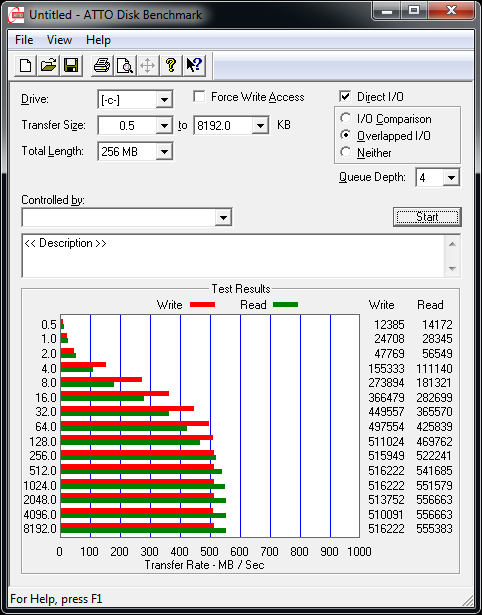 This post has been edited by louislw: Aug 7 2012, 12:03 PM |
|
|
Aug 7 2012, 12:09 PM
|
|
Senior Member
3,591 posts Joined: Feb 2008
|
QUOTE(louislw @ Aug 7 2012, 11:58 AM) here's the result... Looks like everything is fine then. Read and write is hitting past 500MB/s.This is how Sandforce-based SSDs behave. Poorly on random and incompressible data and very well on compressible data, and all the manufacturers uses the compressible data performance for their advertising. |
|
|
|
|
|
Aug 7 2012, 12:11 PM
|
|
Junior Member
238 posts Joined: May 2012
|
phew... i thought got problem
 thx everling for the software thx everling for the software |
|
|
Aug 7 2012, 12:12 PM
|
|
Senior Member
3,591 posts Joined: Feb 2008
|
QUOTE(louislw @ Aug 7 2012, 12:11 PM) phew... i thought got problem You're welcome. thx everling for the software |
|
|
Aug 7 2012, 01:59 PM
|

Senior Member
1,457 posts Joined: Jul 2009 
|
QUOTE(EdwinCodec @ Aug 6 2012, 07:19 PM)  |
|
|
Aug 7 2012, 02:17 PM
|

Senior Member
4,522 posts Joined: Apr 2006
|
QUOTE(t3n @ Aug 7 2012, 01:59 PM) How come mine m4 doesn't show in hwmonitor?? Nor does mine and nor does every single owner of the M4.SSDs don't have a temp sensor like HDD does, because there's no use in it having one. An SSD doesn't even bulge 10 celcius anyways. So nothing to be angry about, it's just the way it is. Don't freak out because you think there's something wrong with your SSD when there isn't. |
|
|
Aug 7 2012, 04:28 PM
|
 
VIP
8,788 posts Joined: Jan 2003 From: Kuala Lumpur  
|
QUOTE(everling @ Aug 7 2012, 11:52 AM) "Used" SSDs are always a bit slower, because the NAND chips they use needs to erase "old" data first before they can write new data. Normally I just do a diskpart and "clean" it. Works like a charm for me and I regain the speed You can try it too. |
|
|
Aug 7 2012, 05:57 PM
|

Junior Member
425 posts Joined: Oct 2004 From: Penang 
|
Crucial M4 128GB user here...
my cpu only QuadCore Q8300 8gb ram...ATI 6970 very happy with performances .... cant imagine with i5 cpu and 16gb ram and run SATA3...now only running SATA2 |
|
|
Aug 7 2012, 09:35 PM
|

Junior Member
20 posts Joined: Feb 2011 From: Shah Alam
|
Salam.
 A new noob reporting in. my intel 330 120gb. dont know if this is good or not. my 1st ssd and still a noob. Attached thumbnail(s) 
|
|
|
|
|
|
Aug 7 2012, 11:06 PM
|
|
Junior Member
20 posts Joined: Feb 2011 From: Shah Alam
|
result after doing ssd optimization step ( i refer to link provided on the first page ).
Attached thumbnail(s) 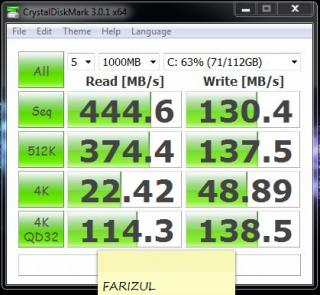
|
|
|
Aug 8 2012, 01:33 AM
|
|
Senior Member
3,591 posts Joined: Feb 2008
|
QUOTE(clawhammer @ Aug 7 2012, 04:28 PM) Normally I just do a diskpart and "clean" it. Works like a charm for me and I regain the speed Thanks for the tip! You can try it too.I also use diskpart and "clean" my SSDs, but my goal was to configure my partitions. I hadn't thought about using "clean" for restoring performance. I should try that one day on my old Kingston SSD as its benchmark performance has dropped over the years. QUOTE(farizul @ Aug 7 2012, 11:06 PM) result after doing ssd optimization step ( i refer to link provided on the first page ). The performance doesn't seem to be improved. |
|
|
Aug 8 2012, 05:20 AM
|

Junior Member
27 posts Joined: Mar 2012
|
Is there any other guide for optimization?
This post has been edited by ReXXaR: Aug 8 2012, 05:21 AM |
|
|
Aug 8 2012, 08:06 AM
|
|
Junior Member
219 posts Joined: Sep 2008
|
New build with SSD (120GB). Should I partition it? Or just leave it like that with OS & some applications...
|
|
|
Aug 8 2012, 09:22 AM
|

Senior Member
499 posts Joined: May 2012 From: Cheras, Kajang
|
All sifus ....120gb ssd issit enough for win7 64bit + 1 antivirus software? any reliable brand can suggest? Intel?
 |
|
|
Aug 8 2012, 09:22 AM
|

Senior Member
1,081 posts Joined: Nov 2005
|
QUOTE(AdamNg @ Aug 8 2012, 08:06 AM) New build with SSD (120GB). Should I partition it? Or just leave it like that with OS & some applications... no need partition.... trust me, you wouldn't want a partition on a disk with small capacity... |
|
|
Aug 8 2012, 09:43 AM
|
|
Senior Member
3,591 posts Joined: Feb 2008
|
QUOTE(ReXXaR @ Aug 8 2012, 05:20 AM) Is there any other guide for optimization? Not all optimisations will improve raw performance. Disabling the automatic defragmentation for instance doesn't effect your raw performance, but it does improve your SSD's lifespan.QUOTE(AdamNg @ Aug 8 2012, 08:06 AM) New build with SSD (120GB). Should I partition it? Or just leave it like that with OS & some applications... You do need to create at least one partition in order to install the OS. As for having multiple partitions, don't create them if it is in a desktop and you have HDDs. If you are on a laptop, you could create them if you like. My laptop's Windows 7 64-bit partition was only 40GB in size until recently.QUOTE(yewMP5 @ Aug 8 2012, 09:22 AM) All sifus ....120gb ssd issit enough for win7 64bit + 1 antivirus software? any reliable brand can suggest? Intel? 120GB is more than plenty, like I said above, 40GB is spacious enough for non-gaming needs.Intel's 330 Series is a good SSD brand for anyone new or old to SSDs. They're cheap, fast, and reliable. This post has been edited by everling: Aug 8 2012, 09:44 AM |
|
Topic ClosedOptions
|
| Change to: |  0.0215sec 0.0215sec
 0.63 0.63
 6 queries 6 queries
 GZIP Disabled GZIP Disabled
Time is now: 3rd December 2025 - 09:20 PM |
 Quote
Quote