

 Speed wise it is doubled the read/write speed of my X25-M Gen 2 in RAID-0.
The SSD Thread V2, Faster Better Greener Unbreakable!
The SSD Thread V2, Faster Better Greener Unbreakable!
|
|
 Mar 31 2012, 01:56 AM Mar 31 2012, 01:56 AM
Return to original view | Post
#1
|
 
VIP
8,788 posts Joined: Jan 2003 From: Kuala Lumpur    
|
I just bought 2 units of Intel 520 120GB SSD and set it up under a RAID-0 array. I opt for Intel because of it's reliability
Speed wise it is doubled the read/write speed of my X25-M Gen 2 in RAID-0. |
|
|
|
|
|
Apr 2 2012, 03:28 AM
Return to original view | Post
#2
|
|
VIP
8,788 posts Joined: Jan 2003 From: Kuala Lumpur
|
QUOTE(bad melatonin @ Apr 1 2012, 12:55 PM) bro alvin, can share benchies for intel 520 raid0 pls. Sure and here you go  i'm still considering whether getting Intel 520 120gb x 02 (czone) or Crucial M4 128gb x 02 from (CyntrixTech).   Let's start off with the original 2 x 80GB X25-M in RAID-0 SATA 2 configuration: Let's start off with the original 2 x 80GB X25-M in RAID-0 SATA 2 configuration: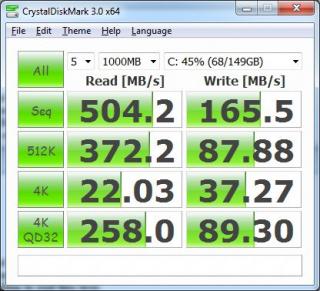
As we all know, the maximum bandwidth on the SATA 2 would be around 500MB++ and that is why SATA 3 is important if you have newer/modern SSD's. Intel 520 120GB in RAID-0 SATA2: 
Intel 520 120GB in RAID-0 SATA3: 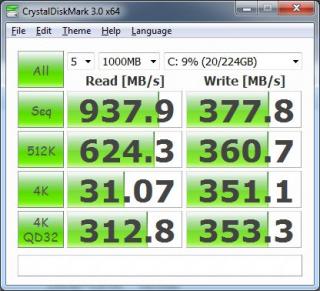
To be honest, most SSD's these days are comparable. It really depends on what you are looking at but personally for me, I would go for Intel because of it's warranty and reliability. Please do not rely on the benchmark numbers alone because in real life, the difference is very minimal (we're talking bout 2-3 seconds). I changed from an old Intel based controller (X25-M SSD) to SF SSD, my Windows 7 and games doesn't load up 10 seconds faster Some people keep on showing you charts and that 200-300MB difference in benchmark doesn't mean that SSD is a lot faster. |
|
|
Apr 2 2012, 03:00 PM
Return to original view | Post
#3
|
|
VIP
8,788 posts Joined: Jan 2003 From: Kuala Lumpur
|
QUOTE(skycrawler @ Apr 2 2012, 05:37 AM) r u saying that its okay to buy SF SSDs compare to Other SSDs? What I mean is that the benchmark is just numbers It doesn't always correlate with real life performance. These are flash memory and benchmarks are very similar to RAM benchmarks. Do you notice performance difference when certain RAM runs 1000MB/s faster? Same theory/answer.QUOTE(bryan @ Apr 2 2012, 11:00 AM) He's saying that no need to simply follow benchmarks. Get what you can afford. Most SF based SSD's seems to have issues with the controller but Intel's SF has been thoroughly tested and seems to be problem free. However they are more expensive However from my research I would avoid Sandforce. No point to be fast if you keep having problems with your drive. Added on April 2, 2012, 11:33 amIMHO better to pay a bit more to avoid the sakit hati. QUOTE(everling @ Apr 2 2012, 12:37 PM) Incorrect. The SSD configuration is in fact faster by so and so amount. You are just bottlenecked by your processor or your usage and that the unfortunate fact that performance over time is reciprocal. The problem with you is that you're always with theoretical views CODE Performance File Time Copied 100 MB/s 1000 MB 10.0s 200 MB/s 1000 MB 5.0s 300 MB/s 1000 MB 3.3s 400 MB/s 1000 MB 2.5s 500 MB/s 1000 MB 2.0s 600 MB/s 1000 MB 1.6s 700 MB/s 1000 MB 1.4s 800 MB/s 1000 MB 1.2s 900 MB/s 1000 MB 1.1s 1000 MB/s 1000 MB 1.0s This is the reason why I said "The performance of SSDs have become less meaningful as they get faster." You need ridiculous task loads to justify the performance, especially tasks that is heavy on random reads/writes. Have fun copying your 1080p movies from one SSD partition to another SSD partition in less than ten seconds and think to yourself that "this is so worth paying RM2k" or setting up RAID-0 SSD arrays. I think there are only two places where SSD's random read/write is very noticeable, fragmented HDDs and working with thousands of tiny little files. This is why SSDs are extremely beneficial for programmers, loaded database servers, multimedia artists, and normal users (eg: computer illiterate or average office worker) who do not know how to maintain their computer's performance (eg: do not know to defragment, install tons of crapware, runs daily full anti-virus scans). And you do not even need a high performance SSDs for these users; reliable, cheap and high capacity ones will do just fine for most. Gamers or users who knows how to maintain their computer's performance actually benefits less from SSDs, because once you have good boot times and application start times, you have nothing left to improve on. First of all, I am talking from the perspective of a home user (which majority of us would want a SSD for). What we need is a good I/O speed which SSD's are able to provide.The statement below is flawed: "This is why SSDs are extremely beneficial for programmers, loaded database servers, multimedia artists, and normal users (eg: computer illiterate or average office worker) who do not know how to maintain their computer's performance (eg: do not know to defragment, install tons of crapware, runs daily full anti-virus scans)" 1. SSD is beneficial for everyone because the bottleneck in the computer is the I/O, not the processor. If you're not studying IT, I can excuse you for that. 2. Do you know what is the main reason they designed SSD? What are the main advantages of SSD versus a platter drive? 3. Who told you that enterprise solution database servers are using SSD? Are you sure SSD is the mainstream for data centres today? 4. How many home users would buy multiple SSD's and to copy huge files from SSD disk 1 to SSD disk 2 daily and how does your example above even bothers a home user? 5. How would 3 seconds slower impact a home user? I can easily prove you wrong by doing a few tests: 1. I can setup 4 PC's with the same hardwares but 2 PC's with platter drives and 2 PC's with SSD's. Simply ask someone that doesn't know the difference to test it out and I'm sure they can easily tell which one is faster. Hence, how can you say SSD is only beneficial to certain functions and group of users? 2. You don't need to spend so much of time going to the technicals of SSD's and confuse everyone with it. What a home user need is just recommendation on a SSD and that's where I am coming from. |
|
|
Apr 2 2012, 04:19 PM
Return to original view | Post
#4
|
|
VIP
8,788 posts Joined: Jan 2003 From: Kuala Lumpur
|
everling, you have to understand that every product has a failure rate and out of the failures, certain percentage are due to user's fault and not manufacturing defects. Like I've mentioned earlier, there's no point to dwell so deep into technical details, ROI, etc. For a home user, they just want a SSD to get a more responsive computer (reduce the I/O bottleneck) and that's the whole point to it.
Who are the "big enterprise" using SSD's in the data centre? Like I've said, these are all through reading (theoritical) and not personal experiences. I work in the IT industry for infrastructure/system integration for more than 10 years and I have not came across any large MNC using SSD as the main stream for now. Obviously there are reasons why they are not doing so but I'm not going to discuss it in depth here. Therefore, SAS drives still have a very huge market in the data centre domain while SSD's are more towards normal PC users.Doing a RAID-0 is not useless because if you say it is, you would be smarter than the guy that invented the RAID array There are obviously pros/cons in a RAID-0 setup and if I buy a single 240GB SSD, I will not get the speed I'm getting with 2 x 120GB in RAID-0. Knowing Intel's reliability, I'm very confident it wouldn't fail me. I am not encouraging people to RAID because if the person that doesn't know enough knowledge about it (like yourself) would assume it's risky and useless (Btw, I have been playing with RAID more than 10 years ago).My point is simple: 1. As a home user, all current generation SSD's that you can buy today are more or less the same. 2. Benchmarks are just numbers and having a few hundred MB/s faster doesn't mean real life experiences are doubled. 3. This is also proven because I have used plenty of SSD's myself. If I setup 5 PC's with a mixture of single Intel X25-M, Intel 520, OCZ Vertex 3 you probably can't tell the difference when Windows boots up, starting up games, doing usual home users tasks. 4. As a home user, buy a SSD that suits the budget and a good warranty. This will save you hassles if something goes wrong. If people are comfortable with Crucial M4 then go ahead and buy them, there's no need to spend more for a Vertex 3 because most of us don't copy huge files everyday. |
|
|
Apr 2 2012, 04:57 PM
Return to original view | Post
#5
|
|
VIP
8,788 posts Joined: Jan 2003 From: Kuala Lumpur
|
QUOTE(chaics85 @ Apr 2 2012, 04:55 PM) ever since i bought and install fresh window on my m4, i got 2 sudden BSOD (once during gaming, once during normal operation) and last nite while doing some photoshop, all of sudden got grey screen. the music at the back is still playing and whatever button i click or push oso wont recover it. not really sure its due to my M4 or what.. dont know how to read mini dump file.. sorry if its not related here. b'cos before using ssd, i got no problem at all with my window. If you do a quick google, there are indeed issues with the M4 drives. I am not sure if yours is related but you can try some of the solutions provided. If you want a problem free SSD solution then please consider Intel |
|
|
Apr 2 2012, 05:37 PM
Return to original view | Post
#6
|
|
VIP
8,788 posts Joined: Jan 2003 From: Kuala Lumpur
|
QUOTE(chaics85 @ Apr 2 2012, 05:08 PM) ic.. thanks. will go google around, see what i can find.. To be honest, I'm not really sure if it's the SSD at fault i always thought m4 is stable and reliable enough with its latest 0309 firmware. thats why i bought it.. guess not..  It's just a suggestion from me that you try and find out to see if other users are experiencing such issues which they might have a solution for it. If your system is overclocked, try to run it at stock/default to see if the problem persists. Sometimes you need to spend some time troubleshooting to see what's the real cause. Good luck. It's just a suggestion from me that you try and find out to see if other users are experiencing such issues which they might have a solution for it. If your system is overclocked, try to run it at stock/default to see if the problem persists. Sometimes you need to spend some time troubleshooting to see what's the real cause. Good luck. |
|
|
|
|
|
Apr 2 2012, 05:54 PM
Return to original view | Post
#7
|
|
VIP
8,788 posts Joined: Jan 2003 From: Kuala Lumpur
|
1. What are the impacts of MySpace or Facebook going down for hours due to SSD failures compared to banks, manufacturing, trading companies going down for hours?
If you are using companies like MySpace and Facebook as a benchmark (enterprise solution) then big companies will not be spending millions on IBM, HP, DELL, etc servers. At the end of the day, these IT companies will go bankrupt. That is why I'm saying, it's only that much you can gain from theoretical knowledge and reading compared to real life experiences.2. You are saying SSD's are beneficial to a specific group and then followed by a bunch of explanation which isn't very useful for a home user. What you are saying is really redundant and it would've been a lot easier to say which SSD is more recommended because that was the question from others. How many SSD's have you owned and played to be able to conclude it's only beneficial to that specific group you've mentioned earlier? Purely reading or experience? 3. If RAID is not useful, why is Intel having it in their chipset along with home user boards? Besides, there are more and more reviews about RAID-0 configuration and obviously, it is more popular these days than before. Like I've said, you do not use it or don't know how to use it doesn't mean it's useless. You're also indirectly implying Intel is stupid for having a RAID feature on the boards because the function is useless. 4. "Some people keep on showing you charts and that 200-300MB difference in benchmark doesn't mean that SSD is a lot faster." <-- I said "it doesn't mean it's a lot faster". I didn't say it's NOT faster When you have problems understanding and correlating, it then becomes a serious issue. While I know you would like to share your knowledge with others, sometimes you just need to learn how not to confuse others. Many times you are beating around the bush instead of being specific to the point as to what is really important.Like I always am, I put my remarks based on real life experiences and not reading. If I don't know about something, I would rather keep quiet. If some other people owns more SSD's than I do, tried it themselves and have a real life example, I would buy his explanation because that is what matters most. I'm not sure what you are looking for but it's really up to you if you would like to continue being who you are. Good luck. |
|
|
Apr 2 2012, 11:23 PM
Return to original view | Post
#8
|
|
VIP
8,788 posts Joined: Jan 2003 From: Kuala Lumpur
|
QUOTE(everling @ Apr 2 2012, 07:03 PM) I didn't. I stated that they were most useful to specific groups and non-savvy users. And that other savvy users will not get as much as the first group. I've owned three retail SSDs, and waiting on price drops for my fourth. 160GB is getting cramped for my laptop. No worries boss, I believe all of us are just trying to share our experiences and what we know All I said was that RAID-0 was not useful for the average user. And for the millions of Intel and AMD motherboards with hardware RAID support, I wonder what percentage of owners actually make use of any RAID level. It seems to me that the main reason RAID is ubiquitously available is because it doesn't cost much to include. If I am wrong, please correct me so I may better appreciate the value of my motherboard's built-in RAID support. Well, I'm sorry for misreading your sentence. And I was wondering why you were testing me, after all, I do agree with most of your own points. Thank you so much for the inputs |
|
|
Apr 3 2012, 02:49 PM
Return to original view | Post
#9
|
|
VIP
8,788 posts Joined: Jan 2003 From: Kuala Lumpur
|
QUOTE(bad melatonin @ Apr 3 2012, 03:43 AM) » Click to show Spoiler - click again to hide... « tengs bro alvin for d benchies.  i've decided to go wt m4 for d performance/price. bought 02 x 128gb m4 from CyntrixTech yesterday. gonna raid0 it but need to flash it to latest fw 1st. now still figure out how to flash it to fw.0309 i wonder can it be done as external drive?seems like crucial m4 price getting lower now. from Crucial website 02 x 256gb m4 is US$607.18 + US$30 (postage KL) = RM2010  i foresee crucial m5 will be launched soon.  if they launch it out next week, i will scream then...haha   |
|
|
Apr 5 2012, 02:50 AM
Return to original view | Post
#10
|
|
VIP
8,788 posts Joined: Jan 2003 From: Kuala Lumpur
|
QUOTE(Icehart @ Apr 4 2012, 11:18 PM) I got 216.7 MB/s read and 104.7 MB/s write on Intel X25-M G2 160GB. Is this normal? I'ts more or less around there. Did you enable TRIM? You can also do a diskpart to flush it once in a blue moon. |
|
|
Apr 6 2012, 02:51 PM
Return to original view | Post
#11
|
|
VIP
8,788 posts Joined: Jan 2003 From: Kuala Lumpur
|
QUOTE(skycrawler @ Apr 6 2012, 02:12 PM) OCZ Agility 3 120G SSD In my opinion, it's better to buy locally so that you get the warranty. It's really no point to save a small amount of money and end up in inconveniences if something happens to the SSD.820 yuan = RM400 only just add RM12 ship to malaysia  http://item.taobao.com/item.htm?id=14035200773 |
|
|
Apr 6 2012, 11:21 PM
Return to original view | Post
#12
|
|
VIP
8,788 posts Joined: Jan 2003 From: Kuala Lumpur
|
QUOTE(riku2replica @ Apr 6 2012, 09:16 PM) Very risky and big mistake indeed, to be safe sandforce controller based ssd needs its warranty. Not all SF based SSD's are problematic. Intel ones are superbly good. |
|
|
Apr 7 2012, 03:24 AM
Return to original view | Post
#13
|
|
VIP
8,788 posts Joined: Jan 2003 From: Kuala Lumpur
|
QUOTE(yinchet @ Apr 6 2012, 11:26 PM) yup, intel come with their own firmware. Just curious, what do you guys normally install on a SSD drive upto 240GB? I find it very difficult to even fill up 100GB, lol. I also can't afford a 240GB so I never bother about it's pricing I heard most of the the problem solve edi. btw how much is the intel 330 240gb version cost? |
|
|
|
|
|
Apr 8 2012, 12:45 AM
Return to original view | Post
#14
|
|
VIP
8,788 posts Joined: Jan 2003 From: Kuala Lumpur
|
QUOTE(everling @ Apr 7 2012, 12:31 PM) *looks at signature* Haha, ok boss But you already have one. Mine is work related. Projects, data, a VirtualBox Ubuntu server (I'm a novice), and XP Mode for WinXP and IE6, all encrypted on a laptop. Normally I only install a few games, MS-Office and that's about it. I have a very hard time trying to fill up my SSD with stuffs. |
|
|
Apr 9 2012, 02:05 AM
Return to original view | Post
#15
|
|
VIP
8,788 posts Joined: Jan 2003 From: Kuala Lumpur
|
QUOTE(zhen^wei @ Apr 8 2012, 02:56 PM) malaysia computer hardware has less profit, tat's why in pc fair u will not see they sell all computer hardware That's true computer shop has another revenue from servicing computers btw. Every buyer wants everything cheap and sellers are killing each other by calling names, throwing price and wants to be cheapest. Seriously, I don't even care if I make money these days because the margin is up to the point that we're like doing charity. |
|
|
Apr 9 2012, 01:55 PM
Return to original view | Post
#16
|
|
VIP
8,788 posts Joined: Jan 2003 From: Kuala Lumpur
|
QUOTE(bryan @ Apr 9 2012, 10:39 AM) Don't forget that Singapore has a GST of 7%. You can recoup 5.5% if you fly, but if you're driving it's not an option. You're absolutely right but do you know what's the tax rate in Malaysia and how many different taxes are there? Singapore only charges 7% GST (even if you import something) for most items except those in the list which requires a bit more. |
|
|
Apr 12 2012, 02:22 PM
Return to original view | Post
#17
|
|
VIP
8,788 posts Joined: Jan 2003 From: Kuala Lumpur
|
QUOTE(bryan @ Apr 10 2012, 07:08 PM) What's the MY tax on SSDs? No ideas, I don't import SSD's and tax rates would depends on which tariff code you declare. On the other hand I'm talking about PC hardwares in general, not limited to only SSD's. |
|
|
Aug 7 2012, 04:28 PM
Return to original view | Post
#18
|
|
VIP
8,788 posts Joined: Jan 2003 From: Kuala Lumpur
|
QUOTE(everling @ Aug 7 2012, 11:52 AM) "Used" SSDs are always a bit slower, because the NAND chips they use needs to erase "old" data first before they can write new data. Normally I just do a diskpart and "clean" it. Works like a charm for me and I regain the speed You can try it too. |
|
|
Aug 14 2012, 12:55 AM
Return to original view | Post
#19
|
|
VIP
8,788 posts Joined: Jan 2003 From: Kuala Lumpur
|
QUOTE(zhen^wei @ Aug 14 2012, 12:49 AM) rumour from one of the salesman of ssd distri. not comfirm, just rumour, not sure true or not. IdealTech can buy over the SSD business from Intel and make it your own brand |
|
Topic ClosedOptions
|
| Change to: |  0.0234sec 0.0234sec
 0.61 0.61
 7 queries 7 queries
 GZIP Disabled GZIP Disabled
Time is now: 4th December 2025 - 12:28 PM |
 Quote
Quote