

QUOTE(tskhang @ May 21 2012, 10:31 AM)
Don't worry. If you refer to my previous post I did post the picture of the new packaging from Crucial. And mine was bought directly from Crucial themselves. 

oh thats good then.The SSD Thread V2, Faster Better Greener Unbreakable!
|
|
 May 21 2012, 12:12 PM May 21 2012, 12:12 PM
|
 
Senior Member
1,042 posts Joined: Dec 2009 From: Mars  
|
QUOTE(tskhang @ May 21 2012, 10:31 AM) Don't worry. If you refer to my previous post I did post the picture of the new packaging from Crucial. And mine was bought directly from Crucial themselves. oh thats good then. |
|
|
|
|
|
May 21 2012, 12:21 PM
|

Senior Member
2,227 posts Joined: Jan 2009
|
QUOTE(stasio @ May 20 2012, 06:54 PM) Just uninstalled Intel® RST 11.5.0.1149 driver as per my post #1101. how to check which version I have in my laptop?Tried also 11.1.0.1006 (not good) and found the best one atm...Intel® RST 11.0.0.1032. » Click to show Spoiler - click again to hide... « This post has been edited by skycrawler: May 21 2012, 12:25 PM |
|
|
May 21 2012, 12:42 PM
|

Junior Member
302 posts Joined: May 2009
|
hey guys i am planning to sell off my rig rampage iii extreme + i7 950 for upgrade ... The main reason is i am so tempting to upgrade to ivy bridge
 Besides that I am no longer doing alot of overclocking now adays and also to fully support my ssd ... Planning to upgrade to i5-3570k with gigabyte Z77X-D3H or asus ASUS P8Z77-V LK what is you guy's opinion ? actually worth it or not ? i will do small overclock on the new rig if i get it .... the 2nd hand for my rig is so low now and that is one of the reason i want to sell it to have some money to buy the new rig This post has been edited by gn9746203: May 21 2012, 12:44 PM |
|
|
May 21 2012, 07:30 PM
|

Junior Member
414 posts Joined: Jan 2010 
|
Crucial M4 cause random BSOD in a few days time period, anyone facing this problem?
|
|
|
May 21 2012, 07:36 PM
|

Junior Member
165 posts Joined: Mar 2009 
|
QUOTE(dwks @ May 21 2012, 07:30 PM) Crucial M4 cause random BSOD in a few days time period, anyone facing this problem? Nope for me |
|
|
May 21 2012, 07:47 PM
|

All Stars
18,504 posts Joined: Oct 2007 From: P.Jaya
|
QUOTE(skycrawler @ May 21 2012, 12:21 PM) how to check which version I have in my laptop? Control Panel/Uninstall Programs........ Device Manager/IDE ATA/ATAPI controllers or use Drive Controller Info 2.1.4  This post has been edited by stasio: May 21 2012, 10:35 PM |
|
|
|
|
|
May 21 2012, 10:37 PM
|
|
Senior Member
2,227 posts Joined: Jan 2009
|
QUOTE(SSJBen @ May 19 2012, 04:10 PM) Cheating~ Try benchmarking during gaming Yes but that works. Playing a HD video using MPEG-2 encode is even better! LOL!  Added on May 21, 2012, 10:51 pmNew reading after I updated intel driver 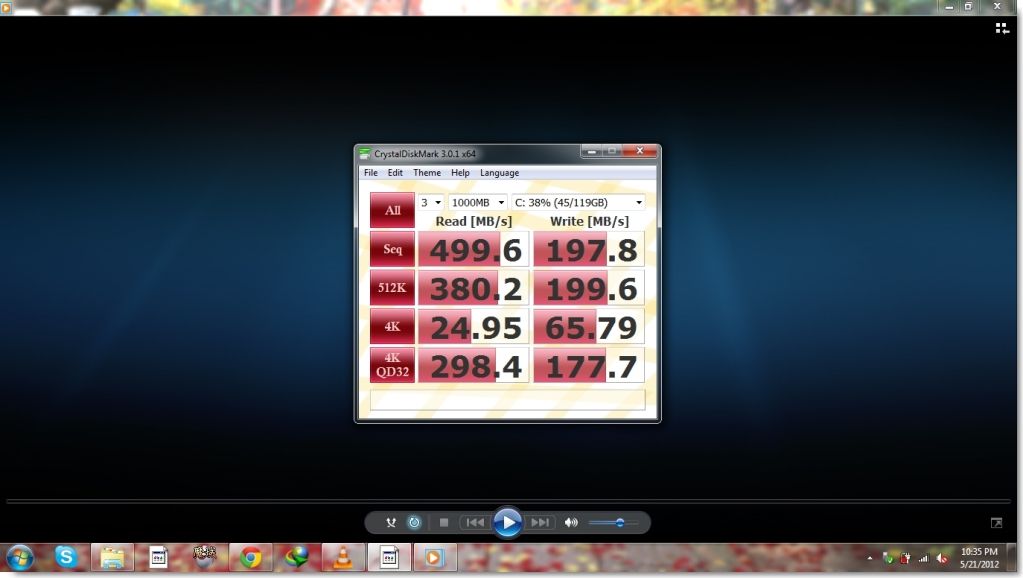 This post has been edited by skycrawler: May 21 2012, 10:51 PM |
|
|
May 21 2012, 11:04 PM
|
 
Elite
8,711 posts Joined: Nov 2007 From: Butterworth, PG / Machang, Kelantan 
|
QUOTE(dwks @ May 21 2012, 07:30 PM) Crucial M4 cause random BSOD in a few days time period, anyone facing this problem? Don't blame the SSD. Check this outBSOD codes for overclocking QUOTE 0x101 = increase vcore 0x124 = increase/decrease vcore or QPI/VTT... have to test to see which one it is 0x0A = unstable RAM/IMC, increase QPI first, if that doesn't work increase vcore 0x1E = increase vcore 0x3B = increase vcore 0x3D = increase vcore 0xD1 = QPI/VTT, increase/decrease as necessary, can also be unstable Ram, raise Ram voltage 0x9C = QPI/VTT most likely, but increasing vcore has helped in some instances 0x50 = RAM timings/Frequency or uncore multi unstable, increase RAM voltage or adjust QPI/VTT, or lower uncore if you're higher than 2x 0x109 = Not enough or too Much memory voltage 0x116 = Low IOH (NB) voltage, GPU issue (most common when running multi-GPU/overclocking GPU) 0x7E = Corrupted OS file, possibly from overclocking. Run sfc /scannow and chkdsk /r |
|
|
May 22 2012, 12:00 AM
|
|
Junior Member
414 posts Joined: Jan 2010
|
QUOTE(owikh84 @ May 21 2012, 11:04 PM) Don't blame the SSD. Check this out No, I not blaming the SSD. Just want to find out what the cause, normally, before i had SSD, I left my PC at night for downloading and still well the next day.BSOD codes for overclocking But, after upgrading to M4, I continue my routine and the next day, sometime, very rarely, my PC would restart or BSOD. So far, I havent been able to see the BSOD cause everytime it crashed, it auto restard back to Window Login on the next day. Finally today, it crash the first time when Im using the PC, but, Im scared what will happen, so, I just restart my PC before it got to BSOD. Having using PC for so long, I havent encounter much BSOD, so I got scared  I have flash the lasted firmware, 000F. |
|
|
May 22 2012, 12:27 AM
|

Senior Member
3,591 posts Joined: Feb 2008
|
QUOTE(dwks @ May 22 2012, 12:00 AM) No, I not blaming the SSD. Just want to find out what the cause, normally, before i had SSD, I left my PC at night for downloading and still well the next day. How did you installed your Windows? A clean install or cloned from an existing Windows installation on a HDD?But, after upgrading to M4, I continue my routine and the next day, sometime, very rarely, my PC would restart or BSOD. So far, I havent been able to see the BSOD cause everytime it crashed, it auto restard back to Window Login on the next day. Finally today, it crash the first time when Im using the PC, but, Im scared what will happen, so, I just restart my PC before it got to BSOD. Having using PC for so long, I havent encounter much BSOD, so I got scared I have flash the lasted firmware, 000F. |
|
|
May 22 2012, 12:31 AM
|
|
Junior Member
414 posts Joined: Jan 2010
|
QUOTE(everling @ May 22 2012, 12:27 AM) How did you installed your Windows? A clean install or cloned from an existing Windows installation on a HDD? Clean install, but I do have 1 partitions containing all my games installation, reformat did corrupt some of my games but most is still able to run without a problem.I did copy all of my save file from My Documents from last HDD. |
|
|
May 22 2012, 07:17 AM
|
|
Elite
8,711 posts Joined: Nov 2007 From: Butterworth, PG / Machang, Kelantan
|
QUOTE(dwks @ May 22 2012, 12:00 AM) No, I not blaming the SSD. Just want to find out what the cause, normally, before i had SSD, I left my PC at night for downloading and still well the next day. ok, so what's the error code u got on the BSOD screen?But, after upgrading to M4, I continue my routine and the next day, sometime, very rarely, my PC would restart or BSOD. So far, I havent been able to see the BSOD cause everytime it crashed, it auto restard back to Window Login on the next day. Finally today, it crash the first time when Im using the PC, but, Im scared what will happen, so, I just restart my PC before it got to BSOD. Having using PC for so long, I havent encounter much BSOD, so I got scared I have flash the lasted firmware, 000F. |
|
|
May 22 2012, 10:37 AM
|
|
Junior Member
319 posts Joined: Jan 2008 
|
disable automatic restart on system failure. you will get bluescreen without system restart. you need to reset or power off/on your pc manually. then you can see the error code of the bluescreen, write it or just snap using your camera, come back here, and post it
 |
|
|
|
|
|
May 22 2012, 11:15 AM
|

Senior Member
682 posts Joined: Nov 2004
|
Alternatively, you can view the dump file of the BSOD to see the BSOD code.
This post has been edited by Demon_Eyes_Kyo: May 22 2012, 11:16 AM |
|
|
May 22 2012, 08:13 PM
|

Senior Member
1,435 posts Joined: Apr 2011 From: Blank Space
|
Anything bad will happen if we push the SSD speed beyond it's specs? Will it reduce its lifespan?
 Mine is OCZ Vertex Plus SATA II 60GB QUOTE 60GB Max Performance Max Read: up to 185 MB/s Max Write: up to 90 MB/s Random Write 4k (Aligned): 2,500 IOPS IDE mode  AHCI mode  Still configure to install Intel Rapid Storage Technology...  |
|
|
May 23 2012, 05:33 AM
|

All Stars
10,475 posts Joined: Jan 2003 From: Sarawak
|
is there still a need to disable windows file indexing in today's ssd?
|
|
|
May 23 2012, 10:54 AM
|
|
Senior Member
3,591 posts Joined: Feb 2008
|
QUOTE(Skylinestar @ May 23 2012, 05:33 AM) is there still a need to disable windows file indexing in today's ssd? That is a performance optimisation tip. You are never required to do optimisation tips, you choose to do them or not. |
|
|
May 23 2012, 07:06 PM
|
|
Elite
8,711 posts Joined: Nov 2007 From: Butterworth, PG / Machang, Kelantan
|
Nice SSDs coming to Msia...
QUOTE CRUCIAL M4 SATA III 2.5" SSD 128GB = RM445 256GB = RM799 OCZ VERTEX 4 Series SATA III 2.5" SSD / 5 Years Warranty *Indilinx InfusedTM Everest 2 platform 64GB = RM339 drool.gif 128GB = RM545 rclxms.gif 256GB = RM999 http://forum.lowyat.net/topic/806304  |
|
|
May 23 2012, 07:23 PM
|
|
Senior Member
2,538 posts Joined: Jul 2006
|
|
|
|
May 23 2012, 10:20 PM
|

Senior Member
967 posts Joined: Jan 2003 From: setapak
|
nice drop down price... for me this is faster than my thought for the price to continuously stay for bit more time... make me wonder within next two year
1tb ssd might common maybe.. hehe |
|
Topic ClosedOptions
|
| Change to: |  0.0328sec 0.0328sec
 0.67 0.67
 6 queries 6 queries
 GZIP Disabled GZIP Disabled
Time is now: 12th December 2025 - 12:25 AM |
 Quote
Quote
