

hmm ... wondering why astro movies hd (hbo hd and fox premium hd) still lack of subtitles ....
Astro B.yond Episode IV (Version 9.0), The New World of Entertainment
Astro B.yond Episode IV (Version 9.0), The New World of Entertainment
|
|
 Jun 5 2012, 12:37 PM Jun 5 2012, 12:37 PM
|
 
Senior Member
1,520 posts Joined: Jan 2003 From: Shuddup  
|
hmm ... wondering why astro movies hd (hbo hd and fox premium hd) still lack of subtitles ....
|
|
|
|
|
|
Jun 5 2012, 01:12 PM
|

Junior Member
213 posts Joined: Oct 2010 From: Kedah
|
QUOTE(Qash-M @ Jun 5 2012, 10:27 AM) I wonder if those who still using normal old Astro can still see ch.100 & ch.200...? No point because the old astro I think do not support VOD (no ethernet port)    |
|
|
Jun 5 2012, 02:00 PM
|

Senior Member
6,105 posts Joined: Apr 2009 From: Marang, Terengganu 
|
QUOTE Marvel Universe all set for Asia debut Dedicated Marvel block, Marvel Universe, premieres on Disney XD in India this month, paving the way for a new era of animated superheroes in the region. The dedicated Marvel Universe TV block, announced in the U.S. earlier this year, was created as the home of Marvel’s biggest superstars, including Spider-Man, Iron Man, Hulk, Thor and Captain America. The idea, Marvel said when the block was announced, was to introduce “dynamic stories of action, adventure and heroism to a whole new generation”. The one-hour weekly India block launches at 5pm on Sunday, 24 June, with new series Ultimate Spider-Man and Iron Man Armored Adventures. The block debuts as part of the new Disney XD in Malaysia in September, and makes its way across the rest of Southeast Asia in 2013. Hmm...  |
|
|
Jun 5 2012, 02:16 PM
|

All Stars
10,510 posts Joined: Jan 2003 From: Atlanta 
|
QUOTE(jamesleetech @ Jun 5 2012, 11:36 AM) Astro On-The-Go screenshots from computer internet browser... Their website says, only ipad and PC/notebook is available now. Iphone and android phone is on 'coming soon'» Click to show Spoiler - click again to hide... « Copyright Notice From Jamesleetech... ALL copyights as shown in all the 8 screenshot images inside spoilers above belong to Astro Malaysia Holdings Sdn Bhd (AMH / ASTRO) and its ASTRO entity, MEASAT and their respective copyright holders. All these captured computer screenshots are displayed here solely for illustration purposes under the doctrine of fair use. Article Reference on the description of fair use : http://en.wikipedia.org/wiki/Fair_use. Any complaints from the copyright holder that these images are deemed infringement and not fair use must provide legally justifiable reason, adequate fair notification and time period by sending private message or posting a reply comment in this forum thread. Upon receiving such valid complaints, I will remove/delete these images here within reasonable time period allowed. By the way, they will broadcast all 31 matches of Euro on the go. |
|
|
Jun 5 2012, 02:26 PM
|

Senior Member
1,587 posts Joined: Apr 2011
|
QUOTE(jamesleetech @ Jun 5 2012, 11:36 AM) I think the Byond box network connection is used for selecting and confirming movies on Video On Demand so that we don't have to use sms or phone call to confirm purchase of any VOD movies to watch. I did not subscribe to PVR so cannot check what is inside the "Video On Demand" in the Home Menu. Please correct me if I am wrong. The Byond box network connection is definitely NOT for Astro On-The-Go service. Yes for VOD. the network connection is also used to download VOD content to the PVR or normal STB with ext HDD |
|
|
Jun 5 2012, 02:39 PM
|

Senior Member
1,180 posts Joined: Jun 2006
|
QUOTE(LickGuy @ Jun 5 2012, 01:37 PM) hmm ... wondering why astro movies hd (hbo hd and fox premium hd) still lack of subtitles .... Let complain then |
|
|
|
|
|
Jun 5 2012, 03:19 PM
|

Senior Member
684 posts Joined: Apr 2010
|
QUOTE(PhakFuhZai @ Jun 5 2012, 02:26 PM) the network connection is also used to download VOD content to the PVR or normal STB with ext HDD When you mention "download VOD content", you mean the actual video content recorded to the PVR harddisk for movies or live events that are purchased as Per Per View and ... and you believed the broadband network connection to the PVR is used to receive such video content.The Astro enginneers knows that not everyone nationwide have superspeed broadband such as TM UniFi or Astro IPTV and many only have 1, 2 or 4 Mbit speed. I think you already know whether the TM streamyx broadband speed is fast enough or not for SD and HD content especially when TM throttle the speed because of FUP. I do believe that Astro will not take the risk of using the internet broadband to download VOD content ! There is no reason why Astro should change when they can so easily record from the actual satellite feed to the Byond box which have very much faster bandwidth speed capable of transmitting 1080i HD video and Dolby 5.1 surround audio content. Astro also know that there are people who subscribed to mobile internet from Maxis, Celcom, Digi which have data limits between 4 MB to 12+ MB and such people may not know about the heavy usage to download VOD content so connecting the Byond box to such broadband network connections will quickly and easily finish up the quota... and then Astro will get shot with huge complaints ! Yes, I don't actually know but I can believe data for interactive menus, updated VOD info, confirmation of VOD purchase, VOD activation, etc is possible through internet broadband connections because the data size is very small. Its difficult for me to believe that Astro will be stupid enough to use the broadband to download VOD video content. Why stupid for Astro to do it ? For example... an SD movie with a size of 2 GB can take between 4 to 7 hours to download using streamyx 1 Mbit/s speed. What about a VOD movie in HD with a size of maybe 8 to 20 GB ? Its possible to apply huge video compression to drastically reduce the video data size but this will greatly reduce the video quality very much below the actual quality from the satellite feed. I also know that many people are already not satisfied with the SD channel video quality received direct from satellite feed.... what will happen if the SD video quality is drop further by 50% to reduce video data size to allow faster download on 1 Mbit broadband ...mmm... (answer) nobody will purchase VOD and forget about VOD HD. This post has been edited by jamesleetech: Jun 5 2012, 03:36 PM |
|
|
Jun 5 2012, 03:48 PM
|
|
Senior Member
1,587 posts Joined: Apr 2011
|
I remember what I seen earlier at Astro webpage, they did mention the minimum requirement for the network connection was 1Mbps, and users will have the option to download it for later view, or they can playback while they are downloading (sort of like youtube buffering)
I don't think satellite can offer true VOD experience, because satellite itself is only able to broadcast, NOT multicast nor unicast, the topology I use could be inappropriate but the context is more or less the same, take AOD as example, yes it can rerun the same episode for the entire day, but would we have the FULL control as to when to playback the episode, down to which minute of time we desire? NO, not without PVR. Now, try to relate back true VOD with AOD, just how many channels already dedicated just to deliver a few TVB dramas currently, imagine the amount of extra channels required to deliver the upcoming VOD content, its almost like one show per channel judging by how they do it for Astro First this shows that the true VOD experience can never be delivered using satellite alone, because it isn't a point to point communication to begin with This post has been edited by PhakFuhZai: Jun 5 2012, 03:50 PM |
|
|
Jun 5 2012, 04:40 PM
|
|
Senior Member
3,147 posts Joined: Dec 2009
|
vod is for those with pvr but those without it hv to stream it via their own BB,isnt that so ?
I stand corrected.  1mbps or even 2mbps on a busy day and prime time wl be of no use , 1mbps or even 2mbps on a busy day and prime time wl be of no use ,  This post has been edited by smileguy: Jun 5 2012, 04:44 PM |
|
|
Jun 5 2012, 04:54 PM
|
|
Senior Member
1,587 posts Joined: Apr 2011
|
QUOTE(smileguy @ Jun 5 2012, 04:40 PM) vod is for those with pvr but those without it hv to stream it via their own BB,isnt that so ? no, must have PVR box or normal Byond with ext HDD, need to have recording service aka PVR functionality to be enabled beforehand I stand corrected. 1mbps or even 2mbps on a busy day and prime time wl be of no use , |
|
|
Jun 5 2012, 06:07 PM
|
|
Senior Member
684 posts Joined: Apr 2010
|
QUOTE(PhakFuhZai @ Jun 5 2012, 03:48 PM) I remember what I seen earlier at Astro webpage, they did mention the minimum requirement for the network connection was 1Mbps, and users will have the option to download it for later view, or they can playback while they are downloading (sort of like youtube buffering) Its a bit complicated but I do understand your valid explanation and I have to accept that you are right and I am wrong about the video content download using our broadband connection. I did make a detailed check for more info and found out that Astro have actually chosen to use our broadband to download the VOD video content.I don't think satellite can offer true VOD experience, because satellite itself is only able to broadcast, NOT multicast nor unicast, the topology I use could be inappropriate but the context is more or less the same, take AOD as example, yes it can rerun the same episode for the entire day, but would we have the FULL control as to when to playback the episode, down to which minute of time we desire? NO, not without PVR. Now, try to relate back true VOD with AOD, just how many channels already dedicated just to deliver a few TVB dramas currently, imagine the amount of extra channels required to deliver the upcoming VOD content, its almost like one show per channel judging by how they do it for Astro First this shows that the true VOD experience can never be delivered using satellite alone, because it isn't a point to point communication to begin with This will cause problems for people who have mobile internet broadband (Maxis, Celcom, etc) and use the mobile telco wifi modem (with ethernet ports) or USB modem connected to wifi router with ethernet ports. This is because of the monthly data quota from such mobile telcos. A fair warning should be announced for such broadband connections. So people... take note of this. After subscribing at RM 10 per month, there is a waiting period for full download of selected movie/content to complete before you can watch the content. Its not the same as Youtube video streaming with buffering. This is what I understood from the "waiting time period" (Refer below). Here is the link for the setup requirement for Byond PVR, Byond IPTV and Byond box... http://byond.digitalfive.com/setup.htm The setup guide for Byond PVR and Byond is the same. No setup is required for Byond IPTV. People who are interested in the VOD service should read the setup guide, link here (PDF file)... http://byond.digitalfive.com/assets/VOD_Connectivity_Guide.pdf Below is the image extracted from Page 19 of the setup guide which shows the "waiting period before can start watching"... » Click to show Spoiler - click again to hide... « The normal runtime for a full length movie is about 90 to 120 minutes. Ok, to make it simple, lets say I have a 1 Mbps connection and want to watch a 90 minute SD movie as "Catch Up"... that means after confirming selection, I have to wait about 90 minutes before I can watch it. And that is only 1 SD movie... what about if I want to select more SD movies... then I will choose to pre-select early a few. No problem since I can just leave my modem switched on for many hours to finish download and then watch the next day or later. Just make sure the modem is not switched off during download, because the period to complete will increase. There are questions that I am not sure of the answer yet. What will happen if a 90 minute movie is downloaded at 20 % and I switched off the modem which breaks the download. When I switched on my modem later, I am guessing that the download will continue from where it stopped, I hope so. If not, a lot of time is wasted to redownload from beginning. What happens if I interrupted the download a few times by switching of the modem a few times ? Will there be a slight possibility that the downloaded video become corrupted ? I think that such corruption is not likely but, still can happen. Also remember that TM streamyx do have Fair Usage Policy which throttles to snail speed when too much download is detected... and... for many people with 1 Mbps speed streamyx, usually can only get about 70% actual speed. So... the actual time to finish download may not be as good as shown on paper. QUOTE(smileguy @ Jun 5 2012, 04:40 PM) vod is for those with pvr but those without it hv to stream it via their own BB,isnt that so ? From what I understood after reading from the VOD Setup Guide and my phone call to Astro Cust Supp... the Byond PVR, Byond IPTV and Byond boxes uses our internet broadband to download the VOD video content and as I have explained earlier, there is a "waiting period" to finish download before we can watch. PVR recording service must already be subscribed. For Byond box which don't have internal harddisk, either the PVR EASi or WD My Passport AV (320 GB) external USB harddisk is needed. I stand corrected. 1mbps or even 2mbps on a busy day and prime time wl be of no use , _______________________________________________________ If anyone find any part of my info here as not accurate, please correct me. Thanks. |
|
|
Jun 5 2012, 06:31 PM
|
|
Junior Member
213 posts Joined: Oct 2010 From: Kedah
|
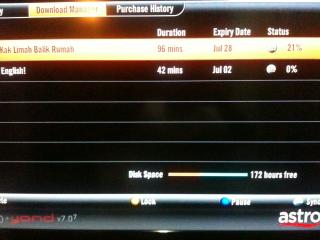
QUOTE(jamesleetech @ Jun 5 2012, 06:07 PM) Its a bit complicated but I do understand your valid explanation and I have to accept that you are right and I am wrong about the video content download using our broadband connection. I did make a detailed check for more info and found out that Astro have actually chosen to use our broadband to download the VOD video content. I noticed there are 3 option in VOD Settings menu. One of it if we choose, we do not need to wait until download is completely finish to be able to watch. By choosing this option, you can watch while you download it, provided that there is enough buffer. There is no video jerking although I used only 1 Mbps speed.This will cause problems for people who have mobile internet broadband (Maxis, Celcom, etc) and use the mobile telco wifi modem (with ethernet ports) or USB modem connected to wifi router with ethernet ports. This is because of the monthly data quota from such mobile telcos. A fair warning should be announced for such broadband connections. So people... take note of this. After subscribing at RM 10 per month, there is a waiting period for full download of selected movie/content to complete before you can watch the content. Its not the same as Youtube video streaming with buffering. This is what I understood from the "waiting time period" (Refer below). Here is the link for the setup requirement for Byond PVR, Byond IPTV and Byond box... http://byond.digitalfive.com/setup.htm The setup guide for Byond PVR and Byond is the same. No setup is required for Byond IPTV. People who are interested in the VOD service should read the setup guide, link here (PDF file)... http://byond.digitalfive.com/assets/VOD_Connectivity_Guide.pdf Below is the image extracted from Page 19 of the setup guide which shows the "waiting period before can start watching"... » Click to show Spoiler - click again to hide... « The normal runtime for a full length movie is about 90 to 120 minutes. Ok, to make it simple, lets say I have a 1 Mbps connection and want to watch a 90 minute SD movie as "Catch Up"... that means after confirming selection, I have to wait about 90 minutes before I can watch it. And that is only 1 SD movie... what about if I want to select more SD movies... then I will choose to pre-select early a few. No problem since I can just leave my modem switched on for many hours to finish download and then watch the next day or later. Just make sure the modem is not switched off during download, because the period to complete will increase. There are questions that I am not sure of the answer yet. What will happen if a 90 minute movie is downloaded at 20 % and I switched off the modem which breaks the download. When I switched on my modem later, I am guessing that the download will continue from where it stopped, I hope so. If not, a lot of time is wasted to redownload from beginning. What happens if I interrupted the download a few times by switching of the modem a few times ? Will there be a slight possibility that the downloaded video become corrupted ? I think that such corruption is not likely but, still can happen. Also remember that TM streamyx do have Fair Usage Policy which throttles to snail speed when too much download is detected... and... for many people with 1 Mbps speed streamyx, usually can only get about 70% actual speed. So... the actual time to finish download may not be as good as shown on paper. From what I understood after reading from the VOD Setup Guide and my phone call to Astro Cust Supp... the Byond PVR, Byond IPTV and Byond boxes uses our internet broadband to download the VOD video content and as I have explained earlier, there is a "waiting period" to finish download before we can watch. PVR recording service must already be subscribed. For Byond box which don't have internal harddisk, either the PVR EASi or WD My Passport AV (320 GB) external USB harddisk is needed. _______________________________________________________ If anyone find any part of my info here as not accurate, please correct me. Thanks. I did try to disconnect the broadband connection while the download process is still running at ~20% and it stopped. Once I reconnect back, it start downloading again from where it stopped  |
|
|
Jun 5 2012, 07:03 PM
|
|
Senior Member
684 posts Joined: Apr 2010
|
QUOTE(chikana @ Jun 5 2012, 06:31 PM) I noticed there are 3 option in VOD Settings menu. One of it if we choose, we do not need to wait until download is completely finish to be able to watch. By choosing this option, you can watch while you download it, provided that there is enough buffer. There is no video jerking although I used only 1 Mbps speed. I did try to disconnect the broadband connection while the download process is still running at ~20% and it stopped. Once I reconnect back, it start downloading again from where it stopped Because I did not subscribe to Superpack 3 or PVR Service for my Byond (not PVR), I cannot enter into the "Video On Demand" menu. A message appears that says "my smartcard is not authorized for PVR funtion..." Now I know that there's an option to watch and download at the same time. Good news that there is no jerking with your 1 Mbps speed and downloads continue from where it stopped earlier. Thanks for the info. |
|
|
|
|
|
Jun 5 2012, 07:17 PM
|

Senior Member
1,543 posts Joined: Jan 2009 From: Somewhere in Damansara
|
At last ethernet port at my byond box is useful right now.
Added on June 5, 2012, 7:20 pm QUOTE(LickGuy @ Jun 5 2012, 12:37 PM) hmm ... wondering why astro movies hd (hbo hd and fox premium hd) still lack of subtitles .... Yeah agree with you.. I think, nothing gonna change for a few years later i think.This post has been edited by minimize: Jun 5 2012, 07:20 PM |
|
|
Jun 5 2012, 09:28 PM
|
|
Junior Member
213 posts Joined: Oct 2010 From: Kedah
|
QUOTE(jamesleetech @ Jun 5 2012, 07:03 PM) Because I did not subscribe to Superpack 3 or PVR Service for my Byond (not PVR), I cannot enter into the "Video On Demand" menu. A message appears that says "my smartcard is not authorized for PVR funtion..." Now I know that there's an option to watch and download at the same time. Good news that there is no jerking with your 1 Mbps speed and downloads continue from where it stopped earlier. Thanks for the info. There is option:1. Remind me when ready to play (default) 2. Playback manually 3. Playback automatically - once I press download, after a few seconds it will play the movie. From the download percentage, it is still running. You should try it. |
|
|
Jun 5 2012, 10:05 PM
|
|
Senior Member
1,587 posts Joined: Apr 2011
|
they feel the pinch from TM HyppTV which also offer VOD service
and now we can also use Unifi to download Astro VOD, for as long as TM doesn't start to implement quota on their existing VIP plans |
|
|
Jun 6 2012, 01:09 AM
|

Senior Member
1,715 posts Joined: May 2005 From: Klang
|
QUOTE(PhakFuhZai @ Jun 5 2012, 03:48 PM) I don't think satellite can offer true VOD experience, because satellite itself is only able to broadcast, NOT multicast nor unicast, the topology I use could be inappropriate but the context is more or less the same, take AOD as example, yes it can rerun the same episode for the entire day, but would we have the FULL control as to when to playback the episode, down to which minute of time we desire? NO, not without PVR. It can be done.http://en.wikipedia.org/wiki/DVB-RCS Of course, this requires that the decoder is capable of operating in IPTV mode over satellite. Either that or an additional modem device sitting under the current decoder (connected to decoder by Ethernet) and the dish transponder must also provide additional connection for the modem. This post has been edited by RAMChYLD: Jun 6 2012, 01:19 AM |
|
|
Jun 6 2012, 07:56 AM
|

Junior Member
409 posts Joined: Mar 2010
|
now my normal byond decoder is updated 7.0, sight, really small notification bar la... why they updated like that?? beside, i have to setting the sub again to BM and English after huge update from 3.0 to 7.0..
|
|
|
Jun 6 2012, 09:40 AM
|
|
Junior Member
213 posts Joined: Oct 2010 From: Kedah
|
QUOTE(chikana @ Jun 5 2012, 09:28 PM) There is option: 1. Remind me when ready to play (default) 2. Playback manually 3. Playback automatically - once I press download, after a few seconds it will play the movie. From the download percentage, it is still running. You should try it. Attached thumbnail(s) 

|
|
|
Jun 6 2012, 09:43 AM
|
|
Junior Member
213 posts Joined: Oct 2010 From: Kedah
|
QUOTE(jamesleetech @ Jun 5 2012, 11:36 AM) Astro On-The-Go screenshots from computer internet browser... » Click to show Spoiler - click again to hide... « on the go on iPad |
|
Topic ClosedOptions
|
| Change to: |  0.0254sec 0.0254sec
 0.57 0.57
 6 queries 6 queries
 GZIP Disabled GZIP Disabled
Time is now: 14th December 2025 - 12:55 PM |
 Quote
Quote


