Welcome Guest ( Log In | Register )

Bump Topic Topic Closed RSS Feed
132 Pages « < 63 64 65 66 67 > » Bottom

Outline · [ Standard ] · Linear+

 SAMSUNG GALAXY S II Official thread V19, Be a SMART user - Pls read Page 1 first

views
     
lolz1120
post Nov 15 2011, 05:39 PM

On my way
****
Senior Member
633 posts

Joined: Jul 2008
From: Somewhere in between heaven and hell


QUOTE(TheLaptopDudeGuy @ Nov 15 2011, 05:31 PM)
If you first time open after you reboot/flash new rom or kernel, it will take some time to load up. once it finish its initial loading then it should open up instantly next time
*
nope, it's more like random. Sometimes it's instantaneous sometimes it takes time. idk why
FutureME92
post Nov 15 2011, 05:45 PM

New Member
*
Junior Member
41 posts

Joined: Mar 2011


QUOTE(williams2011 @ Nov 15 2011, 08:13 AM)
did you tick the usb debugging?
*
Tried ticking then also unticking the box. But neither way works.
snigapoe
post Nov 15 2011, 05:47 PM

Look at all my stars!!
*******
Senior Member
2,388 posts

Joined: Sep 2004


QUOTE(lolz1120 @ Nov 15 2011, 05:39 PM)
nope, it's more like random. Sometimes it's instantaneous sometimes it takes time. idk why
*
did you went to clearing the memory?
FutureME92
post Nov 15 2011, 05:49 PM

New Member
*
Junior Member
41 posts

Joined: Mar 2011


QUOTE(antt00 @ Nov 15 2011, 08:19 AM)
Basically, android will kill idle apps but it does not do it instantly, don't really know the exact period. But if the apps/games is killed within a minute just to answer a call or reply a sms, I would say the problem lies with the app/game and not android. I think the code for the app/game does not allow you to jump to home screen or other app as it sees it as exiting. I hope i make sense to you.

Try and test a game called diversion. I know for sure i can resume this game as i play it alot lately.  tongue.gif Calls came in, messages, turn off screen for a few minutes and i still can resume it without problem.

Edit: Also make sure you do not have any task killer working in the background.


Added on November 15, 2011, 8:24 am
Are you using G version? Have you just updated rom with Kies?  brows.gif
*
G version means I9100G right? If so, then yes i am using G version. I dont think i've updated rom with Kies. Just recently updated the software from 2.3.5 to 2.3.6 only.
joshuawang
post Nov 15 2011, 05:52 PM

New Member
*
Junior Member
14 posts

Joined: Sep 2005


QUOTE(FutureME92 @ Nov 15 2011, 05:45 PM)
Tried ticking then also unticking the box. But neither way works.
*
I finally managed to fix mine finally after few days of troubleshooting. Simple & It works!!

Resolution

1. Unplug the USB cable

2. On the cell phone, dial the following number: *#7284# Once the last # is hit, the PhoneUtil application is launched. Choose USB -> Modem and then USB -> PDA mode. The good mode should be PDA. Even if the mode is PDA, switch to Modem and then back to PDA.

3. Plug the USB cable.

Note:

* Repair USB connection for any Samsung Android phone

Reference: http://www.youtube.com/watch?v=KV2h5O_qDPE
antt00
post Nov 15 2011, 05:52 PM

RescuE
********
All Stars
10,873 posts

Joined: Apr 2009
QUOTE(FutureME92 @ Nov 15 2011, 05:49 PM)
G version means I9100G right? If so, then yes i am using G version. I dont think i've updated rom with Kies. Just recently updated the software from 2.3.5 to 2.3.6 only.
*
You updated from 2.3.5 to 2.3.6 using kies and now you cannot connect to PC

It was reported by dragon360 in post #677
QUOTE(dragon360 @ Nov 13 2011, 09:13 PM)
damnnnnn!!! i solve my 2.3.6 USB problem... i have to do a hard reset or factory rest back.. then i can use the USB!! WTFFFF!!!!! lost all my data and pic

and also i can use KIES aswell now
*
lolz1120
post Nov 15 2011, 05:52 PM

On my way
****
Senior Member
633 posts

Joined: Jul 2008
From: Somewhere in between heaven and hell


QUOTE(snigapoe @ Nov 15 2011, 05:47 PM)
did you went to clearing the memory?
*
u mean cache for gallery?

antt00
post Nov 15 2011, 05:54 PM

RescuE
********
All Stars
10,873 posts

Joined: Apr 2009
QUOTE(lolz1120 @ Nov 15 2011, 05:39 PM)
nope, it's more like random. Sometimes it's instantaneous sometimes it takes time. idk why
*
Do you have task killer or manually clear memory from time to time. If you have then the OS will lose its memory from first media scanning when it startup which causes the gallery to load slow as it is rescanning again.
snigapoe
post Nov 15 2011, 05:55 PM

Look at all my stars!!
*******
Senior Member
2,388 posts

Joined: Sep 2004


QUOTE(lolz1120 @ Nov 15 2011, 05:52 PM)
u mean cache for gallery?
*
long press home button > task manager> ram> clear memory

if you did that, sure will take some time to load all the cache back
lolz1120
post Nov 15 2011, 05:56 PM

On my way
****
Senior Member
633 posts

Joined: Jul 2008
From: Somewhere in between heaven and hell


QUOTE(antt00 @ Nov 15 2011, 05:54 PM)
Do you have task killer or manually clear memory from time to time. If you have then the OS will lose its memory from first media scanning when it startup which causes the gallery to load slow as it is rescanning again.
*
erm..i don't use any task killer wor. @.@
FutureME92
post Nov 15 2011, 06:01 PM

New Member
*
Junior Member
41 posts

Joined: Mar 2011


QUOTE(joshuawang @ Nov 15 2011, 05:52 PM)
I finally managed to fix mine finally after few days of troubleshooting. Simple & It works!!

Resolution

1. Unplug the USB cable

2. On the cell phone, dial the following number: *#7284# Once the last # is hit, the PhoneUtil application is launched. Choose USB -> Modem and then USB -> PDA mode. The good mode should be PDA. Even if the mode is PDA, switch to Modem and then back to PDA.

3. Plug the USB cable.

Note:

* Repair USB connection for any Samsung Android phone

Reference: http://www.youtube.com/watch?v=KV2h5O_qDPE
*
Thanks a lot man! thumbup.gif for you. How'd you manage to figure out the solution?
ashwin1234
post Nov 15 2011, 06:01 PM

║█║▌║█║▌│║▌║▌█║
*****
Senior Member
779 posts

Joined: Dec 2010
From: Everywhere


To those having slow gallery issues, use quickpic instead. It is free and a million times faster!!
FutureME92
post Nov 15 2011, 06:04 PM

New Member
*
Junior Member
41 posts

Joined: Mar 2011


QUOTE(antt00 @ Nov 15 2011, 05:52 PM)
You updated from 2.3.5 to 2.3.6 using kies and now you cannot connect to PC

It was reported by dragon360 in post #677
*
But i wonder why would it turn out to be this way? Is this the only time when it happens when updating to 2.3.6 or everytime whenever update software?
antt00
post Nov 15 2011, 06:07 PM

RescuE
********
All Stars
10,873 posts

Joined: Apr 2009
QUOTE(ashwin1234 @ Nov 15 2011, 06:01 PM)
To those having slow gallery issues, use quickpic instead. It is free and a million times faster!!
*
Actually my gallery is as fast as my quickpic. But am still using quickpic cos of more function.


Added on November 15, 2011, 6:08 pm
QUOTE(FutureME92 @ Nov 15 2011, 06:04 PM)
But i wonder why would it turn out to be this way? Is this the only time when it happens when updating to 2.3.6 or everytime whenever update software?
*
It seem to happen to only G version when updating through kies. Probably the no wipe update by kies left some conflict behind.


Added on November 15, 2011, 6:09 pm
QUOTE(joshuawang @ Nov 15 2011, 05:52 PM)
I finally managed to fix mine finally after few days of troubleshooting. Simple & It works!!

Resolution

1. Unplug the USB cable

2. On the cell phone, dial the following number: *#7284# Once the last # is hit, the PhoneUtil application is launched. Choose USB -> Modem and then USB -> PDA mode. The good mode should be PDA. Even if the mode is PDA, switch to Modem and then back to PDA.

3. Plug the USB cable.

Note:

* Repair USB connection for any Samsung Android phone

Reference: http://www.youtube.com/watch?v=KV2h5O_qDPE
*
@Benny, need to add this to first post so G version user with this issue can stop asking this question here. rolleyes.gif


Added on November 15, 2011, 6:11 pm
QUOTE(lolz1120 @ Nov 15 2011, 05:56 PM)
erm..i don't use any task killer wor. @.@
*
Then did you clear memory as what snigapoe stated
QUOTE(snigapoe @ Nov 15 2011, 05:55 PM)
long press home button > task manager> ram> clear memory

if you did that, sure will take some time to load all the cache back

*
This post has been edited by antt00: Nov 15 2011, 06:11 PM
lolz1120
post Nov 15 2011, 06:22 PM

On my way
****
Senior Member
633 posts

Joined: Jul 2008
From: Somewhere in between heaven and hell


QUOTE(antt00 @ Nov 15 2011, 06:07 PM)
Actually my gallery is as fast as my quickpic. But am still using quickpic cos of more function.


Added on November 15, 2011, 6:08 pm
It seem to happen to only G version when updating through kies. Probably the no wipe update by kies left some conflict behind.


Added on November 15, 2011, 6:09 pm
@Benny, need to add this to first post so G version user with this issue can stop asking this question here.  rolleyes.gif


Added on November 15, 2011, 6:11 pm

Then did you clear memory as what snigapoe stated
*
Other than task killer, is there any other app that will auto clear memory?

todinidot
post Nov 15 2011, 06:26 PM

Getting Started
**
Junior Member
264 posts

Joined: Jul 2011
deng.. sumtim avatar can be deceive...
Gene-Zys
post Nov 15 2011, 06:29 PM

Getting Started
**
Junior Member
132 posts

Joined: Sep 2011
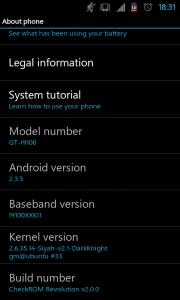
why i am having baseband i9100xxki1?
remember last time after flashing check rom hd 2.0
it is i9100xxki4.
now having baseband version i9100xxki1
and build number checkrom revolution hd 2.0.0.

This post has been edited by Gene-Zys: Nov 15 2011, 06:34 PM


Attached thumbnail(s)
Attached Image
FutureME92
post Nov 15 2011, 06:29 PM

New Member
*
Junior Member
41 posts

Joined: Mar 2011


QUOTE(antt00 @ Nov 15 2011, 05:54 PM)
Do you have task killer or manually clear memory from time to time. If you have then the OS will lose its memory from first media scanning when it startup which causes the gallery to load slow as it is rescanning again.
*
Does this mean that it's not so good to clear RAM from time to time?
joshuawang
post Nov 15 2011, 06:34 PM

New Member
*
Junior Member
14 posts

Joined: Sep 2005


QUOTE(FutureME92 @ Nov 15 2011, 06:01 PM)
Thanks a lot man!  thumbup.gif  for you. How'd you manage to figure out the solution?
*
Haha, welcome bro, glad it works for u.. managed to find it after few days of pening troubleshooting on the drivers. Tried all the steps in Page 1> post #3> Q21, not working, tried reinstalling KIES & usb MTP drivers. Still failed. Finally managed to discover the technique. whew.. almost crazy with this problem...
xsaintzx
post Nov 15 2011, 06:35 PM

On my way
****
Senior Member
598 posts

Joined: Mar 2008
QUOTE(Gene-Zys @ Nov 15 2011, 06:29 PM)
why i am having baseband i9100xxki1?
remember last time after flashing check rom hd 2.0
it is i9100xxki4.
now having baseband version i9100xxki1
and build number checkrom revolution hd 2.0.0.
*
What is the ROM you are having now?
Did you just flash the modem file of XXKI1?
You need to tell what you did before your baseband changed toXXKI1.

132 Pages « < 63 64 65 66 67 > » Top
Topic ClosedOptions
 

Change to:
| Lo-Fi Version
0.0266sec    0.35    6 queries    GZIP Disabled
Time is now: 11th December 2025 - 04:47 AM