

QUOTE(ken8boy @ Nov 11 2011, 10:38 PM)
Anyone know how to use SII as your webcam at PC via USB connection? 

https://market.android.com/details?id=usbwe...plication&hl=en?SAMSUNG GALAXY S II Official thread V19, Be a SMART user - Pls read Page 1 first
|
|
 Nov 11 2011, 11:02 PM Nov 11 2011, 11:02 PM
Return to original view | Post
#1
|
 
Junior Member
132 posts Joined: Sep 2011 
|
QUOTE(ken8boy @ Nov 11 2011, 10:38 PM) Anyone know how to use SII as your webcam at PC via USB connection? https://market.android.com/details?id=usbwe...plication&hl=en? |
|
|
|
|
|
Nov 15 2011, 03:17 AM
Return to original view | Post
#2
|
|
Junior Member
132 posts Joined: Sep 2011
|
QUOTE(rattan @ Nov 15 2011, 02:58 AM) anyone here have direct link to download checkrom 2.0, im downloading it and its taking forever on my 20mbps connection. Most of time its giving me error " download interrupted" even if you have the direct link to it, you still need to download it. |
|
|
Nov 15 2011, 03:39 AM
Return to original view | Post
#3
|
|
Junior Member
132 posts Joined: Sep 2011
|
QUOTE(rattan @ Nov 15 2011, 03:31 AM) i mean a direct torrent connection or a direct ftp connection. tried downloading like 20 times. still failed. have you tried the mirrors? |
|
|
Nov 15 2011, 06:29 PM
Return to original view | Post
#4
|
|
Junior Member
132 posts Joined: Sep 2011
|
why i am having baseband i9100xxki1?
remember last time after flashing check rom hd 2.0 it is i9100xxki4. now having baseband version i9100xxki1 and build number checkrom revolution hd 2.0.0. This post has been edited by Gene-Zys: Nov 15 2011, 06:34 PM Attached thumbnail(s) 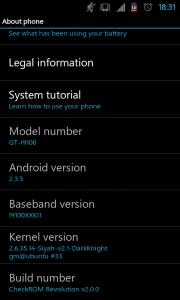
|
|
|
Nov 15 2011, 06:43 PM
Return to original view | Post
#5
|
|
Junior Member
132 posts Joined: Sep 2011
|
QUOTE(xsaintzx @ Nov 15 2011, 06:35 PM) What is the ROM you are having now? attached a thumbnail in previous post.Did you just flash the modem file of XXKI1? You need to tell what you did before your baseband changed toXXKI1. what i did before flash checkrom hd 2.0.0 and siyah dk kernel install mods and themes from kitchen, did a nandroid backup and restore. flash checkrom hd 3.1.1 (i notice the baseband version is xxki1 here) did a nandroid restore to before i flash 3.1.1 |
|
|
Nov 15 2011, 06:52 PM
Return to original view | Post
#6
|
|
Junior Member
132 posts Joined: Sep 2011
|
QUOTE(antt00 @ Nov 15 2011, 06:49 PM) Simply because check ROM 3.1.1 comes with ki1 modem. Nothing wrong there. Just flash ki4 modem if you want to. thanks.so nandroid backup didnt backup modem. This post has been edited by Gene-Zys: Nov 15 2011, 06:55 PM |
|
|
|
|
|
Nov 15 2011, 08:14 PM
Return to original view | Post
#7
|
|
Junior Member
132 posts Joined: Sep 2011
|
QUOTE(dannykhoo17 @ Nov 15 2011, 08:08 PM) anyone know that apps can download youtube video ? i wan straight download on my phone Try tubemate some cool MV  |
|
|
Nov 19 2011, 03:32 AM
Return to original view | Post
#8
|
|
Junior Member
132 posts Joined: Sep 2011
|
QUOTE(HotshotS @ Nov 19 2011, 03:28 AM) Maybe that's normal? Same here with my S2. Not really a red light, just a really dim red light. You can only see it in the dark. Proximity is only red when it is turned on.You can see the red dim light when making call or dial *#0*# to test the sensor. It should not be on all the time. This post has been edited by Gene-Zys: Nov 19 2011, 03:33 AM |
|
|
Nov 19 2011, 04:10 AM
Return to original view | Post
#9
|
|
Junior Member
132 posts Joined: Sep 2011
|
QUOTE(silent_orchestra @ Nov 19 2011, 03:40 AM) yea,its red dim light...but as for as i know the proximity sensor only appear when making calls...mine it appears even i unlock my phone till i lock then it disappear... what causes this problem??any1 know? I saw someone with 9100G having the same issue at xda-developers.comQUOTE(D3viL-JiN @ Nov 19 2011, 03:59 AM) I have a question, how come my lock screen does not have the word saying it is being charging, just like the picture posted by dannykhoo17, when I'm actually charging the phone? Last time still got, now dun have already. You using default lockscreen? Anyone know how to get it back? |
|
|
Nov 19 2011, 04:30 AM
Return to original view | Post
#10
|
|
Junior Member
132 posts Joined: Sep 2011
|
QUOTE(silent_orchestra @ Nov 19 2011, 04:20 AM) yea...i saw the thread regarding this problem at xda-developers.com forum...is there any solution for this? idk. try update to latest rom and see.you can ask someone with g model whether they have the same probelm or someone at service centre. |
|
|
Nov 22 2011, 02:44 AM
Return to original view | Post
#11
|
|
Junior Member
132 posts Joined: Sep 2011
|
QUOTE(snigapoe @ Nov 22 2011, 12:39 AM) is there anyway to enable s2 to detect and connect to adhoc wifi? http://forum.xda-developers.com/showthread...=1252619this work for me using checkrom 2.0 you need a root phone, root explorer, rewritable system path replace the wpa_supplicant in system/bin/ and make sure to allow execute permission This post has been edited by Gene-Zys: Nov 22 2011, 03:02 AM |
|
|
Nov 22 2011, 03:13 AM
Return to original view | Post
#12
|
|
Junior Member
132 posts Joined: Sep 2011
|
QUOTE(stella_purple @ Nov 22 2011, 03:04 AM) so is it means that there is still a chance to get the sme black non g sgs2? yes if you are lucky to find a leftover stock |
|
|
Nov 22 2011, 12:38 PM
Return to original view | Post
#13
|
|
Junior Member
132 posts Joined: Sep 2011
|
QUOTE(snigapoe @ Nov 22 2011, 08:43 AM) how to enable s2 to connect to adhoc wifi network? long press wpa_supplicant, properties, permission, then allow (check) user group other to executei have tried the guide at http://forum.xda-developers.com/showthread.php?t=1252619 but stuck at obtaining ip address loop last time i stuck at obtaining ip too until i allow it Edit: last time the wifi will be turn off automatically. This post has been edited by Gene-Zys: Nov 22 2011, 12:45 PM |
|
Topic ClosedOptions
|
| Change to: |  0.0445sec 0.0445sec
 0.19 0.19
 7 queries 7 queries
 GZIP Disabled GZIP Disabled
Time is now: 2nd December 2025 - 10:00 PM |
 Quote
Quote