

Sifu's anyone know where I can extract the apk software on my device so that I can install it into another device. Some software are already removed from market, that's why.
SAMSUNG GALAXY NOTE™ | V2, RRP RM2299
SAMSUNG GALAXY NOTE™ | V2, RRP RM2299
|
|
 Nov 13 2011, 03:59 PM Nov 13 2011, 03:59 PM
|
 
Junior Member
220 posts Joined: Mar 2006 From: Selangor  
|
Sifu's anyone know where I can extract the apk software on my device so that I can install it into another device. Some software are already removed from market, that's why.
|
|
|
|
|
|
Nov 13 2011, 04:01 PM
|

Senior Member
2,131 posts Joined: Jan 2008 
|
QUOTE(ohkimwoei @ Nov 13 2011, 03:28 PM) i sign dsp88 at the 1st day at queensbay roadshow, purchase SGN at 1399. Whats the offer like for Dsp88? do you get free calls and smses to digi network? whats the difference between dsp88 and dsp68? |
|
|
Nov 13 2011, 04:02 PM
|

Senior Member
3,887 posts Joined: Jun 2008
|
QUOTE(duxz @ Nov 13 2011, 03:47 PM) anyone knows how to delete my samsung account on my old sgs2? sold it to a friend and my account still pops out. Already tried factory reset but the account is still there. Settings>Privacy>Factory Data Reset.Thanks in advance. It will ask for your Google and Samsung account password. It doesn't delete yours? I tried on mine and it works. |
|
|
Nov 13 2011, 04:02 PM
|

Senior Member
509 posts Joined: Jun 2005
|
QUOTE(benQue @ Nov 13 2011, 02:39 PM) guys...any solution, still cannot figure out why cannot make video call. have no problem receiving it Are you trying to call via Wifi or 3G? What's your service provider? I'm using Maxis and APN set to Maxis 3G. Added on November 13, 2011, 4:05 pm QUOTE(andrekua @ Nov 13 2011, 04:02 PM) Settings>Privacy>Factory Data Reset. To make it clean just like when you get from Samsung.. goto Setting>Privacy>Factory Reset and Check Format USB Storage.It will ask for your Google and Samsung account password. It doesn't delete yours? I tried on mine and it works. All files, data and configuration deleted. Added on November 13, 2011, 4:07 pm QUOTE(mysai @ Nov 13 2011, 03:59 PM) Sifu's anyone know where I can extract the apk software on my device so that I can install it into another device. Some software are already removed from market, that's why. Try File Expert. Searh android market. What APK you would like to have? Here some... http://jjpda.blogspot.com/2011/08/download-apk-here.html This post has been edited by jjamain: Nov 13 2011, 04:07 PM |
|
|
Nov 13 2011, 04:09 PM
|

Junior Member
230 posts Joined: Jul 2008
|
QUOTE(waveweaver @ Nov 13 2011, 11:17 AM) Did you update your firmware already.? Try update it first using OTA. New firmware is DXKK1. Bro,I hv just rooted my Note.My S pen features recalibrate itself after update and now it's more accurate Will i lose my root if i were to update to latest firmware fr my current? Thanks |
|
|
Nov 13 2011, 04:11 PM
|
|
Junior Member
220 posts Joined: Mar 2006 From: Selangor
|
Ok thanks found the way from your earlier advices guys. Blur from reading so many posts oredi!
|
|
|
|
|
|
Nov 13 2011, 04:18 PM
|

Senior Member
5,362 posts Joined: Jan 2003 From: Johor Bahru
|
QUOTE(un_id @ Nov 13 2011, 03:53 PM) This is the most active thread in this section. Really needed to be managed. Can mods helps here? wah... why so similar with the situation at Desire HD official thread when the DHD just launched last year. The TS has not updated the first posts frequently and kena tembak like hell. Ultimately TS kena banned in another sub-forum for some offence and thus i took over after the thread reach 2500 posts. DHD thread kind of unique as we take turns to be TS. Thus, every incarnation of new thread will bring fresh ideas and some layout tweaks to the first post.  It is not easy to be a TS so we shared the burden together. It is not easy to be a TS so we shared the burden together.  |
|
|
Nov 13 2011, 04:20 PM
|
|
Senior Member
3,887 posts Joined: Jun 2008
|
Why oh why Samsung design their micro usb port like that? Using the typical connector with the two spring mechanism will scratch the port.
|
|
|
Nov 13 2011, 04:21 PM
|
|
Senior Member
5,362 posts Joined: Jan 2003 From: Johor Bahru
|
QUOTE(ozone9 @ Nov 13 2011, 04:09 PM) Bro,I hv just rooted my Note. nope. i rooted my Note yesterday and only update the firmware just now. Root is still intact after i check. Will i lose my root if i were to update to latest firmware fr my current? Thanks  |
|
|
Nov 13 2011, 04:25 PM
|

Junior Member
212 posts Joined: Jul 2007
|
QUOTE(Cynox @ Nov 13 2011, 04:18 PM) wah... why so similar with the situation at Desire HD official thread when the DHD just launched last year. The TS has not updated the first posts frequently and kena tembak like hell. Ultimately TS kena banned in another sub-forum for some offence and thus i took over after the thread reach 2500 posts. let's vote for new TS ..... DHD thread kind of unique as we take turns to be TS. Thus, every incarnation of new thread will bring fresh ideas and some layout tweaks to the first post. It is not easy to be a TS so we shared the burden together. |
|
|
Nov 13 2011, 04:28 PM
|

Junior Member
12 posts Joined: Oct 2011
|
QUOTE(onibaru @ Nov 13 2011, 01:05 PM) issues so far.. AWESOME INFO THERE! !! WOH where did you get the codes from are u from samsung insider?1. S pen 2. Lag 3. Touch 4. Dead pixel etc Added on November 13, 2011, 1:18 pmGalaxy Secret Codes *#06# = IMEI Number. *#1234# = Firmware Version. *#2222# = H/W Version. *#8999*8376263# = All Versions Together. *#8999*8378# = Test Menu. *#4777*8665# = GPSR Tool. *#8999*523# = LCD Brightness. *#8999*377# = Error Menu. *#8999*327# = EEP Menu. *#8999*667# = Debug Mode. *#92782# = PhoneModel. (Wap) #*5737425# = JAVA Mode. *#2255# = Call List. *#232337# = Bluetooth MAC Adress. *#5282837# = Java Version. #*4773# = Incremental Redundancy. #*7752# = 8 PSK uplink capability bit. #*7785# = Reset wakeup & RTK timer cariables/variables. #*7200# = Tone Generator Mute. #*3888# = BLUETOOTH Test mode. #*7828# = Task screen. #*#8377466# = S/W Version & H/W Version. #*2562# = Restarts Phone. #*2565# = No Blocking? General Defense. #*3353# = General Defense, Code Erased. #*3837# = Phone Hangs on White screen. #*3849# = Restarts Phone. #*3851# = Restarts Phone. #*3876# = Restarts Phone. #*7222# = Operation Typ: (Class C GSM) #*7224# = !!! ERROR !!! #*7252# = Operation Typ: (Class B GPRS) #*7271# = CMD: (Not Available) #*7274# = CMD: (Not Available) #*7337# = Restarts Phone. (Resets Wap Settings) #*2787# = CRTP ON/OFF. #*2886# = AutoAnswer ON/OFF. #*3737# = L1 AFC. #*5133# = L1 HO Data. #*7288# = GPRS Detached/Attached. #*7287# = GPRS Attached. #*7666# = White Screen. #*7693# = Sleep Deactivate/Activate. #*7284# = L1 HO Data. #*2256# = Calibration info? (For CMD set DEBUGAUTONOMY in cihard.opt) #*2286# = Databattery. #*2527# = GPRS switching set to (Class 4, 8, 9, 10) #*2679# = Copycat feature Activa/Deactivate. #*3940# = External looptest 9600 bps. #*4263# = Handsfree mode Activate/Deactivate. #*4700# = Please use function 2637. #*7352# = BVMC Reg value (LOW_SWTOFF, NOMINAL_SWTOFF) #*2558# = Time ON. #*3370# = Same as 4700. #*3941# = External looptest 115200 bps #*5176# = L1 Sleep. #*7462# = SIM Phase. #*7983# = Voltage/Freq. #*7986# = Voltage. #*8466# = Old Time. #*2255# = Call Failed. #*5187# = L1C2G trace Activate/Deactivate. #*5376# = DELETE ALL SMS!!!!. #*6837# = Official Software Version: (0003000016000702) #*7524# = KCGPRS: (FF FF FF FF FF FF FF FF 07) #*7562# = LOCI GPRS: (FF FF FF FF FF FF FF FF FF FF FF FE FF 01) #*2337# = Permanent Registration Beep. #*2474# = Charging Duration. #*2834# = Audio Path. (Handsfree) #*3270# = DCS Support Activate/Deactivate. #*3282# = Data Activate/Deactivate. #*3476# = EGSM Activate/Deactivate. #*3676# = FORMAT FLASH VOLUME!!! #*4760# = GSM Activate/Deactivate. #*4864# = White Screen. #*5171# = L1P1. #*5172# = L1P2. #*5173# = L1P3. #*7326# = Accessory. #*7683# = Sleep variable. #*8465# = Time in L1. #*2252# = Current CAL. #*2836# = AVDDSS Management Activate/Deactivate. #*3877# = Dump of SPY trace. #*7728# = RSAV. #*2677# = Same as 4700. #*3728# = Time 2 Decod. #*3725# = B4 last off. #*7372# = Resetting the time to DPB variables. #*7732# = Packet flow context bit Activate/Deactivate. #*6833# = New uplink establishment Activate/Deactivate. #*3273# = EGPRS multislot. (Class 4, 8, 9, 10) #*7722# = RLC bitmap compression Activate/Deactivate. #*2351# = Blinks 1347E201 in RED. #*4472# = Hysteresis of serving cell: 3 dB #*2775# = Switch to 2 inner speaker. #*9270# = Force WBS. #*7878# = FirstStartup. (0=NO, 1=YES) #*3757# = DSL UART speed set to. (LOW, HIGH) #*8726# = Switches USBACM to Normal. #*8724# = Switches USBACM to Generator mode. #*8727# = Switches USBACM to Slink mode. #*8725# = Switches USBACM to Loop-back mode. #*3838# = Blinks 3D030300 in RED. #*2077# = GPRS Switch. #*2027# = GPRS Switch. #*0227# = GPRS Switch. #*0277# = GPRS Switch. #*8370# = Tfs4.0 Test 0. #*8371# = Tfs4.0 Test 1. #*8372# = Tfs4.0 Test 2. #*8373# = Tfs4.0 Test 3. #*8374# = Tfs4.0 Test 4. #*8375# = Tfs4.0 Test 5. #*8376# = Tfs4.0 Test 6. #*8377# = Tfs4.0 Test 7. #*8378# = Tfs4.0 Test 8. #*8379# = Tfs4.0 Test 9. #*7878# = FirstStartup. (0=NO, 1=YES) #*3838# = Blinks 3D030300 in RED. #*2077# = GPRS Switch. #*2027# = GPRS Switch. #*0227# = GPRS Switch. #*0277# = GPRS Switch. #*22671# = AMR REC START. #*22672# = Stop AMR REC. (File name: /a/multimedia/sounds/voice list/ENGMODE.amr) #*22673# = Pause REC. #*22674# = Resume REC. #*22675# = AMR Playback. #*22676# = AMR Stop Play. #*22677# = Pause Play. #*22678# = Resume Play. #*77261# = PCM Rec Req. #*77262# = Stop PCM Rec. #*77263# = PCM Playback. #*77264# = PCM Stop Play. #*22679# = AMR Get Time. *#8999*364# = Watchdog ON/OFF. *#8999*427# = WATCHDOG signal route setup. *2767*226372# = Camera Reset. (deletes photos) *2767*3855# = E2P Full Reset. *2767*2878# = E2P Custom Reset. *2767*927# = E2P Wap Reset. *2767*226372# = E2P Camera Reset. *2767*688# = Reset Mobile TV. #7263867# = RAM Dump. (On or Off) * # 06 # Show IMEI number next * # 0 * # LCD Test Menu * # * # 4636 # * # * user statistics and Phone Info * # 0011 # Displays status information for the GSM *#1234# View SW Version PDA, CSC, MODEM *#12580*369# SW & HW Info *#197328640# Service Mode *#0228# ADC Reading *#32489# (Ciphering Info) *#232337# Bluetooth Address *#232331# Bluetooth Test Mode *#232338# WLAN MAC Address *#232339# WLAN Test Mode *#0842# Vibra Motor Test Mode *#0782# Real Time Clock Test *#0673# Audio Test Mode *#0*# General Test Mode *#2263# RF Band Selection *#9090# Diagnostic ConfiguratioN *#7284# USB I2C Mode Control *#872564# USB Logging Control *#4238378# GCF Configuration *#0283# Audio Loopback Control *#1575# GPS Control Menu *#3214789650# LBS Test Mode *#745# RIL Dump Menu *#746# Debug Dump Menu *#9900# System Dump Mode *#44336# Sofware Version Info *#7780# Factory Reset *2767*3855# Full Factory Reset *#0289# Melody Test Mode *#2663# TSP / TSK firmware update *#03# NAND Flash S/N *#0589# Light Sensor Test Mode *#0588# Proximity Sensor Test Mode *#273283*255*3282*# Data Create Menu *#273283*255*663282*# Data Create SD Card *#3282*727336*# Data Usage Status *#7594# Remap Shutdown to End Call TSK *#34971539# Camera Firmware Update *#526# WLAN Engineering Mode *#528# WLAN Engineering Mode *#7412365# Camera Firmware Menu *#07# Test History *#3214789# GCF Mode Status *#272886# Auto Answer Selection *#8736364# OTA Update Menu *#301279# HSDPA/HSUPA Control Menu *#7353# Quick Test Menu *2767*4387264636# Sellout SMS / PCODE view *#7465625# View Phone Lock Status *7465625*638*# Configure Network Lock MCC/MNC #7465625*638*# Insert Network Lock Keycode *7465625*782*# Configure Network Lock NSP #7465625*782*# Insert Partitial Network Lock Keycode *7465625*77*# Insert Network Lock Keycode SP #7465625*77*# Insert Operator Lock Keycode *7465625*27*# Insert Network Lock Keycode NSP/CP #7465625*27*# Insert Content Provider Keycode *#272*imei#* Product code , works on Froyo *#*#7780#*#* Factory data reset - Clears Google-account data, system and program settings and installed programs. system will not be deleted, and OEM programs, as well as My Documents (pictures, music, videos) some may not work |
|
|
Nov 13 2011, 04:30 PM
|
|
Senior Member
7,044 posts Joined: Nov 2007
|
about this thread... I'd think it's simple... start v3 and put a note here to ask all to go v3 while waiting for ts to close this one.
someone just need to go start v3... ;-) |
|
|
Nov 13 2011, 04:36 PM
|
|
Senior Member
5,362 posts Joined: Jan 2003 From: Johor Bahru
|
QUOTE(mydragoon @ Nov 13 2011, 04:30 PM) about this thread... I'd think it's simple... start v3 and put a note here to ask all to go v3 while waiting for ts to close this one. i think so too, else when reach 2500 post, all important info will be buried deep inside here, the next TS will sure have a hard time to gather all the info from here. and we kinda like start the same thread again with the same question and answer - very unproductive.someone just need to go start v3... ;-) |
|
|
|
|
|
Nov 13 2011, 04:37 PM
|

Junior Member
244 posts Joined: Jul 2008
|
yea, TS has been gone missing awhile, no offence to him as the 1st page has not updated, and new android user,etc:me, need to search page by page for those solution /information posted by other..
|
|
|
Nov 13 2011, 04:39 PM
|

Senior Member
5,040 posts Joined: Nov 2005 
|
this is what happens when u dump your S2 for your New Note.
It will take it very personally and commit suicide. haha 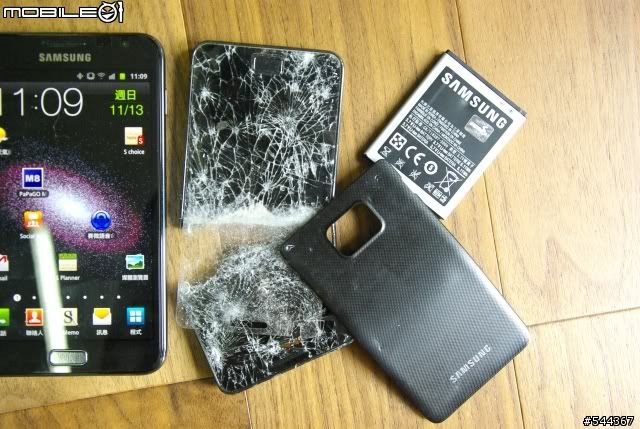 |
|
|
Nov 13 2011, 04:42 PM
|

Senior Member
2,677 posts Joined: Apr 2010 From: KL 
|
QUOTE(rayzrblade @ Nov 13 2011, 04:39 PM) this is what happens when u dump your S2 for your New Note. waa this screen may cost u RM 400 @!@It will take it very personally and commit suicide. haha |
|
|
Nov 13 2011, 04:42 PM
|

Senior Member
1,982 posts Joined: Aug 2005 From: TTDI
|
QUOTE(Innovation @ Nov 13 2011, 04:37 PM) yea, TS has been gone missing awhile, no offence to him as the 1st page has not updated, and new android user,etc:me, need to search page by page for those solution /information posted by other.. it has only been 3 days? since he created v2. LOL u guys expeect him to not have life and be online everyday?  give him a break |
|
|
Nov 13 2011, 04:49 PM
|

Senior Member
1,717 posts Joined: May 2008
|
QUOTE(xpresside @ Nov 13 2011, 04:42 PM) it has only been 3 days? since he created v2. LOL u guys expeect him to not have life and be online everyday? 3 days missing is very bad edi, 3 days woh.......if cannot online everyday do not be the TS loh...... give him a break |
|
|
Nov 13 2011, 04:50 PM
|
|
Junior Member
230 posts Joined: Jul 2008
|
QUOTE(Cynox @ Nov 13 2011, 04:21 PM) nope. i rooted my Note yesterday and only update the firmware just now. Root is still intact after i check. Great!! Thanks bro!Will update then will try to flash to [ROM] N7000ZSKK1 Hong Kong Version [11.11.2011] [Android 2.3.6]  |
|
|
Nov 13 2011, 04:53 PM
|
|
Junior Member
141 posts Joined: Mar 2009
|
QUOTE(rayzrblade @ Nov 13 2011, 04:39 PM) this is what happens when u dump your S2 for your New Note. Wah lao eh~!! It will take it very personally and commit suicide. haha  |
|
Topic ClosedOptions
|
| Change to: |  0.0182sec 0.0182sec
 1.16 1.16
 6 queries 6 queries
 GZIP Disabled GZIP Disabled
Time is now: 21st December 2025 - 11:14 PM |
 Quote
Quote