Welcome Guest ( Log In | Register )

Bump Topic Topic Closed RSS Feed
6 Pages  1 2 3 > » Bottom

Outline · [ Standard ] · Linear+

Maxis Maxis 3G/HS 3G Thread V3 (Not WBB), Don't Envy at Our Super Fast Speed! :D

views
     
TSfruitie
post Nov 5 2011, 04:44 PM, updated 14y ago

Rise and Shine
Group Icon
Staff
72,876 posts

Joined: Sep 2005
From: KUL

Hi, welcome to this thread! wave.gif

You can:
  • Discuss about phone/data card settings for Maxis 3G/HS 3G.
  • Comment about Maxis 3G/HS 3G.
  • Ask for opinions on Maxis 3G/HS 3G.

You can't:
  • Discuss about piracy or illegal contents.
  • Request forummers to rent out their SIM cards here, this is not a trading platform.

REMINDER:
  • This package is already a discontinued plan, hence you will not be able to sign up as new subscribers.
  • This is NOT Maxis WBB thread! There is a separate Maxis WBB thread on this section.


TSfruitie
post Nov 5 2011, 05:09 PM

Rise and Shine
Group Icon
Staff
72,876 posts

Joined: Sep 2005
From: KUL

Special credits to our master of trial and error, chuahcs79 for his contributions. He has tried different devices and used different types of booster to enhance his connection's speed and consistency. Those methods are proven workable and not forgetting they are also cost effective.

For your information, chuahcs79 is based in Penang and hence if your area is not within HSPA coverage, these methods might not work that well for you but they are definitely worth trying.

----------
Part 1:

Below are the methods proven to work in my area. These are however dependable on area, device, timing, distance from the cell signal tower base and network congestion within the same tower.

Booster

a) Windsurfer
- Suitable for all USB modems
- Download the template from HERE


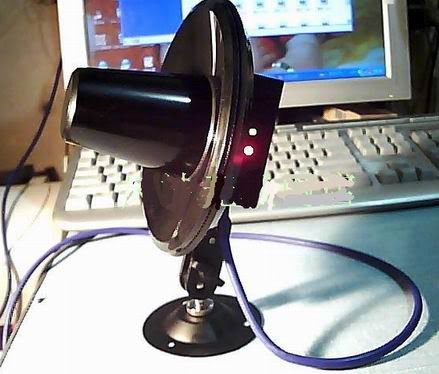
b) Strainer
- Suitable for USB stick modems
- Suitable for areas with poor signal or bad connection's consistency
- Alternatively, this can be used as directional antenna too


user posted image

user posted image

user posted image


Huawei E1762's latest firmware updates
As many of you are aware Huawei E1762 is one of the bundled modems for Maxis broadband registration, hence it shouldn't come to a surprise by seeing most of us (or people out there) using this modem. It is capable to run on 7.2Mbps download speed and 5.76Mbps upload speed.

Credits to cruxidex for his kindness to help out few poor souls out there who were having bad speed using the E1762. tongue.gif

The latest firmware: 11.126.10.00.00
Easy peasy steps:
1) Download the firmware from here and only install the Update_11.126.10.00.00.B418.

2) After get the modem flashed to the latest firmware, it is time to upgrade your dashboard to a later version. Download from here. Install UTPS16.002.10.04.99_MAC16.001.30.00.99.

3) Done!

You will need to take note on these few important points before flashing your modem and dashboard. Spend 1 minute reading them, strongly advised by fruitie.
1) Do not fix the firmware, unless it is broken (slow).
2) OK, now you have decided to flash it; make sure you jot down your current firmware before you start doing anything. Can be obtained from your dashboard: Tools>Diagnostics
3) For those using this modem with TP-Link MR3420, basically not much issues can be found. MR3420 is a very flexible router unlike Aztech HW550-3G.
4) However, if you are using Aztech HW550-3G, before doing the above steps; please update your router to the latest firmware from here.
5) Proceed with the modem+dashboard flashes. In order for it to use on your Aztech HW550-3G router, select RAS (modem) on your dashboard before plugging it into your router. By default, it comes with NDIS.
6) You should be able to use it on your Aztech router with no issues now.


If you feel that your previous firmware does better job than the new one, you may still possible to download the old firmware from DC Files.
Optional: You can also use cruxidex's uploaded file here.

Note: Perform all the steps on your own risk, we are not liable for any issues which may happen during or after the flash.

Part 2: Mobile phones as modem and conclusion in next post...

This post has been edited by fruitie: Dec 14 2011, 11:03 PM
TSfruitie
post Nov 5 2011, 05:39 PM

Rise and Shine
Group Icon
Staff
72,876 posts

Joined: Sep 2005
From: KUL

Mobile Phones as Modem

a) Sony Ericsson Phones
- Recommended phones: SE W705, SE Yari U100 and SE Elm
- I have been connecting them to the TP-Link's TL-MR3420, a 3G router. This is to show you how much the signal strength has gained using these SE phones as modem.

user posted image

user posted image

user posted image

b) Nokia Phone
- Recommended phone: Nokia X3-02
- My favourite phone. Why? I direct connect it with the stock USB cable to my PC and it can get quite a maximised speed in my area as I believe the 3G 900MHz band is stronger in my area.
-Proven by results from Speedtest.net

user posted image

user posted image

user posted image

user posted image

user posted image

Friendly reminder: As phones generally generate more heats compared to designated USB modems, please take precautions steps such as using a cooler pad underneath the phone or station it near to a fan or an air-conditioned system to avoid any unwanted incidents. Please try this on your own risk.


Conclusion:
Phones are easier to get better signal in my area. I have tested with almost all available USB modems such as the Huawei E1762, E270, D-Link DWM 151, ZTE MF627, ZTE MF600, UMG1831 (credits to leecwai), SE phones and Nokia phone. Some areas are only running on 3G 2100 MHz band, while some areas like mine are running on both 2100MHz and 900 MHz 3G band.

In my area 900MHz is proven to have stronger signal and that's the reason phones can easily grab better signal than modem. If you are using phone to do tethering for 24/7, you will need to keep the phone cool all the time, make sure you get a spare battery and open the back cover or place it on top of a laptop cooler pad. It might reduce some of the heats. SE phones are much cooler than Nokia phone when it comes to tethering based on my experience.

If you are using or planning to buy a USB modem, please remember to buy those which support dual 3G 900MHz and 2100 MHz band modem. thumbup.gif

Note: Big thanks to chuahcs79 for his experiments. Above finding is done by chuahcs79 and edited and compiled by fruitie.


Next post: Now you have a good device, good connection. What's next? Share the love, share out your connection. fruitie has some recommendations for you. biggrin.gif

This post has been edited by fruitie: Nov 7 2011, 02:38 AM
TSfruitie
post Nov 5 2011, 05:54 PM

Rise and Shine
Group Icon
Staff
72,876 posts

Joined: Sep 2005
From: KUL

With the advancement of technology, fruitie personally recommends all the Maxis 3G Internet Unlimited users to have a 3G router. You can easily share this high speed connection with your family members or simply for your iPad or mobile phones. biggrin.gif

3G routers are proven to have better connectivity and stability compared to direct plug-in USB modems. Of course, one can easily buy a MiFi device and connection can be shared via WiFi with simple steps. However, if you are not a mobile person, 3G routers are always a better choice than a MiFi. You can choose to connect using LAN (more stable than WiFi) or WiFi. If you have a ready USB modem then you can plug it to your router without wasting its existence, this is something MiFi can't have.

Two choices of our all-time favourite 3G routers:

1) TP Link - TL MR 3420
http://www.tp-link.com/en/products/details/?model=TL-MR3420
-More flexible than Aztech HW550-3G as it accepts many types of USB modems
Discussion thread: https://forum.lowyat.net/index.php?showtopic=2068482

2) Aztech - HW550-3G (I'm using this and quite satisfied with it)
http://www.aztech.com/prod_3g_hw550.html
Discussion thread: https://forum.lowyat.net/index.php?showtopic=1966992

-----

However, computing technology makes life easier. Windows 7 is capable enough to turn your modem into a "virtual router" and you can share out the 3G connection with just some simple tweaks.

Read this tutorial for better understanding. You couldn't agree more that the illustrations actually help a lot! At least to me.
Credits to the original author, Damien from MakeTechEasier.

This post has been edited by fruitie: Nov 7 2011, 02:49 AM
digilife
post Nov 5 2011, 06:08 PM

The MNP guy, its me yeah.
*******
Senior Member
8,025 posts

Joined: Feb 2005
From: Planet Boleland


I luv your work

rclxms.gif rclxms.gif rclxms.gif
KKW
post Nov 5 2011, 06:08 PM

Look at all my stars!!
*******
Senior Member
2,954 posts

Joined: Apr 2008


Today speedtest biggrin.gif
user posted image
TSfruitie
post Nov 5 2011, 06:16 PM

Rise and Shine
Group Icon
Staff
72,876 posts

Joined: Sep 2005
From: KUL

QUOTE(digilife @ Nov 5 2011, 06:08 PM)
I luv your work

rclxms.gif  rclxms.gif  rclxms.gif
*
Thanks. blush.gif
Just edit and add-on points from Chuah's post. tongue.gif

PD's speed at the moment, night time is faster. biggrin.gif

user posted image

user posted image

By the way, no congratulation posts ya. biggrin.gif
digilife
post Nov 5 2011, 06:21 PM

The MNP guy, its me yeah.
*******
Senior Member
8,025 posts

Joined: Feb 2005
From: Planet Boleland


very informative thread

i give u a A+ rating
ChigurhTroll
post Nov 5 2011, 06:54 PM

New Member
*
Junior Member
21 posts

Joined: Jun 2011
But you'll have to make a crazy dish or abuse your mobile phone to get this speed.

I dont think malaysian average Siti and Ahmad or Ah lian and Ah beng would want the hassle and RISK of doing this.

If they are really tech savvy and nbtd, they could just get an outdoor 3G antenna (roof) and connect it to their own router/switch setup. Guarantee MAX speed available in their area.

TSfruitie
post Nov 5 2011, 07:10 PM

Rise and Shine
Group Icon
Staff
72,876 posts

Joined: Sep 2005
From: KUL

QUOTE(ChigurhTroll @ Nov 5 2011, 06:54 PM)
But you'll have to make a crazy dish or abuse your mobile phone to get this speed.

I dont think malaysian average Siti and Ahmad or Ah lian and Ah beng would want the hassle and RISK of doing this.

If they are really tech savvy and nbtd, they could just get an outdoor 3G antenna (roof) and connect it to their own router/switch setup. Guarantee MAX speed available in their area.
*
Not really, I don't do any enhancement to my modem nor using any mobile phone. Those regulars know. smile.gif
Still I can clock more than 6Mbps speed back in PJ, just that I'm back in my hometown now hence the speed was slowed down. smile.gif


digilife
post Nov 5 2011, 07:32 PM

The MNP guy, its me yeah.
*******
Senior Member
8,025 posts

Joined: Feb 2005
From: Planet Boleland


QUOTE(ChigurhTroll @ Nov 5 2011, 06:54 PM)
But you'll have to make a crazy dish or abuse your mobile phone to get this speed.

I dont think malaysian average Siti and Ahmad or Ah lian and Ah beng would want the hassle and RISK of doing this.

If they are really tech savvy and nbtd, they could just get an outdoor 3G antenna (roof) and connect it to their own router/switch setup. Guarantee MAX speed available in their area.
*
you failed Full Time, i hav this

user posted image

connected outside my hse, the signal is worst than before, why?? dBm loss, meaning the longer the cable the lesser is the signal , u hav to connect it nearer to the modem, and i ripped out the antenna socket too (thus putting my modem into "coma")

if u wan good reception, just camp under the tower , like fruitie's house tat is nearby the tower ( UMTS 900 )
ChigurhTroll
post Nov 5 2011, 07:41 PM

New Member
*
Junior Member
21 posts

Joined: Jun 2011
QUOTE(digilife @ Nov 5 2011, 07:32 PM)
you failed Full Time, i hav this

user posted image

connected outside my hse, the signal is worst than before, why?? dBm loss, meaning the longer the cable the lesser is the signal , u hav to connect it nearer to the modem, and i ripped out the antenna socket too (thus putting my modem into "coma")

if u wan good reception, just camp under the tower , like fruitie's house tat is nearby the tower ( UMTS 900 )
*
This is my dish.

user posted image

I live inside my dish, max signal strength: 60,0000,0000km from earth.
chuahcs79
post Nov 5 2011, 08:15 PM

Look at all my stars!!
Group Icon
Elite
6,931 posts

Joined: Apr 2011
From: Bolehland for sure ^_^


congrats to Fruitie for this amazing V3 ,..!! well done,. A+++++...
digilife
post Nov 5 2011, 08:21 PM

The MNP guy, its me yeah.
*******
Senior Member
8,025 posts

Joined: Feb 2005
From: Planet Boleland


QUOTE(chuahcs79 @ Nov 5 2011, 08:15 PM)
congrats to Fruitie for this amazing V3 ,..!! well done,. A+++++...
*
international rating agency only hav A+,A or A-, mana ada A+++++

be international la, we dun wan rojak/alien rating ma

she cannot sleep tonite ady cause got 2 person giv her A+ rating
chuahcs79
post Nov 5 2011, 08:24 PM

Look at all my stars!!
Group Icon
Elite
6,931 posts

Joined: Apr 2011
From: Bolehland for sure ^_^


QUOTE(digilife @ Nov 5 2011, 08:21 PM)
international rating agency only hav A+,A or A-, mana ada A+++++

be international la, we dun wan rojak/alien rating ma

she cannot sleep tonite ady cause got 2 person giv her A+ rating
*
LOL,.. ok ok ok..

fruitie get a A+ from me,... rclxms.gif rclxms.gif
digilife
post Nov 5 2011, 08:32 PM

The MNP guy, its me yeah.
*******
Senior Member
8,025 posts

Joined: Feb 2005
From: Planet Boleland


QUOTE(chuahcs79 @ Nov 5 2011, 08:24 PM)
LOL,.. ok ok  ok..

fruitie get a A+ from me,...  rclxms.gif  rclxms.gif
*
u should add a few hugs and some mucks2 cause you also contributed a lot
ChigurhTroll
post Nov 5 2011, 08:54 PM

New Member
*
Junior Member
21 posts

Joined: Jun 2011

A tech savvy girl is like a Unicorn, elusive and beautiful, everybody wants to ride it.

tongue.gif
TSfruitie
post Nov 5 2011, 09:46 PM

Rise and Shine
Group Icon
Staff
72,876 posts

Joined: Sep 2005
From: KUL

Chuah, we appreciate your contribution. Please continue doing experiments. laugh.gif
chuahcs79
post Nov 5 2011, 10:10 PM

Look at all my stars!!
Group Icon
Elite
6,931 posts

Joined: Apr 2011
From: Bolehland for sure ^_^


QUOTE(fruitie @ Nov 5 2011, 09:46 PM)
Chuah, we appreciate your contribution. Please continue doing experiments. laugh.gif
*
well, i just though is nice to share,. because since everyone have different situation, different device too,..depends on how they use the maxis line,...

i personally dont mind lower speed just to get better consistency,. and SE phone have better consistency in direct plug into pc compare to nokia phone though,..

i will continue to experiment ,.. and will try my best to share,. thumbup.gif
vostro78
post Nov 5 2011, 11:05 PM

Look at all my stars!!
*******
Senior Member
6,804 posts

Joined: Sep 2010


wow, few days not login already v3...congratulation.
maxcheam
post Nov 5 2011, 11:15 PM

Casual
***
Junior Member
384 posts

Joined: Jan 2006
From: Penang


nice!! great job on the information sharing and neat compilation. Keep it up! wink.gif
chuahcs79
post Nov 6 2011, 12:06 AM

Look at all my stars!!
Group Icon
Elite
6,931 posts

Joined: Apr 2011
From: Bolehland for sure ^_^


QUOTE(vostro78 @ Nov 5 2011, 11:05 PM)
wow, few days not login already v3...congratulation.
*
hi there drool.gif

long time no see,. busy lately ? did any test or experiement ? u can share as well,..


Added on November 6, 2011, 12:07 am
QUOTE(maxcheam @ Nov 5 2011, 11:15 PM)
nice!! great job on the information sharing and neat compilation. Keep it up! wink.gif
*
hi max,. i am sure u have big pile of experiment experience to share for sure,.. notworthy.gif notworthy.gif


Added on November 6, 2011, 12:45 am

i found out about the TP LINK 3G router:

when i connect using Lan cable to my win 7 ultimate pc,. i will get high ping, request time out happen a lot in CMD too when i ping google..

but when i use wireless N adapter connect to the router, i get lowest ping in my area and request time out is not happen at all,..


wireless N connection speedtest
user posted image

user posted image

when i use cable, my speedtest ping is always around 60~ 110Ms ( never get anything below 60ms )


can wireless N be better than Lan cable ???

in my case it seems like my wireless N adapter working better than my lan cable,...

This post has been edited by chuahcs79: Nov 6 2011, 12:59 AM
chuahcs79
post Nov 6 2011, 04:33 AM

Look at all my stars!!
Group Icon
Elite
6,931 posts

Joined: Apr 2011
From: Bolehland for sure ^_^


speedtest using nokia x3-02:

( just though sharing on how i set up my nokia to run 24/7 beside my Tp Link 3G router )

i set up this way because my nokia doesnt support by Tp Link 3G router as modem like SE phone and install " Connectify" for my win7 PC to act as 3G router/Mifi so my lappy and andriod pad and phone all can connect to my pc,.. let my Tp Link rest tonight,... LOL...

as what Digilife advise i try to use MDMA to see my nokia x3-02 signal in dBm but it wont work,. sweat.gif

[attachmentid=2520998]

[attachmentid=2520999]

user posted image

user posted image

user posted image

user posted image

user posted image

This post has been edited by chuahcs79: Nov 6 2011, 04:39 AM
KKW
post Nov 6 2011, 04:45 AM

Look at all my stars!!
*******
Senior Member
2,954 posts

Joined: Apr 2008


My download speed on maxis dashboard smile.gif
Attached Image
chuahcs79
post Nov 6 2011, 04:48 AM

Look at all my stars!!
Group Icon
Elite
6,931 posts

Joined: Apr 2011
From: Bolehland for sure ^_^


wow off the max on the chart,.. ....
cruxidex
post Nov 6 2011, 06:51 AM

Enthusiast
*****
Senior Member
898 posts

Joined: Aug 2006
From: Kajang, Selangor


speedtest at my wife's kampung... Jeram Pasu, Pasir Puteh Kelantan
user posted image

ping has improved... speed around the same


This post has been edited by cruxidex: Nov 6 2011, 06:51 AM
coolstore
post Nov 6 2011, 03:41 PM

Regular
******
Senior Member
1,524 posts

Joined: Apr 2008
QUOTE(ChigurhTroll @ Nov 5 2011, 06:54 PM)
But you'll have to make a crazy dish or abuse your mobile phone to get this speed.

I dont think malaysian average Siti and Ahmad or Ah lian and Ah beng would want the hassle and RISK of doing this.

If they are really tech savvy and nbtd, they could just get an outdoor 3G antenna (roof) and connect it to their own router/switch setup. Guarantee MAX speed available in their area.
*
although average users not really like hassle matter, but some times it is also fun to DIY when one got leisure time instead of lepak kepak at shopping mall right?

do this DIY is better than get conned with fake 3G signal booster (as i bought 1 to test out, although initially think 90% it was fake, but still can resist myself buying 1, end up confirm fake 3G signal booster, a true signal booster would cost hundreds ...)

user posted image
coolstore
post Nov 6 2011, 04:14 PM

Regular
******
Senior Member
1,524 posts

Joined: Apr 2008
QUOTE(digilife @ Nov 5 2011, 07:32 PM)
you failed Full Time, i hav this

user posted image

connected outside my hse, the signal is worst than before, why?? dBm loss, meaning the longer the cable the lesser is the signal , u hav to connect it nearer to the modem, and i ripped out the antenna socket too (thus putting my modem into "coma")

if u wan good reception, just camp under the tower , like fruitie's house tat is nearby the tower ( UMTS 900 )
*
hi, i did know you having some difficulties in the usage way that accidentally rip off your huawei modem antenna jack, accident do happens, member 'mxsteven' seems also experienced that before, just solder back as he did as this crc9 are smaller connector, more vulnerable than big brother sma connector. (as you said your friend's E1762 connector also ripped off itself even no applying antenna at it before right?)

btw, apart from that accident, i never heard from you the signal is wosen than before while starting using it?

so far already sold about 10 units++, none of one said negative, all improved results.

3G antenna are proven industrial product, not DIY. telco also using them, no play-play. like chuach79 own disclaimer, every person situation / environment is different, so wanna know how your situation getting you that kind of end result?

longer cable did giving more signal loss, but with original 18dbi gain, minus the signal loss by 2.5m RG58/u cable, still got at least 16dbi ++, far multple times powerful than built-in antenna.

member 'dexeric' did the spot test at the same lrt i cod with you that time, he used ZTE MF60 mifi device. In open no blocking good condition like that, we don't expect much improved 3G results, but right put on testing, he already noticed improvment to -6xdbm and speed go up to 8.x Mbps after targetting a base station around 2-3km away.

member 'miezaidin' is the buyer so far i noticing the user (among 10+ buyers) who gain the most from his maxis line is his kampung in perak. lym who interested to know how much speed he got from the (under-utilised) maxis tower, can pm him, no good to disclose this openly as might trigger maxis 'alarm'. hehe.

latest member 'mynor' buyer feedback show the same way:
QUOTE(mynor @ Nov 2 2011, 11:16 PM)
Yeay !!! Received mine this morning ...

Before

user posted image

After

user posted image

Still looking for the best tower ... hehe

Excellent seller and product ...
*
so wonder how your situation give you 'negative' results? this will be a worth for in-depth analysis case if 3G high gain antenna also cannot solve. more situation details / illustration needed indeed.

This post has been edited by coolstore: Nov 6 2011, 04:20 PM

digilife
post Nov 6 2011, 05:35 PM

The MNP guy, its me yeah.
*******
Senior Member
8,025 posts

Joined: Feb 2005
From: Planet Boleland


@coolstore

i bought 2 antenna from u b4, the patch( dual band) is good or rather better as the cable was short and easy to handle and i got dBm gain of abt -14dBm from -98 to -84/83 while using the e 1762 (dual band modem) , i am still keeping it. thumbup.gif

when i saw this new Yagi, i bot it in the hope of getting a much better gain of at least -15dBm + and maybe i can position it pointing towards the tower around my place and get better result, but i was wrong cause when i plug in the antenna, the signal was "worst" -101dBm , cause the e1762 was not "receiving" the signal from its own internal antenna, it was receiving the signal from the Yagi ( cause it was connected via the modem's connector), and this yagi's cable is much rigid, hence very difficult to get a good grip icon_idea.gif

anyway, dun be alarmed " Mr Antenna seller" i am not here to badmouth your product and hav no intention of doing so, as there could be various reasons why i dun get the desired results......i will explore more ways to understand this yagi

i only hav one e1762 at tat time and since that e1762 was put into "coma" due to the dislodge antenna connector, i hav no more e 1762 to try sweat.gif

but now i ady bot another e1762 biggrin.gif , i will try them out with the Yagi again soon rclxms.gif but then again i am afraid tat i will rip the connector out again doh.gif

i just hope you could help me to solder the pigtail connector to my 2# camatose e1762, please notworthy.gif i dun mind tat the internal antenna of the e1762 will be gone forever after the soldering as they are in a coma and will never wake up

i should be in KL this Thursday, PM me if are willing to do it as i will pay for the pigtail connector. i tried to open the e1762 but i couldn't manage to locate the screws sweat.gif


chuahcs79
post Nov 6 2011, 06:12 PM

Look at all my stars!!
Group Icon
Elite
6,931 posts

Joined: Apr 2011
From: Bolehland for sure ^_^


well in my case

i do have a 3G yagi antenna,. it didnt work that well for me in my area compare with the strainer or windsurfer,. and also end up i accidently rip offthe connector in my E1762modem too, ( same like Digilife )

i suspect that usb modem is either can't provide enough power gain to the yagi to perform, or usb modem is just plain dont work in my area due to 3G band 900Mhz ?

and end up i testing with phone,. easier and signal is end up stronger and so strong like most of the time is FULL,. also achieve the highest speed that i wanted and consistency is higher than usb modem i( in my area )..

so now i dont know what to do with my 3G yagi antenna doh.gif doh.gif

This post has been edited by chuahcs79: Nov 6 2011, 06:13 PM
espurido
post Nov 6 2011, 06:16 PM

New Member
*
Newbie
1 posts

Joined: Nov 2011


Phone is always the best! I hardly use my 3G modem now biggrin.gif
chuahcs79
post Nov 6 2011, 06:33 PM

Look at all my stars!!
Group Icon
Elite
6,931 posts

Joined: Apr 2011
From: Bolehland for sure ^_^


speedtest with nokiax3-02 ( PING is amazing.. )

agree, phone is bvest solution ,..

user posted image

user posted image

user posted image

user posted image
digilife
post Nov 6 2011, 06:36 PM

The MNP guy, its me yeah.
*******
Senior Member
8,025 posts

Joined: Feb 2005
From: Planet Boleland


QUOTE(chuahcs79 @ Nov 6 2011, 06:12 PM)
well in my case

i do have a 3G yagi antenna,. it didnt work that well for me in my area compare with the strainer or windsurfer,. and also end up i accidently rip offthe connector in my E1762modem too, ( same like Digilife )

i suspect that usb modem is either can't provide enough power gain to the yagi to perform, or usb modem is just plain dont work in my area due to 3G band 900Mhz ?

and end up i testing with phone,. easier and signal is end up stronger and so strong like most of the time is FULL,. also achieve the highest speed that i wanted and consistency is higher than usb modem i( in my area )..

so now i dont know what to do with my 3G yagi antenna doh.gif  doh.gif
*
PM coolstore to solder the pigtail connector> send me the modem on Tue>i go see him on Thu> he do solder>i send u back the modem>u pay the pos laju and my "leg food" biggrin.gif
TSfruitie
post Nov 6 2011, 06:40 PM

Rise and Shine
Group Icon
Staff
72,876 posts

Joined: Sep 2005
From: KUL

PD's evening speed. icon_rolleyes.gif Yeah~

user posted image
chuahcs79
post Nov 6 2011, 06:44 PM

Look at all my stars!!
Group Icon
Elite
6,931 posts

Joined: Apr 2011
From: Bolehland for sure ^_^


QUOTE(digilife @ Nov 6 2011, 06:36 PM)
PM coolstore to solder the pigtail connector> send me the modem on Tue>i go see him on Thu> he do solder>i send u back the modem>u pay the pos laju and my "leg food" biggrin.gif
*
i think i pass, since the Yagi dont gain much signal in my places compare to phone,.., i rather use phone now,.. easier,..

just dont know what to do with the 3G yagi antenna now,... hmm.gif
digilife
post Nov 6 2011, 07:18 PM

The MNP guy, its me yeah.
*******
Senior Member
8,025 posts

Joined: Feb 2005
From: Planet Boleland


QUOTE(chuahcs79 @ Nov 6 2011, 06:44 PM)
i think i pass, since the Yagi dont gain much signal in my places compare to phone,.., i rather use phone now,.. easier,..

just dont know what to do with the 3G yagi antenna now,...  hmm.gif
*
next time when we do "camp fire" at PD Beach, use it to skew some ikan kembong or cocktail sausage over the BBQ pit thumbup.gif

Chuah, when did you last used the yagi? maybe tat time the signal was not tat good compared to now, i sincerely believe since your e1762 is in coma, why dun u use abt rm6(poslaju)+rm6(poslaju)+rm15(pigtail connector+soldering)=rm27 to revive it and do another round of test.....no nid to pay me leg-food la.....i am a walker , i enjoy walking, been running(walking) chores for fruitie many times ady biggrin.gif


Added on November 6, 2011, 7:22 pm
QUOTE(fruitie @ Nov 6 2011, 06:40 PM)
PD's evening speed. icon_rolleyes.gif Yeah~

user posted image
*
user posted image


This post has been edited by digilife: Nov 6 2011, 07:22 PM
chuahcs79
post Nov 6 2011, 08:21 PM

Look at all my stars!!
Group Icon
Elite
6,931 posts

Joined: Apr 2011
From: Bolehland for sure ^_^


QUOTE(digilife @ Nov 6 2011, 07:18 PM)
next time when we do "camp fire" at PD Beach, use it to skew some ikan kembong or cocktail sausage over the BBQ pit  thumbup.gif 

Chuah, when did you last used the yagi? maybe tat time the signal was not tat good compared to now, i sincerely believe since your e1762 is in coma, why dun u use abt rm6(poslaju)+rm6(poslaju)+rm15(pigtail connector+soldering)=rm27 to revive it and do another round of test.....no nid to pay me leg-food la.....i am a walker , i enjoy walking, been running(walking) chores for fruitie many times ady  biggrin.gif
*
well, is not the money i am worry about,. is the effort, because i scare later after everything done and signal still as crappy as in august, then all effort will go into drain,.. doh.gif

because currently strainer, windsurfer, phone all is doing way better than my yagi ( last trial in august )..
digilife
post Nov 6 2011, 08:38 PM

The MNP guy, its me yeah.
*******
Senior Member
8,025 posts

Joined: Feb 2005
From: Planet Boleland


QUOTE(chuahcs79 @ Nov 6 2011, 08:21 PM)
well, is not the money i am worry about,. is the effort, because i scare later after everything done and signal still as crappy as in august, then all effort will go into drain,..  doh.gif

because currently strainer, windsurfer, phone all is doing way better than my yagi ( last trial in august )..
*
then just giv me your e1762 to get it revived thumbup.gif since it is in a coma

i will present it to fruitie to test with your Yagi biggrin.gif


chuahcs79
post Nov 6 2011, 09:57 PM

Look at all my stars!!
Group Icon
Elite
6,931 posts

Joined: Apr 2011
From: Bolehland for sure ^_^


QUOTE(digilife @ Nov 6 2011, 08:38 PM)
then just giv me your e1762 to get it revived  thumbup.gif since it is in a coma

i will present it to fruitie to test with your Yagi biggrin.gif
*
Fruitie area having so good speed already with just a simple E1762 plug into router or direct plug,.. and yet consistent too,. dont think fruitie need any Yagi 3G antenna,.
TSfruitie
post Nov 7 2011, 02:50 AM

Rise and Shine
Group Icon
Staff
72,876 posts

Joined: Sep 2005
From: KUL

QUOTE(chuahcs79 @ Nov 6 2011, 09:57 PM)
Fruitie area having so good speed already with just a simple E1762 plug into router or direct plug,.. and yet consistent too,. dont think fruitie need any Yagi 3G antenna,.
*
laugh.gif I'm not sure after more than 10 days away from the good old PJ, if the speed has gone haywire there. tongue.gif

Meanwhile, I have updated post #3 and post #4. smile.gif


Added on November 7, 2011, 3:46 amIt is raining cats and dogs in PD.

I'm shocked to see such upload speed. shocking.gif
user posted image

Take two with high download speed. shocking.gif
user posted image

Take three. Maxis is amazing. shocking.gif
user posted image

Good test to prove my router can go more than 2Mbps for upload.
user posted image

Did I just clock one of the best upload speeds here? tongue.gif

HSPA FTW! PD has HSPA. rclxm9.gif

This post has been edited by fruitie: Nov 7 2011, 03:48 AM
chuahcs79
post Nov 7 2011, 05:33 AM

Look at all my stars!!
Group Icon
Elite
6,931 posts

Joined: Apr 2011
From: Bolehland for sure ^_^


QUOTE(fruitie @ Nov 7 2011, 02:50 AM)
laugh.gif I'm not sure after more than 10 days away from the good old PJ, if the speed has gone haywire there. tongue.gif

Meanwhile, I have updated post #3 and post #4. smile.gif


Added on November 7, 2011, 3:46 amIt is raining cats and dogs in PD.

I'm shocked to see such upload speed. shocking.gif
user posted image

Take two with high download speed. shocking.gif
user posted image

Take three. Maxis is amazing. shocking.gif
user posted image

Good test to prove my router can go more than 2Mbps for upload.
user posted image

Did I just clock one of the best upload speeds here? tongue.gif

HSPA FTW! PD has HSPA. rclxm9.gif
*
great job,. lot's of good stuff ,.


my speedtest with nokiax3-02 ( these few day speed here is around 4~5Mbps DL hmm.gif )

user posted image


Added on November 7, 2011, 6:22 amspeedtest with SE W705

user posted image

user posted image


This post has been edited by chuahcs79: Nov 7 2011, 06:22 AM
digilife
post Nov 7 2011, 06:36 AM

The MNP guy, its me yeah.
*******
Senior Member
8,025 posts

Joined: Feb 2005
From: Planet Boleland


@ Fruitie, i ady told u tat NS upload speed is awesome on HSPA UMTS-900
btw, i heard raining heavily in PD, i like to hold an umbrella and standing on the PD beach while raining heavily, wats more if its in pitch darkness.... rclxms.gif rclxms.gif try it, u would love it,

here you go, (look at the Ping)

user posted image

user posted image

user posted image

device used e1762
vostro78
post Nov 7 2011, 08:34 AM

Look at all my stars!!
*******
Senior Member
6,804 posts

Joined: Sep 2010


heavy rain now at klang....don need speed test already....


Added on November 7, 2011, 9:55 amuser posted image

This post has been edited by vostro78: Nov 7 2011, 09:55 AM
TSfruitie
post Nov 7 2011, 11:57 AM

Rise and Shine
Group Icon
Staff
72,876 posts

Joined: Sep 2005
From: KUL

But I noticed speed in PD only improves late at night. sweat.gif
While in PJ, it is good all the time. laugh.gif
coolstore
post Nov 7 2011, 12:23 PM

Regular
******
Senior Member
1,524 posts

Joined: Apr 2008
QUOTE(chuahcs79 @ Nov 6 2011, 06:12 PM)
well in my case

i do have a 3G yagi antenna,. it didnt work that well for me in my area compare with the strainer or windsurfer,. and also end up i accidently rip offthe connector in my E1762modem too, ( same like Digilife )

i suspect that usb modem is either can't provide enough power gain to the yagi to perform, or usb modem is just plain dont work in my area due to 3G band 900Mhz ?

and end up i testing with phone,. easier and signal is end up stronger and so strong like most of the time is FULL,. also achieve the highest speed that i wanted and consistency is higher than usb modem i( in my area )..

so now i dont know what to do with my 3G yagi antenna doh.gif  doh.gif
*
chuachcs79, usb 3G modem is equipped with higher transmission power than our normal wifi usb receiver. basically usb 3g modem can have around 200mW / 23dbm TX power, more than enough to run any high gain antenna. (lately P1 going to launch new a home desktop modem with around 500-600mW TX power, this should be a concern issue instead (too powerful), as this power level is normally for outdoor CPE or Bridge device for wifi project for e.g, if put indoor to use with elder folks, small children around is too hassle, don't know if MCMC would pass that device or not). (nor worth sacrify users' health in long term just for good signal for internet surfing purpose and for company profits)

so get rid of 3g usb modem wireless power matter, i think the issue should be lie in the what Maxis 3g band run in your and digilife area based on both feedback much alike (2100MHz + 900MHz or 900MHz alone?)

3G high gain yagi antenna are tuned to provide high gain for 2100MHz only, no dual or multi-bands, no high gain for other frequency.

If Maxis in your area cancelled tradisional 3G 2100MHz and swithced to 900MHz totally instead of running both, then that's the reason why you two experienced poor performance with dedicated 3G antenna for 2100MHz, bcoz no gain for 900MHz. (maxis/celcom do dual band at some major cities in peninsular beginning this year, rural and sabah / sarawak not affected)

and this also explained why digilife using that lower gain 10dbi dual-band panel which support 900MHz ~2100MHz can have higher signal result than dedicated 3G 18dbi yagi for 2100MHz. the mystery solved.

one easy to find out if dual band runs or what band(s) run in your area by maxis, get a 2100MHz supported only 3g modem (don't use dual band 3g modem or dual band phone) test at open space / outdoor, such as using huawei E1550 (borrow from digi users), if using that yield no signal or worst signal, then knowing 2100MHz not functioning there. need not keep changing 3G antenna to test and wonder why, all 2100MHz 3G antenna (omni or directional) will give same result.

** btw, soldering always has risk, no guarantee perfect job done ya. if modem somehow not functioning, can give it a try. if crc9 jack already completely ripped off, i think can try solder the cable to replace the crc9, better don't touch the internal antenna part, let the internal antenna there, once successful, can having back dual antenna system, just crc9 connector gone replaced with a rp-sma connector.

This post has been edited by coolstore: Nov 7 2011, 01:25 PM
digilife
post Nov 7 2011, 02:02 PM

The MNP guy, its me yeah.
*******
Senior Member
8,025 posts

Joined: Feb 2005
From: Planet Boleland


QUOTE(coolstore @ Nov 7 2011, 12:23 PM)
chuachcs79, usb 3G modem is equipped with higher transmission power than our normal wifi usb receiver. basically usb 3g modem can have around 200mW / 23dbm TX power, more than enough to run any high gain antenna. (lately P1 going to launch new a home desktop modem with around 500-600mW TX power, this should be a concern issue instead (too powerful), as this power level is normally for outdoor CPE or Bridge device for wifi project for e.g, if put indoor to use with elder folks, small children around is too hassle, don't know if MCMC would pass that device or not). (nor worth sacrify users' health in long term just for good signal for internet surfing purpose and for company profits)

so get rid of 3g usb modem wireless power matter, i think the issue should be lie in the what Maxis 3g band run in your and digilife area based on both feedback much alike (2100MHz + 900MHz or 900MHz alone?)

3G high gain yagi antenna are tuned to provide high gain for 2100MHz only, no dual or multi-bands, no high gain for other frequency.

If Maxis in your area cancelled tradisional 3G 2100MHz and swithced to 900MHz totally instead of running both, then that's the reason why you two experienced poor performance with dedicated 3G antenna for 2100MHz, bcoz no gain for 900MHz. (maxis/celcom do dual band at some major cities in peninsular beginning this year, rural and sabah / sarawak not affected)

and this also explained why digilife using that lower gain 10dbi dual-band panel which support 900MHz ~2100MHz can have higher signal result than dedicated 3G 18dbi yagi for 2100MHz. the mystery solved.

one easy to find out if dual band runs or what band(s) run in your area by maxis, get a 2100MHz supported only 3g modem (don't use dual band 3g modem or dual band phone) test at open space / outdoor, such as using huawei E1550 (borrow from digi users), if using that yield no signal or worst signal, then knowing 2100MHz not functioning there. need not keep changing 3G antenna to test and wonder why, all 2100MHz 3G antenna (omni or directional) will give same result.

** btw, soldering always has risk, no guarantee perfect job done ya. if modem somehow not functioning, can give it a try. if crc9 jack already completely ripped off, i think can try solder the cable to replace the crc9, better don't touch the internal antenna part, let the internal antenna there, once successful, can having back dual antenna system, just crrc9c9 connector gone replaced with a rp-sma connector.
*
so meaning my area is more suitable to use the Dual band Patch antenna?

thumbup.gif

abt the
QUOTE
if crc9 jack already completely ripped off, i think can try solder the cable to replace the crc9, better don't touch the internal antenna part, let the internal antenna there, once successful, can having back dual antenna system, just crc9 connector gone replaced with a rp-sma connector.


meaning you can replace the crc9 with the rp-sma connector via soldering?

if i come over to your place on Thu, can you do it for me on the spot?

thanks
chuahcs79
post Nov 7 2011, 03:39 PM

Look at all my stars!!
Group Icon
Elite
6,931 posts

Joined: Apr 2011
From: Bolehland for sure ^_^


speedtest with SE W705
user posted image

user posted image

user posted image

user posted image

not bad for a day time,..still prefer to use phone for tethering,.. thumbup.gif

This post has been edited by chuahcs79: Nov 7 2011, 03:41 PM
vostro78
post Nov 7 2011, 04:33 PM

Look at all my stars!!
*******
Senior Member
6,804 posts

Joined: Sep 2010


user posted image


user posted image
TSfruitie
post Nov 7 2011, 04:39 PM

Rise and Shine
Group Icon
Staff
72,876 posts

Joined: Sep 2005
From: KUL

PD's connection is slower and unstable, disconnects very often. sweat.gif
One day 2-3 times will face with disconnection whereas in PJ, hardly disconnects, 1-2 days on the same IP address. laugh.gif

user posted image

This post has been edited by fruitie: Nov 7 2011, 04:40 PM
chuahcs79
post Nov 7 2011, 05:57 PM

Look at all my stars!!
Group Icon
Elite
6,931 posts

Joined: Apr 2011
From: Bolehland for sure ^_^


speedtest with SE W705 ( location peragin mall starbuck cafe )


user posted image
digilife
post Nov 7 2011, 06:06 PM

The MNP guy, its me yeah.
*******
Senior Member
8,025 posts

Joined: Feb 2005
From: Planet Boleland


QUOTE(fruitie @ Nov 7 2011, 04:39 PM)
PD's connection is slower and unstable, disconnects very often. sweat.gif
One day 2-3 times will face with disconnection whereas in PJ, hardly disconnects, 1-2 days on the same IP address. laugh.gif

user posted image
*
today PJ's connection lagi stable cause mostly are still away at kampongs and highways/byways

laugh.gif

PD hav too many holiday seekers, therefore the slower speed icon_idea.gif

i wonder how will the traffic situation come tomolo's morning when everyone is heading back to the concrete jungle sweat.gif
chuahcs79
post Nov 7 2011, 06:20 PM

Look at all my stars!!
Group Icon
Elite
6,931 posts

Joined: Apr 2011
From: Bolehland for sure ^_^


well packed and slow and not stable lo,.. ha ha


digilife
post Nov 7 2011, 06:31 PM

The MNP guy, its me yeah.
*******
Senior Member
8,025 posts

Joined: Feb 2005
From: Planet Boleland


So meaning maxis DL/UL is faster then the traffic back to the City laugh.gif laugh.gif

i really scare this kind of situation cause scare if stomach got a "storm inside"
duno where to release doh.gif doh.gif


chuahcs79
post Nov 7 2011, 07:04 PM

Look at all my stars!!
Group Icon
Elite
6,931 posts

Joined: Apr 2011
From: Bolehland for sure ^_^


QUOTE(digilife @ Nov 7 2011, 06:31 PM)
So meaning maxis DL/UL is faster then the traffic back to the City laugh.gif  laugh.gif

i really scare this kind of situation cause scare if stomach got a "storm inside"
duno where to release  doh.gif  doh.gif
*
LOL, emergency stop can settle the storm inside lo,. ha ha

of course confirm maxis is faster than the trafffic back to city for sure,.. u know la, it always jam pack,..
digilife
post Nov 7 2011, 07:08 PM

The MNP guy, its me yeah.
*******
Senior Member
8,025 posts

Joined: Feb 2005
From: Planet Boleland


QUOTE(chuahcs79 @ Nov 7 2011, 07:04 PM)
LOL, emergency stop can settle the storm inside lo,. ha ha

of course confirm maxis is faster than the trafffic back to city for sure,.. u know la, it always jam pack,..
*
if you are on maxis, u can click a mouse to stop but when u are on the highway, how to stop on the Emergency lane when the lane also used by idiotic motorist to potong jalan, wat more if you are on a bus/train sweat.gif


chuahcs79
post Nov 7 2011, 08:25 PM

Look at all my stars!!
Group Icon
Elite
6,931 posts

Joined: Apr 2011
From: Bolehland for sure ^_^


speedtest with E1762 ( peragin mall starbuck )

user posted image
max speed for download with E1762 thumbup.gif


Added on November 7, 2011, 8:35 pm
QUOTE(coolstore @ Nov 7 2011, 12:23 PM)
chuachcs79, usb 3G modem is equipped with higher transmission power than our normal wifi usb receiver. basically usb 3g modem can have around 200mW / 23dbm TX power, more than enough to run any high gain antenna. (lately P1 going to launch new a home desktop modem with around 500-600mW TX power, this should be a concern issue instead (too powerful), as this power level is normally for outdoor CPE or Bridge device for wifi project for e.g, if put indoor to use with elder folks, small children around is too hassle, don't know if MCMC would pass that device or not). (nor worth sacrify users' health in long term just for good signal for internet surfing purpose and for company profits)

so get rid of 3g usb modem wireless power matter, i think the issue should be lie in the what Maxis 3g band run in your and digilife area based on both feedback much alike (2100MHz + 900MHz or 900MHz alone?)

3G high gain yagi antenna are tuned to provide high gain for 2100MHz only, no dual or multi-bands, no high gain for other frequency.

If Maxis in your area cancelled tradisional 3G 2100MHz and swithced to 900MHz totally instead of running both, then that's the reason why you two experienced poor performance with dedicated 3G antenna for 2100MHz, bcoz no gain for 900MHz. (maxis/celcom do dual band at some major cities in peninsular beginning this year, rural and sabah / sarawak not affected)

and this also explained why digilife using that lower gain 10dbi dual-band panel which support 900MHz ~2100MHz can have higher signal result than dedicated 3G 18dbi yagi for 2100MHz. the mystery solved.

one easy to find out if dual band runs or what band(s) run in your area by maxis, get a 2100MHz supported only 3g modem (don't use dual band 3g modem or dual band phone) test at open space / outdoor, such as using huawei E1550 (borrow from digi users), if using that yield no signal or worst signal, then knowing 2100MHz not functioning there. need not keep changing 3G antenna to test and wonder why, all 2100MHz 3G antenna (omni or directional) will give same result.

** btw, soldering always has risk, no guarantee perfect job done ya. if modem somehow not functioning, can give it a try. if crc9 jack already completely ripped off, i think can try solder the cable to replace the crc9, better don't touch the internal antenna part, let the internal antenna there, once successful, can having back dual antenna system, just crc9 connector gone replaced with a rp-sma connector.
*
yea totally agree,. that is the only reason why my antenna and E270, and all the modem dont work in my area ...

so is time to get rid of the antenna,..

This post has been edited by chuahcs79: Nov 7 2011, 08:35 PM
digilife
post Nov 7 2011, 08:35 PM

The MNP guy, its me yeah.
*******
Senior Member
8,025 posts

Joined: Feb 2005
From: Planet Boleland


QUOTE(chuahcs79 @ Nov 7 2011, 08:25 PM)
speedtest with E1762 ( peragin mall starbuck )

user posted image
max speed for download with E1762  thumbup.gif
*
i tot your e1762 is coma?

usually umts900 is stronger indoors/inside complex

try with your Mf190, its a umts2100 ONLY modem
chuahcs79
post Nov 8 2011, 03:11 AM

Look at all my stars!!
Group Icon
Elite
6,931 posts

Joined: Apr 2011
From: Bolehland for sure ^_^


QUOTE(digilife @ Nov 7 2011, 08:35 PM)
i tot your e1762 is  coma?

usually umts900 is stronger indoors/inside complex

try with your  Mf190, its a umts2100 ONLY modem
*
is not in fully coma, just only that connector hole cannot use,. oh well, whenever i go out, anywhere the E1762 always work perfectly,. only when i come back my house , then it failed on me,.. sweat.gif


Added on November 8, 2011, 3:12 am
QUOTE(digilife @ Nov 7 2011, 08:35 PM)
i tot your e1762 is  coma?

usually umts900 is stronger indoors/inside complex

try with your  Mf190, its a umts2100 ONLY modem
*
is not in fully coma, just only that connector hole cannot use,. oh well, whenever i go out, anywhere the E1762 always work perfectly,. only when i come back my house , then it failed on me,.. sweat.gif

This post has been edited by chuahcs79: Nov 8 2011, 03:12 AM
KKW
post Nov 8 2011, 03:26 AM

Look at all my stars!!
*******
Senior Member
2,954 posts

Joined: Apr 2008


Finally I bought the Tplink ML3420 from lowyat today smile.gif
Here is photo and speedtest. rclxm9.gif
» Click to show Spoiler - click again to hide... «


user posted image

I notice that my upload dropped doh.gif
chuahcs79
post Nov 8 2011, 03:37 AM

Look at all my stars!!
Group Icon
Elite
6,931 posts

Joined: Apr 2011
From: Bolehland for sure ^_^


well, from my try, my E1762 with tp link router,. depends on area here,.

some area i can get more than 1.5Mbps, some area is not,.

but your PING still amazing though,. at least u can share the maxis properly now right ? tongue.gif

This post has been edited by chuahcs79: Nov 8 2011, 03:38 AM
KKW
post Nov 8 2011, 03:45 AM

Look at all my stars!!
*******
Senior Member
2,954 posts

Joined: Apr 2008


QUOTE(chuahcs79 @ Nov 8 2011, 03:37 AM)
well, from my try, my E1762 with tp link router,. depends on area here,.

some area i can get more than 1.5Mbps, some area is not,.

but your PING still amazing though,. at least u can share the maxis properly now right ? tongue.gif
*
Oh.. icic..
Just now I tried use longer USB cable to connect my E1762..
The router hang on heavy usage..
Now connected to the short cable which came with E1762. It's fine.
Does this happen to you?
btw, any recommendation tweak should I do?
chuahcs79
post Nov 8 2011, 03:55 AM

Look at all my stars!!
Group Icon
Elite
6,931 posts

Joined: Apr 2011
From: Bolehland for sure ^_^


QUOTE(KKW @ Nov 8 2011, 03:45 AM)
Oh.. icic..
Just now I tried use longer USB cable to connect my E1762..
The router hang on heavy usage..
Now connected to the short cable which came with E1762. It's fine.
Does this happen to you?
btw, any recommendation tweak should I do?
*
well there is a few thing u can tweak,

MTU

DNS

APN

flash ur firmware, or reflash ur firmware or reset factory default setting ( if u feel anything wrong )

and also your strainer direction too


for MTU is very different for everyone, i dont know how to calculate it, but i try one by one start from 1480->1479-> until i find out myself one is 1390 suitable,..

if u feel that ur connection is fine, probably u can leave it 1480 ( default )

for usb extensoion, i dont think it should be problems as i am using 3meter one currently , LOL,.

i think maxis is using 900Mhz or 2100Mhz is the matters,.. sweat.gif

This post has been edited by chuahcs79: Nov 8 2011, 03:56 AM
KKW
post Nov 8 2011, 03:58 AM

Look at all my stars!!
*******
Senior Member
2,954 posts

Joined: Apr 2008


QUOTE(chuahcs79 @ Nov 8 2011, 03:55 AM)
well there is a few thing u can tweak,

MTU

DNS

APN

flash ur firmware, or reflash ur firmware or reset factory default setting ( if u feel anything wrong )

and also your strainer direction too
for MTU is very different for everyone, i dont know how to calculate it, but i try one by one start from 1480->1479-> until i find out myself one is 1390 suitable,..

if u feel that ur connection is fine, probably u can leave it 1480 ( default )

for usb extensoion, i dont think it should be problems as i am using 3meter one currently , LOL,.

i think maxis is using 900Mhz or 2100Mhz is the matters,..  sweat.gif
*
Oh ok. Thanks bro.
Btw, Just now I'm using the 3meter one..
The router/modem hang and connection drop. doh.gif
Now connected without strainer
btw, what the usage of MTU?

This post has been edited by KKW: Nov 8 2011, 03:59 AM
chuahcs79
post Nov 8 2011, 04:04 AM

Look at all my stars!!
Group Icon
Elite
6,931 posts

Joined: Apr 2011
From: Bolehland for sure ^_^


QUOTE(KKW @ Nov 8 2011, 03:58 AM)
Oh ok. Thanks bro.
Btw, Just now I'm using the 3meter one..
The router/modem hang and connection drop. doh.gif
Now connected without strainer
btw, what the usage of MTU?
*
if u feels like ur connection is normal and fine,then just leave the MTU default, if not then start to tweak it,. together with yuor apn and DNS,. it might make a different on the connection,.


Added on November 8, 2011, 6:31 amspeedtest with SE W705 ( before bed )

user posted image

user posted image

user posted image

user posted image

user posted image

This post has been edited by chuahcs79: Nov 8 2011, 06:31 AM
KKW
post Nov 8 2011, 08:18 AM

Look at all my stars!!
*******
Senior Member
2,954 posts

Joined: Apr 2008


QUOTE(chuahcs79 @ Nov 8 2011, 04:04 AM)
if u feels like ur connection is normal and fine,then just leave the MTU default, if not then start to tweak it,. together with yuor apn and DNS,. it might make a different on the connection,.


Added on November 8, 2011, 6:31 amspeedtest with SE W705 ( before bed )
» Click to show Spoiler - click again to hide... «

*
My router hang again.. router webpage can't access at all.. doh.gif
Restart manually. Back in action shakehead.gif
Wondering what's the problem...?

TSfruitie
post Nov 8 2011, 08:28 AM

Rise and Shine
Group Icon
Staff
72,876 posts

Joined: Sep 2005
From: KUL

How much did you buy the router? At Viewnet for RM 79? biggrin.gif
KKW
post Nov 8 2011, 08:31 AM

Look at all my stars!!
*******
Senior Member
2,954 posts

Joined: Apr 2008


QUOTE(fruitie @ Nov 8 2011, 08:28 AM)
How much did you buy the router? At Viewnet for RM 79? biggrin.gif
*
I bought at All IT RM 82 biggrin.gif
Since I'm getting some other stuff from All IT and I just get router from there since just only RM 3 different. rclxms.gif


This post has been edited by KKW: Nov 8 2011, 08:34 AM
TSfruitie
post Nov 8 2011, 08:37 AM

Rise and Shine
Group Icon
Staff
72,876 posts

Joined: Sep 2005
From: KUL

QUOTE(KKW @ Nov 8 2011, 08:31 AM)
I bought at All IT RM 82  biggrin.gif
Since I'm getting some other stuff from All IT and I just get router from there since just only RM 3 different.  rclxms.gif
*
Oh cool, I have an alternative now.
Earlier All IT didn't sell it at that price, more expensive than that. biggrin.gif
KKW
post Nov 8 2011, 08:41 AM

Look at all my stars!!
*******
Senior Member
2,954 posts

Joined: Apr 2008


QUOTE(fruitie @ Nov 8 2011, 08:37 AM)
Oh cool, I have an alternative now.
Earlier All IT didn't sell it at that price, more expensive than that. biggrin.gif
*
Yup. Earlier All IT selling RM 89 doh.gif
digilife
post Nov 8 2011, 09:03 AM

The MNP guy, its me yeah.
*******
Senior Member
8,025 posts

Joined: Feb 2005
From: Planet Boleland


the longer the cable you use, the higher the dBm loss and the weaker the signal icon_idea.gif

anyway the best way is to put the MR3420 outside of your house or better still on the first floor balcony ( if u hav one) connect via wifi only and find the best possible position by trial and error by looking at the signal strenght indicator of the MR3420 page (192.168.1.1)

for my case i hav to locate the best possible spot, it is not the highest point of my house, mind you icon_idea.gif
its near my neighbour's pagar where i parked my Van , ontop of the Van sweat.gif doh.gif
i believed tat the signal from my neighbour's pagar (grille) acts as an antenna of some sort to my modem/router
, when i put it ontop of my car which is parked next to my Van, the signal dropped as its away from the pagar doh.gif

TSfruitie
post Nov 8 2011, 09:05 AM

Rise and Shine
Group Icon
Staff
72,876 posts

Joined: Sep 2005
From: KUL

I don't use cable for my USB, straight plug to router. biggrin.gif
ddr3
post Nov 8 2011, 09:05 AM

HEDGIE :3
******
Senior Member
1,459 posts

Joined: Oct 2009
From: BOLEHLAND


Mind if i ask, is there any way to disable the virtual CD and SD card on E1762?
digilife
post Nov 8 2011, 09:12 AM

The MNP guy, its me yeah.
*******
Senior Member
8,025 posts

Joined: Feb 2005
From: Planet Boleland


QUOTE(fruitie @ Nov 8 2011, 09:05 AM)
I don't use cable for my USB, straight plug to router. biggrin.gif
*
you live too near to a Maxis tower, could be hazardous to your health in the long run, but the signal there will be good (compensated) so stay at your office longer then icon_idea.gif


Added on November 8, 2011, 9:15 am
QUOTE(ddr3 @ Nov 8 2011, 09:05 AM)
Mind if i ask, is there any way to disable the virtual CD and SD card on E1762?
*
debrand/flash it , do it at your own risk, i done it to one of my Mf190 and still using it. it wont install any dashboard when u plug it into a pc/lappie, hav to install it manually from my thumbdrive which i DL the dashboard......

and this Mf190 works fine with my MR3420, which Chuah was having some problems when using the Mf190+Mr3420

This post has been edited by digilife: Nov 8 2011, 09:15 AM
KKW
post Nov 8 2011, 09:39 AM

Look at all my stars!!
*******
Senior Member
2,954 posts

Joined: Apr 2008


QUOTE(digilife @ Nov 8 2011, 09:03 AM)
the longer the cable you use, the higher the dBm loss and the weaker the signal  icon_idea.gif

anyway the best way is to put the MR3420 outside of your house or better still on the first floor balcony ( if u hav one) connect via wifi only and find the best possible position by trial and error by looking at the signal strenght indicator of the MR3420 page (192.168.1.1)

for my case i hav to locate the best possible spot, it is not the highest point of my house, mind you icon_idea.gif
its near my neighbour's pagar where i parked my Van , ontop of the Van  sweat.gif doh.gif
i believed tat the signal from my neighbour's pagar (grille) acts as an antenna of some sort to my modem/router
, when i put it ontop of my car which is parked next to my Van, the signal dropped as its away from the pagar doh.gif
*
Oh.. now I using 1meter cable which came with the modem.
I'm staying at hostel and my room at ground floor sad.gif
Which connection you select? On demand or automatically?

QUOTE(fruitie @ Nov 8 2011, 09:05 AM)
I don't use cable for my USB, straight plug to router. biggrin.gif
*
Will try that later see whether got any different smile.gif
ddr3
post Nov 8 2011, 09:49 AM

HEDGIE :3
******
Senior Member
1,459 posts

Joined: Oct 2009
From: BOLEHLAND


QUOTE(digilife @ Nov 8 2011, 09:12 AM)

Added on November 8, 2011, 9:15 am

debrand/flash it , do it at your own risk, i done it to one of my Mf190 and still using it. it wont install any dashboard when u plug it into a pc/lappie, hav to install it manually from my thumbdrive which i DL the dashboard......

and this Mf190 works fine with my MR3420, which Chuah was having some problems when using the Mf190+Mr3420
*
sorry, any website to guide me through the debranding process? biggrin.gif

do i need to unlock the modem 1st? hmm.gif

This post has been edited by ddr3: Nov 8 2011, 10:28 AM
KKW
post Nov 8 2011, 11:44 AM

Look at all my stars!!
*******
Senior Member
2,954 posts

Joined: Apr 2008


Hmmm..
I direct plug the modem into router get better signal and stability smile.gif
btw, chuah and digilife I wondering how long does it take to connect after reboot?
coolstore
post Nov 8 2011, 01:16 PM

Regular
******
Senior Member
1,524 posts

Joined: Apr 2008
QUOTE(chuahcs79 @ Nov 7 2011, 08:25 PM)
speedtest with E1762 ( peragin mall starbuck )

user posted image
max speed for download with E1762  thumbup.gif


Added on November 7, 2011, 8:35 pm
yea totally agree,. that is the only reason why my antenna and E270, and all the modem dont work in my area ...

so is time to get rid of the antenna,..
*
Not really, getting the right antenna that support both 900MHz & 2100MHz will do for area if maxis kick out 2100MHz totally. simply say what-frequency there, then use what-frequency supported antenna for any wireless technology.

Actually this 900MHz only situation is not sth ppl welcome, they should run dual band 2100MHz + 900MHz in parallel (the earlier estimated situation when they first announced it, since newer modem can auto switch band). What happens to ppl using old 3g modem which run only in 2100MHz, like huawei E220, ZTE MF600 once bundled with maxis, dump it? forced to buy newer modem?

Ironically, the maxis latest bundled modem changed from Huawei E1762 to to ZTE MF190 which support HSDPA/UMTS 2100MHz only... rclxub.gif (like u said, maxis really giving headache to users now 900/2100?)

Luckily not all telco will do the same 'trick' as maxis / celcom doing. U-mobile and Digi still stick to tradisional 2100MHz 3G band as higher frequency = more data carrier = higher maximum speed. U-mobile now strike for 42mbps in cities area, definitely a justified reason they keep using high frequency. coming LTE which using 2600MHz is even higher band.

lower frequency, as some of my friends said, quite like a trick play by these two telco, since lower frequency having better indoor penetration capabilites than higher frequency (like our tv frequency), so ppl using 3g dongle at home wlll see improved signal level at home/indoor than before, no more complain to mcmc lah ... but in fact higher wireless data speed still belongs to higher frequency like wimax @ 2.3GHz, LTE @ 2.6GHz, wifi latest N @ 5GHz. they should run dual band in parrallel - the ideal situation.
coolstore
post Nov 8 2011, 01:24 PM

Regular
******
Senior Member
1,524 posts

Joined: Apr 2008
QUOTE(KKW @ Nov 8 2011, 03:45 AM)
Oh.. icic..
Just now I tried use longer USB cable to connect my E1762..
The router hang on heavy usage..
Now connected to the short cable which came with E1762. It's fine.
Does this happen to you?
btw, any recommendation tweak should I do?
*
usb cable do nothing with signal loss matter , signal loss are happens start from the antenna socket alongside to the antenna. usb cable responsible for usb electric power for device, and data transferring only.

usb cable for usb 3G modem, same as chuah, up to 3 meter still ok, after 3 meter, i can't even power up huawei modem, let alone stability. 1 meter best.


Added on November 8, 2011, 1:31 pm
QUOTE(chuahcs79 @ Nov 8 2011, 03:11 AM)
is not in fully coma, just only that connector hole cannot use,. oh well, whenever i go out, anywhere the E1762 always work perfectly,. only when i come back my house , then it failed on me,..  sweat.gif


Added on November 8, 2011, 3:12 am

is not in fully coma, just only that connector hole cannot use,. oh well, whenever i go out, anywhere the E1762 always work perfectly,. only when i come back my house , then it failed on me,..  sweat.gif
*
yup, this should be the case if any ext connector ripped off, shouldn't render the machine in coma/malfunction. such as our wifi devices, router/ap/adapter, if rp-sma connector broken, the machine still work, just that broken connector cannot work for any antenna any longer.

so when i get the modem from digilife to check, then only can see how that happens. if experimental success, then not just solder in cable, but a one-of-it-kind rp-sma connector can appear at E1762 body side, then can show-off here, haha...

This post has been edited by coolstore: Nov 8 2011, 01:31 PM
KKW
post Nov 8 2011, 01:34 PM

Look at all my stars!!
*******
Senior Member
2,954 posts

Joined: Apr 2008


QUOTE(coolstore @ Nov 8 2011, 01:24 PM)
usb cable do nothing with signal loss matter , signal loss are happens start from the antenna socket alongside to the antenna. usb cable responsible for usb electric power for device, and data transferring only.

usb cable for usb 3G modem, same as chuah, up to 3 meter still ok, after 3 meter, i can't even power up huawei modem, let alone stability. 1 meter best.
*
My cable only 3meter.. Always dc and hang..
Yesterday tested 1meter cable the modem hang..
Now direct connect to router working fine smile.gif
No hang and dc
digilife
post Nov 8 2011, 04:28 PM

The MNP guy, its me yeah.
*******
Senior Member
8,025 posts

Joined: Feb 2005
From: Planet Boleland


QUOTE(KKW @ Nov 8 2011, 01:34 PM)
My cable only 3meter.. Always dc and hang..
Yesterday tested 1meter cable the modem hang..
Now direct connect to router working fine smile.gif
No hang and dc
*
not everything must be long one, short also good, in this case direct plug in without the cable is best, like i direct plug into the router but place my router on top of my Van at the car porch , no Lan cable, just wireless
chuahcs79
post Nov 8 2011, 04:36 PM

Look at all my stars!!
Group Icon
Elite
6,931 posts

Joined: Apr 2011
From: Bolehland for sure ^_^


QUOTE(digilife @ Nov 8 2011, 04:28 PM)
not everything must be long one, short also good, in this case direct plug in without the cable is best, like i direct plug into the router but place my router on top of my Van at the car porch , no Lan cable, just wireless
*
yea sometimes direct plug in will do the tricks too, just that u have to move your router around in ur area to catch best spot for signal,.

speedtest afternoon with SE W705

user posted image


This post has been edited by chuahcs79: Nov 8 2011, 04:47 PM
digilife
post Nov 8 2011, 04:46 PM

The MNP guy, its me yeah.
*******
Senior Member
8,025 posts

Joined: Feb 2005
From: Planet Boleland


QUOTE(chuahcs79 @ Nov 8 2011, 04:36 PM)
yea sometimes direct plug in will do the tricks too, just that u have to move your router around in ur area to catch best spot for signal,.
*
inside my house signal level is 43

outside , ontop of my van signal is 75, DL can touch 5.xxMbps


chuahcs79
post Nov 8 2011, 04:48 PM

Look at all my stars!!
Group Icon
Elite
6,931 posts

Joined: Apr 2011
From: Bolehland for sure ^_^


QUOTE(digilife @ Nov 8 2011, 04:46 PM)
inside my house signal level is 43

outside , ontop of my van signal is 75, DL can touch 5.xxMbps
*
i guess u found the perfect spot then,. good news rclxms.gif
ERN2
post Nov 8 2011, 05:10 PM

Getting Started
**
Junior Member
168 posts

Joined: Oct 2008


Hi all
Just want to check. I subscribed to this unlimited RM99 plan back in 2008 which is under corporate. I am still using E220 modem. Lately I only get less than 100K speed.
What could be teh reason? and how/what can I do to get the speed that you hug are getting?
Thanks
TSfruitie
post Nov 8 2011, 10:11 PM

Rise and Shine
Group Icon
Staff
72,876 posts

Joined: Sep 2005
From: KUL

Internet is down in PJ? I'm using my BlackBerry to post this because YES has expired. sweat.gif

So quiet I presume you guys are having problems also?


Added on November 8, 2011, 10:18 pmDirect plug-in works but super slow... sad.gif sad.gif


Added on November 8, 2011, 10:32 pmHaha. LAN cable plugged to the wrong port. blush.gif

Now working with my router but super slow... sweat.gif
user posted image

I mandi dulu only tweak around later.

This post has been edited by fruitie: Nov 8 2011, 10:32 PM
digilife
post Nov 9 2011, 12:11 AM

The MNP guy, its me yeah.
*******
Senior Member
8,025 posts

Joined: Feb 2005
From: Planet Boleland


Selemban is fine

user posted image
chuahcs79
post Nov 9 2011, 12:11 AM

Look at all my stars!!
Group Icon
Elite
6,931 posts

Joined: Apr 2011
From: Bolehland for sure ^_^


today afternoon maxis is a bit crazy ,. now back to normal

speedtest SE W705
user posted image

user posted image

user posted image

user posted image

user posted image

This post has been edited by chuahcs79: Nov 9 2011, 12:16 AM
TSfruitie
post Nov 9 2011, 12:20 AM

Rise and Shine
Group Icon
Staff
72,876 posts

Joined: Sep 2005
From: KUL

Now back to normal as my DDL is already flying. biggrin.gif

user posted image

user posted image

Phew, thank God! sweat.gif I thought PJ's connection really gone haywire. Thanks to my murai mouth earlier. shakehead.gif


Added on November 9, 2011, 12:21 amuser posted image

FTW! rclxm9.gif

This post has been edited by fruitie: Nov 9 2011, 12:21 AM
chuahcs79
post Nov 9 2011, 12:25 AM

Look at all my stars!!
Group Icon
Elite
6,931 posts

Joined: Apr 2011
From: Bolehland for sure ^_^


yea thank god this hour is back to normal already,. i just got back from outside,. and afternoon maxis is haywire.. LOL
digilife
post Nov 9 2011, 12:32 AM

The MNP guy, its me yeah.
*******
Senior Member
8,025 posts

Joined: Feb 2005
From: Planet Boleland


i was using YES all day long till i logoff at abt 930pm
i din even knoe tat maxis was being maxshit just now

e1762

user posted image
TSfruitie
post Nov 9 2011, 12:36 AM

Rise and Shine
Group Icon
Staff
72,876 posts

Joined: Sep 2005
From: KUL

Yeah but now seems to be OK, hopefully it retains. biggrin.gif
chuahcs79
post Nov 9 2011, 12:51 AM

Look at all my stars!!
Group Icon
Elite
6,931 posts

Joined: Apr 2011
From: Bolehland for sure ^_^


yea just hope is stable down and continue to be stable for tonight,...
KKW
post Nov 9 2011, 02:35 AM

Look at all my stars!!
*******
Senior Member
2,954 posts

Joined: Apr 2008


Oh no...
My maxis down.. sad.gif
Luckily got hostel internet as backup...
My hostel connection speedtest biggrin.gif
user posted image
chuahcs79
post Nov 9 2011, 02:53 AM

Look at all my stars!!
Group Icon
Elite
6,931 posts

Joined: Apr 2011
From: Bolehland for sure ^_^


my maxis is haywire again, even using nokia x3-02 doh.gif


Added on November 9, 2011, 2:55 amok, now is back to normal,. ha ha thank god,.

when i use SE phone is haywire,. and now nokia phone able to settle the problems,. yay,. thanks god


Added on November 9, 2011, 2:56 am
QUOTE(KKW @ Nov 9 2011, 02:35 AM)
Oh no...
My maxis down.. sad.gif
Luckily got hostel internet as backup...
My hostel connection speedtest  biggrin.gif
user posted image
*
wow super jealous the PING shocking.gif shocking.gif shocking.gif shocking.gif


Added on November 9, 2011, 4:15 amspeedtest SE W705 ( before bed )

user posted image

user posted image

user posted image

user posted image

user posted image

user posted image

user posted image

user posted image


This post has been edited by chuahcs79: Nov 9 2011, 04:15 AM
KKW
post Nov 9 2011, 09:05 AM

Look at all my stars!!
*******
Senior Member
2,954 posts

Joined: Apr 2008


The ping is nice but they blocked everything..
Even Youtube they limit it doh.gif

This post has been edited by KKW: Nov 9 2011, 09:06 AM
TSfruitie
post Nov 9 2011, 09:09 AM

Rise and Shine
Group Icon
Staff
72,876 posts

Joined: Sep 2005
From: KUL

It seems my line also got disconnected when I was sleeping, different IP address now. hmm.gif

Ping pong. biggrin.gif
user posted image

Consistency. biggrin.gif
user posted image

For the win punya upload speed. biggrin.gif
user posted image

KKW, if I have such good connection from the hostel, I'll not bother to subscribe other connection liao. sweat.gif
OK, just saw your reply.

Talking about that, my life back in MMU Malacca was miserable, stayed off-campus and the Internet at my apartment was super horrible. I actually survived with DiGi EDGE after got frustrated with my Celcom. laugh.gif Well, most of the time I was in the campus' lab and sat there for the whole day and got my daily doses downloaded. tongue.gif

This post has been edited by fruitie: Nov 9 2011, 09:09 AM
KKW
post Nov 9 2011, 09:18 AM

Look at all my stars!!
*******
Senior Member
2,954 posts

Joined: Apr 2008


QUOTE(fruitie @ Nov 9 2011, 09:09 AM)
It seems my line also got disconnected when I was sleeping, different IP address now. hmm.gif

Ping pong. biggrin.gif
user posted image

Consistency. biggrin.gif
user posted image

For the win punya upload speed. biggrin.gif
user posted image

KKW, if I have such good connection from the hostel, I'll not bother to subscribe other connection liao. sweat.gif
OK, just saw your reply.

Talking about that, my life back in MMU Malacca was miserable, stayed off-campus and the Internet at my apartment was super horrible. I actually survived with DiGi EDGE after got frustrated with my Celcom. laugh.gif Well, most of the time I was in the campus' lab and sat there for the whole day and got my daily doses downloaded. tongue.gif
*
I heard they said it's blocked everything as well..
No? hmm.gif

btw, my speedtest.. my upload speed dropped using ML3240 router sad.gif
user posted image

This post has been edited by KKW: Nov 9 2011, 09:20 AM
TSfruitie
post Nov 9 2011, 09:19 AM

Rise and Shine
Group Icon
Staff
72,876 posts

Joined: Sep 2005
From: KUL

QUOTE(KKW @ Nov 9 2011, 09:18 AM)
I heard they said it's blocked everything as well..
No? hmm.gif
*
No ah. Can download everything you want, I still watched Youtube videos and online streaming from there.
Well, I left MMU in May 2009. So, now not sure la.
KKW
post Nov 9 2011, 09:23 AM

Look at all my stars!!
*******
Senior Member
2,954 posts

Joined: Apr 2008


QUOTE(fruitie @ Nov 9 2011, 09:19 AM)
No ah. Can download everything you want, I still watched Youtube videos and online streaming from there.
Well, I left MMU in May 2009. So, now not sure la.
*
Oh.. icic..
I saw the speedtest that my friend show me from MMU cyberjaya..
It's crazy speed before UniFi is introduce
ERN2
post Nov 9 2011, 09:39 AM

Getting Started
**
Junior Member
168 posts

Joined: Oct 2008


QUOTE(ERN2 @ Nov 8 2011, 05:10 PM)
Hi all
Just want to check. I subscribed to this unlimited RM99 plan back in 2008 which is under corporate. I am still using E220 modem. Lately I only get less than 100K speed.
What could be teh reason? and how/what can I do to get the speed that you hug are getting?
Thanks
*
Hi Nobody want to help me ah?
I am at Old Klang Road KL.
digilife
post Nov 9 2011, 09:48 AM

The MNP guy, its me yeah.
*******
Senior Member
8,025 posts

Joined: Feb 2005
From: Planet Boleland


QUOTE
Talking about that, my life back in MMU Malacca was miserable, stayed off-campus and the Internet at my apartment was super horrible. I actually survived with DiGi EDGE after got frustrated with my Celcom.  Well, most of the time I was in the campus' lab and sat there for the whole day and got my daily doses downloaded.


you bought a rm350 Nokia 6630 and rm480 ZTE MF622 to use it with Siowxom and
its was not easy to be able to sav tat money( college life) and still can afford to buy such expensive gadgets (at tat time) wat a Gadget Girl rclxms.gif thumbup.gif

Siowxom back then was running 3.6Mbps and Maxis were nowhere to be seen, Maxis nowadays hav increased tremendously and will be rollong out LTE by the Q1 next year earliest(mass trial)


Added on November 9, 2011, 9:50 am
QUOTE(ERN2 @ Nov 9 2011, 09:39 AM)
Hi Nobody want to help me ah?
I am at Old Klang Road KL.
*
try your modem near Fruitie's area or borrow her modem to speedtest your simcard, and buy her dinner too

This post has been edited by digilife: Nov 9 2011, 09:50 AM
iddbbi
post Nov 9 2011, 01:36 PM

Casual
***
Junior Member
323 posts

Joined: Jun 2009


wow, lots of improvement. long time no see, already new thread. rclxms.gif

want to ask, do you change your DNS or IP address to get better speed and connection? hmm.gif
TSfruitie
post Nov 9 2011, 02:50 PM

Rise and Shine
Group Icon
Staff
72,876 posts

Joined: Sep 2005
From: KUL

QUOTE(iddbbi @ Nov 9 2011, 01:36 PM)
wow, lots of improvement. long time no see, already new thread.  rclxms.gif

want to ask, do you change your DNS or IP address to get better speed and connection? hmm.gif
*
Well, not for my case. smile.gif
chuahcs79
post Nov 9 2011, 07:23 PM

Look at all my stars!!
Group Icon
Elite
6,931 posts

Joined: Apr 2011
From: Bolehland for sure ^_^


speedtest ( SE W705 )
user posted image
KKW
post Nov 9 2011, 07:40 PM

Look at all my stars!!
*******
Senior Member
2,954 posts

Joined: Apr 2008


Chuah or digilife,
How long does your router take to connect after reboot the router ?
chuahcs79
post Nov 9 2011, 07:50 PM

Look at all my stars!!
Group Icon
Elite
6,931 posts

Joined: Apr 2011
From: Bolehland for sure ^_^


QUOTE(KKW @ Nov 9 2011, 07:40 PM)
Chuah or digilife,
How long does your router take to connect after reboot the router ?
*
just the normal time to connect,. urs router take a longer while to connect ????

mine quite fast to connect the E1762 or SE phone

This post has been edited by chuahcs79: Nov 9 2011, 07:51 PM
digilife
post Nov 9 2011, 07:53 PM

The MNP guy, its me yeah.
*******
Senior Member
8,025 posts

Joined: Feb 2005
From: Planet Boleland


less than 3mins biggrin.gif and i am connected again


Added on November 9, 2011, 7:57 pm
QUOTE(chuahcs79 @ Nov 9 2011, 07:50 PM)
just the normal time to connect,. urs router take a longer while to connect ????

mine quite fast to connect the E1762 or SE phone
*
are all SE fones can be used with the MR3420?

wat abt Vivas?

thanks

This post has been edited by digilife: Nov 9 2011, 07:57 PM
KKW
post Nov 9 2011, 08:01 PM

Look at all my stars!!
*******
Senior Member
2,954 posts

Joined: Apr 2008


QUOTE(chuahcs79 @ Nov 9 2011, 07:50 PM)
just the normal time to connect,. urs router take a longer while to connect ????

mine quite fast to connect the E1762 or SE phone
*
Oh.. after reboot took 5minute to connect back.. sad.gif

QUOTE(digilife @ Nov 9 2011, 07:53 PM)
less than 3mins  biggrin.gif and i am connected again


Added on November 9, 2011, 7:57 pm

are all SE fones can be used with the MR3420?

wat abt Vivas?

thanks
*
Oh..
How about dc during the router is on?
digilife
post Nov 9 2011, 08:06 PM

The MNP guy, its me yeah.
*******
Senior Member
8,025 posts

Joined: Feb 2005
From: Planet Boleland


very seldom disconnect la, i guess only once or twice after 3 wks using it, secondhand somemore(rm50)
chuahcs79
post Nov 9 2011, 08:23 PM

Look at all my stars!!
Group Icon
Elite
6,931 posts

Joined: Apr 2011
From: Bolehland for sure ^_^


QUOTE(digilife @ Nov 9 2011, 07:53 PM)
less than 3mins  biggrin.gif and i am connected again


Added on November 9, 2011, 7:57 pm

are all SE fones can be used with the MR3420?

wat abt Vivas?

thanks
*
for the SE phone which use SE original OS, all these model can connect, for SE phone using andriod or symbian i am not sure,. not yet try out since i dont have those phone here
KKW
post Nov 9 2011, 08:33 PM

Look at all my stars!!
*******
Senior Member
2,954 posts

Joined: Apr 2008


QUOTE(digilife @ Nov 9 2011, 08:06 PM)
very seldom disconnect la, i guess only once or twice after 3 wks using it, secondhand somemore(rm50)
*
Oh.. mine as always dc every 2-3hours.. doh.gif
It happen when I plug direct to pc/mac

chuahcs79
post Nov 9 2011, 08:41 PM

Look at all my stars!!
Group Icon
Elite
6,931 posts

Joined: Apr 2011
From: Bolehland for sure ^_^


wow, did u reflash ur router ? or your modem ?
KKW
post Nov 9 2011, 08:43 PM

Look at all my stars!!
*******
Senior Member
2,954 posts

Joined: Apr 2008


QUOTE(chuahcs79 @ Nov 9 2011, 08:41 PM)
wow, did u reflash ur router ? or your modem ?
*
It happen before and after flash my modem.
I not sure why... it happen to my friend as well doh.gif
digilife
post Nov 9 2011, 08:50 PM

The MNP guy, its me yeah.
*******
Senior Member
8,025 posts

Joined: Feb 2005
From: Planet Boleland


QUOTE(KKW @ Nov 9 2011, 08:33 PM)
Oh.. mine as always dc every 2-3hours..  doh.gif
It happen when I plug direct to pc/mac
*
the modem or the Lan cable of the router?
KKW
post Nov 9 2011, 08:58 PM

Look at all my stars!!
*******
Senior Member
2,954 posts

Joined: Apr 2008


QUOTE(digilife @ Nov 9 2011, 08:50 PM)
the modem or the Lan cable of the router?
*
The network. doh.gif
Not related to modem or router smile.gif
I changed new modem still the same and I get used to it already
digilife
post Nov 9 2011, 09:00 PM

The MNP guy, its me yeah.
*******
Senior Member
8,025 posts

Joined: Feb 2005
From: Planet Boleland


QUOTE(KKW @ Nov 9 2011, 08:58 PM)
The network.  doh.gif
Not related to modem or router smile.gif
I changed new modem still the same and I get used to it already
*
recently or last 6 mths ago also the same?

your location?

tweet maxis abt this (ie if this sim is registered under u )

KKW
post Nov 9 2011, 09:04 PM

Look at all my stars!!
*******
Senior Member
2,954 posts

Joined: Apr 2008


QUOTE(digilife @ Nov 9 2011, 09:00 PM)
recently or last 6 mths ago also the same?

your location?

tweet maxis abt this (ie if this sim is registered under u )
*
Since the day I moved to cyberjaya..
I don't want to create problem. smile.gif
I think near my place only 2-3person who using maxis unlimited.
Later they cap my speed that time really.. doh.gif
chuahcs79
post Nov 9 2011, 09:31 PM

Look at all my stars!!
Group Icon
Elite
6,931 posts

Joined: Apr 2011
From: Bolehland for sure ^_^


i think the DC is from maxis, is not our device or computer problems, i been there, mine DC was like every 10~15 min, now after i change device and using phone, and after 1 month, and my area is a lot better now,..

vostro78
post Nov 9 2011, 10:07 PM

Look at all my stars!!
*******
Senior Member
6,804 posts

Joined: Sep 2010


for my case , as long as i didnt on any bt program, i will not dc...
KKW
post Nov 9 2011, 10:14 PM

Look at all my stars!!
*******
Senior Member
2,954 posts

Joined: Apr 2008


QUOTE(chuahcs79 @ Nov 9 2011, 09:31 PM)
i think the DC is from maxis, is not our device or computer problems, i been there, mine DC was like every 10~15 min, now after i change device and using phone, and after 1 month, and my area is a lot better now,..
*
Oh.. I'm not that worst compare to yours..

QUOTE(vostro78 @ Nov 9 2011, 10:07 PM)
for my case , as long as i didnt on any bt program, i will not dc...
*
For me is randomly dc.. doh.gif
frey_zero
post Nov 9 2011, 10:42 PM

Casual
***
Junior Member
467 posts

Joined: Dec 2009
From: ~!!! in BolehLand !!!~


QUOTE(KKW @ Nov 9 2011, 09:04 PM)
Since the day I moved to cyberjaya..
I don't want to create problem. smile.gif
I think near my place only 2-3person who using maxis unlimited.
Later they cap my speed that time really..  doh.gif
*
is that true that they can take our precious speed?? n cap it like other customer?? i hope it will not be like that.. coz im using with Huawei K3565 but im getting speed under 2.0Mb?? it my modem prob or my lcoation prob?? coz im getting HSDPA signal here..
KKW
post Nov 9 2011, 11:01 PM

Look at all my stars!!
*******
Senior Member
2,954 posts

Joined: Apr 2008


QUOTE(frey_zero @ Nov 9 2011, 10:42 PM)
is that true that they can take our precious speed?? n cap it like other customer??  i hope it will not be like that.. coz im using with Huawei  K3565 but im getting speed under 2.0Mb?? it my modem prob or my lcoation prob?? coz im getting HSDPA signal here..
*
Try get E1762 because this modem support HSPA and 7.2mpbs download speed smile.gif
Yours only HSDPA and 3.6mbps limit only
TSfruitie
post Nov 9 2011, 11:05 PM

Rise and Shine
Group Icon
Staff
72,876 posts

Joined: Sep 2005
From: KUL

laugh.gif It won't cap you la. sweat.gif

I complained so many times until Maxis also knows me. tongue.gif tongue.gif
KKW
post Nov 9 2011, 11:12 PM

Look at all my stars!!
*******
Senior Member
2,954 posts

Joined: Apr 2008


QUOTE(fruitie @ Nov 9 2011, 11:05 PM)
laugh.gif It won't cap you la. sweat.gif

I complained so many times until Maxis also knows me. tongue.gif tongue.gif
*
Wow.. you must be famous in maxis cs dept smile.gif
I still thinking should I complain or not.. hmm.gif

This post has been edited by KKW: Nov 9 2011, 11:12 PM
TSfruitie
post Nov 9 2011, 11:28 PM

Rise and Shine
Group Icon
Staff
72,876 posts

Joined: Sep 2005
From: KUL

QUOTE(KKW @ Nov 9 2011, 11:12 PM)
Wow.. you must be famous in maxis cs dept smile.gif
I still thinking should I complain or not..  hmm.gif
*
They will ask you which device you use with Maxis 3G.
I won't say modem, I say mobile phone. smile.gif
chuahcs79
post Nov 9 2011, 11:41 PM

Look at all my stars!!
Group Icon
Elite
6,931 posts

Joined: Apr 2011
From: Bolehland for sure ^_^


QUOTE(fruitie @ Nov 9 2011, 11:28 PM)
They will ask you which device you use with Maxis 3G.
I won't say modem, I say mobile phone. smile.gif
*
technically i am using mobile phone too,.. LOL,.. biggrin.gif

i think may be because of this is original " mobile internet".. that's why using phone outcome will be better than modem,..

This post has been edited by chuahcs79: Nov 9 2011, 11:42 PM
KKW
post Nov 9 2011, 11:50 PM

Look at all my stars!!
*******
Senior Member
2,954 posts

Joined: Apr 2008


QUOTE(fruitie @ Nov 9 2011, 11:28 PM)
They will ask you which device you use with Maxis 3G.
I won't say modem, I say mobile phone. smile.gif
*
Speaking about mobile phone..
On my phone doesn't seem dc..
Always connected to the internet hmm.gif
frey_zero
post Nov 10 2011, 12:29 AM

Casual
***
Junior Member
467 posts

Joined: Dec 2009
From: ~!!! in BolehLand !!!~


if im using HP.. how to port it with router since im using TPlink 3420 that have 3G USB.. just pop in the SIM into hp n connect to router using usb.. that all???
TSfruitie
post Nov 10 2011, 12:35 AM

Rise and Shine
Group Icon
Staff
72,876 posts

Joined: Sep 2005
From: KUL

It depends which model of mobile phone. Based on Chuah's experiment, you can refer to front page, SE phones can be connected to the router but not Nokia phones. smile.gif

OK OK la. biggrin.gif
user posted image

user posted image

Wee. biggrin.gif
user posted image
chuahcs79
post Nov 10 2011, 12:38 AM

Look at all my stars!!
Group Icon
Elite
6,931 posts

Joined: Apr 2011
From: Bolehland for sure ^_^


speedtest time with SE W705

user posted image

user posted image


Added on November 10, 2011, 12:41 am
QUOTE(KKW @ Nov 9 2011, 11:50 PM)
Speaking about mobile phone..
On my phone doesn't seem dc..
Always connected to the internet  hmm.gif
*
that's the different,. now u know why i prefer to use phone right ? icon_idea.gif

This post has been edited by chuahcs79: Nov 10 2011, 12:41 AM
KKW
post Nov 10 2011, 12:53 AM

Look at all my stars!!
*******
Senior Member
2,954 posts

Joined: Apr 2008


QUOTE(chuahcs79 @ Nov 10 2011, 12:38 AM)
speedtest time with SE W705

user posted image

user posted image


Added on November 10, 2011, 12:41 am

that's the different,. now u know why i prefer to use phone right ?  icon_idea.gif
*
Yea.. is ok..
I think I still can "tahan" on 2-3hours dc once.. smile.gif

TSfruitie
post Nov 10 2011, 12:56 AM

Rise and Shine
Group Icon
Staff
72,876 posts

Joined: Sep 2005
From: KUL

Got so terrible or not, every 2-3 hours dc-ed once? Even when I was in PD, it wasn't that bad. laugh.gif
KKW
post Nov 10 2011, 01:00 AM

Look at all my stars!!
*******
Senior Member
2,954 posts

Joined: Apr 2008


QUOTE(fruitie @ Nov 10 2011, 12:56 AM)
Got so terrible or not, every 2-3 hours dc-ed once? Even when I was in PD, it wasn't that bad. laugh.gif
*
Yup. Confirm dc.
Last time more even bad.. every 59minute and 55seconds dc! doh.gif
TSfruitie
post Nov 10 2011, 01:02 AM

Rise and Shine
Group Icon
Staff
72,876 posts

Joined: Sep 2005
From: KUL

Then, I must appreciate my connection. biggrin.gif
frey_zero
post Nov 10 2011, 01:07 AM

Casual
***
Junior Member
467 posts

Joined: Dec 2009
From: ~!!! in BolehLand !!!~


so better buy HP rather buying expensive modem..
TSfruitie
post Nov 10 2011, 01:11 AM

Rise and Shine
Group Icon
Staff
72,876 posts

Joined: Sep 2005
From: KUL

QUOTE(frey_zero @ Nov 10 2011, 01:07 AM)
so better buy HP rather buying expensive modem..
*
It depends how you see it, mobile phone is not a long term solution as it wasn't meant to act as a modem in the first place. It emits heats greater than designated modems. smile.gif

My personal observation would be both mobile phone and modem gain the same signal coverage. In term of consistency, most of the time, device isn't the main cause. The main cause comes from the tower you are receiving your signal from.

Modems aren't necessary to be expensive. smile.gif I bought my E1762, a used unit though for only RM 70. Full set with box and very minimal wear and tear.
chuahcs79
post Nov 10 2011, 01:45 AM

Look at all my stars!!
Group Icon
Elite
6,931 posts

Joined: Apr 2011
From: Bolehland for sure ^_^


QUOTE(fruitie @ Nov 10 2011, 01:02 AM)
Then, I must appreciate my connection. biggrin.gif
*
yea fruitie u totally should, even with me i am using HP as modem, i still DC about 2~3 times per day,.. never ever holding 1 ip adress until next day,.
TSfruitie
post Nov 10 2011, 01:47 AM

Rise and Shine
Group Icon
Staff
72,876 posts

Joined: Sep 2005
From: KUL

QUOTE(chuahcs79 @ Nov 10 2011, 01:45 AM)
yea fruitie u totally should, even with me i am using HP as modem, i still DC about 2~3 times per day,.. never ever holding 1 ip adress until next day,.
*
2 years ago it disconnected every 10 minutes, same spot in my little room at PJ. laugh.gif
Things have improved tremendously over the years. Good job Maxis!
chuahcs79
post Nov 10 2011, 01:48 AM

Look at all my stars!!
Group Icon
Elite
6,931 posts

Joined: Apr 2011
From: Bolehland for sure ^_^


QUOTE(fruitie @ Nov 10 2011, 01:11 AM)
It depends how you see it, mobile phone is not a long term solution as it wasn't meant to act as a modem in the first place. It emits heats greater than designated modems. smile.gif

My personal observation would be both mobile phone and modem gain the same signal coverage. In term of consistency, most of the time, device isn't the main cause. The main cause comes from the tower you are receiving your signal from.

Modems aren't necessary to be expensive. smile.gif I bought my E1762, a used unit though for only RM 70. Full set with box and very minimal wear and tear.
*
yea agree, +1.

i did use HP due to the 900Mhz 3G band is in my area instead of 2100Mhz 3G band, and most phone is support dual 3G band, and not all modem support dual 3G band so far yet,...

in my area here, with phone i can get higher signal, and easily achieve max DL speed , with modem ( E1762 ) is very hard to get HSPA signal, not to mention speed is so so and DC is happening more often than using HP..

some area , modem is just fine, but my area is not,.. sweat.gif doh.gif


Added on November 10, 2011, 1:49 am
QUOTE(fruitie @ Nov 10 2011, 01:47 AM)
2 years ago it disconnected every 10 minutes, same spot in my little room at PJ. laugh.gif
Things have improved tremendously over the years. Good job Maxis!
*
i guess i am in your position like 1 years ago ??? still DC 2~3 per day,. LOL sweat.gif

This post has been edited by chuahcs79: Nov 10 2011, 01:49 AM
TSfruitie
post Nov 10 2011, 01:53 AM

Rise and Shine
Group Icon
Staff
72,876 posts

Joined: Sep 2005
From: KUL

QUOTE(chuahcs79 @ Nov 10 2011, 01:48 AM)
i guess i am in your position like 1 years ago ??? still DC 2~3 per day,. LOL  sweat.gif
*
Still not within 10 minutes interval, can you spell frustration? tongue.gif
So wasn't that bad compared to my 2009's experience. laugh.gif
chuahcs79
post Nov 10 2011, 02:38 AM

Look at all my stars!!
Group Icon
Elite
6,931 posts

Joined: Apr 2011
From: Bolehland for sure ^_^


QUOTE(fruitie @ Nov 10 2011, 01:53 AM)
Still not within 10 minutes interval, can you spell frustration? tongue.gif
So wasn't that bad compared to my 2009's experience. laugh.gif
*
yea 2009 maxis is in bad shape,. totally = rclxub.gif
digilife
post Nov 10 2011, 05:23 AM

The MNP guy, its me yeah.
*******
Senior Member
8,025 posts

Joined: Feb 2005
From: Planet Boleland


they just started 3G internet back then , even my place dun hav 3G yet, only Edge and Siowxom was king with its D98(abt 1.5Mbps connection) and i was using DiGi's Edge connected via nokia 6230i and speed of 150kbps laugh.gif postpaid at rm99/mth + second line at 50% discount doh.gif


user posted image


Added on November 10, 2011, 6:01 ame1762
user posted image

This post has been edited by digilife: Nov 10 2011, 06:01 AM
TSfruitie
post Nov 10 2011, 09:05 AM

Rise and Shine
Group Icon
Staff
72,876 posts

Joined: Sep 2005
From: KUL

Woke up late. yawn.gif

user posted image

Look at ping. biggrin.gif
user posted image

user posted image

user posted image


Added on November 10, 2011, 9:06 amStill same IP as last night's. biggrin.gif

This post has been edited by fruitie: Nov 10 2011, 09:06 AM
digilife
post Nov 10 2011, 09:42 AM

The MNP guy, its me yeah.
*******
Senior Member
8,025 posts

Joined: Feb 2005
From: Planet Boleland


the coma2 modem still can use , just tat the signal is a bit weak, upload is weak , but ping is still Good.

Attached Image
user posted image

the coma1 modem is totally useless

Attached Image

this is a normal e1762

user posted image

This post has been edited by digilife: Nov 10 2011, 10:06 AM
chuahcs79
post Nov 10 2011, 05:05 PM

Look at all my stars!!
Group Icon
Elite
6,931 posts

Joined: Apr 2011
From: Bolehland for sure ^_^


lol, digilife,. u better be careful on your next E1762....


Added on November 10, 2011, 8:12 pmevening speedtest ( SE W705 )

user posted image


This post has been edited by chuahcs79: Nov 10 2011, 08:12 PM
TSfruitie
post Nov 10 2011, 09:19 PM

Rise and Shine
Group Icon
Staff
72,876 posts

Joined: Sep 2005
From: KUL

Very good speed, considered now is the golden hours. biggrin.gif
user posted image

Envy? brows.gif
user posted image

Double envies? laugh.gif laugh.gif
user posted image

Good DL/UL/ping = Perfect icon_rolleyes.gif

Time for drama+dinner. biggrin.gif
chuahcs79
post Nov 10 2011, 09:45 PM

Look at all my stars!!
Group Icon
Elite
6,931 posts

Joined: Apr 2011
From: Bolehland for sure ^_^


wow super envy.. double & tripple envy,..

time for drama + dinner for me too, LOL
digilife
post Nov 11 2011, 02:31 AM

The MNP guy, its me yeah.
*******
Senior Member
8,025 posts

Joined: Feb 2005
From: Planet Boleland


using a X3-02

user posted image

user posted image


chuahcs79
post Nov 11 2011, 02:33 AM

Look at all my stars!!
Group Icon
Elite
6,931 posts

Joined: Apr 2011
From: Bolehland for sure ^_^


speedtest before bed ( E1762 + TL-MR3420 )

user posted image

user posted image


Added on November 11, 2011, 2:34 am
QUOTE(digilife @ Nov 11 2011, 02:31 AM)
using a X3-02

user posted image

user posted image
*
wow nice one, a lot higher than your usual speed for sure in DL,.. rclxms.gif

This post has been edited by chuahcs79: Nov 11 2011, 02:34 AM
digilife
post Nov 11 2011, 02:40 AM

The MNP guy, its me yeah.
*******
Senior Member
8,025 posts

Joined: Feb 2005
From: Planet Boleland


user posted image
smoother than e1762, but COD-ing this x3-02 was difficult as i hav to drive 100+km to deal and i was a noob in the Sunway area. and the seller ( college student ) dun hav transport to go to a well known landmark to deal, so i hav to drive to her house doh.gif , anyway worth the effort........ thumbup.gif


user posted image
chuahcs79
post Nov 11 2011, 02:44 AM

Look at all my stars!!
Group Icon
Elite
6,931 posts

Joined: Apr 2011
From: Bolehland for sure ^_^


yea, people use this phone to tethering before they will know why this phone is my favourite,..

and yet very super strong signal and high consistent,..
digilife
post Nov 11 2011, 02:50 AM

The MNP guy, its me yeah.
*******
Senior Member
8,025 posts

Joined: Feb 2005
From: Planet Boleland


actually this fon is quite good, just the keypad layout is "out of normal", but anyway i use it to online (modem) so ok la........

user posted image

my N900 also can touch this high(speed) but if N900 chip got fried, i would feel sad, this X3-02 is much cheaper so if fried, not so sad lo cool2.gif
chuahcs79
post Nov 11 2011, 02:55 AM

Look at all my stars!!
Group Icon
Elite
6,931 posts

Joined: Apr 2011
From: Bolehland for sure ^_^


QUOTE(digilife @ Nov 11 2011, 02:50 AM)
actually this fon is quite good, just the keypad layout is "out of normal", but anyway i use it to online (modem) so ok la........

user posted image

my N900 also can touch this high(speed) but if N900 chip got fried, i would feel sad, this X3-02 is much cheaper so if fried, not so sad lo cool2.gif
*
the x3-02 very easy to get 3.5G signal,. just go to setting-> phone -> network mode-> select 3G only-> then the 3.5G signal is there,. so simple, and u can put this places in any places u like and dont need to worry about the signal,. i used it everynight to tethering and speed flying high now,. rclxms.gif

as long as u open the back cover and places the phone on top cooler pad, i dont think it will fried anytime sooner,.. laugh.gif

This post has been edited by chuahcs79: Nov 11 2011, 02:56 AM
digilife
post Nov 11 2011, 02:57 AM

The MNP guy, its me yeah.
*******
Senior Member
8,025 posts

Joined: Feb 2005
From: Planet Boleland


QUOTE(chuahcs79 @ Nov 11 2011, 02:55 AM)
the x3-02 very easy to get 3.5G signal,. just go to setting-> phone -> network mode-> select 3G only-> then the 3.5G  signal is there,. so simple, and u can put this places in any places u like and dont need to worry about the signal,. i used it everynight to tethering and speed flying high now,.  rclxms.gif

as long as u open the back cover and places the phone on top cooler pad, i dont think it will fried anytime sooner,..  laugh.gif
*
i din do any settings and once i put in the sim, it shows 3.5G on the signal area thumbup.gif

btw, why dun u start a thread on X3-02 thumbup.gif
chuahcs79
post Nov 11 2011, 03:07 AM

Look at all my stars!!
Group Icon
Elite
6,931 posts

Joined: Apr 2011
From: Bolehland for sure ^_^


QUOTE(digilife @ Nov 11 2011, 02:57 AM)
i din do any settings and once i put in the sim, it shows 3.5G on the signal area  thumbup.gif

btw, why dun u start a thread on X3-02  thumbup.gif
*
well is a really good phone and worth the money to buy it as the download speed performance really consistent,.. thumbup.gif

and yet it will get you the MAX speed of your area for you without u worry about the signal,.. signal wise is really off the chart, rclxms.gif

and i did download the nokia Ovi suite and flash my x3-02 to latest firmware too,. icon_idea.gif

This post has been edited by chuahcs79: Nov 11 2011, 03:08 AM
digilife
post Nov 11 2011, 03:16 AM

The MNP guy, its me yeah.
*******
Senior Member
8,025 posts

Joined: Feb 2005
From: Planet Boleland


QUOTE(chuahcs79 @ Nov 11 2011, 03:07 AM)
well is a really good phone and worth the money to buy it as the download speed performance really consistent,..  thumbup.gif

and yet it will get you the MAX speed of your area for you without u worry about the signal,.. signal wise  is really off the chart,  rclxms.gif

and i did download the nokia Ovi suite and flash my x3-02 to latest firmware too,.  icon_idea.gif
*
yeah, with Ovi, its easy to update the FW, no nid to use Flashbox anymore

btw, i also cod-ed a Vivaz today brows.gif , will test tat out on another day thumbup.gif


Added on November 11, 2011, 3:40 amplacing the X3 in the center of the strainer

user posted image

user posted image


Added on November 11, 2011, 4:10 amwhen i use back my e1762, this is wat i got

user posted image

so X3-02 is FTW thumbup.gif

This post has been edited by digilife: Nov 11 2011, 04:10 AM
iddbbi
post Nov 11 2011, 07:37 AM

Casual
***
Junior Member
323 posts

Joined: Jun 2009


QUOTE(digilife @ Nov 11 2011, 03:16 AM)
yeah, with Ovi, its easy to update the FW, no nid to use  Flashbox anymore

btw, i also cod-ed a Vivaz today  brows.gif , will test tat out on another day thumbup.gif


Added on November 11, 2011, 3:40 amplacing the X3 in the center of the strainer

user posted image

user posted image


Added on November 11, 2011, 4:10 amwhen i use back my e1762, this is wat i got

user posted image

so X3-02 is FTW thumbup.gif
*
impressive, X3 have higher download speed and E1762 have higher upload speed. rclxms.gif
digilife
post Nov 11 2011, 07:38 AM

The MNP guy, its me yeah.
*******
Senior Member
8,025 posts

Joined: Feb 2005
From: Planet Boleland


E1762

user posted image

X3-02

MDMA can detect my X3-02 signal which is way better than E1762 signal indicator ( with e1762 i usually get abt -85~92dBm)

Attached Image

user posted image


Added on November 11, 2011, 7:42 am
X3-02

user posted image

user posted image

user posted image

user posted image


Added on November 11, 2011, 8:03 amvivaz, although signal is 100% connection wise is just like a e1762, albeit lower Upload

user posted image

user posted image

user posted image


Added on November 11, 2011, 8:25 amdamn it i cannot post anymore of my findings in pic as i hav finished the quota

( however, i hav posted it here post # 1651 tongue.gif tongue.gif


anyway, the Vivaz can be used as a modem on this MR3420 and the signal indicator shows 100 percent and if i use a e1762, it shows only 45% at the same spot doh.gif

This post has been edited by digilife: Nov 11 2011, 08:33 AM
iddbbi
post Nov 11 2011, 09:40 AM

Casual
***
Junior Member
323 posts

Joined: Jun 2009


QUOTE(digilife @ Nov 11 2011, 07:38 AM)
E1762

X3-02

MDMA can detect my X3-02 signal which is way better than E1762 signal indicator ( with e1762 i usually get abt -85~92dBm)

Attached Image


Added on November 11, 2011, 7:42 am
X3-02


Added on November 11, 2011, 8:03 amvivaz, although signal is 100% connection wise is just like a e1762, albeit lower Upload


Added on November 11, 2011, 8:25 amdamn it i cannot post anymore of my findings in pic as i hav finished the quota

( however, i hav posted it here post # 1651 tongue.gif  tongue.gif
anyway, the Vivaz can be used as a modem on this MR3420 and the signal indicator shows 100 percent and if i use a e1762, it shows only 45% at the same spot doh.gif
*
100%? for me it's really hard to get 100% except i use it at my friend's room. shocking.gif
digilife
post Nov 11 2011, 09:50 AM

The MNP guy, its me yeah.
*******
Senior Member
8,025 posts

Joined: Feb 2005
From: Planet Boleland


Se fones hav the strongest signal
frey_zero
post Nov 11 2011, 09:51 AM

Casual
***
Junior Member
467 posts

Joined: Dec 2009
From: ~!!! in BolehLand !!!~


QUOTE(digilife @ Nov 11 2011, 09:50 AM)
Se fones hav the strongest signal
*
n lot2 of heat isnt?? rclxms.gif rclxms.gif
iddbbi
post Nov 11 2011, 10:54 AM

Casual
***
Junior Member
323 posts

Joined: Jun 2009


QUOTE(frey_zero @ Nov 11 2011, 09:51 AM)
n lot2 of heat isnt??  rclxms.gif  rclxms.gif
*
haha. of course. biggrin.gif

This post has been edited by iddbbi: Nov 11 2011, 10:55 AM
frey_zero
post Nov 11 2011, 11:27 AM

Casual
***
Junior Member
467 posts

Joined: Dec 2009
From: ~!!! in BolehLand !!!~


hahaaaa wanna try it first dude....


Added on November 11, 2011, 12:44 pmuser posted image

today... with my huawei K3xxx ?? donno what the model??

This post has been edited by frey_zero: Nov 11 2011, 12:44 PM
chuahcs79
post Nov 11 2011, 02:09 PM

Look at all my stars!!
Group Icon
Elite
6,931 posts

Joined: Apr 2011
From: Bolehland for sure ^_^


QUOTE(digilife @ Nov 11 2011, 09:50 AM)
Se fones hav the strongest signal
*
actually nokia & SE phone both have the strongest signal but speed wise nokia phone is faster than SE phone.

stronger signal u get = more heat u get on the phone,. SE phone is much cooler than nokia phone,..

congrats u finally get very amazing DL speed,. rclxms.gif rclxms.gif


Added on November 11, 2011, 2:10 pm
QUOTE(frey_zero @ Nov 11 2011, 09:51 AM)
n lot2 of heat isnt??  rclxms.gif  rclxms.gif
*
nope, SE phone generate less heat compare with nokia phone,. ( tested from my experiment ) sweat.gif


Added on November 11, 2011, 2:15 pmafternoon speedtest ( with nokia x3-02 )

user posted image


Added on November 11, 2011, 6:54 pmevening speedtest ( nokia x3-02 )

user posted image

user posted image

user posted image

user posted image

This post has been edited by chuahcs79: Nov 11 2011, 06:54 PM
TSfruitie
post Nov 12 2011, 02:31 AM

Rise and Shine
Group Icon
Staff
72,876 posts

Joined: Sep 2005
From: KUL

Let me share the power of E1762. tongue.gif I'm a modem supporter. laugh.gif

user posted image

user posted image

user posted image

user posted image

user posted image

It scored straight As! icon_rolleyes.gif
chuahcs79
post Nov 12 2011, 03:02 AM

Look at all my stars!!
Group Icon
Elite
6,931 posts

Joined: Apr 2011
From: Bolehland for sure ^_^


well, fruitie u are very lucky in you area,.. as not everyone is as lucky as you just need a E1762 simple places in any corner to work, LOL,..

i am phone as modem supporter,. power of SE W705 LOL
user posted image

user posted image


This post has been edited by chuahcs79: Nov 12 2011, 03:09 AM
TSfruitie
post Nov 12 2011, 03:05 AM

Rise and Shine
Group Icon
Staff
72,876 posts

Joined: Sep 2005
From: KUL

QUOTE(chuahcs79 @ Nov 12 2011, 03:02 AM)
well, fruitie u are very lucky in you area,.. as not everyone is as lucky as you just need a E1762 simple places in any corner to work, LOL,..
*
In a way, yeah. biggrin.gif
It saves my troubles to look for the best spot as I'm quite a lazy person and to me convenience is everything. tongue.gif Wherever that fits my router perfectly, that should be where my router lays. laugh.gif
chuahcs79
post Nov 12 2011, 03:16 AM

Look at all my stars!!
Group Icon
Elite
6,931 posts

Joined: Apr 2011
From: Bolehland for sure ^_^


yea i wish my places is as good as yours, i sure wont spend any extra cash to test so many device,. doh.gif
MX510
post Nov 12 2011, 03:17 AM

Love Me Sin Hate Me Sinner
*******
Senior Member
4,038 posts

Joined: Aug 2005
From: Earth


I'm just curious anyone here use iPhone 4S

How was the connections improving ?


digilife
post Nov 12 2011, 04:41 AM

The MNP guy, its me yeah.
*******
Senior Member
8,025 posts

Joined: Feb 2005
From: Planet Boleland


same spot if use modem only max out at 4Mbps, but X3-02 giv this


user posted image

user posted image

user posted image

if i4s, hmm.gif maybe slightly higher, maybe......wont knoe till my i4s arrive biggrin.gif

This post has been edited by digilife: Nov 12 2011, 04:44 AM
chuahcs79
post Nov 12 2011, 03:30 PM

Look at all my stars!!
Group Icon
Elite
6,931 posts

Joined: Apr 2011
From: Bolehland for sure ^_^


QUOTE(digilife @ Nov 12 2011, 04:41 AM)
same spot if use modem only max out at 4Mbps, but X3-02 giv this
user posted image

user posted image

user posted image

if i4s,  hmm.gif maybe slightly higher, maybe......wont knoe till my i4s arrive biggrin.gif
*
wow Digilife, finally u break through the limit,. very amazing speed,.. worth to drooling for,.. rclxms.gif rclxms.gif
iddbbi
post Nov 12 2011, 04:21 PM

Casual
***
Junior Member
323 posts

Joined: Jun 2009


Location: Gombak
Signal Strength: -71dBm
user posted image
chuahcs79
post Nov 12 2011, 05:16 PM

Look at all my stars!!
Group Icon
Elite
6,931 posts

Joined: Apr 2011
From: Bolehland for sure ^_^


speedtest @ goergetown penang ( SE W 705 )
user posted image

user posted image

user posted image

user posted image

upload in my area now is poor a bit,. sweat.gif

This post has been edited by chuahcs79: Nov 12 2011, 05:17 PM
vostro78
post Nov 12 2011, 06:12 PM

Look at all my stars!!
*******
Senior Member
6,804 posts

Joined: Sep 2010


i notice this afternoon my bt download can can perform 200kB ++...supposedly this will only happen on midnight....anyone using bt now ?
digilife
post Nov 12 2011, 06:24 PM

The MNP guy, its me yeah.
*******
Senior Member
8,025 posts

Joined: Feb 2005
From: Planet Boleland


BECAUSE today is Sat, and everyone is chilling in the club and no one online, if online also i dun use maxis, i use YES

yes yes yes

user posted image
chuahcs79
post Nov 12 2011, 07:13 PM

Look at all my stars!!
Group Icon
Elite
6,931 posts

Joined: Apr 2011
From: Bolehland for sure ^_^


can easily get decent speed with maxis,. so i dont think i need YES at all,.. LOL,..


Added on November 12, 2011, 7:14 pm
QUOTE(vostro78 @ Nov 12 2011, 06:12 PM)
i notice this afternoon my bt download can can perform 200kB ++...supposedly this will only happen on midnight....anyone using bt now ?
*
after midnight is for office weekday hour only, for weekend and public holidays, anytime can do,,. thumbup.gif

This post has been edited by chuahcs79: Nov 12 2011, 07:14 PM
TSfruitie
post Nov 12 2011, 08:35 PM

Rise and Shine
Group Icon
Staff
72,876 posts

Joined: Sep 2005
From: KUL

I was away for more than half a day, went out chilling with my mates. biggrin.gif

user posted image

user posted image

user posted image

Report card not good, B+ only. tongue.gif

But I'm quite contented la. biggrin.gif
chuahcs79
post Nov 12 2011, 09:53 PM

Look at all my stars!!
Group Icon
Elite
6,931 posts

Joined: Apr 2011
From: Bolehland for sure ^_^


at least the DL , UL & ping all is not bad, very decent,..
iddbbi
post Nov 12 2011, 11:19 PM

Casual
***
Junior Member
323 posts

Joined: Jun 2009


QUOTE(chuahcs79 @ Nov 12 2011, 09:53 PM)
at least the DL , UL & ping all is not bad, very decent,..
*
agreed, there are improvements. drool.gif
user posted image

This post has been edited by iddbbi: Nov 12 2011, 11:20 PM
chuahcs79
post Nov 12 2011, 11:49 PM

Look at all my stars!!
Group Icon
Elite
6,931 posts

Joined: Apr 2011
From: Bolehland for sure ^_^


QUOTE(iddbbi @ Nov 12 2011, 11:19 PM)
agreed, there are improvements. drool.gif
user posted image
*
wow big improvement on your DL speed,. u using same E1762 device ??? drool.gif
KKW
post Nov 13 2011, 12:23 AM

Look at all my stars!!
*******
Senior Member
2,954 posts

Joined: Apr 2008


Haiz.. I just confirm that my area don't have HSPA+ yet doh.gif
Here my speedtest with my Galaxy Note.
user posted image
TSfruitie
post Nov 13 2011, 12:24 AM

Rise and Shine
Group Icon
Staff
72,876 posts

Joined: Sep 2005
From: KUL

user posted image

user posted image

user posted image

brows.gif Don't envy ya. tongue.gif

Same IP address since I came back, about 7.30 p.m. biggrin.gif
iddbbi
post Nov 13 2011, 12:57 AM

Casual
***
Junior Member
323 posts

Joined: Jun 2009


QUOTE(chuahcs79 @ Nov 12 2011, 11:49 PM)
wow big improvement on your DL speed,. u using same E1762 device ???  drool.gif
*
nope, i'm still using my Huawei UMG1831. biggrin.gif
chuahcs79
post Nov 13 2011, 03:06 AM

Look at all my stars!!
Group Icon
Elite
6,931 posts

Joined: Apr 2011
From: Bolehland for sure ^_^


lucky you, at least ur area still running 3G 2100Mhz band,

just found a new cell tower base in my area,.. normally is only between 2 cell id, and today i found another cell id,. different brand new number,.. hoping it is new tower for HSPA+.. drool.gif


speedtest with SE W705
user posted image

user posted image

user posted image

This post has been edited by chuahcs79: Nov 13 2011, 03:08 AM
iddbbi
post Nov 13 2011, 09:27 AM

Casual
***
Junior Member
323 posts

Joined: Jun 2009


QUOTE(chuahcs79 @ Nov 13 2011, 03:06 AM)
lucky you, at least ur area still running 3G 2100Mhz band,

just found a new cell tower base in my area,.. normally is only between 2 cell id, and today i found another cell id,. different brand new number,.. hoping it is new tower for HSPA+..  drool.gif
speedtest with SE W705

*
nice DL but quite okay for UL. drool.gif

btw, i think they have make some improvements at my kampung, when i went there last week i got better signal and speed than before, of course some reports have been made to them early this year..hehe.. biggrin.gif
ChinKoon.Nau
post Nov 13 2011, 09:46 AM

Getting Started
**
Junior Member
59 posts

Joined: Oct 2010


JB Speedtest using E1762 with HW553

user posted image

This post has been edited by ChinKoon.Nau: Nov 13 2011, 09:49 AM
TSfruitie
post Nov 13 2011, 11:48 AM

Rise and Shine
Group Icon
Staff
72,876 posts

Joined: Sep 2005
From: KUL

Came back from KL, hot day. yawn.gif

user posted image

user posted image

user posted image

user posted image

user posted image

Consistent speed. biggrin.gif Oh yeah, still the same IP address since last evening. rclxms.gif
KKW
post Nov 13 2011, 02:17 PM

Look at all my stars!!
*******
Senior Member
2,954 posts

Joined: Apr 2008


Speedtest of the day on galaxy note
user posted image
chuahcs79
post Nov 13 2011, 04:19 PM

Look at all my stars!!
Group Icon
Elite
6,931 posts

Joined: Apr 2011
From: Bolehland for sure ^_^


@fruitie,.. u have super consistent for sure,./.

speedtest SEW705 + TL-MR3420 ( georgetown , penang )
user posted image

user posted image


digilife
post Nov 13 2011, 06:36 PM

The MNP guy, its me yeah.
*******
Senior Member
8,025 posts

Joined: Feb 2005
From: Planet Boleland


why is it so important if your connection stay with the same IP if the connection is not reset?

even if its reset, u might get another IP, but would it be better this way cause i always disconnect/reconnect to DL from Mega and other DL sites as they wont let the same IP DL another file in a 24hrs period..........

meaning now DL part1 , done>disconnect and reconnect and DL part2 , and so on and so forth.....cause those nincompoop sites dun knoe its the same guy but different IP biggrin.gif rclxms.gif , so the system let us go through thumbup.gif
TSfruitie
post Nov 13 2011, 06:41 PM

Rise and Shine
Group Icon
Staff
72,876 posts

Joined: Sep 2005
From: KUL

QUOTE(digilife @ Nov 13 2011, 06:36 PM)
why is it so important if your connection stay with the same IP if the connection is not reset?

even if its reset, u might get another IP, but would it be better this way cause i always disconnect/reconnect to DL from Mega and other DL sites as they wont let the same IP DL another file in a 24hrs period..........

meaning now DL part1 , done>disconnect and reconnect and DL part2 , and so on and so forth.....cause those nincompoop sites dun knoe  its the same guy but different IP biggrin.gif  rclxms.gif , so the system let us go through thumbup.gif
*
Why I must change my IP address when it is not broken? smile.gif
I don't need dynamic IP address as I have premium account. whistling.gif
chuahcs79
post Nov 13 2011, 06:43 PM

Look at all my stars!!
Group Icon
Elite
6,931 posts

Joined: Apr 2011
From: Bolehland for sure ^_^


yea if u have premium account, then best is stay with same ip adress,.

certain IP adress is faster than others,..
TSfruitie
post Nov 13 2011, 06:45 PM

Rise and Shine
Group Icon
Staff
72,876 posts

Joined: Sep 2005
From: KUL

QUOTE(chuahcs79 @ Nov 13 2011, 06:43 PM)
yea if u have premium account, then best is stay with same ip adress,.

certain IP adress is faster than others,..
*
Plus as I mentioned before, it takes very long time to get my E1762 connected to my router.
I really don't wish to waste my precious time waiting for it to be connected. smile.gif
chuahcs79
post Nov 13 2011, 06:46 PM

Look at all my stars!!
Group Icon
Elite
6,931 posts

Joined: Apr 2011
From: Bolehland for sure ^_^


QUOTE(fruitie @ Nov 13 2011, 06:45 PM)
Plus as I mentioned before, it takes very long time to get my E1762 connected to my router.
I really don't wish to waste my precious time waiting for it to be connected. smile.gif
*
well, if u using TL-MR3420 then reconnect is very fast & simple,.. thumbup.gif

my area here i normally dc 2~5 times per day, get tons of IP adress,. some are amazing i rate 5 star some lousy slow i didnt rate any...

This post has been edited by chuahcs79: Nov 13 2011, 06:47 PM
TSfruitie
post Nov 13 2011, 06:48 PM

Rise and Shine
Group Icon
Staff
72,876 posts

Joined: Sep 2005
From: KUL

QUOTE(chuahcs79 @ Nov 13 2011, 06:46 PM)
well, if u using TL-MR3420 then reconnect is very fast & simple,..  thumbup.gif

my area here i normally dc 2~5 times per day, get tons of IP adress,. some are amazing i rate 5 star some lousy slow i didnt rate any...
*
Haha. I'll get one, one fine day. Still considering because I don't go back PD that often.
Sooner or later I'll get one. biggrin.gif
digilife
post Nov 13 2011, 06:51 PM

The MNP guy, its me yeah.
*******
Senior Member
8,025 posts

Joined: Feb 2005
From: Planet Boleland


QUOTE(chuahcs79 @ Nov 13 2011, 06:46 PM)
well, if u using TL-MR3420 then reconnect is very fast & simple,..  thumbup.gif

my area here i normally dc 2~5 times per day, get tons of IP adress,. some are amazing i rate 5 star some lousy slow i didnt rate any...
*
5 ~ 45 secs , the most


@CoCo,
btw, some premium accounts are not cheap , not the rm10/mth one, its rm45/mth wei..........
cubaan
post Nov 13 2011, 06:56 PM

New Member
*
Junior Member
20 posts

Joined: Feb 2011
i just notice this thread today..
can i ask? is it normal for the connection to dc once every 2-3 hours?
im using e173u modem connect straight to my computer usb port.. no router watsoever..
connected to internet using mobile connect.. <-is there any version with auto reconnect?
tried using other dialer but seem like the speed got cap to 1.5mbps from normal 3.2-3.8 mbps at my area..
chuahcs79
post Nov 13 2011, 07:58 PM

Look at all my stars!!
Group Icon
Elite
6,931 posts

Joined: Apr 2011
From: Bolehland for sure ^_^


QUOTE(digilife @ Nov 13 2011, 06:51 PM)
5 ~ 45 secs , the most
@CoCo,
btw, some premium accounts are not cheap , not the rm10/mth one, its rm45/mth wei..........
*
yea normally the router connect very fast,... if u feel is slow to reconnect, then best is reboot the router,..


Added on November 13, 2011, 8:03 pm
QUOTE(cubaan @ Nov 13 2011, 06:56 PM)
i just notice this thread today..
can i ask? is it normal for the connection to dc once every 2-3 hours?
im using e173u modem connect straight to my computer usb port.. no router watsoever..
connected to internet using mobile connect.. <-is there any version with auto reconnect?
tried using other dialer but seem like the speed got cap to 1.5mbps from normal 3.2-3.8 mbps at my area..
*
DC & speed is depends on a few reason,

your device ,

what time u use,

many user in ur area connect to same signal tower or not,

your device signal,

your area signal tower base


so far i dont think dialer will cap your speed, because no matter what dialer u use, u still using the same modem driver as mobile connect, if u using huawei modem, u can try MWCONN dialer,. ( google it,. ). it have auto reconnect function or set up the window dialer, in dial up section under network, ( window dialer also can auto reconnect too )..

hope that helps,

for signal wise i personally myself have to use phone because it work better in my area than modem,...


This post has been edited by chuahcs79: Nov 13 2011, 08:03 PM
cubaan
post Nov 13 2011, 08:20 PM

New Member
*
Junior Member
20 posts

Joined: Feb 2011
already tried both MWCONN and windows dialer before.. and i cant get the same speed as mobile connect..
maybe im not using the correct configuration for that dialer..
chuahcs79
post Nov 13 2011, 08:28 PM

Look at all my stars!!
Group Icon
Elite
6,931 posts

Joined: Apr 2011
From: Bolehland for sure ^_^


QUOTE(cubaan @ Nov 13 2011, 08:20 PM)
already tried both MWCONN and windows dialer before.. and i cant get the same speed as mobile connect..
maybe im not using the correct configuration for that dialer..
*
i dont think dialer will get u different speed,. is the setting, what APN, DNS and MTU you use in seting ?
KKW
post Nov 13 2011, 09:01 PM

Look at all my stars!!
*******
Senior Member
2,954 posts

Joined: Apr 2008


QUOTE(cubaan @ Nov 13 2011, 06:56 PM)
i just notice this thread today..
can i ask? is it normal for the connection to dc once every 2-3 hours?
im using e173u modem connect straight to my computer usb port.. no router watsoever..
connected to internet using mobile connect.. <-is there any version with auto reconnect?
tried using other dialer but seem like the speed got cap to 1.5mbps from normal 3.2-3.8 mbps at my area..
*
Try update to latest firmware and latest mobile connect.
Mine auto connect smile.gif
chuahcs79
post Nov 13 2011, 09:07 PM

Look at all my stars!!
Group Icon
Elite
6,931 posts

Joined: Apr 2011
From: Bolehland for sure ^_^


mine is auto reconnect too Via TP-MR3420..
KKW
post Nov 13 2011, 09:14 PM

Look at all my stars!!
*******
Senior Member
2,954 posts

Joined: Apr 2008


This my MR3420 screenshot
First time can last for so long doh.gif
Attached Image
chuahcs79
post Nov 13 2011, 09:24 PM

Look at all my stars!!
Group Icon
Elite
6,931 posts

Joined: Apr 2011
From: Bolehland for sure ^_^


wow mine never last that long,. the most is 18 hour only then it sure will DC,. at least DC minimum 2 times per day.. doh.gif
KKW
post Nov 13 2011, 09:27 PM

Look at all my stars!!
*******
Senior Member
2,954 posts

Joined: Apr 2008


QUOTE(chuahcs79 @ Nov 13 2011, 09:24 PM)
wow mine never last that long,. the most is 18 hour only then it sure will DC,. at least DC minimum 2 times per day.. doh.gif
*
My only 4hours+ wor.. hmm.gif
chuahcs79
post Nov 13 2011, 09:29 PM

Look at all my stars!!
Group Icon
Elite
6,931 posts

Joined: Apr 2011
From: Bolehland for sure ^_^


sometimes in bad day,, mine DC every 2~3 hour.. only once in a while it can last 18hour +
KKW
post Nov 13 2011, 09:30 PM

Look at all my stars!!
*******
Senior Member
2,954 posts

Joined: Apr 2008


QUOTE(chuahcs79 @ Nov 13 2011, 09:29 PM)
sometimes in bad day,, mine DC every 2~3 hour.. only once in a while it can last 18hour +
*
Oh.. Same to me.. got once 22hours
chuahcs79
post Nov 13 2011, 09:33 PM

Look at all my stars!!
Group Icon
Elite
6,931 posts

Joined: Apr 2011
From: Bolehland for sure ^_^


QUOTE(KKW @ Nov 13 2011, 09:30 PM)
Oh.. Same to me.. got once 22hours
*
nothing i can do to make it last longer like fruitie consistency,.. mine DC 2~5 times per day is consider normal for me,. LOL,..
cubaan
post Nov 13 2011, 09:35 PM

New Member
*
Junior Member
20 posts

Joined: Feb 2011
oh so its normal if dc once every 2-3 hours in busy day..
ermm.. now just need to update my mobile connect..
been googling for awhile still haven find download for it
chuahcs79
post Nov 13 2011, 09:37 PM

Look at all my stars!!
Group Icon
Elite
6,931 posts

Joined: Apr 2011
From: Bolehland for sure ^_^


QUOTE(cubaan @ Nov 13 2011, 09:35 PM)
oh so its normal if dc once every 2-3 hours in busy day..
ermm.. now just need to update my mobile connect..
been googling for awhile still haven find download for it
*
sometimes is also depends on area signal tower base,.. certain area is very consistent and connection can last until 1~2 days before it get DC, and my area here minimum DC 2 times per day,..
KKW
post Nov 13 2011, 09:38 PM

Look at all my stars!!
*******
Senior Member
2,954 posts

Joined: Apr 2008


QUOTE(chuahcs79 @ Nov 13 2011, 09:33 PM)
nothing i can do to make it last longer like fruitie consistency,.. mine DC 2~5 times per day is consider normal for me,. LOL,..
*
Yup. Unless I hijack the uni FTTH only biggrin.gif

QUOTE(cubaan @ Nov 13 2011, 09:35 PM)
oh so its normal if dc once every 2-3 hours in busy day..
ermm.. now just need to update my mobile connect..
been googling for awhile still haven find download for it
*
Yup. It's normal.
I dc every 2-3hours..

chuahcs79
post Nov 13 2011, 09:40 PM

Look at all my stars!!
Group Icon
Elite
6,931 posts

Joined: Apr 2011
From: Bolehland for sure ^_^


nothing much we can do about the DC,. is really depends on area signal & the tower base,.. is nothing to do with our end,.. no matter what device we use,..

we can only enhance the signal by changing device, and we cannot stop it from DC,..
TSfruitie
post Nov 13 2011, 09:41 PM

Rise and Shine
Group Icon
Staff
72,876 posts

Joined: Sep 2005
From: KUL

Just now storming in PJ while I was having short nap, no choice but got up and switched off my router. Then, the line got disconnected, manually. tongue.gif

KKW
post Nov 13 2011, 09:43 PM

Look at all my stars!!
*******
Senior Member
2,954 posts

Joined: Apr 2008


QUOTE(chuahcs79 @ Nov 13 2011, 09:40 PM)
nothing much we can do about the DC,. is really depends on area signal & the tower base,.. is nothing to do with our end,.. no matter what device we use,..

we can only enhance the signal by changing device, and we cannot stop it from DC,..
*
Soon I will test by siting below the tower biggrin.gif
TSfruitie
post Nov 13 2011, 09:43 PM

Rise and Shine
Group Icon
Staff
72,876 posts

Joined: Sep 2005
From: KUL

QUOTE(KKW @ Nov 13 2011, 09:43 PM)
Soon I will test by siting below the tower biggrin.gif
*
Seriously I don't even know where the tower is, I can't locate any tower that near to my house.
chuahcs79
post Nov 13 2011, 09:44 PM

Look at all my stars!!
Group Icon
Elite
6,931 posts

Joined: Apr 2011
From: Bolehland for sure ^_^


QUOTE(KKW @ Nov 13 2011, 09:43 PM)
Soon I will test by siting below the tower biggrin.gif
*
well i can tell you that u are still getting DC even u are under the tower,.. it the way of wireless ISP system,.. just only DC less or DC more,. nothing to stop it from DC,..


Added on November 13, 2011, 9:45 pm
QUOTE(fruitie @ Nov 13 2011, 09:43 PM)
Seriously I don't even know where the tower is, I can't locate any tower that near to my house.
*
well if i have the consistency like ur area,. i totally wont bother to check signal, tower, or changing device at all, LOL...

This post has been edited by chuahcs79: Nov 13 2011, 09:45 PM
KKW
post Nov 13 2011, 09:46 PM

Look at all my stars!!
*******
Senior Member
2,954 posts

Joined: Apr 2008


QUOTE(fruitie @ Nov 13 2011, 09:43 PM)
Seriously I don't even know where the tower is, I can't locate any tower that near to my house.
*
I'm using OpenSignal app on android.
I saw which tower I'm connected and I saw the location as well. biggrin.gif

QUOTE(chuahcs79 @ Nov 13 2011, 09:44 PM)
well  i can tell you that u are still getting DC even u are under the tower,.. it the way of wireless ISP system,.. just only DC less or DC more,. nothing to stop it from  DC,..
*
Before I move to cyberjaya.
It work like a charm. No dc at all.
Once I moved here and dc every 2-3hours doh.gif
chuahcs79
post Nov 13 2011, 09:48 PM

Look at all my stars!!
Group Icon
Elite
6,931 posts

Joined: Apr 2011
From: Bolehland for sure ^_^


QUOTE(KKW @ Nov 13 2011, 09:46 PM)
I'm using OpenSignal app on android.
I saw which tower I'm connected and I saw the location as well. biggrin.gif
Before I move to cyberjaya.
It work like a charm. No dc at all.
Once I moved here and dc every 2-3hours doh.gif
*
yea certain area never DC at all, like when i am in cameron highland,. with RSSI :-51dBm ( full ) using 3G band 2100Mhz Huawei E270 modem and never DC for 24 hour plus,.... and when i back in home town here, DC 2~3 times per day,.. sweat.gif

This post has been edited by chuahcs79: Nov 13 2011, 09:49 PM
KKW
post Nov 13 2011, 09:54 PM

Look at all my stars!!
*******
Senior Member
2,954 posts

Joined: Apr 2008


QUOTE(chuahcs79 @ Nov 13 2011, 09:48 PM)
yea certain area never DC at all, like when i am in cameron highland,. with RSSI :-51dBm ( full ) using 3G band 2100Mhz Huawei E270 modem and never DC for 24 hour plus,.... and when i back in home town here, DC 2~3 times per day,..  sweat.gif
*
Now I'm thinking when maxis going to release HSPA+ on my area
chuahcs79
post Nov 13 2011, 10:05 PM

Look at all my stars!!
Group Icon
Elite
6,931 posts

Joined: Apr 2011
From: Bolehland for sure ^_^


my area i found a new cell ID tower number, which i am hoping for HSPA+ tower,. only able to connect to it 5 min then DC after that,..


Added on November 14, 2011, 2:14 amspeedtest with nokia x3-02
user posted image

user posted image

user posted image

user posted image

user posted image


This post has been edited by chuahcs79: Nov 14 2011, 02:14 AM
KKW
post Nov 14 2011, 10:39 AM

Look at all my stars!!
*******
Senior Member
2,954 posts

Joined: Apr 2008


Eh.. first time 10hours+ connection on MR3420 biggrin.gif
Attached Image
cruxidex
post Nov 14 2011, 02:14 PM

Enthusiast
*****
Senior Member
898 posts

Joined: Aug 2006
From: Kajang, Selangor


QUOTE(cubaan @ Nov 13 2011, 09:35 PM)
oh so its normal if dc once every 2-3 hours in busy day..
ermm.. now just need to update my mobile connect..
been googling for awhile still haven find download for it
*
dc-files.com

download any firmware update & dashboard update available based on your modem model

if the setup requires a code... google (sheeptech).. the blog has an article to get the code and use the flash code during your update process

for e1762 maxis modem users
you can get the latest firmware here
http://www.maxis.com.my/maxisbb/download/M...firmware_R2.zip

for the latest green dashboard for 1762 and 1552 modem the link is no longer available on the self help website
ddr3
post Nov 14 2011, 03:18 PM

HEDGIE :3
******
Senior Member
1,459 posts

Joined: Oct 2009
From: BOLEHLAND


what will be the latest version of MObile Partner for E1762? mine is this

Attached Image

i dont know about others but mine always disconnected but after changing to this mobile partner, it last from morning till nite biggrin.gif

This post has been edited by ddr3: Nov 14 2011, 03:19 PM
cubaan
post Nov 14 2011, 04:08 PM

New Member
*
Junior Member
20 posts

Joined: Feb 2011
thanks.. ill be looking into it.. hope i didnt eff-up my modem.. im not really a guy that do well in this type of stuff smile.gif
cruxidex
post Nov 14 2011, 04:18 PM

Enthusiast
*****
Senior Member
898 posts

Joined: Aug 2006
From: Kajang, Selangor


QUOTE(ddr3 @ Nov 14 2011, 03:18 PM)
what will be the latest version of MObile Partner for E1762? mine is this

Attached Image

i dont know about others but mine always disconnected but after changing to this mobile partner, it last from morning till nite  biggrin.gif
*
if you opt to use mobile partner.. the latest version available at dc-files.com is
11.302.09.00.03 for e1762
a generic mobile partner that is usable for e1762 is
16.001.06.01.500

the latest generic mobile partner is not compatible for e1762 which is
21.003.27.00.03

if you want to have the latest maxis broadband green dashboard for e1762 and e1552.. the dashboard version is
16.002.10.04.99

and the firmware version for e1762 as far as i know right now is
11.126.10.00.00


This post has been edited by cruxidex: Nov 14 2011, 05:13 PM
chuahcs79
post Nov 14 2011, 05:25 PM

Look at all my stars!!
Group Icon
Elite
6,931 posts

Joined: Apr 2011
From: Bolehland for sure ^_^


still using phone as modem is a lot easier,. as none of the modem can work well in my places,.. yea now all my modem just sitting one side already,. waiting to collect dust, LOL...
digilife
post Nov 14 2011, 06:23 PM

The MNP guy, its me yeah.
*******
Senior Member
8,025 posts

Joined: Feb 2005
From: Planet Boleland


QUOTE(cruxidex @ Nov 14 2011, 02:14 PM)
dc-files.com

download any firmware update & dashboard update available based on your modem model

if the setup requires a code... google (sheeptech).. the blog has an article to get the code and use the flash code during your update process

for e1762 maxis modem users
you can get the latest firmware here
http://www.maxis.com.my/maxisbb/download/M...firmware_R2.zip

for the latest green dashboard for 1762 and 1552 modem the link is no longer available on the self help website
*
care to elaborate how to utilise the files from the dc-files .com?

thanks

QUOTE(chuahcs79 @ Nov 14 2011, 05:25 PM)
still using phone as modem is a lot easier,. as none of the modem can work well in my places,.. yea now all my modem just sitting one side already,. waiting to collect dust, LOL...
*
sell them to me la........
chuahcs79
post Nov 14 2011, 06:43 PM

Look at all my stars!!
Group Icon
Elite
6,931 posts

Joined: Apr 2011
From: Bolehland for sure ^_^


QUOTE(digilife @ Nov 14 2011, 06:23 PM)
care to elaborate how to utilise the files from the dc-files .com?

thanks
sell them to me la........
*
some of them have a lot scatches, no full set, no box, and oh well, i guess who want a modem like that when they can get a lot cheaper on new set in garage sales,..


This post has been edited by chuahcs79: Nov 14 2011, 06:44 PM
digilife
post Nov 14 2011, 06:47 PM

The MNP guy, its me yeah.
*******
Senior Member
8,025 posts

Joined: Feb 2005
From: Planet Boleland


QUOTE(chuahcs79 @ Nov 14 2011, 06:43 PM)
some of them have a lot scatches, no full set, no box, and oh well, i guess who want a modem like that when they can get a lot cheaper on new set in garage sales,..
*
snap the pics tat show the scratch, do a MDMA test result for each modem, email/PM me those pics and data and your best price( 1mouth price) including Poslaju.

btw, YES is down and its raining over here, using Maxis now

user posted image
MX510
post Nov 14 2011, 07:26 PM

Love Me Sin Hate Me Sinner
*******
Senior Member
4,038 posts

Joined: Aug 2005
From: Earth


Nobody did testing with iPhone 4S?
digilife
post Nov 14 2011, 07:46 PM

The MNP guy, its me yeah.
*******
Senior Member
8,025 posts

Joined: Feb 2005
From: Planet Boleland


nobody here hav an i4s here?

btw, YES is down in some parts of Malaysia now, even its site is out of reach, i wonder will this happen to maxis as 2 wks back UM suffered the same fate
mel5582
post Nov 14 2011, 07:50 PM

None
*****
Senior Member
777 posts

Joined: Jan 2003
From: Not definite


Using i4S:
user posted image
chuahcs79
post Nov 14 2011, 08:00 PM

Look at all my stars!!
Group Icon
Elite
6,931 posts

Joined: Apr 2011
From: Bolehland for sure ^_^


QUOTE(mel5582 @ Nov 14 2011, 07:50 PM)
Using i4S:
user posted image
*
seems like not much different on i4s though on DL speed
mel5582
post Nov 14 2011, 08:04 PM

None
*****
Senior Member
777 posts

Joined: Jan 2003
From: Not definite


Yup, but depends on area.. Spiked to 12mbps before but hardly at home can get that. Even on GS2 also can get this speed..

This post has been edited by mel5582: Nov 14 2011, 08:05 PM
chuahcs79
post Nov 14 2011, 08:06 PM

Look at all my stars!!
Group Icon
Elite
6,931 posts

Joined: Apr 2011
From: Bolehland for sure ^_^


QUOTE(mel5582 @ Nov 14 2011, 08:04 PM)
Yup, but depends on area.. Spiked to 12mbps before but hardly at home can get that. Even on GS2 also can get this speed..
*
well my area it spikes to 9~9.6Mbps at graveyard shift everyday and now very hard to get it too with nokia x3-02.. hmm.gif
digilife
post Nov 14 2011, 08:14 PM

The MNP guy, its me yeah.
*******
Senior Member
8,025 posts

Joined: Feb 2005
From: Planet Boleland


QUOTE(mel5582 @ Nov 14 2011, 08:04 PM)
Yup, but depends on area.. Spiked to 12mbps before but hardly at home can get that. Even on GS2 also can get this speed..
*
bro, pls try at 5~6am in the morning, maybe it can surpassed 10Mbps

btw, YES is back in action now

user posted image
cruxidex
post Nov 14 2011, 09:51 PM

Enthusiast
*****
Senior Member
898 posts

Joined: Aug 2006
From: Kajang, Selangor


QUOTE(digilife @ Nov 14 2011, 06:23 PM)
care to elaborate how to utilise the files from the dc-files .com?


*
go the site dc-files.com
choose your modem brand>click the modem logo
choose your modem model>click the modem logo

Dashboard Win = mobile partner for windows
Dashboard Mac = mobile partner for Mac
Firmware Update = firmware update utility (application)
Dashboard Update = application to flash your modem to change the installer inside to have the mobile partner inside

the dashboard update can be install directly
the firmware update need a flash unlock code to proceed with the installation (google: sheeptech) there is an article to teach you how to get the code

but... if you choose to have the latest firmware n dashboard... maxis is the latest
you can download here.. no need unlock code
http://www.maxis.com.my/maxisbb/download/M...firmware_R2.zip
firmware = 11.126.10.00.00
but the dashboard is = 11.302.06.15.99

i have ask for the latest dashboard link but maxislistens in twitter said.. bring your modem & laptop to the nearest maxis center and they will upgrade for you
the latest maxis broadband dashboard is = 16.002.10.04.99


Added on November 14, 2011, 9:58 pmok... i upload the latest maxisbroadband dashboard for everyone... TS can post this on the 1st page.. this is for e1762 modem only

basically what you need to do is
download this http://www.maxis.com.my/maxisbb/download/M...firmware_R2.zip
and only install (Update_11.126.10.00.00.B418)

then download this
http://www.multiupload.com/AWPJ0OBPMA
flash (UTPS16.002.10.04.99_MAC16.001.30.00.99)

and you are all done...

This post has been edited by cruxidex: Nov 14 2011, 09:58 PM
TSfruitie
post Nov 14 2011, 10:56 PM

Rise and Shine
Group Icon
Staff
72,876 posts

Joined: Sep 2005
From: KUL

I don't know where to slit in the info now. Any idea? All posts are occupied. laugh.gif
ddr3
post Nov 14 2011, 11:36 PM

HEDGIE :3
******
Senior Member
1,459 posts

Joined: Oct 2009
From: BOLEHLAND


sorry, mind if i ask what are the changes in latest maxisbroadband dashboard? Thanks

Here is the new interface of the Dashboard, thanks a lot cruxidex

Attached Image

one minor stuff here, the new connection now is Mobile Broadband Connection but before this, the connection was Local Area Connection, will there be any differences? rclxub.gif

another thing is i cant change the DNS server, changed but then it revert back to default. ald did the changes in the profile management also but still fail..so i willr evert back to mobile partner biggrin.gif

This post has been edited by ddr3: Nov 15 2011, 12:15 AM
chuahcs79
post Nov 15 2011, 12:07 AM

Look at all my stars!!
Group Icon
Elite
6,931 posts

Joined: Apr 2011
From: Bolehland for sure ^_^


QUOTE(fruitie @ Nov 14 2011, 10:56 PM)
I don't know where to slit in the info now. Any idea? All posts are occupied. laugh.gif
*
well fruitie u can slide it into the 2nd or 3rd post,.. just add a tittle E1762

speedtest with nokia x3-02 ( high speed is back drool.gif )
user posted image

user posted image


Added on November 15, 2011, 12:09 am
QUOTE(ddr3 @ Nov 14 2011, 11:36 PM)
sorry, mind if i ask what are the changes in latest maxisbroadband dashboard? Thanks

Here is the new interface of the Dashboard, thanks a lot cruxidex

Attached Image

one minor stuff here, the new connection now is Mobile Broadband Connection but before this, the connection was Local Area Connection, will there be any differences?  rclxub.gif
*
i think the Local Area Connection would be faster right ? at least faster than the dailer or the dail up setup, hmm.gif hmm.gif

This post has been edited by chuahcs79: Nov 15 2011, 12:09 AM
TSfruitie
post Nov 15 2011, 12:11 AM

Rise and Shine
Group Icon
Staff
72,876 posts

Joined: Sep 2005
From: KUL

Er, before I post it up. Any improvements after updating the dashboard?
chuahcs79
post Nov 15 2011, 12:15 AM

Look at all my stars!!
Group Icon
Elite
6,931 posts

Joined: Apr 2011
From: Bolehland for sure ^_^


QUOTE(fruitie @ Nov 15 2011, 12:11 AM)
Er, before I post it up. Any improvements after updating the dashboard?
*
i not yet flash, just downloading it now,.. will know shortly later on,.. but n my area i doubt there will be any different since most modem die in fucntioning .// hmm.gif
TSfruitie
post Nov 15 2011, 12:20 AM

Rise and Shine
Group Icon
Staff
72,876 posts

Joined: Sep 2005
From: KUL

Tonight's upload speed is just so-so.

user posted image

user posted image

user posted image

user posted image

user posted image
-This one is quite OK but the download speed. laugh.gif
ddr3
post Nov 15 2011, 12:23 AM

HEDGIE :3
******
Senior Member
1,459 posts

Joined: Oct 2009
From: BOLEHLAND


QUOTE(chuahcs79 @ Nov 15 2011, 12:07 AM)
i think the Local Area Connection would be faster right ? at least faster than the dailer or the dail up setup,  hmm.gif  hmm.gif
*
i think so, but still i couldnt get it back, even with the Nobile Partner also i still get DialUp n VPN smile.gif

my speedtest

user posted image

user posted image

This post has been edited by ddr3: Nov 15 2011, 12:36 AM
chuahcs79
post Nov 15 2011, 12:35 AM

Look at all my stars!!
Group Icon
Elite
6,931 posts

Joined: Apr 2011
From: Bolehland for sure ^_^


QUOTE(ddr3 @ Nov 15 2011, 12:23 AM)
i think so, but still i couldnt get it back, even with the Nobile Partner also i still get DialUp n VPN  smile.gif
*
well u can try to speedtest or download, then see is there any different on the speed ...

wen i use Sonyericsson phone, if i select usb option via phone then i will direct have a Local area connection pop up and auto connect, this LAC provide a 10Mbps driver for the link,. but when i connect via dial up setup, the Link speed is vary from time to time,.. and dial up setup dialer i can feel a little slow in speed compare to the LAC

This post has been edited by chuahcs79: Nov 15 2011, 12:36 AM
ddr3
post Nov 15 2011, 12:37 AM

HEDGIE :3
******
Senior Member
1,459 posts

Joined: Oct 2009
From: BOLEHLAND


QUOTE(chuahcs79 @ Nov 15 2011, 12:35 AM)
well u can try to speedtest or download, then see is there any different on the speed ...

wen i use Sonyericsson phone, if i select usb option via phone then i will direct have a Local area connection pop up and auto connect, this LAC provide a 10Mbps driver for the link,. but when i connect via dial up setup, the Link speed is vary from time to time,.. and dial up setup dialer i can feel a little slow in speed compare to the LAC
*
the speed still the same, i dont think there is any differences.... biggrin.gif

This post has been edited by ddr3: Nov 15 2011, 12:42 AM
cubaan
post Nov 15 2011, 02:49 AM

New Member
*
Junior Member
20 posts

Joined: Feb 2011
QUOTE(cruxidex @ Nov 14 2011, 02:14 PM)
dc-files.com

download any firmware update & dashboard update available based on your modem model

if the setup requires a code... google (sheeptech).. the blog has an article to get the code and use the flash code during your update process

for e1762 maxis modem users
you can get the latest firmware here
http://www.maxis.com.my/maxisbb/download/M...firmware_R2.zip

for the latest green dashboard for 1762 and 1552 modem the link is no longer available on the self help website
*
really thanking u for this.. notworthy.gif
now after updating the dashboard(mobile partner) connection become stable..
now uptime is 14hrs and counting.. really2 big improvement from 2-3hours using old mobile partner b4.. thumbup.gif

and i think that modem setup instead of local area network is why i didnt get good speed when using windows dialer and WMCONN before.. dunno maybe other factors involved..

still didnt know if this newer dashboard for e173 have auto reconnect or not cause still didnt dc yet..
cant see any option for auto reconnect in the setting..
chuahcs79
post Nov 15 2011, 07:09 AM

Look at all my stars!!
Group Icon
Elite
6,931 posts

Joined: Apr 2011
From: Bolehland for sure ^_^


speedtest with SE W705 + TL-MR3420
user posted image
cruxidex
post Nov 15 2011, 08:58 AM

Enthusiast
*****
Senior Member
898 posts

Joined: Aug 2006
From: Kajang, Selangor


QUOTE(fruitie @ Nov 15 2011, 12:11 AM)
Er, before I post it up. Any improvements after updating the dashboard?
*
most e1762 which facing DC issues after a few minutes or a few hours will become much much much more stable after installing the firmware n dashboard update to at least this version
http://www.maxis.com.my/maxisbb/download/M...firmware_R2.zip

the greendashboard v16 is an optional upgrade... no effect on modem stability n performance in my long long experience on all 3 e1762 that i have right now
TSfruitie
post Nov 15 2011, 09:02 AM

Rise and Shine
Group Icon
Staff
72,876 posts

Joined: Sep 2005
From: KUL

QUOTE(cruxidex @ Nov 15 2011, 08:58 AM)
most e1762 which facing DC issues after a few minutes or a few hours will become much much much more stable after installing the firmware n dashboard update to at least this version
http://www.maxis.com.my/maxisbb/download/M...firmware_R2.zip

the greendashboard v16 is an optional upgrade... no effect on modem stability n performance in my long long experience on all 3 e1762 that i have right now
*
Alright, I shall update it later when I'm in the office. Now preparing to work. smile.gif
cruxidex
post Nov 15 2011, 09:02 AM

Enthusiast
*****
Senior Member
898 posts

Joined: Aug 2006
From: Kajang, Selangor


QUOTE(ddr3 @ Nov 14 2011, 11:36 PM)
sorry, mind if i ask what are the changes in latest maxisbroadband dashboard? Thanks

Here is the new interface of the Dashboard, thanks a lot cruxidex

Attached Image

one minor stuff here, the new connection now is Mobile Broadband Connection but before this, the connection was Local Area Connection, will there be any differences?  rclxub.gif

another thing is i cant change the DNS server, changed but then it revert back to default. ald did the changes in the profile management also but still fail..so i willr evert back to mobile partner  biggrin.gif
*
the green v16 dashboard has an online update feature to update the dashboard... but no new updates from maxis for now n i have confirm on twitter that the v16 dashboard is the latest version...

yes... the v16 dashboard cannot set other DNS.. it will revert back to default instantly.. its a bug i think... you can use other DNS on the v11 dashboard that comes with the R2 zip files

if i want to use other DNS i will set the DNS on my TP Link router n plug the modem... the connection will use the DNS i set on the router

mobile broadband connection/LAN .. there is no difference in my experience

This post has been edited by cruxidex: Nov 15 2011, 09:04 AM
cruxidex
post Nov 15 2011, 09:09 AM

Enthusiast
*****
Senior Member
898 posts

Joined: Aug 2006
From: Kajang, Selangor


another tips... if you want to complaint on maxis broadband performance.. the fastest most critical info that they want is this screenshot (diagnostic>WAN status screenshot) and dont erase anything..

from here they will know which tower exact location you have the problem and they revert back to you usually in 2 working days...

here is my example where i complaint fast speed (2mbps average but superbad ping n major packet loss at my home)
Attached Image

the next day they revert back the status saying that the tower really having a problem.. after 5 days.. its fixed!

their twitter handle is @MaxisListens
hope this can help your Maxis experience further more
MX510
post Nov 15 2011, 09:37 AM

Love Me Sin Hate Me Sinner
*******
Senior Member
4,038 posts

Joined: Aug 2005
From: Earth


Thanks for those who tested on the iPhone 4S

Not much difference


chuahcs79
post Nov 15 2011, 03:54 PM

Look at all my stars!!
Group Icon
Elite
6,931 posts

Joined: Apr 2011
From: Bolehland for sure ^_^


well, just did the test,

after i flash my E1762, it able to get HSPA signal inside my house, wow amazing,...
even i try so many thing it won't work, as soon as i finish flash it, i plug it in my TL-MR3420 router

and speedtest i try at other webites like p1

E1762 + TL-MR3420

first time speed quite good,
[attachmentid=2537431]

second time speed not bad,consider day time
[attachmentid=2537433]

third time is a charm, speed is shocking.gif shocking.gif
[attachmentid=2537435]

This post has been edited by chuahcs79: Nov 15 2011, 08:22 PM
TSfruitie
post Nov 15 2011, 03:56 PM

Rise and Shine
Group Icon
Staff
72,876 posts

Joined: Sep 2005
From: KUL

I also want to to flash. biggrin.gif But if flash already, still can use on my router? sad.gif

This post has been edited by fruitie: Nov 15 2011, 03:56 PM
chuahcs79
post Nov 15 2011, 03:58 PM

Look at all my stars!!
Group Icon
Elite
6,931 posts

Joined: Apr 2011
From: Bolehland for sure ^_^


after i flash my signal is stable and stay around 61~64%,.. wow finally i can learn like fruitie, places it anywhere in my room next to my pc,.

sure after u flash still can use,. why not? onlythe firmware is different and dashboard,. but when u plug it in router,. router can still recognize it for sure,..

and process of flashing it so fast either, take less than5 min ( as i use window xp to flash it )
chuahcs79
post Nov 15 2011, 04:00 PM

Look at all my stars!!
Group Icon
Elite
6,931 posts

Joined: Apr 2011
From: Bolehland for sure ^_^


signal show on router super stable for the last 20 min,..

[attachmentid=2537017]

if u direct plug into pc, the green dashboard so cool too thumbup.gif thumbup.gif

[attachmentid=2537028]
another fourth time is totally super rocks,.!! shocking.gif shocking.gif shocking.gif shocking.gif shocking.gif


Added on November 15, 2011, 4:09 pm
QUOTE(fruitie @ Nov 15 2011, 03:56 PM)
I also want to to flash. biggrin.gif But if flash already, still can use on my router? sad.gif
*
after u flash it, it might take shorter time for ur router to dial the connection with your E1762,. nothing to lose,. if u dont like it u can always flash it back to the version u have now,.. just download the dc-file for your version and laos the version that posted here by cruxidex. then after u try, it no different u can either leave it or flash it back to your version now,..

This post has been edited by chuahcs79: Nov 15 2011, 04:11 PM
TSfruitie
post Nov 15 2011, 04:21 PM

Rise and Shine
Group Icon
Staff
72,876 posts

Joined: Sep 2005
From: KUL

Yer, you make me can't wait to go back home to try out. biggrin.gif

See if my little room is a magical room. laugh.gif


Added on November 15, 2011, 4:27 pmBut I will update those info when I'm back at home. I just remember it contains a company's name which I wanna refrain from posting using company's connection.

Later mafan. laugh.gif

This post has been edited by fruitie: Nov 15 2011, 04:27 PM
digilife
post Nov 15 2011, 05:29 PM

The MNP guy, its me yeah.
*******
Senior Member
8,025 posts

Joined: Feb 2005
From: Planet Boleland


QUOTE(chuahcs79 @ Nov 15 2011, 04:00 PM)
signal show on router super stable for the last 20 min,..

[attachmentid=2537017]

if u direct plug into pc, the green dashboard so cool too  thumbup.gif  thumbup.gif

[attachmentid=2537028]
another fourth time is totally super rocks,.!!  shocking.gif  shocking.gif  shocking.gif  shocking.gif  shocking.gif


Added on November 15, 2011, 4:09 pm

after u flash it, it might take shorter time for ur router to dial the connection with your E1762,. nothing to lose,. if u dont like it u can always flash it back to the version u have now,.. just download the dc-file for your version and laos the version that posted here by cruxidex. then after u try, it no different u can either leave it or flash it back to your version now,..
*
wat is your dashboard version now ?

and wat is your e1762 firmware version now?

can u pls link which file to DL for the dashboard and FW as there are a few files to choose rclxub.gif
chuahcs79
post Nov 15 2011, 05:38 PM

Look at all my stars!!
Group Icon
Elite
6,931 posts

Joined: Apr 2011
From: Bolehland for sure ^_^


QUOTE(digilife @ Nov 15 2011, 05:29 PM)
wat is your dashboard version now ?

and wat is your e1762 firmware version now?

can u pls link which file to DL for the dashboard and FW as there are a few files to choose rclxub.gif
*
QUOTE
Cruxidex:
ok... i upload the latest maxisbroadband dashboard for everyone... TS can post this on the 1st page.. this is for e1762 modem only

basically what you need to do is
download this http://www.maxis.com.my/maxisbb/download/M...firmware_R2.zip
and only install (Update_11.126.10.00.00.B418)

then download this
http://www.multiupload.com/AWPJ0OBPMA
flash (UTPS16.002.10.04.99_MAC16.001.30.00.99)

and you are all done...
yea i follow the step above,. and all done perfectly, less than 5 min needed for flashing my E1762 and now it work perfectly inside my house any corner in my room,. notworthy.gif notworthy.gif

This post has been edited by chuahcs79: Nov 15 2011, 05:41 PM
digilife
post Nov 15 2011, 05:41 PM

The MNP guy, its me yeah.
*******
Senior Member
8,025 posts

Joined: Feb 2005
From: Planet Boleland


the first link came back with this

The system cannot find the file specified.


second link din try yet doh.gif

chuahcs79
post Nov 15 2011, 05:50 PM

Look at all my stars!!
Group Icon
Elite
6,931 posts

Joined: Apr 2011
From: Bolehland for sure ^_^


QUOTE(digilife @ Nov 15 2011, 05:41 PM)
the first link came back with this

The system cannot find the file specified.
second link din try yet doh.gif
*
i just redit the link in my last post, try again, it worked now,

or here

from Cruxidex:

basically what you need to do is
download this http://www.maxis.com.my/maxisbb/download/M...firmware_R2.zip
and only install (Update_11.126.10.00.00.B418)

then download this
http://www.multiupload.com/AWPJ0OBPMA
flash (UTPS16.002.10.04.99_MAC16.001.30.00.99)

and you are all done...

This post has been edited by chuahcs79: Nov 15 2011, 05:51 PM
digilife
post Nov 15 2011, 05:55 PM

The MNP guy, its me yeah.
*******
Senior Member
8,025 posts

Joined: Feb 2005
From: Planet Boleland


this is my current situation, any different fr yours?

Attached Image

Attached Image
chuahcs79
post Nov 15 2011, 06:12 PM

Look at all my stars!!
Group Icon
Elite
6,931 posts

Joined: Apr 2011
From: Bolehland for sure ^_^


QUOTE(digilife @ Nov 15 2011, 05:55 PM)
this is my current situation, any different fr yours?

Attached Image

Attached Image
*
i didnt direct plug in, after i flash i plug in my router and they both work like a charm,

is a big different for me as after flash it start to work inside my house perfectly,.

my dashboard / dialer is green color,. like cruxidex posted


Added on November 15, 2011, 6:23 pmafter flashing my ping is better now,. and still same ip adress, very stable

user posted image

This post has been edited by chuahcs79: Nov 15 2011, 06:23 PM
digilife
post Nov 15 2011, 07:26 PM

The MNP guy, its me yeah.
*******
Senior Member
8,025 posts

Joined: Feb 2005
From: Planet Boleland


my modem's FW is the latest as shown below when i was abt to flash the modem , but my itchfied finger click update also tongue.gif

Attached Image

my former dashboard signal is a bit low as show below

Attached Image

my updated new Dashboard, note the signal is much stronger at the same location

Attached Image

result,

user posted image

conclusion:

at this time, i am not suppose to get this speed at this location, so i can say tat after the dashboard upgrade, its much better although the modem FW is still the same as the previous FW( but i reflash it too)

i din use my router as i wan the "raw feel" brows.gif

Network connection (win 7) shows Lan or High Speed Internet

morale of my story:

update your modem + dashboard if u wan better speed


chuahcs79
post Nov 15 2011, 08:07 PM

Look at all my stars!!
Group Icon
Elite
6,931 posts

Joined: Apr 2011
From: Bolehland for sure ^_^


QUOTE(digilife @ Nov 15 2011, 07:26 PM)
my modem's FW is the latest as shown below when i was abt to flash the modem , but my itchfied finger click update also tongue.gif

Attached Image

my former dashboard signal is a bit low as show below

Attached Image

my updated new Dashboard, note the signal is much stronger at the same location

Attached Image

result,

user posted image

conclusion:

at this time, i am not suppose to get this speed at this location, so i can say tat after the dashboard upgrade, its much better although the modem FW is still the same as the previous FW( but i reflash it too)

i din use my router as i wan the "raw feel"  brows.gif

Network connection (win 7) shows Lan or High Speed Internet

morale of my story:

update your modem + dashboard if u wan better speed

*
see, work for you too right ? still regret to flash it ?

mine is working charming amazingly and i can use it at any corner inside my house and still get HSPA signal strong and STABLE,..

afternoon speedtest GONE wild after flash drool.gif
[attachmentid=2537424]

[attachmentid=2537426]

evening speed is quite good too
[attachmentid=2537423]

user posted image


This post has been edited by chuahcs79: Nov 15 2011, 08:27 PM
frey_zero
post Nov 15 2011, 08:33 PM

Casual
***
Junior Member
467 posts

Joined: Dec 2009
From: ~!!! in BolehLand !!!~


user posted image

already change to Huawei e1762.. is my huawei got new firmware??
chuahcs79
post Nov 15 2011, 08:37 PM

Look at all my stars!!
Group Icon
Elite
6,931 posts

Joined: Apr 2011
From: Bolehland for sure ^_^


QUOTE(frey_zero @ Nov 15 2011, 08:33 PM)
user posted image

already change to Huawei e1762.. is my huawei got new firmware??
*
u can try:

from Cruxidex:

basically what you need to do is
download this http://www.maxis.com.my/maxisbb/download/M...firmware_R2.zip
and only install (Update_11.126.10.00.00.B418)

then download this
http://www.multiupload.com/AWPJ0OBPMA
flash (UTPS16.002.10.04.99_MAC16.001.30.00.99)

and you are all done...
cruxidex
post Nov 15 2011, 08:41 PM

Enthusiast
*****
Senior Member
898 posts

Joined: Aug 2006
From: Kajang, Selangor


QUOTE(digilife @ Nov 15 2011, 07:26 PM)
my modem's FW is the latest as shown below when i was abt to flash the modem , but my itchfied finger click update also tongue.gif

Attached Image

*
the link i give here is having a more latest FW 11.126.10.00.00
http://www.maxis.com.my/maxisbb/download/M...firmware_R2.zip
digilife
post Nov 15 2011, 08:56 PM

The MNP guy, its me yeah.
*******
Senior Member
8,025 posts

Joined: Feb 2005
From: Planet Boleland


QUOTE(cruxidex @ Nov 15 2011, 08:41 PM)
the link i give here is having a more latest FW 11.126.10.00.00
http://www.maxis.com.my/maxisbb/download/M...firmware_R2.zip
*
okay your version is the lastest but i am stuck here when trying yours

Attached Image

how now?


chuahcs79
post Nov 15 2011, 09:06 PM

Look at all my stars!!
Group Icon
Elite
6,931 posts

Joined: Apr 2011
From: Bolehland for sure ^_^


after flash ( direct plug into win xp pc )

[attachmentid=2537493]

[attachmentid=2537495]

and speedtest with it:( PING is consistent thumbup.gif )

user posted image

user posted image

user posted image

user posted image

This post has been edited by chuahcs79: Nov 15 2011, 09:10 PM
KKW
post Nov 15 2011, 09:07 PM

Look at all my stars!!
*******
Senior Member
2,954 posts

Joined: Apr 2008


Just update my dashboard..
Speed wise the same and on mac just become white colour while on windows become green colour smile.gif
Connected to MR3420 same signal but direct connect the pc get -80db..
On router only 51% doh.gif
digilife
post Nov 15 2011, 09:13 PM

The MNP guy, its me yeah.
*******
Senior Member
8,025 posts

Joined: Feb 2005
From: Planet Boleland


if signal is -80dBm and below is considered Good ady
KKW
post Nov 15 2011, 09:15 PM

Look at all my stars!!
*******
Senior Member
2,954 posts

Joined: Apr 2008


QUOTE(digilife @ Nov 15 2011, 09:13 PM)
if signal is -80dBm and below is considered Good ady
*
That signal is -80dBm is on pc. Full bar HSPA somemore shocking.gif
How do I check how much signal I getting on router? I only saw the percentage..

chuahcs79
post Nov 15 2011, 09:16 PM

Look at all my stars!!
Group Icon
Elite
6,931 posts

Joined: Apr 2011
From: Bolehland for sure ^_^


LOL speed burst laugh.gif laugh.gif

E1762 direct plug into win xp pc
[attachmentid=2537504]
shocking.gif shocking.gif

user posted image
shocking.gif shocking.gif

test DDL ( ubuntu )
[attachmentid=2537517]
drool.gif

This post has been edited by chuahcs79: Nov 15 2011, 09:27 PM
TSfruitie
post Nov 15 2011, 09:34 PM

Rise and Shine
Group Icon
Staff
72,876 posts

Joined: Sep 2005
From: KUL

Before flash it, now I'm downloading those files at 700kBps wor. laugh.gif

This post has been edited by fruitie: Nov 15 2011, 09:35 PM
chuahcs79
post Nov 15 2011, 09:43 PM

Look at all my stars!!
Group Icon
Elite
6,931 posts

Joined: Apr 2011
From: Bolehland for sure ^_^


i am satisfy now with my E1762, Direct plug in can really get real RAW power of maxis, and now my RSSI: -65dBm.. and speed start running wild in QVOD PLAYER...

thanks to cruxidex,..!!!1

u done amazing job and it solve my E1762 inside my house problems, as now my E1762 can work as strong as my phone in signal !!
maxcheam
post Nov 15 2011, 09:43 PM

Casual
***
Junior Member
384 posts

Joined: Jan 2006
From: Penang


nice updates, i'm downloading the files now. Can't wait to try it out. Thanks for sharing!! notworthy.gif

QUOTE(digilife @ Nov 15 2011, 08:56 PM)
okay your version is the lastest but i am stuck here when trying yours

Attached Image

how now?
*
You'll need a flash lock code for your E1762, similar to the SIM unlock code. Let me see if I can't find anything in Google.

Update: Just found that I still have the code generator, not sure if it's okay to post here. need fruitie to confirm. Otherwise, you can just send me your E1762's IMEI and I will PM you the generated code. brows.gif

This post has been edited by maxcheam: Nov 15 2011, 09:49 PM
TSfruitie
post Nov 15 2011, 09:56 PM

Rise and Shine
Group Icon
Staff
72,876 posts

Joined: Sep 2005
From: KUL

Er, flashed. Somehow, I have difficulty in using it with my router.

Now direct plugged in, can't load Speedtest.net. sweat.gif

Can revoke back to my previous firmware?


Added on November 15, 2011, 10:06 pmWhy am I still seeing blue dashboard? No difference at all. doh.gif

Now worse I can't use my router anymore. doh.gif doh.gif

This post has been edited by fruitie: Nov 15 2011, 10:06 PM
ddr3
post Nov 15 2011, 10:09 PM

HEDGIE :3
******
Senior Member
1,459 posts

Joined: Oct 2009
From: BOLEHLAND


QUOTE(chuahcs79 @ Nov 15 2011, 09:43 PM)
i am satisfy now with my E1762, Direct plug in can really get real RAW power of maxis, and now my RSSI: -65dBm.. and speed start running wild in QVOD PLAYER...

thanks to cruxidex,..!!!1

u done amazing job and it solve my E1762 inside my house problems, as now my E1762 can work as strong as my phone in signal !!
*
what did you do with the modem wor? the speed is soooooooo.........fast, u using strainer? drool.gif
maxcheam
post Nov 15 2011, 10:12 PM

Casual
***
Junior Member
384 posts

Joined: Jan 2006
From: Penang


QUOTE(fruitie @ Nov 15 2011, 09:56 PM)
Er, flashed. Somehow, I have difficulty in using it with my router.

Now direct plugged in, can't load Speedtest.net. sweat.gif

Can revoke back to my previous firmware?


Added on November 15, 2011, 10:06 pmWhy am I still seeing blue dashboard? No difference at all. doh.gif

Now worse I can't use my router anymore. doh.gif doh.gif
*
it's time for you to get MR3420. tongue.gif

Anyway, to get the green dashboard, you need to install the new dialer after flashed.
TSfruitie
post Nov 15 2011, 10:21 PM

Rise and Shine
Group Icon
Staff
72,876 posts

Joined: Sep 2005
From: KUL

I already did. Haiz. Nothing happens and my router cannot be used. No joke wei. Now I just want it to be revoked back to my previous firmware.

I already worried this will happen but Chuah said it will not... sad.gif

Don't talk about changing router now la.


Added on November 15, 2011, 10:22 pmI did all the steps but still seeing blue dashboard.

This post has been edited by fruitie: Nov 15 2011, 10:22 PM
maxcheam
post Nov 15 2011, 10:25 PM

Casual
***
Junior Member
384 posts

Joined: Jan 2006
From: Penang


the new dialer is called Maxis instead of Mobile Partner. I think you're still launching the old dialer. Look for Maxis shortcut.

anyway, i've just tested mine. No improvement from my end. sad.gif
will monitor further.
TSfruitie
post Nov 15 2011, 10:27 PM

Rise and Shine
Group Icon
Staff
72,876 posts

Joined: Sep 2005
From: KUL

I only see Maxis Broadband? No Maxis or Mobile Partner. Before and after flash still the same name for me - Maxis Broadband.

Aargh. Shit wei. Can't work with my router, that's the worst thing I could ever imagine. I wanna revoke back. cry.gif
maxcheam
post Nov 15 2011, 10:29 PM

Casual
***
Junior Member
384 posts

Joined: Jan 2006
From: Penang


sorry, it's Maxis Broadband.

Anyway, do you still remember what was your previous firmware? we can still reflash it back
TSfruitie
post Nov 15 2011, 10:33 PM

Rise and Shine
Group Icon
Staff
72,876 posts

Joined: Sep 2005
From: KUL

No, I don't. Anyway, I can check back?
maxcheam
post Nov 15 2011, 10:36 PM

Casual
***
Junior Member
384 posts

Joined: Jan 2006
From: Penang


i'm afraid not. did you flash both files that were suggested? if yes, you can try to flash again but only the first one (link from Maxis).
TSfruitie
post Nov 15 2011, 10:39 PM

Rise and Shine
Group Icon
Staff
72,876 posts

Joined: Sep 2005
From: KUL

I believe this could be the reason: http://suibian-anything.blogspot.com/2010/...-broadband.html

Thank God I have my faithful ZTE MF622 now. biggrin.gif OK, will try with Aztech firmware now.
maxcheam
post Nov 15 2011, 10:43 PM

Casual
***
Junior Member
384 posts

Joined: Jan 2006
From: Penang


QUOTE(fruitie @ Nov 15 2011, 10:39 PM)
I believe this could be the reason: http://suibian-anything.blogspot.com/2010/...-broadband.html

Thank God I have my faithful ZTE MF622 now. biggrin.gif OK, will try with Aztech firmware now.
*
haha.. let us know the results then
chuahcs79
post Nov 15 2011, 10:45 PM

Look at all my stars!!
Group Icon
Elite
6,931 posts

Joined: Apr 2011
From: Bolehland for sure ^_^


QUOTE(fruitie @ Nov 15 2011, 10:39 PM)
I believe this could be the reason: http://suibian-anything.blogspot.com/2010/...-broadband.html

Thank God I have my faithful ZTE MF622 now. biggrin.gif OK, will try with Aztech firmware now.
*
cross my finger for your fruitie,. but if u using to link router, u will see the different,.. guess Aztech router is a bit different,.. hmm.gif
TSfruitie
post Nov 15 2011, 10:46 PM

Rise and Shine
Group Icon
Staff
72,876 posts

Joined: Sep 2005
From: KUL

QUOTE(chuahcs79 @ Nov 15 2011, 10:45 PM)
cross my finger for your fruitie,. but if u using to link router, u will see the different,.. guess Aztech router is a bit different,..  hmm.gif
*
I always say, if ain't broken don't fix it. This time I went and "fixed" it, biggest mistake I have ever done. doh.gif


Added on November 15, 2011, 10:48 pmIf not Chuah gonna compensate me with a TP Link MR3420. biggrin.gif

This post has been edited by fruitie: Nov 15 2011, 10:48 PM
chuahcs79
post Nov 15 2011, 11:00 PM

Look at all my stars!!
Group Icon
Elite
6,931 posts

Joined: Apr 2011
From: Bolehland for sure ^_^


QUOTE(fruitie @ Nov 15 2011, 10:46 PM)
I always say, if ain't broken don't fix it. This time I went and "fixed" it, biggest mistake I have ever done. doh.gif


Added on November 15, 2011, 10:48 pmIf not Chuah gonna compensate me with a TP Link MR3420. biggrin.gif
*
well, in my situation now my E1762working as good as my phone now in capture signal and yet the speed of direct plug with E1762 is amazing i have to say,. i though my E1762 CACAT already and sit one side for long time, and then now is like alive again,.. rclxms.gif
TSfruitie
post Nov 15 2011, 11:10 PM

Rise and Shine
Group Icon
Staff
72,876 posts

Joined: Sep 2005
From: KUL

Dead. Can't use at all despite upgrading my firmware. Bravo to myself. I just committed suicide. Please help me la guys. cry.gif

How to get back my previous firmware? Stock firmware by Maxis is which one?
KKW
post Nov 15 2011, 11:17 PM

Look at all my stars!!
*******
Senior Member
2,954 posts

Joined: Apr 2008


QUOTE(fruitie @ Nov 15 2011, 11:10 PM)
Dead. Can't use at all despite upgrading my firmware. Bravo to myself. I just committed suicide. Please help me la guys. cry.gif

How to get back my previous firmware? Stock firmware by Maxis is which one?
*
That's weird...
Did you try reflash?
TSfruitie
post Nov 15 2011, 11:20 PM

Rise and Shine
Group Icon
Staff
72,876 posts

Joined: Sep 2005
From: KUL

QUOTE(KKW @ Nov 15 2011, 11:17 PM)
That's weird...
Did you try reflash?
*
No... No faith already. Can use plug-in but as slow as ever.
My fast speed can only happen when I use the router. So I must use the router.


Added on November 15, 2011, 11:33 pmOK, I have reinstalled the green dashboard. Now on green dashboard. It doesn't have effect on my router gua? That's just GUI difference.

This post has been edited by fruitie: Nov 15 2011, 11:33 PM
KKW
post Nov 15 2011, 11:33 PM

Look at all my stars!!
*******
Senior Member
2,954 posts

Joined: Apr 2008


QUOTE(fruitie @ Nov 15 2011, 11:20 PM)
No... No faith already. Can use plug-in but as slow as ever.
My fast speed can only happen when I use the router. So I must use the router.
*
Give a try to reflash..
Disable any antivirus.
TSfruitie
post Nov 15 2011, 11:44 PM

Rise and Shine
Group Icon
Staff
72,876 posts

Joined: Sep 2005
From: KUL

Already reflashed. No changes. Still can't use with my router.

Haiz.
KKW
post Nov 15 2011, 11:45 PM

Look at all my stars!!
*******
Senior Member
2,954 posts

Joined: Apr 2008


QUOTE(fruitie @ Nov 15 2011, 11:44 PM)
Already reflashed. No changes. Still can't use with my router.

Haiz.
*
Upgrade your router firmware?
TSfruitie
post Nov 16 2011, 12:12 AM

Rise and Shine
Group Icon
Staff
72,876 posts

Joined: Sep 2005
From: KUL

QUOTE(KKW @ Nov 15 2011, 11:45 PM)
Upgrade your router firmware?
*
Done. No effect also.
KKW
post Nov 16 2011, 12:21 AM

Look at all my stars!!
*******
Senior Member
2,954 posts

Joined: Apr 2008


QUOTE(fruitie @ Nov 16 2011, 12:12 AM)
Done. No effect also.
*
Still can't detect your modem?
Let me find on my computer.
See whether I still got keep the older firmware
chuahcs79
post Nov 16 2011, 12:53 AM

Look at all my stars!!
Group Icon
Elite
6,931 posts

Joined: Apr 2011
From: Bolehland for sure ^_^


QUOTE(ddr3 @ Nov 15 2011, 10:09 PM)
what did you do with the modem wor? the speed is soooooooo.........fast, u using strainer?  drool.gif
*
i didnt use any strainer or windsurfer at all, after flash it with newer dashboard and firmware, and it work amazingly,. i just places it on top of my pc casing,..
TSfruitie
post Nov 16 2011, 01:10 AM

Rise and Shine
Group Icon
Staff
72,876 posts

Joined: Sep 2005
From: KUL

QUOTE(KKW @ Nov 16 2011, 12:21 AM)
Still can't detect your modem?
Let me find on my computer.
See whether I still got keep the older firmware
*
Yes, still can't detect.
The blue LED keeps blinking... I have been trying for more than 3 hours. cry.gif
I'm so tired but I can't sleep without getting this problem solved.
chuahcs79
post Nov 16 2011, 01:34 AM

Look at all my stars!!
Group Icon
Elite
6,931 posts

Joined: Apr 2011
From: Bolehland for sure ^_^


after i flash my E1762

[attachmentid=2538003]
and it capture signal fine,.. is weird that fruitie Aztech router seems cannot accept the update on the firmware hmm.gif hmm.gif

TSfruitie
post Nov 16 2011, 01:45 AM

Rise and Shine
Group Icon
Staff
72,876 posts

Joined: Sep 2005
From: KUL

What a bad choice to choose to update. So be caution, whoever wants to update please jot down your old firmware. I'm a great example and I just murdered my own modem. yawn.gif

Today is an extremely sad day. I wish it was just a dream.


Added on November 16, 2011, 2:14 amAnybody that hasn't updated their E1762, care to let me know your firmware version? I really need that. cry.gif

This post has been edited by fruitie: Nov 16 2011, 02:14 AM
digilife
post Nov 16 2011, 06:18 AM

The MNP guy, its me yeah.
*******
Senior Member
8,025 posts

Joined: Feb 2005
From: Planet Boleland


crazy UL speed but DL soso only

user posted image

stuck at this FW and was not able to upgrade to 11.126.10.00.00(latest FW), maybe due to no unlock code (but this is an unlocked modem sweat.gif )

Attached Image


Added on November 16, 2011, 6:54 amnow i revert back to "old" dashboard cause the green new dashboard interefere with my Chrome browser

user posted image


This post has been edited by digilife: Nov 16 2011, 06:54 AM
9M-MAS
post Nov 16 2011, 07:22 AM

Regular
******
Senior Member
1,423 posts

Joined: Jan 2008
From: Southern Kledang
QUOTE(fruitie @ Nov 16 2011, 01:10 AM)
Yes, still can't detect.
The blue LED keeps blinking... I have been trying for more than 3 hours. cry.gif
I'm so tired but I can't sleep without getting this problem solved.
*
Have you tried downloading the firmware from dc-files.com?
TSfruitie
post Nov 16 2011, 07:40 AM

Rise and Shine
Group Icon
Staff
72,876 posts

Joined: Sep 2005
From: KUL

QUOTE(9M-MAS @ Nov 16 2011, 07:22 AM)
Have you tried downloading the firmware from dc-files.com?
*
Yes... sad.gif cry.gif
maxcheam
post Nov 16 2011, 07:44 AM

Casual
***
Junior Member
384 posts

Joined: Jan 2006
From: Penang


QUOTE(digilife @ Nov 16 2011, 06:18 AM)
stuck at this FW and was not able to upgrade to 11.126.10.00.00(latest FW), maybe due to no unlock code (but this is an unlocked modem  sweat.gif )
*
SIM lock and flash lock are two different things, my offer to generate the unlock codes still valid. Just send me your modem's IMEI.
digilife
post Nov 16 2011, 07:45 AM

The MNP guy, its me yeah.
*******
Senior Member
8,025 posts

Joined: Feb 2005
From: Planet Boleland


i borrow back the HW550 and plug my e1762 (FW 11.126.08.03.74)
connection took abt 1~2mins to get connected

this is wat i got

user posted image

then i plug in another of my e1762 with the latest FW 11.126.10.00.00, and the modem just blink blink and cannot get connected at all doh.gif , proven by Fruitie

so if u guys are using HW550, pls dun upgrade to the latest FW of 11.126.10.00.00

@Chuah, you were right, u din update to the latest FW of 11.126.10.00.00 and i guess FW 11.126.08.03.74 is still the best for u and Fruitie

so Fruitie hav to download this and reflash her modem


http://dc-files.com/files/huawei/modems/E1762/


maxcheam
post Nov 16 2011, 07:48 AM

Casual
***
Junior Member
384 posts

Joined: Jan 2006
From: Penang


QUOTE(fruitie @ Nov 16 2011, 07:40 AM)
Yes... sad.gif cry.gif
*
I still have older firmware and dashboard version from Maxis dated in 2010. I'm uploading it to one of the file servers now. Will post the link once the upload is completed.
digilife
post Nov 16 2011, 07:48 AM

The MNP guy, its me yeah.
*******
Senior Member
8,025 posts

Joined: Feb 2005
From: Planet Boleland


QUOTE(maxcheam @ Nov 16 2011, 07:44 AM)
SIM lock and flash lock are two different things, my offer to generate the unlock codes still valid. Just send me your modem's IMEI.
*
thanks bro

i actually found the DC unlocker but held back on upgrading as i also hav another e1762 tat hav the latest FW which cannot connect to the HW550, luckily Coco told us her problems late last nite, if not i would hav upgraded and regretted thumbup.gif


Added on November 16, 2011, 7:59 ame1762(FW 11.126.10.00.00) direct plug in

user posted image

e1762(FW 11.126.08.03.74) also Chuah's FW direct plug in

user posted image

see the difference? sweat.gif

This post has been edited by digilife: Nov 16 2011, 07:59 AM
maxcheam
post Nov 16 2011, 08:02 AM

Casual
***
Junior Member
384 posts

Joined: Jan 2006
From: Penang


QUOTE(maxcheam @ Nov 16 2011, 07:48 AM)
I still have older firmware and dashboard version from Maxis dated in 2010. I'm uploading it to one of the file servers now. Will post the link once the upload is completed.
*
file uploaded, you can get it from here - http://www.multiupload.com/H32PF0MDRY

instructions should be straight forward:
1. flash the firmware first, should be the smallest size file
2. then flash the dashboard

Hope it revives the E1762 for Aztech HW550-3G
digilife
post Nov 16 2011, 08:10 AM

The MNP guy, its me yeah.
*******
Senior Member
8,025 posts

Joined: Feb 2005
From: Planet Boleland


from wat i see, the FW is the thing tat is "killing" her connection

abt the Dashboard, the only big difference other than the color is the option to choose wat Band to use

on the blue color dashboard, u cannot choose wat band, meaning single or dual band and in the new green dashboard u can choose the Band u use. Once u choose your Band, it is locked into the modem and even if u use back the older dashboard the Band is ady set by you and it will stay there. btw, i am using Dual band on WCDMA only, meaning no Edge and GPRS
TSfruitie
post Nov 16 2011, 08:15 AM

Rise and Shine
Group Icon
Staff
72,876 posts

Joined: Sep 2005
From: KUL

QUOTE(digilife @ Nov 16 2011, 07:45 AM)
i borrow back the HW550 and plug my e1762 (FW 11.126.08.03.74)
connection took abt 1~2mins to get connected

this is wat i got

user posted image

then i plug in another of my e1762 with the latest FW 11.126.10.00.00, and the modem just blink blink and cannot get connected at all doh.gif  , proven by Fruitie

so if u  guys are using HW550, pls dun upgrade to the latest FW of 11.126.10.00.00

@Chuah, you were right, u din update to the latest FW of 11.126.10.00.00 and i guess FW 11.126.08.03.74 is still the best for u and Fruitie

so Fruitie hav to download this and reflash her modem
http://dc-files.com/files/huawei/modems/E1762/
*
There wasn't FW 11.126.08.03.74 in DC Files link right? I think they have overwritten the file... sad.gif

QUOTE(maxcheam @ Nov 16 2011, 08:02 AM)
file uploaded, you can get it from here - http://www.multiupload.com/H32PF0MDRY

instructions should be straight forward:
1. flash the firmware first, should be the smallest size file
2. then flash the dashboard

Hope it revives the E1762 for Aztech HW550-3G
*
Thank you very much! Let me try now. Only slept few hours and my dream was all about my dead router and modem. laugh.gif

QUOTE(digilife @ Nov 16 2011, 08:10 AM)
from wat i see, the FW is the thing tat is "killing" her connection

abt the Dashboard, the only big difference other than the color is the option to choose wat Band to use

on the blue color dashboard, u cannot choose wat band, meaning single or dual band and in the new green dashboard u can choose the Band u use. Once u choose your Band, it is locked into the modem and even if u use back the older dashboard the Band is ady set by you and it will stay there. btw, i am using Dual band on WCDMA only, meaning no Edge and GPRS
*
Yes, dashboard shouldn't be the problem... The firmware is the main culprit.


Added on November 16, 2011, 8:23 amActually I have downloaded so many firmwares yesterday and now I looked back. I have actually tried firm-E1762Update_11.126.08.03.74.B416 and E1762Update_11.126.08.01.99.B416 Both firmwares are not working.

Let me try again... Max's uploaded link is E1762Update_11.126.08.01.99.B416.

This post has been edited by fruitie: Nov 16 2011, 08:24 AM
digilife
post Nov 16 2011, 08:29 AM

The MNP guy, its me yeah.
*******
Senior Member
8,025 posts

Joined: Feb 2005
From: Planet Boleland


the good thing abt FW 11.126.10.00.00 is this

user posted image

its faster than FW 11.126.08.03.74

luckily i hav 2 (working) e1762 to test thumbup.gif
TSfruitie
post Nov 16 2011, 08:31 AM

Rise and Shine
Group Icon
Staff
72,876 posts

Joined: Sep 2005
From: KUL

Anyway, while trying out those firmwares... I also dropped an email to Aztech.
digilife
post Nov 16 2011, 08:38 AM

The MNP guy, its me yeah.
*******
Senior Member
8,025 posts

Joined: Feb 2005
From: Planet Boleland


QUOTE(fruitie @ Nov 16 2011, 08:15 AM)
There wasn't FW 11.126.08.03.74 in DC Files link right? I think they have overwritten the file... sad.gif
Thank you very much! Let me try now. Only slept few hours and my dream was all about my dead router and modem. laugh.gif
Yes, dashboard shouldn't be the problem... The firmware is the main culprit.


Added on November 16, 2011, 8:23 amActually I have downloaded so many firmwares yesterday and now I looked back. I have actually tried firm-E1762Update_11.126.08.03.74.B416 and E1762Update_11.126.08.01.99.B416 Both firmwares are not working.

Let me try again... Max's uploaded link is E1762Update_11.126.08.01.99.B416.
*
FW 11.126.10.00.00 also cannot connect to MR3420, but FW 11.126.08.03.74 can, only when i use the Lan cable sweat.gif

@ Chuah pls try this out at your side too, with and without Lan Cable
TSfruitie
post Nov 16 2011, 08:39 AM

Rise and Shine
Group Icon
Staff
72,876 posts

Joined: Sep 2005
From: KUL

OK, maxcheam's uploaded firmware is not working for my case... sad.gif sad.gif

Now wanna reflash to 11.126.08.03.74.
KKW
post Nov 16 2011, 08:42 AM

Look at all my stars!!
*******
Senior Member
2,954 posts

Joined: Apr 2008


QUOTE(fruitie @ Nov 16 2011, 08:39 AM)
OK, maxcheam's uploaded firmware is not working for my case... sad.gif sad.gif

Now wanna reflash to 11.126.08.03.74.
*
try find 11.126.02.01.99
Found on my spare modem.


Added on November 16, 2011, 8:44 am
QUOTE(digilife @ Nov 16 2011, 08:38 AM)
FW 11.126.10.00.00 also cannot connect to MR3420, but FW 11.126.08.03.74 can, only when i use the Lan cable sweat.gif

@ Chuah pls try this out at your side too, with and without Lan Cable
*
I don't have problem since first day of I bought the router.


This post has been edited by KKW: Nov 16 2011, 08:44 AM
digilife
post Nov 16 2011, 08:46 AM

The MNP guy, its me yeah.
*******
Senior Member
8,025 posts

Joined: Feb 2005
From: Planet Boleland


now after my e1762(FW 11.126.08.03.74) is connected via MR3420 via Lan Cable, then i unplug the cable and wifi is still working and this explains why our fren KKW took ages to get connected via e1762+MR3420, maybe his e1762 FW is same as mine.

any users here managed to connect MR3420 with e1762 ( FW 11.126.10.00.00) if u hav not upgraded to this FW, pls dun upgrade it cause IT MIGHT NOT WORK WITH MR3420, cause it was proven by me and Fruitie tat it cannot work with HW550 sweat.gif doh.gif
TSfruitie
post Nov 16 2011, 08:48 AM

Rise and Shine
Group Icon
Staff
72,876 posts

Joined: Sep 2005
From: KUL

QUOTE(KKW @ Nov 16 2011, 08:42 AM)
try find 11.126.02.01.99
Found on my spare modem.
*
As per maxcheam's uploaded file also... Tried but can't. sad.gif
Thank you guys for helping me so much but I can't seem to revive it. sad.gif
I'm so sad now.
frey_zero
post Nov 16 2011, 08:50 AM

Casual
***
Junior Member
467 posts

Joined: Dec 2009
From: ~!!! in BolehLand !!!~


i think for stable firmware is 11.126.02.01.99 isnt???
digilife
post Nov 16 2011, 08:51 AM

The MNP guy, its me yeah.
*******
Senior Member
8,025 posts

Joined: Feb 2005
From: Planet Boleland


QUOTE(fruitie @ Nov 16 2011, 08:48 AM)
As per maxcheam's uploaded file also... Tried but can't. sad.gif
Thank you guys for helping me so much but I can't seem to revive it. sad.gif
I'm so sad now.
*
wat abt direct plug in?


KKW
post Nov 16 2011, 08:51 AM

Look at all my stars!!
*******
Senior Member
2,954 posts

Joined: Apr 2008


QUOTE(digilife @ Nov 16 2011, 08:46 AM)
now after my e1762(FW 11.126.08.03.74) is connected via MR3420 via Lan Cable, then i unplug the cable and wifi is still working and this explains why our fren KKW took ages to get connected via e1762+MR3420, maybe his e1762 FW is same as mine.

any users here managed to connect MR3420 with e1762 ( FW 11.126.10.00.00) if u hav not upgraded to this FW, pls dun upgrade it cause IT MIGHT NOT WORK WITH MR3420, cause it was proven by me and Fruitie tat it cannot work with HW550 sweat.gif  doh.gif
*
It happen when I plug the modem to extended USB.
I don't have any problem when direct plug into the router. smile.gif
Seem I need downgrade see whether the signal got improve or not tongue.gif


Added on November 16, 2011, 8:53 am
QUOTE(fruitie @ Nov 16 2011, 08:48 AM)
As per maxcheam's uploaded file also... Tried but can't. sad.gif
Thank you guys for helping me so much but I can't seem to revive it. sad.gif
I'm so sad now.
*
That one is much older firmware compare to maxcheam link.. hmm.gif

This post has been edited by KKW: Nov 16 2011, 08:53 AM
TSfruitie
post Nov 16 2011, 08:55 AM

Rise and Shine
Group Icon
Staff
72,876 posts

Joined: Sep 2005
From: KUL

Guys, I managed to revive my own modem + router. Wanna know how? rclxm9.gif rclxm9.gif

The culprit is the RSA (modem) vs NDIS. I discovered that accidentally. Then switched it to RSA (modem) and plugged to my router. Working like charm now. rclxms.gif

I self-proclaimed a female troubleshooter. tongue.gif

user posted image
digilife
post Nov 16 2011, 08:57 AM

The MNP guy, its me yeah.
*******
Senior Member
8,025 posts

Joined: Feb 2005
From: Planet Boleland


now lets wait till our professorie of testing comments when he wakes up hmm.gif

let him tell wat is the best FW


Added on November 16, 2011, 9:00 am
QUOTE(fruitie @ Nov 16 2011, 08:55 AM)
Guys, I managed to revive my own modem + router. Wanna know how? rclxm9.gif rclxm9.gif

The culprit is the RSA (modem) vs NDIS. I discovered that accidentally. Then switched it to RSA (modem) and plugged to my router. Working like charm now. rclxms.gif

I self-proclaimed a female troubleshooter. tongue.gif

user posted image
*
meaning all the while after the upgrade it was NDIS?

wat FW are u using now?

dare to flash back to FW 11.1266.10.00.00 and use RSA to test again?

This post has been edited by digilife: Nov 16 2011, 09:00 AM
KKW
post Nov 16 2011, 09:10 AM

Look at all my stars!!
*******
Senior Member
2,954 posts

Joined: Apr 2008


QUOTE(fruitie @ Nov 16 2011, 08:55 AM)
Guys, I managed to revive my own modem + router. Wanna know how? rclxm9.gif rclxm9.gif

The culprit is the RSA (modem) vs NDIS. I discovered that accidentally. Then switched it to RSA (modem) and plugged to my router. Working like charm now. rclxms.gif

I self-proclaimed a female troubleshooter. tongue.gif

user posted image
*
Oh that small problem.
Last time windows 7 can't detect. Google around ask me to change to RSA(modem)
I thought after flash also will on RSA(modem)
TSfruitie
post Nov 16 2011, 09:10 AM

Rise and Shine
Group Icon
Staff
72,876 posts

Joined: Sep 2005
From: KUL

I'm now using the latest firmware. rclxm9.gif Flashed again out of curiosity, it is the proven the RSA is my saviour for the day. biggrin.gif


Added on November 16, 2011, 9:13 am
QUOTE(digilife @ Nov 16 2011, 08:57 AM)
now lets wait till our professorie of testing comments when he wakes up  hmm.gif

let him tell wat is the best FW


Added on November 16, 2011, 9:00 am

meaning all the while after the upgrade it was NDIS?

wat FW are u using now?

dare to flash back to FW 11.1266.10.00.00 and use RSA to test again?
*
Yeah, flashed to the latest one already. brows.gif
user posted image
No difference from my previous FW but at least it is revived now. laugh.gif

QUOTE(KKW @ Nov 16 2011, 09:10 AM)
Oh that small problem.
Last time windows 7 can't detect. Google around ask me to change to RSA(modem)
I thought after flash also will on RSA(modem)
*
Exactly, one little tiny problem and costs my all night punya rest. sweat.gif


Added on November 16, 2011, 9:13 amYes, by default it is NDIS. Need to change it to RSA (modem). biggrin.gif I'll have to put this on my 2nd post. biggrin.gif


Added on November 16, 2011, 9:15 amuser posted image
Oh my >6Mbps, how I miss you. cry.gif

user posted image

This post has been edited by fruitie: Nov 16 2011, 09:15 AM
KKW
post Nov 16 2011, 09:21 AM

Look at all my stars!!
*******
Senior Member
2,954 posts

Joined: Apr 2008


So it's working on router again?
TSfruitie
post Nov 16 2011, 09:24 AM

Rise and Shine
Group Icon
Staff
72,876 posts

Joined: Sep 2005
From: KUL

QUOTE(KKW @ Nov 16 2011, 09:21 AM)
So it's working on router again?
*
Yes, for Aztech HW550-3G, it is very sensitive. Must select RSA (modem) on the dashboard before plugging to router. I believe in the old dashboard, such selection doesn't exist? I'm not sure as I didn't pay attention to little detail like this. Unfortunately, this teaches me a huge lesson. Next time even the smallest detail also cannot let go. tongue.gif

This post has been edited by fruitie: Nov 16 2011, 09:25 AM
digilife
post Nov 16 2011, 09:26 AM

The MNP guy, its me yeah.
*******
Senior Member
8,025 posts

Joined: Feb 2005
From: Planet Boleland


meaning, flash modem>change to RSA b4 pluging it back to the router

good, i use the latest FW with the router now

thx
TSfruitie
post Nov 16 2011, 10:16 AM

Rise and Shine
Group Icon
Staff
72,876 posts

Joined: Sep 2005
From: KUL

QUOTE(digilife @ Nov 16 2011, 09:26 AM)
meaning, flash modem>change to RSA b4 pluging it back to the router

good, i use the latest FW with the router now

thx
*
Yes. smile.gif
As simple as that but created biggest headache to me. laugh.gif
digilife
post Nov 16 2011, 10:19 AM

The MNP guy, its me yeah.
*******
Senior Member
8,025 posts

Joined: Feb 2005
From: Planet Boleland


i tried the modem with the FW 11.126.10.00.00 with RSA(modem) selected with the HW550 but still cannot cannot, maybe the router's FW is "old" but the modem with the FW 11.128.08.03.74 can connect sweat.gif
TSfruitie
post Nov 16 2011, 10:26 AM

Rise and Shine
Group Icon
Staff
72,876 posts

Joined: Sep 2005
From: KUL

QUOTE(digilife @ Nov 16 2011, 10:19 AM)
i tried the modem with the FW 11.126.10.00.00 with RSA(modem) selected with the HW550 but still cannot cannot, maybe the router's FW is "old" but the modem with the FW 11.128.08.03.74 can connect sweat.gif
*
Oh ya, I did flash to the latest firmware yesterday, I mean the router. If you want, you can try. smile.gif
digilife
post Nov 16 2011, 10:32 AM

The MNP guy, its me yeah.
*******
Senior Member
8,025 posts

Joined: Feb 2005
From: Planet Boleland


care to PM me to the link to the latest HW550 FW b4 i return the router later as i wan to test it with the modem latest FW,

thx


Added on November 16, 2011, 10:50 ame1762 FW 11.126.10.00.00

user posted image

e1762 FW 11.126.08.03.74

user posted image


both direct plug-in


This post has been edited by digilife: Nov 16 2011, 10:50 AM
TSfruitie
post Nov 16 2011, 11:07 AM

Rise and Shine
Group Icon
Staff
72,876 posts

Joined: Sep 2005
From: KUL

Why need to PM so secretive? laugh.gif

It is at Aztech website. http://www.aztech.com/support/downloads/pr...category=prod3g
digilife
post Nov 16 2011, 11:16 AM

The MNP guy, its me yeah.
*******
Senior Member
8,025 posts

Joined: Feb 2005
From: Planet Boleland


thanks

the latest Maxis FW is good la

user posted image

at this time, i can get this is considered good liao

This post has been edited by digilife: Nov 16 2011, 11:22 AM
KKW
post Nov 16 2011, 01:44 PM

Look at all my stars!!
*******
Senior Member
2,954 posts

Joined: Apr 2008


QUOTE(fruitie @ Nov 16 2011, 09:24 AM)
Yes, for Aztech HW550-3G, it is very sensitive. Must select RSA (modem) on the dashboard before plugging to router. I believe in the old dashboard, such selection doesn't exist? I'm not sure as I didn't pay attention to little detail like this. Unfortunately, this teaches me a huge lesson. Next time even the smallest detail also cannot let go. tongue.gif
*
Yup there is this selection.
I notice this since I'm using e1762 when it's out in market smile.gif
cruxidex
post Nov 16 2011, 02:19 PM

Enthusiast
*****
Senior Member
898 posts

Joined: Aug 2006
From: Kajang, Selangor


- post deleted -

This post has been edited by cruxidex: Nov 16 2011, 02:27 PM
TSfruitie
post Nov 16 2011, 02:27 PM

Rise and Shine
Group Icon
Staff
72,876 posts

Joined: Sep 2005
From: KUL

QUOTE(digilife @ Nov 16 2011, 11:16 AM)
thanks

the latest Maxis FW is good la

user posted image

at this time, i can get this is considered good liao
*
On Aztech HW550-3G or normal plug in?

QUOTE(KKW @ Nov 16 2011, 01:44 PM)
Yup there is this selection.
I notice this since I'm using e1762 when it's out in market smile.gif
*
Oh is it? Probably it wasn't that sensitive that time. laugh.gif
MX510
post Nov 16 2011, 03:01 PM

Love Me Sin Hate Me Sinner
*******
Senior Member
4,038 posts

Joined: Aug 2005
From: Earth


Bought an iPhone 4S Singapore set 16GB

Signal is great due to due antenna design

user posted image


mel5582
post Nov 16 2011, 04:07 PM

None
*****
Senior Member
777 posts

Joined: Jan 2003
From: Not definite


It's the same.. My i4S and i4 both get the same speeds lol
digilife
post Nov 16 2011, 04:55 PM

The MNP guy, its me yeah.
*******
Senior Member
8,025 posts

Joined: Feb 2005
From: Planet Boleland


QUOTE(fruitie @ Nov 16 2011, 02:27 PM)
On Aztech HW550-3G or normal plug in?
Oh is it? Probably it wasn't that sensitive that time. laugh.gif
*
direct plug in

meanwhile my e1762 (old FW) + MR3420 via wifi on my ipad

user posted image
KKW
post Nov 16 2011, 07:10 PM

Look at all my stars!!
*******
Senior Member
2,954 posts

Joined: Apr 2008


QUOTE(fruitie @ Nov 16 2011, 02:27 PM)
On Aztech HW550-3G or normal plug in?
Oh is it? Probably it wasn't that sensitive that time. laugh.gif
*
I realise that when I'm using windows 7 smile.gif

QUOTE(mel5582 @ Nov 16 2011, 04:07 PM)
It's the same.. My i4S and i4 both get the same speeds lol
*
No luck on galaxy note as well.
I guess no HSPA+ yet sad.gif
maxcheam
post Nov 16 2011, 07:58 PM

Casual
***
Junior Member
384 posts

Joined: Jan 2006
From: Penang


more tests on the new firmware with E1762. Found out that I can now get stable connections and similar signal strengths without my 3G Yagi antenna. Since the antenna only supports 2100MHz, i'm guessing that the newer firmware provides better connection to 900MHz towers.

chuah, more findings from you? you're the only person here who's got all kind of devices to test. tongue.gif
chuahcs79
post Nov 16 2011, 08:21 PM

Look at all my stars!!
Group Icon
Elite
6,931 posts

Joined: Apr 2011
From: Bolehland for sure ^_^


QUOTE(maxcheam @ Nov 16 2011, 07:58 PM)
more tests on the new firmware with E1762. Found out that I can now get stable connections and similar signal strengths without my 3G Yagi antenna.  Since the antenna only supports 2100MHz, i'm guessing that the newer firmware provides better connection to 900MHz towers.

chuah, more findings from you? you're the only person here who's got all kind of devices to test. tongue.gif
*
not much testing currently as not much device to test with, just testing with the 900Mhz & 2100Mhz 3G band now,. realise in my area 900Mhz provide faster speed ( can max out 7.2Mbps ) and 2100Mhz provide lower speed ( around 2~4Mbps )

as after flashing the E1762 newer firmware, my E1762 able to get signal easily inside my house like u said due to 900Mhz signal improve and stable with this upgrade hmm.gif

and my area there is 1 new tower, confirm that this tower provide higher speed for DL than any of the current tower,.. but can only connect to it around 5~ 15 min then it will get DC and change to usual tower doh.gif

This post has been edited by chuahcs79: Nov 16 2011, 08:23 PM
TSfruitie
post Nov 16 2011, 08:47 PM

Rise and Shine
Group Icon
Staff
72,876 posts

Joined: Sep 2005
From: KUL

user posted image

user posted image

user posted image

user posted image

user posted image

At this hour. icon_rolleyes.gif


Added on November 16, 2011, 9:43 pmDownloading file at 900kBps = 0.9MBps now. icon_rolleyes.gif

This post has been edited by fruitie: Nov 16 2011, 09:43 PM
mel5582
post Nov 16 2011, 10:02 PM

None
*****
Senior Member
777 posts

Joined: Jan 2003
From: Not definite


By the way, I have firmware 11.126.08.03.74 on my E1762.. do I need the new flash? The firmware version is older than the one I currently have? I downloaded this for E1762, whereas the one posted here is for E176, which is also downloadable from DC-Files.
chuahcs79
post Nov 16 2011, 10:06 PM

Look at all my stars!!
Group Icon
Elite
6,931 posts

Joined: Apr 2011
From: Bolehland for sure ^_^


QUOTE(fruitie @ Nov 16 2011, 08:47 PM)
user posted image

user posted image

user posted image

user posted image

user posted image

At this hour. icon_rolleyes.gif


Added on November 16, 2011, 9:43 pmDownloading file at 900kBps = 0.9MBps now. icon_rolleyes.gif
*
wow congrats fruitie,. seems like upgrade to latest firmware & dashboard did help after all,.. sweat.gif

test With SE W705 + TL-MR3420
user posted image

user posted image

user posted image

user posted image

user posted image


Added on November 16, 2011, 10:08 pm
QUOTE(mel5582 @ Nov 16 2011, 10:02 PM)
By the way, I have firmware 11.126.08.03.74 on my E1762.. do I need the new flash? The firmware version is older than the one I currently have? I downloaded this for E1762, whereas the one posted here is for E176, which is also downloadable from DC-Files.
*
well if u happy with the speed of your E1762 can get you then u dont need to flash new FW. but if u think your E1762 been perform much more poorer than it actually can, then try to flash with new firmware + the green color dashboard. it might enhances a little on your E1762 performances,.. nod.gif

This post has been edited by chuahcs79: Nov 16 2011, 10:08 PM
TSfruitie
post Nov 16 2011, 10:10 PM

Rise and Shine
Group Icon
Staff
72,876 posts

Joined: Sep 2005
From: KUL

Talking about that, I will need to spend some time to write about the flash upgrade thingy. smile.gif

It didn't really help me much actually, the speed looks the same to me. hmm.gif
mel5582
post Nov 16 2011, 10:11 PM

None
*****
Senior Member
777 posts

Joined: Jan 2003
From: Not definite


Actually.. I don't really know what is good speed or not with the modem.. since you know lah, I have always been using phone tethering since ages ago LOL! Now I have to settle this for the old folks.. lu chai la.. wanna do, do good good for them then no more future worries mah.
digilife
post Nov 16 2011, 10:12 PM

The MNP guy, its me yeah.
*******
Senior Member
8,025 posts

Joined: Feb 2005
From: Planet Boleland


QUOTE(mel5582 @ Nov 16 2011, 10:02 PM)
By the way, I have firmware 11.126.08.03.74 on my E1762.. do I need the new flash? The firmware version is older than the one I currently have? I downloaded this for E1762, whereas the one posted here is for E176, which is also downloadable from DC-Files.
*
of of my e1762 hav this FW, but the speed only max out at abt 3Mbps but my other e1762 (FW 11.128.10.00.00) can max out at 4.xxMbps, i believe tat the latest FW should maximise Maxis signal and the latest Green dashboard hav a feature to upgrade the latest file available at Maxis server too
chuahcs79
post Nov 16 2011, 10:13 PM

Look at all my stars!!
Group Icon
Elite
6,931 posts

Joined: Apr 2011
From: Bolehland for sure ^_^


QUOTE(fruitie @ Nov 16 2011, 10:10 PM)
Talking about that, I will need to spend some time to write about the flash upgrade thingy. smile.gif

It didn't really help me much actually, the speed looks the same to me. hmm.gif
*
well i always believe that newer firmware & dashboard sure always better & easily out perform the older version,..

and u try to direct plug in and Feel the "RAW POWER", go to p1.com.my and do speed test with direct plug in, u will see the speed easy burst around 10~ 38Mbps DL,.. LOL laugh.gif
mel5582
post Nov 16 2011, 10:14 PM

None
*****
Senior Member
777 posts

Joined: Jan 2003
From: Not definite


Hmmm.. the dashboard doesn't really matter if I'm gonna have the E1762 plugged into the TP-Link MR3420 right? tongue.gif But I need something stable, so not sure by flashing this firmware, it will be more stable.. and I can't compare since I hardly use the 3G modem.. hmmm..
chuahcs79
post Nov 16 2011, 10:15 PM

Look at all my stars!!
Group Icon
Elite
6,931 posts

Joined: Apr 2011
From: Bolehland for sure ^_^


QUOTE(mel5582 @ Nov 16 2011, 10:11 PM)
Actually.. I don't really know what is good speed or not with the modem.. since you know lah, I have always been using phone tethering since ages ago LOL! Now I have to settle this for the old folks.. lu chai la.. wanna do, do good good for them then no more future worries mah.
*
yea i am using phone tethering because of the problems of 900Mhz & 2100Mhz 3G band frequency in my area and cause most of my 2100Mhz modem act up and not working, so now my only hope is on the E1762 although the speed wont be so stable like using phone tethering ,. just hope to make it work lo,.
TSfruitie
post Nov 16 2011, 10:15 PM

Rise and Shine
Group Icon
Staff
72,876 posts

Joined: Sep 2005
From: KUL

QUOTE(chuahcs79 @ Nov 16 2011, 10:13 PM)
well i always believe that newer firmware & dashboard sure always better & easily out perform the older version,..

and u try to direct plug in and Feel the "RAW POWER", go to p1.com.my and do speed test with direct plug in, u will see the speed easy burst around 10~ 38Mbps DL,.. LOL  laugh.gif
*
I tried before, plug in super slow for me, all the time... sad.gif
Most also 3.5Mbps, else stuck at below 2Mbps.


user posted image
good DL,UL and Ping.

user posted image

user posted image
chuahcs79
post Nov 16 2011, 10:17 PM

Look at all my stars!!
Group Icon
Elite
6,931 posts

Joined: Apr 2011
From: Bolehland for sure ^_^


QUOTE(digilife @ Nov 16 2011, 10:12 PM)
of of my e1762 hav this FW, but the speed only max out at abt 3Mbps but my other e1762 (FW 11.128.10.00.00) can max out at 4.xxMbps, i believe tat the latest FW should maximise Maxis signal and the latest Green dashboard hav a feature to upgrade the latest file available at Maxis server too
*
well most people who flash and upgrade getting much more decent speed & stable signal compare with older version of FW. so i believe the new FW & dashboard really helps,..


Added on November 16, 2011, 10:18 pm
QUOTE(fruitie @ Nov 16 2011, 10:15 PM)
I tried before, plug in super slow for me, all the time... sad.gif
Most also 3.5Mbps, else stuck at below 2Mbps.
user posted image
good DL,UL and Ping.

user posted image

user posted image
*
it is so weird that your E1762 can only perform when adding into aztech router combination,.. hmmm hmm.gif

This post has been edited by chuahcs79: Nov 16 2011, 10:18 PM
digilife
post Nov 16 2011, 10:20 PM

The MNP guy, its me yeah.
*******
Senior Member
8,025 posts

Joined: Feb 2005
From: Planet Boleland


QUOTE(fruitie @ Nov 16 2011, 10:15 PM)
I tried before, plug in super slow for me, all the time... sad.gif
Most also 3.5Mbps, else stuck at below 2Mbps.

user posted image
good DL,UL and Ping.

user posted image

user posted image
*
wat could be the reason? hmm.gif hmm.gif
mel5582
post Nov 16 2011, 10:22 PM

None
*****
Senior Member
777 posts

Joined: Jan 2003
From: Not definite


Don't care d.. just flash lol
chuahcs79
post Nov 16 2011, 10:31 PM

Look at all my stars!!
Group Icon
Elite
6,931 posts

Joined: Apr 2011
From: Bolehland for sure ^_^


QUOTE(mel5582 @ Nov 16 2011, 10:22 PM)
Don't care d.. just flash lol
*
well, i did that too, just flash,. and nothing to lose,. LOL
TSfruitie
post Nov 16 2011, 10:39 PM

Rise and Shine
Group Icon
Staff
72,876 posts

Joined: Sep 2005
From: KUL

QUOTE(chuahcs79 @ Nov 16 2011, 10:17 PM)
it is so weird that your E1762 can only perform when adding into aztech router combination,.. hmmm  hmm.gif
*
QUOTE(digilife @ Nov 16 2011, 10:20 PM)
wat could be the reason?  hmm.gif  hmm.gif
*
One mystery that I haven't had the time to research on. biggrin.gif One day I'll do it. biggrin.gif
mel5582
post Nov 16 2011, 10:49 PM

None
*****
Senior Member
777 posts

Joined: Jan 2003
From: Not definite


Okay, after flashing to the latest firmware and dashboard from Maxis, the signal seems stronger. Was getting around 51% but now, it's around 80%. Speed wise, around the same.
cruxidex
post Nov 16 2011, 11:04 PM

Enthusiast
*****
Senior Member
898 posts

Joined: Aug 2006
From: Kajang, Selangor


to share my experience... since using e1762 with tplink 3420...
half of the places i go i get speeds faster 3-7mbps using this combination

else if i direct plug in its around 2-4mbps
only at my hometown n certain uncongested areas direct plug in is faster than connect to tp link router...

so all in all it still depends on location... this router have done great speeds for me since early this year smile.gif
chuahcs79
post Nov 17 2011, 12:16 AM

Look at all my stars!!
Group Icon
Elite
6,931 posts

Joined: Apr 2011
From: Bolehland for sure ^_^


high speed is here rclxms.gif ( nokia x3-02 )

user posted image
speed really burst drool.gif

user posted image

user posted image

user posted image

user posted image


Added on November 17, 2011, 3:22 amspeedtest @ graveyard shift biggrin.gif ( Nokia x3-02 )

user posted image

user posted image

user posted image

user posted image

This post has been edited by chuahcs79: Nov 17 2011, 03:22 AM
sheenho
post Nov 17 2011, 06:32 AM

On mah way! :D
****
Senior Member
688 posts

Joined: Nov 2008
From: SIK


Good morning peeps! My fast speed which only available at this hour of time. sweat.gif

With E1762 new FW and dashboard.
user posted image

user posted image

user posted image

user posted image
chuahcs79
post Nov 17 2011, 07:24 AM

Look at all my stars!!
Group Icon
Elite
6,931 posts

Joined: Apr 2011
From: Bolehland for sure ^_^


QUOTE(sheenho @ Nov 17 2011, 06:32 AM)
Good morning peeps! My fast speed which only available at this hour of time.  sweat.gif

With E1762 new FW and dashboard.
user posted image

user posted image

user posted image

user posted image
*
wow u have amazing upload speed.


Added on November 17, 2011, 7:48 amspeedtest W nokia x3-02 @ morning,..

user posted image

user posted image


This post has been edited by chuahcs79: Nov 17 2011, 07:48 AM
iddbbi
post Nov 17 2011, 08:26 AM

Casual
***
Junior Member
323 posts

Joined: Jun 2009


This morning speedtest using Huawei UMG1831 with Mobile Partner 11.302.09.00.03
user posted image
location: Gombak

recently my signals are not consistent, sometime got 2 bars, sometime got 4 bars, sometime 5 bars. rclxub.gif
TSfruitie
post Nov 17 2011, 08:51 AM

Rise and Shine
Group Icon
Staff
72,876 posts

Joined: Sep 2005
From: KUL

Look at the ping, my lowest ping ever. brows.gif

user posted image

user posted image

user posted image
lwk523
post Nov 17 2011, 12:27 PM

Premium Q Trader
******
Senior Member
1,040 posts

Joined: Mar 2006


My Speed sweat.gif
Is it this normal speed even i in HSPA+ ? Or my speed have been capped ?

user posted image

user posted image

user posted image
TSfruitie
post Nov 17 2011, 02:19 PM

Rise and Shine
Group Icon
Staff
72,876 posts

Joined: Sep 2005
From: KUL

QUOTE(lwk523 @ Nov 17 2011, 12:27 PM)
My Speed  sweat.gif
Is it this normal speed even i in HSPA+ ? Or my speed have been capped ?

user posted image

user posted image

user posted image
*
Normal lo. You really think you will get HSPA+ speed despite in HSPA+ area? laugh.gif
That's why I asked you not to waste money to buy the modem. whistling.gif
chuahcs79
post Nov 17 2011, 02:21 PM

Look at all my stars!!
Group Icon
Elite
6,931 posts

Joined: Apr 2011
From: Bolehland for sure ^_^


QUOTE(lwk523 @ Nov 17 2011, 12:27 PM)
My Speed  sweat.gif
Is it this normal speed even i in HSPA+ ? Or my speed have been capped ?

user posted image

user posted image

user posted image
*
it depends on what device u use,

what time u use,

what is your device signal in rssi

and so on,..

i only get 8~10Mbps during 3~6am in my area with nokia x3-02,.. other time during the day is just plain HSPA,.. nod.gif


my afternoon speedtest with nokia x3-02
user posted image

user posted image

user posted image

user posted image


Added on November 17, 2011, 2:25 pm
QUOTE(fruitie @ Nov 17 2011, 02:19 PM)
Normal lo. You really think you will get HSPA+ speed despite in HSPA+ area? laugh.gif
That's why I asked you not to waste money to buy the modem. whistling.gif
*
i do get HSPA+ in my area but only during 1~6am,.. sometimes is 3~6am,. LOL,. icon_rolleyes.gif

This post has been edited by chuahcs79: Nov 17 2011, 02:25 PM
KKW
post Nov 17 2011, 02:29 PM

Look at all my stars!!
*******
Senior Member
2,954 posts

Joined: Apr 2008


Hmmm.. I realise my speedtest on MR3420 dropped..
I direct connect to my pc/mac will get 6.4mbps while on router only get below 5mpbs doh.gif
Anything can I do to increase the speed?
TSfruitie
post Nov 17 2011, 02:33 PM

Rise and Shine
Group Icon
Staff
72,876 posts

Joined: Sep 2005
From: KUL

QUOTE(KKW @ Nov 17 2011, 02:29 PM)
Hmmm.. I realise my speedtest on MR3420 dropped..
I direct connect to my pc/mac will get 6.4mbps while on router only get below 5mpbs doh.gif
Anything can I do to increase the speed?
*
Mine terbalik. Plugged in, drops. Router, good. doh.gif
Well, I'll try out USB 3.0 port, see if it is better.
KKW
post Nov 17 2011, 02:46 PM

Look at all my stars!!
*******
Senior Member
2,954 posts

Joined: Apr 2008


QUOTE(fruitie @ Nov 17 2011, 02:33 PM)
Mine terbalik. Plugged in, drops. Router, good. doh.gif
Well, I'll try out USB 3.0 port, see if it is better.
*
USB 3.0 just transfer rate higher only. Will effect the speed also?
Here is the result between direct plug in and router.
Router
user posted image

Direct plug in
user posted image

Galaxy Note
user posted image
TSfruitie
post Nov 17 2011, 02:50 PM

Rise and Shine
Group Icon
Staff
72,876 posts

Joined: Sep 2005
From: KUL

I'm not sure. laugh.gif I really have no idea why my plug-in speed is bad compared to router though on the same spot. sweat.gif
KKW
post Nov 17 2011, 02:54 PM

Look at all my stars!!
*******
Senior Member
2,954 posts

Joined: Apr 2008


Oh.. All the 3 speedtest above was did at the same spot.. smile.gif
Still.. all get different speed doh.gif
chuahcs79
post Nov 17 2011, 03:13 PM

Look at all my stars!!
Group Icon
Elite
6,931 posts

Joined: Apr 2011
From: Bolehland for sure ^_^


QUOTE(KKW @ Nov 17 2011, 02:54 PM)
Oh.. All the 3 speedtest above was did at the same spot.. smile.gif
Still.. all get different speed doh.gif
*
mine direct plug in is crazy like fruitie sometimes,. only when in lucky day then it work like charm,.

with router the E1762 getting 4~5Mbps DL only, so far didnt break through 6Mbps like yours case too,

only with phone then 6Mbps easily achieve,.. hmm.gif


Added on November 17, 2011, 3:14 pm
QUOTE(fruitie @ Nov 17 2011, 02:33 PM)
Mine terbalik. Plugged in, drops. Router, good. doh.gif
Well, I'll try out USB 3.0 port, see if it is better.
*
yea ur case so weird,.. only work like charm with your Aztech router,. hmmmm wondering why your Aztech router so special,.. ha ha rclxub.gif

This post has been edited by chuahcs79: Nov 17 2011, 03:14 PM
TSfruitie
post Nov 17 2011, 03:15 PM

Rise and Shine
Group Icon
Staff
72,876 posts

Joined: Sep 2005
From: KUL

QUOTE(chuahcs79 @ Nov 17 2011, 03:13 PM)
mine direct plug in is crazy like fruitie sometimes,. only when in lucky day then it work like charm,.

with router the E1762 getting 4~5Mbps DL only, so far didnt break through 6Mbps like yours case too,

only with phone then 6Mbps easily achieve,..  hmm.gif


Added on November 17, 2011, 3:14 pm

yea ur case so weird,.. only work like charm with your Aztech router,. hmmmm wondering why your Aztech router so special,..  ha ha  rclxub.gif
*
Yeah, I still manage to get more than 6Mbps with router combo. biggrin.gif biggrin.gif

The Aztech router? Sucks. laugh.gif So mafan one. tongue.gif
KKW
post Nov 17 2011, 03:18 PM

Look at all my stars!!
*******
Senior Member
2,954 posts

Joined: Apr 2008


Sometimes I feel more mafan using router..
I think if any interested I will sell it off..
chuahcs79
post Nov 17 2011, 03:23 PM

Look at all my stars!!
Group Icon
Elite
6,931 posts

Joined: Apr 2011
From: Bolehland for sure ^_^


QUOTE(fruitie @ Nov 17 2011, 03:15 PM)
Yeah, I still manage to get more than 6Mbps with router combo. biggrin.gif biggrin.gif

The Aztech router? Sucks. laugh.gif So mafan one. tongue.gif
*
that's why i am using phone direct plug into WIn 7 pc and install the Connectify to share out as Router,. my Router didnt really working recently,.. resting period,. feel like some how my router USB port dont support any higher than 5Mbps DL speed ? hmm.gif hmm.gif


Added on November 17, 2011, 3:26 pm
QUOTE(KKW @ Nov 17 2011, 02:46 PM)
USB 3.0 just transfer rate higher only. Will effect the speed also?
Here is the result between direct plug in and router.
Router
user posted image

Direct plug in
user posted image

Galaxy Note
user posted image
*
the USB 3.0 not only higher DATA transfer rates, it also provide higher power supply than USB 2.0.


my speedtest with nokia x3-02 ( after clear cache )

user posted image

This post has been edited by chuahcs79: Nov 17 2011, 03:26 PM
lwk523
post Nov 17 2011, 05:33 PM

Premium Q Trader
******
Senior Member
1,040 posts

Joined: Mar 2006


QUOTE(fruitie @ Nov 17 2011, 02:19 PM)
Normal lo. You really think you will get HSPA+ speed despite in HSPA+ area? laugh.gif
That's why I asked you not to waste money to buy the modem. whistling.gif
*
lolx..
Currently, I using K4505 RM150 only but maybe you are right ... blush.gif .... Anyway, I will test my speed at midnight and see how thumbup.gif
digilife
post Nov 17 2011, 06:16 PM

The MNP guy, its me yeah.
*******
Senior Member
8,025 posts

Joined: Feb 2005
From: Planet Boleland


QUOTE(fruitie @ Nov 17 2011, 03:15 PM)
Yeah, I still manage to get more than 6Mbps with router combo. biggrin.gif biggrin.gif

The Aztech router? Sucks. laugh.gif So mafan one. tongue.gif
*
your Router is one of its kind, other ppl including me when on router, the speed reduced and yours increased doh.gif

i guess you can keep tat router or sell it higher than rm200 if some one is interested in it cause it will BOOST the speed considerably thumbup.gif

i strongly believe the MR3420 wont return this speedtest result, buy it from KKW as he was to sell out now. offer him rm70 and he would be glad to sell it to you


TSfruitie
post Nov 17 2011, 06:23 PM

Rise and Shine
Group Icon
Staff
72,876 posts

Joined: Sep 2005
From: KUL

QUOTE(KKW @ Nov 17 2011, 03:18 PM)
Sometimes I feel more mafan using router..
I think if any interested I will sell it off..
*
I'll be glad to be the new owner provided with nice price. rolleyes.gif
chuahcs79
post Nov 17 2011, 08:11 PM

Look at all my stars!!
Group Icon
Elite
6,931 posts

Joined: Apr 2011
From: Bolehland for sure ^_^


QUOTE(fruitie @ Nov 17 2011, 06:23 PM)
I'll be glad to be the new owner provided with nice price. rolleyes.gif
*
is good time to get from him, since is someone we know and yet is much flexible router dont have to worry about setting between NDIS or RAS, LOL,.


speedtest with E1762 direct plug in win 7 pc ( with RSSI: -65dBm )
user posted image

user posted image

user posted image

amazing thing using this E1762 is now can even start the graveyard shift DL,.. rclxms.gif rclxms.gif

This post has been edited by chuahcs79: Nov 17 2011, 08:12 PM
digilife
post Nov 17 2011, 08:13 PM

The MNP guy, its me yeah.
*******
Senior Member
8,025 posts

Joined: Feb 2005
From: Planet Boleland


QUOTE(lwk523 @ Nov 17 2011, 12:27 PM)
My Speed  sweat.gif
Is it this normal speed even i in HSPA+ ? Or my speed have been capped ?

user posted image

user posted image

user posted image
*
how you knoe tat u a are in a HSPA+ area?

btw, wat modem are u using tat can detect HSPA+ there?

thanks
chuahcs79
post Nov 17 2011, 08:13 PM

Look at all my stars!!
Group Icon
Elite
6,931 posts

Joined: Apr 2011
From: Bolehland for sure ^_^


QUOTE(digilife @ Nov 17 2011, 06:16 PM)
your Router is one of its kind, other ppl including me when on router, the speed reduced and yours increased doh.gif

i guess you can keep tat router or sell it higher than rm200 if some one is interested in it cause it will BOOST the speed considerably  thumbup.gif

i strongly believe the MR3420 wont return this speedtest result, buy it from KKW as he was to sell out now. offer him rm70 and he would be glad to sell  it to you
*
think fruitie better keep the Aztech since is the only one i hear that can boost the speed,. and not like many of our router dont boost but decrease the speed,.. sweat.gif doh.gif


Added on November 17, 2011, 8:14 pm
QUOTE(digilife @ Nov 17 2011, 08:13 PM)
how you knoe tat u a are in a HSPA+ area?

btw, wat modem are u using tat can detect HSPA+ there?

thanks
*
lwk523 is using huawei K4505 thumbup.gif

This post has been edited by chuahcs79: Nov 17 2011, 08:14 PM
digilife
post Nov 17 2011, 08:17 PM

The MNP guy, its me yeah.
*******
Senior Member
8,025 posts

Joined: Feb 2005
From: Planet Boleland


@ Chuah, i strongly believe your place is nearby some Maxis Patch Antenna, it could be your neighbour's rooftop as i used to get this speed when i speedtest infront of a 3 storey shop tat hav some Maxis Patch antenna installed on the top floor. i can even get 6.xxMbps at 8.00Pm (peak time)
TSfruitie
post Nov 17 2011, 10:04 PM

Rise and Shine
Group Icon
Staff
72,876 posts

Joined: Sep 2005
From: KUL

What an exhausted day, came back and dozed off for a while.

user posted image

user posted image

user posted image

The best I could get for now, I think my speed has slightly deteriorated after I flashed my firmware... sweat.gif Oh well, I can't be too fussy.

See later if I have the mood to try out normal USB 2.0 plug-in and USB 3.0 to compare with router combo's speed.
chuahcs79
post Nov 17 2011, 10:17 PM

Look at all my stars!!
Group Icon
Elite
6,931 posts

Joined: Apr 2011
From: Bolehland for sure ^_^


QUOTE(digilife @ Nov 17 2011, 08:17 PM)
@ Chuah, i strongly believe your place is nearby some Maxis Patch Antenna, it could be your neighbour's rooftop as i used to get this speed when i speedtest infront of a 3 storey shop tat hav some Maxis Patch antenna installed on the top floor. i can even get 6.xxMbps at 8.00Pm (peak time)
*
somehow this E1762 is working way better than my SE W705 in this peak hour, weird,.. i never had this E1762 works so well before,. and it DC twice just now and HSPA signal easily come back too as stated in MDMA dialer,.. signal running between -65dBm ~ -71dBm. quite good for this hour i have to say,. can;t wait to see what speed E1762 can get later during graveyard ,.. drool.gif


Added on November 17, 2011, 10:22 pmtest again ( my area upload is always poor no matter what device, LOL )
user posted image

user posted image

user posted image

user posted image


Added on November 17, 2011, 10:24 pm
QUOTE(fruitie @ Nov 17 2011, 10:04 PM)
What an exhausted day, came back and dozed off for a while.

user posted image

user posted image

user posted image

The best I could get for now, I think my speed has slightly deteriorated after I flashed my firmware... sweat.gif Oh well, I can't be too fussy.

See later if I have the mood to try out normal USB 2.0 plug-in and USB 3.0 to compare with router combo's speed.
*
LOL,.. but dont forget when it combine with your Aztech Router, it is SUPERB!! thumbup.gif thumbup.gif

This post has been edited by chuahcs79: Nov 17 2011, 10:24 PM
TSfruitie
post Nov 17 2011, 10:27 PM

Rise and Shine
Group Icon
Staff
72,876 posts

Joined: Sep 2005
From: KUL

Those speeds were clocked with router combo, if you are not informed earlier... sad.gif

But then again, PJ is such a hustle city, so I can't complain much when all my housemates are on Maxis and using their data plan on their phones as well. That's only my house, I haven't counted other people yet. tongue.gif
chuahcs79
post Nov 17 2011, 10:34 PM

Look at all my stars!!
Group Icon
Elite
6,931 posts

Joined: Apr 2011
From: Bolehland for sure ^_^


QUOTE(fruitie @ Nov 17 2011, 10:27 PM)
Those speeds were clocked with router combo, if you are not informed earlier... sad.gif

But then again, PJ is such a hustle city, so I can't complain much when all my housemates are on Maxis and using their data plan on their phones as well. That's only my house, I haven't counted other people yet. tongue.gif
*
well, fruitie u can try to flash with older firmware by those link i give you, then change the setting to RAS and see whether u can get the high speed back or not,.. since now u know is the RAS & NDIS buggy,.. hmm.gif
TSfruitie
post Nov 17 2011, 10:35 PM

Rise and Shine
Group Icon
Staff
72,876 posts

Joined: Sep 2005
From: KUL

QUOTE(chuahcs79 @ Nov 17 2011, 10:34 PM)
well, fruitie u can try to flash with older firmware by those link i give you, then change the setting to RAS and see whether u can get the high speed back or not,.. since now u know is the RAS & NDIS buggy,..  hmm.gif
*
But I'm not sure which firmware was my previous firmware. Do you have any clue about it?
chuahcs79
post Nov 17 2011, 10:37 PM

Look at all my stars!!
Group Icon
Elite
6,931 posts

Joined: Apr 2011
From: Bolehland for sure ^_^


QUOTE(fruitie @ Nov 17 2011, 10:35 PM)
But I'm not sure which firmware was my previous firmware. Do you have any clue about it?
*
currently is 11.126.10.00.00 firmware,.. u can try anything older than this current firmware and see whether improve or not,. since now we confirm that setting needed to change before u plug in aztech router,..at least u know u wont brick the modem since now not yet graveyard shift, and if not working well u can always flash it back,.

oh when i plug my E1762 in my WIN 7 pc just now, i also update all the E1762 drivers too,. i think newer drivers helps when direct plug in right ?

This post has been edited by chuahcs79: Nov 17 2011, 10:39 PM
TSfruitie
post Nov 17 2011, 10:41 PM

Rise and Shine
Group Icon
Staff
72,876 posts

Joined: Sep 2005
From: KUL

I'll probably download from DC Files again. Yes, since I know where is the root cause, that traded many hours of my rest. I won't forget that! mad.gif

This post has been edited by fruitie: Nov 17 2011, 10:41 PM
ddr3
post Nov 17 2011, 10:45 PM

HEDGIE :3
******
Senior Member
1,459 posts

Joined: Oct 2009
From: BOLEHLAND


QUOTE(lwk523 @ Nov 17 2011, 05:33 PM)
lolx..
Currently, I using K4505 RM150 only but maybe you are right ...  blush.gif  .... Anyway, I will test my speed at midnight and see how  thumbup.gif
*
K4505 RM150 - nice price wor, where did u get it? biggrin.gif
chuahcs79
post Nov 17 2011, 10:47 PM

Look at all my stars!!
Group Icon
Elite
6,931 posts

Joined: Apr 2011
From: Bolehland for sure ^_^


QUOTE(fruitie @ Nov 17 2011, 10:41 PM)
I'll probably download from DC Files again. Yes, since I know where is the root cause, that traded many hours of my rest. I won't forget that! mad.gif
*
but at least u figure out the next day,. since that day took too long time and tiredness kick in and make the whole situation much more blur,..

well, plenty of older firmware from mobile partner at dc-file sites,. it might work as old time again,.. try out,.. hmm.gif
TSfruitie
post Nov 17 2011, 10:50 PM

Rise and Shine
Group Icon
Staff
72,876 posts

Joined: Sep 2005
From: KUL

QUOTE(ddr3 @ Nov 17 2011, 10:45 PM)
K4505 RM150 - nice price wor, where did u get it?  biggrin.gif
*
From China last spoken. Not sure in the end, he really got it from China or not. tongue.gif

QUOTE(chuahcs79 @ Nov 17 2011, 10:47 PM)
but at least u figure out the next day,. since that day took too long time and tiredness kick in and make the whole situation much more blur,..

well, plenty of older firmware from mobile partner at dc-file sites,. it might work as old time again,.. try out,..  hmm.gif
*
I think only one and old firmware uploaded. Or I missed out another part? blink.gif

This post has been edited by fruitie: Nov 17 2011, 10:51 PM
chuahcs79
post Nov 17 2011, 10:55 PM

Look at all my stars!!
Group Icon
Elite
6,931 posts

Joined: Apr 2011
From: Bolehland for sure ^_^


QUOTE(fruitie @ Nov 17 2011, 10:50 PM)
From China last spoken. Not sure in the end, he really got it from China or not. tongue.gif
I think only one and old firmware uploaded. Or I missed out another part? blink.gif
*
oh yea,. is on the other sites,. LOL blur blur me doh.gif
TSfruitie
post Nov 17 2011, 11:00 PM

Rise and Shine
Group Icon
Staff
72,876 posts

Joined: Sep 2005
From: KUL

QUOTE(chuahcs79 @ Nov 17 2011, 10:55 PM)
oh yea,. is on the other sites,.  LOL  blur blur me  doh.gif
*
I was thinking to ask you to post up the link here.
On second thought, better not. I'm really fed-up to try out so many different firmwares. I'll try out the previous version then. tongue.gif
chuahcs79
post Nov 17 2011, 11:04 PM

Look at all my stars!!
Group Icon
Elite
6,931 posts

Joined: Apr 2011
From: Bolehland for sure ^_^


QUOTE(fruitie @ Nov 17 2011, 11:00 PM)
I was thinking to ask you to post up the link here.
On second thought, better not. I'm really fed-up to try out so many different firmwares. I'll try out the previous version then. tongue.gif
*
well nothing to lose, and u might get the old speed back even,. at least u still can use it with your aztech and the stand by "ZTE MF622" icon_rolleyes.gif
chuahcs79
post Nov 18 2011, 01:06 AM

Look at all my stars!!
Group Icon
Elite
6,931 posts

Joined: Apr 2011
From: Bolehland for sure ^_^


Speedtest with E1762

user posted image

user posted image

user posted image

user posted image

user posted image

user posted image


MDMA Profile:
[attachmentid=2541370]

definitely after flash with firmware cruxidex suggested, my E1762 is finally back alive with same speed as my Sonyericsson W705 phone,. WOW rclxms.gif

TSfruitie
post Nov 18 2011, 01:18 AM

Rise and Shine
Group Icon
Staff
72,876 posts

Joined: Sep 2005
From: KUL

I'll continue monitoring. biggrin.gif I think the slow speed earlier was because of the IP address I got. nevertheless, my download was more than 1MBps. icon_rolleyes.gif

Changed to a new set of IP address. Speed improved. smile.gif

user posted image

user posted image

user posted image

user posted image

user posted image
chuahcs79
post Nov 18 2011, 01:30 AM

Look at all my stars!!
Group Icon
Elite
6,931 posts

Joined: Apr 2011
From: Bolehland for sure ^_^


wow fruitie, u are back to business, ha ha,. i am sure the new firmware and dashboard will help a little somehow & somewhere for sure,..
TSfruitie
post Nov 18 2011, 01:54 AM

Rise and Shine
Group Icon
Staff
72,876 posts

Joined: Sep 2005
From: KUL

OK, since I have time now....

Direct plug-in:
user posted image

user posted image

Router combo:
user posted image

user posted image

user posted image
See the difference? laugh.gif


*I forgot to declare this since the beginning, I think LAN cable makes a difference as well. smile.gif I'm using the Cat 6 cable, brought back from office since we have lots of supply of Cat 6 cables in the office. biggrin.gif
chuahcs79
post Nov 18 2011, 02:18 AM

Look at all my stars!!
Group Icon
Elite
6,931 posts

Joined: Apr 2011
From: Bolehland for sure ^_^


so fruitie u using cat 6 cable connect your router to your laptop ?

but still is so weird because most people direct plug in will be like me increase speed instead of decrease speed,.. hmm.gif


This post has been edited by chuahcs79: Nov 18 2011, 02:19 AM
TSfruitie
post Nov 18 2011, 02:28 AM

Rise and Shine
Group Icon
Staff
72,876 posts

Joined: Sep 2005
From: KUL

QUOTE(chuahcs79 @ Nov 18 2011, 02:18 AM)
so fruitie u using cat 6 cable connect your router to your laptop ?

but still is so weird because most people direct plug in will be like me increase speed instead of decrease speed,..  hmm.gif
*
Yes, I have been using Cat 6 for many months before I started using the E1762. smile.gif
Haha. I'm a great example. tongue.gif I do not have a normal cable to try now, probably will do so in next week and do another round of comparison. Normal cheapo LAN cable vs. Cat 6. brows.gif
It could be interesting and who knows I could set up a new trend here where everybody rushes to the nearest computer store and gets themselves a Cat 6 each. tongue.gif
Nevertheless, Cat 6 is a more expensive cable. Even 1m costs around RM 10. The one I have here is 5m. laugh.gif

This post has been edited by fruitie: Nov 18 2011, 02:29 AM
chuahcs79
post Nov 18 2011, 02:36 AM

Look at all my stars!!
Group Icon
Elite
6,931 posts

Joined: Apr 2011
From: Bolehland for sure ^_^


wow , looks like i need to get myself one of those cat 6,. if my router + E1762 can perform like your combo too,.

as i am using LAN cat 5 cable only now sad.gif

This post has been edited by chuahcs79: Nov 18 2011, 02:37 AM
TSfruitie
post Nov 18 2011, 02:39 AM

Rise and Shine
Group Icon
Staff
72,876 posts

Joined: Sep 2005
From: KUL

QUOTE(chuahcs79 @ Nov 18 2011, 02:36 AM)
wow , looks like i need to get myself one of those cat 6,. if my router + E1762 can perform like your combo too,.

as i am using LAN cat 5 cable only now  sad.gif
*
Well, your plug-in is already working well what, no need to waste so much of money. biggrin.gif
The cable I'm using now: http://www.siemon.com/e-catalog/ECAT_GI_pa...6-modular-cords

Hold back your purchase till I try with normal LAN cable next week. biggrin.gif
chuahcs79
post Nov 18 2011, 02:42 AM

Look at all my stars!!
Group Icon
Elite
6,931 posts

Joined: Apr 2011
From: Bolehland for sure ^_^


QUOTE(fruitie @ Nov 18 2011, 02:39 AM)
Well, your plug-in is already working well what, no need to waste so much of money. biggrin.gif
The cable I'm using now: http://www.siemon.com/e-catalog/ECAT_GI_pa...6-modular-cords

Hold back your purchase till I try with normal LAN cable next week. biggrin.gif
*
but when i use router,. i only have cat 5 & cat 5 cable, performance always very bad,. no ideas why,.. hmm.gif


Added on November 18, 2011, 2:59 amok here is speedtest using Cat 5E lan cable + TL-MR3420 + E1762

user posted image

user posted image

user posted image

user posted image

user posted image

any different with direct plug in ????? hmm.gif hmm.gif hmm.gif

This post has been edited by chuahcs79: Nov 18 2011, 03:05 AM
digilife
post Nov 18 2011, 08:53 AM

The MNP guy, its me yeah.
*******
Senior Member
8,025 posts

Joined: Feb 2005
From: Planet Boleland


e1762, latest dashboard and latest FW

user posted image

direct plug-in
TSfruitie
post Nov 18 2011, 09:09 AM

Rise and Shine
Group Icon
Staff
72,876 posts

Joined: Sep 2005
From: KUL

QUOTE(chuahcs79 @ Nov 18 2011, 02:42 AM)
any different with direct plug in ?????  hmm.gif  hmm.gif  hmm.gif
*
That one only you will know. tongue.gif

Meanwhile, mine. biggrin.gif

user posted image

user posted image

user posted image

user posted image

user posted image

Consistency. icon_rolleyes.gif Same IP address since I last manual disconnected yesterday for the testing. biggrin.gif
digilife
post Nov 18 2011, 09:15 AM

The MNP guy, its me yeah.
*******
Senior Member
8,025 posts

Joined: Feb 2005
From: Planet Boleland


QUOTE(fruitie @ Nov 18 2011, 09:09 AM)
That one only you will know. tongue.gif

Meanwhile, mine. biggrin.gif

user posted image

user posted image

user posted image

user posted image

user posted image

Consistency. icon_rolleyes.gif Same IP address since I last manual disconnected yesterday for the testing. biggrin.gif
*
if i were u, i would aquire a 42Mbps or HSPA+ modem to test/use to reap the maximum benefit, esp on DL brows.gif

i strongly believe you can go higher if u hav the proper device icon_idea.gif

------OT------rm8k camera can buy rm0.35k modem cannot buy--------- penny wise pound foolish ............ whistling.gif

icon_rolleyes.gif

biggrin.gif

This post has been edited by digilife: Nov 18 2011, 09:16 AM
TSfruitie
post Nov 18 2011, 09:18 AM

Rise and Shine
Group Icon
Staff
72,876 posts

Joined: Sep 2005
From: KUL

QUOTE(digilife @ Nov 18 2011, 09:15 AM)
if i were u, i would aquire a 42Mbps or HSPA+ modem to test/use to reap the maximum benefit, esp on DL brows.gif

i strongly believe you can go higher if u hav the proper device icon_idea.gif

------OT------rm8k camera can buy rm0.35k modem cannot buy--------- penny wise pound foolish ............ whistling.gif

                            icon_rolleyes.gif               

                                              biggrin.gif
*
See, not about the money issues. I don't need that and I definitely need the WiFi capability. 42Mbps or HSPA+ modem is not going to be useful.
After all, my speed has never gone over 6.51Mbps, I doubt it has HSPA+ coverage here.
KKW
post Nov 18 2011, 09:22 AM

Look at all my stars!!
*******
Senior Member
2,954 posts

Joined: Apr 2008


QUOTE(fruitie @ Nov 17 2011, 06:23 PM)
I'll be glad to be the new owner provided with nice price. rolleyes.gif
*
I test for another week first then only decide whether to sell it or not smile.gif

QUOTE(digilife @ Nov 18 2011, 09:15 AM)
if i were u, i would aquire a 42Mbps or HSPA+ modem to test/use to reap the maximum benefit, esp on DL brows.gif

i strongly believe you can go higher if u hav the proper device icon_idea.gif

------OT------rm8k camera can buy rm0.35k modem cannot buy--------- penny wise pound foolish ............ whistling.gif

                           
*
How you know?
Stalking her? brows.gif

QUOTE(fruitie @ Nov 18 2011, 09:18 AM)
See, not about the money issues. I don't need that and I definitely need the WiFi capability. 42Mbps or HSPA+ modem is not going to be useful.
After all, my speed has never gone over 6.51Mbps, I doubt it has HSPA+ coverage here.
*
Did you housemate using any phone that support up to 14.4mbps/21mbps?
If yes, try put the sim into that phone see whether can reach that speed or not.. biggrin.gif
For my place, no luck. Tested on my galaxy note sad.gif
While UMobile can get HSPA+ at my place doh.gif
digilife
post Nov 18 2011, 09:29 AM

The MNP guy, its me yeah.
*******
Senior Member
8,025 posts

Joined: Feb 2005
From: Planet Boleland


QUOTE(KKW @ Nov 18 2011, 09:22 AM)
I test for another week first then only decide whether to sell it or not smile.gif
How you know?
Stalking her?  brows.gif
Did you housemate using any phone that support up to 14.4mbps/21mbps?
If yes, try put the sim into that phone see whether can reach that speed or not..  biggrin.gif
For my place, no luck. Tested on my galaxy note sad.gif
While UMobile can get HSPA+ at my place doh.gif
*
i dun stalk her, i actually is her "servant" , sending her this and tat for testing as she is a very capable person tat can perform task beyond your imagination and someone tat you really like to work with , esp her creativity. thumbup.gif
cruxidex
post Nov 18 2011, 11:36 AM

Enthusiast
*****
Senior Member
898 posts

Joined: Aug 2006
From: Kajang, Selangor


almost like fruitie
my tp link 3420 router combo with e1762 gives faster speeds than direct plug in at these following area only
- my Office in Bandar Baru Bangi Seksyen 16,
- Jalan Bukit, Kajang
- Jeram Pasu, Pasir Puteh Kelantan

this places has significant difference... direct plug in only can get 1.8mbps but router combo can get 4.8mbps~!!

other places... direct plug in is faster than router combo but merely 10% difference of speed only so i use my router most of the time


Added on November 18, 2011, 11:40 am
QUOTE(fruitie @ Nov 17 2011, 10:35 PM)
But I'm not sure which firmware was my previous firmware. Do you have any clue about it?
*
im uploading a previous official maxis version for you that maxis publish long long long time ago
later i share the link
fw : 11.126.08.01.99
dashboard : 11.302.06.06.99


Added on November 18, 2011, 11:58 amfruitie... here you go
http://www.multiupload.com/HZHT22KQK9

This post has been edited by cruxidex: Nov 18 2011, 11:58 AM
chuahcs79
post Nov 18 2011, 03:44 PM

Look at all my stars!!
Group Icon
Elite
6,931 posts

Joined: Apr 2011
From: Bolehland for sure ^_^


QUOTE(cruxidex @ Nov 18 2011, 11:36 AM)
almost like fruitie
my tp link 3420 router combo with e1762 gives faster speeds than direct plug in at these following area only
- my Office in Bandar Baru Bangi Seksyen 16,
- Jalan Bukit, Kajang
- Jeram Pasu, Pasir Puteh Kelantan

this places has significant difference... direct plug in only can get 1.8mbps but router combo can get 4.8mbps~!!

other places... direct plug in is faster than router combo but merely 10% difference of speed only so i use my router most of the time


Added on November 18, 2011, 11:40 am

im uploading a previous official maxis version for you that maxis publish long long long time ago
later i share the link
fw : 11.126.08.01.99
dashboard : 11.302.06.06.99


Added on November 18, 2011, 11:58 amfruitie... here you go
http://www.multiupload.com/HZHT22KQK9
*
wow good news for fruitie,. bet she can't wait to try this FIRMWARE & DASHBOARD,.. rclxms.gif rclxms.gif


speedtest afternoon with E1762 + TL-MR3420
user posted image

user posted image

user posted image

user posted image

user posted image

user posted image

user posted image

user posted image


looks like E1762 working better with this TL-MR3420 router than direct plug in,..

This post has been edited by chuahcs79: Nov 18 2011, 03:52 PM
TSfruitie
post Nov 18 2011, 03:56 PM

Rise and Shine
Group Icon
Staff
72,876 posts

Joined: Sep 2005
From: KUL

See, I told you it works better with router combo.

Hey, thanks for the link! I will try it out when I go back PD later. brows.gif
chuahcs79
post Nov 18 2011, 05:27 PM

Look at all my stars!!
Group Icon
Elite
6,931 posts

Joined: Apr 2011
From: Bolehland for sure ^_^


QUOTE(fruitie @ Nov 18 2011, 03:56 PM)
See, I told you it works better with router combo.

Hey, thanks for the link! I will try it out when I go back PD later. brows.gif
*
wow fruitie , i hope u able to make this older firmware working for your E1762 when u back to PD.. rclxms.gif

yea somehow yesterdya whole day my E1762 love to work together woth TL-MR3420, if direct plug in, speed will be super unstable and low during day time,. weird huh? hmm.gif hmm.gif
digilife
post Nov 18 2011, 05:44 PM

The MNP guy, its me yeah.
*******
Senior Member
8,025 posts

Joined: Feb 2005
From: Planet Boleland


will Fruitie FOC us Cat6 cable too?
chuahcs79
post Nov 18 2011, 05:56 PM

Look at all my stars!!
Group Icon
Elite
6,931 posts

Joined: Apr 2011
From: Bolehland for sure ^_^


QUOTE(digilife @ Nov 18 2011, 05:44 PM)
will Fruitie FOC us Cat6 cable too?
*
wow i really wish, hmm rclxms.gif rclxms.gif

yea but cat 6 cable does make huge different between cat 5 & cat 5E hmm.gif hmm.gif
TSfruitie
post Nov 18 2011, 08:17 PM

Rise and Shine
Group Icon
Staff
72,876 posts

Joined: Sep 2005
From: KUL

I'm not Cat6 cable supplier la. sweat.gif

Actually, I don't think there will be significant differences between Cat6 and Cat5/Cat5e.

As long as don't use those cheapo or poorly built cable, I believe it somehow will deteriorate the speed. smile.gif

This post has been edited by fruitie: Nov 18 2011, 08:20 PM
chuahcs79
post Nov 18 2011, 08:38 PM

Look at all my stars!!
Group Icon
Elite
6,931 posts

Joined: Apr 2011
From: Bolehland for sure ^_^


QUOTE(fruitie @ Nov 18 2011, 08:17 PM)
I'm not Cat6 cable supplier la. sweat.gif

Actually, I don't think there will be significant differences between Cat6 and Cat5/Cat5e.

As long as don't use those cheapo or poorly built cable, I believe it somehow will deteriorate the speed. smile.gif
*
but if u have any longer length of the lan cable, i think best is using cat 6 instead of cat5 or cat 5E.. hmm.gif
TSfruitie
post Nov 18 2011, 08:46 PM

Rise and Shine
Group Icon
Staff
72,876 posts

Joined: Sep 2005
From: KUL

My cable is so long but I gulung-gulung till 30cm. tongue.gif
digilife
post Nov 18 2011, 08:49 PM

The MNP guy, its me yeah.
*******
Senior Member
8,025 posts

Joined: Feb 2005
From: Planet Boleland


QUOTE(fruitie @ Nov 18 2011, 08:46 PM)
My cable is so long but I gulung-gulung till 30cm. tongue.gif
*
potong and pass some to us cannot meh?

we can make the jack/connector rite?
chuahcs79
post Nov 18 2011, 09:02 PM

Look at all my stars!!
Group Icon
Elite
6,931 posts

Joined: Apr 2011
From: Bolehland for sure ^_^


currently i am using 15 meter CAT 5E Lan cable, i move my router to the other side of my house so my E1762 can get better and full signal, LOL,.... imagine 15 meter of cat 6 cable,. sweat.gif sweat.gif
iipohbee
post Nov 18 2011, 09:03 PM

On my way
****
Senior Member
603 posts

Joined: Dec 2008
Hahaha I saw the speedtest results. Just for a 200kbps difference would not justify my decision to change to CAT6 cables.

If they differ by 2mbps then maybe I will consider.
chuahcs79
post Nov 18 2011, 09:14 PM

Look at all my stars!!
Group Icon
Elite
6,931 posts

Joined: Apr 2011
From: Bolehland for sure ^_^


i will take whatever is best,

is different when u come to my situation, as everyone situation is different, as my situation not allow me to sign for streamyx telephone line or unifi or time or penangfon cable because my landlord not allow so my choice only left wireless ISP,.

and whatever modem come into my house, they all die and cannot performs in my room, to get best signal i have to move my router out of my room and places it infront of my house under shelter .. that way i can get RSSI : -51dBm signal FULL, and speed very good stable and PING will be decent too,. but as too far away i cannot use wifi,

so i dont mind how much the cat 6 cable cost and YES i will still get it even it is just 10kbps extra on my speed or lower a bit PING,..

when u come to situation using 15~ 20 meter LAN, then u will know what i am talking about,


cruxidex
post Nov 18 2011, 09:51 PM

Enthusiast
*****
Senior Member
898 posts

Joined: Aug 2006
From: Kajang, Selangor


user posted image
user posted image

modem n router combo

suddenly tonight my router signal is 68-71%
i think there is a new tower or signal upgrade or 900MHz nearby
chuahcs79
post Nov 18 2011, 09:57 PM

Look at all my stars!!
Group Icon
Elite
6,931 posts

Joined: Apr 2011
From: Bolehland for sure ^_^


QUOTE(cruxidex @ Nov 18 2011, 09:51 PM)
user posted image
user posted image

modem n router combo

suddenly tonight my router signal is 68-71%
i think there is a new tower or signal upgrade or 900MHz nearby
*
wow big imrpovement on DL and UL,... then u get good ping from good UL speed,. yea 900Mhz speed will be better than 2100Mhz 3G band,.. thumbup.gif


Added on November 18, 2011, 10:17 pmuser posted image

user posted image


This post has been edited by chuahcs79: Nov 18 2011, 10:17 PM
TSfruitie
post Nov 18 2011, 10:46 PM

Rise and Shine
Group Icon
Staff
72,876 posts

Joined: Sep 2005
From: KUL

Back in PD and having exactly same problem like the one I had back in PJ, keeps blinking and cannot connect through router. sweat.gif

Now using direct plug-in. doh.gif

Gonna change back to old firmware.
chuahcs79
post Nov 18 2011, 10:52 PM

Look at all my stars!!
Group Icon
Elite
6,931 posts

Joined: Apr 2011
From: Bolehland for sure ^_^


QUOTE(fruitie @ Nov 18 2011, 10:46 PM)
Back in PD and having exactly same problem like the one I had back in PJ, keeps blinking and cannot connect through router. sweat.gif

Now using direct plug-in. doh.gif

Gonna change back to old firmware.
*
well u can flash it back and it might work out fine,.. icon_idea.gif
TSfruitie
post Nov 18 2011, 11:03 PM

Rise and Shine
Group Icon
Staff
72,876 posts

Joined: Sep 2005
From: KUL

QUOTE(chuahcs79 @ Nov 18 2011, 10:52 PM)
well u can flash it back and it might work out fine,..  icon_idea.gif
*
Flashed back, and direct plug-in. biggrin.gif

user posted image
szaku89
post Nov 18 2011, 11:16 PM

Amazing Z
******
Senior Member
1,351 posts

Joined: Jul 2008
From: Planet Earth


Anybody who is using Maxis 3G around Sri Petaling / Bukit Jalil area? Do you all find the speed is slow during night time? 0.3 Mbps DL , 0.09 Mbps UL.
TSfruitie
post Nov 18 2011, 11:25 PM

Rise and Shine
Group Icon
Staff
72,876 posts

Joined: Sep 2005
From: KUL

I'm now using old dashboard, old firmware and on NDIS. By default is NDIS right? smile.gif
chuahcs79
post Nov 18 2011, 11:28 PM

Look at all my stars!!
Group Icon
Elite
6,931 posts

Joined: Apr 2011
From: Bolehland for sure ^_^


QUOTE(fruitie @ Nov 18 2011, 11:03 PM)
Flashed back, and direct plug-in. biggrin.gif

user posted image
*
yea speed not bad at all,..

yea default is NDIS
TSfruitie
post Nov 18 2011, 11:48 PM

Rise and Shine
Group Icon
Staff
72,876 posts

Joined: Sep 2005
From: KUL

OK, then now confirmed can be connected using old dashboard. biggrin.gif

Don't want pandai2 fix my firmware anymore. tongue.gif
chuahcs79
post Nov 18 2011, 11:58 PM

Look at all my stars!!
Group Icon
Elite
6,931 posts

Joined: Apr 2011
From: Bolehland for sure ^_^


QUOTE(fruitie @ Nov 18 2011, 11:48 PM)
OK, then now confirmed can be connected using old dashboard. biggrin.gif

Don't want pandai2 fix my firmware anymore. tongue.gif
*
so old dashboard + firmware doing good speed in PD like it used to ?
TSfruitie
post Nov 19 2011, 12:00 AM

Rise and Shine
Group Icon
Staff
72,876 posts

Joined: Sep 2005
From: KUL

QUOTE(chuahcs79 @ Nov 18 2011, 11:58 PM)
so old dashboard + firmware doing good speed in PD like it used to ?
*
Yes PD's max speed is around 4Mbps only, can't expect more. biggrin.gif
Now router can connect with NDIS. rclxms.gif
digilife
post Nov 19 2011, 12:18 AM

The MNP guy, its me yeah.
*******
Senior Member
8,025 posts

Joined: Feb 2005
From: Planet Boleland


QUOTE(fruitie @ Nov 18 2011, 10:46 PM)
Back in PD and having exactly same problem like the one I had back in PJ, keeps blinking and cannot connect through router. sweat.gif

Now using direct plug-in. doh.gif

Gonna change back to old firmware.
*
I tot u ady kautim the modem's FW thingy back in PJ, how come it gila again?


TSfruitie
post Nov 19 2011, 12:21 AM

Rise and Shine
Group Icon
Staff
72,876 posts

Joined: Sep 2005
From: KUL

QUOTE(digilife @ Nov 19 2011, 12:18 AM)
I tot u ady kautim the modem's FW thingy back in PJ, how come it gila again?
*
No idea but now back to old firmware+dash board, no more issue. biggrin.gif
chuahcs79
post Nov 19 2011, 12:24 AM

Look at all my stars!!
Group Icon
Elite
6,931 posts

Joined: Apr 2011
From: Bolehland for sure ^_^


QUOTE(fruitie @ Nov 19 2011, 12:00 AM)
Yes PD's max speed is around 4Mbps only, can't expect more. biggrin.gif
Now router can connect with NDIS. rclxms.gif
*
yea actually the reason i buy this E1762 because i wanted a higher upload speed,. instead of high download speed,.

phone is good when u need high DL speed when u DL something,. but when in browsing websites, forum, FB, and so on, low upload speed will cause many problems, pages load half way, and stopped sometimes, was always hoping this E1762 can work out well in my room since day 1 i buy it. and thanks to the dashboard & FW from cruxidex. work well now and am glad,. 4~5Mbps DL is good enough for me, as no point of getting 8~9Mbps in DL while upload is so poor, and browsing websites also faces problems,.. doh.gif
digilife
post Nov 19 2011, 12:26 AM

The MNP guy, its me yeah.
*******
Senior Member
8,025 posts

Joined: Feb 2005
From: Planet Boleland


QUOTE(fruitie @ Nov 19 2011, 12:21 AM)
No idea but now back to old firmware+dash board, no more issue. biggrin.gif
*
but your speed of 4Mbps is good now as i only get this here

user posted image

wat is your modem FW now?

i believe the dashboard dun hav much difference if u are using router
chuahcs79
post Nov 19 2011, 12:42 AM

Look at all my stars!!
Group Icon
Elite
6,931 posts

Joined: Apr 2011
From: Bolehland for sure ^_^


currently i get this

user posted image
TSfruitie
post Nov 19 2011, 12:54 AM

Rise and Shine
Group Icon
Staff
72,876 posts

Joined: Sep 2005
From: KUL

QUOTE(chuahcs79 @ Nov 19 2011, 12:24 AM)
yea actually the reason i buy this E1762 because i wanted a higher upload speed,. instead of high download speed,.

phone is good when u need high DL speed when u DL something,. but when in browsing websites, forum, FB, and so on, low upload speed will cause many problems, pages load half way, and stopped sometimes, was always hoping this E1762 can work out well in my room since day 1 i buy it. and thanks to the dashboard & FW from cruxidex. work well now and am glad,. 4~5Mbps DL is good enough for me, as no point of getting 8~9Mbps in DL while upload is so poor, and browsing websites also faces problems,.. doh.gif
*
Yes, I don't want super high speed but with miserable upload speed. You know as a photography hobbyist, how important the upload speed means to me. biggrin.gif
Anyway, I'm quite happy with my speed for now. biggrin.gif

QUOTE(digilife @ Nov 19 2011, 12:26 AM)
but your speed of 4Mbps is good now as i only get this here

user posted image

wat is your modem FW now?

i believe the dashboard dun hav much difference if u are using router
*
Well, wireless broadband is like this. Ada naik, ada turun. smile.gif
I use cruxidex's uploaded file: https://forum.lowyat.net/index.php?showtopi...post&p=46814463
iipohbee
post Nov 19 2011, 01:08 AM

On my way
****
Senior Member
603 posts

Joined: Dec 2008
QUOTE(chuahcs79 @ Nov 18 2011, 09:14 PM)
i will take whatever is best,

is different when u come to my situation, as everyone situation is different, as my situation not allow me to sign for streamyx telephone line or unifi or time or penangfon cable because my landlord not allow so my choice only left wireless ISP,.

and whatever modem come into my house, they all die and cannot performs in my room, to get best signal i have to move my router out of my room and places it infront of my house under shelter .. that way i can get RSSI : -51dBm signal FULL, and speed very good stable and PING will be decent too,. but as too far away i cannot use wifi,

so i dont mind how much the cat 6 cable cost and YES i will still get it even it is just 10kbps extra on my speed or lower a bit PING,..

when u come to situation using 15~ 20 meter LAN, then u will know what i am talking about,
*
Have you considered even more radical ideas such as mounting a 3G antenna on a camera tripod stand or outside your house to connect to your 3G modem?

There are a few members selling this such as:
https://forum.lowyat.net/topic/1952547

Don't put too much hope on wireless though. Not this generation. Perhaps LTE and beyond if you want high speed.
TSfruitie
post Nov 19 2011, 01:14 AM

Rise and Shine
Group Icon
Staff
72,876 posts

Joined: Sep 2005
From: KUL

QUOTE(iipohbee @ Nov 19 2011, 01:08 AM)
Have you considered even more radical ideas such as mounting a 3G antenna on a camera tripod stand or outside your house to connect to your 3G modem?

There are a few members selling this such as:
https://forum.lowyat.net/topic/1952547

Don't put too much hope on wireless though. Not this generation. Perhaps LTE and beyond if you want high speed.
*
They have bought and used the antenna already, not so much effects. smile.gif
You may refer to our main page, on the findings and suggested solutions we have compiled. smile.gif
LTE is nice to use, was using it to watch full HD 3D online streaming movies. biggrin.gif
iipohbee
post Nov 19 2011, 01:21 AM

On my way
****
Senior Member
603 posts

Joined: Dec 2008
QUOTE(fruitie @ Nov 19 2011, 01:14 AM)
They have bought and used the antenna already, not so much effects. smile.gif
You may refer to our main page, on the findings and suggested solutions we have compiled. smile.gif
LTE is nice to use, was using it to watch full HD 3D online streaming movies. biggrin.gif
*
I'm misinformed then. My bad for not following up ohmy.gif

But yeah 6mbps is probably the limit you can hit with overheads involved for a 7.2mbps device.
With a 3.6mbps HSDPA device, 2.6-2.8 should be the fastest speed attainable.
TSfruitie
post Nov 19 2011, 01:24 AM

Rise and Shine
Group Icon
Staff
72,876 posts

Joined: Sep 2005
From: KUL

QUOTE(iipohbee @ Nov 19 2011, 01:21 AM)
I'm misinformed then. My bad for not following up ohmy.gif

But yeah 6mbps is probably the limit you can hit with overheads involved for a 7.2mbps device.
With a 3.6mbps HSDPA device, 2.6-2.8 should be the fastest speed attainable.
*
smile.gif Not an issue. smile.gif
Yes, my highest record on this 7.2Mbps modem is 6.51Mbps, nothing more than that but there are forummers who clock more than 7Mbps using the same device as mine. smile.gif

The LTE I was referring to was running on more than 80Mbps. biggrin.gif
iipohbee
post Nov 19 2011, 01:27 AM

On my way
****
Senior Member
603 posts

Joined: Dec 2008
If an area is going to get 100mbps LTE, very likely it has FTTH covered already because you need an extensive fibre network for that to take place.

Between the 2 technology I prefer FTTH anytime.


TSfruitie
post Nov 19 2011, 01:33 AM

Rise and Shine
Group Icon
Staff
72,876 posts

Joined: Sep 2005
From: KUL

QUOTE(iipohbee @ Nov 19 2011, 01:27 AM)
If an area is going to get 100mbps LTE, very likely it has FTTH covered already because you need an extensive fibre network for that to take place.

Between the 2 technology I prefer FTTH anytime.
*
smile.gif I'm in a telco vendor company, I was trying out the LTE's speed. smile.gif
iipohbee
post Nov 19 2011, 01:34 AM

On my way
****
Senior Member
603 posts

Joined: Dec 2008
QUOTE(fruitie @ Nov 19 2011, 01:24 AM)
smile.gif Not an issue. smile.gif
Yes, my highest record on this 7.2Mbps modem is 6.51Mbps, nothing more than that but there are forummers who clock more than 7Mbps using the same device as mine. smile.gif

The LTE I was referring to was running on more than 80Mbps. biggrin.gif
*
Getting speeds like 6.5mbps or slightly more with a 7.2mbps modem is not common or something we would see everyday. That's probably the highest limit attainable with the modem.

LTE with speeds of over 50mbps will not be made widely available in Malaysia until our HSBB project has covered most cities.Still some way to go.
chuahcs79
post Nov 19 2011, 01:35 AM

Look at all my stars!!
Group Icon
Elite
6,931 posts

Joined: Apr 2011
From: Bolehland for sure ^_^


QUOTE(fruitie @ Nov 19 2011, 01:14 AM)
They have bought and used the antenna already, not so much effects. smile.gif
You may refer to our main page, on the findings and suggested solutions we have compiled. smile.gif
LTE is nice to use, was using it to watch full HD 3D online streaming movies. biggrin.gif
*
yea i have the 2100Mhz 3Gband yagi antenna sitting on my window beam and collecting dust,. i guess i did really try everything after all,..


sweat.gif sweat.gif
TSfruitie
post Nov 19 2011, 01:36 AM

Rise and Shine
Group Icon
Staff
72,876 posts

Joined: Sep 2005
From: KUL

I'll be updating second post with E1762's latest firmware and things that should take note, based on my own experience. laugh.gif
iipohbee
post Nov 19 2011, 01:38 AM

On my way
****
Senior Member
603 posts

Joined: Dec 2008
QUOTE(chuahcs79 @ Nov 19 2011, 01:35 AM)
yea i have the 2100Mhz 3Gband yagi antenna sitting on my window beam and collecting dust,. i guess i did really try everything after all,..
sweat.gif  sweat.gif
*
Was it of any help?

I've got a question. How come the DiGi HSPA network at my place says it support 14.4mbps but I can hardly even reach 3mbps even with a 7.2mbps modem? It's almost very rare I could hit beyond 3mbps.

The Huawei Dashboard says indicates HSPA.
chuahcs79
post Nov 19 2011, 01:50 AM

Look at all my stars!!
Group Icon
Elite
6,931 posts

Joined: Apr 2011
From: Bolehland for sure ^_^


QUOTE(iipohbee @ Nov 19 2011, 01:38 AM)
Was it of any help?

I've got a question. How come the DiGi HSPA network at my place says it support 14.4mbps but I can hardly even reach 3mbps even with a 7.2mbps modem? It's almost very rare I could hit beyond 3mbps.

The Huawei Dashboard says indicates HSPA.
*
when dashboard stated the hspa, but still depends on which tower base u are connected to, and congested or not, and what is the RSSI ( signal )? what time u use ? do your Huawei near by any window or not ? do your huawei dashboard & firmware is flash to latest ?

Digi support 14.4Mbps is just a saying,. but still have to calculate sharing with how many user at the time,..

seriously buying a 3G texternal antenna is a big waste of money ( speak from my experience ).. i get a sonyericsson W705 phone from second hand market cost around RM200 and use as modem which easily out perform the Huawei modem + antenna,..

a second hand SE phone might cost less than a Huawei modem + antenna...


Added on November 19, 2011, 1:53 am
QUOTE(fruitie @ Nov 19 2011, 01:36 AM)
I'll be updating second post with E1762's latest firmware and things that should take note, based on my own experience. laugh.gif
*
yea, is good to updating all our experiment in there,. to share with people who is using E1762,.. it might helps,.. rclxms.gif rclxms.gif

This post has been edited by chuahcs79: Nov 19 2011, 01:55 AM
iipohbee
post Nov 19 2011, 01:59 AM

On my way
****
Senior Member
603 posts

Joined: Dec 2008
QUOTE(chuahcs79 @ Nov 19 2011, 01:50 AM)
when dashboard stated the hspa, but still depends on which tower base u are connected to, and congested or not, and what is the RSSI ( signal )?  what time u use ? do your Huawei near by any window or not ?  do your huawei dashboard & firmware is flash to latest ?

seriously buying a 3G texternal antenna is a big waste of money ( speak from my experience ).. i get a sonyericsson W705 phone  from second hand market cost around RM200  and use as modem which easily out perform the Huawei modem + antenna,..

a second hand SE phone might cost less than a Huawei modem + antenna...
*
I remember it was like -78 to 72 or something dBm. Speedtest usually at 3am till 5am in the morning.
My computer faraway from window wor sweat.gif Only when using the Yes/Umobile Mifi device I probably could get it near the window.

Not putting much hope on wireless here in Ipoh. Umobile only operating a 3.6mbps HSDPA here, DiGi almost never registered anything above 3mbps except early days.

Maxis...maybe. Tried before fastest I've got was like 4mbps+. That's it.


chuahcs79
post Nov 19 2011, 02:04 AM

Look at all my stars!!
Group Icon
Elite
6,931 posts

Joined: Apr 2011
From: Bolehland for sure ^_^


QUOTE(iipohbee @ Nov 19 2011, 01:59 AM)
I remember it was like -78 to 72 or something dBm. Speedtest usually at 3am till 5am in the morning.
My computer faraway from window wor sweat.gif Only when using the Yes/Umobile Mifi device I probably could get it near the window.

Not putting much hope on wireless here in Ipoh. Umobile only operating a 3.6mbps HSDPA here, DiGi almost never registered anything above 3mbps except early days.

Maxis...maybe. Tried before fastest I've got was like 4mbps+. That's it.
*
well u need to get a lower RSSI,. every places there will be one particular special corner that can get good RSSI,. not have to be close to window,. u need to try out experiment,. with higher signal then u can get higher speed,. best is using MDMA dialer software to dial your huawei so u can see which signal tower ( CELL ID ) u connect to fast or slow,..

if u really want your wireless internet to work, best slot the sim into a phone,. phone easily getting signal outbid modem

speedtest with SE W705 + TL-MR3420 + RSSI : -51dBm

user posted image

user posted image

user posted image

user posted image

user posted image

This post has been edited by chuahcs79: Nov 19 2011, 02:06 AM
TSfruitie
post Nov 19 2011, 02:09 AM

Rise and Shine
Group Icon
Staff
72,876 posts

Joined: Sep 2005
From: KUL

OK, I have updated Huawei E1762's info on second post. smile.gif If anymore stuffs to add, please let me know. smile.gif


iipohbee
post Nov 19 2011, 02:10 AM

On my way
****
Senior Member
603 posts

Joined: Dec 2008
Wow not bad not bad. Way better than my Streamyx 4mbps.

Ping also better than a wired line.

But the mobile network in Ipoh still very lagging behind compared to larger cities like KV, JB and Penang.
chuahcs79
post Nov 19 2011, 02:10 AM

Look at all my stars!!
Group Icon
Elite
6,931 posts

Joined: Apr 2011
From: Bolehland for sure ^_^


QUOTE(fruitie @ Nov 19 2011, 02:09 AM)
OK, I have updated Huawei E1762's info on second post. smile.gif If anymore stuffs to add, please let me know. smile.gif
*
currently only the E1762 issue,. not much yet,..


Added on November 19, 2011, 2:13 am
QUOTE(iipohbee @ Nov 19 2011, 02:10 AM)
Wow not bad not bad. Way better than my Streamyx 4mbps.

Ping also better than a wired line.

But the mobile network in Ipoh still very lagging behind compared to larger cities like KV, JB and Penang.
*
well, try to use a phone can support 7.2Mbps download speed , 2 or 5.76Mbps upload and also support 900 Mhz & 2100 Mhz dual 3G band,.

then u will realise that phone can easily out perform any modem in poor signal area,. my house inside is very poor signal, even my friends sumsung galaxy ace come in and stuck with only 3G like my modem do too,..

day time i can get easily 3~5Mbps,. stable and yet steady too with this sonyericsson W705,..

with phone tethering, u dont need to put it near window, and yet u still can easily get good signal, and better reception,..

This post has been edited by chuahcs79: Nov 19 2011, 02:14 AM
TSfruitie
post Nov 19 2011, 02:14 AM

Rise and Shine
Group Icon
Staff
72,876 posts

Joined: Sep 2005
From: KUL

QUOTE(iipohbee @ Nov 19 2011, 02:10 AM)
Wow not bad not bad. Way better than my Streamyx 4mbps.

Ping also better than a wired line.

But the mobile network in Ipoh still very lagging behind compared to larger cities like KV, JB and Penang.
*
That's our normal speed. tongue.gif tongue.gif

Too bad I'm back in my hometown now, speed is not as great as when I'm in PJ. sad.gif
user posted image
PING also twice higher than when I was in PJ... sad.gif


Added on November 19, 2011, 2:15 amuser posted image
OK, slightly better than PING. biggrin.gif

user posted image
hmm.gif

This post has been edited by fruitie: Nov 19 2011, 02:15 AM
chuahcs79
post Nov 19 2011, 02:15 AM

Look at all my stars!!
Group Icon
Elite
6,931 posts

Joined: Apr 2011
From: Bolehland for sure ^_^


QUOTE(fruitie @ Nov 19 2011, 02:14 AM)
That's our normal speed. tongue.gif tongue.gif

Too bad I'm back in my hometown now, speed is not as great as when I'm in PJ. sad.gif
user posted image
PING also twice higher than when I was in PJ... sad.gif
*
you have the little magical room in PJ,. so well deserve, and u might achieve higher than 7.2Mbps if u use other device to try, brows.gif brows.gif
TSfruitie
post Nov 19 2011, 02:17 AM

Rise and Shine
Group Icon
Staff
72,876 posts

Joined: Sep 2005
From: KUL

QUOTE(chuahcs79 @ Nov 19 2011, 02:15 AM)
you have the little magical room in PJ,. so well deserve, and u might achieve higher than 7.2Mbps if u use other device to try,  brows.gif  brows.gif
*
No la, I'm quite contented actually. biggrin.gif
Especially PD doesn't have UniFi and highest Streamyx's package is 4Mbps, so I'm faster than those users. tongue.gif
KKW
post Nov 19 2011, 02:17 AM

Look at all my stars!!
*******
Senior Member
2,954 posts

Joined: Apr 2008


My router speed is back in action! rclxm9.gif drool.gif

user posted image

user posted image

user posted image

This post has been edited by KKW: Nov 19 2011, 02:17 AM
chuahcs79
post Nov 19 2011, 02:17 AM

Look at all my stars!!
Group Icon
Elite
6,931 posts

Joined: Apr 2011
From: Bolehland for sure ^_^


QUOTE(fruitie @ Nov 19 2011, 02:14 AM)
That's our normal speed. tongue.gif tongue.gif

Too bad I'm back in my hometown now, speed is not as great as when I'm in PJ. sad.gif
user posted image
PING also twice higher than when I was in PJ... sad.gif


Added on November 19, 2011, 2:15 amuser posted image
OK, slightly better than PING. biggrin.gif

user posted image
hmm.gif
*
i guess PD not yet develop well in 900Mhz 3G band ? hmm.gif hmm.gif hmm.gif
TSfruitie
post Nov 19 2011, 02:18 AM

Rise and Shine
Group Icon
Staff
72,876 posts

Joined: Sep 2005
From: KUL

QUOTE(KKW @ Nov 19 2011, 02:17 AM)
My router speed is back in action!
*
Oh no, there goes my dream of owning your router!
Looks like I'll have to get one for myself. biggrin.gif


Added on November 19, 2011, 2:18 am
QUOTE(chuahcs79 @ Nov 19 2011, 02:17 AM)
i guess PD not yet develop well in 900Mhz 3G band ?  hmm.gif  hmm.gif  hmm.gif
*
It showed HSPA when I plugged in and saw it on my dashboard. smile.gif

This post has been edited by fruitie: Nov 19 2011, 02:18 AM
iipohbee
post Nov 19 2011, 02:19 AM

On my way
****
Senior Member
603 posts

Joined: Dec 2008
QUOTE(chuahcs79 @ Nov 19 2011, 02:10 AM)
currently only the E1762 issue,. not much yet,..


Added on November 19, 2011, 2:13 am

well, try to use a phone can support 7.2Mbps download speed , 2 or 5.76Mbps upload and also support 900 Mhz & 2100 Mhz dual 3G band,.

then u will realise that phone can easily out perform any modem in poor signal area,. my house inside is very poor signal, even my friends sumsung galaxy ace come in and stuck with only 3G like my modem do too,..

day time i can get easily 3~5Mbps,. stable and yet steady too  with this sonyericsson W705,..
*
The Nokia X3-02 speed results looks enticing...brows.gif
That one specs says it support 10.2mbps.

rclxms.gif

Thailand and Australia all always get good signal strength is because they use 850MHz band.
It's very good even when penetrating indoors and walls.

Malaysia should not hold back the 850MHz bands.
chuahcs79
post Nov 19 2011, 02:19 AM

Look at all my stars!!
Group Icon
Elite
6,931 posts

Joined: Apr 2011
From: Bolehland for sure ^_^


QUOTE(fruitie @ Nov 19 2011, 02:18 AM)
Oh no, there goes my dream of owning your router!
Looks like I'll have to get one for myself. biggrin.gif


Added on November 19, 2011, 2:18 am
It showed HSPA when I plugged in and saw it on my dashboard. smile.gif
*
well may be your PD is not as magical as PJ ? well, now is same device, same firmware and same dashboard and also same Aztech router too,..

weird huh ?

This post has been edited by chuahcs79: Nov 19 2011, 02:22 AM
KKW
post Nov 19 2011, 02:24 AM

Look at all my stars!!
*******
Senior Member
2,954 posts

Joined: Apr 2008


QUOTE(fruitie @ Nov 19 2011, 02:18 AM)
Oh no, there goes my dream of owning your router!
Looks like I'll have to get one for myself. biggrin.gif


Added on November 19, 2011, 2:18 am
It showed HSPA when I plugged in and saw it on my dashboard. smile.gif
*
For now only..
Will check again during peak time smile.gif

QUOTE(chuahcs79 @ Nov 19 2011, 02:19 AM)
wow, if for me i am super content too! LOL  thumbup.gif

yea imagine streamyx user 4Mb and still suffer speed slow, torrent block, lame excuse, and blah blah blah , best thing is they stuck at home but we are not,. he he  brows.gif


Added on November 19, 2011, 2:21 am

wow, congrats to you,  rclxm9.gif . but sorry to fruitie, her bubble just burst when u post this, LOL  sweat.gif  sweat.gif
*
Thanks.
I realise ip address does make the speed different
My modem signal must above 48% in order to get this speed.
TSfruitie
post Nov 19 2011, 02:24 AM

Rise and Shine
Group Icon
Staff
72,876 posts

Joined: Sep 2005
From: KUL

QUOTE(chuahcs79 @ Nov 19 2011, 02:19 AM)
well may be your PD is not as magical as PJ ? well, now is same device, same firmware and same dashboard and also same Aztech router too,..

weird huh ?
*
Nothing weird. That should be perfectly normal.
The base towers are not capable to receive so much of signals compared to PJ because of the number of users. Hence, PJ towers are obviously better in this aspect. smile.gif

This post has been edited by fruitie: Nov 19 2011, 02:25 AM
chuahcs79
post Nov 19 2011, 02:24 AM

Look at all my stars!!
Group Icon
Elite
6,931 posts

Joined: Apr 2011
From: Bolehland for sure ^_^


QUOTE(iipohbee @ Nov 19 2011, 02:19 AM)
The Nokia X3-02 speed results looks enticing...brows.gif
That one specs says it support 10.2mbps.

rclxms.gif

Thailand and Australia all always get good signal strength is because they use 850MHz band.
It's very good even when penetrating indoors and walls.

Malaysia should not hold back the 850MHz bands.
*
yea i am surprise too when this nokia can easily achieve MAX OUT the current HSPA and even go across to HSPA+ border too,.i only use the nokia x3-02 when i have tons DL to do,. thumbup.gif

yea i can easily get it between 1 am ~ 6am in my area,.. atttractive enough as a wireless broadband right ? brows.gif brows.gif
KKW
post Nov 19 2011, 02:26 AM

Look at all my stars!!
*******
Senior Member
2,954 posts

Joined: Apr 2008


Fruitie,
Do you know any way that can check which frequency band does my area use or my modem connected to.. ?
chuahcs79
post Nov 19 2011, 02:26 AM

Look at all my stars!!
Group Icon
Elite
6,931 posts

Joined: Apr 2011
From: Bolehland for sure ^_^


QUOTE(KKW @ Nov 19 2011, 02:24 AM)
For now only..
Will check again during peak time smile.gif
Thanks.
I realise ip address does make the speed different
My modem signal must above 48% in order to get this speed.
*
well i can't imagine what speed u get when u have my RSSI: -65dBm brows.gif brows.gif

yea certain great IP i mark 5 star in speedtest.net//.. so when i see 5 star i know i hit the jackpot,.. drool.gif


Added on November 19, 2011, 2:27 am
QUOTE(fruitie @ Nov 19 2011, 02:24 AM)
Nothing weird. That should be perfectly normal.
The base towers are not capable to receive so much of signals compared to PJ because of the number of users. Hence, PJ towers are obviously better in this aspect. smile.gif
*
so that mean PD tower is not as capable as the one u connect in PJ for sure,. yea, some area the tower is old and signal might not stable too,.

This post has been edited by chuahcs79: Nov 19 2011, 02:27 AM
KKW
post Nov 19 2011, 02:29 AM

Look at all my stars!!
*******
Senior Member
2,954 posts

Joined: Apr 2008


QUOTE(chuahcs79 @ Nov 19 2011, 02:26 AM)
well i can't imagine what speed u get when u have my RSSI: -65dBm  brows.gif  brows.gif

yea certain great IP i mark 5 star in speedtest.net//.. so when i see 5 star i know i hit the jackpot,..  drool.gif


Added on November 19, 2011, 2:27 am

so that mean PD tower is not as capable as the one u connect in PJ for sure,. yea, some area the tower is old and signal might not stable too,.
*
Can borrow your nokia phone? tongue.gif
Mine direct plug in only get -80dBm doh.gif
chuahcs79
post Nov 19 2011, 02:30 AM

Look at all my stars!!
Group Icon
Elite
6,931 posts

Joined: Apr 2011
From: Bolehland for sure ^_^


QUOTE(KKW @ Nov 19 2011, 02:26 AM)
Fruitie,
Do you know any way that can check which frequency band does my area use or my modem connected to.. ?
*
well, for 2100Mhz band u normally getting like slower dl speed and quite high ping too,.

and when u connected to 900Mhz, u will get amazing PING and almost max out the HSPA DL & UL speed
TSfruitie
post Nov 19 2011, 02:31 AM

Rise and Shine
Group Icon
Staff
72,876 posts

Joined: Sep 2005
From: KUL

QUOTE(KKW @ Nov 19 2011, 02:26 AM)
Fruitie,
Do you know any way that can check which frequency band does my area use or my modem connected to.. ?
*
I don't. I guess Chuah should know. smile.gif
I'm not that good in all these stuffs one. tongue.gif

QUOTE(chuahcs79 @ Nov 19 2011, 02:26 AM)
so that mean PD tower is not as capable as the one u connect in PJ for sure,. yea, some area the tower is old and signal might not stable too,.
*
Yes, once the area is known to have lesser users, no point installing towers that capable to receive multi-signals from plenty of users. In a way, it is cost effective as well. smile.gif
KKW
post Nov 19 2011, 02:31 AM

Look at all my stars!!
*******
Senior Member
2,954 posts

Joined: Apr 2008


QUOTE(chuahcs79 @ Nov 19 2011, 02:30 AM)
well, for 2100Mhz band u normally getting like slower dl speed and quite high ping too,.

and when u connected to 900Mhz, u will get amazing PING and almost max out  the HSPA DL & UL speed
*
That's means now I'm connected to 900Mhz band?
chuahcs79
post Nov 19 2011, 02:31 AM

Look at all my stars!!
Group Icon
Elite
6,931 posts

Joined: Apr 2011
From: Bolehland for sure ^_^


QUOTE(KKW @ Nov 19 2011, 02:29 AM)
Can borrow your nokia phone? tongue.gif
Mine direct plug in only get -80dBm doh.gif
*
well u dont need this nokia x3-02,. u can try sonyericsson Yari u100 or W705 or Elm,..

make sure u select via phone under USB setting, then plug it in, and u will see amazing different,..

they all 3 are user friendly to TL-MR3420 too
KKW
post Nov 19 2011, 02:32 AM

Look at all my stars!!
*******
Senior Member
2,954 posts

Joined: Apr 2008


QUOTE(fruitie @ Nov 19 2011, 02:31 AM)
I don't. I guess Chuah should know. smile.gif
I'm not that good in all these stuffs one. tongue.gif
Yes, once the area is known to have lesser users, no point installing towers that capable to receive multi-signals from plenty of users. In a way, it is cost effective as well. smile.gif
*
Oh kk..
forget to update you guys..
I tried to plug in my galaxy note into router..
Can't detect at all doh.gif

chuahcs79
post Nov 19 2011, 02:33 AM

Look at all my stars!!
Group Icon
Elite
6,931 posts

Joined: Apr 2011
From: Bolehland for sure ^_^


QUOTE(fruitie @ Nov 19 2011, 02:31 AM)
I don't. I guess Chuah should know. smile.gif
I'm not that good in all these stuffs one. tongue.gif
Yes, once the area is known to have lesser users, no point installing towers that capable to receive multi-signals from plenty of users. In a way, it is cost effective as well. smile.gif
*
yea from company point of view , yeah,. no point to invest in less user area,. guess i am lucky to stay in centre heart of georgetown here in penang,.. and yet plenty of hotel around too,.. laugh.gif


Added on November 19, 2011, 2:34 am
QUOTE(KKW @ Nov 19 2011, 02:31 AM)
That's means now I'm connected to 900Mhz band?
*
from your PING i am sure u are connect to 900Mhz,. 900Mhz strong penetration to inside building,. that's why rclxms.gif

This post has been edited by chuahcs79: Nov 19 2011, 02:34 AM
TSfruitie
post Nov 19 2011, 02:35 AM

Rise and Shine
Group Icon
Staff
72,876 posts

Joined: Sep 2005
From: KUL

QUOTE(KKW @ Nov 19 2011, 02:32 AM)
Oh kk..
forget to update you guys..
I tried to plug in my galaxy note into router..
Can't detect at all doh.gif
*
Any option to select it to be a modem? biggrin.gif

QUOTE(chuahcs79 @ Nov 19 2011, 02:33 AM)
yea from company point of view , yeah,. no point to invest in less user area,. guess i am lucky to stay in centre heart of georgetown here in penang,.. and yet plenty of hotel around too,..  laugh.gif
*
That's way how business should get their profit from.
Additionally, don't forget these towers are not good for health. tongue.gif
KKW
post Nov 19 2011, 02:35 AM

Look at all my stars!!
*******
Senior Member
2,954 posts

Joined: Apr 2008


QUOTE(chuahcs79 @ Nov 19 2011, 02:31 AM)
well u dont need this nokia x3-02,. u can try sonyericsson Yari u100 or W705 or Elm,..

make sure u select via phone under USB setting, then plug it in, and u will see amazing different,..

they all 3 are user friendly to TL-MR3420 too
*
Which of your phone that can reach 10mbps?
Nokia right?
chuahcs79
post Nov 19 2011, 02:35 AM

Look at all my stars!!
Group Icon
Elite
6,931 posts

Joined: Apr 2011
From: Bolehland for sure ^_^


QUOTE(KKW @ Nov 19 2011, 02:32 AM)
Oh kk..
forget to update you guys..
I tried to plug in my galaxy note into router..
Can't detect at all doh.gif
*
our TP link router only accept those SOnyericsson phone which running SE own OS,. those running andriod type all not recognize doh.gif sweat.gif
KKW
post Nov 19 2011, 02:37 AM

Look at all my stars!!
*******
Senior Member
2,954 posts

Joined: Apr 2008


QUOTE(fruitie @ Nov 19 2011, 02:35 AM)
Any option to select it to be a modem? biggrin.gif
That's way how business should get their profit from.
Additionally, don't forget these towers are not good for health. tongue.gif
*
Got. Still can't sad.gif

QUOTE(chuahcs79 @ Nov 19 2011, 02:35 AM)
our TP link router only accept those SOnyericsson phone which running SE own OS,. those running andriod type all not recognize  doh.gif  sweat.gif
*
Oh.. later I test with my K850i biggrin.gif
chuahcs79
post Nov 19 2011, 02:38 AM

Look at all my stars!!
Group Icon
Elite
6,931 posts

Joined: Apr 2011
From: Bolehland for sure ^_^


QUOTE(KKW @ Nov 19 2011, 02:35 AM)
Which of your phone that can reach 10mbps?
Nokia right?
*
yea, but this nokia x3-02 not recognize by our TP LINK router,

so that's why most of the time i use SE W705 with the router,..

this nokia only perform around 1~6am, depends,. sometimes is 3~6am only can get 9Mbps speed
iipohbee
post Nov 19 2011, 02:38 AM

On my way
****
Senior Member
603 posts

Joined: Dec 2008
I think I know why my place here cannot get good speeds already with DiGi and uMobile. Must be the frequency problem.

They use 1800MHz and 2100MHz only..

The only 2 operators which are using 900MHz here in Malaysia are Celcom and Maxis.
TM runs its CDMA EV-DO Rev A at 450MHz. One station can cover whole city even with walled environments.
chuahcs79
post Nov 19 2011, 02:39 AM

Look at all my stars!!
Group Icon
Elite
6,931 posts

Joined: Apr 2011
From: Bolehland for sure ^_^


QUOTE(fruitie @ Nov 19 2011, 02:35 AM)
Any option to select it to be a modem? biggrin.gif
That's way how business should get their profit from.
Additionally, don't forget these towers are not good for health. tongue.gif
*
well we all know that not good for health but good for "US" to get online and so on,.. without them, my life will be sure miserable sweat.gif


Added on November 19, 2011, 2:40 am
QUOTE(KKW @ Nov 19 2011, 02:37 AM)
Got. Still can't sad.gif
Oh.. later I test with my K850i biggrin.gif
*
well can';t wait to see what u geting from K850i,.. rclxms.gif rclxms.gif


Added on November 19, 2011, 2:42 am
QUOTE(iipohbee @ Nov 19 2011, 02:38 AM)
I think I know why my place here cannot get good speeds already with DiGi and uMobile. Must be the frequency problem.

They use 1800MHz and 2100MHz only..

The only 2 operators which are using 900MHz here in Malaysia are Celcom and Maxis.
TM runs its CDMA EV-DO Rev A at 450MHz. One station can cover whole city even with walled environments.
*
yea frquency is very important note, that's how we get good speed,. 2100Mhz band wont get u any higher speed & good ping compare to 900Mhz ,..

2100Mhz only can get around 2~3.5Mbps download speed,.

yea that's why TM smart t choose 450Mhz to run with in the very first places,

This post has been edited by chuahcs79: Nov 19 2011, 02:43 AM
KKW
post Nov 19 2011, 02:47 AM

Look at all my stars!!
*******
Senior Member
2,954 posts

Joined: Apr 2008


QUOTE(chuahcs79 @ Nov 19 2011, 02:39 AM)
well we all know that not good for health but good for "US" to get online and so on,.. without them, my life will be sure miserable  sweat.gif


Added on November 19, 2011, 2:40 am

well can';t wait to see what u geting from K850i,..  rclxms.gif  rclxms.gif


Added on November 19, 2011, 2:42 am

yea frquency is very important note, that's how we get good speed,. 2100Mhz band wont get u any higher speed & good ping compare to 900Mhz ,..

2100Mhz only can get around 2~3.5Mbps download speed,.

yea that's why TM smart t choose 450Mhz to run with in the very first places,
*
I don't have the cable to connect doh.gif
iipohbee
post Nov 19 2011, 02:47 AM

On my way
****
Senior Member
603 posts

Joined: Dec 2008
QUOTE(chuahcs79 @ Nov 19 2011, 02:39 AM)
well we all know that not good for health but good for "US" to get online and so on,.. without them, my life will be sure miserable  sweat.gif


Added on November 19, 2011, 2:40 am

well can';t wait to see what u geting from K850i,..  rclxms.gif  rclxms.gif


Added on November 19, 2011, 2:42 am

yea frquency is very important note, that's how we get good speed,. 2100Mhz band wont get u any higher speed & good ping compare to 900Mhz ,..

yea that's why TM smart t choose 450Mhz to run with in the very first places,
*
Those CDMA base stations running at 450MHz can cover whole city with just one single station.

But please note that 450MHz devices are HUGE. Design flaw is that the lower the freq. the antennas have to be separated further part. sweat.gif

A 700MHz base station can cover roughly 4X the area of a 2400MHz Wimax base station.
For a vendor that's not a good way to make profit.

Did you asked your sales engineers that question before, Fruitie?
chuahcs79
post Nov 19 2011, 02:48 AM

Look at all my stars!!
Group Icon
Elite
6,931 posts

Joined: Apr 2011
From: Bolehland for sure ^_^


QUOTE(KKW @ Nov 19 2011, 02:47 AM)
I don't have the cable to connect doh.gif
*
LOL,.. doh.gif doh.gif doh.gif
TSfruitie
post Nov 19 2011, 02:52 AM

Rise and Shine
Group Icon
Staff
72,876 posts

Joined: Sep 2005
From: KUL

QUOTE(iipohbee @ Nov 19 2011, 02:47 AM)
Those CDMA base stations running at 450MHz can cover whole city with just one single station.

But please note that 450MHz devices are HUGE. Design flaw is that the lower the freq. the antennas have to be separated further part. sweat.gif

A 700MHz base station can cover roughly 4X the area of a 2400MHz Wimax base station.
For a vendor that's not a good way to make profit.

Did you asked your sales engineers that question before, Fruitie?
*
To be honest, I'm not that good in this kind of technical stuffs. biggrin.gif
Probably I can try asking the implementation engineers since I'm closer to them rather than the sales team. biggrin.gif
chuahcs79
post Nov 19 2011, 03:17 AM

Look at all my stars!!
Group Icon
Elite
6,931 posts

Joined: Apr 2011
From: Bolehland for sure ^_^


interesting PING ( consistent right ? thumbup.gif )

user posted image

user posted image

user posted image

user posted image
digilife
post Nov 19 2011, 08:09 AM

The MNP guy, its me yeah.
*******
Senior Member
8,025 posts

Joined: Feb 2005
From: Planet Boleland


I noticed something,

if u use the latest dashboard+latest firmware on our multisim, u will hav slow speed or problems on your browser once maxis hav any latest updates via the dashboard ( cause the dashboard hav a feature to update itself) UNLESS u are a Maxis Broadband user cause u hav to log-in using your WBB Id and pw which we multisim users dun hav icon_idea.gif

however, u can bypass this by doing any or includes any of the below

1)router
2)downgrade your modem FW to 11.126.08.03.74
3)dun use the latest Green Dashboard (which includes the dashboard update feature)

my result
e1762 (FW 11.126.10.00.00) + MR3420 via LAN cable

user posted image

user posted image

same device but WITHOUT the LAN cable

user posted image

user posted image

This post has been edited by digilife: Nov 19 2011, 09:30 AM
chuahcs79
post Nov 19 2011, 03:31 PM

Look at all my stars!!
Group Icon
Elite
6,931 posts

Joined: Apr 2011
From: Bolehland for sure ^_^


speedtest ( SE W705 + TL-MR3420 )

user posted image

user posted image

user posted image


speedtest ( Nokia X3-02 )

user posted image

user posted image

user posted image


The different between both is the PING,. Nokia phone can get better lower PING than SE phone,.. icon_idea.gif


This post has been edited by chuahcs79: Nov 20 2011, 02:32 AM
iipohbee
post Nov 20 2011, 02:44 AM

On my way
****
Senior Member
603 posts

Joined: Dec 2008
QUOTE(chuahcs79 @ Nov 19 2011, 03:31 PM)
looks like lan cable is better option,..  hmm.gif  hmm.gif

wish it was cat 6 cable , LOL  thumbup.gif
Chuahcs79, I would like to give some remarks about the Yagi antenna you placed close to the window on the left hand side in the picture.

user posted image

It doesn't look like one which is appropriate for 900MHz band signals due to its bone strips length. More like one which supports bands of between 2.3-2.6GHz signals.It could probably work great with Wimax modems running at high frequency ranges like 2.3GHz above.

There's a reason for an antenna design according to different frequency ranges as they produce different wave lengths.

As for 900MHz range it's within UHF designation, an antenna design like the fishbone length is most appropriate.

For 450MHz bands(called the 70cm band) antennas sizes should be like those VHF outdoor ones used.
http://en.wikipedia.org/wiki/70-centimeter_band

Key formula:

C(speed of light, m/s) = freq(Hz) x lambda(wavelength in meter)

This post has been edited by iipohbee: Nov 20 2011, 02:46 AM
digilife
post Nov 20 2011, 02:51 AM

The MNP guy, its me yeah.
*******
Senior Member
8,025 posts

Joined: Feb 2005
From: Planet Boleland


wat abt this then

user posted image


http://forum.lowyat.net/index.php?act=ST&f=155&t=1731077
chuahcs79
post Nov 20 2011, 02:53 AM

Look at all my stars!!
Group Icon
Elite
6,931 posts

Joined: Apr 2011
From: Bolehland for sure ^_^


high speed is here 5 min ago with nokia x3-02 thumbup.gif thumbup.gif

user posted image

user posted image

user posted image

user posted image

user posted image


Added on November 20, 2011, 2:56 am
QUOTE(iipohbee @ Nov 20 2011, 02:44 AM)
Chuahcs79, I would like to give some remarks about the Yagi antenna you placed close to the window on the left hand side in the picture.

user posted image

It doesn't look like one which is appropriate for 900MHz band signals due to its bone strips length. More like one which supports bands of between 2.3-2.6GHz signals.It could probably work great with Wimax modems running at high frequency ranges like 2.3GHz above.

There's a reason for an antenna design according to different frequency ranges as they produce different wave lengths.

As for 900MHz range it's within UHF designation, an antenna design like the fishbone length is most appropriate.

For 450MHz bands(called the 70cm band) antennas sizes should be like those VHF outdoor ones used.
http://en.wikipedia.org/wiki/70-centimeter_band

Key formula:

C(speed of light, m/s) = freq(Hz) x lambda(wavelength in meter)
*
that Yagi is 2100Mhz 3G band antenna with connector -> E1762 and so on,..

my yagi 3G antenna is totally death sweat.gif my area 2100Mhz it seems not there at all,. sweat.gif sweat.gif

This post has been edited by chuahcs79: Nov 20 2011, 03:06 AM
iipohbee
post Nov 20 2011, 03:01 AM

On my way
****
Senior Member
603 posts

Joined: Dec 2008
QUOTE(digilife @ Nov 20 2011, 02:51 AM)
The length of the teeth or sticks should be(closest):

75cm for 450MHz
30-35cm for 900MHz
10-15cm for 1800MHz

The short one like in the picture more for like Wifi/Wimax frequency ranges.

[EDIT]
If you want to make a parabolic dish, then make sure the diameter is in accordance to the ranges above.

This post has been edited by iipohbee: Nov 20 2011, 03:04 AM
digilife
post Nov 20 2011, 03:09 AM

The MNP guy, its me yeah.
*******
Senior Member
8,025 posts

Joined: Feb 2005
From: Planet Boleland


the seller claimed tat its a 2100 MHz 3G antenna and cannot be use for 2300 or 2400 MHz WiFi usage, try PM the seller for his explanation icon_idea.gif

6 Pages  1 2 3 > » Top
Topic ClosedOptions
 

Change to:
| Lo-Fi Version
0.1904sec    0.89    6 queries    GZIP Disabled
Time is now: 17th December 2025 - 06:06 PM