

QUOTE(chuahcs79 @ Aug 30 2012, 05:53 PM)
if u set properly with good ventilation or fan it will be fine,
mine is this
[attachmentid=3025169]

The first time I see it, I thought you upgraded to panel antenna mine is this
[attachmentid=3025169]

Tp Link TL-MR3420 3G/3.75G router owner club V1
|
|
 Aug 30 2012, 06:27 PM Aug 30 2012, 06:27 PM
|
 
Elite
8,409 posts Joined: Jul 2008  
|
QUOTE(chuahcs79 @ Aug 30 2012, 05:53 PM) if u set properly with good ventilation or fan it will be fine, The first time I see it, I thought you upgraded to panel antenna mine is this [attachmentid=3025169] |
|
|
|
|
|
Aug 30 2012, 11:43 PM
|

Elite
6,931 posts Joined: Apr 2011 From: Bolehland for sure ^_^ 
|
QUOTE(blacktubi @ Aug 30 2012, 06:27 PM) The first time I see it, I thought you upgraded to panel antenna i would much more prefer patch antenna than panel antenna though,still searching,. he he,..  Tweaking never easy,. need a lot of patience,. sometimes i tweak for nearly whole day without getting any better result, well patience is virtue, so will end up with better result,.. almost try everything that i can use, can get to make it work with what i have too |
|
|
Aug 31 2012, 10:38 AM
|
 
Senior Member
1,459 posts Joined: Oct 2009 From: BOLEHLAND
|
took me 1 minute +- to make the router connect to Sierra 313u and can on9 through wireless, too long or normal the time?
A very very noob question here, can i change the configuration of the modem while i connect to it through wireless? just edit the setting through http://192.168.1.1/? the signal strength only 54%,  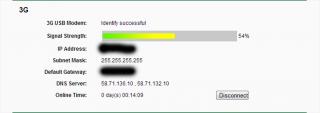
This post has been edited by ddr3: Aug 31 2012, 10:55 AM |
|
|
Aug 31 2012, 12:11 PM
|
|
Elite
6,931 posts Joined: Apr 2011 From: Bolehland for sure ^_^
|
QUOTE(ddr3 @ Aug 31 2012, 10:38 AM) took me 1 minute +- to make the router connect to Sierra 313u and can on9 through wireless, too long or normal the time? yes u can, u can connect with your phone and edit setting through web interface too A very very noob question here, can i change the configuration of the modem while i connect to it through wireless? just edit the setting through http://192.168.1.1/? the signal strength only 54%,
|
|
|
Aug 31 2012, 01:29 PM
|
|
Senior Member
1,459 posts Joined: Oct 2009 From: BOLEHLAND
|
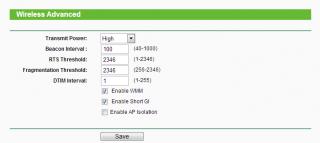
QUOTE(chuahcs79 @ Aug 31 2012, 12:11 PM) yes u can, u can connect with your phone and edit setting through web interface too HOHO, malunyer, i thought need to connect through LAN  prof chuah, is there any setting that i should take note of? coz the wireless seems to be dead after some time, i mean like no recive and sent from the router, i have set the idle time to 0 ald, any other setting? TQTQ  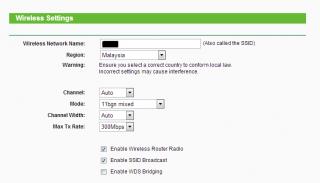
This post has been edited by ddr3: Aug 31 2012, 01:48 PM |
|
|
Aug 31 2012, 01:48 PM
|
|
Elite
6,931 posts Joined: Apr 2011 From: Bolehland for sure ^_^
|
QUOTE(ddr3 @ Aug 31 2012, 01:29 PM) HOHO, malunyer, i thought need to connect through LAN u need to check and try error on the wireless channel,. prof chuah, is there any setting that i should take note of? coz the wireless seems to be dead after some time, i mean like no recive and sent from the router, i have set the idle time to 0 ald, any other setting? TQTQ
may be your surrounding too many similar channel and kill your wireless, try manual channel 1 or 11 or 6 and see,.. |
|
|
|
|
|
Aug 31 2012, 01:50 PM
|
|
Senior Member
1,459 posts Joined: Oct 2009 From: BOLEHLAND
|
QUOTE(chuahcs79 @ Aug 31 2012, 01:48 PM) u need to check and try error on the wireless channel,. how about the advanced setting? u using default? heheh, trying may be your surrounding too many similar channel and kill your wireless, try manual channel 1 or 11 or 6 and see,.. |
|
|
Aug 31 2012, 01:53 PM
|
|
Elite
6,931 posts Joined: Apr 2011 From: Bolehland for sure ^_^
|
QUOTE(ddr3 @ Aug 31 2012, 01:50 PM) how about the advanced setting? u using default? heheh, trying which part of the advance setting u refer to ?  |
|
|
Aug 31 2012, 01:55 PM
|
|
Senior Member
1,459 posts Joined: Oct 2009 From: BOLEHLAND
|
QUOTE(chuahcs79 @ Aug 31 2012, 01:53 PM) which part of the advance setting u refer to ? here, this 1 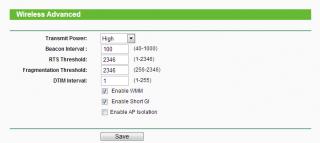
my surroundings too many channel meaning that too many wireless around me izit? yea. got 6 wireless around me, all residential, haizzzzzzz This post has been edited by ddr3: Aug 31 2012, 01:56 PM |
|
|
Aug 31 2012, 02:03 PM
|
|
Elite
8,409 posts Joined: Jul 2008
|
QUOTE(ddr3 @ Aug 31 2012, 01:29 PM) HOHO, malunyer, i thought need to connect through LAN I think you is another people like me having defective WiFi on a MR3420 yet my seller refused to RMA for me and insisted I need to RMA myself. prof chuah, is there any setting that i should take note of? coz the wireless seems to be dead after some time, i mean like no recive and sent from the router, i have set the idle time to 0 ald, any other setting? TQTQ
I am very frustrated dealing with their distributor as well, if things go bad, I gonna file some dispute as irresponsible seller. This post has been edited by blacktubi: Aug 31 2012, 02:04 PM |
|
|
Aug 31 2012, 02:06 PM
|
|
Senior Member
1,459 posts Joined: Oct 2009 From: BOLEHLAND
|
QUOTE(blacktubi @ Aug 31 2012, 02:03 PM) I think you is another people like me having defective WiFi on a MR3420 yet my seller refused to RMA for me and insisted I need to RMA myself. i set to channel 1 then all ok ald wor I am very frustrated dealing with their distributor as well, if things go bad, I gonna file some dispute as irresponsible seller. thanks prof chuah  |
|
|
Aug 31 2012, 02:06 PM
|
|
Elite
8,409 posts Joined: Jul 2008
|
QUOTE(ddr3 @ Aug 31 2012, 02:06 PM) i set to channel 1 then all ok ald wor Mine works very well on WiFi but seriously unstable because one of the antenna totally not doing anything. thanks prof chuah P/S : Already on the least congested channel. This post has been edited by blacktubi: Aug 31 2012, 02:09 PM |
|
|
Aug 31 2012, 02:07 PM
|
|
Elite
6,931 posts Joined: Apr 2011 From: Bolehland for sure ^_^
|
QUOTE(ddr3 @ Aug 31 2012, 02:06 PM) i set to channel 1 then all ok ald wor too many wireless similar channel will crash your wireless connection due to similar channel,. thanks prof chuah normally change to 1, 6 or 11 then will do though |
|
|
|
|
|
Aug 31 2012, 02:18 PM
|
|
Senior Member
1,459 posts Joined: Oct 2009 From: BOLEHLAND
|
QUOTE(chuahcs79 @ Aug 31 2012, 02:07 PM) too many wireless similar channel will crash your wireless connection due to similar channel,. no wonder my wireless dead after sometime, nvr thought it got sth to do with the 6 wireless in my taman normally change to 1, 6 or 11 then will do though |
|
|
Aug 31 2012, 02:40 PM
|
|
Elite
6,931 posts Joined: Apr 2011 From: Bolehland for sure ^_^
|
QUOTE(ddr3 @ Aug 31 2012, 02:18 PM) no wonder my wireless dead after sometime, nvr thought it got sth to do with the 6 wireless in my taman mostly is channel issue,if trying channel failed, meaning the router is defective product |
|
|
Aug 31 2012, 03:13 PM
|
 
Staff
72,815 posts Joined: Sep 2005 From: KUL 
|
I only use channel 6 for my router, and it works the best for me till today.
 |
|
|
Aug 31 2012, 03:29 PM
|
|
Elite
6,931 posts Joined: Apr 2011 From: Bolehland for sure ^_^
|
i use channel 11 in my area here,.. tons of other wireless signal crashing mine
 |
|
|
Aug 31 2012, 04:33 PM
|
|
Senior Member
1,459 posts Joined: Oct 2009 From: BOLEHLAND
|
QUOTE(chuahcs79 @ Aug 31 2012, 03:29 PM) i use channel 11 in my area here,.. tons of other wireless signal crashing mine channel 11 works the best for my lappy and ipadchannel 1/6 - not good for my ipad |
|
|
Aug 31 2012, 05:09 PM
|
|
Staff
72,815 posts Joined: Sep 2005 From: KUL
|
Mine channel 6 works the best for my iPad.
|
|
|
Aug 31 2012, 05:25 PM
|

Senior Member
8,025 posts Joined: Feb 2005 From: Planet Boleland
|
This is how i use the Ikea Napkin Holder to hold the router with the blower fan blowing at full blast

This post has been edited by digilife: Aug 31 2012, 05:26 PM |
|
Topic ClosedOptions
|
| Change to: |  0.0189sec 0.0189sec
 0.17 0.17
 6 queries 6 queries
 GZIP Disabled GZIP Disabled
Time is now: 8th December 2025 - 11:45 PM |
 Quote
Quote