

so now which 1 better? 3220 or 3420?
http://www.tp-link.com.my/products/details...model=TL-MR3220
http://www.tp-link.com.my/products/details/?model=TL-MR3420
Tp Link TL-MR3420 3G/3.75G router owner club V1
Tp Link TL-MR3420 3G/3.75G router owner club V1
|
|
 Jul 5 2012, 03:34 PM Jul 5 2012, 03:34 PM
Return to original view | Post
#1
|
 
Senior Member
1,459 posts Joined: Oct 2009 From: BOLEHLAND  
|
so now which 1 better? 3220 or 3420?
http://www.tp-link.com.my/products/details...model=TL-MR3220 http://www.tp-link.com.my/products/details/?model=TL-MR3420 |
|
|
|
|
|
Jul 5 2012, 04:34 PM
Return to original view | Post
#2
|
|
Senior Member
1,459 posts Joined: Oct 2009 From: BOLEHLAND
|
QUOTE(digilife @ Jul 5 2012, 04:32 PM) of the one that supports 4G is better la..............but is it in our market yet? dunno, got asked form a shop then they quote me price RM80 oni wor, but 1 antenna vs 2 antenna? 150mbps vs 300mbps? which 1 to choose   This post has been edited by ddr3: Jul 5 2012, 04:36 PM |
|
|
Jul 17 2012, 01:41 PM
Return to original view | Post
#3
|
|
Senior Member
1,459 posts Joined: Oct 2009 From: BOLEHLAND
|
sorry to ask here, is ICON 505M supported by this 3G router?
 TQ TQ |
|
|
Jul 17 2012, 03:03 PM
Return to original view | Post
#4
|
|
Senior Member
1,459 posts Joined: Oct 2009 From: BOLEHLAND
|
QUOTE(fruitie @ Jul 17 2012, 02:50 PM) Yes. thanks for the info fruitie  helping a fren to ask as he is interested in my ICON 505M helping a fren to ask as he is interested in my ICON 505M  |
|
|
Aug 3 2012, 02:42 PM
Return to original view | Post
#5
|
|
Senior Member
1,459 posts Joined: Oct 2009 From: BOLEHLAND
|
3420 version 2.0 launched?
http://www.tp-link.com/en/products/details...=TL-MR3420#down This post has been edited by ddr3: Aug 3 2012, 02:42 PM |
|
|
Aug 3 2012, 03:21 PM
Return to original view | Post
#6
|
|
Senior Member
1,459 posts Joined: Oct 2009 From: BOLEHLAND
|
QUOTE(vostro78 @ Aug 3 2012, 02:57 PM) tested at home already? work or not? buy also didnt buy yet  hahahahha hahahahha |
|
|
|
|
|
Aug 3 2012, 05:51 PM
Return to original view | Post
#7
|
|
Senior Member
1,459 posts Joined: Oct 2009 From: BOLEHLAND
|
QUOTE(vostro78 @ Aug 3 2012, 05:26 PM) Highlights: got any upgrade on the router itself? i mean the spec, any difference rather than the 4G? -Compatible with LTE/HSUPA/HSDPA/UMTS/EVDO USB modems, tested in the field -3G/4G and WAN connection Backup guarantees an "Always-online" Internet connection -Local wireless HD video sharing, with speeds up to 300Mbps -Easy one-touch wireless security encryption with the Quick Security Setup button -Bandwidth control allows administrators to determine how much bandwidth is allotted to each PC * 4G LTE Modems Compatibility apply to TL-MR3420 Version 2.0 ONLY. |
|
|
Aug 5 2012, 10:09 AM
Return to original view | Post
#8
|
|
Senior Member
1,459 posts Joined: Oct 2009 From: BOLEHLAND
|
QUOTE(longterm @ Aug 5 2012, 09:20 AM) anyone have list of 3g modem that compatible with this router? i think its easy for other forumer to check it later. no need to ask same question huhuhuhu. Better update at the first page/first post its stated in the webpage ald |
|
|
Aug 10 2012, 08:48 AM
Return to original view | Post
#9
|
|
Senior Member
1,459 posts Joined: Oct 2009 From: BOLEHLAND
|
QUOTE(Skylinestar @ Aug 9 2012, 04:53 PM) Anyone having problem with Celcom today? bang, celcom thread lor Last night, still can connect. Before going to my default homepage, google, it'll link me to Celcom website first. Then, only can browse. Something like airport wifi. Today, it's shown connected but didn't go to any website. Can't online at all. The IP is there. The windows networking center looks as if there's Internet connection. Can see the earth globe. But cannot online. I try to plug the 3G modem direct to my pc and use the default dialer which I normally use before I buy the router. Doesn't work too. It's shown connected but can't online. Cannot go to www.celcom.com.my. Anyone have the same problem? Added on August 9, 2012, 11:41 pmCalled Celcom and the rep replied that there's problem.  |
|
|
Aug 29 2012, 10:34 AM
Return to original view | Post
#10
|
|
Senior Member
1,459 posts Joined: Oct 2009 From: BOLEHLAND
|
waiting for my ZTEMF680, hopefully this 1 can use with this router
|
|
|
Aug 30 2012, 04:27 PM
Return to original view | Post
#11
|
|
Senior Member
1,459 posts Joined: Oct 2009 From: BOLEHLAND
|
ello, need some guidance here.
1. Just got the MR3420, upgrade FIRMWARE, set up with SIERRA 313U 2. All ok for now, no disconnect at all 3. Lets say i wanna use ZTE MF680, I will need to set up all over again using the LAN cable rite? 4. what is the speed that you guys got in WIRELESS? 300Mbps or 150Mbps? |
|
|
Aug 30 2012, 04:57 PM
Return to original view | Post
#12
|
|
Senior Member
1,459 posts Joined: Oct 2009 From: BOLEHLAND
|
QUOTE(chuahcs79 @ Aug 30 2012, 04:54 PM) just turn off router, and swap modem and turn on router only, thanks bro, normal oni the speed as oni QOS 16000 with HSPA+ network, 700-900kb/s download. no need to reset anything  what is your speed with Sierra 313u ?  then the wireless, you all getting 150mbps o 300mbps? 
haiz, wasted my money to buy ZTE modem, thought SIERRA 313u not compatible with MR3420  |
|
|
Aug 30 2012, 05:05 PM
Return to original view | Post
#13
|
|
Senior Member
1,459 posts Joined: Oct 2009 From: BOLEHLAND
|
QUOTE(chuahcs79 @ Aug 30 2012, 05:02 PM) for the wireless 150 or 300, have to see what wireless adapter u using to connect the router,. ,my acer laptop broadcom wireless adapter built in able to get 300mbps bro, any major differences btw 150mbps and 300mbps? mine is ASUS lappy, ATHEROS, maybe its time to upgrade the driver |
|
|
|
|
|
Aug 30 2012, 05:15 PM
Return to original view | Post
#14
|
|
Senior Member
1,459 posts Joined: Oct 2009 From: BOLEHLAND
|
QUOTE(chuahcs79 @ Aug 30 2012, 05:11 PM) well correct me if i am wrong,.. hurm, thats weird, usually is the LAN better ping rite? heheh, nvm, now SIERRA 313u realli compatible lei (touchwood) 1 and half hour didnt disconnected. hehee i dont think there is any different in speed with 150 or 300 in wireless since our speed Max out near 20Mbps only,. new driver of course confirm performs better than old driver,.. and my acer broadcom 300Mbps ping google better and lower latency than my pc lan cable realtek lan network adapter , weird huh  bro, if wanna turn off modem just off the main switch oni rite? thanks bro, if wanna turn off modem just off the main switch oni rite? thanks |
|
|
Aug 30 2012, 05:22 PM
Return to original view | Post
#15
|
|
Senior Member
1,459 posts Joined: Oct 2009 From: BOLEHLAND
|
QUOTE(fireballs @ Aug 30 2012, 05:20 PM) mf680 is compatible tested. mine Sierra still normal heat just that it runs hot! chrome built QUOTE(chuahcs79 @ Aug 30 2012, 05:21 PM) so far my router combo set never turn off, LOL,.. ha ha,. scared later shock then cham liao well yea just turn off power plug will do,. |
|
|
Aug 30 2012, 05:27 PM
Return to original view | Post
#16
|
|
Senior Member
1,459 posts Joined: Oct 2009 From: BOLEHLAND
|
QUOTE(fireballs @ Aug 30 2012, 05:24 PM) ddr3 - if u dun wan ur siera can sell to me Lol, im happi with it, wanna sell off zte pulak still didnt in my hand  who wants can pm me. who wants can pm me. |
|
|
Aug 31 2012, 10:38 AM
Return to original view | Post
#17
|
|
Senior Member
1,459 posts Joined: Oct 2009 From: BOLEHLAND
|
took me 1 minute +- to make the router connect to Sierra 313u and can on9 through wireless, too long or normal the time?
A very very noob question here, can i change the configuration of the modem while i connect to it through wireless? just edit the setting through http://192.168.1.1/? the signal strength only 54%, 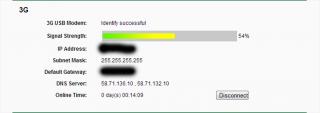
This post has been edited by ddr3: Aug 31 2012, 10:55 AM |
|
|
Aug 31 2012, 01:29 PM
Return to original view | Post
#18
|
|
Senior Member
1,459 posts Joined: Oct 2009 From: BOLEHLAND
|
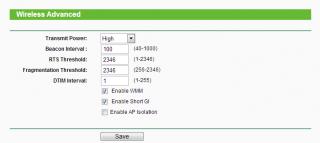
QUOTE(chuahcs79 @ Aug 31 2012, 12:11 PM) yes u can, u can connect with your phone and edit setting through web interface too HOHO, malunyer, i thought need to connect through LAN  prof chuah, is there any setting that i should take note of? coz the wireless seems to be dead after some time, i mean like no recive and sent from the router, i have set the idle time to 0 ald, any other setting? TQTQ 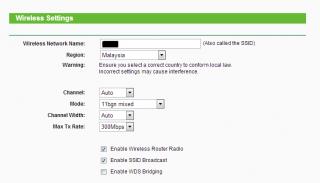
This post has been edited by ddr3: Aug 31 2012, 01:48 PM |
|
|
Aug 31 2012, 01:50 PM
Return to original view | Post
#19
|
|
Senior Member
1,459 posts Joined: Oct 2009 From: BOLEHLAND
|
QUOTE(chuahcs79 @ Aug 31 2012, 01:48 PM) u need to check and try error on the wireless channel,. how about the advanced setting? u using default? heheh, trying may be your surrounding too many similar channel and kill your wireless, try manual channel 1 or 11 or 6 and see,.. |
|
|
Aug 31 2012, 01:55 PM
Return to original view | Post
#20
|
|
Senior Member
1,459 posts Joined: Oct 2009 From: BOLEHLAND
|
QUOTE(chuahcs79 @ Aug 31 2012, 01:53 PM) which part of the advance setting u refer to ? here, this 1 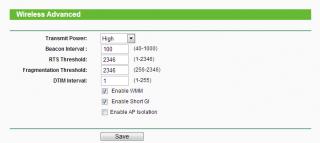
my surroundings too many channel meaning that too many wireless around me izit? yea. got 6 wireless around me, all residential, haizzzzzzz This post has been edited by ddr3: Aug 31 2012, 01:56 PM |
|
Topic ClosedOptions
|
| Change to: |  0.0590sec 0.0590sec
 0.58 0.58
 7 queries 7 queries
 GZIP Disabled GZIP Disabled
Time is now: 10th December 2025 - 06:46 AM |
 Quote
Quote