

i missed the loopback setting.

This post has been edited by sepulse: Dec 15 2021, 02:55 PM
Enterprise Networking Mikrotik Routers (RouterBoard & RouterOS), User and owner discussion group
|
|
 Dec 15 2021, 08:52 AM Dec 15 2021, 08:52 AM
|
 
Junior Member
434 posts Joined: Dec 2008 
|
managed to make it works. nvm
i missed the loopback setting. This post has been edited by sepulse: Dec 15 2021, 02:55 PM |
|
|
|
|
|
Dec 15 2021, 06:27 PM
|

Junior Member
612 posts Joined: Mar 2008 
|
QUOTE(rezzorix @ Dec 14 2021, 02:44 PM) Thanks for offering your support. The prefix unifi gives you only can do for one network only, un less it is /56 prefix or you know how to divide those /64 using manual, as other /64 will use mac address for the address. Btw how come you can make the DHCPv6-PD works in RB5009? Are you using unifi?With 7.1 I actually managed to get a /64 prefix. So my RB5009 is getting a prefix, auto-creating a pool. Then assigning one address from the pool to the bridge works BUT assigning another address gives an error: "address pool error: Pool ipv6poolname exhausted - no more addresses left! (14)" I have tried all address options (with/without EUI64, Advertise, No DAD) but still same error. Is the reason the following problem that still persists on RB5009? :  |
|
|
Dec 15 2021, 07:46 PM
|

Junior Member
98 posts Joined: Nov 2021
|
QUOTE(Gaara92 @ Dec 15 2021, 06:27 PM) The prefix unifi gives you only can do for one network only, un less it is /56 prefix or you know how to divide those /64 using manual, as other /64 will use mac address for the address. Btw how come you can make the DHCPv6-PD works in RB5009? Are you using unifi? I am using Time Internet. I get a /64 ipv6 prefix from them, but then can as described, can only assign 1x ipv6:  Assigning this to the (main-)bridge it doesnt do anything... cant get out into the web with ipv6... |
|
|
Dec 16 2021, 12:21 AM
Show posts by this member only | IPv6 | Post
#2434
|

Junior Member
25 posts Joined: Feb 2006
|
QUOTE(rezzorix @ Dec 15 2021, 07:46 PM) I am using Time Internet. Looks like v7 issue. Though Time is only giving /64 but works ok for V6.492I get a /64 ipv6 prefix from them, but then can as described, can only assign 1x ipv6: Assigning this to the (main-)bridge it doesnt do anything... cant get out into the web with ipv6... |
|
|
Dec 16 2021, 10:59 AM
|

Junior Member
137 posts Joined: Dec 2008 From: Somewhere between my chair and computer
|
Bought an RB5009 to upgrade my new home lab. Excited to try it out. Any recommendations for a noob like me to get started with RouterOS using TIME Broadband?
Also, a recommendation for Synchroweb Technology. The first unit they gave me had a strange rough mark on the bottom metal plate (see photo) and after discussing with the sales rep, they sent Lalamove to pick it up and replace with another unit. Definitely can recommend  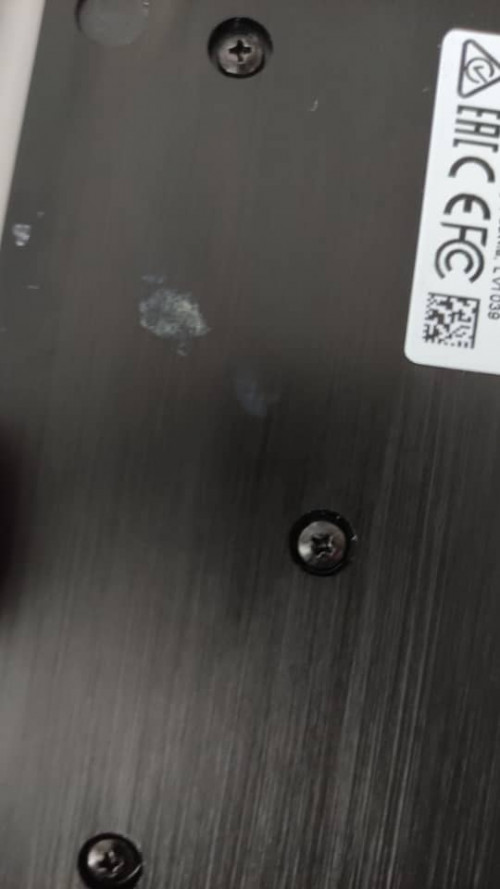 |
|
|
Dec 16 2021, 05:51 PM
|
|
Junior Member
98 posts Joined: Nov 2021
|
QUOTE(PeacefulDiscord @ Dec 16 2021, 10:59 AM) Bought an RB5009 to upgrade my new home lab. Excited to try it out. Any recommendations for a noob like me to get started with RouterOS using TIME Broadband? Simplest way go start is;- Download Winbox - Plug-in WAN from Modem to ETH1, and your computer into ETH2... - Connect with Winbox to the router - Go to "Quick Set" and check for updates, install updates, reboot, and reconnect to router - Go again to "Quick Set" -- Configuration: Router -- Internet: Port ETH1 -- Address Aquisition: PPPoE --- PPPoE User (your time username) --- PPPoE Password (password) -- Local Network --- set as you need You should be connected to internet... now you can setup your LAN as you need etc. |
|
|
|
|
|
Dec 17 2021, 07:22 PM
|
|
Junior Member
612 posts Joined: Mar 2008
|
QUOTE(rezzorix @ Dec 15 2021, 07:46 PM) I am using Time Internet. I think you put it wrong. Try to put 1::/64 instead. Dont copy the whole address as it already take from the pool option below.I get a /64 ipv6 prefix from them, but then can as described, can only assign 1x ipv6: Assigning this to the (main-)bridge it doesnt do anything... cant get out into the web with ipv6... rezzorix liked this post
|
|
|
Dec 17 2021, 09:02 PM
|
|
Junior Member
98 posts Joined: Nov 2021
|
QUOTE(Gaara92 @ Dec 17 2021, 07:22 PM) I think you put it wrong. Try to put 1::/64 instead. Dont copy the whole address as it already take from the pool option below. You are the man!Using just ::/64 did the job. Thanks a lot  |
|
|
Dec 18 2021, 04:17 PM
|
|
Junior Member
137 posts Joined: Dec 2008 From: Somewhere between my chair and computer
|
QUOTE(rezzorix @ Dec 16 2021, 05:51 PM) Simplest way go start is; Thanks for the steps man. So I did all of that and everything seems to be OK and I am connected to WAN.- Download Winbox - Plug-in WAN from Modem to ETH1, and your computer into ETH2... - Connect with Winbox to the router - Go to "Quick Set" and check for updates, install updates, reboot, and reconnect to router - Go again to "Quick Set" -- Configuration: Router -- Internet: Port ETH1 -- Address Aquisition: PPPoE --- PPPoE User (your time username) --- PPPoE Password (password) -- Local Network --- set as you need You should be connected to internet... now you can setup your LAN as you need etc. But wow, for a noob like me, I didn't realize how complicated RouterOS is  Trying to set up firewall rules but have to figure out what all these default firewall rules mean. Learning about chains first |
|
|
Dec 18 2021, 05:35 PM
|
|
Junior Member
98 posts Joined: Nov 2021
|
QUOTE(PeacefulDiscord @ Dec 18 2021, 04:17 PM) Thanks for the steps man. So I did all of that and everything seems to be OK and I am connected to WAN. RB5009 was also my first Mikrotik, still learning. But it seems like once you get the hang of it, it becomes easy and clear to setup.But wow, for a noob like me, I didn't realize how complicated RouterOS is Trying to set up firewall rules but have to figure out what all these default firewall rules mean. Learning about chains first Also the community (here and on the Mikrotik Forum, reddit, etc.) is very helpful. As next steps make sure your firewall etc. are properly configured, for some reason with my (at that time beta) more or less all ports where open... Learned that pretty quick when my pihole showed DNS requests from some random clients from WAN  megablur liked this post
|
|
|
Dec 18 2021, 08:10 PM
|
|
Junior Member
612 posts Joined: Mar 2008
|
QUOTE(PeacefulDiscord @ Dec 16 2021, 10:59 AM) Bought an RB5009 to upgrade my new home lab. Excited to try it out. Any recommendations for a noob like me to get started with RouterOS using TIME Broadband? How much did you buy from synchroweb?Also, a recommendation for Synchroweb Technology. The first unit they gave me had a strange rough mark on the bottom metal plate (see photo) and after discussing with the sales rep, they sent Lalamove to pick it up and replace with another unit. Definitely can recommend |
|
|
Dec 18 2021, 09:43 PM
|
|
Junior Member
137 posts Joined: Dec 2008 From: Somewhere between my chair and computer
|
QUOTE(Gaara92 @ Dec 18 2021, 08:10 PM) How much did you buy from synchroweb? RM1000. This includes the rackmount kit |
|
|
Dec 18 2021, 09:59 PM
|
|
Junior Member
612 posts Joined: Mar 2008
|
QUOTE(PeacefulDiscord @ Dec 18 2021, 09:43 PM) RM1000. This includes the rackmount kit Nice deal. Mine got for RM900 for the RB5009 and RM60 for the rackmount kit. I am a returned customer so yeah they got discount for that  |
|
|
|
|
|
Dec 18 2021, 11:14 PM
|
|
Junior Member
137 posts Joined: Dec 2008 From: Somewhere between my chair and computer
|
QUOTE(Gaara92 @ Dec 18 2021, 09:59 PM) Nice deal. Mine got for RM900 for the RB5009 and RM60 for the rackmount kit. I am a returned customer so yeah they got discount for that Yeah, I still think RM1000 was a good deal with the rackmount kit since it was sold out at SubTel and Precomp was selling for RM1023 without rackmount kit. But this was my first purchase with them so hopefully when I go back to purchase the CRS328-24P-4S+RM switch from them when they get stock, I can ask for a bit of discount |
|
|
 Dec 20 2021, 10:45 PM Dec 20 2021, 10:45 PM
|
|
Junior Member
98 posts Joined: Nov 2021
|
I am using Time Broadband and would like to get rid of the fibre modem and instead use a SFP Module in my Mikrotik Router.
I heard that it is possible but have to get Time Broadband Support to update the MAC address in their system... Anyone here has already done this and who can share a how-to? |
|
|
Dec 22 2021, 09:52 AM
|
|
Junior Member
612 posts Joined: Mar 2008
|
QUOTE(rezzorix @ Dec 20 2021, 10:45 PM) I am using Time Broadband and would like to get rid of the fibre modem and instead use a SFP Module in my Mikrotik Router. Actually you can. Refer to this thread https://forum.lowyat.net/topic/4925452I heard that it is possible but have to get Time Broadband Support to update the MAC address in their system... Anyone here has already done this and who can share a how-to? rezzorix liked this post
|
|
|
Dec 28 2021, 01:02 PM
|
|
Junior Member
98 posts Joined: Nov 2021
|
QUOTE(Gaara92 @ Dec 22 2021, 09:52 AM) Thanks man - in the meantime I got a stick... but still struggling to make it work.See also here; I posted directly in the thread you suggested. And again thanks for your support so far - I am not a total networking noob but only do it more as a hobby at home and know that I really need to learn a lot more  |
|
|
Dec 29 2021, 08:49 AM
Show posts by this member only | IPv6 | Post
#2448
|
|
Junior Member
203 posts Joined: Feb 2008
|
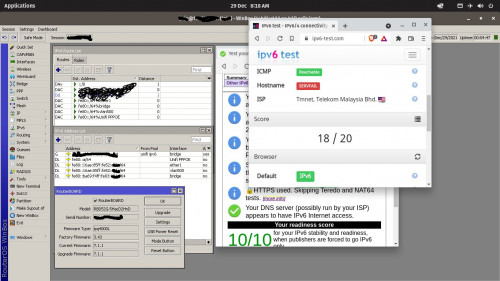
Testing my newly configured routeros
 |
|
|
Dec 29 2021, 10:35 PM
|
|
Junior Member
612 posts Joined: Mar 2008
|
QUOTE(hasmidzul_jojo @ Dec 29 2021, 08:49 AM) Testing my newly configured routeros Yours not RB5009 right? The problem only exist in RB5009 running v7, other models not affected. |
|
|
Dec 29 2021, 10:41 PM
Show posts by this member only | IPv6 | Post
#2450
|

All Stars
11,459 posts Joined: Oct 2007 From: KL
|
QUOTE(Gaara92 @ Dec 29 2021, 10:35 PM) Yours not RB5009 right? The problem only exist in RB5009 running v7, other models not affected. Screenshot is D52G-5HacD2HnD, should be hAP AC2. |
| Change to: |  0.0278sec 0.0278sec
 0.53 0.53
 6 queries 6 queries
 GZIP Disabled GZIP Disabled
Time is now: 22nd December 2025 - 02:48 AM |
 Quote
Quote