Welcome Guest ( Log In | Register )

176 Pages « < 120 121 122 123 124 > » Bottom

Outline · [ Standard ] · Linear+

Enterprise Networking Mikrotik Routers (RouterBoard & RouterOS), User and owner discussion group

views
     
rioven
post Dec 11 2021, 01:13 AM

Enthusiast
*****
Senior Member
975 posts

Joined: Sep 2004
From: Setapak


QUOTE(syahpian @ Dec 11 2021, 12:45 AM)
both rb4011/rb5009 is outside my budget through, max is rm 500, that why im asking here  laugh.gif
*
Dont worry mates, im also in ur boat. Technically ac2 can be go higher (depends on firewall), but mangle+pppoe will use more cpu power plus ipv6 cant be fasttrack.
go626201
post Dec 11 2021, 01:19 AM

Regular
******
Senior Member
1,882 posts

Joined: Sep 2017
QUOTE(syahpian @ Dec 10 2021, 07:43 PM)
btw, i want to upgrade my old rb2011, is hex good enough for 800Mbps without enabling fasttack? hmm.gif
this rb2011 cannot get full speed without enabling fasttrack, maybe because hardware too old already  sad.gif
*
hex without fasttrack only get about 300mbps in my memory.(But with fasttrack 800mbps is possible)
Better atleast get hap ac2 or hapac3 or higher series. (should be around 500mbps without fasttrack)
I suggest add abit more to your budget since u are using it for years,just get a rb4011 or rb5009 should be enough for future 3/5 years usage.

After getting my RB5009,next time i will targeting on CCR series haha.

This post has been edited by go626201: Dec 11 2021, 01:21 AM
Oltromen Ripot
post Dec 13 2021, 09:34 AM

👍 999999 person Likes this member
*******
Senior Member
4,034 posts

Joined: Dec 2019
decided to forgo mikrotik router.
from the way you guys described it, sounds like it requires dedication, patience, and mad scientist's laboratory 😅 to get it right.

(and read somewhere it won't be able to achieve 1Gbps outside mad scientist's laboratory conditions.)

opted for asus since if i die, at least household can still find their way through it.
sepulse
post Dec 14 2021, 08:48 AM

Casual
***
Junior Member
434 posts

Joined: Dec 2008
hi guys im kinda new to mikrotik and i got something i wanna figure out.

im using ccr1009-7g-1c-1s+ and on unifi 300Mbps, so the situation is:

i have another 100Mbps x 3 in my office and i plan to load balance it with mikrotik. so my question is how do i do that? Router to Mikrotik? or direct from TM BTU to Mikrotik?


Gaara92
post Dec 14 2021, 09:51 AM

Herald
****
Junior Member
612 posts

Joined: Mar 2008


QUOTE(sepulse @ Dec 14 2021, 08:48 AM)
hi guys im kinda new to mikrotik and i got something i wanna figure out.

im using ccr1009-7g-1c-1s+ and on unifi 300Mbps, so the situation is:

i have another 100Mbps x 3 in my office and i plan to load balance it with mikrotik. so my question is how do i do that? Router to Mikrotik? or direct from TM BTU to Mikrotik?
*
You can direct from BTU and dial the PPPoE from your mikrotik. After that you can configure mangle rules to load balance. There are several ways to do load balancing in mikrotik.
sepulse
post Dec 14 2021, 10:35 AM

Casual
***
Junior Member
434 posts

Joined: Dec 2008
QUOTE(Gaara92 @ Dec 14 2021, 09:51 AM)
You can direct from BTU and dial the PPPoE from your mikrotik. After that you can configure mangle rules to load balance. There are several ways to do load balancing in mikrotik.
*
so need to put vlan on everything too right? i will give it a try first.
tj01
post Dec 14 2021, 01:21 PM

New Member
*
Junior Member
25 posts

Joined: Feb 2006
if your 3 X TM connection is not physically cabled to the Mikrotik, then vlan as a means to get the connection. If it's all in one location and able to physically connect to any of the ethernet ports on the 1009, then no need vlan. I suggest you do a failover WAN rather than load balance, especially if throughout is not high. CCR1009 is powerful enough to be single router to dial out on all 4. But then it's single router failure.
soonwai
post Dec 14 2021, 02:03 PM


********
All Stars
11,459 posts

Joined: Oct 2007
From: KL


QUOTE(sepulse @ Dec 14 2021, 08:48 AM)
hi guys im kinda new to mikrotik and i got something i wanna figure out.

im using ccr1009-7g-1c-1s+ and on unifi 300Mbps, so the situation is:

i have another 100Mbps x 3 in my office and i plan to load balance it with mikrotik. so my question is how do i do that? Router to Mikrotik? or direct from TM BTU to Mikrotik?
*
Last time I do load balance with my Unifi and my neighbour's Unifi (using wifi). There're links in my post to other people's guides on load balancing.
https://forum.lowyat.net/index.php?showtopi...post&p=83909578

This post has been edited by soonwai: Dec 14 2021, 02:04 PM
rezzorix
post Dec 14 2021, 02:44 PM

Getting Started
**
Junior Member
98 posts

Joined: Nov 2021
QUOTE(Gaara92 @ Nov 29 2021, 09:41 PM)
share your ipv6 config or screenshot here.
*
Thanks for offering your support.

With 7.1 I actually managed to get a /64 prefix.

So my RB5009 is getting a prefix, auto-creating a pool.
Then assigning one address from the pool to the bridge works BUT assigning another address gives an error:
"address pool error: Pool ipv6poolname exhausted - no more addresses left! (14)"
I have tried all address options (with/without EUI64, Advertise, No DAD) but still same error.

Is the reason the following problem that still persists on RB5009? :

QUOTE(cwtien @ Dec 10 2021, 02:58 PM)
Doh! And there I thought I could finally get ipv6 working on RB5009 sad.gif.  Nevermind, IPv6 is only 'good-to-have', not a 'must-have'.
*
QUOTE(Gaara92 @ Dec 10 2021, 09:34 PM)
Don't worry, there are already people submitted the support ticket regarding this issue. The dev already take note on this matter and will be fix in the next stable release.
get a hap ac2 or hap ac3 based on @soonwai experience. Why do you need to turn off fastrack? Are you doing mangle rules ?

*
sepulse
post Dec 14 2021, 04:26 PM

Casual
***
Junior Member
434 posts

Joined: Dec 2008
QUOTE(soonwai @ Dec 14 2021, 02:03 PM)
Last time I do load balance with my Unifi and my neighbour's Unifi (using wifi). There're links in my post to other people's guides on load balancing.
https://forum.lowyat.net/index.php?showtopi...post&p=83909578
*
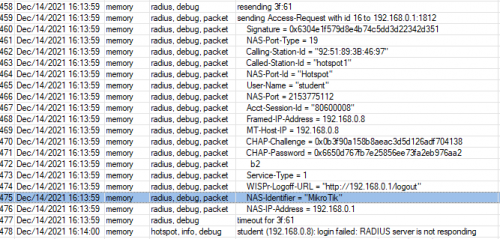
tq bro. i think i get it now. new problem is RADIUS haha. i managed to login using user account in mikrotik-system-user account but my user manager is not working. "RADIUS Server is not responding".


user posted image

This post has been edited by sepulse: Dec 15 2021, 03:58 PM
sepulse
post Dec 15 2021, 08:52 AM

Casual
***
Junior Member
434 posts

Joined: Dec 2008
managed to make it works. nvm

i missed the loopback setting. bangwall.gif

This post has been edited by sepulse: Dec 15 2021, 02:55 PM
Gaara92
post Dec 15 2021, 06:27 PM

Herald
****
Junior Member
612 posts

Joined: Mar 2008


QUOTE(rezzorix @ Dec 14 2021, 02:44 PM)
Thanks for offering your support.

With 7.1 I actually managed to get a /64 prefix.

So my RB5009 is getting a prefix, auto-creating a pool.
Then assigning one address from the pool to the bridge works BUT assigning another address gives an error:
"address pool error: Pool ipv6poolname exhausted - no more addresses left! (14)"
I have tried all address options (with/without EUI64, Advertise, No DAD) but still same error.

Is the reason the following problem that still persists on RB5009? :
*
The prefix unifi gives you only can do for one network only, un less it is /56 prefix or you know how to divide those /64 using manual, as other /64 will use mac address for the address. Btw how come you can make the DHCPv6-PD works in RB5009? Are you using unifi?
rezzorix
post Dec 15 2021, 07:46 PM

Getting Started
**
Junior Member
98 posts

Joined: Nov 2021
QUOTE(Gaara92 @ Dec 15 2021, 06:27 PM)
The prefix unifi gives you only can do for one network only, un less it is /56 prefix or you know how to divide those /64 using manual, as other /64 will use mac address for the address. Btw how come you can make the DHCPv6-PD works in RB5009? Are you using unifi?
*
I am using Time Internet.

I get a /64 ipv6 prefix from them, but then can as described, can only assign 1x ipv6:

user posted image

Assigning this to the (main-)bridge it doesnt do anything... cant get out into the web with ipv6...
tj01
post Dec 16 2021, 12:21 AM

New Member
*
Junior Member
25 posts

Joined: Feb 2006
QUOTE(rezzorix @ Dec 15 2021, 07:46 PM)
I am using Time Internet.

I get a /64 ipv6 prefix from them, but then can as described, can only assign 1x ipv6:

user posted image

Assigning this to the (main-)bridge it doesnt do anything... cant get out into the web with ipv6...
*
Looks like v7 issue. Though Time is only giving /64 but works ok for V6.492
PeacefulDiscord
post Dec 16 2021, 10:59 AM

Getting Started
**
Junior Member
137 posts

Joined: Dec 2008
From: Somewhere between my chair and computer


Bought an RB5009 to upgrade my new home lab. Excited to try it out. Any recommendations for a noob like me to get started with RouterOS using TIME Broadband?

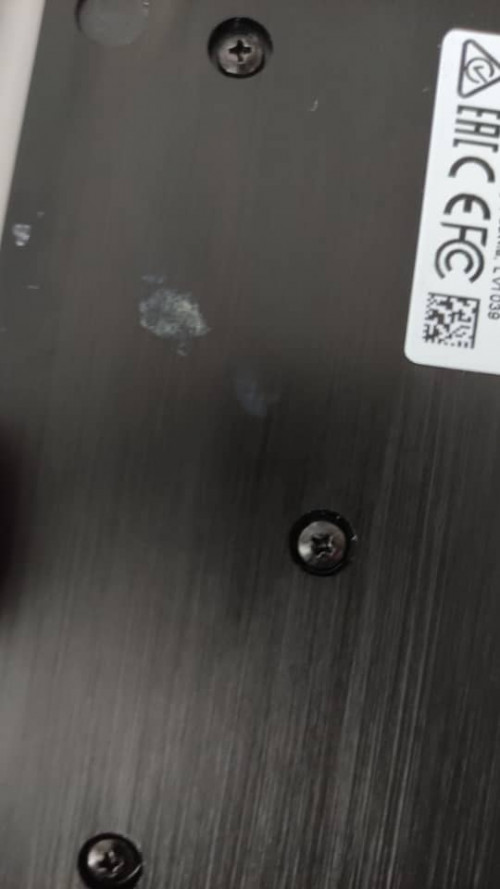
Also, a recommendation for Synchroweb Technology. The first unit they gave me had a strange rough mark on the bottom metal plate (see photo) and after discussing with the sales rep, they sent Lalamove to pick it up and replace with another unit. Definitely can recommend thumbup.gif thumbup.gif

user posted image
rezzorix
post Dec 16 2021, 05:51 PM

Getting Started
**
Junior Member
98 posts

Joined: Nov 2021
QUOTE(PeacefulDiscord @ Dec 16 2021, 10:59 AM)
Bought an RB5009 to upgrade my new home lab. Excited to try it out. Any recommendations for a noob like me to get started with RouterOS using TIME Broadband?
Simplest way go start is;

- Download Winbox
- Plug-in WAN from Modem to ETH1, and your computer into ETH2...
- Connect with Winbox to the router
- Go to "Quick Set" and check for updates, install updates, reboot, and reconnect to router
- Go again to "Quick Set"
-- Configuration: Router
-- Internet: Port ETH1
-- Address Aquisition: PPPoE
--- PPPoE User (your time username)
--- PPPoE Password (password)

-- Local Network
--- set as you need

You should be connected to internet... now you can setup your LAN as you need etc.


Gaara92
post Dec 17 2021, 07:22 PM

Herald
****
Junior Member
612 posts

Joined: Mar 2008


QUOTE(rezzorix @ Dec 15 2021, 07:46 PM)
I am using Time Internet.

I get a /64 ipv6 prefix from them, but then can as described, can only assign 1x ipv6:

user posted image

Assigning this to the (main-)bridge it doesnt do anything... cant get out into the web with ipv6...
*
I think you put it wrong. Try to put 1::/64 instead. Dont copy the whole address as it already take from the pool option below.
rezzorix
post Dec 17 2021, 09:02 PM

Getting Started
**
Junior Member
98 posts

Joined: Nov 2021
QUOTE(Gaara92 @ Dec 17 2021, 07:22 PM)
I think you put it wrong. Try to put 1::/64 instead. Dont copy the whole address as it already take from the pool option below.
*
You are the man!

Using just ::/64 did the job.


Thanks a lot smile.gif thumbup.gif
PeacefulDiscord
post Dec 18 2021, 04:17 PM

Getting Started
**
Junior Member
137 posts

Joined: Dec 2008
From: Somewhere between my chair and computer


QUOTE(rezzorix @ Dec 16 2021, 05:51 PM)
Simplest way go start is;

- Download Winbox
- Plug-in WAN from Modem to ETH1, and your computer into ETH2...
- Connect with Winbox to  the router
- Go to "Quick Set" and check for updates, install updates, reboot, and reconnect to router
- Go again to "Quick Set"
-- Configuration: Router
-- Internet: Port ETH1
-- Address Aquisition: PPPoE
--- PPPoE User (your time username)
--- PPPoE Password (password)

-- Local Network
--- set as you need

You should be connected to internet... now you can setup your LAN as you need etc.
*
Thanks for the steps man. So I did all of that and everything seems to be OK and I am connected to WAN.

But wow, for a noob like me, I didn't realize how complicated RouterOS is lol.gif lol.gif

Trying to set up firewall rules but have to figure out what all these default firewall rules mean. Learning about chains first
rezzorix
post Dec 18 2021, 05:35 PM

Getting Started
**
Junior Member
98 posts

Joined: Nov 2021
QUOTE(PeacefulDiscord @ Dec 18 2021, 04:17 PM)
Thanks for the steps man. So I did all of that and everything seems to be OK and I am connected to WAN.

But wow, for a noob like me, I didn't realize how complicated RouterOS is  lol.gif lol.gif

Trying to set up firewall rules but have to figure out what all these default firewall rules mean. Learning about chains first
*
RB5009 was also my first Mikrotik, still learning. But it seems like once you get the hang of it, it becomes easy and clear to setup.
Also the community (here and on the Mikrotik Forum, reddit, etc.) is very helpful.

As next steps make sure your firewall etc. are properly configured, for some reason with my (at that time beta) more or less all ports where open...
Learned that pretty quick when my pihole showed DNS requests from some random clients from WAN shocking.gif

176 Pages « < 120 121 122 123 124 > » Top
 

Change to:
| Lo-Fi Version
0.0319sec    0.52    6 queries    GZIP Disabled
Time is now: 21st December 2025 - 02:37 AM