

 Using cm elite 330 only.
Attached thumbnail(s)

Picture of nice cable management.., - Post ur pics. No cacings pls
|
|
 Jan 17 2008, 04:09 AM Jan 17 2008, 04:09 AM
|
 
Senior Member
699 posts Joined: Jun 2007 From: Malacca / K. Lumpur  
|
Hi . . . this is my rig, tried my best to sort the cables . . . there are really nice cale management in this forum and tried to follow, haha . . . advices and comments appreciated (forgot bout the cpu and cooler, Gpower pro)
Using cm elite 330 only.Attached thumbnail(s)
|
|
|
|
|
|
Jan 17 2008, 05:09 AM
|

Senior Member
4,496 posts Joined: Apr 2005 From: KL
|
Nothing to comment bro ... u have adopted the most straight forward method ..
Spiral wrap ...  It's good if u find the spiral wrap in black rather than grey ..... There's also other type of plastic wrap selling at ACE Hardware or IKANO Power if not mistaken .. . But so far .. excellent u have utilized the power of spiral wrap to the max .. godlike .... |
|
|
Jan 17 2008, 12:52 PM
|
|
Senior Member
699 posts Joined: Jun 2007 From: Malacca / K. Lumpur
|
Haha, thanks fo the advice
 , . . . will go check out the hardware store then. , . . . will go check out the hardware store then. |
|
|
Jan 17 2008, 07:06 PM
|

Junior Member
194 posts Joined: Oct 2006 From: Shah Alam
|
QUOTE(Crazyallen @ Jan 15 2008, 09:15 PM) How did u make the fan stand vertically at below g.card? Simple and cheap way, by using only a cable tie  Can show me some pic with more detail?    cable ties sure helps a lot     This post has been edited by eimzic: Jan 17 2008, 07:54 PM |
|
|
Jan 17 2008, 11:32 PM
|

Junior Member
260 posts Joined: Nov 2005
|
QUOTE(hermit23 @ Jan 17 2008, 04:09 AM) Hi . . . this is my rig, tried my best to sort the cables . . . there are really nice cale management in this forum and tried to follow, haha . . . advices and comments appreciated (forgot bout the cpu and cooler, Gpower pro) Nice one you got there. I am using the same casing as yours. Better than my cable management. NICE JOB! Using cm elite 330 only. Anyway, the ram you got there right, is it running on dual channel. I thought running dual channel must be same colour slot? |
|
|
Jan 18 2008, 05:33 AM
|
|
Senior Member
699 posts Joined: Jun 2007 From: Malacca / K. Lumpur
|
QUOTE(longpants @ Jan 17 2008, 11:32 PM) Nice one you got there. I am using the same casing as yours. Better than my cable management. NICE JOB! haha, thank you . . . Anyway, the ram you got there right, is it running on dual channel. I thought running dual channel must be same colour slot? lack of hardware so easier manage. The ram is dual channel, i also thought must be same colour but the mobo manual K9A2-CF say put in slot 1, 2 or 3, 4 for dual channel but it does run on dual now. Thanks for the concern though, haha. |
|
|
|
|
|
Jan 18 2008, 10:57 AM
|

Senior Member
1,180 posts Joined: Feb 2007 From: Earth of Alone
|
here's my rig...
 need advice from the expert 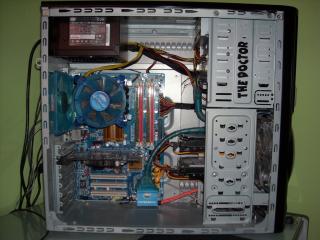
|
|
|
Jan 18 2008, 11:05 AM
|

Senior Member
2,497 posts Joined: Jan 2006 From: Selangor
|
QUOTE(sukatra_aicaca @ Jan 18 2008, 10:57 AM) here's my rig... nice and clean....good job. if u can sleeve all the cable, would be nicer... need advice from the expert
|
|
|
Jan 18 2008, 12:47 PM
|
|
Senior Member
1,180 posts Joined: Feb 2007 From: Earth of Alone
|
hihi..ya2..didn't sleeve yet...
|
|
|
Jan 19 2008, 08:43 PM
|

Senior Member
7,689 posts Joined: Jul 2005 From: The Land of No Return
|
Just redone my cable management today as i need to install a new CPU Cooler. Will try and upload some pictures later...
Tried a few other options to hide cables but seriously, cable management is tough..LOL.. |
|
|
Jan 19 2008, 09:01 PM
|
|
Senior Member
4,496 posts Joined: Apr 2005 From: KL
|
hahah, u are giving preview arr ???
Faster post your rig dude ... |
|
|
Jan 19 2008, 10:20 PM
|
|
Senior Member
7,689 posts Joined: Jul 2005 From: The Land of No Return
|
QUOTE(Doom @ Jan 19 2008, 09:01 PM) hahah, u are giving preview arr ??? LOL...Not preview but my PC do not have any bluetooth connection. Need to transfer those pictures from my hpone to my PC Faster post your rig dude ... Anyway, here are the pictures. Still not perfect cable management but i do hope this is better than last time. Took in some advice of pros here and fix some of the issues i have last time..  Still, the problem with the 8pin power connector is there. Will try to source out a solution later... Changes : - Took out the fan grill - Changed a new CPU Cooler - Change the position of my DVD Burner to make it closer to my SATA ports - Change the location of my PSU - Route most of the cables to the back of the mobo plate Any other comments are welcomed.     |
|
|
Jan 19 2008, 11:05 PM
|

Senior Member
732 posts Joined: Nov 2004 From: where to where... 
|
Mine..new setup...ATI concept,hot..hoho..
    |
|
|
|
|
|
Jan 19 2008, 11:05 PM
|
|
Senior Member
4,496 posts Joined: Apr 2005 From: KL
|
hehehe .. finally the long awaiting A10 is arrived with awesome setup ..
So far so good ... looks good .. btw, can't u route the 8 pins mobo connector behind the side patent fan .. I did mine last time by routing through the opening between the mobo and graphic card ... then straight up to the connector .. not sure ur setup can do the same or not ... |
|
|
Jan 19 2008, 11:18 PM
|
|
Senior Member
7,689 posts Joined: Jul 2005 From: The Land of No Return
|
QUOTE(Doom @ Jan 19 2008, 11:05 PM) hehehe .. finally the long awaiting A10 is arrived with awesome setup .. Well, at first, i tried to route it between the side panel fan and graphic card. Boot up the system and found out that the side panel fan is actually clashing with the fan. The fan blades are actually touching the cable itself. Therefore, i route it the other way around, which looks really bad in picture. So far so good ... looks good .. btw, can't u route the 8 pins mobo connector behind the side patent fan .. I did mine last time by routing through the opening between the mobo and graphic card ... then straight up to the connector .. not sure ur setup can do the same or not ... I will try out your suggestion later when i have the time. Hopefully, the cable is long enough and it will make it look way better... |
|
|
Jan 19 2008, 11:24 PM
|
|
Senior Member
4,496 posts Joined: Apr 2005 From: KL
|
yah hopefully it's long enough loh ...
if not I really have no idea where u gonna get 8 pins extension.. probably two 4 pins extension could works as well .. arrr ... !! I've nth to play around now .. everyday stick with the same setup ... |
|
|
Jan 19 2008, 11:32 PM
|

Senior Member
2,765 posts Joined: Nov 2005 From: **Hornbills**
|
@akachester
erm yeah i did same like wat doom mention..since u using SS psu i think its long enuf to plug on top of the 8pin atx port..dunno if the dimension of A10 and TJ07 differ abit..but last time using zeus 600w i can route it along the mobo between gfx  |
|
|
Jan 19 2008, 11:39 PM
|

All Stars
10,530 posts Joined: Nov 2004 From: Petaling Jaya & Mid Valley
|
routing it in the space between the mobo and the GFX is a real good idea....i do the same thing as well but for my fans la....
problem is...doing that will kinda kill the purpose of a removable mobo tray. imagine wanna remove the mobo tray have to unplug the 8pin then unscrew the GC just to get the cable out of the way so that u can remove the mobo tray. and the removable mobo tray is one of the reasons u chose the A10 instead of the V1000. i say leave it the way it is temporarily until u get an extension. main purpose of cable management has always been airflow first and foremost. neatness second. and ur airflow looks fine to me as for the extension, make the extension go all the way to the rom bays, then down the bays and into ur PSU's 8pin plug. Added on January 19, 2008, 11:41 pm@ryudox very nicely done This post has been edited by mADmAN: Jan 19 2008, 11:41 PM |
|
|
Jan 19 2008, 11:42 PM
|

Senior Member
7,173 posts Joined: Jan 2003 From: PCH
|
or you can use the same route as your mainboard power too
 , i did mine that way FYI... , i did mine that way FYI... |
|
|
Jan 20 2008, 12:04 AM
|
|
Senior Member
4,496 posts Joined: Apr 2005 From: KL
|
What I did with my A10 last time is to use the extension ..
so whenever I wanted to remove the mobo with the tray I just disconnect it.. Still consider removable right Hope he akachester could get the extension that fit nicely .. |
|
Topic ClosedOptions
|
| Change to: |  0.0202sec 0.0202sec
 0.68 0.68
 6 queries 6 queries
 GZIP Disabled GZIP Disabled
Time is now: 12th December 2025 - 07:57 AM |
 Quote
Quote