Outline ·
[ Standard ] ·
Linear+
Unifi Official TM UniFi High Speed Broadband Thread V12, FREE Installation & 1-month subscription
|
yeowhan
|
 Aug 28 2011, 04:29 PM Aug 28 2011, 04:29 PM
|

|
QUOTE(island @ Aug 28 2011, 03:46 PM) is better put in first bill. my experience when install land line.. they charge me cash then they bill me first month also. so become double charge. i goto tm point, the CS unable to explain to me. i bring together the cash bill receipt then ask the CS , WHY have a special charge similar to this receipt amount. The CS response, this is special charge only charge you first time for service. but never explain what service. i check with my friends, they also the same situation, charge 2 time same amount. can i know by logging in to the customer portal.. can i check my 1st bill information? |
|
|
|
|
|
littleprawn
|
Aug 28 2011, 08:44 PM
|
|
|
guys, need to know is the telephone line link to the modem or router?
coz when i turn off the modem / router the phone line goes dead~
is it i need to turn on my modem / router 24/7?
|
|
|
|
|
|
KennyKB
|
Aug 28 2011, 08:48 PM
|
|
|
QUOTE(littleprawn @ Aug 28 2011, 08:44 PM) guys, need to know is the telephone line link to the modem or router? coz when i turn off the modem / router the phone line goes dead~ is it i need to turn on my modem / router 24/7? Telephone line is connected to the modem. No power means no line. |
|
|
|
|
|
littleprawn
|
Aug 28 2011, 08:50 PM
|
|
|
QUOTE(KennyKB @ Aug 28 2011, 08:48 PM) Telephone line is connected to the modem. No power means no line. Thanks~ Thats mean i cant turn off the modem~ The modem wont so lousy and spolit due to overheat de rite~  |
|
|
|
|
|
pydrumerboy
|
Aug 28 2011, 09:28 PM
|
New Member

|
You can put a laptop fan cooler underneath just in case to keep the air circulation fresh. That what i did
|
|
|
|
|
|
XPS
|
Aug 28 2011, 10:52 PM
|
|
|
QUOTE(littleprawn @ Aug 28 2011, 08:50 PM) Thanks~ Thats mean i cant turn off the modem~ The modem wont so lousy and spolit due to overheat de rite~ The modem is fine running 24x7. Just don't stack the router or any heat source onto it and ensure some space around it for ventilation. Mine is kept in a semi-enclosed cabinet  |
|
|
|
|
|
bizness
|
Aug 29 2011, 12:04 AM
|
|
|
Hey guys, today I've upgraded my TP-Link TD-W8960N (V1) to the latest firmware which is 1.4.0 but after I've upgraded, the hardware version changed too..Previously it was V1 and now it changed to V3..Weird thing.. Here is the screenshot : 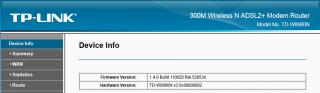
The reason I upgraded cause I wanted the function of NAT Loopback.. Thanks 
Added on August 29, 2011, 12:12 amAnd also I've got some webserver running on two different server..one with IP 192.168.0.100 and another at 192.168.0.101.. When I try to access them using my laptop ( 192.168.0.102), I can only access the IP 192.168.0.100 and not the 192.168.0.101.. This problem arise after I've upgraded my firmware to the latest one..The previous firmware works fine..I wonder what is the problem..hmm  This post has been edited by bizness: Aug 29 2011, 12:12 AM This post has been edited by bizness: Aug 29 2011, 12:12 AM |
|
|
|
|
|
paultantk
|
Aug 29 2011, 12:52 AM
|
|
|
Does anyone here have BOTH Maxis FTTH and Unifi installed on the same location?
|
|
|
|
|
|
IwanAGP
|
Aug 29 2011, 01:59 AM
|
|
|
QUOTE(paultantk @ Aug 29 2011, 12:52 AM) Does anyone here have BOTH Maxis FTTH and Unifi installed on the same location?  which crazy fellow |
|
|
|
|
|
fire_chrome
|
Aug 29 2011, 03:59 AM
|
Getting Started
|
Hi guys,
i got this problem with unifi, huawei hg655a BTU. it keep disconnecting and voip change from green to red light. last time it happen and i change the BTU and took almost 5 days to get it change.
does anyone know what is the real cause on this issue? overheating?
|
|
|
|
|
|
shinkawa
|
Aug 29 2011, 11:09 AM
|
|
|
hi,
i'm not unifi user but i got few question wondering in my head.
1) since hpptv is using internet broadcast. does it also consume the internet 60gb? one day if unifi decide limit it. it's kinda not fair coz family want to watch tv but it use up all the internet download limit.
2) is there any way to play video from pc -> stb -> tv ?
|
|
|
|
|
|
island
|
Aug 29 2011, 11:12 AM
|
|
|
QUOTE(yeowhan @ Aug 28 2011, 04:29 PM) can i know by logging in to the customer portal.. can i check my 1st bill information? no idea. but the tm selfcare not show any details at all.. they just put an amount.. TM now keep asking me to upgrade the streamyx almost every month call my land line, and they claim all is F.O.C again... haha, they can't 100% sure is F.O.C when i double check again... Sorry Lo...If they really charge me for Unifi, it can cost over RM1K for f***.... one time kena streamyx all F.O.C scam, feel worry lo..i pay all the streamyx charged, installation fee and modem fee and 2 month deposit and unknow service charge..hate u TM |
|
|
|
|
|
Chumpy
|
Aug 29 2011, 11:26 AM
|
Getting Started
|
QUOTE(shinkawa @ Aug 29 2011, 11:09 AM) hi, i'm not unifi user but i got few question wondering in my head. 1) since hpptv is using internet broadcast. does it also consume the internet 60gb? one day if unifi decide limit it. it's kinda not fair coz family want to watch tv but it use up all the internet download limit. 2) is there any way to play video from pc -> stb -> tv ? 1. No. the hypptv does not consumes your 60gb. Free. 2. Never try.  |
|
|
|
|
|
littleprawn
|
Aug 29 2011, 11:56 AM
|
|
|
QUOTE(pydrumerboy @ Aug 28 2011, 09:28 PM) You can put a laptop fan cooler underneath just in case to keep the air circulation fresh. That what i did Thanks, thats a good idea~ QUOTE(XPS @ Aug 28 2011, 10:52 PM) The modem is fine running 24x7. Just don't stack the router or any heat source onto it and ensure some space around it for ventilation. Mine is kept in a semi-enclosed cabinet mine is kept on a shelf open air~ guess its alright dy~ problem solved~ thanks~ |
|
|
|
|
|
SUSkhalpowers
|
Aug 29 2011, 12:40 PM
|
|
|
Selamat hari raya & maaf zahir batin for all the VIP here....miss my unifi bila balik kpg.....huhuh
|
|
|
|
|
|
-Teddy-
|
Aug 29 2011, 02:00 PM
|
|
|
QUOTE(pydrumerboy @ Aug 28 2011, 09:28 PM) You can put a laptop fan cooler underneath just in case to keep the air circulation fresh. That what i did The cheapskate me just made the modem stand vertically  |
|
|
|
|
|
mypagan_26
|
Aug 29 2011, 05:10 PM
|
New Member
|
Hey guys, I gotta a weird problem with me Unifi. For some reason, my phone (android) is having problems connecting to the router via wifi. The strange thing is, my housemate's phone on WinMo can connect with no problems and laptop also no problems connecting. Only my phone, an LG Optimus One. Anyone got any ideas? have tried fiddling with the channel settings but hasn't made much of a difference.
All other devices no problems, and the speed is just great. Only the android OS phone having connection issues...
Cheers and thanks for any help or ideas...
|
|
|
|
|
|
aceedburn
|
Aug 29 2011, 05:45 PM
|
|
|
QUOTE(mypagan_26 @ Aug 29 2011, 05:10 PM) Hey guys, I gotta a weird problem with me Unifi. For some reason, my phone (android) is having problems connecting to the router via wifi. The strange thing is, my housemate's phone on WinMo can connect with no problems and laptop also no problems connecting. Only my phone, an LG Optimus One. Anyone got any ideas? have tried fiddling with the channel settings but hasn't made much of a difference. All other devices no problems, and the speed is just great. Only the android OS phone having connection issues... Cheers and thanks for any help or ideas... have u tried changing your wireless channel to 6? and also the bandwidth to 20mhz? |
|
|
|
|
|
KennyKB
|
Aug 29 2011, 08:03 PM
|
|
|
QUOTE(mypagan_26 @ Aug 29 2011, 05:10 PM) Hey guys, I gotta a weird problem with me Unifi. For some reason, my phone (android) is having problems connecting to the router via wifi. The strange thing is, my housemate's phone on WinMo can connect with no problems and laptop also no problems connecting. Only my phone, an LG Optimus One. Anyone got any ideas? have tried fiddling with the channel settings but hasn't made much of a difference. All other devices no problems, and the speed is just great. Only the android OS phone having connection issues... Cheers and thanks for any help or ideas... Try these settings. I found it on another thread and it is supposed to fail safe settings for all devices. Attached thumbnail(s)
|
|
|
|
|
|
zhen^wei
|
Aug 29 2011, 08:55 PM
|
|
|
on 26th august the contractor come to installed the unifi at my house, 28th august then cannot online, called to the service centre it said need to send the problem to networking section. on 29th august i called, they said need to wait until 9 september just can fixed. so i am wasting my time for 2 weeks and money for nothing !!
wtf. !
think twice when u get this suck service in malaysia.
|
|
|
|
|




 Quote
Quote






 0.0514sec
 0.31
0.31
 7 queries
 GZIP Disabled