

QUOTE(kelvin88 @ Jul 31 2011, 02:25 PM)
gosh..... i am having the same problem too.... only around 11Mb/s-20Mb/s...

Is it the HDD or the USB 3.0 in our laptops that's giving us problems. X.XHP Pavillion DV6-6XXX series Owners Lounge V2, - 91 owners!! FUUUUUUUUUUUUU!!
|
|
 Jul 31 2011, 02:42 PM Jul 31 2011, 02:42 PM
|
 
Junior Member
437 posts Joined: Oct 2009  
|
QUOTE(kelvin88 @ Jul 31 2011, 02:25 PM) gosh..... i am having the same problem too.... only around 11Mb/s-20Mb/s... Is it the HDD or the USB 3.0 in our laptops that's giving us problems. X.X |
|
|
|
|
|
Jul 31 2011, 03:15 PM
|

Senior Member
1,267 posts Joined: Sep 2010 
|
Is your WD harddisk usb cable male head (blue coloured plastic) and labelled with SS ?
the software is renesas electronic usb 3.0 host controller driver. |
|
|
Jul 31 2011, 04:07 PM
|

Senior Member
1,365 posts Joined: Jan 2003 From: Seri Petaling
|
QUOTE(Zhao @ Jul 31 2011, 03:15 PM) Is your WD harddisk usb cable male head (blue coloured plastic) and labelled with SS ? yes... and its plugged to the 3.0 USB port....the software is renesas electronic usb 3.0 host controller driver. |
|
|
Jul 31 2011, 04:14 PM
|

Junior Member
270 posts Joined: Jun 2011
|
before blaming the USB 3.0 not working please make sure your external hard drive are supporting USB 3.0 speed.
 Added on July 31, 2011, 4:19 pmand also for warranty issue for these who purchase online, just patiently wait for HP to activate your full warranty after you getting your laptop, it will take around 2 week / 10 WORKING days to proceed that, and you also will get the invoice / letter after 2 week / 10 WORKING days with a all details of what you purchase from HP including the carepack warranty. This post has been edited by jacob521: Jul 31 2011, 04:19 PM |
|
|
Jul 31 2011, 04:59 PM
|
|
Senior Member
1,365 posts Joined: Jan 2003 From: Seri Petaling
|
QUOTE(jacob521 @ Jul 31 2011, 04:14 PM) before blaming the USB 3.0 not working please make sure your external hard drive are supporting USB 3.0 speed. seriously, you're not helping at all....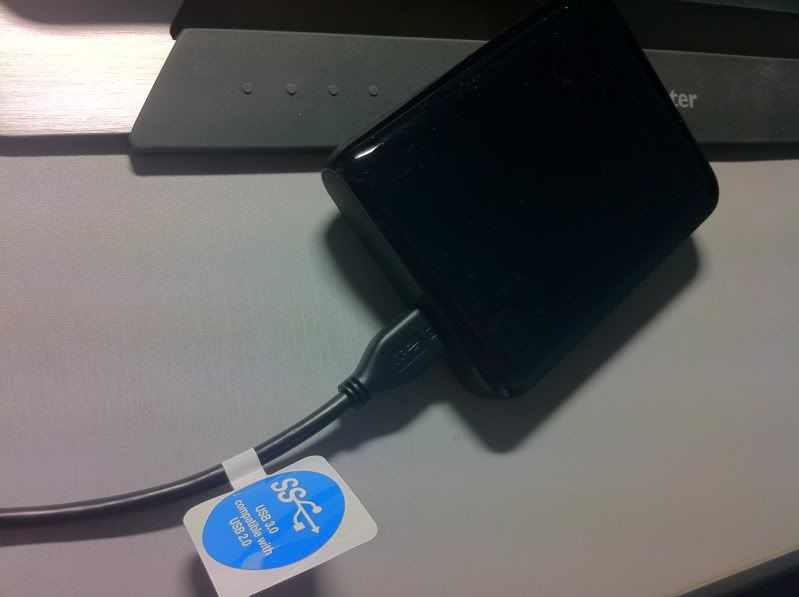 pls open your eyes and see which part of the drive does not support 3.0? |
|
|
Jul 31 2011, 05:15 PM
|
|
Newbie
1 posts Joined: Apr 2011
|
QUOTE(SRLee @ Jul 31 2011, 12:16 PM) Just tried transferring 9,906 files (videos files, PDF files, audio files & some Microsoft Office files) totaling 154GB via USB 3.0 (left port) from my DV6 to my WS Passport. You need to send individual and large files to see the true speed. if there are multiple and tiny files, it has to keep starting and stopping again and again so it never gets fastSpeed gradually increased from 5MB/s and stabilized at 26MB/s. What can I do to achieve a much higher speed? I am disappointed. Anyway, does anyone know what will happen to my Microsoft Office if I get a replacement unit? |
|
|
|
|
|
Jul 31 2011, 05:18 PM
|
|
Senior Member
1,267 posts Joined: Sep 2010
|
QUOTE(kelvin88 @ Jul 31 2011, 04:59 PM) seriously, you're not helping at all.... I am not sure why isnt the transfer speed as high as mine. try transfer smaller volume of files , 20-40gb once or zip the small files first =)» Click to show Spoiler - click again to hide... « pls open your eyes and see which part of the drive does not support 3.0? This post has been edited by Zhao: Jul 31 2011, 05:20 PM |
|
|
Jul 31 2011, 05:18 PM
|

Junior Member
540 posts Joined: Jan 2008
|
QUOTE(jacob521 @ Jul 31 2011, 04:14 PM) before blaming the USB 3.0 not working please make sure your external hard drive are supporting USB 3.0 speed. Can buy HP Laptop online in msia?Added on July 31, 2011, 4:19 pmand also for warranty issue for these who purchase online, just patiently wait for HP to activate your full warranty after you getting your laptop, it will take around 2 week / 10 WORKING days to proceed that, and you also will get the invoice / letter after 2 week / 10 WORKING days with a all details of what you purchase from HP including the carepack warranty. |
|
|
Jul 31 2011, 05:22 PM
|
|
Junior Member
437 posts Joined: Oct 2009
|
QUOTE(Zhao @ Jul 31 2011, 03:15 PM) Is your WD harddisk usb cable male head (blue coloured plastic) and labelled with SS ? How do I check if it's enabled?the software is renesas electronic usb 3.0 host controller driver. Yes, the HDD supports USB 3.0. QUOTE(powerpack240v @ Jul 31 2011, 05:15 PM) You need to send individual and large files to see the true speed. if there are multiple and tiny files, it has to keep starting and stopping again and again so it never gets fast QUOTE(Zhao @ Jul 31 2011, 05:18 PM) I am not sure why isnt the transfer speed as high as mine. try transfer smaller volume of files , 20-40gb once or zip the small files first =) I tried transferring a single .avi file of 4.2GB. The speed obtained was about 35MB/s.But if I transfer the file from the HDD to my laptop, then I get 75MB/s. From laptop to HDD, 35MB/s. From HDD to laptop, 75MB/s. The DV6 cannot support fast USB 3.0?  This post has been edited by SRLee: Jul 31 2011, 05:24 PM |
|
|
Jul 31 2011, 05:23 PM
|
|
Junior Member
41 posts Joined: Jul 2008
|
QUOTE(jacob521 @ Jul 31 2011, 04:14 PM) Added on July 31, 2011, 4:19 pmand also for warranty issue for these who purchase online, just patiently wait for HP to activate your full warranty after you getting your laptop, it will take around 2 week / 10 WORKING days to proceed that, and you also will get the invoice / letter after 2 week / 10 WORKING days with a all details of what you purchase from HP including the carepack warranty.  now it clears all my doubt... |
|
|
Jul 31 2011, 05:27 PM
|
|
Senior Member
1,267 posts Joined: Sep 2010
|
QUOTE(SRLee @ Jul 31 2011, 05:22 PM) How do I check if it's enabled? For my USB 3.0 HDDYes, the HDD supports USB 3.0. I tried transferring a single .avi file of 4.2GB. The speed obtained was about 35MB/s. But if I transfer the file from the HDD to my laptop, then I get 75MB/s. From laptop to HDD, 35MB/s. From HDD to laptop, 75MB/s. The DV6 cannot support fast USB 3.0? From laptop to HDD, 50-90MB/s. From HDD to laptop, 90-120MB/s. For my USB 2.0 HDD From laptop to HDD, 25-40MB/s. From HDD to laptop, 25-40MB/s. |
|
|
Jul 31 2011, 05:33 PM
|

Junior Member
361 posts Joined: Jun 2007
|
QUOTE(SRLee @ Jul 31 2011, 05:22 PM) How do I check if it's enabled? Could it be that your external HD write speed limit the overall transfer speed?Yes, the HDD supports USB 3.0. I tried transferring a single .avi file of 4.2GB. The speed obtained was about 35MB/s. But if I transfer the file from the HDD to my laptop, then I get 75MB/s. From laptop to HDD, 35MB/s. From HDD to laptop, 75MB/s. The DV6 cannot support fast USB 3.0? |
|
|
Jul 31 2011, 05:42 PM
|
|
Senior Member
1,365 posts Joined: Jan 2003 From: Seri Petaling
|
still not getting the speed power of 3.0.....

|
|
|
|
|
|
Jul 31 2011, 05:57 PM
|

Junior Member
257 posts Joined: May 2008
|
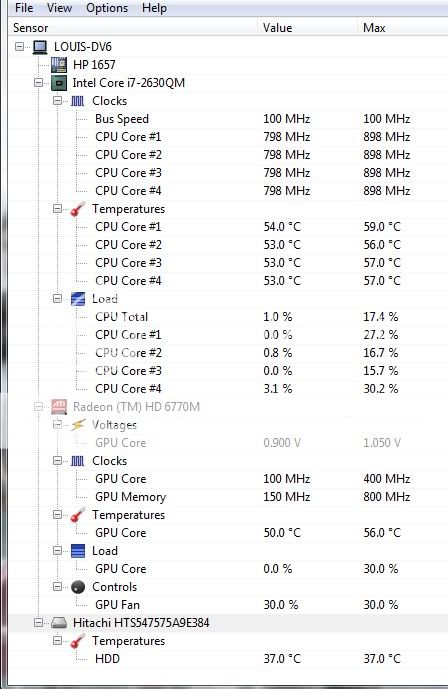 sifu..wanna ask...y sudden have the hitachi ar??? |
|
|
Jul 31 2011, 06:12 PM
|

Senior Member
1,855 posts Joined: May 2011 From: Cat City
|
Your HDD is Hitachi lo..like mine is Toshiba..
|
|
|
Jul 31 2011, 06:18 PM
|
|
Senior Member
1,267 posts Joined: Sep 2010
|
» Click to show Spoiler - click again to hide... « U mean usb3.0 high speed transfer till something like this??   This post has been edited by Zhao: Jul 31 2011, 06:21 PM |
|
|
Jul 31 2011, 06:26 PM
|
|
Senior Member
1,855 posts Joined: May 2011 From: Cat City
|
QUOTE(Zhao @ Jul 31 2011, 06:18 PM) » Click to show Spoiler - click again to hide... « U mean usb3.0 high speed transfer till something like this??  so FAST?!?! so FAST?!?!  |
|
|
Jul 31 2011, 07:33 PM
|
|
Junior Member
257 posts Joined: May 2008
|
QUOTE(Bboy4Life @ Jul 31 2011, 06:12 PM) Your HDD is Hitachi lo..like mine is Toshiba.. but u see.. last time it didnt show out..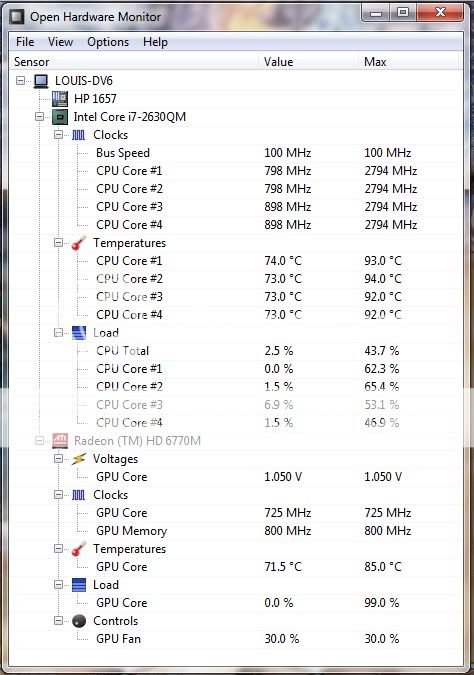 but y now will show huh? Added on July 31, 2011, 7:34 pm QUOTE(Zhao @ Jul 31 2011, 06:18 PM) » Click to show Spoiler - click again to hide... « U mean usb3.0 high speed transfer till something like this?? Added on July 31, 2011, 7:45 pm QUOTE(Acid_RuleZz @ Jul 27 2011, 06:59 PM) Ok i just did. oh yea acid... u do this wont void ur warranty??? Pardon my out-of-focus peektur and my messy table. Pardon my out-of-focus peektur and my messy table.» Click to show Spoiler - click again to hide... « » Click to show Spoiler - click again to hide... « This post has been edited by louisfjh: Jul 31 2011, 07:45 PM |
|
|
Jul 31 2011, 08:56 PM
|
|
Senior Member
1,267 posts Joined: Sep 2010
|
QUOTE(louisfjh @ Jul 31 2011, 07:33 PM) omg.. is that real???  |
|
|
Jul 31 2011, 11:32 PM
|

Junior Member
170 posts Joined: Nov 2007
|
To all sifu, i have a question. Is the 1366 X 768 resolution show big difference for game/movie if compare to full hd 1920 X 1080 by asus n53sv?
|
|
Topic ClosedOptions
|
| Change to: |  0.0314sec 0.0314sec
 0.68 0.68
 6 queries 6 queries
 GZIP Disabled GZIP Disabled
Time is now: 15th December 2025 - 10:21 PM |
 Quote
Quote [/url]

