

Add in jingping93 too.

HP Pavillion DV6-6XXX series Owners Lounge V2, - 91 owners!! FUUUUUUUUUUUUU!!
|
|
 Jun 19 2011, 12:46 PM Jun 19 2011, 12:46 PM
Return to original view | Post
#1
|
 
Junior Member
437 posts Joined: Oct 2009  
|
I'm on the owners' list haha.
Add in jingping93 too. |
|
|
|
|
|
Jul 2 2011, 02:15 AM
Return to original view | Post
#2
|
|
Junior Member
437 posts Joined: Oct 2009
|
Is it normal that my dv6-6114tx has more than 100 processes running?
It's also taking more than 2 minutes to boot... |
|
|
Jul 2 2011, 04:42 PM
Return to original view | Post
#3
|
|
Junior Member
437 posts Joined: Oct 2009
|
Hey everyone, should I send my warranty card for Beats headphones to Singapore? Will I get covered by the warranty since I'm in Malaysia.
Also, which of the following programs can be safely uninstalled: - Energy Star Digital Logo - ESU for Microsoft Windows 7 - HP 3D DriveGuard - HP Connection Manager - HP Documentation - HP On Screen Display - HP Power Manager - HP Quick Launch - HP Setup - HP Setup Manager - HP Software Framework - HP Support Assistant - IDT Audio - Intel® Display Audio Driver - Intel® Management Engine Components - Intel® Rapid Storage Technology - Validity WBF DDK First thing I did was to create the recovery discs so I think I'm safe to mess up my computer since I can restore it, correct? Anyway, why is there 88 processes (I removed some) running on my laptop? And why is it taking more than 1 minute 30 seconds to boot my computer? Sometimes it lags too. It shouldn't do that, it's a new computer. == |
|
|
Jul 2 2011, 05:30 PM
Return to original view | Post
#4
|
|
Junior Member
437 posts Joined: Oct 2009
|
QUOTE(Acid_RuleZz @ Jul 2 2011, 05:24 PM) I kept this. You removed some HP software, can you use your fingerprint sensor?- HP Software Framework - HP Support Assistant - IDT Audio - Intel® Display Audio Driver - Intel® Management Engine Components - Intel® Rapid Storage Technology - Validity WBF DDK  |
|
|
Jul 2 2011, 06:31 PM
Return to original view | Post
#5
|
|
Junior Member
437 posts Joined: Oct 2009
|
How many running processes is considered average/optimum?
|
|
|
Jul 2 2011, 06:43 PM
Return to original view | Post
#6
|
|
Junior Member
437 posts Joined: Oct 2009
|
QUOTE(RiverDrifte @ Jul 2 2011, 06:35 PM) Acid can pin the assembly video to first post? My desktop runs about 60 processes. I think might come handy for people later on who wish to: - change thermal paste - change blueray driver *i doubt* - change hdd *very probably* - remove dust from air duct. *i noticed that the person in the video is very professionally train in handling the laptop and organised the screws very neatly following original order.. more important step is to that he ground himself to avoid ESD which i think is a very good practice in handling internal electrical component.* Added on July 2, 2011, 6:41 pm definitely no average in this as the usage of each user varies..is depends solely on user.. so people might run 20 chrome tab which has 20 different processes... So I'm kind of worried that my new laptop is running 100.  |
|
|
|
|
|
Jul 2 2011, 07:39 PM
Return to original view | Post
#7
|
|
Junior Member
437 posts Joined: Oct 2009
|
Can somebody help me with my laptop, please?
My problems: 1. Laptop boots on average about 2 minutes. I did this and followed the steps, but it stopped without doing anything after 2 boots. Didn't show any information after that. 2. Laptop often lags. 3. Mozilla Firefox takes about 2 to 3 seconds to load and will go into a "Not Responding" status right after loading for about 2 seconds before it is usable. What should I do? I'm very frustrated.  |
|
|
Jul 2 2011, 07:52 PM
Return to original view | Post
#8
|
|
Junior Member
437 posts Joined: Oct 2009
|
QUOTE(RiverDrifte @ Jul 2 2011, 07:48 PM) sounds like a generic problem.. might consider reinstalling windows 7? cause i got that problem once with my desktop.. How do I reinstall Windows 7? I got the Recovery Discs, do I use that? |
|
|
Jul 2 2011, 08:13 PM
Return to original view | Post
#9
|
|
Junior Member
437 posts Joined: Oct 2009
|
QUOTE(lee_what2004 @ Jul 2 2011, 07:58 PM) @SRLee, can you open msconfig and go to startup, disable everything then check the startup speed again? OK after disabling everything and rebooting 3 times, my average time to boot were 45 to 50 seconds, running 65 processes.EDIT: After a few minutes, it is now running 76 processes. EDIT 2: Now it's running 83 processes. This post has been edited by SRLee: Jul 2 2011, 08:25 PM |
|
|
Jul 2 2011, 08:38 PM
Return to original view | Post
#10
|
|
Junior Member
437 posts Joined: Oct 2009
|
QUOTE(RiverDrifte @ Jul 2 2011, 08:32 PM) if u follow the step posted by acid, i thought it auto optimize for 6 reboots? and the last run use boot timer? Using the code provided that I input in CMD, my laptop autoboot twice then I accidentally hit "Cancel" because it was idle for a few minutes (I thought it stopped).I expected better performance with this laptop. A lot better performance, in fact. |
|
|
Jul 2 2011, 09:01 PM
Return to original view | Post
#11
|
|
Junior Member
437 posts Joined: Oct 2009
|
QUOTE(RiverDrifte @ Jul 2 2011, 08:53 PM) i think this laptop is working better than my 2 generation old desktop.. Good.  but then.. mine is only running 29sec.. hmm.. maybe you are just one of those unlucky ones.. but hey.. we are here to help..  So what do I do next? O.o |
|
|
Jul 2 2011, 09:20 PM
Return to original view | Post
#12
|
|
Junior Member
437 posts Joined: Oct 2009
|
QUOTE(Acid_RuleZz @ Jul 2 2011, 09:08 PM) Finished install everything you need for your laptop already? I am done installing everything I need for this laptop.Also.. remove norton and use MSE instead. Then redo the guide. U gonna need 30-60 mins for this i think.  Temporarily remove your login password for this tweak. Norton has been removed, MSE has been installed. What next?  |
|
|
Jul 3 2011, 01:19 AM
Return to original view | Post
#13
|
|
Junior Member
437 posts Joined: Oct 2009
|
Hey guys, I just completed the 6-set autoboot thing.
Using Bootimer, I tested my laptop twice and I got an average boot time of 25 seconds. However, Soluto says:"Boot done in 1 minute 6 seconds." Is this boot time average? Other info: 81 processes | 3% CPU Usage | 24% RAM Usage Now I'm wondering how do I test the speed of my laptop? Is it doable? |
|
|
|
|
|
Jul 3 2011, 01:43 AM
Return to original view | Post
#14
|
|
Junior Member
437 posts Joined: Oct 2009
|
QUOTE(Acid_RuleZz @ Jul 3 2011, 01:39 AM) Soluto? Yeah Soluto: http://www.soluto.com/Mine 72 processes, 17% Ram usage. Lolwut. I still kept all the HP software though. I just disabled them on startup.  |
|
|
Jul 3 2011, 03:08 PM
Return to original view | Post
#15
|
|
Junior Member
437 posts Joined: Oct 2009
|
Question 1
Hey everyone, my laptop came with 2 cables that can be used to charge my laptop. These are cables that are plugged into the power brick and power point. Which should I use? 1. Looks like this: 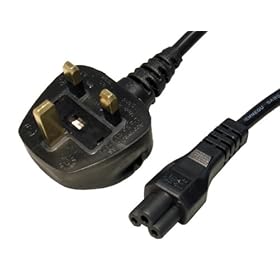 2. The other one that has a straight head. Question 2 Will I get warranty for my RAM and Beats Solo headphones? Should I send the warranty cards? Question 3 Where to find my purchase receipt/invoice for this laptop? This post has been edited by SRLee: Jul 3 2011, 04:14 PM |
|
|
Jul 3 2011, 10:48 PM
Return to original view | Post
#16
|
|
Junior Member
437 posts Joined: Oct 2009
|
How do I change the settings for my mousepad?
How do I access it? Multi-touch is now disabled for some reason unknown. I want it back. =/ |
|
|
Jul 3 2011, 11:45 PM
Return to original view | Post
#17
|
|
Junior Member
437 posts Joined: Oct 2009
|
QUOTE(Acid_RuleZz @ Jul 3 2011, 11:25 PM) Traybar there don't have Synaptic Pointing Device? Right click and select Touchpad Properties. Found it and changed. _______________________________________________________ New questions... Question 1 Where to find the invoice for my laptop purchase? Question 2 When I run CyberLink YouCam, it says the following: QUOTE You do not have the compatible VGA hardware or driver to run CyberLink YouCam. How do I solve this problem? I've updated my CCC but still I can't use it. This post has been edited by SRLee: Jul 4 2011, 02:13 AM |
|
|
Jul 4 2011, 10:31 PM
Return to original view | Post
#18
|
|
Junior Member
437 posts Joined: Oct 2009
|
Hey, does anyone know where to find the invoice for my laptop purchased online?
Also, Synaptics Mousepad isn't auto-running itself whenever I boot. How do I enable it to auto-run during boot? P.S My CyberLink YouCam problem solved itself. Literally. xD This post has been edited by SRLee: Jul 4 2011, 10:32 PM |
|
|
Jul 5 2011, 07:56 PM
Return to original view | Post
#19
|
|
Junior Member
437 posts Joined: Oct 2009
|
QUOTE(nothingz @ Jul 5 2011, 12:49 PM) the invoice from HP will reach you in around 2 weeks times. OK thanks.you may have disabled the auto start option I already disabled and enabled Synaptics program in msconfig, but still it isn't auto-booting. What should I do? Another thing: My battery has a wear level of 0.45% according to BatteryCare. Is that normal? It's less than 1 week old. This post has been edited by SRLee: Jul 5 2011, 08:21 PM |
|
|
Jul 6 2011, 04:36 PM
Return to original view | Post
#20
|
|
Junior Member
437 posts Joined: Oct 2009
|
To Acid, how do I reinstall Synaptics mousepad?
|
|
Topic ClosedOptions
|
| Change to: |  0.0515sec 0.0515sec
 0.27 0.27
 7 queries 7 queries
 GZIP Disabled GZIP Disabled
Time is now: 9th December 2025 - 03:14 AM |
 Quote
Quote