

Its on the left side..
HP Pavillion DV6-6XXX series Owners Lounge V2, - 91 owners!! FUUUUUUUUUUUUU!!
HP Pavillion DV6-6XXX series Owners Lounge V2, - 91 owners!! FUUUUUUUUUUUUU!!
|
|
 Jul 31 2011, 02:10 AM Jul 31 2011, 02:10 AM
|
 
Senior Member
6,612 posts Joined: Jan 2003 From: Tomorrow  
|
Its on the left side..
|
|
|
|
|
|
Jul 31 2011, 07:33 AM
|

Junior Member
87 posts Joined: Jun 2011
|
Its around 50 C normally and 70 - 80 degrees when playing game.
Anyway guys my fan is really loud even when i am just watching youtube. It spins really loud. I am afraid that my fan is already dusty. |
|
|
Jul 31 2011, 10:21 AM
|
|
Junior Member
41 posts Joined: Jul 2008
|
I was told that my case
-- ordered a dv6 from HP Online Malaysia on 24th July 2011 the carepack must be registered within 7 days... now my only bet is the 7 days count does not include saturday and sunday... going to call HP Centre to verify this tomorrow morning... sad... bought a laptop with warranty usable for one year only... is there any warranty extension that is applicable for laptop under warranty?? instead of this carepack which requires 7 days validation... Edit: want to ask a freaking stupid question... HP carepack requires registration within 7/10 days(whichever reliable) from the date of laptop purchase... But... My dv6 might be reaching in a month's time... So how is it possible for me to register the carepack??? This post has been edited by Rotary7: Jul 31 2011, 12:51 PM |
|
|
Jul 31 2011, 12:16 PM
|

Junior Member
437 posts Joined: Oct 2009
|
Just tried transferring 9,906 files (videos files, PDF files, audio files & some Microsoft Office files) totaling 154GB via USB 3.0 (left port) from my DV6 to my WS Passport.
Speed gradually increased from 5MB/s and stabilized at 26MB/s. What can I do to achieve a much higher speed? I am disappointed. Anyway, does anyone know what will happen to my Microsoft Office if I get a replacement unit? This post has been edited by SRLee: Jul 31 2011, 12:17 PM |
|
|
Jul 31 2011, 12:47 PM
|

Junior Member
21 posts Joined: Mar 2009 From: Petaling Jaya.Damansara. 
|
i got DV-6.so far so good.
|
|
|
Jul 31 2011, 01:30 PM
|

Senior Member
1,267 posts Joined: Sep 2010 
|
QUOTE(SRLee @ Jul 31 2011, 12:16 PM) Just tried transferring 9,906 files (videos files, PDF files, audio files & some Microsoft Office files) totaling 154GB via USB 3.0 (left port) from my DV6 to my WS Passport. Did u uninstall your usb3.0 software ? (preinstalled bloatware.)Speed gradually increased from 5MB/s and stabilized at 26MB/s. What can I do to achieve a much higher speed? I am disappointed. Anyway, does anyone know what will happen to my Microsoft Office if I get a replacement unit?  My usb 2.0 external is getting 27-32mb constantly .no matter how big/small the file is ,when plugged at usb 3.0 port. |
|
|
|
|
|
Jul 31 2011, 02:03 PM
|
|
Junior Member
437 posts Joined: Oct 2009
|
QUOTE(Zhao @ Jul 31 2011, 01:30 PM) Did u uninstall your usb3.0 software ? (preinstalled bloatware.) I'm pretty sure I didn't uninstall it.My usb 2.0 external is getting 27-32mb constantly .no matter how big/small the file is ,when plugged at usb 3.0 port. But just to be sure, what is the name of the software? I'm getting 19MB/s now. External HDD I'm using: Western Digital My Passport Essentials. This post has been edited by SRLee: Jul 31 2011, 02:03 PM |
|
|
Jul 31 2011, 02:17 PM
|

Senior Member
1,365 posts Joined: Jan 2003 From: Seri Petaling
|
noob here, how do you check the transfer speed?
I just got my WD 3.0 HDD too yesterday.... |
|
|
Jul 31 2011, 02:20 PM
|
|
Junior Member
288 posts Joined: Feb 2009
|
QUOTE(SRLee @ Jul 31 2011, 02:03 PM) I'm pretty sure I didn't uninstall it. You sure its USB 3.0? Does it have the "SS" logo?But just to be sure, what is the name of the software? I'm getting 19MB/s now. External HDD I'm using: Western Digital My Passport Essentials. |
|
|
Jul 31 2011, 02:21 PM
|
|
Junior Member
437 posts Joined: Oct 2009
|
QUOTE(kelvin88 @ Jul 31 2011, 02:17 PM) noob here, how do you check the transfer speed? Transfer files from your laptop to the HDD. Click on Show Details and there you go.I just got my WD 3.0 HDD too yesterday.... |
|
|
Jul 31 2011, 02:25 PM
|
|
Senior Member
1,365 posts Joined: Jan 2003 From: Seri Petaling
|
QUOTE(SRLee @ Jul 31 2011, 02:21 PM) Transfer files from your laptop to the HDD. Click on Show Details and there you go. gosh..... i am having the same problem too.... only around 11Mb/s-20Mb/s...This post has been edited by kelvin88: Jul 31 2011, 02:25 PM |
|
|
Jul 31 2011, 02:35 PM
|

Junior Member
52 posts Joined: Jul 2011 From: Spring Arbor, MI
|
Acid. Am proud owner of Dv6001 from mobility square at 3129 with 8gb ram
 |
|
|
Jul 31 2011, 02:37 PM
|

Junior Member
170 posts Joined: Nov 2007
|
QUOTE(Lionheart88 @ Jul 31 2011, 03:35 PM) Acid. Am proud owner of Dv6001 from mobility square at 3129 with 8gb ram pc expo melaka selling at RM 3000, 8GB, 3 years warranty |
|
|
|
|
|
Jul 31 2011, 02:42 PM
|
|
Junior Member
437 posts Joined: Oct 2009
|
QUOTE(kelvin88 @ Jul 31 2011, 02:25 PM) gosh..... i am having the same problem too.... only around 11Mb/s-20Mb/s... Is it the HDD or the USB 3.0 in our laptops that's giving us problems. X.X |
|
|
Jul 31 2011, 03:15 PM
|
|
Senior Member
1,267 posts Joined: Sep 2010
|
Is your WD harddisk usb cable male head (blue coloured plastic) and labelled with SS ?
the software is renesas electronic usb 3.0 host controller driver. |
|
|
Jul 31 2011, 04:07 PM
|
|
Senior Member
1,365 posts Joined: Jan 2003 From: Seri Petaling
|
QUOTE(Zhao @ Jul 31 2011, 03:15 PM) Is your WD harddisk usb cable male head (blue coloured plastic) and labelled with SS ? yes... and its plugged to the 3.0 USB port....the software is renesas electronic usb 3.0 host controller driver. |
|
|
Jul 31 2011, 04:14 PM
|
|
Junior Member
270 posts Joined: Jun 2011
|
before blaming the USB 3.0 not working please make sure your external hard drive are supporting USB 3.0 speed.
 Added on July 31, 2011, 4:19 pmand also for warranty issue for these who purchase online, just patiently wait for HP to activate your full warranty after you getting your laptop, it will take around 2 week / 10 WORKING days to proceed that, and you also will get the invoice / letter after 2 week / 10 WORKING days with a all details of what you purchase from HP including the carepack warranty. This post has been edited by jacob521: Jul 31 2011, 04:19 PM |
|
|
Jul 31 2011, 04:59 PM
|
|
Senior Member
1,365 posts Joined: Jan 2003 From: Seri Petaling
|
QUOTE(jacob521 @ Jul 31 2011, 04:14 PM) before blaming the USB 3.0 not working please make sure your external hard drive are supporting USB 3.0 speed. seriously, you're not helping at all....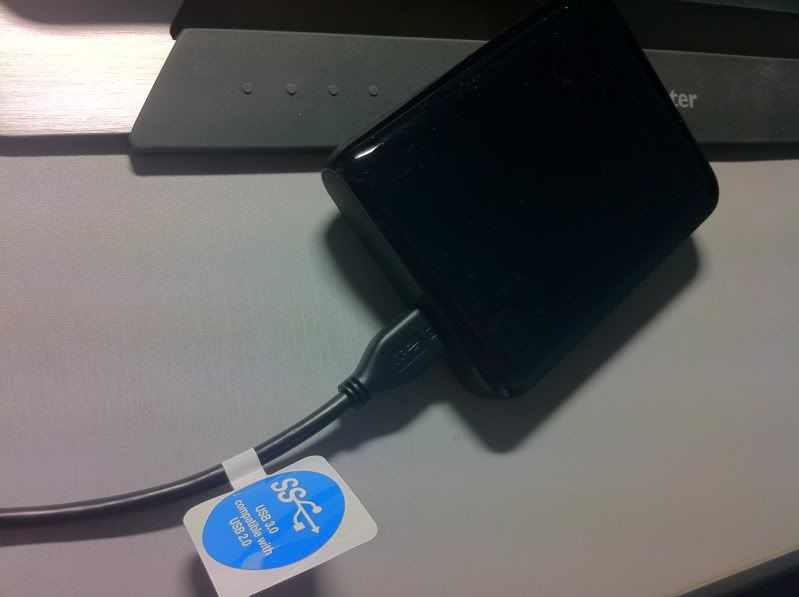 pls open your eyes and see which part of the drive does not support 3.0? |
|
|
Jul 31 2011, 05:15 PM
|
|
Newbie
1 posts Joined: Apr 2011
|
QUOTE(SRLee @ Jul 31 2011, 12:16 PM) Just tried transferring 9,906 files (videos files, PDF files, audio files & some Microsoft Office files) totaling 154GB via USB 3.0 (left port) from my DV6 to my WS Passport. You need to send individual and large files to see the true speed. if there are multiple and tiny files, it has to keep starting and stopping again and again so it never gets fastSpeed gradually increased from 5MB/s and stabilized at 26MB/s. What can I do to achieve a much higher speed? I am disappointed. Anyway, does anyone know what will happen to my Microsoft Office if I get a replacement unit? |
|
|
Jul 31 2011, 05:18 PM
|
|
Senior Member
1,267 posts Joined: Sep 2010
|
QUOTE(kelvin88 @ Jul 31 2011, 04:59 PM) seriously, you're not helping at all.... I am not sure why isnt the transfer speed as high as mine. try transfer smaller volume of files , 20-40gb once or zip the small files first =)» Click to show Spoiler - click again to hide... « pls open your eyes and see which part of the drive does not support 3.0? This post has been edited by Zhao: Jul 31 2011, 05:20 PM |
|
Topic ClosedOptions
|
| Change to: |  0.0315sec 0.0315sec
 0.72 0.72
 6 queries 6 queries
 GZIP Disabled GZIP Disabled
Time is now: 14th December 2025 - 09:10 AM |
 Quote
Quote