

sorry... what you means by "clock wont be so high" .. paiseh.. i am really newbie alot here
Fundamentals of Overclocking, NEWBIES PLS READ THIS BEFORE POSTING
Fundamentals of Overclocking, NEWBIES PLS READ THIS BEFORE POSTING
|
|
 Jul 29 2008, 10:11 PM Jul 29 2008, 10:11 PM
|
 
Senior Member
571 posts Joined: Jun 2008 From: Perth   
|
sorry... what you means by "clock wont be so high" .. paiseh.. i am really newbie alot here
|
|
|
|
|
|
Jul 29 2008, 11:16 PM
|

Senior Member
2,547 posts Joined: Oct 2007 
|
erm..sory for being not clear....
by using lower proc multiplier, ur proc clock is lower on the same proc fsb speed.... read here for more understanding... http://forum.lowyat.net/index.php?act=ST&f...0#entry15451675 http://forum.lowyat.net/topic/626450 http://forum.lowyat.net/topic/627600 |
|
|
Jul 30 2008, 10:00 AM
|
|
Senior Member
571 posts Joined: Jun 2008 From: Perth
|
The first thread answer everythings that i need to know Awesome..
 Haven got time to go through the 2nd and 3rd one... Thank tkh_1001. |
|
|
Jul 30 2008, 06:45 PM
|
|
Senior Member
2,547 posts Joined: Oct 2007
|
QUOTE(FoxNope @ Jul 30 2008, 10:00 AM) The first thread answer everythings that i need to know Awesome.. no probs bro... Haven got time to go through the 2nd and 3rd one... Thank tkh_1001.  hopefully those thread can be moved n pinned here  |
|
|
Jul 31 2008, 11:01 AM
|

Junior Member
290 posts Joined: May 2008
|
A question here. How should i know the voltage needed to add to cpu voltage when overclock? And how much should i add to overclock E8400 from 3GHz to 4GHz?
|
|
|
Jul 31 2008, 12:32 PM
|

Junior Member
276 posts Joined: Dec 2007 From: GOMBAK
|
easy.if u want to oc higher,u need to add vcore.thats d fact.let say ur cpu is 350x10=3.5ghz at 1.35v very stable.but when u try to push at 360x10=3.6ghz n ur oc fail,here u must up d vcore.
 |
|
|
|
|
|
Jul 31 2008, 12:36 PM
|
 
Elite
4,746 posts Joined: Dec 2007 From: Speed rule
|
QUOTE(Federer @ Jul 31 2008, 11:01 AM) A question here. How should i know the voltage needed to add to cpu voltage when overclock? And how much should i add to overclock E8400 from 3GHz to 4GHz? You need to add voltage when your system start to get unstable.Here is some setting that should work: 500x8 1:1 divider 1.35vcore(Less or more,try yourself as it differ from chip) 1.33vmch 1.9~2vdimm(5-5-5-12) And test stability using orthos.Just change the vcore to the lowest that will pass orthos in this setting:Custom,Priority 8,Large FFT=6144,FFT in place for 30minutes first until you can get the lowest vcore then do it for 12hours. Good luck |
|
|
Jul 31 2008, 01:41 PM
|
|
Senior Member
571 posts Joined: Jun 2008 From: Perth
|
is.... what is actually means by unstable ? is that means the pc wont boot up or what?
and i got very very little knowledge on OC RAM... just wonder, is 5-5-5-12 compare to 4-4-4-12 is a big diff? |
|
|
Jul 31 2008, 07:39 PM
|
|
Elite
4,746 posts Joined: Dec 2007 From: Speed rule
|
QUOTE(FoxNope @ Jul 31 2008, 01:41 PM) is.... what is actually means by unstable ? is that means the pc wont boot up or what? Unstable could be a lot of thing.Could be cannot post,but most of the time is the rig start to act up.Sudden program crash or something like that is the sign of instability.and i got very very little knowledge on OC RAM... just wonder, is 5-5-5-12 compare to 4-4-4-12 is a big diff? For daily use,timing difference is minimum.The difference only show in certain benchmark  For daily,better to use low vdimm and looser timing For daily,better to use low vdimm and looser timing  One more thing,4GB kit cannot do 1000 C4  It does however can do 11xx C5 so c5 is what you should use on your ram. It does however can do 11xx C5 so c5 is what you should use on your ram.This post has been edited by OC4/3: Jul 31 2008, 07:41 PM |
|
|
Aug 2 2008, 11:49 AM
|

Senior Member
3,119 posts Joined: May 2007 From: Home
|
cl5 have lower bandwidth readings than cl4 when it comes to subtimings. In ram overclocking, its not about the speed and how tight your timings can be, its also about how much bandwidth you gain from an overclock.
What is bandwidth? It is in layman terms defined to be the amount of information being able to be carried per second. So for example, if i have a ram which is ddr2 800 in rating at cl5-5-5-15, my memory bandwidth is generally rated at 6400MB/s or lower(there are other factors involved too). So for example if i tighten my timings to cl4-4-4-12, my bandwidth actually is increased to around 7000~8000MB/s. This is a gain in bandwidth This is what overclockers in general want. Ill give u an screenshot of what i mean Stability is simple. If the computer doesnt run like you want it to run like, its not stable. There are many ways to test stability, one easiest method, is, running heavy programs, or softwares. That can be a good test, or the simple SuperPi32M test Notice the Memory bandwidths and latency what u get on stock 
and... what u get when u overclock 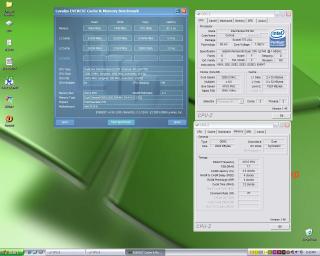
This post has been edited by a1098113: Aug 2 2008, 11:58 AM |
|
|
Aug 2 2008, 12:34 PM
|
|
Senior Member
2,547 posts Joined: Oct 2007
|
ah bro ar..... ur divider n proc clock for both bench is not the same wor... like that compare where got fair
 |
|
|
Aug 2 2008, 12:49 PM
|
|
Senior Member
3,119 posts Joined: May 2007 From: Home
|
just a comparison of bandwidth only. No specific indication on dividers whatsoever.. i just wanted to show what overclocking actually do
|
|
|
Aug 2 2008, 06:05 PM
|
|
Senior Member
2,547 posts Joined: Oct 2007
|
QUOTE(FoxNope @ Jul 31 2008, 01:41 PM) is.... what is actually means by unstable ? is that means the pc wont boot up or what? actually from the 2nd n 3rd link i gave u got explain the effect of CL4 and CL5... go read up bro... the explaination there very detailed and i got very very little knowledge on OC RAM... just wonder, is 5-5-5-12 compare to 4-4-4-12 is a big diff?  |
|
|
|
|
|
Aug 5 2008, 08:43 AM
|

Junior Member
401 posts Joined: Oct 2005
|
Not sure if this question has been asked before...
If I were to increase my fsb frequency from 333MHz to 350MHz, it will increase my processor clock, but will it affect my other hardware such as PCIE, PCI cards and ram? Is there a risk of damaging other hardware other than the CPU? |
|
|
Aug 5 2008, 10:47 AM
|
|
Junior Member
290 posts Joined: May 2008
|
One more noob question i want to ask
. To calculate vdrop it's [(bios set vcore) - (CPUz vcore at idle]). Where to check the bios set vcore? I use Biostar TPower i45. |
|
|
Aug 5 2008, 01:23 PM
|
|
Senior Member
3,119 posts Joined: May 2007 From: Home
|
QUOTE(tlts @ Aug 5 2008, 01:18 PM) oic again.. wanna get free post counts ah |
|
|
Aug 5 2008, 01:33 PM
|
|
Junior Member
401 posts Joined: Oct 2005
|
QUOTE(tlts @ Aug 5 2008, 01:18 PM) oic This guy is spamming in a lot of threads... Mods unleash ban hammer now! |
|
|
Aug 5 2008, 07:25 PM
|
|
Senior Member
2,547 posts Joined: Oct 2007
|
QUOTE(lytros @ Aug 5 2008, 08:43 AM) Not sure if this question has been asked before... yes ur proc clock will increase if u increase ur proc fsb... ur ram speed will increase together as well as u increase ur fsb... pls read the links i posted above to get more understand If I were to increase my fsb frequency from 333MHz to 350MHz, it will increase my processor clock, but will it affect my other hardware such as PCIE, PCI cards and ram? Is there a risk of damaging other hardware other than the CPU? QUOTE(Federer @ Aug 5 2008, 10:47 AM) One more noob question i want to ask erm..bios set vcore u ma check in ur bios lo . To calculate vdrop it's [(bios set vcore) - (CPUz vcore at idle]). Where to check the bios set vcore? I use Biostar TPower i45. |
|
|
Aug 12 2008, 08:41 PM
|

Senior Member
558 posts Joined: Jun 2006 From: KL Sentral - Segamat 
|
hi guys
i have 1 Q all this while i simply play around wit it but i would like to know wen do u actually up the vNB? and generally......what are the safe limits for NB? ip35E user here  |
|
|
Aug 12 2008, 08:44 PM
|
 
VIP
3,773 posts Joined: Jan 2003 From: Anywhere lah...as long got Kopi-O 
|
QUOTE(dro @ Aug 12 2008, 08:41 PM) hi guys You try not to...in fact it's the last choice in memory clocking stabillity unless you trying to run out of spec memory strappings (particularly when you're going for insane memory clock speeds on dividers)i have 1 Q all this while i simply play around wit it but i would like to know wen do u actually up the vNB? and generally......what are the safe limits for NB? ip35E user here |
| Change to: |  0.0257sec 0.0257sec
 0.32 0.32
 6 queries 6 queries
 GZIP Disabled GZIP Disabled
Time is now: 13th December 2025 - 10:59 AM |
 Quote
Quote