Outline ·
[ Standard ] ·
Linear+
SAMSUNG GALAXY TAB Official Thread V1, ..best and most portable Android tablet
|
L7Awesome
|
 Feb 21 2011, 03:17 PM Feb 21 2011, 03:17 PM
|

|
Just got myself a Used but very new Galaxy Tab. Having fun with it. It is a nice device that goes with my Digi broadband data plan. Not really brilliant for a phone replacement but with only data, this is superb.
What would be the best app to check the bandwidth for Broadband usage? I downloaded Network Monitor but it does not seems to be working.
This post has been edited by L7Awesome: Feb 21 2011, 03:27 PM
|
|
|
|
|
|
myzer0
|
Feb 21 2011, 03:37 PM
|
New Member

|
QUOTE(L7Awesome @ Feb 21 2011, 03:17 PM) Just got myself a Used but very new Galaxy Tab. Having fun with it. It is a nice device that goes with my Digi broadband data plan. Not really brilliant for a phone replacement but with only data, this is superb. What would be the best app to check the bandwidth for Broadband usage? I downloaded Network Monitor but it does not seems to be working. 3G watchdog... u will love it! |
|
|
|
|
|
L7Awesome
|
Feb 21 2011, 04:07 PM
|
|
|
QUOTE(myzer0 @ Feb 21 2011, 03:37 PM) 3G watchdog... u will love it! Thanks for that. That is exactly what I need. Also, would there be any apps that acts like ALT-TAB on a PC? I find that if i were to read something and need to jot down notes, I will need to go to home and then go to the specific application. Something like if i can change say the Search button to a shortcut that activate ALT-TAB app. This post has been edited by L7Awesome: Feb 21 2011, 04:15 PM |
|
|
|
|
|
shinzan
|
Feb 21 2011, 08:13 PM
|
|
|
QUOTE(L7Awesome @ Feb 21 2011, 04:07 PM) Thanks for that. That is exactly what I need. Also, would there be any apps that acts like ALT-TAB on a PC? I find that if i were to read something and need to jot down notes, I will need to go to home and then go to the specific application. Something like if i can change say the Search button to a shortcut that activate ALT-TAB app. U can try AppSwitcher...just search it in Market...  |
|
|
|
|
|
thepittbull
|
Feb 21 2011, 09:47 PM
|
New Member
|
QUOTE(L7Awesome @ Feb 21 2011, 04:07 PM) Thanks for that. That is exactly what I need. Also, would there be any apps that acts like ALT-TAB on a PC? I find that if i were to read something and need to jot down notes, I will need to go to home and then go to the specific application. Something like if i can change say the Search button to a shortcut that activate ALT-TAB app. Or if I get you correctly, you could just hold down the HOME button and the last few applications (8, I think) will show up in an almost ALT-Tab like manner. |
|
|
|
|
|
karyaw
|
Feb 21 2011, 10:31 PM
|
|
|
SAMSUNG GALAXY TAB 2 will be coming out in MARCH!
|
|
|
|
|
|
TSbenny888
|
Feb 21 2011, 11:48 PM
|
Gadget Freak

|
This was posted in comments on my blog about using ext4 kernel:
This will share his info about gaming performance which some of you guys were asking, which I know nuts.
Hi Benny,
I’m back to share what I found out about Paul O’Brien’s MCK-r3-ext4.tar and the absolute need of an external microSD card…
Perhaps it wasn’t made very clear at here / Paul’s Modaco page / Paul’s XDA post,
THAT,
an external microSD card with empty space that can support your existing ROM, Apps + Data
IS NEEDED
for Paul’s great EXT4 kernel and the included clockworkmod recovery in his .tar file to work flawlessly.
So, for those of you who are still on fence deciding whether to change to EXT4, go download and play the game “GUN BROS” from the market and you’ll definitely understand what lag due to RFS is all about! [ My TAB doesn't lag anymore playing this now that it runs Paul's EXT4 kernel ]
For those who’s taking the plunge same as Benny & I, follow my pre-requisite steps below closely if u like:
1. Make a backup of all your Apps & its Data using Titanium Backup.
2. Copy/Zip-over the TitaniumBackup folder to your home computer or anywhere safe [TAB's internal & external microSD NOT recommended!] and check the data integrity [Zip: Test Archive].
3. Now you have 2 options:
A. Get a new microSD card with enough free space that can support your “existing ROM + Apps + Data” to use as TAB’s external memory and proceed to Step 4 below.
B. Wipe / factory-reset your TAB to return to stock ROM that is with minimum space requirement and check if your existing inserted microSD card has enough free space to support. [fresh ROM usually needs ~600MB]
If formatting the external microSD will make enough room, go ahead.
4. Proceed with Benny’s guide from
“Download the EXT4 TAR file from HERE”
to
“The whole process took about 21 minutes.”
Good luck !
and enjoy the much superior EXT4 partition. I know I definitely am!
p/s: Great Thx to Benny for quick replying on my S.O.S.![I]
This post has been edited by benny888: Feb 21 2011, 11:50 PM
|
|
|
|
|
|
vicng
|
Feb 22 2011, 01:01 AM
|
Getting Started
|
QUOTE(benny888 @ Feb 15 2011, 11:20 PM) Just key in the MMS settings manually again . See post#4 for the APN settings I done it but still cannot retrieve MMS on my Tab.   |
|
|
|
|
|
TSbenny888
|
Feb 22 2011, 01:08 AM
|
Gadget Freak
|
QUOTE(vicng @ Feb 22 2011, 01:01 AM) I done it but still cannot retrieve MMS on my Tab.
Added on February 22, 2011, 7:49 amQUOTE(benny888 @ Feb 22 2011, 01:08 AM) Who is your telco ? You can also check this , scroll right down to : APN type - normally is default - select internet+mms If yours is Celcom - I have added in additional MMS settings in post #4 : Celcom 3g internet setting :
Name : Celcom 3G Internet
APN : celcom3g
MCC : 502
MNC : 19
APN type : default
Celcom 3g MMS setting :
Name : Celcom 3G MMS
APN : celcom3g
MMSC : http://mms.celcom.net.my
MMS proxy : 10.128.1.242
MMS port : 8080
MCC : 502
MNC : 19
APN type : mms
Celcom 2g internet setting :
Name : Celcom 2G Internet
APN : celcom.net.my
MCC : 502
MNC : 19
APN type : default
Celcom 2g MMS setting :
Name : Celcom 2G MMS
APN : mms.celcom.net.my
MMSC : http://mms.celcom.net.my
MMS proxy : 10.128.1.242
MMS port : 8080
MCC : 502
MNC : 19
APN type : mmsRefer here this case , same problem but solution was so simple : http://forum.lowyat.net/topic/1741916 |
|
|
|
|
|
L7Awesome
|
Feb 22 2011, 10:43 AM
|
|
|
QUOTE(thepittbull @ Feb 21 2011, 09:47 PM) Or if I get you correctly, you could just hold down the HOME button and the last few applications (8, I think) will show up in an almost ALT-Tab like manner. Oh wow, thanks for the guide. I am still a noop when it comes to Android phone. Will need to play with it more then. This is certainly very helpful!
Added on February 22, 2011, 10:46 amQUOTE(shinzan @ Feb 21 2011, 08:13 PM) U can try AppSwitcher...just search it in Market... Thanks Shinzan for the guide. I did use AppSwitcher but I think thepittbull bulleye in on what I need to do. :-) This is sure an amazing gadget and I have not even get to the Rooting, upgrading ROM, etc yet. This post has been edited by L7Awesome: Feb 22 2011, 10:46 AM |
|
|
|
|
|
TSbenny888
|
Feb 22 2011, 11:17 AM
|
Gadget Freak
|
Wish to change the look/themes on your Tab. You can try this Blue theme from Galaxayer http://forum.xda-developers.com/showthread.php?t=948942Install the zip file thro recovery mode; takes about half a minute. Read other user comments before you try. Do a NandroidBackup first incase anything go wrong or you wish to restore back original BEFORE 
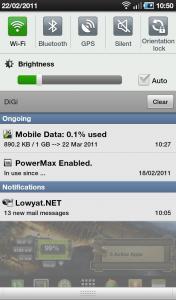
AFTER 
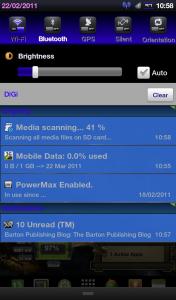
Gingerbread-like menu selection and Mounting Android change 

|
|
|
|
|
|
myzer0
|
Feb 22 2011, 02:04 PM
|
New Member
|
My Homescreen, without the OC kernel its kinda lagging 
|
|
|
|
|
|
TSbenny888
|
Feb 22 2011, 04:39 PM
|
Gadget Freak
|
QUOTE(myzer0 @ Feb 22 2011, 02:04 PM) My Homescreen, without the OC kernel its kinda lagging
No need to change to O/C kernel to improve performance . Just change to a EXT4 file system will improve it a lot : http://android.modaco.com/content/samsung-...ung-galaxy-tab/You can refer to my blog HERE where I explained briefly why the need to change and steps to do it |
|
|
|
|
|
L7Awesome
|
Feb 22 2011, 05:23 PM
|
|
|
Just curious, do you guys use Anti-Virus on your SGT? When I am using this, I realised that Malware can be working behind the scene. So just curious on how many of you do use Anti-Virus :-)
|
|
|
|
|
|
psychomist
|
Feb 22 2011, 07:39 PM
|
New Member
|
yeah..just bought my galaxy tab today.
This post has been edited by psychomist: Feb 22 2011, 08:32 PM
|
|
|
|
|
|
zer0imax
|
Feb 22 2011, 10:00 PM
|
Getting Started
|
QUOTE(benny888 @ Feb 22 2011, 04:39 PM) No need to change to O/C kernel to improve performance . Just change to a EXT4 file system will improve it a lot : http://android.modaco.com/content/samsung-...ung-galaxy-tab/You can refer to my blog HERE where I explained briefly why the need to change and steps to do it Lol im ext4.. actually its lagging due to my setcpu settings to powersave |
|
|
|
|
|
mw5026
|
Feb 22 2011, 11:06 PM
|
New Member
|
hi guys..new owner gt here.. mw5026/Europe/XXJK5/XWJJ7  a,way thanks to benny888 for advise and helping to solve my problem.. This post has been edited by mw5026: Feb 22 2011, 11:07 PM |
|
|
|
|
|
TSbenny888
|
 Feb 22 2011, 11:14 PM Feb 22 2011, 11:14 PM
|
Gadget Freak
|
QUOTE(mw5026 @ Feb 22 2011, 11:06 PM) hi guys..new owner gt here.. mw5026/Europe/XXJK5/XWJJ7 a,way thanks to benny888 for advise and helping to solve my problem.. Welcome. WOW ----- You are now the 100th user I have recorded |
|
|
|
|
|
Lennox
|
Feb 22 2011, 11:18 PM
|
|
|
QUOTE(mw5026 @ Feb 22 2011, 11:06 PM) hi guys..new owner gt here.. mw5026/Europe/XXJK5/XWJJ7 a,way thanks to benny888 for advise and helping to solve my problem.. 100th USER  Guys, after i bought my Galaxy Tab, i join a contest call Samsung Reward Mania. And i WON another Galaxy TAB  |
|
|
|
|
|
TSbenny888
|
Feb 22 2011, 11:21 PM
|
Gadget Freak
|
QUOTE(Lennox @ Feb 22 2011, 11:18 PM) 100th USER Guys, after i bought my Galaxy Tab, i join a contest call Samsung Reward Mania. And i WON another Galaxy TAB WOW ! Congrats. |
|
|
|
|



 Quote
Quote


 0.0321sec
 0.46
0.46
 6 queries
 GZIP Disabled