Welcome Guest ( Log In | Register )

64 Pages « < 25 26 27 28 29 > » Bottom

Outline · [ Standard ] · Linear+

 Linux/BSD/FOSS General Chat & FAQ, Post whatever questions you have....

views
     
cocooh
post Jan 14 2011, 07:35 PM

✔ Awesomeness ✔
*******
Senior Member
2,789 posts

Joined: Jul 2010
From: Silicon Valley


QUOTE(powerwoot @ Jan 14 2011, 05:50 PM)
I am still using it once in a while to update my kaspersky 2011... my son used it mostly for PES 2011. For internet and multimedia pleasure, most of the time we are using opensuse. My daughter had a problem at her 1st day in computer club, she doesn't know very well how to use windows because since from her primary school, I am exposed to my children to linux (opensuse)  smile.gif

btw, how to change the title above the stars eh?  hmm.gif
*
title O.O settings there , edit personal info / profile info


wanfaris
post Jan 14 2011, 07:42 PM

O_o
******
Senior Member
1,439 posts

Joined: Aug 2010


QUOTE(cocooh @ Jan 14 2011, 07:35 PM)
title O.O settings there , edit personal info / profile info
*
http://forum.lowyat.net/index.php?act=faq&article=13
powerwoot
post Jan 14 2011, 08:44 PM

讨厌的 ubuntu
*******
Senior Member
2,930 posts

Joined: Jan 2007
From: Kolej Universiti Agrosains Malaysia, Melaka


I see thanks for the guide... will update later on.
scorps
post Jan 15 2011, 01:11 AM

Something you call love, but I call sex
*******
Senior Member
9,572 posts

Joined: Jun 2005
From: Terengganu Darul Iman


it's recommended to remove ClamAV antivirus and MySQL if not use it? i'm thinking to free some space on home partition
GameSky
post Jan 15 2011, 02:03 AM

Nyancat too much
*******
Senior Member
6,381 posts

Joined: Jun 2005
From: meow meow
I thought programs were installed in root directory hmm.gif
cocooh
post Jan 15 2011, 02:07 AM

✔ Awesomeness ✔
*******
Senior Member
2,789 posts

Joined: Jul 2010
From: Silicon Valley


» Click to show Spoiler - click again to hide... «


Wingpanel in action drool.gif drool.gif drool.gif

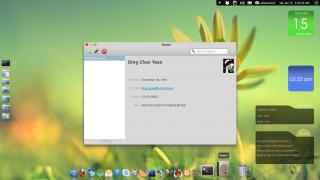
Successfully compile & install Postler from bzr (but cant connect sweat.gif ) and installed Dexter as well

Wingpanel is nice but i cant get access to my nm-applet rolleyes.gif


Attached thumbnail(s)
Attached Image
Acid_RuleZz
post Jan 15 2011, 03:20 AM

ミウ ❤
*******
Senior Member
6,612 posts

Joined: Jan 2003
From: Tomorrow


Ultimate Bashrc File

QUOTE(WebUpd8-Download the Ultimate Bashrc file)
The Ultimate Bashrc is a custom .bashrc file that comes with tons of aliases, functions and bash settings, all in one file. Here are a few examples: various bash prompts, sudo for entire line, apt history, various conversion functions like temperature, currency (based on Google) and so on, rip audio from video, bookmarks directories, copy/paste for the command line, convert any video to avi, cp with progress bar, translate a word using Google, Deb Extraction / Remaker (extracts a deb file & organizes for easy deb manipulation and repacking using "debremaker"), a "del" alias that moves the files to trash instead of removing them completely, a "site down for everyone or is it just me" function, various computer info and many more.

sauce : http://tinyurl.com/5u64xro

come on guys, lets start customizing and hacking those terminals drool.gif drool.gif
cocooh
post Jan 15 2011, 03:39 AM

✔ Awesomeness ✔
*******
Senior Member
2,789 posts

Joined: Jul 2010
From: Silicon Valley


Attached Image

Postler - Minimalistic email client from elementary . Now only works with GMail so far . MSN has a lil' prob sweat.gif

Attached Image

LibreOffice - Although its RC3 , i haven encounter any crashes ATM . Looks very Mac-ish-Microsoft-Office-2011 but this is Linux laugh.gif

Attached Image

Dexter - no bugs encountered yet laugh.gif Wanna try import VCard from my phone tomorrow . Wingpanel - buggy abit especially when i want to quit some indicator applet , it juz wont let me quit it sweat.gif
wanfaris
post Jan 15 2011, 03:51 AM

O_o
******
Senior Member
1,439 posts

Joined: Aug 2010


im still stuck at compiling...how to use eh??

first,i use this : cd usr/home/..../downloads....is that true..why it said no such directory???sigh.... doh.gif doh.gif
Acid_RuleZz
post Jan 15 2011, 04:00 AM

ミウ ❤
*******
Senior Member
6,612 posts

Joined: Jan 2003
From: Tomorrow


i don't think home directory is in /usr/
try ~/downloads


Added on January 15, 2011, 4:00 ambtw its case sensitive

This post has been edited by Acid_RuleZz: Jan 15 2011, 04:00 AM
wanfaris
post Jan 15 2011, 04:08 AM

O_o
******
Senior Member
1,439 posts

Joined: Aug 2010


QUOTE(Acid_RuleZz @ Jan 15 2011, 04:00 AM)
i don't think home directory is in /usr/
try ~/downloads


Added on January 15, 2011, 4:00 ambtw its case sensitive
*
hahaha...no wonder la it cant read...'d' is capital letter... tongue.gif

ok,thanks... notworthy.gif notworthy.gif
joker_jr
post Jan 15 2011, 04:52 AM

Casual
***
Junior Member
326 posts

Joined: Sep 2005
From: next station taman melati


I think i want to get certified since i dont have any critical project to handle currently. either LPIC, RHCE, CSA or CEH.
looking for training center....

This post has been edited by joker_jr: Jan 15 2011, 04:55 AM
Acid_RuleZz
post Jan 15 2011, 11:53 AM

ミウ ❤
*******
Senior Member
6,612 posts

Joined: Jan 2003
From: Tomorrow


morning penguins and devils, today i'm feeling generous so i'ma share my mplayer/vlc setting for smooth ts/tp playback after hours of experimenting and hallucinating. Probably for those who dunhave the privilege to use vdpau output.

if you dunhave mplayer or vlc yet or feeling like upgrading the player u've installed from maverick repo, feel free to add these 2 ppa(s) to enjoice newer version of both player.
(i suppose non-ubuntu user know how to do this with their distro)
sudo add-apt-repository ppa:ferramroberto/vlc
sudo add-apt-repository ppa:ripps818/coreavc

and start
sudo apt-get update
sudo apt-get install vlc mplayer / sudo apt-get upgrade


for VLC
  1. Go to Preference(or hit Ctrl+P)
  2. Go to Video and set Output to XVideo output (XCB)
  3. Then set Deinterlacing=Auto/On and Mode=BoB/Linear
  4. Enjoice
if the playback still suck:
- try to check Deinterlacing & Deinterlacing Mode by right clicking the video and go to Video>Deinterlace/Deinterlace mode coz my VLC tend to not save the setting and set Deinterlace mode to Discard when the video is playing.
- try to toggle(On/Off) 'Use GPU acceleration' in Preferences>Input & Codecs.

for Mplayer (basic)
  1. Start terminal and type mplayer -fps 60 -vo xv -vf tfields=4 <insert.video.path>
  2. Enjoice

integrate into SMplayer
  1. Go to Preferences>Advanced>Options for Mplayer
  2. In Option field put '-fps 60'
  3. In Video Filter field put 'tfields=4'
  4. Enjoice
- make sho u set video output to XV
- this could also apply to other mplayer frontend client like gnome mplayer, kmplayer, kplayer and anything yang sewaktu dengannya. probably
eg: Attached Image

if you have anything to ask about vlc.
goto Topeka

if you have anything to ask about mplayer
open terminal and start
  1. mplayer -vo help
  2. mplayer -ao help
  3. mplayer -vf help
  4. mplayer -af help
  5. mplayer -pphelp
  6. man mplayer | grep <insert.keywurd>
or Topeka

if you have HUGE! mkv HD movie(>10GB permovie) and want to play it with mplayer/smplayer, i suggest follow these tuts for future enjoicement.
http://code.google.com/p/coreavc-for-linux/w/list
- note : step 3 for Install patch into mplayer is not needed.

Last note : I've only tested these with my lappy(C2D + Intel X4500MHD). My friend lappy (C2D + Ati 4570). Another friend lappy (C2D + Nvidia G310M). If this method not working for your setup, just Topeka

any whining tidak akan dilayan.
wanfaris
post Jan 15 2011, 01:55 PM

O_o
******
Senior Member
1,439 posts

Joined: Aug 2010


QUOTE(Acid_RuleZz @ Jan 15 2011, 11:53 AM)
morning penguins and devils, today i'm feeling generous so i'ma share my mplayer/vlc setting for smooth ts/tp playback after hours of experimenting and hallucinating. Probably for those who dunhave the privilege to use vdpau output.

if you dunhave mplayer or vlc yet or feeling like upgrading the player u've installed from maverick repo, feel free to add these 2 ppa(s) to enjoice newer version of both player.
(i suppose non-ubuntu user know how to do this with their distro)
» Click to show Spoiler - click again to hide... «

*
haha...nice one bro...with hoot 1st performance at behind.... brows.gif brows.gif

anyway,thx 4 sharing...good tutorial.. icon_rolleyes.gif
Chyan
post Jan 15 2011, 07:11 PM

Look at all my stars!!
*******
Senior Member
4,222 posts

Joined: Apr 2007

QUOTE(Acid_RuleZz @ Jan 15 2011, 11:53 AM)
morning penguins and devils, today i'm feeling generous so i'ma share my mplayer/vlc setting for smooth ts/tp playback after hours of experimenting and hallucinating. Probably for those who dunhave the privilege to use vdpau output.

» Click to show Spoiler - click again to hide... «


any whining tidak akan dilayan.
*
Epic. Just what I was looking for. smile.gif
wanfaris
post Jan 15 2011, 07:15 PM

O_o
******
Senior Member
1,439 posts

Joined: Aug 2010


Headline : Unity 2D Gets A PPA

QUOTE
Unity 2D gets a PPA

The slick Unity 2D we told you about yesterday has now got a PPA for Ubuntu 10.10 and Ubuntu 11.04 users to test.

It can’t say how it compares to the regular flavour of Unity becuase that doesn’t work on my computer, but one thing I can certainly say is that it is faster than the regular Desktop Session.

Attached Image

Attached Image

Installation

To add the PPA and install Unity 2D run the commands below in a terminal:-

    * sudo add-apt-repository ppa:unity-2d-team/unity-2d-daily && sudo apt-get update
    * sudo apt-get install unity-qt-default-settings


Choose ‘Unity Qt’ at the Login screen to use.


more screenshot at http://www.omgubuntu.co.uk/2011/01/unity-2d-gets-a-ppa/

This post has been edited by wanfaris: Jan 15 2011, 07:17 PM
GameSky
post Jan 15 2011, 09:52 PM

Nyancat too much
*******
Senior Member
6,381 posts

Joined: Jun 2005
From: meow meow
anywhere to fix or restart crashed compiz without having to logout or reboot hmm.gif?
Acid_RuleZz
post Jan 15 2011, 10:00 PM

ミウ ❤
*******
Senior Member
6,612 posts

Joined: Jan 2003
From: Tomorrow


QUOTE(GameSky @ Jan 15 2011, 09:52 PM)
anywhere to fix or restart crashed compiz without having to logout or reboot hmm.gif?
*
my only solution is to logout. =\
no need to reboot.

not sure if there is anything relevant about this... but my compiz never crash since i start using liquorix kernel.
wanfaris
post Jan 15 2011, 10:05 PM

O_o
******
Senior Member
1,439 posts

Joined: Aug 2010


QUOTE(Acid_RuleZz @ Jan 15 2011, 10:00 PM)
my only solution is to logout. =\
no need to reboot.

not sure if there is anything relevant about this... but my compiz never crash since i start using liquorix kernel.
*
yes,me too..never crash before...maybe it hv conflict with other settings,i guess...
GameSky
post Jan 15 2011, 10:12 PM

Nyancat too much
*******
Senior Member
6,381 posts

Joined: Jun 2005
From: meow meow
well i'm using linux mint 10 atm, sometime compiz will crash, tho

on intel gma 965

64 Pages « < 25 26 27 28 29 > » Top
 

Change to:
| Lo-Fi Version
0.0247sec    0.46    6 queries    GZIP Disabled
Time is now: 8th December 2025 - 05:59 PM