


@cocooh, i would love to get that stacked clock. but i'm using a lappie, could'nt find return key for that third step. any other way??

Linux/BSD/FOSS General Chat & FAQ, Post whatever questions you have....
|
|
 Dec 29 2010, 10:44 PM Dec 29 2010, 10:44 PM
|
 
Validating
1,822 posts Joined: Jul 2010 From: Yesterday, 01:25 AM 
|
yes i think it only effect lmde 32 bits.. but i'm a 32 bits user, nearly download that iso
@cocooh, i would love to get that stacked clock. but i'm using a lappie, could'nt find return key for that third step. any other way?? |
|
|
|
|
|
Dec 29 2010, 10:47 PM
|

Senior Member
2,930 posts Joined: Jan 2007 From: Kolej Universiti Agrosains Malaysia, Melaka  
|
Just to add some candy in the mouth, the Dedoimedo has announce the best distro of 2010 is
QUOTE And the GRAND winner is ... You haven't seen it listed above, but it would feature under the glorious title of best all-arounder. And that would have to be Linux Mint. While it did underperform in the spring, the autumn release is just splendid. It's a perfect 10 for the tenth release. Linux Mint Julia has the best overall combination of ingredients. The best desktop theme and menu, the best combination of programs, the best package management. It's the most usable distribution out there, and it's just a pleasure to run. Linux Mint Julia Linux Mint is not afraid to be different. While it is based on Ubuntu, it uses its own set of programs, sticking to goodies like Thunderbird, Pidgin, GIMP, and others, without following the herd mentality of the social integration and application dumbefication. Everything works out of the box, every little detail is carefully placed and designed, there's practically nothing bad you can think of. Upping this achievement is going to be really hard. But the title is well deserved. Linux Mint Julia Compiz Best distro of 2010: Linux Mint 10 Julia. Bravo! http://www.dedoimedo.com/computers/best-distro-2010.html Dedoimedo gained it's reputation among Linux lovers for it's good reviews of many distros for many years. Congrats to Linux Mint 10! |
|
|
Dec 29 2010, 10:47 PM
|

Senior Member
2,789 posts Joined: Jul 2010 From: Silicon Valley
|
QUOTE(axxer @ Dec 29 2010, 10:44 PM) yes i think it only effect lmde 32 bits.. but i'm a 32 bits user, nearly download that iso You need hit return only if your gconf-editor starts at another folder @cocooh, i would love to get that stacked clock. but i'm using a lappie, could'nt find return key for that third step. any other way??   If its in default and not displaying any open folder , return key can be skipped If its in default and not displaying any open folder , return key can be skipped |
|
|
Dec 29 2010, 11:03 PM
|
|
Validating
1,822 posts Joined: Jul 2010 From: Yesterday, 01:25 AM
|
QUOTE(cocooh @ Dec 29 2010, 10:47 PM) You need hit return only if your gconf-editor starts at another folder ohhh If its in default and not displaying any open folder , return key can be skipped but i'm now stucked at step 5.. how to set to custom?? when i double-click on format. a windows appear but "custom" nowhere to be found  and if its located in that type section, i cant modify it even if i run gconf-editor with root priviledge  |
|
|
Dec 29 2010, 11:10 PM
|
|
Senior Member
2,789 posts Joined: Jul 2010 From: Silicon Valley
|
change "value" to custom
which means , delete that 12-hour and type custom in it |
|
|
Dec 29 2010, 11:27 PM
|
|
Validating
1,822 posts Joined: Jul 2010 From: Yesterday, 01:25 AM
|
hmm it doesnt work with lmde.. i think that script just ment for ubuntu. got "??????" on my clock when paste that script. lol
thanks anyway  |
|
|
|
|
|
Dec 29 2010, 11:44 PM
|
|
Senior Member
2,789 posts Joined: Jul 2010 From: Silicon Valley
|
QUOTE(axxer @ Dec 29 2010, 11:27 PM) hmm it doesnt work with lmde.. i think that script just ment for ubuntu. got "??????" on my clock when paste that script. lol Whr did u paste the script thanks anyway ??Screenshoot : » Click to show Spoiler - click again to hide... « |
|
|
Dec 30 2010, 12:18 AM
|
|
Validating
1,822 posts Joined: Jul 2010 From: Yesterday, 01:25 AM
|
thanks, it works now. ur pic worth more than a thousand words, now i know why it did'nt work earlier.. silly me, paste in the wrong value
|
|
|
Dec 30 2010, 12:46 AM
|
|
Senior Member
2,789 posts Joined: Jul 2010 From: Silicon Valley
|
QUOTE(axxer @ Dec 30 2010, 12:18 AM) thanks, it works now. ur pic worth more than a thousand words, now i know why it did'nt work earlier.. silly me, paste in the wrong value Yippee  Working , good XD Hope everyone finds it useful as these tweaks can make the hefty-long-clock panel bcome short and space free Working , good XD Hope everyone finds it useful as these tweaks can make the hefty-long-clock panel bcome short and space free  PS: Hapi Burfday to myself  |
|
|
Dec 30 2010, 01:52 AM
|

Senior Member
6,612 posts Joined: Jan 2003 From: Tomorrow
|
^ thanks for the clock tips
 anyone using gimp 2.7.x? is it possible to make it permanent 1 window   This post has been edited by Acid_RuleZz: Dec 30 2010, 01:53 AM |
|
|
Dec 30 2010, 01:54 AM
|
|
Senior Member
2,789 posts Joined: Jul 2010 From: Silicon Valley
|
QUOTE(Acid_RuleZz @ Dec 30 2010, 01:52 AM) ^ thanks for the clock tips Hmm , one window GIMP has been delayed if im not mistaken anyone using gimp 2.7.x? is it possible to make it permanent 1 window Dun dare to try out the unstable builds though |
|
|
Dec 30 2010, 02:04 AM
|
|
Validating
1,822 posts Joined: Jul 2010 From: Yesterday, 01:25 AM
|
if using earlier gimp like 2.6.10 can use gimpbox
http://www.omgubuntu.co.uk/2010/09/gimpbox...le-window-mode/ |
|
|
Dec 30 2010, 02:34 AM
|
|
Senior Member
6,612 posts Joined: Jan 2003 From: Tomorrow
|
^ yeah, i tried gimpbox before but gimp mainmenu juz disappeared when i'm using it
|
|
|
|
|
|
Dec 30 2010, 02:41 AM
|
|
Senior Member
2,789 posts Joined: Jul 2010 From: Silicon Valley
|
Woohoo , sharing time
Ive found another applet which can be a replacement for Indicator App menu Applet .  Its called Gnome 2 Global Menu applet which can display the application name when u are using it . To install : CODE sudo add-apt-repository ppa:nilarimogard/webupd8 sudo apt-get update sudo apt-get install gnome-globalmenu |
|
|
Dec 30 2010, 02:44 AM
|
|
Validating
1,822 posts Joined: Jul 2010 From: Yesterday, 01:25 AM
|
anyone here using apt-fast with aria2 or apt-proz with prozilla?
currently i'm using apt-fast with axel, got 4 threads per file.. if using with aria2 or prozilla maybe could achieve faster speed  |
|
|
Dec 30 2010, 02:56 AM
|
|
Senior Member
2,789 posts Joined: Jul 2010 From: Silicon Valley
|
apt-fast O.O hmm , gonna try it XD , does it makes apt-get install or upgrade faster in download speed ? or ?
PS: @@ replying thx comment at FB @ the moment This post has been edited by cocooh: Dec 30 2010, 02:59 AM |
|
|
Dec 30 2010, 03:12 AM
|
|
Senior Member
6,612 posts Joined: Jan 2003 From: Tomorrow
|
QUOTE(axxer @ Dec 30 2010, 02:44 AM) anyone here using apt-fast with aria2 or apt-proz with prozilla? i'm using apt-fast. if u not happy with 4 thread u can increase it by editing the apt-fast bash scriptcurrently i'm using apt-fast with axel, got 4 threads per file.. if using with aria2 or prozilla maybe could achieve faster speed CODE $ sudo nano /usr/bin/apt-fast on line 42 CODE apt-get -y --print-uris $@ | egrep -o -e "(ht|f)tp://[^\']+" > apt-fast.list && cat apt-fast.list | xargs -l1 axel -a change xargs -l1 axel -a to xargs -l1 axel -n <inser-number-of-connection> -a |
|
|
Dec 30 2010, 03:17 AM
|
|
Senior Member
2,789 posts Joined: Jul 2010 From: Silicon Valley
|
hmm , apt-fast vs apt-proz vs apt-fast w. Aria2 , what are the difference ???
|
|
|
Dec 30 2010, 03:22 AM
|
|
Validating
1,822 posts Joined: Jul 2010 From: Yesterday, 01:25 AM
|
yup got much faster speed using apt-fast, much better than apt-get.
it uses cli downloader to achieve faster speed. apt fast got 2 version, original which uses axel and another one which uses aria2. another one is apt-proz which uses prozilla. 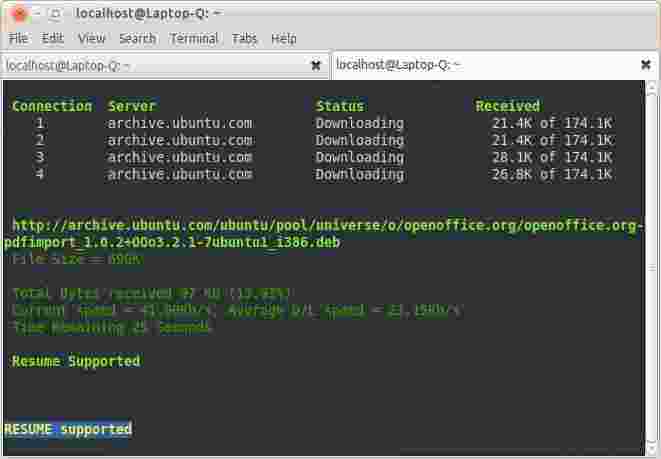 installation apt-fast for ubuntu/linuxmint CODE sudo add-apt-repository ppa:tldm217/tahutek.net sudo apt-get update sudo apt-get install apt-fast installation of apt-proz for ubuntu/linuxmint, same as above except the last line, intead use CODE sudo apt-get install apt-proz and u can had both apt-fast and apt-proz on the same machine. now to use it... instead of apt-fast in terminal, u use apt-fast or apt-proz so it should look like CODE apt-fast update apt-fast upgrade apt-fast install apt-fast remove apt-fast autoremove apt-fast purge apt-fast source apt-fast build-dep apt-fast dist-upgrade apt-fast dselect-upgrade apt-fast clean apt-fast autoclean apt-fast check apt-fast markauto apt-fast unmarkauto or in the case of apt-proz CODE apt-proz update apt-proz upgrade apt-proz install apt-proz remove apt-proz autoremove apt-proz purge apt-proz source apt-proz build-dep apt-proz dist-upgrade apt-proz dselect-upgrade apt-proz clean apt-proz autoclean apt-proz check apt-proz markauto apt-proz unmarkauto i'm using it since i've installed my lmde, so far so good This post has been edited by axxer: Dec 30 2010, 03:48 AM |
|
|
Dec 30 2010, 03:25 AM
|
|
Senior Member
6,612 posts Joined: Jan 2003 From: Tomorrow
|
different cli download accelerator?
default apt-fast use axel to accel apt-get apt-metalink use aria2c to accel apt-get apt-proz use prozilla to accel apt-get? i can't find prozilla package in repo |
| Change to: |  0.0239sec 0.0239sec
 0.83 0.83
 6 queries 6 queries
 GZIP Disabled GZIP Disabled
Time is now: 7th December 2025 - 02:43 AM |
 Quote
Quote
