

QUOTE(tachlio @ Jul 8 2019, 08:47 PM)
Open bottom case and unplug battery connector for 10sec.
Then issue solve.
Suspect USB-C related issue

lmao it works. That's so weird. Thank you!Then issue solve.
Suspect USB-C related issue
Dell XPS Series, Discuss everything about ur XPS
|
|
 Jul 8 2019, 10:04 PM Jul 8 2019, 10:04 PM
Show posts by this member only | IPv6 | Post
#1921
|
 
Junior Member
535 posts Joined: Oct 2009 From: QWERTY 
|
QUOTE(tachlio @ Jul 8 2019, 08:47 PM) Open bottom case and unplug battery connector for 10sec. lmao it works. That's so weird. Thank you!Then issue solve. Suspect USB-C related issue |
|
|
|
|
|
Jul 8 2019, 10:56 PM
|

Senior Member
714 posts Joined: Sep 2009 
|
QUOTE(ZM Fong @ Jul 8 2019, 09:45 PM) XPS 15 is plagued with issues - for years. Never recommend it (the iGPU model is still OK but not available in Malaysia). Not to be confused with XPS 15 9575 2 in 1 which is decent but I hate the non-upgradeable RAM and high price i thought they fix the thermal issue, modifying the flow |
|
|
Jul 8 2019, 11:07 PM
Show posts by this member only | IPv6 | Post
#1923
|

Senior Member
8,240 posts Joined: Apr 2017
|
QUOTE(afiqsabri @ Jul 8 2019, 10:56 PM) i thought they fix the thermal issue, modifying the flow Not just thermal issue only...there are way more issues which is unacceptable given its price |
|
|
Jul 13 2019, 03:12 PM
|

Senior Member
3,681 posts Joined: Nov 2005 From: -
|
QUOTE(IdiuU @ Jul 4 2019, 03:21 AM) the new XPS 15 7590 price so much different from what i saw when it just pop up on dell website last week. I noticed that too. Yes Dell increased the price all the sudden in one single day.now, i7, 4k model-extra rm900 i9 model- extra rm2k dell simply adjust the price? the price originally on the website Was really tempted to buy with that earlier price but after the hike, felt disappointed with such quiet move. |
|
|
Jul 17 2019, 06:53 PM
|

Junior Member
440 posts Joined: May 2010
|
QUOTE(ZM Fong @ Jul 8 2019, 11:07 PM) Not just thermal issue only...there are way more issues which is unacceptable given its price This is so true, I'm on the brink of selling my 9570 and get myself a new laptop. The BIOS issue, thermal throttling, fan issues...I had undervolted, repasted new thermal twice. Quite disappointed as I've paid a high price for this, sigh. Other than the above, everything else is great. The keyboard and touch pad is so good, weight-wise is good, with low profile charging adapter. But the mechanical-technical side of it, really make me sad. |
|
|
Jul 17 2019, 07:51 PM
Show posts by this member only | IPv6 | Post
#1926
|
|
Senior Member
8,240 posts Joined: Apr 2017
|
QUOTE(volrath @ Jul 17 2019, 06:53 PM) This is so true, I'm on the brink of selling my 9570 and get myself a new laptop. The BIOS issue, thermal throttling, fan issues...I had undervolted, repasted new thermal twice. Quite disappointed as I've paid a high price for this, sigh. Thanks for sharing. Finally a user speaks about these issuesOther than the above, everything else is great. The keyboard and touch pad is so good, weight-wise is good, with low profile charging adapter. But the mechanical-technical side of it, really make me sad. Yeah having powerful hardware with good battery life+portability is really a good concept, however X1 Extreme / P1 is just a much better choice (even though it also throttles when both CPU+GPU is under load, it has slightly better thermals and doesn't have VRM throttling) This post has been edited by ZM Fong: Jul 17 2019, 07:52 PM |
|
|
|
|
|
Jul 18 2019, 04:41 PM
|
|
Junior Member
440 posts Joined: May 2010
|
QUOTE(ZM Fong @ Jul 17 2019, 07:51 PM) Thanks for sharing. Finally a user speaks about these issues These XPS legacy problems, you think would carry on? Is the new XPS using the same chassis? (coz it looks like it to me). Meaning, the same issue will most likely going to persist right?Yeah having powerful hardware with good battery life+portability is really a good concept, however X1 Extreme / P1 is just a much better choice (even though it also throttles when both CPU+GPU is under load, it has slightly better thermals and doesn't have VRM throttling) |
|
|
Jul 18 2019, 05:23 PM
Show posts by this member only | IPv6 | Post
#1928
|
|
Senior Member
8,240 posts Joined: Apr 2017
|
QUOTE(volrath @ Jul 18 2019, 04:41 PM) These XPS legacy problems, you think would carry on? Is the new XPS using the same chassis? (coz it looks like it to me). Meaning, the same issue will most likely going to persist right? No more DPC issues but other issues remain (according to NBC)Honestly, Dell really need to redesign the whole thing (7590 is the same chassis with 9570) |
|
|
Jul 18 2019, 07:18 PM
Show posts by this member only | IPv6 | Post
#1929
|

Senior Member
978 posts Joined: Jun 2008 
|
QUOTE(ZM Fong @ Jul 18 2019, 05:23 PM) No more DPC issues but other issues remain (according to NBC) I think that's why it's necessary to have the Dell service coverage, at least things like this can be repaired without much cost (except for the yearly renewal for the service cover). But one thing though, the battery standby is awesome on XPS.Honestly, Dell really need to redesign the whole thing (7590 is the same chassis with 9570) |
|
|
Aug 1 2019, 11:17 AM
|

Senior Member
4,470 posts Joined: Sep 2007 From: Kuala Lumpur
|
QUOTE(ZM Fong @ Jul 17 2019, 07:51 PM) Thanks for sharing. Finally a user speaks about these issues i still using my 9570, anyway i think x1 extreme is better than xps 15, the reason bother me the most u guess is what... is the open angle of the chasis.... i like thinkpad can open 180 degree and even my other laptop open angle is bigger than this...Yeah having powerful hardware with good battery life+portability is really a good concept, however X1 Extreme / P1 is just a much better choice (even though it also throttles when both CPU+GPU is under load, it has slightly better thermals and doesn't have VRM throttling) |
|
|
Aug 13 2019, 05:28 PM
|

Senior Member
8,461 posts Joined: Mar 2007 From: Kota Bharu,Kelantan
|
I've recently purchased the 9570 [I knew of the various throttling issues, but since I can't afford the X1 Extreme and there were no other suitable models] and tried to tackle the throttling problems myself.
First step I did was to repaste with Thermal Grizzly Kryonaut, but it seems that maybe my application was poor as the temp decrease on the CPU and GPU was not what I hoped for [coupled with the slow ramping up of the fans on the latest BIOS]. Next step was to tackle the VRM and power limit throttling issues. What I did first was as below, using stacked thermal pads to bridge the VRM to the bottom case 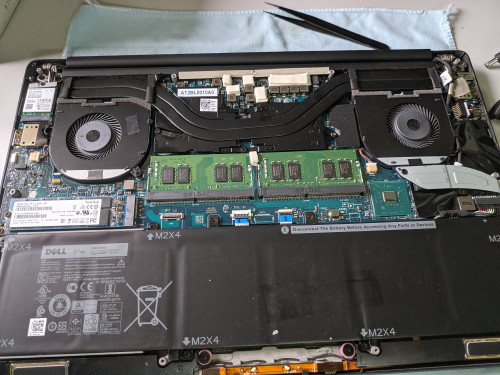 This did help the VRM become cooler but was not enough as it still throttled after 15 minutes of War Thunder. Next I tried connecting the VRMs to the bottom case and to the heatsink at the same time 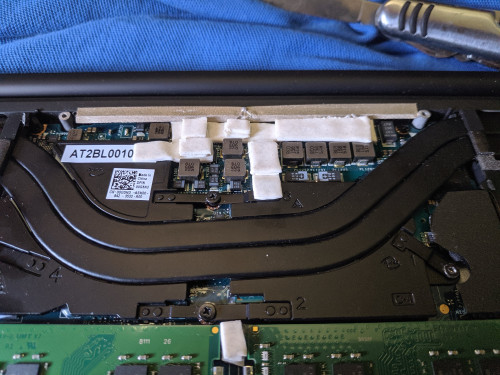 Using this method, the VRMs took longer to overheat at 30 minutes of War Thunder. This was a welcome improvement but not good enough. Next step I did was to undervolt and downclock using Throttlestop. With a 2.5GHz max on all 6 cores and -150mV offset I can now play War Thunder for hours without noticeable throttling. I intend to improve this further, but for now this is what I achieved. This is in a non air conditioned room btw. |
|
|
Aug 14 2019, 05:51 PM
|

Junior Member
165 posts Joined: Jul 2009
|
QUOTE(Racerx @ Aug 13 2019, 05:28 PM) I've recently purchased the 9570 [I knew of the various throttling issues, but since I can't afford the X1 Extreme and there were no other suitable models] and tried to tackle the throttling problems myself. Nice share First step I did was to repaste with Thermal Grizzly Kryonaut, but it seems that maybe my application was poor as the temp decrease on the CPU and GPU was not what I hoped for [coupled with the slow ramping up of the fans on the latest BIOS]. Next step was to tackle the VRM and power limit throttling issues. What I did first was as below, using stacked thermal pads to bridge the VRM to the bottom case This did help the VRM become cooler but was not enough as it still throttled after 15 minutes of War Thunder. Next I tried connecting the VRMs to the bottom case and to the heatsink at the same time Using this method, the VRMs took longer to overheat at 30 minutes of War Thunder. This was a welcome improvement but not good enough. Next step I did was to undervolt and downclock using Throttlestop. With a 2.5GHz max on all 6 cores and -150mV offset I can now play War Thunder for hours without noticeable throttling. I intend to improve this further, but for now this is what I achieved. This is in a non air conditioned room btw.  |
|
|
Aug 21 2019, 10:10 AM
|

Senior Member
1,671 posts Joined: Apr 2012
|
anyone has any hands on experience with the dell precision 5540 ?
|
|
|
|
|
|
Aug 26 2019, 05:44 PM
|

Senior Member
4,947 posts Joined: Nov 2007 
|
Had the XPS 9570 for a half a year, the thermal throttle on it is unreal. I have seen some reviews of the new XPS 7590 with i7 9750H, it seems to have the same thermal throttling issues. Which means even tho it has an upgraded CPU it performs similarly to its predecessor with 8th gen Core i7 8750H.
The thermal and power limit throttle can make the laptop go as slow as 1GHz some cases. |
|
|
Mar 30 2020, 04:16 PM
|
|
Junior Member
84 posts Joined: Aug 2007
|
had use dell xps 15 7590 with 4k oled ; so far can battery usage 2 hours netflix and 3 hours working with ms office , screen brigtness set to 30% , still have 30% battery left.
The only cons is there is no 2nd m2 ssd slot. others seem very satisfied. Just get the ready unit 3 days before mco |
|
|
Apr 3 2020, 09:58 PM
|

All Stars
15,192 posts Joined: Oct 2004
|
QUOTE(volrath @ Jul 17 2019, 06:53 PM) This is so true, I'm on the brink of selling my 9570 and get myself a new laptop. The BIOS issue, thermal throttling, fan issues...I had undervolted, repasted new thermal twice. Quite disappointed as I've paid a high price for this, sigh. i think i will not go for dell liaoOther than the above, everything else is great. The keyboard and touch pad is so good, weight-wise is good, with low profile charging adapter. But the mechanical-technical side of it, really make me sad. |
|
|
Apr 18 2020, 08:19 PM
Show posts by this member only | IPv6 | Post
#1937
|
|
Senior Member
978 posts Joined: Jun 2008
|
Hi all,
I'm planning to upgrade the SSD for my XPS 13 9360 (2017) model. I've checked online and find it confusing with the amount of choices available for SSD. I'm looking for an affordable SSD with same/similar performance as the default one (Toshiba 256 SSD). If any of you done similar upgrading, appreciate if you can share your experience and the model that you used. Perhaps I can come to a decision based on that. Thank you |
|
|
Apr 18 2020, 08:28 PM
|
|
All Stars
12,089 posts Joined: Jun 2014 From: Kuchai Lama
|
QUOTE(jack2 @ Apr 3 2020, 09:58 PM) i think i will not go for dell liao xps 15 memang alot problem.. go for precision or xps 13 if u wan light weight..msi gs oso bad issue... |
|
|
Apr 18 2020, 08:29 PM
|
|
All Stars
12,089 posts Joined: Jun 2014 From: Kuchai Lama
|
QUOTE(rai_fuzz @ Apr 18 2020, 08:19 PM) Hi all, u can choose ssd like transcend mte 220s, corsair , adata xps 8200 pro, among all.. transcend cheapest la... I'm planning to upgrade the SSD for my XPS 13 9360 (2017) model. I've checked online and find it confusing with the amount of choices available for SSD. I'm looking for an affordable SSD with same/similar performance as the default one (Toshiba 256 SSD). If any of you done similar upgrading, appreciate if you can share your experience and the model that you used. Perhaps I can come to a decision based on that. Thank you tat toshiba is dramless.. although good endurance but trash in the long run... sk hynix n micron nvme oso not bad |
|
|
Apr 18 2020, 08:30 PM
|
|
All Stars
12,089 posts Joined: Jun 2014 From: Kuchai Lama
|
QUOTE(zzzhhhzzz @ Aug 21 2019, 10:10 AM) anyone has any hands on experience with the dell precision 5540 ? still there? wat experience u wan?? |
| Change to: |  0.0246sec 0.0246sec
 0.74 0.74
 6 queries 6 queries
 GZIP Disabled GZIP Disabled
Time is now: 3rd December 2025 - 01:09 PM |
 Quote
Quote